
- NewspaperModules Builder in Newspaper Theme
- NewspaperIntroduction to CPT and ACF with Newspaper Theme
- NewspaperHow to edit modules for Flex Block X
- NewspaperStripe Setup
- NewspaperPayPal Setup
- NewspaperAdd Cryptocurrency Price Ticker Widget
- NewspapertagDiv Shop
- NewspaperDesign your post pages using the Default Templates
- NewspaperTheme modules and blocks
- NewspaperUsing the Theme Translations with WPML
- NewspaperHow to Set the Image Avatar
- NewspaperNewspaper theme documentation
- NewsmagInstalling pre-built websites
- NewsmagIntroduction
- NewsmagSmart Lists
- NewsmagTheme thumbs
- NewspaperSmart Sidebar
- NewspaperBreadcrumbs
- NewspaperFooter Builder
- NewspaperMain Menu
 Bogdan B.
 Hello,
Here is a list that might help you decide which block to use: http://demo.tagdiv.com/newspaper/block-1/
Our theme provides 25 blocks to choose from. I’m sure one of them will fit your needs.
Thank you!
 john low
Hello,
i want to know how can i change the logo of the footer (white logo) after instaling the default demo
thank you
 Simion C.
 Hi,
The code from above center aligns the title text so it fills the column better but it also depends of the length of the words (if they can not fit in the row space they will appear on the second row). By default the title has no alignment, that is one of the differences between the modules that those block use as you can see in the demo – http://demo.tagdiv.com/newspaper/block-9/ – http://demo.tagdiv.com/newspaper/block-10/ of the blocks on one column.
Thanks
 David Langer
Hi,
I want to modify the Video News demo in Newspaper Theme. My idea is to have all in black so I need to change two grey parts at the homepage to black (first part is under header menu and video slider, the other one is under a block) I am not able to find it in theme panel.
Screenshots: http://leteckaposta.cz/505912133
Maybe is better to add this two parts by myself to default theme and customize. Can you tell me some codes how to make this background color like it is on the screenshot? I add the page so you can see it http://www.shredder-magazine.com
Thanks!
 joymax2710
Hello,
I were try install demo, after 3 days, my website were “Hacked By 57. ALAY | Sessizce Nöbetteyiz!”.
I’m sure about it, because I have 2 website, everytime I try install demo from your theme, my website will be “Hacked By 57. ALAY | Sessizce Nöbetteyiz!” (you can check google about this guy)
I think you should check about this problems
Thanks
 ericatfitz
Help! I’ve recently purchased the Newspaper 7 theme to revamp my website. The existing website’s theme, settings and contents are all being cloned to a new server for this purpose. Just then I’ve activated the newly purchased Newspaper 7 and installed one of the demos (News Magazine, include content), but found out I can not make any changes at all, even as simple as updating the Social Counter widget.
What’s the cause of this problem? Does it have anything to do with the existing settings with the old theme?
Thank you
 gem1814g
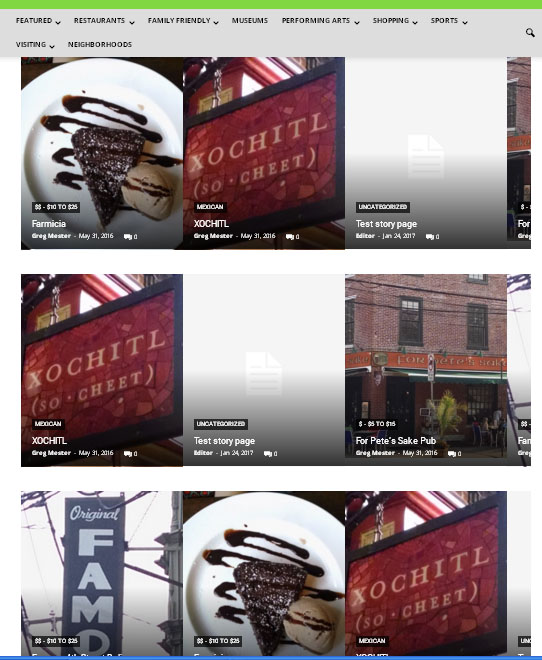
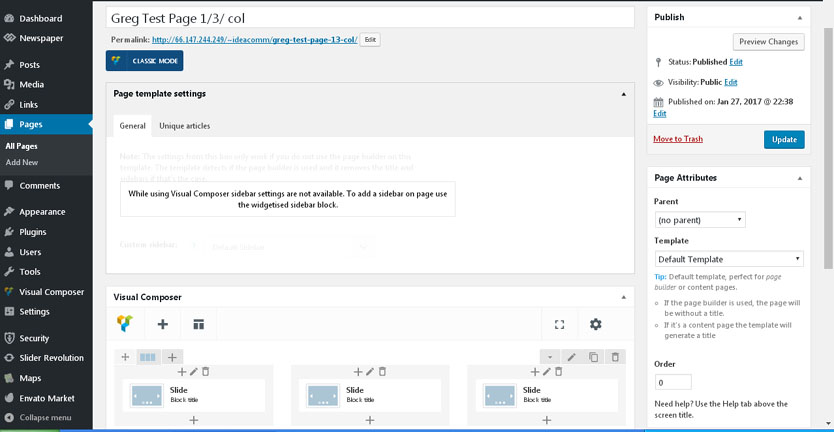
 I had to reduce the size to view the 3 columns. It looks like instead of creating three column with a single picture slide, it created three rows with a couple 1/3 size pictures in each row sliding through. I want to create what is on the http://demo.tagdiv.com/newspaper/ios-slider/ page with basically 3 1/3 columns
front end
back-end view.
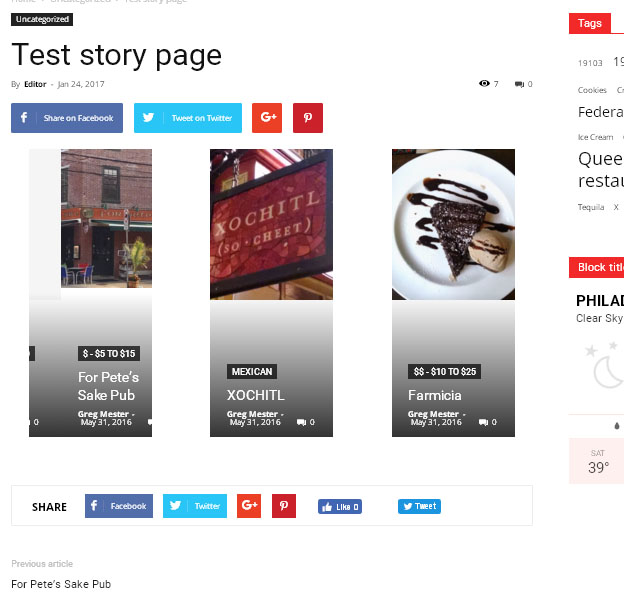
it looks correct when I tested the 1/3 column slide in a post shown below
 Xiluvanogcosta
Hello!
I have two questions:
1. I saw on this Demo: http://demo.tagdiv.com/newspaper_local_news/ on the “MUST WATCH” that the dark background is full width. How can I do the same for my website: http://epilepsyandwellness.com/
2. How can I delete the “Homepage latest articles” that appear after my videos? I didn´t put that posts there.
Thanks in advance
 ben.hinc
Hello,
We use Newspaper’s mobile plugin as our mobile theme at The Apex (http://www.theapex.racing). We use a smart list post style for multi-page reference posts that we call Race Reports. On desktop, these work great and don’t do strange things with the images.
However, on mobile, each page of the smart list seems to take the first image it finds on the page (if there are any) and moves it to the top as a “featured image.” This might be okay but it also removes it from where it’s supposed to be and interferes with the information we’re trying to present.
Here’s a particular page (https://www.theapexracing.co/2017/01/race-report-2017-rolex-24-daytona/4/) that demonstrates this effect as viewed on an iPhone 6s Plus:

How can I modify the mobile theme so this no longer occurs?
Thank you!
Ben
 mayaguez
 Thanks Simion, I tried but can’t get it done.
I went to Theme Panel-Blog and Post Template
But it seems to me that I can only select or create 1 sidebar. I don’t see how to select 2 sidebars. ???
Also, when I downloaded the Newspaper demo the Post template displayed (still does) News Categories-see here
http://hispaniclatinonewsandevents.network/usa/miami/hamilton-coming-fort-lauderdale-heres-get-tickets/
Will have to delete in order to add more ad boxes?
If so, how?
Thanks
Also I did the css to remove Ads from the Home Page Header as you intructed, the Ads do not display but for a “moment” the title “Advertisement” displays and then disappears. Can this be corrected?
-
This reply was modified 9 years by
mayaguez.
 shinny0129
Hi,
I just noticed that the main logo (272*90) is shrinking to around 238*76.
Is this default setting? The font inside of the logo seems “get blurred”.
Also, I checked your demo site (ex: Travel blog etc…), it seems the logo is shrinking too.
On the panel, it shows the size “272*90”.
I would like to show it as the original size.
Is there anything that I can do?
I will wait for your reply.
All best,
Simion C. Hi,
To create a mega menu with sub-categories first you need to use a root menu item that does not have sub menus – https://www.screencast.com/t/xQxlknKwZx and add a parent category to the menu if you want a mega menu with sub-categories – https://www.screencast.com/t/jaUh3ToKYWhe so you need to create a parent category with sub-categories (assign categories a parent category)- https://www.screencast.com/t/NhTg6B9Zgjuy The result is like the Fashion mega menu item in the demo – http://demo.tagdiv.com/newspaper/
Hope this helps
Thanks
Simion C. Hi,
If i understand correctly you want two different blocks containing different modules to look the same when they are not meant to – http://demo.tagdiv.com/newspaper/block-9/ – http://demo.tagdiv.com/newspaper/block-12/ You could use the same block then, or something similar to both of them like block 17 – http://demo.tagdiv.com/newspaper/block-17/ If you could explain exactly what you want to edit in block 9 maybe I can give you a solution.
Thanks
Bogdan B. Hello,
1. Our theme requires featured images in order to display a thumbnail on the homepage and other blocks. I’m not sure what plugin you used for this but it could not be compatible with the theme
2. Please provide a link to your site so I can inspect it
3. I’m not sure what Sppe Boasting is. Is it the speedbooster maybe? Please use this guide in order to see how speedbooster works: https://forum.tagdiv.com/how-to-make-the-site-faster/ – https://forum.tagdiv.com/topic/tinymce-advanced-and-other-various-disabling-speed-boster/
4. Hi,
Sorry but the tested and recommended plugin to use with our theme is wp super cache. That is why we only provide settings for it: https://forum.tagdiv.com/cache-plugin-install-and-configure/
5. In order to move the post views to the bottom of the post you must access each of the post template files and move the post view code further to the bottom of the file: https://www.screencast.com/t/XIB9wqAPY
each post style has it’s own file
6. Please use this guide: https://forum.tagdiv.com/the-child-theme-support-tutorial/
7. Sorry but we have no official method for instant articles. There is this topic where some of our users discuss the issues presented using the FBIA: https://forum.tagdiv.com/topic/newsmag-media-elements-incompatible-with-facebook-instant-articles/
8. Yes there is. Please use this link and select the different blocks from the ‘menu’: http://demo.tagdiv.com/newspaper/block-1/
9. Unfortunately you will have to use a plugin for that.
here are a few:
https://ru.wordpress.org/plugins/wordpress-social-login/
https://ru.wordpress.org/plugins/super-socializer/
https://ru.wordpress.org/plugins/nextend-facebook-connect/
Unfortunately these are not tested so they could require further customization to work properly with our theme especially our custom login modal.
10. Here is an unofficial guide I made: https://forum.tagdiv.com/topic/facebook-comments-2/
Thank you!
 Catalin
 Hello areim,
Please notice that these are two different demos which are available from Theme panel, like this -> https://www.screencast.com/t/jBeM8Lgbck Each of them has the own CSS and if you want to have some elements from one demo to the other one yo should make some adjustments in CSS and this task involves custom work and we cannot provide this type of services at the moment, sorry! So, if you want to have latest articles at the bottom of your page, you should use the Pagebuilder+Latest Articles+Pagination as a page template, like this -> https://www.screencast.com/t/WM8vUFsdQV9X In our Sandal demo is used this type of page template with module_11 as you can see here -> https://www.screencast.com/t/xtNsV0Yb6rI For more information about Page Templates, please consult here -> https://forum.tagdiv.com/newsmag-page-templates/
Thanks for your understanding!
 ecase
ecase Starting with point 3: The error warning started happening right when I activated mobile theme
4. I purchased the theme for speed, our alexa has really been falling drastically since install, we have noticed that the menu takes some time to load , its like it has a delayed animation.. This happens on your demo too. It thenm works fine after first load, but when you move to next page it struggles to load again. So if now if mobile isn’t faster, what will make the main site faster
2, we have optimized it accordingly and even added imagify, keycdn but the issue still persist , can you have a look? Please note that this is not a new site, it’s very old and has a history, and loads of visitors and has other thems changed. I am trying to resolve this with you, if you will take the time to see, but it just seems the speed issue is really a problem,
I’ll contact you with you with login
 Beyondesports.eu
Hi everyone!
My name is Brian and I made a huge mistake. I run a website called beyond Esports and use wordpress on it. We are experiencing rapid growth and there for wanted to upgrade our website theme.
So I purchased Newspaper 7 and wanted to make it look exactly like the Demo NH Magazine, but yeah that did not happen.
So now I am stuck with a half working website and 100% clueless, if anyone could help me out that would be amazing.
The website is: http://www.beyondesports.eu
Thanks
Brian
ecaseWhat can we do to speed up menu load. There is a delay when you try and open menu first time and then it’s fast. Not sure why. I tested on your demo too and it is difficult for our readers to navigate especially they are on a very slow connection.
We are still using the mobile theme and it’s still making us wait a few seconds before it loads first time. Same thing happens when you navigate to other pages
 EverydayCareerGirl
I updated the theme last night,and I got the beauty demo, but I have noticed nothing is showing in my other pages just the home page. I tried to add my own blocks, copy and paste from the home page to the other pages but nothing is working.
john low Hello,
i haven’t change anything on the code theme, i have just added some text on a post of demo and i have added a new post called test1 and the same probleme i have :
https://www.screencast.com/t/7psjA5Oy
thank you so mush
-
This reply was modified 9 years by
john low.
 secretpea
This is my first time buying a wordpress theme & Building a website,
i trying to search but can’t find the youtube tutorial about that
i build http://www.andrepedia.com , using news mag demo
-how to remove that youtube video ? (watch now)
-how to change which one showing in the homepage ? (i want to remove that Travel Guides)
ty
Bogdan B. Our demo does not have the mobile theme plugin activated. If you do not like the mobile theme, please deactivate the plugin and use the standard responsive version of the theme. This way your pages, posts and smart lists will be kept from the main theme and not changed on mobile.
Thank you!
 Asif2BD
I am facing few issues, listed below.
1) My site was not using Featured Images, but I added a plugin, and now all first image are added as Featured image. But some portion of my homepage still showing without images. Example

2) I check all those posts has Featured Images, and If I open those post manually once then the home page shows image. But I rechekced post had the featured image from the beginning. I triple checked from dashboard, no post is missing the Featured Images now.
3) How your Sppe Boasting API works, could this causing it? Is there a way to disable and test?
4) Do you have a guide for W3TC? I know you officially recommend WPSC.
5) If I was the post view to show in the bottom of the post instead of the top, below title what I have to do?
6) Do you have a guide for using child theme properly?
7) Do you have any good guide for using Facebook Instant Article?
8) Is there a guide or example or demo where I could see all blocks design, like right now I cant find a way to see whats the structure of Block 15 easily.
9) How to let people login via Facebook/Twitter, and could I use custom login, how to hook it.
10) Any guide to use Facebook Comments properly?
Simion C. Hi,
You can remove the space between the menu and the slider by using this code, just enter it in Theme panel->Custom Css
.td-main-page-wrap {

padding-top: 0;

}
Result – https://www.screencast.com/t/9y1dHt8nD2
Also please note that if you choose to use Header style 9,10 or 11 – https://forum.tagdiv.com/logo-favicon/ you can use bigger sized full width logos like in this demo – http://demo.tagdiv.com/newspaper_cars/
Hope this helps you
Thanks
Catalin Hello jeff2017,
I have tested our demo on Firefox browser and the drop down menus seems to work as properly. Please provide your website so I can take a closer look and also, so I will be able to provide a more accurate response.
Thanks for the message!
