
- NewspaperHeader Builder
- NewspaperHeader ads
- NewspaperHeader styles
- NewspaperSearch setup for custom post type
- NewspapertagDiv Composer – Website Manager
- NewspaperBookmark – Save For Later
- NewspaperWooCommerce: Happy “Add to Favorites!”
- NewspaperModal Popup
- NewspaperFlex Block Settings Guide
- NewspaperPosts Loop Element
- NewspaperHow to Add a Logo in Newspaper
- NewspaperDefault Category Settings
- NewspaperWhen tagDiv Composer is Not Working
- NewspapertagDiv Cloud Library Plugin
- NewspapertagDiv Composer Tutorial
- NewspaperUsing the Theme Translations with WPML
- NewspaperInstagram in Newspaper WordPress Theme
- NewspaperWeather Shortcode
- NewspaperThe Mobile Theme
- NewspaperLogin – How to Enable User Registration
 itgrcapitallink
I would like to change the url and the text of “CREATE AN ACCOUNT” when someone will click on that button.
On the previous versions I was going to /xxxx.com/public_html/wp-content/plugins/td-composer/legacy/Newspaper/parts/header
and I changing the
$users_can_register_link = '' . __td('Create an account', TD_THEME_NAME) . '';"
Now, In the version 11.3.1 I cannot see the changes that I make.
Do you know why?
 sumasystems
 After deactivating the said plugins. I have lost my header and footer settings.
 Bettina
 Hello!
I just replied you here in your own topic: https://forum.tagdiv.com/topic/please-i-want-to-change-headers-background-color-i-go-to-newspaper-theme-pane/#post-421779
Please provide more information about what you need to achieve, screenshots or an example and your website link in order to help you efficiently.
A solution for sending a screenshot/video is this:
Download, capture, send: https://www.techsmith.com/jing-tool.html
After making the screenshot, you will have a link, paste it here.
Thank you!
 kevinwebdesign
please I want to change HEADERS BACKGROUND COLOR, I go to Newspaper – Theme panel and change the HEADERS BACKGROUND COLOR, but this doesn’t work. please can you help me? thank you
Bettina Hello!
We recommend to use cloud/PRO templates in order to have the possibility to edit them with the TagDiv Composer which contains a lot of functions and features, please check our tutorial here: https://forum.tagdiv.com/tagdiv-composer-tutorial/
Documentation here:
– https://forum.tagdiv.com/cloud-library-templates/
– https://forum.tagdiv.com/design-post-pages-using-cloud-library-templates/
– https://forum.tagdiv.com/cloud-library-category-templates/
Check also our video tutorials here: https://www.youtube.com/c/tagdivThemes/videos
Of course you can import a cloud/PRO header template assign it on your page where you need and add the News Ticker there, or any other element.
Thank you!
 ninjaray
 Appreciate the reply. Not exactly clear, I don’t think we’re using a header template from the Cloud Library, just whatever header that was active with the demo. Can we convert our existing header into a template? Can we download a header from the Cloud Library and modify it to match our existing layout, then swap it out? Any additional detail would be helpful.
Thanks so much!
 wwti
wwtiWhen I did the latest update I have lost some CSS and the layout in the header was gone. I had to do a restore:
https://www.wewilltransportit.com
I will need to send the wp login information, let’s communicate using this email: jsocarras71@gmail.com
Has been for all the websites that I am using the Newspaper theme.
 menneskedyr
 Thank you for the quick response, but that’s not quite it. Yes, TD Composer has a lot of queries and we live with it, but this was caused by a single (double, actually) repeating query from TD Standard Pack apparently fetching the site logo, using what seems to be a highly inefficient function:
attachment_url_to_postid()
And it was doing it twice, once for the desktop and once for the mobile logo, on every single page load. This caused mysqld to spike to 200% and above.
I see now that I have posted the wrong screenshot above, sorry. Here’s the correct one:
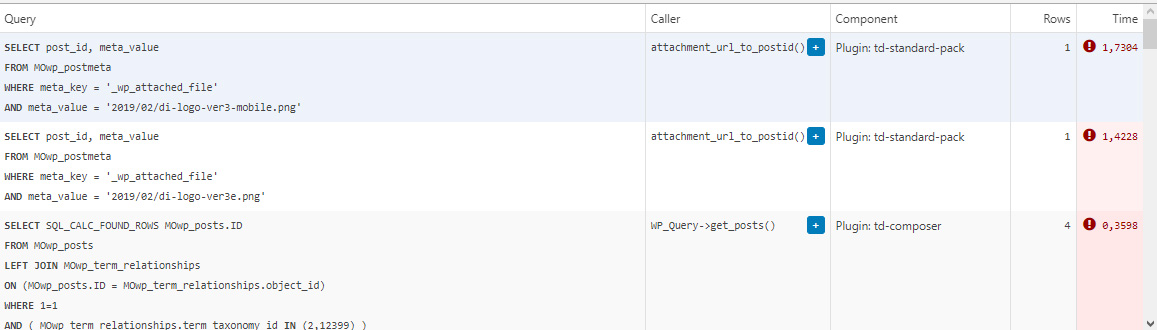
This morning I managed to patch up the problem, it’s a crude solution but may help someone. In header template I found that it was loading the logos from
plugins/td-standard-pack/Newspaper/parts/header/header-menu-h1.php
(yours may be different of course)
There I simply removed the PHP block fetching the logos and hardcoded the HTML for the logos in. As soon as I did that, the SQL spike went away. So I’d say it’s a bug, or inefficient code at least.
To be clear, we’re running the latest versions of WP, PHP, MySQL, the theme & plugins, all on a solid VPS. Yes there is quite a bit of SQL load, we’re working to optimize it with new blocks and Cloud Templates, but this was something else. Could be related to the latest Standard Pack update, don’t know, team didn’t report it before.
-
This reply was modified 4 years by
menneskedyr.
Bettina Hello!
Yes, there is no ad in the header. Please provide more information about your issue, screenshots or a video with the settings you make in order to help you efficiently.
A solution for sending a screenshot/video is this:
Download, capture, send: https://www.techsmith.com/jing-tool.html
After making the screenshot, you will have a link, paste it here.
Thank you!
 gallantmedia
Header ad is not showing regardless of what settings I use. http://www.gallantmedia-staging.ca/pontiacjournal/
 Anamaria
 Hello,
Please check this topic https://forum.tagdiv.com/topic/header-and-footer-wont-display-as-boxed-in-desktop-viewport/
Thank you!
 dkleidonaris
Hello,
I have imported a template to my site that has the header & footer full width, but the main content boxed. How can I make the header & footer narrow too, so that my background image won’t be hiden by them?
Thanks in advance!
Anamaria Hello,
I checked your menu on mobile and work => https://i.imgur.com/8lWU2vZ.png
Also, I saw you have the mobile theme plugin activated, and on the main page is disabled that’s why the menu is ok, but for posts/categories template, etc you need to set the menu in Theme Panel -> Mobile Theme -> Header -> Main menu => https://i.imgur.com/AjjhTfB.png
Thank you!
Anamaria Hello,
This is an older video, and our theme has now new functionalities, you can use Cloud Templates -> https://tagdiv.com/how-to-use-the-header-builder-and-tagdiv-cloud-header-templates/
Also, you can use a Single Post/ footer template, etc from Cloud Library, and you can customize it with tagDiv Composer => https://www.youtube.com/watch?v=SoGQ0d5kIBg
Also, please check our documentation -> https://forum.tagdiv.com/newspaper-theme-documentation/
Thank you!
Anamaria Hello,
If you have a header from Cloud Library, then you need to add a row on the top => https://www.screencast.com/t/YfHuH8AZOX and design it with tagDiv Composer => https://i.imgur.com/ku9sfh4.png => https://tagdiv.com/how-to-use-the-header-builder-and-tagdiv-cloud-header-templates/
Hope this helps you!
Thank you!
 qwenmn
Header.php is not loading properly, a line of script added via FTP is not loading on the front end.
I check the theme editor the code is there.
Before this I got an error of “theme not found” i manage to resolve this but any edits to the files are not working
 CenterfoldNews
Hello,
I am trying to edit the header style on my new newspaper 11 website, but when I navigate to the theme panel, the header style and search position are missing. I am following along with the below linked youtube video. The header style I am describing can be seen at minute 31.
Am I doing something wrong? Thanks!
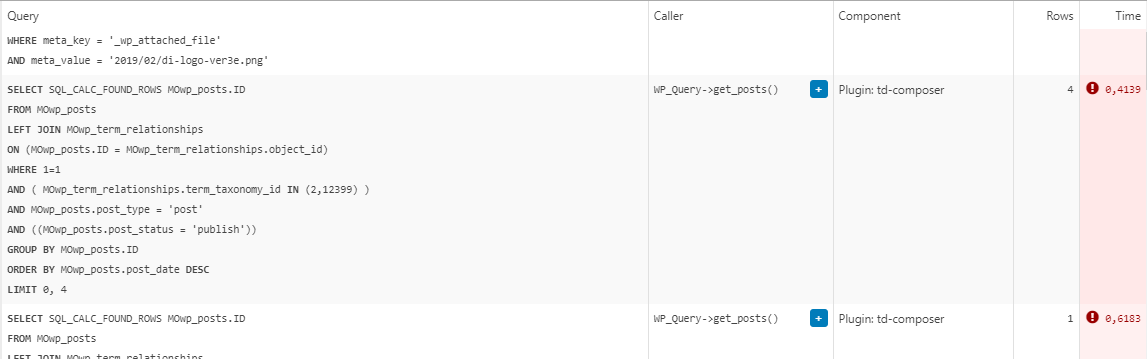
menneskedyrThe latest version of TD Standard Pack suddenly started producing a massive number of SQL queries. The issue came to my attention when the team reported very slow website, particularly during media uploads.
Inspection showed mysqld process being over 100% CPU constantly, often above 200%. After eliminating the usual culprits such as Yoast SEO, it turned out that it was TD Standard Pack. When deactivated, mysqld returns to normal levels.
The queries in question are all “SELECT post_id, meta_value FROM MOwp_postmeta WHERE meta_key = ‘_wp_attached_file’ AND meta_value = (…)”. They seem to be constantly running and, as far as I can tell, are called from the header template.
The site is running on a solid VPS and latest versions of theme and required plugins.
We are in a process of migrating to a completely cloud templates built site which might resolve the problem because we will not need the Standard Pack anymore, but in the meantime, any ideas?
Example from Query Monitor:
 Tughan
Heyo,
I bought the Newsletter theme a day ago. I’m all good and pleased with the theme. However, I cannot find enough resources on the internet about the problem I’m dealing with.
I have to versions of mobile theme. Although it perfectly works on my PC. It is broken in my mobile browser and Google does not recognize any AMP.
I checked Mobile + AMP from the Theme Options > Mobile Theme.
I followed the documentation to create a mobile version, I designed mobile header and footer. From tagDiv Composer, I also clicked Manager and set footer and header as the global.
The mobile version looks like this on pc
https://www.hizliresim.com/ahhhpoc
It looks like this on mobile
https://www.hizliresim.com/nnz1opd
I followed the AMP settings recommended on the documentation. Moreover, I found a link on the documentation to check the AMP, when I test my website, it tells
“Not an AMP page
The URL is not an AMP page, nor does it link to an AMP page”
Can someone help me about what I am missing?
 bob@mrrogersweborhood.com
Hi there.
Is there a limitation that prevents us from placing 1 post in the header? I’ve added it to the header, but it just won’t display. I’ve cleared all cache, so that’s not the issue.
Here are some screenshots to show what I’ve got set up.
https://www.dropbox.com/s/hi1rquqdfcl2ula/Screenshot%202021-10-29%2011.51.35.png?dl=0
https://www.dropbox.com/s/7a929rs9os5s95g/Screenshot%202021-10-29%2011.51.19.png?dl=0
https://www.dropbox.com/s/705x8arosrg802f/Screenshot%202021-10-29%2011.50.59.png?dl=0
https://www.dropbox.com/s/pfinzs6d7pqvmj6/Screenshot%202021-10-29%2011.50.27.png?dl=0
https://www.dropbox.com/s/48x2iricy6k5i7v/Screenshot%202021-10-29%2011.50.14.png?dl=0
Could you please assist?
Thanks.
Anamaria Hello,
Please make sure the header template is set global from Manager -> Header => https://i.imgur.com/LJpCGDr.png
Thank you!
 nomadwebs
 Hi Anamaria,
Great, I understad the option you described me. Is not optimal as I liked but it works.
Now I have a problem with the header template. I did the same action you described me in your last comment but I cannot add it to the other page.
Here you are an screenshot.
move header to template
As you can see, I created the header in the new page:
new header
Thanks in advance for your support.
Best regards.
Francisco
Anamaria Hello,
Please make sure the tagDiv Standard Pack plugin is updated and activated.
Those shortcodes and the error are from tagDiv Standard Pack, and this plugin is not required from version 10.4, because the new demos are using cloud templates.
Also, you can use a header template / footer template , posts, etc from Cloud Library, and you can customize it with tagDiv Composer => https://www.youtube.com/watch?v=HXQQygkCCJo
Also, please check our documentation -> https://forum.tagdiv.com/newspaper-theme-documentation/
Thank you!
 Philwat
Hi,
My website theme was on 11.2 version, after update it with 11.3.1, many errors appeared.
Rollback with old version stable for my site not change anything.
In panel theme i cannot see header style, top bar…
Result: no logo, no footer, all settings are lost
In post settings, i see only one default post template, so the result is, where are disappears my features, result:
https://www.australien-backpackersguide.com/australien-blog/
Other result: https://www.australien-backpackersguide.com/unglaubliche-koala-geschichten/
wp_booster error:
td_api_base::mark_used_on_page : a component with the ID: single_template_3 is not set.
/var/www/clients/client1/web3/web/wp-content/plugins/td-composer/legacy/common/wp_booster/td_api.php
with a button display backtrace
I have two others website with same theme, same features etc and i make an update on one of it and there are no problems.
Please i need support, investigate, i can create credentials, how do you proceed in this case ?
Regards.
Anamaria Hello,
I investigate your website and seems also, on the desktop the ads are not displayed => https://i.imgur.com/QiZWtD4.png -> https://i.imgur.com/vlWNX8r.png
Please try to re-add the code https://forum.tagdiv.com/header-ads-adsense/
Thank you!



