
- NewsmagHomepage – How to build and set it
- NewspaperHomepage – How to build and set it
- NewspaperHow to edit modules for Flex Block X
- NewspaperGeneral Options that May Interfere with the Newspaper Theme
- NewspaperThe Newspaper Mobile Theme: Introduction
- NewspaperHow to Add a Logo in Newspaper
- NewspapertagDiv Shop
- NewspaperHow to Use tagDiv Cloud Library
- NewspaperDesign your Post Pages using the Cloud Library Templates
- NewspaperHeader Builder
- NewspapertagDiv Cloud Library Plugin
- NewsmagtagDiv Composer Tutorial
- TutorialsFrom WPBakery to tagDiv Composer
- NewspapertagDiv Composer Tutorial
- NewspaperNewspaper theme documentation
- NewspaperThe Mobile Theme
- NewsmagNewsmag documentation
- NewsmagMain menu
- NewsmagLogo & Favicon
- NewsmagPage templates
 Bogdan B.
 Hello,
These are block titles that you set on your homepage when adding a block or editing it’s setting. you can change this to anything you want when editing the page in visual composer: http://screencast.com/t/zJsGaJ83W
If your sidebar is not created in visual composer, but rather is a normal sidebar from the widgets area, you can change the title from there: http://screencast.com/t/rlKFqH5VLlm
I hope this helps.
Thank you!
 kaalozz
Hello every body
i purchased the template 4 months ago and installed this website in french
the problem i have is that i have hard difficulties to change titles of the following rubrics :
“Most popular” and “hot news” at the bottom right of the homepage and “latest news” “must read” at the right inside every items
i don’t find those titles to change inside Newspaper–>theme panel–>translations !
i don’t know where to find them to modify them
i need your help please
i am desperate
thanks
 Adam Niewiadomski
Hi
Newspaper has a new homepage style “CARS”. Does that style work on mobile devices as well – smartphones, tabs?
Adam
 durgatripathy
 Hi Andrei,
Glad to inform you that succeeded to achieve the NEXT-PREV text. http://www.screencast.com/t/f7fr3J8xAT. Only need help for numeric pagination as shown in the demo of newsmag theme homepage. Please help as soon as possible.
Thanx,
Durga
 Catalin
 Hello emirbalin,
I have checked your website again and saw that you have some untested plugins installed on the theme. Please try to disable all the active plugins, leave just Visual Composer and instal only the plugins that come bundled with our theme. These issues might be caused by interference between these plugins and our theme. Also, I noticed that you have Big Grid Slider on the top of your homepage which is not displayed. Please check your Big Grid settings and ensure you have filtered by some categories which have posts, otherwise, does not display anything. Please check this -> http://screencast.com/t/d0kn40siZTy1
Hope this helps and let us know how it goes!
Thank you for the message!
Catalin Hello ape,
Please notice that DON’T MISS is a block on the homepage wich is added with Visual Composer. If you want to edit, you have to access the block settings like this -> http://screencast.com/t/BGcbqljeXPD and Style hunter, Vogue, Travel are some categories on the site and you have access for it from the panel like this -> http://screencast.com/t/yzXm6myShMKU -> http://screencast.com/t/oYC9gBoRb5e
For more information about blocks, and mega menu, please consult our documentation here -> https://forum.tagdiv.com/block-settings-tutorial/ -> https://forum.tagdiv.com/mega-menu/
If is not what you mean, please provide more details about your desired changes and also, provide your website URL so I will be able to provide a more accurate response.
Hope this helps!
Thank you for the message!
Bogdan B. Hello,
You can use the raw html element or the text box element to add shortcodes into the homepage. Please follow the plugin/widget instructions because most plugins provide alternative implementation methods.
Thank you!
Bogdan B. Hello,
If you want to to use the travel demo, you can install the demo content for it and go from there http://screencast.com/t/z7YnlI5Vmm1R. If you simply want to replicate the homepage for the travel demo, you can follow my tutorial here: https://forum.tagdiv.com/topic/adding-top-area-like-travel-example/
Thank you!
 comsolo
Hello,
I want visitors stay on my homepage while they’re checking out the content they’re interested in a new tab. I’ve searched online and target=”_blank” looks to be put in some place in php but I don’t know if where I add it and it begins to work. How can I do that?
 svharishtech
Hello,
I have designed the home page successfully. While making the post, i have added a big image as a featured image. But in the home page it is still cropped. is there any possibility that i make a fix image size as !important somewhere in CSS? Currently there is a big gray area even if the original image size is bigger than the box.
 joyceloh
 I would like to have “grow effect” on the block elements
Screenshot of the hover attribute: http://www.sansan-bizconnect.com.sg/wp-content/uploads/2016/02/Screen-Shot-2016-02-01-at-6.26.28-pm.png
link of codes: http://designshack.net/articles/css/joshuajohnson-2/
Can you please help me with it because when i copy and paste l can’t seem to get it work…
My homepage Link: http://www.sansan-bizconnect.com.sg
Thanks!!!!
Bogdan B. Hello,
You will need to be careful when creating your homepage in visual composer and check every element to see if it gets displayed properly. Right now you have a big grid 5 on your homepage that creates this white space as it probably has no posts to display: http://screencast.com/t/WgqljMruvPT
As for the mobile menu colors, they can be changed from the theme panel here: http://screencast.com/t/Djlu2oEr
Thank you!
 seosmart
Hi all,
i need to know why i read full articles in homepage and not the read more button. thanks.
 Hivvu
Hivvu No problem, that’s why I called it a challenge and I appreciate your help.
I’ve managed to create what I want, using a custom wp_query with the same HTML but now I’m figuring out how to use it in my homepage.
Can I create a custom module?
Best regards
 Andrei L.
 Hi
You can edit the posts displayed in this block: http://screencast.com/t/lsnK4QM1kROv from Visual Composer pagebuilder: http://screencast.com/t/wr9hXXZ5yZ For more details about how can you customize the homepage please check this tutorial: https://forum.tagdiv.com/newsmag-homepage-how-to-build-and-set-it/
The indicated widgets are actually blocks from Visual Composer: http://screencast.com/t/tiZgngyzhgxP
This: http://screencast.com/t/pRKcTS96m is a block 7 and can be found in footer 2 widget: http://screencast.com/t/o9tQI3yLLE
If this is not what you mean please provide more details.
Thanks!
Catalin Hello Visionlaunch,
I have checked your website and saw that you are using Newspaper 6.1 version. The pagination issue was fixed in the latest update 6.6.4. This kind of problem was caused by the ultimate version of WordPress 4.4.1. Please try to update to the latest version and also, before this, please do a full update.
There is also a quick fix for this, but also this is provided for version 6 of the theme. You could adjust this code and add it to your functions.php file – https://forum.tagdiv.com/topic/wordpress-4-4-1-pagination-new-fix/ Try this code, it might work:
add_filter('redirect_canonical', 'td_tmp_fix_wp_441_pagination', 10, 2);

function td_tmp_fix_wp_441_pagination($redirect_url, $requested_url) {

   global $wp_query;
if (is_page() && !is_feed() && isset($wp_query->queried_object) && get_page_template_slug($wp_query->queried_object->ID) == 'page-homepage-loop.php') {
return false;
}
return $redirect_url;
}
Please consider to update the theme in near future as you may have other issues with the theme if you update the plugins that you use, WordPress..and we always use the latest version of the theme to help our clients and we provide fixes for problems occurred, like in this case WordPress latest version.
Thanks!
Bogdan B. Hello,
Unfortunately there is no option to add a full article on the homepage. You can chose one of the content blocks you want to display and filter it to only show 1 post from the block settings: http://screencast.com/t/5Ky4aEWtE
You can see the content blocks better here: http://demo.tagdiv.com/newspaper/block-1/
Thank you!
 giovanni114
Is anyone familiar with Geo Directory? It is a business/event directory. I use this plugin on my site with Newspaper 6, I would like to create a widget that would display featured businesses and/or events to place on the homepage. Does anyone have any suggestions on how to do this?
Thank you for your insights!
 deviajeenviaje
Hello, I recently added this widget https://wordpress.org/plugins/colorful-categories/ that succesfully appears in every post page, but can’t add it as a widget on the homepage. Any solutions?
Thanks
 Nana
Nana Sorry, see it on my homepage here http://www.fashionghana.com
 blogatrompa
Hello
I’m trying to remove the thin white line that we see in the border of contents in homepage (see image please). I’m trying but with no success…
Where can I remove that line? Can you help me please?
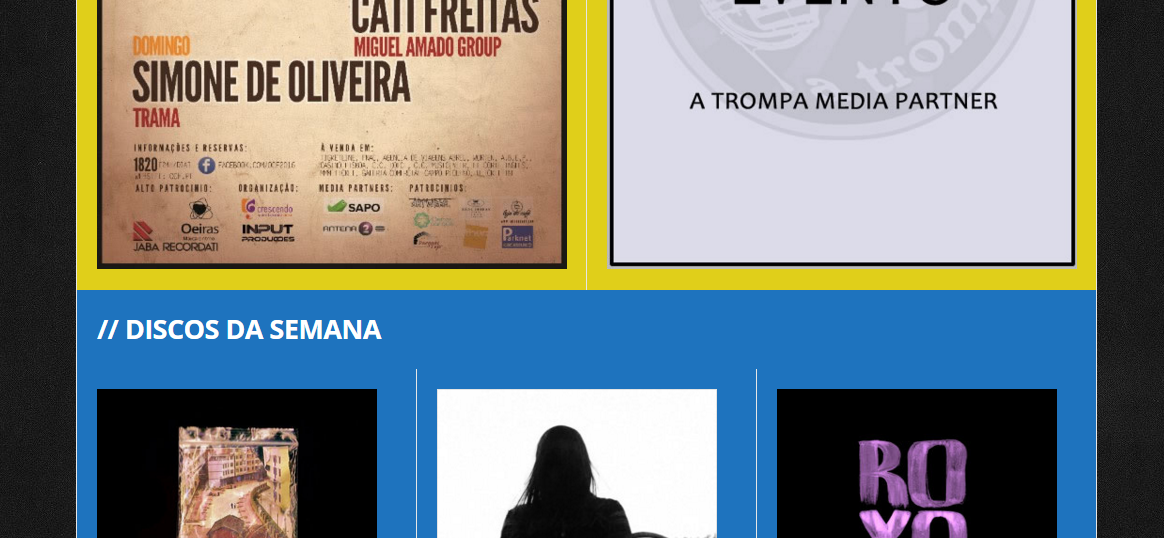
Thx
 tagdiv1000
My website. http://www.asiaworldmedia.com/main/
Ok, I wanted to know where the menu are so I can make changes to the category on the homepage. Under category FASHION WEEK, GADGET WORLD, & BEST Smartphones.
Second, where can I locate the widget of the side menu under POPULAR VIDEO, HOLIDAY RECIPES?
Third, where can I locate the widget on the footer where EVEN MORE NEWS & POPULAR CATEGORY?
Thanks in advance!
 Albert
 I can´t find this option in Yoast Seo, I have been looking for all plugin setting, but I can´t see it.
It´s something that I would like to solve, because this issue prevent homepage from showing up in the rankings, so I think it´s important.
Thanks
 karrieristen
2 Things:
First, Build by Visual Composer, my Homepage Shows many White Spaces between the Different Widgets, eg newsticker and 5 Feature Posts
Moreover, while loading on mobile device, THE background of Header/ Logo is Black – needs to be White alltime
Ideas?
Albert Hello
Yes, I´m using Yoast but I can´t find exactly where is this option to uncheck the option to enforce trailing slash.
The URL I have on the WP admin>settings>general doesn´t have any trailing slash. Should I put it? I have two boxes with the same homepage URL.
Thanks

