
- NewspaperAutoptimize Plugin – install and configuration
- NewspaperCache plugin – install and configure
- NewspaperInstalling Pre-built Websites
- NewspaperHow to Install Newspaper via FTP
- NewspaperHow to Install Newspaper via WordPress
- NewspaperIntroduction to CPT and ACF with Newspaper Theme
- NewspaperHow to edit modules for Flex Block X
- NewspaperWooCommerce: Happy “Add to Favorites!”
- NewspaperWoo Brands
- NewspaperStripe Setup
- NewspaperModal Popup
- NewspaperPayPal Setup
- NewspaperFlex Block Settings Guide
- NewspaperHow to setup the Contact Page
- NewspaperAdd Cryptocurrency Price Ticker Widget
- NewspaperInfinite Loading for Single Posts
- NewspaperThe Newspaper Mobile Theme: Introduction
- NewspapertagDiv Social Counter plugin
- NewspapertagDiv Shop
- NewspapertagDiv Opt-In Builder
 Catalin
 Hello Aminul Islam,
Unfortunately, the mobile theme plugin has not been tested with Multisite and we cannot say for sure if it will work or not. This has not been designed to be used in Multisite and that’s why it was not tested. sorry!
The Multisite is just a WordPress functionality and it can be done in a lot of ways. For more information about this implementation, please check here -> https://codex.wordpress.org/Create_A_Network We recommend using the way of multisite when you have to create a new install for each subdomain and then you can make a redirect between them.
Hope this helps!
Thanks for the message!
 Bogdan B.
 Hi,
Please disable all plugins except visual composer and wp super cache as there could be another plugin conflicting with wp super cache. Please only use these settings: https://forum.tagdiv.com/cache-plugin-install-and-configure/
Thank you!
Catalin Hello recons,
First of all, I will thank you for your interests in our theme. So, if you want to see a comparison between our themes you should consult here -> http://tagdiv.com/newspaper-vs-newsmag-how-to-choose-the-perfect-wordpress-theme-for-your-project/ Before doing this switch is to make a full backup to your data to avoid losing this and then install the new theme and try to load the backup on it. Please notice that it could be possible to appear some differences regarding on style and you should adjust them.
Hope this helps!
Thanks for the message!
Bogdan B. Hello,
If you read the very first part of the guide you mention you will see that the plugin does not require activation: http://screencast.com/t/RI1LwoYEKi
You update the plugin using the guide by disabling and deleting your current plugin and installing the one that is bundled with our theme. You will still see the activation message and the update message as the latest version of the plugin is not yet provided in the theme files. We will include it in the next theme update.
Thank you!
Catalin Hello simply_shelby_h,
I have checked your website on mobile and the website seems to work as properly, and the featured images still working fine. Where is the problem? Also, I have checked your console and I saw that you are some js errors within it. Please try to disable all the active plugins, leave just Visual Composer to active, clear all your caches and install only the plugins that come bundled wit the theme packet and rule out any conflicting plugins.
Thanks for your understanding!
Bogdan B. Hi,
Well you did not mention if you updated the mobile theme plugin. The plugin will not update automatically. You have to disable and delete the plugin files from the plugins section of wordpress and then install it again from the main theme package you downloaded from envato (if you want to use the mobile theme plugins that is)
Thank you!
 aefaison
 MGitkos
Good evening team,
I installed your theme last night, but I’m having a few constant issues. Tried modifying wp-config files, removing old caching files, re-installing the theme about 5 times, deactivating all plugins, but I can’t figure out the fix. So that’s why I’m here, and looking forward to your response.
Thank you.
Website: DeadicatedFans.com
Warning: Invalid argument supplied for foreach() in /home/deadic6/public_html/wp-content/themes/Newspaper/includes/wp_booster/td_wp_booster_functions.php on line 2203
Warning: session_start(): Cannot send session cache limiter – headers already sent (output started at /home/deadic6/public_html/wp-content/themes/Newspaper/includes/wp_booster/td_wp_booster_functions.php:2203) in /home/deadic6/public_html/wp-content/plugins/um-social-login/core/um-social-login-init.php on line 135
 ecase
ecaseWe already have a site running with thousands of visitors daily. I did a page speed test for mobile and we are geting 54%
I’ve cloned the same site on a sandbox location on the same server, installed your theme, even disabled most pl;ugins and we are now getting 0… but when we install your mobile theme whiich is not so flexible to do what we want, we get 34%
Ive left a few plugins we can’t do without and I went to status to see page booster
one by one I became shocked
v4.5 – Disabled – incompatible plugin detected: updraftplus/updraftplus.php
same for askimet, Disqus Comment System and some others
just seems that the plugin is of no use since these are kind of key plugins and even common ones too
please can you advice what next if your speedbooster doesn’t work?
What really concerns me more is that I activated 3 different themes on the same site and tested, they all performed way better and the only reason I bought this was the promotion that this theme was going to be super fast… seems a lot of optimizations beyond the normal is required if I’m not mistaken
Please put my mind to rest with solutions
 cpndgn
Hi,
is there any other easy way to use child theme other than copying files in phppanel?
As I don’t have much experience in that I’m a little afraid to make changes there.
What settings change after the updates if I don’t use child theme?
Does it effect the whole site including contents?
Thanks a lot.
 nateb2127
 That sounds amazing!! I have just had redis installed and wow. Yeah it’s fast – and the run we are currently under (100,000) page views per day, for the past few days; it’s holding solid and loading within 4 seconds. I’m stunned that redis made that much of a difference and the theme works great with it too. Now, as for the other stuff, I will run that by our team and see what we can use because – rumor has it the faster you get the more views you get.
Thanks again Chris for your “secret” code that goes into htaccess – that did a lot as well.
Have a look at our site if you want too: christiantruther.com
(Keep in mind we are getting slammed – and will be for a bit longer, we have more posts to do)
https://gtmetrix.com/reports/christiantruther.com/C1mA5uIz
https://tools.pingdom.com/#!/dROv7R/https://christiantruther.com
 darararan
Category top post grid thumbnail images are not displayed correctly. (Homepage big grid is ok)
Thumbnails are to the top leaving a gap at the bottom.
I didn’t have anypost or post thumbnails before installing this theme. this was fresh site.
http://2dollarback.com/category/movie_trailer/
any suggestions?
 melissa.coffman
Was finalizing my new site last night when suddenly the homepage went black. I turned off the Visual Compser plugin and the posts came back but the layout wasn’t right. Nothing worked so I deleted and reinstalled the Newspaper theme and started all over again… I’m about done and now the boxes in the Backend Editor are gone and all it is is text. HELP!!! 🙂 Thanks!! Melissa
 nandar
hi, i cant install plugin that come with the theme, ” The plugin does not have a valid header.
Downloading install package from http://nyuzz.com/wp-content/themes/Newspaper/includes/plugins/js_composer.zip…
Download failed. cURL error 6: Could not resolve host: nyuzz.com
i will give you admin access if you want. oh ya, better you have common issues documentation, so it will much easier for all. thank you
 jpagora
 I re-installed the visual composer and did not change anything, the problem continues.
 BIBI
BIBIHello folks,
Today i added Facebook pixel code inside the header.php file, however there is one problem which i want to discuss with you. Currently i’m using Facebook Pixel Helper on chrome which shows me that for majority of the pages code is placed perfectly. The problem is only the pages where i have a Thrive Theme custom page builder installed. Any ideas where to place pixel code so that it can be active on entire site?
 coskel
 UPDATE: I figured it out because I saw a post about installing the theme.
The fix:
In your plugins, the mobile theme installs as a PLUGIN, called tagDiv Mobile Theme.
Disable that plugin, and your site will become responsive and correctly display shortcodes, etc.
nateb2127 Hey guys thank you so much for your suggestions!!
we are getting quadruple the views we normally get and the site is struggling to stay alive so we are going to install redis and see how it goes!
I hope it works!
 kobzeci
Hi,
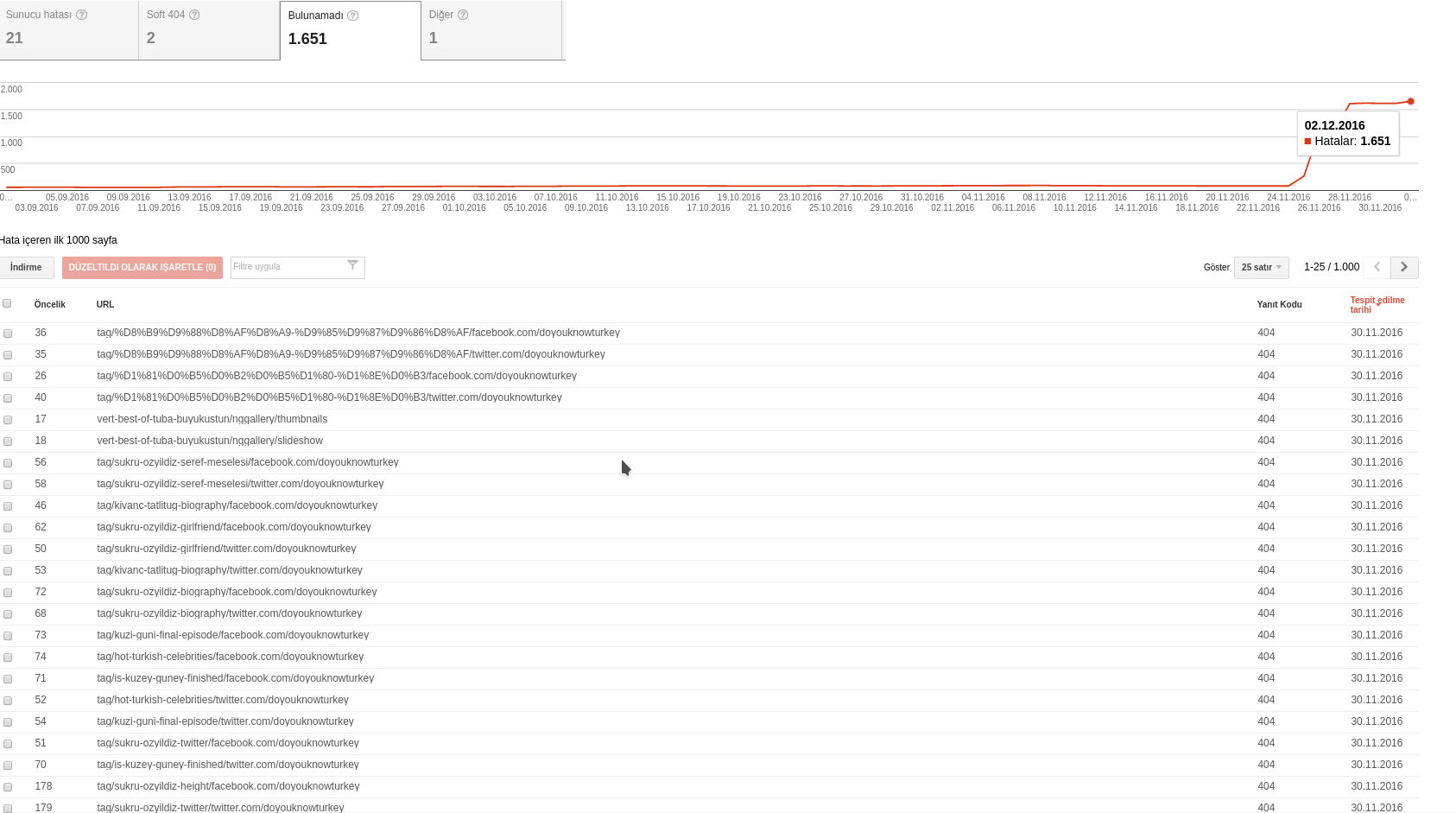
Last week i’ve installed Newsmag but i have lots of 404 error with some strance /facebook.com/sitename or twitter/sitename urls.
For example, the 404 given url is:
72
tag/sukru-ozyildiz-biography/facebook.com/doyouknowturkey which google search console says it has a 404 error upon crawling. I have not such urls in my site… The detail section says the following two pages linked to the url:
http://www.doyouknowturkey.com/tag/sukru-ozyildiz-biography
http://www.doyouknowturkey.com/tag/sukru-ozyildiz-biography/
no such urls in source code….
I’ve update the permalinks but i’m not sure it will restore the broken url&social structure. I had optimized the db after installation probably 25.11.2016
 Cactus24
Hi, it’s a pleasure.
I installed WP Super Cache, and it did not load the home page or its images, everything was left blank. As in the following image.

But then I deleted the plugin, and deleted the wp-config.php to leave no trace of the WP Super Cache, and I restored the page, but sometimes it remains so blank, is there any solution so that it will not continue to show blank?
Or what do you recommend doing?
As it should always be, it is like this image.

The page sometimes looks good and sometimes does not look good, but in the incognito mode of google chrome, if you see the page as if it did not have anything.
This is the web http://www.cactus24.com.ve/wordpress
This is my configuration on System status

 Nana
Nana Hi
I just fixed all the https problems. thanks so much for the f12 advice. its now left with these errors. Still not sure what it means.
JQMIGRATE: Migrate is installed, version 1.4.1
plugin.min.js:1 Deprecated TinyMCE API call: <target>.onInit.add(..)
ping:1 Can’t Load URL: The domain of this URL isn’t included in the app’s domains. To be able to load this URL, add all domains and subdomains of your app to the App Domains field in your app settings.
9a.php:1 [.Offscreen-For-WebGL-0000000009AA21B0]RENDER WARNING: Render count or primcount is 0.
https://rc.revolvermaps.com/d/f/eu.png Failed to load resource: the server responded with a status of 404 (Not Found)
 simchris
 Good first step is fix all the errors being generated on the page.
Do “F12” in Chrome for the console view; always wise to check that for any issues.
jquery-migrate.min.js:2 JQMIGRATE: Migrate is installed, version 1.4.1

www.fashionghana.com/:834 Mixed Content: The page at 'https://www.fashionghana.com/forums/politics/160/' was loaded over HTTPS, but requested an insecure image 'http://www.fashionghana.com/wp-content/uploads/2015/12/newlogo-1.png'. This content should also be served over HTTPS.

www.fashionghana.com/:846 Mixed Content: The page at 'https://www.fashionghana.com/forums/politics/160/' was loaded over HTTPS, but requested an insecure image 'http://www.fashionghana.com/wp-content/uploads/2015/12/newlogo-1.png'. This content should also be served over HTTPS.

www.fashionghana.com/:849 Mixed Content: The page at 'https://www.fashionghana.com/forums/politics/160/' was loaded over HTTPS, but requested an insecure image 'http://www.fashionghana.com/wp-content/uploads/2015/12/newlogo-1.png'. This content should also be served over HTTPS.

www.fashionghana.com/:1900 Mixed Content: The page at 'https://www.fashionghana.com/forums/politics/160/' was loaded over HTTPS, but requested an insecure image 'http://www.fashionghana.com/wp-content/uploads/2015/12/newlogo2.png'. This content should also be served over HTTPS.

ping:1 Application Error: There was a problem getting data for the application you requested. The application may not be valid, or there may be a temporary glitch. Please try again later.
 txtfox
Visual Composer Not Showing Up yet installed.
http://screencast.com/t/WxjUm03r
Also the Visual and Text Buttons are unclickable.
Please help
http://screencast.com/t/hpRSaiMH3px
Also select all not working
 recons
Hi,
I noticed that Newspaper is maintained and updated much better by Tagdiv than Newsmag, which I had bought initially.
I bought Newspaper as well, as bugs/issues keep popping up with Newsmag.
Question 1: is there some table with comparison of features for both or can Tagdiv summarize the main differences?
Question 2: what is the easiest way to do the switch of the theme? Currently for Newsmag I have installed October version and am using Child as active theme.
Thanks.
Bogdan B. Hello,
The plugin does not come with the theme. You must install it and create an account on the plugin page.
Thank you!

