
- NewspaperAutoptimize Plugin – install and configuration
- NewspaperCache plugin – install and configure
- NewspaperInstalling Pre-built Websites
- NewspaperHow to Install Newspaper via FTP
- NewspaperHow to Install Newspaper via WordPress
- NewspaperIntroduction to CPT and ACF with Newspaper Theme
- NewspaperHow to edit modules for Flex Block X
- NewspaperWooCommerce: Happy “Add to Favorites!”
- NewspaperWoo Brands
- NewspaperStripe Setup
- NewspaperModal Popup
- NewspaperPayPal Setup
- NewspaperFlex Block Settings Guide
- NewspaperHow to setup the Contact Page
- NewspaperAdd Cryptocurrency Price Ticker Widget
- NewspaperInfinite Loading for Single Posts
- NewspaperThe Newspaper Mobile Theme: Introduction
- NewspapertagDiv Social Counter plugin
- NewspapertagDiv Shop
- NewspapertagDiv Opt-In Builder
 soenke@blauwasser.de
Hello,
I would like to integrate a WooCommerce shop into my website, which is running on Newspaper 12 with WP Bakery Pag Builder. I would like to use a shop template for the woocommerce shop. What is the best way to do this?
Can I use a template from the TagDiv Cloud Library, or can I use any shop template from the WooCommerce Marketplace? Or would that conflict with the existing Newspaper/WP Bakery installation?
Also, which tool would I use to edit and customize the shop templatesa after installation?
Thank you very much and best regards
Sönke
 Calin
Calin Hi ygknews2020,
After updating the theme, please make sure that all required theme plugins are uploaded and installed, usually tagDiv Composer, and possibly tagDiv Cloud Library or tagDiv Standard Pack.
With tagDiv Composer, you can edit pages created using this builder, as well as manage cloud templates from the tagDiv Cloud Library.
Also, if you already have a version of tagDiv Composer installed, try deleting it and reinstalling it from Newspaper > Plugins. Finally, make sure the theme is activated and that the license key is assigned to your domain under Newspaper > My License.
Thank you!
Calin Hi,
This situation usually occurs after a theme update when not all required theme plugins are installed, enabled, or updated. All plugins that were used before the update should also be updated and activated.
Please go to Newspaper > Plugins and make sure that tagDiv Composer, tagDiv Cloud Library, and tagDiv Opt-In Builder are installed, updated, and enabled.
Thank you!
 AjitSirohi
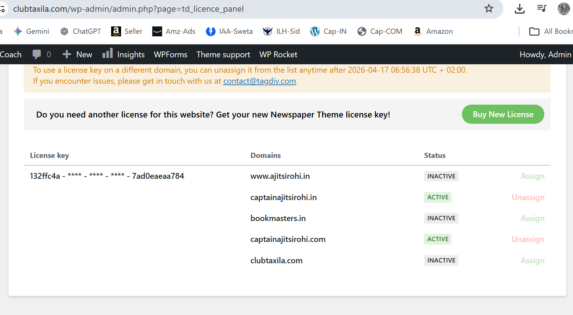
I have just purchased a New License ie second License.I already had one which is installed on two websites. However, on the website the Assign/Unassign options are disabled. Not able to click on them and Assign or Unassign. See Image. Please advise how to Assign the new purchased License.
 hardbau
My site https://www.misioni-rijeka.hr/
I updated to Version: 12.7.5, then I opened the page and everything opened in a mess.
The top menu does not exist at all and the entire header logo has been removed.
I uninstalled some plugins and re-activated them, but the problem is the same.
My PHP Versions ist 8.3
 simchris
 Did you install TD Composer plugin and activate it? Works up to PHP 8.3 without issue 🙂
(I don’t work here.)
 MzMaffei
We are using Newspaper 12.7.5 with td-cloud-library 3.9.4 and WPML. We need a native language switcher element in the header Cloud Template builder, but tdb_header_language does not exist in our shortcodes/header/ directory and does not appear in the editor element list.
Available header shortcodes in our installation: tdb_header_categories, tdb_header_date, tdb_header_logo, tdb_header_mega_menu, tdb_header_menu, tdb_header_menu_favorites, tdb_header_search, tdb_header_user, tdb_header_weather.
Questions:
Is tdb_header_language available in a newer version of Newspaper or td-cloud-library?
Is there a dedicated WPML + tagDiv integration plugin that adds this element?
Is there an official recommended approach to integrate WPML language switcher natively in the header Cloud Template builder?
 frenasux
 If I delete the plugin and reinstall it, will I lose my current setting cloud templates?
Calin Hi,
This kind of issue can occur when the plugin version is not compatible with the theme. I recommend deleting the plugin and reinstalling it from Newspaper > Plugins.
I hope this helps!
Calin Hi,
I’ve run some additional tests on my installation and also asked a colleague to test it. Everything is working properly on our end. There are no errors when editing the title in the classic editor; everything functions correctly.
If possible, I recommend creating a staging environment and providing us access so we can investigate further. You can share the access details via email at contact@tagdiv.com
Thank you!
Calin Hi,
Please make a full backup and update the theme to the last version 12.7.5. Make sure all theme plugins you have before the update are updated and installed https://tagdiv.com/newspaper-changelog/?utm_source=forum&utm_medium=menu&utm_campaign=forum_loggedin&utm_content=52878. The latest theme versions contain the landmark elements you need.
Calin Hi,
Please make a full backup and update the theme to the last version 12.7.5. Make sure all theme plugins you have before the update are updated and installed https://tagdiv.com/newspaper-changelog/?utm_source=forum&utm_medium=menu&utm_campaign=forum_loggedin&utm_content=52878. The latest theme versions contain the landmark elements you need.
Calin Hi,
I’m glad that you managed to install the demo https://forum.tagdiv.com/installing-demos/
If you have other questions related to the theme, please let me know!
AjitSirohiHi,
I had the Theme installed on four websites for last many years. I am now getting message that I can install only on two websites. Is there a change of policy.
1. What happens now to my other sites. Besides the two. Will the theme be de-activated there.
2. Is there a Free version of Newspaper Theme that I continue to use.
Please help.
 akashmpct
 Able to install it
akashmpctHi I want to install Demo content same as mentioned in Demo https://demo.tagdiv.com/newspaper_magazine_pro.
Can you suggest how can i install or if you can install it for me.
http://cnb.fcn.temporary.site/website_a96f1d82/
Calin Hi,
I checked the article, and there are only 2 ajax pagination https://prnt.sc/xrj5A2oFf-hv – https://prnt.sc/u29O9SBfrhVk, so I do not believe that these are making so many queries.
What you can try to install Query Monitor and check the pages and articles that are most viewed.
Calin Hi,
When the site looks like this https://drive.google.com/file/d/1g6gvg6l28TQCKVOMUCBTjRx3HAMKR3E-/view and displays only shortcodes, it is because some of the theme plugins are no longer installed/activated, those can be instllaed form Newsaper > plugins, most of the website needs tagDiv Composer, tagDiv Cloud Library and it may be need to use tagDiv Standard Pack and maybe tagDiv Opt-in Builder.
Calin Hi,
After you have installed the Newspaper theme, do you still have analytics set to get information from the website? If the analytics code was set in the previous theme and not in an extra plugin that now exists on the website, then the results will be as you mentioned, because no code to retrieve information from the website is set. The code for analytics in the Newsapper theme can be set in Newsapper > theme panel > Analytics/js code – https://prnt.sc/-prI93sIOCON
Changing theme can affect the ranking of your site and try to add Yoast SEO plugin.
Go to Yoast SEO > Settings next > Site connections add your > verification code in Bing Webmaster tools,Google Search console, Baidu and Yandex
 MarryCaribbean
 OMG, I had forgot to re-install The Standard Pack plugin. sun of a gun! Thanks bro!
-
This reply was modified 6 months by
MarryCaribbean.
Calin Hi,
I appreciate your detailed message it’s very thorough.
Here’s what may have happened: after the theme was updated, one of the theme plugins might no longer have been installed or activated.
The best practice when updating the theme is the following:
– Create a full backup of the website and database.
– Update the theme.
– Update all theme plugins used with the theme. In some cases, these need to be updated manually from Newspaper > Plugins, because other plugins may interfere with the automatic update system, or there may be certain code restrictions.
https://forum.tagdiv.com/how-to-update-the-theme-2/
Thank you!
Calin Hi,
If those are taxonomies and not categories, then it can be added with custom code or with an extra plugin like ACF or similar, but based on the demo you have installed, it is also possible to have installed a theme dedicated plugin https://prnt.sc/-hcPUNiDVhJq, which indeed adds extra CPT and taxonomies.
Thank you!
Calin Hi,
I already tried it on my installation before providing the solution, so it should work for you as well.
Please try using a different browser, and if the situation persists, disable all plugins except the theme plugins and try again. By doing this, you’ll make sure that no extra plugin is interfering.
Calin Hi,
Right now, you set the old blog template. This applies when you set the blog under the wordpress settings – https://prnt.sc/L6mb44D9iEYM. When it’s set it no longer takes the demo style you have. Now the demo coaching pro when is installed alredy have a page blog that is adapted to the demo layout, indeed is set as a category, but this can be set as a normal page that will act like a blog, if you wnat I can set it for you, for this, please contact us via email and provide temporary wp-admin access https://www.wpbeginner.com/plugins/how-to-create-temporary-login-for-wordpress-no-passwords/ also, inlcude the link of this topic to identify you faster.
Thank you!
Calin Hi,
I just tested on my install and it seems to be working correctly – https://prnt.sc/Q5PTCqjKhpM2. Could you please do a test using only the theme, theme plugins, and the WP Bakery? Also, if you have a child theme, set the main theme during the tests.
Thank you!
