
- NewspaperAutoptimize Plugin – install and configuration
- NewspaperCache plugin – install and configure
- NewspaperInstalling Pre-built Websites
- NewspaperHow to Install Newspaper via FTP
- NewspaperHow to Install Newspaper via WordPress
- NewspaperIntroduction to CPT and ACF with Newspaper Theme
- NewspaperHow to edit modules for Flex Block X
- NewspaperWooCommerce: Happy “Add to Favorites!”
- NewspaperWoo Brands
- NewspaperStripe Setup
- NewspaperModal Popup
- NewspaperPayPal Setup
- NewspaperFlex Block Settings Guide
- NewspaperHow to setup the Contact Page
- NewspaperAdd Cryptocurrency Price Ticker Widget
- NewspaperInfinite Loading for Single Posts
- NewspaperThe Newspaper Mobile Theme: Introduction
- NewspapertagDiv Social Counter plugin
- NewspapertagDiv Shop
- NewspapertagDiv Opt-In Builder
 Catalin
 Hello itduck2020,
I have inspected your website and I saw that your sidebar on post pages does not work. If you are using some untested plugins try to disable all of these, purge all CDN files if you are using the CDN system, clear all the caches and check the results. If the problem is still there, try to make a new clean install from scratch via FTP way and check the results. If you need more assistance in this case, please send us an email at contact@tagdiv.com with your log-in information (wp-admin) so we can further inspect it closer your setup page. Provide there the link to this topic so we can quickly identify you.
Thanks for the message!
 Bogdan B.
 Hello,
1. I have checked your site and saw that the ads now sho up properly. Maybe your adsense account was new and not yet active. Please check ads again.
2. Please use this guide: https://forum.tagdiv.com/how-to-install-revolution-slider-v5/
3. Please make sure you entered the code exactly as provided, the code must be wrapped with <script> tags by default
– https://developers.google.com/analytics/devguides/collection/analyticsjs/
4. The plugin does not need activation as it is a bundled version. Please ignore the activation and do not pay for it. This is described here: https://forum.tagdiv.com/how-to-update-visual-composer-plugin/
Thank you!
 Olya
Olya So, a little unclear. I install demo without content. I edited so as WPBakery Page Builder, for example? I have the content on the website is, I need only the layout of some templates
 emmavestrheim
Hello!
I currently use Toolset Layouts and when I installed the Newspaper theme on my website it removed the settings I had in Layouts plus it distorts my custom taxonomies archives.
Is there any way to fix it?
Thanks,
Emma
Examples:
You can see here the page is blank. It should be displaying data gained from shortcodes set in Toolset Layouts (like the director, producer, actors, etc): https://www.cinemascandinavia.com/movie/a-man-divided/
On the archives page you’ll notice the sidebar doesn’t appear, well, on the side, but rather underneath all the posts and sometimes overlaps them: https://www.cinemascandinavia.com/director/ruben-ostlund/
 haqemcom
Hi Tagdiv! i want to know why after change a installed demo my SSL not show green secure! before this my SSL on correctly
My blog is https://haqem.my/
 nickp94
Hello
I have purchased a plugin. “Hero Menu”. The support of that plugin has helped me with installing the menu. He had to implement the menu in my site. Now I’m actually not satisfied with the whole result (bugs). Is there a possibility to reset this to the original header? I have already updated the header.php (both in child theme and in main theme). And it didn’t worked it.
(site: http://www.kustnieuws.com )
Thanks for the help!
 kastriot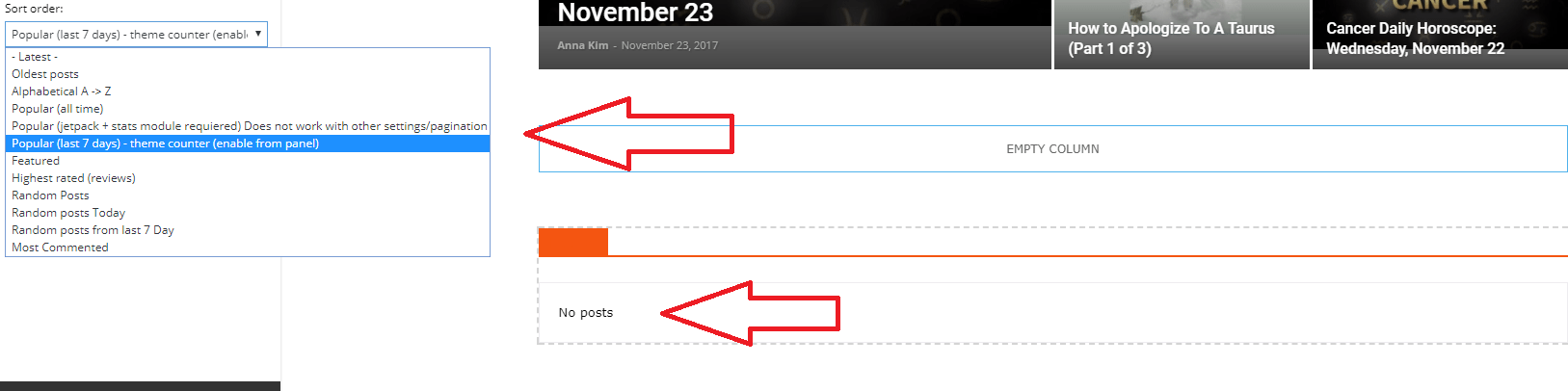
Hello as you can see in the screenshot I can’t get 7 days most popular? Is there any option excluding SHOW POST VIEWS (that I already tried).
Or is there any chance because It’s fresh installed theme and that’s why it doesn’t have evidence for 7 days… thanks
 okajones
How do I use “Visual Composer”? instead of visual composer, I am seeing “TagDiv Composer” against what you guys have in your tutorial video. How do I install the Visual composer that will give me all most exactly as what you have on your demo preview?
 Bruce H.
I’m considering updating my installation of the Newspaper theme to address the known issue with the weather widget. However, since this will require major development on my part (I’m using a much older version of the theme heavily customized), I want to confirm all bugs with the weather widget have been addressed. When I test the widget on the demo page at https://demo.tagdiv.com/newspaper/weather-widget/ by clicking the location icon, my browser prompts me to allow location access. When I do, nothing happens: the widget continues to display New York weather (I am located in Canada).
Bruce
 LaunchwebZa
Hi,
We have Newspaper theme installed on http://bulkhandlingtoday.co.za/ and we have created Custom Sidebar for each category through Theme Panel. Now, when we add new widget in sidebar it doesn’t save and disappears after page reload – http://bulkhandlingtoday.co.za/wp-admin/widgets.php
Please have a look, and let me know if you need anything from us.
Thank you.
OlyaHello! In WPBakery Page Builder choose a predefined template, I need a rubric. Called the Homepage, all settings save and click on Publish.
But it is not changing, only has one kind of like this https://o-tele.ru
For a few days already can not install the normal template, because of this, attendance drops. What you need to do?
Catalin Hello culturezvous,
Unfortunately, please keep in mind that we do not have any bad reports in this case until now! Regarding on outbound connection, notice that is not a problem regarding our theme, sorry! Check again your theme version to be the latest one, remove all of the untested plugins, clear all the caches, purge all CDN files if you are using the Cloudflare and check the results. Also, make a new clean install to a new sub-domain for testing and check the results.
Thanks.
Catalin Hello Zaheen,
Please notice that none of these plugins have to be purchased because these are just already included in our theme’s packet. Please check our documentation here -> https://www.screencast.com/t/60lb767t -> https://forum.tagdiv.com/install-via-ftp/ because there you will find the answer to your question regarding their place in the theme’s files.
Thanks for the message!
haqemcomhello tagdiv please help me i want to change default demo to sound radar without lose a posting. how ?
Catalin Hello Serd,
I have inspected your source page and I saw that you are using some untested plugins which can interact with the theme core files and which might cause a lot of unknown issues. Also, you should update the theme to the latest version of it which is Newspaper 8.2 because I saw that you are using an old theme version, like 7.8. Try to switch the theme to the main theme because now you are using the child theme and it’s possible to affect some theme’s functionality. Please follow all of these useful steps, clear all the memory caches and check the results. If the problem is still there, you should try making a new fresh install from scratch via FTP way in another sub-domain and see the results. If you cannot resolve this, please send us an email at contact@tagdiv.com with your wp-admin so we can take a closer look at it. Also, provide there the link to this topic so we can quickly identify you.
Hope this helps and let us know how it goes!
Thanks for the message!
 Renu Bakshi
I am thinking of using Speed Booster Plugin on my wordpress site using newspaper theme. I just read following:
“The plugin (Speed Booster) will move the js and css of the recommended plugins at the page bottom. If another (unknown) plugin is installed it will automatically disable itself, this behavior was added to avoid a potential plugin conflict.”
My questions:
(i) Is the function of this plugin is only to move the js and css of the recommended plugins at the page bottom.
If that is so I am using only two recommended plugins, “tagDV composer” and “Yoast SEP Premium”. So Speed Booster plugin won’t help me much.
(ii) Also, if another (unknown) plugin is installed Speed Booster will automatically disable itself, this behavior was added to avoid a potential plugin conflict.
If that is so, I am using two plugins which are not in the recommended list – “AdSense Integration WP QUADS” and “WP Smush”
Here also if the Speed Booster is going to be disabled, so there is no point in using it.
Can some body please advise me on the above?
Thanks…
Catalin Hello admin_kh,
Please check our documentation here -> https://forum.tagdiv.com/install-via-ftp/ because there you will find explained step by step the way of theme installing.
Thanks for the message!
Bogdan B. Hello,
When you download the theme from envato there are multiple ways you can download.
1 just the install zip
2 the full theme package.
Please access your envato account and download the full package. Or ‘all files’. I can’t remember the exact name of the option.
Thank you!
Catalin Hello virgboggie
I have inspected your source page and I saw that you are using some untested plugins which can interact with the theme core files (header section) and causes a lot of unknown issues. Try to disable all of these, leave just to active only the bundled plugins and tested with the theme, clear all the caches and check the results. If the problem is still there, you should try making a new fresh install on a sub-domain with the latest theme’s version and check the results. Also, if you need more assistance in this case, please send us an email at contact@tagdiv.com with your wp-admin so we can further inspect it closer your setup page. Also, before sending us an email, you should disable all of the untested plugins because this is the first step for debugging in WordPress.
Thanks for the message!
 rumunaptra
1st: Ads do not appear
2nd: I am trying to install the plugin slider and it does not install.
3rd: the code of analytics are appearing in all pages
4th: WPBakery Page Builder comes with the layout, but it does not activate and is asking me to buy for 32$ when I click. Can you give me the activation code plz?
Catalin Hello alpaq53,
Make sure that you have the latest version of the theme installed via FTP way, remove all of the untested plugins, clear all the caches and check the results. If the problem is still there regarding on Facebook, send us an email at contact@tagdiv.com with your wp-admin so we can further inspect it closer your setup page. Provide there the link to this topic so we can quickly identify you.
Thanks for the message!
Catalin Hello King,
Make sure that you are using the latest version of it, remove all of the untested plugins, clear all the caches and check the results. I saw that you are using a plugin for comments section which is not tested with the theme and it’s possible to affect the theme core files and causes some unknown issues. As a test, if your problem is still there you should make a new sub-domain with a clear theme install and check the results. Should work as expected, without any problems.
Hope this helps and let us know how it goes!
Thanks for the message!
 zaheen
I can see some plugins in theme panel, but my question is do we have to pay to activate Revolution Slider, tagDiv Mobile Theme, and Visual Composer? Because those are not installed and activated by default.
Thank you
Zaheen
Catalin Hello drschulz,
Please try to make a new clean install from scratch via FTP way or create another sub-domain for testing, clear all the caches and check the results. If you want to achieve good results, make sure that your theme is the latest version of it, downloaded from Theme Forest.
Thanks for the message!
Catalin Hello,
Make sure that you are using the latest version of it installed via FTP way because this is the surest method in this case. Also, if you are using some untested plugins, try to disable all of these, clear all the caches and check the results.
Hope this helps and let us know how it goes!
Thanks.
