
- NewspaperThe Newspaper Mobile Theme: Introduction
- NewspaperThe Mobile Theme
- NewspaperModules Builder in Newspaper Theme
- NewspaperNewspaper theme documentation
- NewspaperTheme Colors Introduction
- NewspaperWhat’s Included in the Newspaper Theme Package
- NewspaperFilters and sorting for taxonomies
- NewspaperHow to Add a Logo in Newspaper
- NewspaperBig Grid Flex Settings
- NewspaperHeader Builder
- NewspapertagDiv AMP Plugin Tutorial
- NewspaperBest Of Forums
- NewspaperCache plugin – install and configure
- NewspaperFont Customization
- NewspaperBackground Introduction
- NewspaperHeader ads
- NewspaperPost template ads
- NewspaperCustom ad spots
- NewspaperMain Menu
- NewspaperHow to Install Newspaper via FTP
 Anamaria
 Hello,
The theme in Newspaper and the theme includes over 135+ pre-built websites.
This is a video on how you can install a prebuilt website -> https://www.youtube.com/watch?v=ezaaE2VP7V8
Also, please check this topic where I explained each mobile version -> https://forum.tagdiv.com/topic/mobile-version-not-working-properly-2/ and choose what mobile version you want.
Also, on our channel https://www.youtube.com/channel/UCOT1RiNysIPCTPSnVZskwtQ, you can find more videos that can help you and documentation https://forum.tagdiv.com/newspaper-theme-documentation/ and you can ask us here on the forum if you have any questions.
Have a nice day!
Thank you!
 Universidademanizales
Hi,
I updated my newspapper theme and i saw you can create your own mobile version, i created and i selected but it doesnt works, also i put the option on Theme Panel -> Mobile Theme -> Mobile + AMP
The website is umcentral.umanizales.edu.co
Can you take a look and see what’s happening?
Thank you, Regrads
 biki
bikiWhy predefined themes are showing demo even after license key has been installed, and mobile version is not showing as expected activated the google amp plugin checked with broadband. Please help
 A-Jenkins
 I would like to add, I am getting the same issue but for the rest of my pages (categories, search page etc.)
https://www.gymtechreview.com/?s=reebok+jet+100
In the DivTag builder you can set the image height and image width (percentage based). It looks like something has gone wrong here, it should be minimum image height and width, not depending on the image size and width of your initial image. Which is why they are all different sizes.
I can fix this with CSS, but it would mean writing it all again for desktop/tablet/mobile, but there should be a fix for this soon.
It’s also an issue on your demo theme.
https://demo.tagdiv.com/newspaper_parenting_pro/?s=and
The images are all different sizes.
-
This reply was modified 4 years by
A-Jenkins.
 Bettina
 Hello @MeghaRajpara!
You need to take into account many factors:
External factors: server speed, if you are using CDN or not, the external resources loaded by your website like ads, fonts, tracking scripts like Facebook Pixel, Google Analytics, Twitter analytics, Hotjar and so on.
Internal factors: the number of elements on the page, image size, image formats, if you are using mobile optimized layouts, console errors.
We have 3 options of mobile versions that you can use:
1. Responsive version: A responsive version of your website is looking similar like on desktop, edit the page with TagDiv Composer, click on the mobile viewport: https://www.screencast.com/t/XDQJedlggSB ; there you can see your mobile version and you can edit the elements there.
2. Mobile pages: https://tagdiv.com/newspaper-10-3-7-update-brings-customizable-and-fast-mobile-pages/
3. Mobile theme plugin: The Mobile Theme is a performance optimized theme included in the Newspaper main theme and it loads only for mobile devices. It comes with its own templates/design for page, post, category, etc so your current templates from the desktop theme will get converted to the mobile theme layout. For more details, please take a look here: https://forum.tagdiv.com/the-mobile-theme/ and https://forum.tagdiv.com/mobile-theme-introduction/
A full explanation you can find here: https://www.youtube.com/watch?v=SpGkOnJeNZY
You can choose to use which one is more affordable and useful for you.
If you follow the steps which are presented in this tutorial here: https://tagdiv.com/how-to-increase-page-loading-speed/ you’ll be able to increase the speed of your website.
Other starting points to improve your website page speed are here:
– https://forum.tagdiv.com/how-to-make-the-site-faster/
– https://forum.tagdiv.com/topic/score-100100-pagespeed-with-newspaper-wordpress-theme/
– https://www.infophilic.com/get-almost-100-pagespeed-newspaper-theme/
– https://developers.google.com/speed/docs/insights/v5/about
– https://www.youtube.com/watch?v=tnkVapqhIHc
– https://www.andraware.com/wp-rocket-for-newspaper-theme/
Please check the tutorials from those platforms gt metrix and Google Pagespeed Insights and I’m sure you can increase the page speed.
Please note that page speed is not covered by the support team: https://forum.tagdiv.com/newspaper-theme-support/
Thank you for understanding!
Bettina Hello Ben!
I’ve checked your website and it seems that your responsive version looks similar as your desktop. If you use a mobile page, then please assign it again and see the results.
We have 3 options of mobile versions that you can use:
1. Responsive version: A responsive version of your website is looking similar like on desktop, edit the page with TagDiv Composer, click on the mobile viewport: https://www.screencast.com/t/XDQJedlggSB ; there you can see your mobile version and you can edit the elements there.
2. Mobile pages: https://tagdiv.com/newspaper-10-3-7-update-brings-customizable-and-fast-mobile-pages/
3. Mobile theme plugin: The Mobile Theme is a performance optimized theme included in the Newspaper main theme and it loads only for mobile devices. It comes with its own templates/design for page, post, category, etc so your current templates from the desktop theme will get converted to the mobile theme layout. For more details, please take a look here: https://forum.tagdiv.com/the-mobile-theme/ and https://forum.tagdiv.com/mobile-theme-introduction/
A full explanation you can find here: https://www.youtube.com/watch?v=SpGkOnJeNZY
You can choose to use which one is more affordable and useful for you.
I can see that the register button doesn’t work at all, neither in desktop. Please re-check!
Thank you!
 MeghaRajpara
I am using Newspaper – News & WooCommerce WordPress Theme. I just installed it’s prebuilt website, but it’s google page speed insight score very low in mobile. It is just 58, I didn’t even do any customization in website just demo content.
Anamaria Hello,
You need to disable the sign-in/join from Theme Panel -> Mobile Theme -> Header https://i.imgur.com/1XdWker.png
Thank you!
 Calin
Calin Hi,
If you want to use the tagDiv Composer, then you can set the shortcodes on column text and text with title where it is also use the classic editor -> https://i.imgur.com/fngLIwW.png
Or you can just used the Gutenberg editor and use for mobile the responsive version or the mobile page template (not the mobile theme plugin).
Thank you!
Calin Hi,
Yes, you can override the Mobile theme plugin, but this must be done individually on each page and post, for this you must use the Gutenberg from WordPress -> https://i.imgur.com/FyrtoCD.png -> https://i.imgur.com/VadkbsV.png -> https://forum.tagdiv.com/mobile-theme-introduction/
Maybe this can help you!
Thank you!
Calin Hi,
Yes, you can share it via email contact@tagdiv.com, just add the link of this topic too.
When the mobile version is on desktop, usually is a problem with the cache plugin. Most probably you are using the mobile theme or mobile page template and the cache plugin that you have do not recognize it. Most of the time this is solving by enabling from the cache plugin the mobile support. We recommend to use Wp Super Cache plugin.
Thank you!
 maxonline
Hi guys
I tried hard to get good results with WP super cache, but on mobile this solution doesn’t seem to work fine.
So I’m triyng with WP-Rocket which boosts my performance by 15 point on google page speed.
Further optimization could be done with the “remove unused css” feature, but there is a problem with loading some images.
This seem due to a feature in Style.css sheet. Can you help me ?
I paste the solution from wp-rocket support.
thank you in advance
Max
sample page: https://www.massimobasso.com/partire-per-gli-stati-uniti-le-cose-importanti-da-sapere/
—-
I reproduced the problem on my testing environment and found the root cause of the issue.
The issue was caused by Remove Unused CSS feature in WP Rocket, but it is coming from an underlying issue in one of the stylesheets.
This stylesheet: https://www.massimobasso.com/wp-content/themes/Newspaper/style.css?ver=11.4.2 contains an error.
It has a non-valid value width: auto\9;.
Please see the validation error report: https://jigsaw.w3.org/css-validator/validator?uri=https%3A%2F%2Fwww.massimobasso.com%2Fwp-content%2Fthemes%2FNewspaper%2Fstyle.css%3Fver%3D11.4.2&profile=css3svg&usermedium=all&warning=1&vextwarning=&lang=en
The \9 is a hack to make the rule only readable by IE8 up to IE11.
This error is negated on the non-cached page. The browser simply removes this non-existing value.
See the screenshot: https://i.imgur.com/NpugXvX.png
When Remove Unused CSS is enabled and the stylesheet is processed, the value is parsed as width: auto; and added to the Used CSS this way. This value is valid and therefore it is preserved by the browser. But the presence of this value breaks the layout.
See the screenshot: https://i.imgur.com/kcnZ97U.png
The solution would be to resolve the underlying error in the https://www.massimobasso.com/wp-content/themes/Newspaper/style.css?ver=11.4.2
stylesheet.
Removing width: auto\9;
line from the CSS stylesheet will resolve the problem for you.
The issue will be back when you update Newspaper theme. You would need to remove the line again.
Calin Hi,
The “-” from the post can be removed only using custom css. You can use this code:
.single .td-post-author-name .td-author-line {

display: none;

}
The code need to be set in the theme panel > custom code> custom css.
In case that you are using mobile theme plugin, then please set the code in the theme panel > mobile theme > custom code> css too.
I hope this will help you!
 thelastpoet
Hello Calin,
The mobile plugin takes over everything on mobile.
Is there a way to override some pages to use the responsive version on mobile? If not yet, can this be planned?
I would like to:
1. Create a Cloud Template for Single Posts
2. Assign this template to specific categories
3. Make sure this template is available to mobile users even though I have the mobile theme plugin installed.
I am doing this because I have the mobile theme installed with Ads in the content on it.
I want different posts without Ads in the content body.
I don’t want to disable the mobile theme for the whole site.
Thanks
 Eighthats
Currently, when using the tagdiv editor, changes made to the mobile menu, such as selecting which menu it should use,
do not save when the page is updated.
The mobile menu always pulls up the menu from the main header, even if the menu itself is set to a different menu.
This page is using a different overall header:
https://www.rcrwireless.com/qualcomm-analyst-day-2022
The mobile menu will not retain the settings so we’ve had to leave the horizontal menu layout in place.
I have also been unable to change the CSS on the page. Any changes made are erased when the page is updated.
Theme status page:
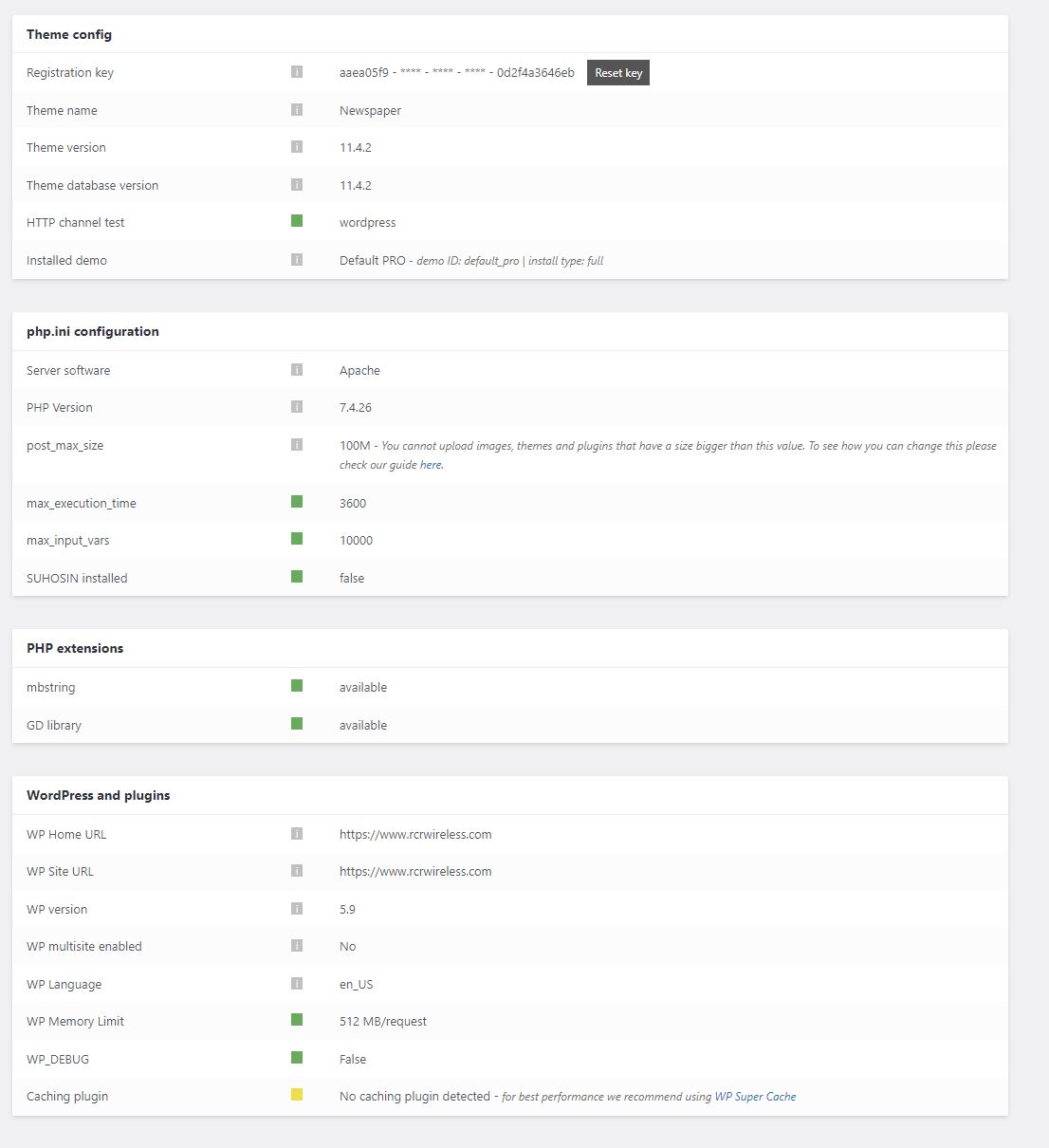
 PatWire
The mobile menu fails in 11.4.2 – rolled back to 11.4.1 and it works again
There was also a WordPress update today to 5.9
Mobile theme plugin not activated because I don’t use the mobile theme plugin
Thanks
 channeld
Hi. I have this issue with desktop menu (mobile works).
When the menu has subcategories, the main one is not clicked.
In console I see 1 error: r ‘tds_more_articles_on_post_pages_distance_from_top is not defined’
I read the forums topics and says it has to activate and set value on more box. did that. the value shows in the code (and then deactivated the Standard Pack) but the menu still doesn’t work.
I use wprocket. Without wprocket it works but that makes no sense as everything else works with wprocket (in your theme too).
So, what is the solution? Why I get the same error despite the more box having value?
Anamaria Hello,
For mobile theme +AMP, you can change the fonts from Theme Panel -> Mobile Theme -> Theme Fonts -> Post Content -> https://i.imgur.com/SdAOwE3.png
Thank you!
Anamaria Hello ludyma,
The options the Reading Time Shortcode and the Reading Progress Bar are available in Single Post Templates -> https://i.imgur.com/P6gWJ6d.png
You can now add unlimited ads in the post loop shortcode is available in Posts Loop and Posts Loop 2-> https://i.imgur.com/qxGrllf.png
RAW HTML ACE Editor -> now you can extend the element Raw HTML -> https://i.imgur.com/uZE3aRt.png
Option to Enable / Disable Saving History can be found in Manager(Website Manager) -> Settings -> https://i.imgur.com/nazGJvt.png and refers to these options -> https://i.imgur.com/O0asy16.png
Option To Set The Background Color For Mobile Navigation Toolbar from Theme Panel -> Theme Colors -> General theme colors -> https://i.imgur.com/Yood0aL.png and is for mobile browser toolbar.
Thank you!
Calin Hi,
Our theme can use 3 options for mobile version:
1 – the responsive version
2 – the mobile page template (can be used on pages and cloud templates -> https://prnt.sc/XVq4TcxR0lwJ)
3 – the mobile theme plugin
To have the same layout, then you need to avoid the mobile theme plugin. Use the responsive version or the mobile page template (if you want to edit the mobile version to have a different look or content).
Also, here is a video tutorial that maybe can help you!
Thank you!
Bettina Hello @pratiek!
It could be a plugin conflict there or something that can interfere in our theme: https://forum.tagdiv.com/general-options-may-interfere-newspaper-theme/, so please make a test and deactivate ALL plugins except tagDiv ones, also deactivate the cache plugin that you use, and try again.
Enable the sharing feature on mobile theme + AMP from Theme panel -> Mobile
Theme -> Post Settings -> Sharing.
Yes, you’re right they do not appear on AMP. I’ll address this issue to our developers.
Yes, we implemented it in the new update.
Thank you!
Anamaria Hello,
Please note that if you have mobile pages, amp works only with the mobile theme plugin.
So, please check this topic where I explained each mobile version -> https://forum.tagdiv.com/topic/mobile-version-not-working-properly-2/ and choose what mobile version you want.
Thank you!
 ludyma
I do not see where or how does this apply?
* New: Added The Reading Time Shortcode On Single Post Cloud Templates to Allow You To Create SMOOTHER EXPERIENCE FOR YOUR VISITORS.
* New: You can now add unlimited ads in the post loop shortcode. The Newspaper Theme Helps You Generate More Revenue by Displaying Engaging Ads Between The Articles Published on Your Website Using The Post Loop Shortcode.
* New: Added The Reading Time Shortcode On Single Post Cloud Templates to Allow You To Create SMOOTHER EXPERIENCE FOR YOUR VISITORS.
* NEW: ADDED The Reading Progress Bar On Single Post Cloud Templates;
* NEW: RAW HTML ACE Editor;
* New: Option to Enable / Disable Saving History;
* New: Option To Set The Background Color For Mobile Navigation Toolbar from Theme Panel;
They could contribute information about it, thank you.
 larchva
Hello,
I am using Newspaper theme and as I saw it have great mobile views… but, there is so many problems with my website. I turned off now both AMP and mobile theme plugin, but still can not adjust global theme for all posts. Few posts it have good mobile view others not… I really confused. please help me to resolve this problems.
thanks,
Irakli
 RickRozo
Please help!
I followed the instructions for create a new mobile web page, all run like train on rails…, but when i try to see my web page in my iphone, i get a bad web page, i was try all, nothing works. =(
This is the web…see on desktop and see on amp
Try your self the web…



