
- NewspaperThe Newspaper Mobile Theme: Introduction
- NewspaperThe Mobile Theme
- NewspaperModules Builder in Newspaper Theme
- NewspaperFilters and sorting for taxonomies
- NewspaperHow to Add a Logo in Newspaper
- NewspaperBig Grid Flex Settings
- NewspaperHeader Builder
- NewspapertagDiv AMP Plugin Tutorial
- NewspaperNewspaper theme documentation
- NewspaperBest Of Forums
- NewspaperCache plugin – install and configure
- NewspaperFont Customization
- NewspaperTheme Colors Introduction
- NewspaperBackground Introduction
- NewspaperHeader ads
- NewspaperPost template ads
- NewspaperCustom ad spots
- NewspaperMain Menu
- NewspaperHow to Install Newspaper via FTP
- NewspaperHow to Install Newspaper via WordPress
 tenacemente
 Ciao Mobile Theme POST, vorrei il nero come colore:
https://imgur.com/a/cNJZBLM
https://imgur.com/a/GKsC1aQ
Grazie.
 marcosimbolotti
 Hello,
I created a new post with a shortcode inside.
You suggested that I disable the mobile plugin for posts that contained shortcodes because with the TagDiv Mobile plugin active, the shortcodes didn’t work.
And indeed, the post https://new.vediamocichiara.it/ginecologa-dottssa-farris-risponde/ worked. I disabled AMP and the shortcode works in mobile as well.
But this doesn’t happen with the page https://new.vediamocichiara.it/convenzione-con-redcare/, which also contains a shortcode but doesn’t work on mobile even with the AMP disabled.
Why is this happening?
 nibbl
nibbl This is outrageous!
I paid for the template, and I still get ads that my authors from mobile devices can’t work!
I ask the developers to remove this banner and not to do such things anymore!
I understand if you were giving away your template for free and put your banners everywhere, and we bought it!
If I want to support you I myself want to turn on this banner, but there should be a button to turn it on and off!
I’m waiting for feedback!
Translated with http://www.DeepL.com/Translator (free version)
 Bettina
 Hello!
Check out these topics for more solutions:
– https://www.infophilic.com/get-almost-100-pagespeed-newspaper-theme/
– https://forum.tagdiv.com/topic/score-100100-pagespeed-with-newspaper-wordpress-theme/
– https://developers.google.com/speed/docs/insights/v5/about
– https://www.youtube.com/watch?v=tnkVapqhIHc
– https://www.xtechkr.com/optimize-newspaper-theme/
– Check those guides : https://web.dev/lcp/ – > https://www.sqlpac.com/en/documents/google-pagespeeds-lighthouse-6-new-features-lcp-cls.html -> > https://wp-rocket.me/google-core-web-vitals-wordpress/improve-cumulative-layout-shift
– https://forum.tagdiv.com/topic/to-high-cumulative-layout-shift-in-mobile-theme/
Please check the tutorials from those platforms gt metrix and Google Pagespeed Insights and I’m sure you can increase the page speed.
Please note that page speed is not covered by the support team: https://forum.tagdiv.com/newspaper-theme-support/
Thank you!
 ezioboy
 It seems that the gap between the thumbnail and the upper fixed bar on mobile is also a problem.
Text or images are cut off.
ezioboy Bettina Nothing’s working right now
① Layout size problem
https://ibb.co/p2bBcP9 The existing Real News Pro theme and my current site are different. First size please https://ibb.co/SNDW56b
The small image below also comes out broken in an unoptimized state.
Small lines flicker when moving up and down. This issue also appears in the real news bone theme. If you move it slightly left and right, you will see a white line. The resizing of the theme is not optimized.
② This is a problem that occurs in the post state.
https://ibb.co/JQYGj7B When viewing on a PC, the category is out of the thumbnail space https://ibb.co/bbWJKYW If you scroll down the article, the pinned sidebar disappears.
https://ibb.co/yXWkCbb Do you see the thumbnail when viewing it on mobile? It has a white line.
Beta or what I want please like real news pro demo site I want to go back to the beginning.
 meugamer
 This stuff you recommended I have already done, I have removed, cleared the cache, restarted the server, everything. And, nothing removes it. Is there a command I can use in “functions.php”, to choose which cpt, the mobile theme can be displayed?
Bettina Hello!
Unfortunately, there is no workaround for this. Only if you do not use AMP. Because AMP and mobile theme have other options and do not allow so many features in their layout.
Thank you!
 Anamaria
 Hello,
You can’t edit the Mobile theme and AMP version with tagdiv Composer; the only settings are from Theme Panel -> Mobile Theme.
The mobile theme comes with its own templates for page, post, category, etc so your current templates from the desktop theme will get converted to the mobile theme layout, the page content is made without builders in mobile editor => https://www.screencast.com/t/xbgZG8kH also, the options that are provided to edit the mobile theme version are limited (this keeps the things simple)).
So, if you want to have those shortcodes displayed, you need to disable the mobile theme plugin.
Also, please check this topic where I explained each mobile version -> https://forum.tagdiv.com/topic/mobile-version-not-working-properly-2/ -> https://forum.tagdiv.com/topic/amp-pages-not-working-well-with-this-theme/ and choose what mobile version you want.
Also, for page speed please check this topic https://forum.tagdiv.com/topic/my-site-is-so-slow-after-installing-newspaper-theme/
Thank you!
meugamer Nginx Helper and Redis. The problem is not about caching. It simply doesn’t work in CPT, even if you uncheck the mobile option. Only in the standard post it works.
 ppbub
ppbub  findbitter
Hi,
My site looks different on the desktop and on the mobile. Mobile and desktop site themes are different, how do i set it to be the same?
Thank you
 chrisfoxatx
I’m customizing the single (detail) page.
I bumped into these issue yesterday and today.
1) After adding a flex block (1) in the sidebar (column set to sticky) it started to flicker when it reaches the point of the next fleck block (1) in a full width row below.
2) I’ve been rebuilding the whole page from scratch all day. Now when I have already a flex block (1) in the sidebar, and I add a few more at the bottom each in their own row with a full width, they show correctly in the builder, but not in the resulting page.
3) I copied some elements from the original single page (Gossip Pro) on another page. The gray author/date box is showing up on the mobile viewport, even though it’s nowhere in the builder on any viewport….
Are there any issues about reusing the same type of element?
 ilouie
 The only way I were able to fix this issue was by installing a Pre-built website and deleting the Mobile template. It shouldn’t have to be this way. I’m now using Header Template – Italy Report PRO, but now I have a different issue. I can’t figure out how to make the header sticky. I don’t want it to show the second dropdown part of it showing the logo and the menu. If I make it sticky, I can’t find the row that would stand still, unless I delete the top row with the adbox. Also, if I make it sticky, then I go back to the original problem I always had and that is, the mobile part of the header will disappear, hence the reason I created a Mobile Template, and unfortunately that didn’t work either. I like this theme, but it seems to have some issues. Please show me what I’m doing wrong. The fix you gave me for the other issue didn’t work either. Thanks
Bettina Hello @alexweb !
Try this solution as well: https://wordpress.org/support/topic/uppercase-greek-letters-are-getting-accents-on-iphone-mobile-devices/
Thank you!
 aurelienmatte
 Hi,
Actually i want pages to appear too 😀
So is there a way to exclude mobile pages from search results ?
Thanks again
Anamaria Hi,
I answered here -> https://forum.tagdiv.com/topic/header-ads-banner-is-not-display-on-mobile-home/ Please check if added the banner for all devices.
Thank you!
Anamaria Hi,
You can’t use two mobile menu elements in the same page, the settings are inherited
that is why I said if you want you can use modal popup -> https://forum.tagdiv.com/modal-popup/ You need to create a page where to add the menu with a list menu, set the page id in the modal popup, and check if the problem persists.
Thank you!
 ngotuannghia
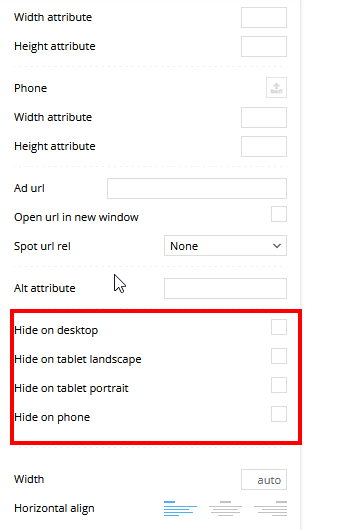
 To display the ad in the header of mobile, you need to edit with tagDiv Composer, select the viewport on phone, add a row and in the row add “ad box” and set the code for the ad.
It not working 🙁
-
This reply was modified 3 years by
ngotuannghia.
ngotuannghiaDear Admin,
I am sorry for bother you.
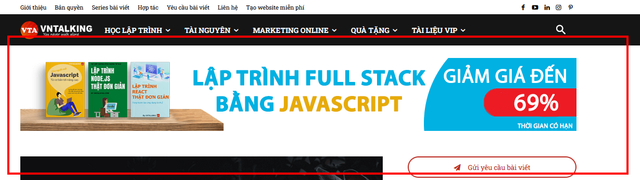
I have a issue relate show header banner.
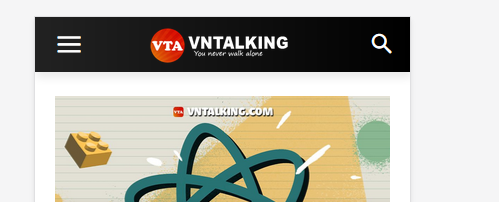
Althrough do not disable header banner on mobile, but it still not show
(show as normal on Desktop mode)
Please help or guide me what i wrong.
Thank
 cenkerinan
 Please see attached screenshot
I installed a mobile menu plugin that works but I do not want to use or pay for another plugin. Why doesn’t the TagDiv one work. It allows me to add multiple menu to the nav bar so why doesn’t it display them correctly on mobile. Desktop works, just not in mobile mode.
meugamer It is exactly this option that I uncheck, and yet it still displays as mobile.
ppbubWhy are there no options for creating a news slider when you’re creating a 1 column layout for mobile?
Please advise, as I only see this option available when you install the “Mobile Newspaper Theme Plugin”. Is there another way to create this type of scroller?
Thanks.
Anamaria Hi,
Please check if in the WP Rocket, the option for mobile cache is enabled -> https://docs.wp-rocket.me/article/708-mobile-cache
Thank you!
aurelienmatteHi,
When i create mobile pages, they appear in the search result, aisde of the normal page.
How to exclude them ?
thanks for your help 🙂
