- TutorialsFrom WPBakery to tagDiv Composer
- TutorialsDefault Block Settings Guide
- TutorialsOffset Feature
- TutorialsSystem status parameters guide
- TutorialsWhat is Ajax preloading?
- TutorialsHow to Update the WPBakery Page Builder plugin
- TutorialsHow to Install bbPress forum
 rougesmagazine
 Ok, let me break it down in very simple terms. In the newspaper wordpress theme, when you create a blog post, you have to choose a “post type” to display a certain layout otherwise it will use the default in the theme panel. With me so far?
Now, when I copy and paste in content, select a post type, and publish that content; I find that with some (but not all) “post types” (the thing that determines how the content will presented to the end user) generate an error.
The following error sometimes occurs in the conditions that I have just described: (please see photo)

 Anamaria
 Hello,
A solution could be to use the unique article option, follow this guide: https://forum.tagdiv.com/unique-articles/
This option automatically removes duplicate posts from the page.
Also, another solution is to set the offset posts on the blocks => https://www.screencast.com/t/Tsiu65TSaRS -> https://www.screencast.com/t/YbkmVbsBrnk
You can use the Flex Block 1 and you can filter it to display the posts only from a category -> https://i.imgur.com/Nnt3zGX.png and you can design it to look like a posts loops block.
The Posts Loops settings are divided into 5 tabs: General, Layout, Style, ADS and CSS. The Posts loop is a special block and doesn’t have filtering options.
Also, one of the options for pagination of the Posts Loop has the option for normal numbered and the flex blocks do not have this option.
The Posts Loop is automatically filtering the posts depending on the cloud template you set (for example on the category page there will be posted posts from that category).
Thank you!
 dra_proba
In the L’histoire theme, images are difficult to load, and if I have more content with more images, only 2-3 images are loaded. Other images appear after scrolling, but often do not appear and in that case the images at the bottom of the page do not appear either.
Is there an option that gradually uploads images? That ‘s a real problem. Where it should be set that all images are loaded immediately on the page, and not to appear with scrolling?
 Bettina
 Hello!
You need to take into account:
External factors: server speed, if you are using CDN or not, the external resources loaded by your website like ads, fonts, tracking scripts like Facebook Pixel, Google Analytics, Twitter analytics, Hotjar and so on.
Internal factors: the number of elements on the page, image size, image formats, if you are using mobile optimized layouts, console errors.
Our developers are working a lot to improve the page speed in every update.
As a suggestion, disable the lazy load animation. Other starting points to improve your website page speed are here:
– https://www.xtechkr.com/optimize-newspaper-theme/
– https://forum.tagdiv.com/how-to-make-the-site-faster/
– https://forum.tagdiv.com/topic/score-100100-pagespeed-with-newspaper-wordpress-theme/
– https://www.infophilic.com/get-almost-100-pagespeed-newspaper-theme/
– https://developers.google.com/speed/docs/insights/v5/about
– https://www.youtube.com/watch?v=tnkVapqhIHc
Please check the tutorials from those platforms gt metrix and Google Pagespeed Insights and I’m sure you can increase the page speed.
Please note that page speed is not covered by the support team: https://forum.tagdiv.com/newspaper-theme-support/
Thank you for understanding!
Anamaria Hello,
Please try to set the code in the Ad box in the tab for Custom code and see if the problem persists.
The ad box has 3 sections for ads: using theme panel ads -> https://i.imgur.com/KFa9ibl.png, using images/banners -> https://i.imgur.com/MfAPTaE.png and custom code -> https://i.imgur.com/2rh8SuD.png save it and will appear on the post (you can set a shortcode like a shortcode from adrotate plugin or other plugins)
Thank you!
 STARSonTV
Good day,
I am working on the Single Post Template – Default PRO and there you can insert ads in the content area.
There is an area called “Ad Margin” and it says “0px 0px 0px 0px”.
If I use two of the three ads, they appear at the top of the content below each other. However, I would like to place them in other places in the content.
I just don’t know what I would have to put in “0px 0px 0px”. What is the meaning?
I want to put the first ad after the first paragraph and the second one a little further down. How can I do that?
Can you help me? That would be really great.
Many greetings,
Sebastian
 Mclongx
 Dear Bettina,
Thank you very much! I just made a lot of progress under your instruction. It works!
Currently, I have some other problem along the way, could you take a look:
1) the background image’s resolution level is very low, can’t find a way to adjust it. It looks like this: https://www.gowiselife.com/wp-content/uploads/2022/05/resolution1.jpg
2) is it possible that the background images will change when visitor visit the page next time? or different visitor from different location see different background image?
3) is it possible to have some gif or motion pictures or image slice over there?
Thank you so very much for your reply, it helped a lot.
Yours
Michael
-
This reply was modified 4 years by
Mclongx.
Bettina Hello!
1. Please check the settings from the homepage and apply them for the other pages too.
2. You can copy paste the elements in the other page as well.
3. There is only 1 element displaying on 2 rows. So, you can limit the flex block at 4 posts and add other flex block with limit 4 and offset 4.(or copy paste it). For more information about the settings, please check this guide: https://forum.tagdiv.com/flex-block-settings-guide/
4. You use the Mobile Theme plugin, so you can not modify that because there are only some settings in the Theme panel -> Mobile theme.
We have 3 options of mobile versions that you can use:
1. Responsive version: A responsive version of your website is looking similar like on desktop, edit the page with TagDiv Composer, click on the mobile viewport: https://www.screencast.com/t/XDQJedlggSB ; there you can see your mobile version and you can edit the elements there or adjust them to look better.
2. Mobile pages: https://tagdiv.com/newspaper-10-3-7-update-brings-customizable-and-fast-mobile-pages/
3. Mobile theme plugin: The Mobile Theme is a performance optimized theme included in the Newspaper main theme and it loads only for mobile devices. It comes with its own templates/design for page, post, category, etc so your current templates from the desktop theme will get converted to the mobile theme layout. For more details, please take a look here: https://forum.tagdiv.com/the-mobile-theme/ and https://forum.tagdiv.com/mobile-theme-introduction/
A full explanation you can find here: https://www.youtube.com/watch?v=SpGkOnJeNZY
You can choose to use which one is more affordable and useful for you.
5. Please check this guide: https://forum.tagdiv.com/social-sharing/
6. Use a responsive version and all you need to do is to uninstall the Mobile Theme plugin.
Thank you!
MclongxDear staff,
Could you give me some hints to build a homepage showing a search form at the front with Metropolitan PRO theme? or any other theme ?
Here is an example that I’d like to build:
1) https://www.gowiselife.com/wp-content/uploads/2022/05/1.jpg
Here is an example for stick menu:
2) https://www.gowiselife.com/wp-content/uploads/2022/05/2.jpg
The sample website is http://www.pexels.com
Thank you very much!
Michael
 muktipolice
I want to set a title tag. But if you look at the bottom of the setting, there’s another one. What is the lower part? How else should I set it up?
 mariosaf
 Hi, you say:
“Simply click on the single post content element and click on the Ads tab. Here, you are able to add the code for the flex block to be display inside the post content.”
Ok, but where I can create the code for the flex block with my category an other settings for paste into the ads tab
Thanks
Bettina Hello!
Make sure you assigned correctly the mobile page to your desktop page: https://tagdiv.com/newspaper-10-3-7-update-brings-customizable-and-fast-mobile-pages/
You need to take into account:
External factors: server speed, if you are using CDN or not, the external resources loaded by your website like ads, fonts, tracking scripts like Facebook Pixel, Google Analytics, Twitter analytics, Hotjar and so on.
Internal factors: the number of elements on the page, image size, image formats, if you are using mobile optimized layouts, console errors.
Our developers are working a lot to improve the page speed in every update, so the latest version of the theme is 11.4.3. Make sure that all the plugins are up to date too.
As a suggestion, disable the lazy load animation. Other starting points to improve your website page speed are here:
– https://www.xtechkr.com/optimize-newspaper-theme/
– https://forum.tagdiv.com/how-to-make-the-site-faster/
– https://forum.tagdiv.com/topic/score-100100-pagespeed-with-newspaper-wordpress-theme/
– https://www.infophilic.com/get-almost-100-pagespeed-newspaper-theme/
– https://developers.google.com/speed/docs/insights/v5/about
– https://www.youtube.com/watch?v=tnkVapqhIHc
Please check the tutorials from those platforms gt metrix and Google Pagespeed Insights and I’m sure you can increase the page speed.
Please note that page speed is not covered by the support team: https://forum.tagdiv.com/newspaper-theme-support/
Thank you for understanding!
 zoldfulu
Good afternoon,
We run an automotive website ( https://egzostive.com/ ) that relies heavily on Envira gallery. The gallery is however very slow (when loading over 100 photos of 2-300kbyte).
As an interim solution we started implementing pagination on our articles, and putting the full gallery to the last page, but we see the following issues:
1. Since our posts feature pagination the number of page visitors are lower than the impressions. Previously, each visit and the gallery clicks counted as a page view, hence visitor counts of over 2000 was easily possible. As an example, here is an article with 1831 views: https://egzostive.com/autoworld-porsche-70/
This one has the entire article on one page, but with a painfully slow load time.
Now with pagination, the clicks on the gallery (on the last page of the post) does not seem to count. We followed this approach in most of our 2022 post, ensuring much faster load time.
2. To reduce the load speed, I tried to introduce pagination on envira gallery as well, but this seems to show some conflict with the pagination of Newspaper: by clicking on next envira page, the article reloads on page 1 (see e.g. here: https://egzostive.com/zoute-concours-2021-anniversaries-alfa-1900-countach-etype-sm-quattro/3/ ).
Is there any solution in sight?
3. Irrespectably of Envira, for the pages with several pages, the visitor stats seems to remain below actual visibility, as the stats do not seem to grow with navigating between the pages of the article..
Strangely our calendar post (https://egzostive.com/the-ultimate-2022-car-show-and-events-list/ ) does not have pagination (or Envira), and still shows a big stat discrepancy: the visitor count on the article shows 896 counts, but my WordPress dashboard shows 2651 views, which seems closer to the actual visitor figures.
Can it be that Newapper’s page-count is wrong? How can this be remedied?
4. I read that in some cases you replied that Envira is not tested, but then comes the question: what is Tagdiv’s solution for a gallery plugin? Envira is one of the most recommended plugins, and we invested considerable time and also some money in implementing it, so we would need an efficient way to harmonise our website to any other alternatives.
Best
Egzostive.com
 Simion C.
 Hi,
There can be other cases why WhatsApp doesn’t share the post correctly. The rest of the socials all have debugging tools, WhatsApp does not. Normally the issue is with the size of the images, in case the image is not displayed when sharing. But there can be other issues.
I checked a post from the website, Facebook sees the image
https://i.imgur.com/K4q8UPv.png
Twitter as well https://i.imgur.com/h8Pqyt4.png
But trying it with WhatsApp, there is no image when sharing this post.
The og image meta tag is in the page https://i.imgur.com/WbzC5kO.png
And it is not too large. All the other socials use it, besides WhatsApp. I cannot explain why this happens however. The theme would have nothing to do with the sharing. Yoast loads the og meta tags, and the socials use them.
I had a similar case recently, everything was in order on the website, same as here, but still the WhatsApp share would not work consistently. For some posts it worked and for others it did not. I tried various suggestions found online https://stackoverflow.com/questions/19778620/provide-an-image-for-whatsapp-link-sharing And I tried with a default WordPress theme as well.
But no definite solution was found so far. If I would have a solution, I would gladly provide it.
Thank you!
 RedPillRevolution
However… when I access the site while not logged into WP and/or from another browser while I’m not logged in… the site appears to be fine. But while I’m logged in, the HOME page is all code. How can I fix this? All I did was update the theme. My site is TheRedPillRevolution.com.
After updating the theme, my homepage currently looks like this: https://theredpillrevolution.com/wp-content/uploads/2022/05/Screen-Shot-2022-05-11-at-1.51.30-PM.png
The rest of the site is all jacked-up as well.
 llucson
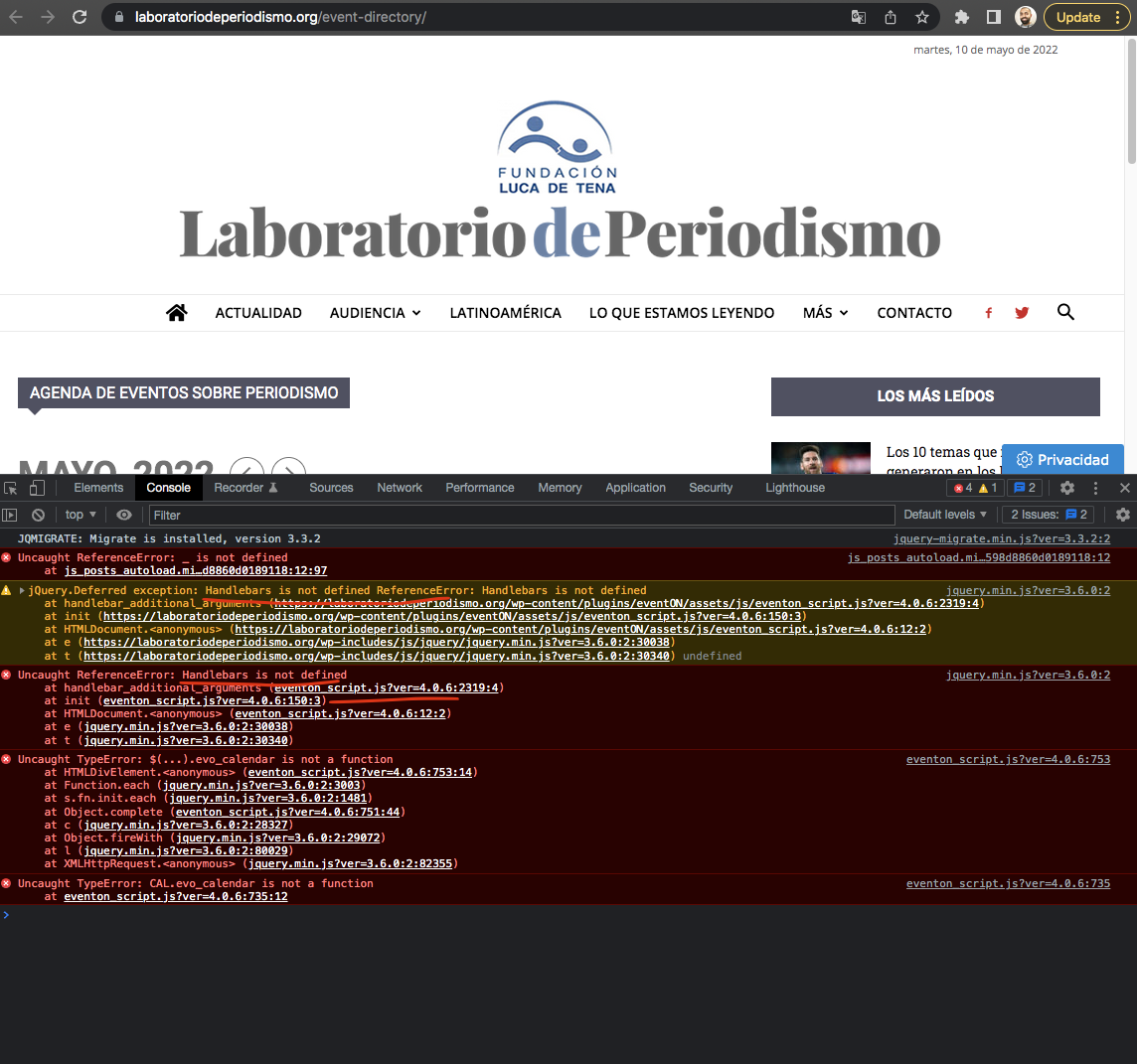
I’ve installed the Eventon Calendar plugin from Envato and it doesn’t work. Eventon support tells me this is a problem of the Newspaper theme, which blocks the handlebar script. Exactly, the Eventon developer says:
“the Newspaper theme is not letting the handlebar script run and eventON need this for it to run”. Here is a pic. https://helpdesk.ashanjay.com/wp-content/uploads/2022/05/Screen-Shot-2022-05-10-at-2.28.20-PM.png
The truth is that if I change Newspaper for another wordpress theme, the problem disappears
How can it be fixed?
 richseals
Hi,
Another question please…
I am changing the image in the ‘Slide’ at the top, (see image link above), but it is staying the same on all of the category slides. I save them all individually different and they all stay the same as the last save. How do I make them all independent of each other?
Thanks
Richard
 phase3av
 Hi,
I’ve already got the correct css as it’s working correctly on all other pages and even on the shop page for the 1st 10 products, I am just asking if there is something I am missing on the shop page that it’s causing it to change on the 11th product on onward when the page loads more products. I’ve read many posts where you assist with things like this, I’m not looking for full customization..
Thank you
Bettina Hello @porec145!
If you mean page speed, then you need to take into account:
External factors: server speed, if you are using CDN or not, the external resources loaded by your website like ads, fonts, tracking scripts like Facebook Pixel, Google Analytics, Twitter analytics, Hotjar and so on.
Internal factors: the number of elements on the page, image size, image formats, if you are using mobile optimized layouts, console errors.
Our developers are working a lot to improve the page speed in every update, so the latest version of the theme is 11.4.3. Make sure that all the plugins are up to date too.
As a suggestion, disable the lazy load animation. Other starting points to improve your website page speed are here:
– https://www.xtechkr.com/optimize-newspaper-theme/
– https://forum.tagdiv.com/how-to-make-the-site-faster/
– https://forum.tagdiv.com/topic/score-100100-pagespeed-with-newspaper-wordpress-theme/
– https://www.infophilic.com/get-almost-100-pagespeed-newspaper-theme/
– https://developers.google.com/speed/docs/insights/v5/about
– https://www.youtube.com/watch?v=tnkVapqhIHc
Please check the tutorials from those platforms gt metrix and Google Pagespeed Insights and I’m sure you can increase the page speed.
Please note that page speed is not covered by the support team: https://forum.tagdiv.com/newspaper-theme-support/
Thank you for understanding!
 crodexter
Hello,
I don’t know much of the HTML and I am not sure/dont’ know does this loads all images in srcset.
Tis is code: https://www.codepile.net/pile/RvmpOByj
I am trying to fix LCP (Largest Contentful Paint)
Since that code is from mobile theme I odn’t understand why there are other image sizes.
Can I remove them from mobile theme?
Thank you
Anamaria Hello,
From what I saw and from the other topic you added code in the theme files, that’s why you get these errors.
I recommend is to do a clean install, without changes in the theme files (to reinstall the theme).
Our theme is a frontend theme for most of the elements and changes, you’ll need to use the tagDiv Composer to edit the pages and templates for posts/categories, etc => https://i.imgur.com/I3OUYxr.jpg -> https://i.imgur.com/mMrEufY.jpg from the frontend, no in the code -> https://www.screencast.com/t/LDdokrHPl
The theme can be used on RTL format in frontend using the tagDiv Composer and cloud templates (not editing the theme files)
For example, to add the code for ads in the header, you need to do it like in this video -> https://www.screencast.com/t/NFYQ9zfkB0Kz
The ad box has 3 sections for ads: using theme panel ads -> https://i.imgur.com/KFa9ibl.png, using images/banners -> https://i.imgur.com/MfAPTaE.png and custom code -> https://i.imgur.com/2rh8SuD.png save it and will appear on the post (you can set a shortcode like a shortcode from adrotate plugin or other plugins)
Also, on our channel https://www.youtube.com/channel/UCOT1RiNysIPCTPSnVZskwtQ, you can find more videos that can help you and documentation https://forum.tagdiv.com/newspaper-theme-documentation/ and you can ask us here on the forum or email if you have any questions.
Thank you!
Bettina Hello!
Please edit the homepage with the TagDiv Composer, access Website Manager and check if the header and footer are there and it is not selected “No footer”. Check in the Dashboard -> Cloud Templates and see if you have the footer template. If not, then please install a footer template from the Cloud Library or build it from scratch by uploading a blank template.
For the category page, you can add a flex block with filter Category: Current category -> https://forum.tagdiv.com/flex-block-settings-guide/ The posts from that category will display.
Let the offset field empty with no space, no value and see the results: https://www.screencast.com/t/peVbVmUDE. For more information about offset feature, please check this tutorial: https://forum.tagdiv.com/offset-feature/.
Check this topic to see the difference: https://forum.tagdiv.com/topic/location-of-specific-blocks-to-edit/
We have 3 options of mobile versions that you can use:
1. Responsive version: A responsive version of your website is looking similar like on desktop, edit the page with TagDiv Composer, click on the mobile viewport: https://www.screencast.com/t/XDQJedlggSB ; there you can see your mobile version and you can edit the elements there or adjust them to look better.
2. Mobile pages: https://tagdiv.com/newspaper-10-3-7-update-brings-customizable-and-fast-mobile-pages/
3. Mobile theme plugin: The Mobile Theme is a performance optimized theme included in the Newspaper main theme and it loads only for mobile devices. It comes with its own templates/design for page, post, category, etc so your current templates from the desktop theme will get converted to the mobile theme layout. For more details, please take a look here: https://forum.tagdiv.com/the-mobile-theme/ and https://forum.tagdiv.com/mobile-theme-introduction/
A full explanation you can find here: https://www.youtube.com/watch?v=SpGkOnJeNZY
You can choose to use which one is more affordable and useful for you.
Note: If you want to use version 1 or 2, then you need to deactivate the Mobile theme plugin and see the results.
From what I can see, you use the Mobile theme plugin and there are only some settings in the theme panel -> Mobile theme for customization.
Some texts can be translated from Newspaper -> Theme panel -> Translations -> Translations: https://prnt.sc/zSmXIgSMCyCj
That logo you’ve set up in the theme panel, you can change it and delete it from there.
Social media icons can be disabled/enabled by filling the fields Newspaper -> Theme panel -> Social Networks with the unique URL.
You can delete the join / SIGNUP from here: https://prnt.sc/O96Ni2YaFjJ1
Unfortunately, you can not add other elements there.
Thank you!
 Kfm90
Kfm90Hi, after last update the Slide Gallery have a great problem.
The gallery have black windows on photo: this is the link https://bit.ly/3F8GPgO
I also have another problem that I haven’t talked about previously. Unfortunately this theme is really slow compared to the other themes, it takes several seconds and despite loading the server is semi-dedicated.
With other themes the site loads much faster.
 AjitSirohi
I have correctly created the Mobile Page of Home Page. However, they seem to have been disconnected to each other. Hence, on Mobile I am unable to see the “Home-Mobile-Page. See the image. How to activate the Home-Mobile-Page.

 mydesignjobs
My website name is Gambling Associates [https://gamblingassociates.com]
I tried to update my NewspaperVersion: 11.4.1 To NewspaperVersion: 11.4.3, from my WordPress Dash Board, everything was O.K.
And the theme was updated successfully. After that when the plugins started to install & activate automatically, the TagDiv Composer failed and all others were installed successfully.
Then I tried to install & activate “TagDiv Composer” manually but I got the same result, the TagDiv Composer failed and was not installed.
After that I deleted the old “TagDiv Composer” file from cPanel File Manager and uploaded a new one from the recent updated files supplied by Envato Market.
Then I again tried to install & activate “TagDiv Composer” manually but I got the same result, the TagDiv Composer failed and was not installed.
A screenshot has been attached herewith.
Please help me and instruct what to do now.