- NewspaperUser review system
- NewspaperReviews
- NewspaperCredit System
- NewspaperModules Builder in Newspaper Theme
- NewspaperHow to use the Posts List shortcode
- NewspaperModal Popup
- NewspaperLockers
- NewspaperLeads
- NewspaperFlex Block Settings Guide
- NewspaperSingle Post Shortcodes
- NewspaperDefault Category Settings
- NewspaperCloud Library – Category Templates
- NewspaperBig Grid Flex Settings
- NewspaperMeta Info on Modules and Blocks
- NewspapertagDiv Cloud Library Plugin
- NewspapertagDiv AMP Plugin Tutorial
- NewspapertagDiv Composer Tutorial
- NewspaperNewspaper theme documentation
- NewspaperWeather Shortcode
- NewspaperHow to Add an Icon in Menu
 Simion C.
 Hi,
@Arlink Sorry again for the inconvenience, it will be fixed. As Bogdan mentioned this will not cause any actual problems as it happens only when previewing a cloud header template.
Thanks
 Siddhartha Mukherjee
 Hi
These are the settings.
Single Post Template 21
Image Size: 2560 x 975px
Res: 402 kb
JPGE
1. This is a preview page. Not yet published.
A. Upload

B. Specifications

C. Back end Editor: Using WordPress 5.1.1 Full Width Image Area.
As you can see the image appears clear

D.Front Display area
The image is blurred

2. Tag Div Center Width
A. Enabled

B. Back end display area

C. Front Display Area
The image does not even fill up the text area

3.This is a published page
Url:https://farbound.net/bhutti-weavers-co-operative-society/
Single Post Template 21
Image Size: 1950 x 1080px
Res: 217 kb
JPGE
WordPress Gallery Full Width
A. Back end editor area

B. Front display area

 cdavies
 I have done what you told me, and this is what i get:
http://revist10-cp139.wordpresstemporal.com/prueba-carrusel/
I think it’s not right.
Doesn’t work either The preview tab
It display THIS: 502 Bad Gateway
nginx
THANKS
 Calin
Calin Hi,
Yes, you can use our Reviews functionality from our theme because the Google will be index this post and the stars will be there, in SERP section, as you can see here -> https://www.screencast.com/t/FLdBDtoaYMA
Please make sure that you clear all cache, and you re-save the permalinks after you disable the Yoast SEO, also is possible to take some time until google will re-index your posts/pages.
Also you can try with this checker to the reviews -> https://search.google.com/structured-data/testing-tool/u/0
Thanks.
 Aline
AlineHi!
I’ve built many pages before and I cannot understand what is happening this time. Perhaps it is due to the new version?
I’m running Newspaper v 9.6
I’ve made an entire page, saved it in TD composer, then saved it and the message came saying “successfully saved”
But when I try to go back, then TD Composer shows a completely empty page!
Looking at the bottom of the page, I see that the code (which usually appears in the editor area of the traditional page composer) still figures in “Custom Fields” “tdc_content” (I have copied the code below)
But there is also a 1 in “tdc_dirty_content”
Could you help please? I’ve already tried to make the same page again, unsuccessfully.
Here is the code:
[tdc_zone type=”tdc_content” tdc_css=”eyJhbGwiOnsibWFyZ2luLXRvcCI6Ii01MCIsImRpc3BsYXkiOiIifX0=”][vc_row tdc_css="eyJhbGwiOnsiYmFja2dyb3VuZC1jb2xvciI6IiM1ZmFiZDMiLCJkaXNwbGF5IjoiIn19" full_width="stretch_row"][vc_column width="2/3"][td_block_text_with_title h_color=”#ffffff”]<h1>IRRI Survey 2019 – The Nordic Cut</h1>[/td_block_text_with_title][td_block_text_with_title h_color=”#ffffff” f_post_font_family=”521″ post_color=”#000000″]<p>IRRI stands for Independent Research in Responsible Investment Survey.<br />It is the globally-authoritative annual Survey of leadership in SRI & corporate governance.<br />In 2018, more than 1,100 industry professionals from 43 countries participated.</p><p>This year, NordSIP is proud to partner with IRRI and in particular, to be able to deliver the Nordic Cut, a series of category results tailored to the Nordic market.</p>[/td_block_text_with_title][/vc_column][vc_column width="1/3"][vc_single_image media_size_image_height="983" media_size_image_width="995" image="10454" height="220" width="70%" tdc_css="eyJhbGwiOnsibWFyZ2luLXRvcCI6IjIwIiwiZGlzcGxheSI6IiJ9fQ=="][/vc_column][/vc_row][vc_row][vc_column width="1/3"][td_block_text_with_title f_post_font_family=”521″ f_post_font_size=”14″ f_post_font_line_height=”1.4″]<h2>Why vote?</h2><p>Completing this survey benefits:</p><p>Individuals:<br />… because survey completers receive a free copy of the results that relate to them and their firm (non-completers only headline rankings)</p><p>Firms:<br />All asset managers and asset owners: … because it presents research providers with a globally-comprehensive picture of what asset managers need; this, in turn, leads to more focused research and more tailored client service</p><p>All companies: … because it enables them to influence the shape of the communications that they have with SRI & CG research providers; to commend good practice and to encourage changes to inefficient or other poor practices.</p><p>All sell-side brokers: … because it allows them to showcase their own research product, to flag areas for partnership with independents and to reinforce messages to asset managers about their own business model and the commission allocation process</p><p>All SRI & CG research providers: … because it allows them to showcase their capabilities, to reward clients and to shape how companies, clients and other counter-parties deal with them.</p><p>The whole SRI & CG industry:<br />… because a transparent flow of practitioner-led information up and down the value chain improves the focus and quality of research</p><h3>Any more incentives?</h3><p>As an extra incentive, everyone who participates in the Survey will receive a modest weighting of votes towards their position on the ranking of industry influence.</p>[/td_block_text_with_title][/vc_column][vc_column width="1/3"][td_block_text_with_title f_post_font_family=”521″ f_post_font_size=”14″ f_post_font_line_height=”1.4″ f_list_font_size=”14″]<h2>Who can vote?</h2><p>Anyone with a current professional exposure to the Sustainable & Responsible Investing & Corporate Governance value chain can vote!</p>
- Employees of asset managers
- Asset owners
- Investment consultants
- Sell-side analysts
- Independent research providers
- The IR & CSR directors of quoted companies
- Consultants
- Industry experts
<h3>How long does it take?</h3><p>The Survey takes about 10 minutes to complete.</p><h3>Who voted in 2017?</h3><p>Over 1,100 industry professionals from across the value chain.</p><h3>Organisations or individuals?</h3><p>Individuals should vote in a personal capacity. Each individual’s vote counts the same. The Survey does not accept ‘team votes’. Our aim is to understand the specific day-to-day needs and opinions of practitioners not the policy positions of organisations.<br />Isn’t it just a popularity contest?</p><p>The results from previous years show that the successful firms and analysts are those that combine:</p>
- high-quality research, investment practice and service delivery throughout the year with
- good client relationships … that enable them to pick up the phone and encourage a client to vote.
<p>Being popular isn’t enough on its own; being clever isn’t enough … but people and firms that can combine the two …</p><h3>When will the results be announced?</h3><p>The results of IRRI 2019 will be announced on 3 June via various industry events and social media channels. </p><p>The Nordic Cut will be announced by NordSIP.</p><h3>Are responses confidential?</h3><p>We disclose the fact that you have voted … (to show that you have contributed to the development of standards within the industry).<br />We will never disclose (…to anyone … ever) how you have voted.</p><p> </p>[/td_block_text_with_title][/vc_column][vc_column width="1/3"][td_block_text_with_title f_post_font_family=”521″ f_post_font_size=”14″ f_post_font_line_height=”1.4″]<h2>What’s new this year?</h2><p>As in previous years, IRRI remains a 360° review of industry leadership and focuses on the economics and dynamics of sustainable investment and corporate governance. A few crucial amendments in this year’s edition are designed to sharpen the survey’s focus further.</p><h3>The 2019 Survey is shorter</h3><p>The 2019 Survey is 11% shorter than in 2017 and should take an average of 10 minutes to complete. We are very conscious of the pressure on the time of industry professionals and keen to minimise our demand on it.</p><h3>Interface with the Extel Survey</h3><p>To reflect the movement of SRI & corporate governance towards mainstream investment, the IRRI Survey runs concurrently with the main Extel Survey of European Equity investment. This allows to combine answers to relevant questions across the two surveys (thereby deepening the response dataset to both). It also sets the IRRI results within better market context (e.g. the ability to weight response by AuM as well as deliver them in absolute numbers)</p><h3>New categories for research providers</h3><p>We have extended the opportunity to recognise research leadership in climate change research and have introduced new specialist categories for:</p>
- The best credit ratings agency for integrating sustainability or corporate governance factors into their research and ratings?
- The best specialist provider of single-subject-focused sustainability research (excl. climate change)?
<h3>Retained focus on leadership | Increased depth on economics and impact</h3><p>After the success the IRRI survey delivered last year in getting beyond the ‘usual suspects of the sustainable investment conference circuit’ and recognising some of the people who really make our value chain tick, we have retained the question on: Which individual made the most positive overall contribution to sustainable investment or corporate governance during 2018?</p><p>The survey also increases the depth to the questions asked about the needs of and resources applied by asset owners and asset managers. It also contains more direct questions to providers about whether asset managers are doing what they say they are.</p><p>Finally, a new ranking for the best provider of impact measurement services is available, in recognition of the growing significance of this service category in the market.</p><h3>New insights for companies</h3><p>The question about investor demands on companies is tighter and the survey introduces a feature that enables companies to ask focused questions about SRI & corporate governance with a commitment that we will source them a tailored answer.</p><p>… and yet it’s still shorter… !</p><p>… because other questions have disappeared. If they didn’t deliver the highest levels of insight possible on a relevant subject, they have not made the cut.</p>[/td_block_text_with_title][/vc_column][/vc_row][/tdc_zone]
 activeJR
 Just been doing some more testing and the AMP error panel is saying the following is causing the issues
tagDiv Composer
tagDiv Cloud Library
Inline Related Posts
Jetpack by WordPress.com
Advanced Ads Pro
Akismet Anti-Spam
Advanced Ads
GDPR Cookie Consent
Advanced Ads – Slider
Advanced Ads – Responsive Ads
Advanced Ads – PopUp and Layer Ads
Google Analytics Dashboard for WP (GADWP)
WooCommerce
Let’s Review
Advanced Ads – Sticky Ads
Amazon Affiliate for WordPress
Advanced Ads – Ad Tracking
Theme – Newspaper
Just to be CLEAR, Once again. The errors have only come about since installing the TD mobile plugin and using the AMP integration. I have had a AMP plugin working fine before
 jered
jeredHi, occasionally the featured image on posts will display partially off-screen. Sometimes not. Interesting!
Testing Environment
OS: Mac (only)
Browser: Chrome
URL to Preview: https://classicalbumsundays.com/banquet-records-in-kingston-behind-the-counter-episode-8-12/
Screenshot: https://classicalbumsundays.com/wp-content/uploads/2019/03/Classic-Album-Sundays-featured-image.png
Thanks in advance!
 scott.dutton
 Please could you review the email I sent a few days again. It’s an urgent matter.
Thank you
 ilicmi1
 Yes, snippet preview is blank (white) with no data, fields, analyse data… I use WordPress 5.1.1, Newspaper v 9.6 and Yoast SEO 10.0
 Catalin
 Hi,
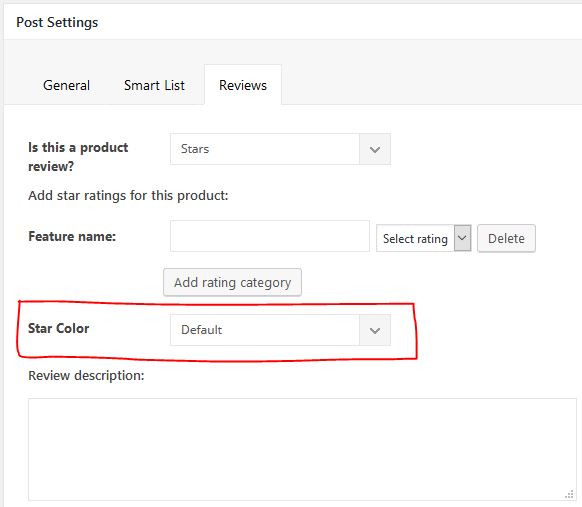
Unfortunately, the theme does not have any such an option that allows you to add a color for your Review section, at the moment, sorry! I have added to our list of improvements and we will consider in our future updates.
Thank you!
 solstrom
how can i add next/ preview button in post theme newspaper 9.5
 spurt
spurtI have imported many featured images from a previous non-tagDiv WordPress installation. The images have different dimensions from the dimensions used for the Newspaper theme.
My question is whether there is a setting or hack to make these photos fit in the thumbnail/preview sizes on the home page and on archive pages. Right now, they are being cropped to fit, which looks terrible.
 Seyfert
Hello Tagdiv Team,
i want to add Option (on Single Post) to change the color of Stars Review. Like this:
https://i.ibb.co/k97gPg5/single-post.jpg (https://ibb.co/61MRqRr)
My Steps:
1. Added html to
“/includes/wp_booster/wp-admin/content-metaboxes/td_set_post_settings.php”
on Line 341
— — —
<div class=”td-meta-box-row”>
<span class=”td-page-o-custom-label”>Stars Color</span>
<div class=”td-select-style-overwrite td-inline-block-wrap”>
<select id=”starsColor” class=”td-panel-dropdown”>
<option value=””>Default</option>
<option value=”green_stars”>Green</option>
<option value=”red_stars”>Red</option>
</select>
</div>
</div>
— — —
2. Added CSS
— — —
.green_stars .td-icon-star {
color: green !important;
}
.red_stars .td-icon-star {
color: red !important;
}
— — —
3. and now where can i add this class to change the stars color on Frontend?
The result, that i want:
https://i.ibb.co/68dvp7m/starscolor.jpg (https://ibb.co/sCB5Dd2)
Can u help me pls?
Regards
 vuolo89
I’m trying to import one of the Nomad headers from the Cloud Library. When it imports into the tagDiv Composer I only see what looks like an empty column instead of the header. Then when I try to look at the preview the header does not load properly and does not display like the preview in the Cloud Library. I’ve used the Cloud Library for other templates, such as Categories, successfully.
Does anyone know how to fix this?
 lkicknosway
I have a two column row with an inline single image in one column and text in the other. I can see the text and the image in TD composer but when I preview the page I can only see the text and get a broke image for the inline single image. Not sure why I can see the image within the TD composer and not on the page. I’m working in a staging environment here.
Cheers.
 TomChen25
I recently purchased the news9paper theme and try to install with another theme that I already use (the website is up and I want to customize the New9paper theme first). However, I receive this respond when i try to live preview the theme – Internal Server Error
The server encountered an internal error or misconfiguration and was unable to complete your request.
Please contact the server administrator, and inform them of the time the error occurred, and anything you might have done that may have caused the error.
More information about this error may be available in the server error log.
I contacted the server support and they said it might be one of the plugins. Can you tell me what is the problem and if there is any plugin that makes the theme not working?
Thanks
 rsm
rsmHi,
How come the mega menu is not showing. It just shows the down arrow but it doesn’t show the article previews. https://equinewellnessmagazine.com/ I think I have the settings right (screenshots:)
https://ibb.co/sR3Djjs and https://ibb.co/7r2ngdp
Please help. ty
 InPa
InPa Hi,
it finally works in preview but not on website!?
 mike-simone Simion C.
 Hi,
1. Actually WP Super cache is rated quite good in reviews – https://www.isitwp.com/best-wordpress-caching-plugins-compared/
– https://kinsta.com/blog/wordpress-caching-plugins/
While it may not be the best solution there is, it still is in the top caching plugins. AS far as I know this is the only caching plugin that works with the mobile theme properly. Maybe others do as well if configured in a right way, but I can’t say which one and what configuration unfortunately.
2. I tested a post from your website with both AMP validator and test
– http://prntscr.com/mxn9hl – http://prntscr.com/mxn9k5
– http://prntscr.com/mxnakd – http://prntscr.com/mxnanm
– http://prntscr.com/mxnc62 – http://prntscr.com/mxnc8b
AMP is valid in the posts from what I can see. That message in the console seems to say something about a script. Are you sure it is a script loaded by the theme? What exactly is this script if it’s possible to find out?
This https://prnt.sc/mx7lwd is related to AMP auto ads, how exactly are you implementing the ads? Should be like this – http://prntscr.com/mxnext
That tag meta name=”viewport” is loaded by the AMP plugin in the head, only once
– http://prntscr.com/mxngvh
Where exactly does it appear twice?
3. The menu icon appears and works just fine at the moment – http://prntscr.com/mxngvh
Let me know if I should check somewhere more specific.
4. I can’t say if this will be implemented at the moment, or if it is possible to do with the mobile theme. It is noted as a request and will be strongly considered.
6. This works in our tests and I haven’t seen similar topics about it. Maybe this is a specific situation where it does not work. If you want us to investigate provide admin login as well as cPanel if possible at contact@tagdiv.com.
7. Maybe it takes a while. I will add this for testing to check if it works as it should.
Thanks
 kesuma
after I put the totalpoll pro plugin, I activate it, then I make a simple poll, I preview, an error appears as shown below
https://www.screencast.com/t/lIDyeJnE7O
for more details, some screenshots that I took
https://www.screencast.com/t/NJMk9LAHJhv
https://www.screencast.com/t/4u3MFf7ojir
https://www.screencast.com/t/JRCA77LZ3pNx
https://www.screencast.com/t/WjTdXC2uHrgF
please…give me a solution for this error
 spu
spu Hi Calin,
This has already been done – Cache has been cleared too.
Please make sure that you activate the amp from mobile theme -> https://www.screencast.com/t/6m5bxthx8ec and you check the box from general Amp -> https://www.screencast.com/t/WEyXhNzY
Still we are getting constant amp problem errors. Please see the below and also from webmaster tools.
https://prnt.sc/mx78ku
https://prnt.sc/mx790e
An AMP component ‘script’ tag is present, but unused.
First detected: 3/11/19
Status: Error
http://prnt.sc/mx7gj3
Thanks Please help.
Followed your steps and this has been rectified. How to rectify rest of the issues.
There is content which fails AMP validation. However, your site is configured to automatically accept sanitization of the offending markup. You should review the issues to confirm whether or not sanitization should be accepted or rejected. Review issues
Invalid elements: script (20)
 Simion C.
 Hi,
So you want to reduce the space between the post content and the left side? maybe by using a cloud post template and stretching the row containing the post content element
– http://prntscr.com/mx6b0r
Here you can experiment with cloud post template to see what the possibilities are
– https://affiliate.tagdiv.com/#/load/Single
They can be previewed and even edited with the composer.
Not using cloud templates and modifying the post template with CSS it could be possible, maybe by removing the padding right and increasing the right
– http://prntscr.com/mx6diq
Or removing both padding left and right – http://prntscr.com/mx6dxr
This last one may cause problems because the post content width will increase because the padding is removed. Here is the code if you want to give it a try
.td-post-template-5 .td-pb-span8.td-main-content {

padding-right: 0;

padding-left: 0;

}
Thanks
Calin Hi,
Our developer team is working continue to make our theme better and to add new improves and fix the existential problems from our theme; the mobile theme with amp is one of them that are on the list to be improve and make it better.
@kuaza that plugins is not longer work on mobile because the new mobile theme with amp integrate try to make all the time the pages/post on AMP ( so you can navigate in amp posts ), the amp version is just a preview of post, you can not sent information in posts/page that’s way is not longer working, sorry!
@Confiqueror now the code that you set on amp need to be set in mobile amp ads -> https://www.screencast.com/t/Uug357Bi -> https://tagdiv.com/amp-newspaper-theme/
Thank you for your understanding
 Bidyut
 About 2 years ago i heard about W3TC, may be it’s free & having bunch of features included – so i went to try it & 🙁 too many individual features to handle with. Even some of my fav. top bloggers also suggested W3TC features should only be used when you’re completely aware of your customization, little mistake can create great trouble.
Last year after hearing about WP Rocket from most of the top bloggers reviews i gave it a try – too much user friendly functions to tweak website. Since it works fine with Newspaper & for it’s supports – never felt necessity to look around for another cache plugins.
Ya, my AMP issue is sorted out, just having some minor doubts to be cleared from devs, waiting for their reply there.