
- NewspapertagDiv Composer Tutorial
- NewspaperCredit System
- NewspaperCreate a frontend submission form
- NewspaperHow to Use the Tabbed Content shortcode
- NewspaperCreate a form contact page
- NewspaperFilters and sorting for taxonomies
- NewspaperUser review system
- NewspaperModal Popup
- NewspaperFlex Block Settings Guide
- NewspaperSocial Sharing
- NewspaperSingle Post Shortcodes
- NewspaperInfinite Loading for Single Posts
- NewspaperThe Newspaper Mobile Theme: Introduction
- NewspaperHow to Add a Logo in Newspaper
- NewspaperCustom Post Type Support
- NewspaperCloud Library Templates
- NewspaperDesign your Post Pages using the Cloud Library Templates
- NewspaperHeader Builder
- NewspapertagDiv Cloud Library Plugin
- NewspaperAd Box Element and Ads Overview
 Anamaria
 Hi,
There are multiple headers in our theme, for example, if you are using tagDiv Standard pack the file that you want to edit is this one -> wp-content/plugins/td-standard-pack/Newspaper/header.php if you do not use standard pack, only tagDiv Cloud Library with tagDiv Composer, then the file is this one -> wp-content/plugins/td-composer/legacy/Newspaper/header.php
Thank you!
 domingoz
How would you go about customizing the weather widget frontend on the top bar: ie, customizing the render_top_bar_template() inside the td-composer plugin?
 pepperandplatinum
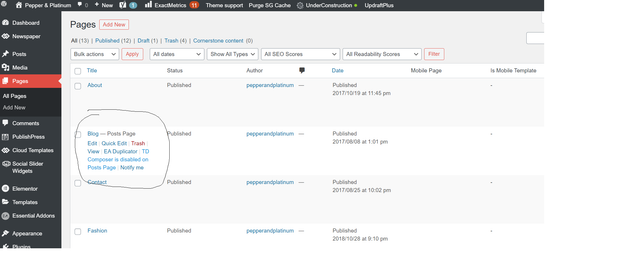
 I am resetting the theme entirely at this point, but cannot figure out why TD composer is not enabled on posts page.
How do I enable this so that I can edit my site?
 aaronaw90
Apologies if this has been brought up recently, but I’ve just gone to update 10.3.9.1 on WordPress and it says theme update failed – has anyone had this issue?
Full error thread below:
Unpacking the package…
Updating the theme…
Removing the old version of the theme…
The update cannot be installed because we will be unable to copy some files. This is usually due to inconsistent file permissions. tagdiv-deploy-mode.php, font-newspaper.css, woocommerce, woocommerce/single-product.php, woocommerce/archive-product.php, search.php, sidebar.php, comments.php, editor-style.css, style.css, archive.php, functions.php, translation, translation/ru_RU.po, translation/de_DE.po, translation/de_DE.mo, translation/hi_IN.po, translation/es_ES.po, translation/pt_PT.po, translation/ta_LK.po, translation/mr_IN.mo, translation/ja.po, translation/ta_LK.mo, translation/pl_PL.mo, translation/pl_PL.po, translation/ro_RO.mo, translation/ur_IN.po, translation/ja.mo, translation/el.po, translation/nl_NL.po, translation/th.po, translation/id_ID.mo, translation/th.mo, translation/fi.po, translation/id_ID.po, translation/ru_RU.mo, translation/fi.mo, translation/tr_TR.mo, translation/nl_NL.mo, translation/default.po, translation/es_ES.mo, translation/pt_PT.mo, translation/el.mo, translation/mr_IN.po, translation/ro_RO.po, translation/ur_IN.mo, translation/tr_TR.po, translation/default.mo, translation/hi_IN.mo, loop-single.php, style-buddypress.css, includes, includes/tagdiv-page-generator.php, includes/wp-booster, includes/wp-booster/tagdiv-options.php, includes/wp-booster/wp-admin, includes/wp-booster/wp-admin/tagdiv-view-support.php, includes/wp-booster/wp-admin/tagdiv-view-welcome.php, includes/wp-booster/wp-admin/css, includes/wp-booster/wp-admin/css/plugins.less, includes/wp-booster/wp-admin/css/welcome.less, includes/wp-booster/wp-admin/css/general.less, includes/wp-booster/wp-admin/css/wp-admin.less, includes/wp-booster/wp-admin/css/wp-admin.css, includes/wp-booster/wp-admin/plugins, includes/wp-booster/wp-admin/plugins/class-tagdiv-old-plugins-deactivation.php, includes/wp-booster/wp-admin/plugins/class-tagdiv-theme-plugins-setup.php, includes/wp-booster/wp-admin/plugins/class-tgm-plugin-activation.php, includes/wp-booster/wp-admin/js, includes/wp-booster/wp-admin/js/tagdiv-theme-plugins-setup.js, includes/wp-booster/wp-admin/tagdiv-view-theme-plugins.php, includes/wp-booster/wp-admin/images, includes/wp-booster/wp-admin/images/font, includes/wp-booster/wp-admin/images/font/tagDiv.svg, includes/wp-booster/wp-admin/images/font/tagDiv.eot, includes/wp-booster/wp-admin/images/font/tagDiv.ttf, includes/wp-booster/wp-admin/images/font/tagDiv.woff, includes/wp-booster/wp-admin/images/plugins, includes/wp-booster/wp-admin/images/plugins/plugins-installed-success.gif, includes/wp-booster/wp-admin/images/plugins/rev-slider.png, includes/wp-booster/wp-admin/images/plugins/cloud-templates.jpg, includes/wp-booster/wp-admin/images/plugins/tagdiv-newsletter.png, includes/wp-booster/wp-admin/images/plugins/visual-composer.png, includes/wp-booster/wp-admin/images/plugins/label.png, includes/wp-booster/wp-admin/images/plugins/standard-pack.jpg, includes/wp-booster/wp-admin/images/plugins/mobile.png, includes/wp-booster/wp-admin/images/plugins/td-composer.png, includes/wp-booster/wp-admin/images/plugins/success.jpg, includes/wp-booster/wp-admin/images/plugins/social.png, includes/wp-booster/wp-admin/images/plugins/invoice.png, includes/wp-booster/wp-admin/images/plugins/tagdiv-amp.png, includes/wp-booster/wp-admin/tagdiv-view-header.php, includes/wp-booster/tagdiv-util.php, includes/wp-booster/tagdiv-global.php, includes/wp-booster/tagdiv-admin-notices.php, includes/wp-booster/tagdiv-wp-booster-functions.php, includes/tagdiv-panel-docs.php, includes/js, includes/js/tagdiv-theme.min.js, includes/js/tagdiv-theme.js, includes/tagdiv-config.php, single.php, style-bbpress.css, loop.php, index.php, error_log, loop-archive.php, style-woocommerce.css, header.php, page.php, tag.php, footer.php, attachment.php, bbpress.php, 404.php, screenshot.png, searchform.php, author.php, images, images/admin-panel, images/admin-panel/logo-panel.png, images/editor-style, images/editor-style/grid-sidebar-desktop.gif, images/editor-style/grid-no-sidebar-desktop.gif, images/no-thumb, images/no-thumb/medium_large.png, images/icons, images/icons/newspaper.svg, images/icons/newspaper.woff, images/icons/newspaper.eot, images/icons/newspaper.ttf, gutenberg-editor.css, category.php
Theme update failed.
 Calin
Calin Hi,
The tdb_header_search.php if is on a different line you can delete tagDiv Cloud Library and tagDiv Composer and reinstall them from Newspaper > plugins and it should be on the same line as for me, if not, search for the code line and add the aria-label attribute like this -> https://www.screencast.com/t/iyvML1u00
The line code for twitter background color is this one -> https://i.imgur.com/3ncfflE.png from wp-content/plugins/td-social-counter/shortcode/td_block_social_counter.php
Normal it should work for Newsletter, if you made the implementation in the same way as for the rest of Accessibility issues.
There will be soon a theme update that hope will fix those accessibility issues.
Thank you!
 sanjeev
 Dear tagDiv Team,
Our Website is https://rashtrajyoti.in. The wordpress is of updated version 5.6 with a last theme version Newspaper 10.3.9.1. Recently we set up a woocommerce store on the same website with same newspaper theme. And we noticed that we had to install a plugin for every small thing that was required to set up this store and still it doesn’t function smoothly. Eg: I added a sidebar on rashtrajyoti.in/store(in draft right now) but after every small change in wp-admin or installation of a plugin the sidebar disappears from the store. We are facing more such issues.
Also tagDiv composer is not working properly. The new version of tdcomposer is not getting updated. We contacted you for the same issue before and we are yet to do implement the provided solution of manual updation.
I want to know if the theme is the problem in the store setup functionality or its the tdcomposer issue here?
Requesting you to kindly help me out on priority as the store is going to be LIVE asap. Can be available for Team Viewer Support too. Thanks.
Awaiting for your active and earliest response,
Neelam,
Theme User, Site Admin,
Team Sanjeev.
 Anonymous
 Hi, Bettina!
One doubt about minifying HTML, that was the culprit of the issue: when I minify it, it brakes the connection with tagdiv servers, but it does not brake my live website functionality.
Is it ok to minify the HTML on my live site and unminify it only when I need to use the TD Composer and TD Cloud Library?
 Bettina
 Hello!
You can find where the variable is generated in wp-content\plugins\td-composer\legacy\common\wp_booster\td_js_generator.php [line 45]. This variable is used in javascript code.
Unfortunately, all of our javascript get minified and you can not make sense of it in order to modify it.
Thank you for your understanding!
 drift1943
Hi,
I have some questions about the mobile page.
1.
Is this the right way to edit the mobile page with TD Composer?
(edit in No mobile page > Open TD composer > ignore “Create Mobile Page button”)
If not, what is the mobile view is used for?
https://www.screencast.com/t/7G9hTrzazoIu
https://www.screencast.com/t/yk6OE6a2i9f
2.
Is this the right way to edit the mobile page with TD Composer? (using the small pencil button)
There is no desktop view, if I want a totally different look from the desktop layout elements instead of RWD, should I edit here? Cause I saw the header is different.
https://www.screencast.com/t/DlaoWX5kg
https://www.screencast.com/t/6acjdTsVh
3.
Is this the right way to edit the mobile page with TD Composer?
(choose the mobile page and open TD composer > edit in mobile page)
https://www.screencast.com/t/QcbAvKt31w
https://www.screencast.com/t/7DCzcBes
https://www.screencast.com/t/MhN8RAtBG (look the same with using the small pencil button)
4.
Is this the right way to edit the mobile page with TD Composer?
(choose the mobile page and open TD composer > click any element > choose mobile view)
https://www.screencast.com/t/A54zkEGN3
Please kindly let me know which is the correct route to edit the mobile page.
And the following question is:
How to assign and remove the mobile page?
If I go to “setting > reading > A static page (select below) > Mobile page”
Then it will load the mobile version homepage even if I use a desktop. So I don’t think it’s the right way to assign.
I just tried many options randomly.
And somehow I found that the mobile page was assigned to my desktop homepage.
It became the black bar on the top when I view my site on mobile, instead of the desktop layout with the RWD version.
The field was blank yesterday. And I have no idea how I assign the mobile page to my desktop homepage.
https://www.screencast.com/t/LZFoTeVz5
So…How to assign and remove the mobile page from the desktop homepage?
I’m struggling with the mobile page…
Please kindly help.
Thanks.
 jmkmedia
Hi, I currently have the tagdiv mobile theme and AMP deactivated as I prefer just the mobile version. However, I just noticed that while it reflected my desktop version mostly, the header still shows the template’s version. I was able to edit the homepage header using TD composer’s manager->mobile menu. However, when I click on articles or any post, the header is showing the template’s (Lifestyle Pro) too. Is there a setting I might have missed that can help me edit this part on my desktop just like I was able to with the homepage’s header?
Anamaria Hello,
For contact form, we recommend using Contact Form 7.
I try to help you with some screenshots because is easier to understand.
After you install the plugin go back on your WP Dashboard click on Contact > Contact Forms and copy the code under Shortcode https://www.screencast.com/t/NngJWh1j after that click on pages or in posts -> hover the page you have for contact and select edit with td Composer ( https://www.screencast.com/t/sqDfb18UaqP ) or you can click on the page and after is open click the button TAGDIV Composer ( https://www.screencast.com/t/4iZR8xcZb5 ).
After TD Composer is open click on add element ( https://www.screencast.com/t/rHVSES71x ), click on the row and drag it at the bottom of your page (or where you like to be your contact https://www.screencast.com/t/pPYxfNGA) and drop the row there, then search for column text then drag it and drop him on the row ( https://www.screencast.com/t/YCmZGKn5Qwn ) click on it and then in the sidebar from the left click on edit Content ( https://www.screencast.com/t/75fZTYkFoy ) then paste the code there and click on save and view page ( https://www.screencast.com/t/iT5Ex0ytiu ).
See the results: https://www.screencast.com/t/fDx1SAu6
Here is some documentation: https://contactform7.com/getting-started-with-contact-form-7/
I hope this will help you.
Thank you.
 chucky20
SLOW… i did everything but i couldnt change gtmetrix points to up. i use your theme and mobil theme plugin. i use wp-rocket loader for css vs minifying.. and imagify for image optimization. i didnt understand what im doing wrong. GTMETRIX : 35 point for performance and saying largest paintiful paint 5-6 secs ! i delete featured image which size 1200×675. and added 696X392 (size of td-composer said on homepage big grid flex) nothing change…
note: when i activated amp plugin scores are more slower …. :(( could you help me please for this ?
Calin Hi,
According to our documentation the header-menu.php need to be set in child theme like this
wp-content/themes/Newsmag-child/parts/header/header-menu.php but there are also files that need t o be set in child theme, for example to make it easier, copy all files from wp-content/plugins/td-composer/legacy/Newsmag/parts/header in wp-content/themes/Newsmag-child/parts/header/ and edit the style that you want to use, also make sure that you have selected the child theme in WordPress -> https://i.imgur.com/GG50WUK.png
Hope this will help you!
 danielkostuj
 Keep your data there for you and you will see for yourself. I am still struggling with such a mistake Fatal error: Out of memory (allocated 35651584) (tried to allocate 40960 bytes) in /home/klient.dhosting.pl/lucjamagoch/czasostrefa.pl/public_html/wp-content/plugins/td-composer/legacy/common/wp_booster/td_util.php on line 2883
 khiemtt.vn
 Great! Thanks a lot Calin,
Had a quick explore, and now I know that I need to edit wp-content/plugins/td-composer/legacy/Newsmag/parts/header/header-menu.php , so, could you please tell me the way to use child theme solution to customize it?
I tried to install Newsmag-child theme, and place the edited version in wp-content/themes/Newsmag-child/parts/header/header-menu.php, but it didnt work
Thank you again, Calin
Calin Hi,
If you want to edit the theme files then you need to edit this file -> wp-content/plugins/td-composer/legacy/Newsmag/header.php
Also it will be indicate to set the file in child theme to do not lose it when you’ll update the theme.
Thank you!
 Dobrinets
Hello! I have a problem with editing in TD Composer. I can’t change background image in Image info box element. Media library not displayed due to error in JS. Please, see screenshots
https://new.orda-info.online/wp-content/uploads/2021/01/1.png
<br>
https://new.orda-info.online/wp-content/uploads/2021/01/2.png
 hard8hopping
I have a new and clean v10 site imported from newspaper pro demo. Looking in Appearances | Menu, I see the menu items use tdc font and icons in the Custom Link | Navigation Label, e.g.
<i class=”tdc-font-tdmp tdc-font-tdmp-chip”></i> Gaming
1. Is this where I add and make changes to menus or is there another location within the Theme panel or TDC Composer?
2. Where can I see all the available tdc icons I can add to the menu?
3. Searching the forum, I see a post showing how to add Font Awesome icons, but are there resources for showing how to use the tdc fonts and icons and to add new menu items?
chiyurealestate.com
Bettina Hello!
For cloud templates there are 2 files that you need to modify:
1. td-cloud-library/state/single/tdb_state_single.php [line 123] -> Here the information related to the featured image is processed.
2. td-cloud-library/shortcodes/single/tdb_single_featured_image.php -> This retrieves the processed information from above file and displays it.
For thumbnails on modules there is one file
td-composer/legacy/common/wp_booster/td_module [line 276].
Some modules use another file found in
td-cloud-library/includes/tdb_module.php [line 248].
Hope that helps you somehow!
Thank you!
 transcontinentaltimes
 Hi Ana,
We have already followed the steps and we have set the fonts from TAGDIV composer from Style section as well. Please check, as we have changed the font for our tdb-logo-text-title (Transcontinental Times).
Here is our test website: staging.transcontinentaltimes.com
When we inspect the element in browser, we can see the Chomsky New font but not on website
.tdi_32_6ff .tdb-logo-text-title {
display: block;
font-family: Chomsky New !important;
font-size: 50px !important;
font-weight: 500 !important;
text-transform: capitalize !important;
}
We have followed the guidelines, mentioned on : https://forum.tagdiv.com/font-customization
We have uploaded the .woff extension, through theme panel.
Changed the text font style and updated the website.
Not appearing the new change in fonts.
Could you help us to understand, what is required and what would be the issue?
sanjeev Hi,
Website is working fine at https://rashtrajyoti.in
Also, the wordpress is of updated version 5.6 with a last theme version Newspaper 10.3.9.1
But TD composer is not working properly. There’s an issue while editing.
so, I deleted the tagdiv composer plugin in wordpress and reinstalled it.
I also tried to update it but it still shows that my tagdiv composer is outdated. Here are the images
“https://photos.app.goo.gl/HUm3wPpRFVQhZZHb8”

-
This reply was modified 5 years by
sanjeev.
Anamaria Hi,
For this, you need to change the social counter style, from composer it can be done like this -> https://i.imgur.com/qOE6puJ.jpg or for the widget you need to add an extra class
-> https://i.imgur.com/MSPJ2v6.png
Style 1: td-social-style1
Style 2: td-social-font-icons td-social-style2
Style 3: td-social-colored td-social-style3
Style 4: td-social-colored td-social-style4
Style 5: td-social-boxed td-social-colored td-social-style5
Style 6: td-social-boxed td-social-colored td-social-style6
Style 7: td-social-boxed td-social-style7
Style 8: td-social-boxed td-social-font-icons td-social-style8
Style 9: td-social-boxed td-social-colored td-social-style9
Style 10: td-social-boxed td-social-colored td-social-style10
Hope this will helps you!
Thank you!
sanjeev Hi,
Website is working fine at https://rashtrajyoti.in
But TD composer is not working properly. About 9 out of 10 times there’s an issue while editing.
Need to refresh page mutliple times while editing, and still it doesn’t respond to changes made/ or in many cases it doesn’t reveal the feature of TD composer previously available.
Some screenshots while recent attempts at editing header template for the site https://photos.app.goo.gl/RKuUnxQ5D571VyLG9
Thanks
Geet
Theme User, Site Admin,
Team S Sanjeev
 tkanel
I’m tryimg to make changes with TagDiv composer,infinitely saves and I see 404 POST error messages in console like the following:
load-scripts.php?c=0&load[chunk_0]=jquery-core,jquery-migrate,utils&ver=5.6:2
POST https://atticanews.gr/wp-json/td-composer/update_footer_template?uuid=535a06ad-d31e-1873-cc41-877d190b4786
404
send @ load-scripts.php?c=0&load[chunk_0]=jquery-core,jquery-migrate,utils&ver=5.6:2
ajax @ load-scripts.php?c=0&load[chunk_0]=jquery-core,jquery-migrate,utils&ver=5.6:2
s.ajax.s.ajax @ load-scripts.php?c=0&load[chunk_0]=jquery-core,jquery-migrate,utils&ver=5.6:5
updateFooterTemplate @ js_files_for_wrapper.min.js?ver=c784b8db3e66cd68082f3ff7aa2d70e6:57
savePostHandler @ js_files_for_wrapper.min.js?ver=c784b8db3e66cd68082f3ff7aa2d70e6:68
dispatch @ load-scripts.php?c=0&load[chunk_0]=jquery-core,jquery-migrate,utils&ver=5.6:2
v.handle @ load-scripts.php?c=0&load[chunk_0]=jquery-core,jquery-migrate,utils&ver=5.6:2
load-scripts.php?c=0&load[chunk_0]=jquery-core,jquery-migrate,utils&ver=5.6:2
POST https://atticanews.gr/wp-json/td-composer/update_header_template?uuid=64fea725-e636-a328-c403-fbcb2f1ae1b6 404
send @ load-scripts.php?c=0&load[chunk_0]=jquery-core,jquery-migrate,utils&ver=5.6:2
ajax @ load-scripts.php?c=0&load[chunk_0]=jquery-core,jquery-migrate,utils&ver=5.6:2
s.ajax.s.ajax @ load-scripts.php?c=0&load[chunk_0]=jquery-core,jquery-migrate,utils&ver=5.6:5
updateHeaderTemplate @ js_files_for_wrapper.min.js?ver=c784b8db3e66cd68082f3ff7aa2d70e6:47
savePostHandler @ js_files_for_wrapper.min.js?ver=c784b8db3e66cd68082f3ff7aa2d70e6:68
dispatch @ load-scripts.php?c=0&load[chunk_0]=jquery-core,jquery-migrate,utils&ver=5.6:2
v.handle @ load-scripts.php?c=0&load[chunk_0]=jquery-core,jquery-migrate,utils&ver=5.6:2
load-scripts.php?c=0&load[chunk_0]=jquery-core,jquery-migrate,utils&ver=5.6:2
POST https://atticanews.gr/wp-json/td-composer/save_post?uuid=c18c0a7c-3da7-f974-1099-594bc93e9c3c 404
send @ load-scripts.php?c=0&load[chunk_0]=jquery-core,jquery-migrate,utils&ver=5.6:2
ajax @ load-scripts.php?c=0&load[chunk_0]=jquery-core,jquery-migrate,utils&ver=5.6:2
s.ajax.s.ajax @ load-scripts.php?c=0&load[chunk_0]=jquery-core,jquery-migrate,utils&ver=5.6:5
savePost @ js_files_for_wrapper.min.js?ver=c784b8db3e66cd68082f3ff7aa2d70e6:43
savePostHandler @ js_files_for_wrapper.min.js?ver=c784b8db3e66cd68082f3ff7aa2d70e6:69
dispatch @ load-scripts.php?c=0&load[chunk_0]=jquery-core,jquery-migrate,utils&ver=5.6:2
v.handle @ load-scripts.php?c=0&load[chunk_0]=jquery-core,jquery-migrate,utils&ver=5.6:2
Any idea why?
Thanks in advance
 LPresse
Hello,
I have a problem with the tagDiv Mobile Theme.
Everything was working fine until tonight.
Now, the site doesn’t display correctly on mobile anymore (fonts, menus, articles, footer, header…)
Screenshot of the site : https://paste.pics/e8047f0f6e401e4f2401be2095986621
We got an error message on the server today:
[Tue Jan 26 17:37:27.604461 2021] [autoindex:error] [pid 27569] [client 13.66.139.5:0] AH01276: Cannot serve directory /home/wkzt3269/lequotidiendusport.fr/wp-content/plugins/td-composer/legacy/common/: No matching DirectoryIndex (index.php,index.php5,index.php4,index.php3,index.perl,index.pl,index.plx,index.ppl,index.cgi,index.jsp,index.js,index.jp,index.phtml,index.shtml,index.xhtml,index.html,index.htm,index.wml,Default.html,Default.htm,default.html,default.htm,home.html,home.htm) found, and server-generated directory index forbidden by Options directive.
Thanks for your help!



