- NewspaperHow to update a plugin
- NewspaperHow to update the WPBakery Page Builder plugin
- NewspaperHow to Update the Newspaper Theme
- NewspaperSingle Post Excerpt
- NewspaperWP Rocket and Newspaper Theme: Optimization Guide
- NewspaperCredit System
- NewspaperHow to use the Bing Maps API
- NewspaperModules Builder in Newspaper Theme
- NewspaperCreate a frontend submission form
- NewspaperCustom Fields Support
- NewspaperFlex Block Settings Guide
- NewspapertagDiv Opt-In Builder
- NewspaperHow to use the YouTube API
- NewspaperDefault Category Settings
- NewspapertagDiv Composer Tutorial
- NewspaperHow to Set the Image Avatar
- NewspaperUnique Articles
- NewspaperFacebook Share
- NewspaperCache plugin – install and configure
- NewspaperFeatured Image, Video or Audio
 Bettina
 Hello @dfrosso!
If you choose this template: https://prnt.sc/IAjeqc-K9Csp, update the post and view the changes. Check to see if the green button has appeared as well.
Thank you!
 archnews
 Is there any update on this? I’ve removed all plugins except yours as a test to ensure its not a compatibility issue and still having a problem. Google reported that they believe your mobile theme and the AMP plugin have conflicts somewhere, but obviously arn’t going to launch an investigation as its not their product (its yours)
Bettina Hello!
I’m sorry to hear about that. The latest update was for security and safety only and did not include major changes.
Thank you!
 Anamaria
 Hello,
If you have a child theme, please use the main theme to do the update.
I recommend that you update the theme manually https://forum.tagdiv.com/how-to-update-the-theme-2/ via FTP/cPanel/File Manager, also if possible disable extra plugins during the theme update to avoid any problems that may arise and make sure that you have activated the tagDiv Standard pack plugin to keep the website’s look. You can try to update the theme on a staging website.
After you update the theme, you need to update the theme plugins too.
In the worst cases, the settings in the theme panel may be lost (there have been isolated cases), in these cases, after the theme plugins that were previously used are activated, you will have to use a backup for the theme panel -> https://forum.tagdiv.com/import-export-theme-settings/
Thank you!
 patrikaidotcom
Hi
We have been using your theme for last 1 year and have been quiet happy.
But there has been a major problem off late.
For the last 3-4 updates, every update ends up hogging up MySQL database, with load reaching up to 300-400%
Switching to different theme solves the issue.
Everything was working fine, till i updated to latest update few days back. Then last 2 days issue cropped up. Had to change the theme to some basic one for one.
 Chris Baird
 I am looking at doing something like this with columns – – as the widgets doesn’t seem to provide the same functionality . . .
It would be nice if the saved elements – – once updated – – were updated anywhere they were – – don’t always remember where they are placed – and it makes sense that they would update universally . . . .
Any possibility for that within the cloud template system . .. for columns?
 DILUVIO
Hello community!
I have version 8.8.1 of the Newspaper theme installed and wanted to update it to the latest version. I followed the instructions and did it via FTP https://forum.tagdiv.com/how-to-update-the-theme-2/
Also try following this tutorial: https://www.youtube.com/watch?v=r0hNjfCve1E
I also tried to disable the theme. Leave another as the main one and then reactivate the NewsPaper theme.
The theme update went fine with no errors, but after the update the site was broken. The menu and footer were no longer visible. All styles had been removed even though I exported the theme preferences. The entire site had lost its settings, styles and seemed full of broken code. All plugins were up and running.
I had to restore a backup to be able to go back to the previous version and the site continued to work, but I need to update the theme. WordPress currently runs on version 6.1.1
Could anyone tell me how to update the theme without losing the original site’s styles, menu and footer? https://www.edicionrural.com/
Thanks in advance for your help!
Natalia
Bettina Hello @aadityabhatta!
No. Most likely, some plugins were also not updated. Please try to export the theme and see if the problem goes away. When you do an update next time, please make sure you do not use extra plugins that are not tested with our theme, and after that, make sure that your tagdiv plugins are activated.
Thank you!
 aadityabhatta
 Do i have to export theme settings each time I update the theme ?
Anamaria Hello,
Thank you for this information
Some viruses have appeared that infect WordPress themes and files, and this problem is not only with our theme.
We assign developers to each case, and they prepare an update in which the theme will be better secured, but the wp files must also be secured.
Thank you!
aadityabhattaHi there,
I updated my theme this morning and all the theme settings were gone.
Then I asked my host to restore a backup of 1 day before and now still the theme option are not showing on all the pages. Can I please get support from Newspaper theme team on this. I need quick fix on this issue.
 RTW
RTWHello,
I don’t know if this is a known bug but I have lost most of the functionality of tagdiv composer. I can no longer drag and drop elements and I cannot select elements that are already there.
There are no error codes and I have deleted, reinstalled and updated the plugin. Is there anything else I can try?
Thanks
 iniatisg
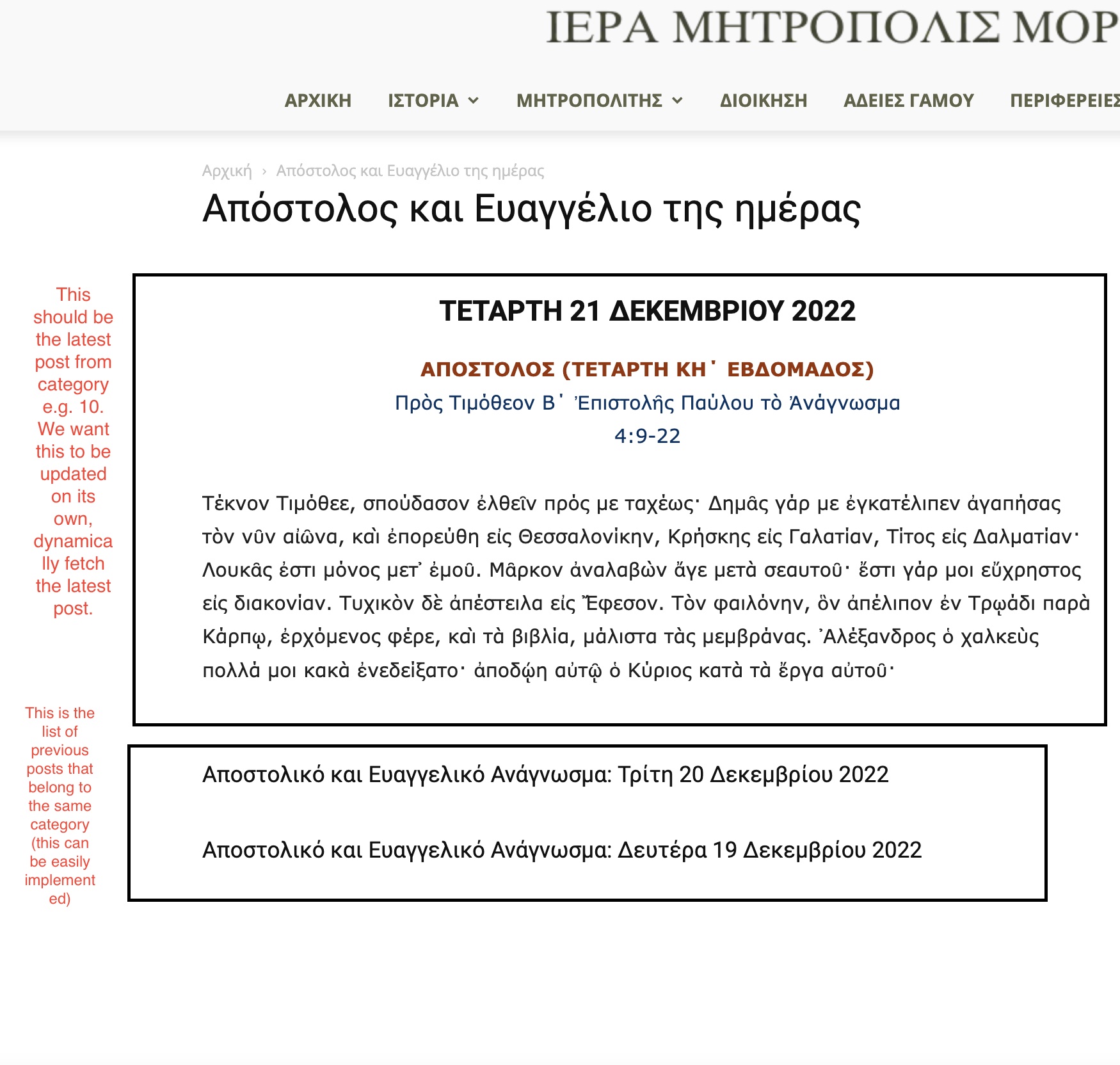
 Hello Bettina and thanks for the quick response. You can find the screenshot in the following link:
https://immorfou.org.cy/wp-content/uploads/2022/12/Screenshot-2022-12-21-at-9.07.11-AM.jpg
As you can see there are two boxes. The second box is easily implemented using flex block 1. The first box is what we want to achieve. I can easily do that using the “Text with title” element. But we want its content to be updated on its own each time a new post is added to that category. The content should be the category last post’s content.
Thanks.
 Calin
Calin Hi,
Yes, the problem may be caused by that plugin, there were users who reported similar situations with different plugins, but since they were vital for them and they wanted to use them, we went with the version with the manual update to the theme.
Tell us the results after an update to the theme.
Thank you!
iniatisgHi,
I would like to implement the following page:
1) Display the latest post CONTENT of a certain category (e.g. category id 10) first.
2) Below display the list of posts that belong to that same category (e.g. category id 10).
The second part is easy and tagdiv composer provides many ways to achieve it. But what about the 1st part? I didn’t find any way using the tagdiv composer to do that. We want to display the latest category post content dynamically. This is because we program post to display at 12 o clock midnight, so the page can be updated on its own at that time to display the new post first (i mean the content of the post) and below the rest category posts (list of titles and meta info).
Can you help how to achieve that?
Thanks in advance
 Jane Boursaw
 Thank you so much, Calin. I think maybe it’s my “WPMU DEV Dashboard” plugin that’s auto-updating both my plugins and NewsMag themes. I’ve disabled the auto updates on that plugin and will see if that fixes the problem.
If that IS the problem, I’m guessing that will also fix my NewsMag Theme update issues with the customizations, because I never had any issues with manually updating the theme and then just updating the TagDiv plugins. Everything was fine when I did it that way.
Thanks again.
 maghrebpost
 Thanks!
I’ve used the Flex Block Module 1 (File: tds_module_loop_1.php) and updated the module according to the theme api. Worked like a charm.
 NewburghNews
 Hello,
I’m not using the fixed count. I currently have the counter pointing to my Facebook ID. I tried reinstalling and deleting my browser cache, but the problem still persists.
The counter is showing the updates as new fans like my Facebook page. The counter is indeed updating. The problem is, the counter is pulling the total of Facebook “page likes”, as opposed to pulling the Facebook “followers”.
In the past, the social media counter pulled the “followers” count. For some reason now, it’s pulling the “page likes” data — instead of the “followers” data.
 fleeksoft
I have updated the domain from https://animefleek.com to https://www.animefleek.com. But there still using the old domain and I’m getting CORS issue for resources like fonts please check console for this link
https://www.animefleek.com/category/manga
How I can fix that for the newspaper theme.
 perspektive
Hey, when trying to change a mobile-page it gives me the following error.
Of course all plugins are updated and installed.
Thanks!
Bettina Hello!
You don’t need to buy an amp. You can use Mobile theme + AMP. You can not mix the mobile version.
We have 3 options for mobile versions that you can use:
1. Responsive version: A responsive version of your website looks similar to the desktop version. TagDiv Composer is used to edit the page.Click on the mobile viewport: https://www.screencast.com/t/XDQJedlggSB. There, you can see your mobile version and edit or adjust the elements to look better.
2. Mobile pages: https://tagdiv.com/newspaper-10-3-7-update-brings-customizable-and-fast-mobile-pages
3. Mobile theme plugin: The Mobile Theme is a performance-optimized theme included in the main Newspaper theme that only loads on mobile devices. It comes with its own templates and designs for pages, posts, categories, etc., so your current templates from the desktop theme will get converted to the mobile theme layout. Please see https://forum.tagdiv.com/the-mobile-theme/ and https://forum.tagdiv.com/mobile-theme-introduction/ for more information.
A full explanation is here: https://www.youtube.com/watch?v=SpGkOnJeNZY
If you need to use the mobile version 1 or 2, then you need to disable the Mobile Theme plugin.
Thank you!
 WordDom
 I don’t have screenshot or video to post because i’m searching for a solution i can’t use for the moment.
Question is simple : how to use newspaper mobile theme with “amp for wp” plugin ?
Only the paid version of this plugin brings YOUR theme available Please see by yourself : https://ampforwp.com/themes/).
But with the free version, it’s possible to create custom templates.
So… what do we need to update in mobile theme code in order to be recognized by “amp for wp” as a template ?
I tried to put the mobile theme folder in /wp-content/plugins/accelerated-mobile-pages/templates/design-manager but it’s note recognized
 Andy White
 Thanks. I’ve made a lot of progress! I tried ‘Big Grid’ but couldn’t get the same ‘look and feel’ as the Flex Bock (see below*), so I simply filtered by Post ID and can control ‘which ones go where’. Brilliant 🙂
Few related questions:
– On the home page, How do I remove the ‘Categories’ from showing on the 4 smaller icons? (they still show on the photo above the Post title)?
– Can up update any previous posts in the forum (i.e. forum.tagdiv.com) to move the domain to make any questions more anonymous?
Thanks a lot. Great help
*I tried the ‘Big Grid’ but couldn’t get the following:
– get the ‘2+4’ layout – i.e. one big photo and 3 smaller ones
– get the ‘mouse over zoom’ effect on the photos
– get the Title to show over the top of the photo. It showed below it and looked rather old fashioned.
– get the ‘black fade’ across the photo so you can read the post title and other info (date etc.)
-
This reply was modified 3 years by
Andy White.
Calin Hi,
Normally the theme will not automatically update. Even the theme panel option requires the admin to click to do it. Most possibly it is from a code set in the confi.php for auto-update or some plugin for this.
If the theme panel settings are rapped out after the theme update what you can do is use a theme panel backup – https://i.imgur.com/EH3caj7.png
Also, an option to update the theme without losing any configurations is manually updating the theme, for this, you’ll need file manager, FTP, or cPanel access, delete the old theme, and set the new one, after that from the WP dashboard> Newsmag > welcome just update the theme plugins.
I hope this will help you!
 ddj
ddjAfter one of the recent Newspaper updates, the font in several locations in not showing up as I’ve specified in TagDiv composer. I’ve checked each of the problematic areas in TagDiv and the fonts are set as Oswald. In the TagDiv editor, they appear as Oswald. But on the live site, the fonts seem to be the default font. Oddly, when I inspect font on the live site, the Inspector says it should be Oswald.
Here are a few pages that show this error.
https://www.meriwethersociety.org/membership/ — the top navigation and sub-navigation items are supposed to be Oswald. The two sentences under Membership are supposed to be Oswald.
https://www.meriwethersociety.org/ — The text on the 4 buttons of Membership, Reunions, Resources, Store is supposed to be Oswald.
Footer of any page — Virtually all the text in the footer (except for the text in blue & italic) is supposed to be Oswald.
In my Theme Panel settings, the option to load Google fonts is On. Also in Theme Panel > Theme Fonts > Font Settings, all the settings are set as Default Font.
I have cleared cache multiple times.