- NewspapertagDiv AMP Plugin Tutorial
- ApiPractical example – How to add a new Block and Module
- NewspaperTrack Subscription Sources with Locker URL in Opt-In Builder
- NewspaperWP Rocket and Newspaper Theme: Optimization Guide
- NewspaperCredit System
- NewspaperIntroduction to CPT and ACF with Newspaper Theme
- NewspaperHow to edit modules for Flex Block X
- NewspaperHow to use the Posts List shortcode
- NewspaperUser review system
- NewspaperCustom Fields Support
- NewspaperHow to generate Facebook App ID
- NewspaperHow to insert a block inside the content of a post
- NewspaperModal Popup
- NewspaperPayPal Setup
- NewspaperLink Tracker
- NewspaperLockers
- NewspaperGeneral Options that May Interfere with the Newspaper Theme
- NewspaperAdd Cryptocurrency Price Ticker Widget
- NewspaperPosts Loop Element
- NewspaperThe Newspaper Mobile Theme: Introduction
 Simion C.
 Hi,
First of all, please check your theme system status to be set properly. If is not, please try to increase it using our guide in this case, because this can be the source of this issue
– https://forum.tagdiv.com/system-status-parameters-guide/
Also, please do not use symbols (!@#$%^&*) for the title of the widgets because it seems that affects the functionality of the sidebar. For more information about the sidebars, please consult our documentation here
– https://forum.tagdiv.com/sidebars-tutorial/
Thanks
 Catalin
 Hello by1411,
Please try to check your Google Plus configuration because maybe your Followers are hidden and that’s why you do not bring any result. Also, you can check with the following id -> +CeoPl and you will see the followers at the counter, for example.
Thanks for your understanding!
Simion C. Hi,
Header styles 9,10 and 11 have no limit for the logo – https://forum.tagdiv.com/logo-favicon/
You can set a image as big as you want for your website. Just make sure to upload it in full size
– https://www.screencast.com/t/b7szSV6lmYPK
An example of a big logo using Header style 10 can be seen in this demo
– https://demo.tagdiv.com/newspaper_cars/
Thanks
 Josan
JosanI have few request If you can add new feeature like:
– Infinite load on Single post? So when user scroll to bottom of post, previous post automatically load. Here is an example
– Prefetch Posts.
– Increase theme Width: A lots of websites are using this theme now, so there are many websites with a similar design. If you add an option to manually increase theme width and select between Full width or boxed it will completely change the design. Voice theme by Meks has an option to manually adjust theme width.
Thanks
 simchris
 Yes, unless you use the normal OEMBED method for Soundcloud you can use the Soundcloud embed code found on their website.
You might find the actual official WordPress docs “codex” helpful in learning to use WP:
https://codex.wordpress.org/Embeds
————–
Usage
To embed a video or another object into a post or page, place its URL into the content area. Make sure the URL is on its own line and not hyperlinked (clickable when viewing the post).
For example:
Check out this cool video:
http://www.youtube.com/watch?v=dQw4w9WgXcQ
That was a cool video.`
WordPress will automatically turn the URL into a YouTube embed and provide a live preview in the visual editor.
Another option is to wrap the URL in the [embed] Shortcode.

[embed width="123" height="456"]http://www.youtube.com/watch?v=dQw4w9WgXcQ[/embed]
If WordPress fails to embed the URL, the post will contain a hyperlink to the URL. simchris
 Normally you’d develop a copy of your site with new theme in a sub-domain or alt dev setup like MAMP on your hard drive and import database from server (lots of articles on web for this).
Install theme via FTP if your hosting setup has funky permissions.
Some people “switch” to new site layout by setting aside a weekend and doing changes when things are less likely to freak people out. Note all your posts won’t break choosing new theme, indexes work, etc.; so often you can switch on new theme, then work on your homepage first, then sort out the rest.
I think there is also a theme switch plugin where you can work on new layout, test, then switch back to old theme. Have not tried that.
 SevenUp
Hi
I am using a newspaper 7 demo installation. I want to change the category names. for example the category “sport” seems to be on the slider on the front page. I want to change the category name “sport” but keep the news articles that were published to that category. So for example I have a news article about Turkey’s referendum that was published under the sport category. I want that article to automatically show in the new name that I choose for the category rather than “sport”.
Is this possible? and what is the best way to do all this.
Thanks
 fenomeno0chris
 1) CHECK
2) CHECK
3) Too bad you can’t help me with that. It is just one line to edit -.-
4) CHECK
5) Since my team has written a lot of news before I changed the theme, can I somehow edit the default Quote-Style to “Quote box left”?
6,7,8) I have edit my functions.php file with the code from your pagespeed tutorial. Those are the css and js files, which appeared on the top of the page:
registered scripts

common | /wp-admin/js/common.min.js

farbtastic | /wp-admin/js/farbtastic.js

admin-bar | /wp-includes/js/admin-bar.min.js

jquery-ui-sortable | /wp-includes/js/jquery/ui/sortable.min.js

utils | /wp-includes/js/utils.min.js

svg-painter | /wp-admin/js/svg-painter.js

wp-auth-check | /wp-includes/js/wp-auth-check.min.js

td_social_counter | http://www.ps4source.de/wp-content/plugins/td-social-counter/js/td_social_counter.js

yoast-seo-admin-global-script | http://www.ps4source.de/wp-content/plugins/wordpress-seo/js/dist/wp-seo-admin-global-460.min.js

media-editor | /wp-includes/js/media-editor.min.js

media-audiovideo | /wp-includes/js/media-audiovideo.min.js

mce-view | /wp-includes/js/mce-view.min.js

image-edit | /wp-admin/js/image-edit.min.js

td_wp_admin | http://www.ps4source.de/wp-content/themes/Newspaper/includes/wp_booster/wp-admin/js/td_wp_admin.js

td_wp_admin_color_picker | http://www.ps4source.de/wp-content/themes/Newspaper/includes/wp_booster/wp-admin/js/td_wp_admin_color_picker.js

td_wp_admin_panel | http://www.ps4source.de/wp-content/themes/Newspaper/includes/wp_booster/wp-admin/js/td_wp_admin_panel.js

td_edit_page | http://www.ps4source.de/wp-content/themes/Newspaper/includes/wp_booster/wp-admin/js/td_edit_page.js

td_page_options | http://www.ps4source.de/wp-content/themes/Newspaper/includes/wp_booster/wp-admin/js/td_page_options.js

td_tooltip | http://www.ps4source.de/wp-content/themes/Newspaper/includes/wp_booster/wp-admin/js/tooltip.js

td_confirm | http://www.ps4source.de/wp-content/themes/Newspaper/includes/wp_booster/wp-admin/js/tdConfirm.js

thickbox | /wp-includes/js/thickbox/thickbox.js

gadwp-backend-ui | http://www.ps4source.de/wp-content/plugins/google-analytics-dashboard-for-wp/admin/js/ui.js
registered styles
farbtastic | /wp-admin/css/farbtastic.min.css
admin-bar | /wp-includes/css/admin-bar.min.css
zilla-popup | http://www.ps4source.de/wp-content/plugins/zilla-shortcodes-2.0/assets/css/admin.css
colors | 1
ie | /wp-admin/css/ie.min.css
wp-auth-check | /wp-includes/css/wp-auth-check.min.css
seedprod_plugin | http://www.ps4source.de/wp-content/plugins/ultimate-maintenance-mode/inc/css/admin-style.css
wysija-admin-css-widget | http://www.ps4source.de/wp-content/plugins/wysija-newsletters/css/admin-widget.css
yoast-seo-adminbar | http://www.ps4source.de/wp-content/plugins/wordpress-seo/css/adminbar-460.min.css
yoast-seo-admin-global | http://www.ps4source.de/wp-content/plugins/wordpress-seo/css/admin-global-460.min.css
yoast-seo-dismissible | http://www.ps4source.de/wp-content/plugins/wordpress-seo/css/wpseo-dismissible-460.min.css
google-font-ubuntu | http://fonts.googleapis.com/css?family=Ubuntu:300,400,500,700,300italic,400italic,500italic,700italic&subset=latin,cyrillic-ext,greek-ext,greek,latin-ext,cyrillic
td-wp-admin-td-panel-2 | http://www.ps4source.de/wp-content/themes/Newspaper/includes/wp_booster/wp-admin/css/wp-admin.css
wp-color-picker | /wp-admin/css/color-picker.min.css
media-views | /wp-includes/css/media-views.min.css
imgareaselect | /wp-includes/js/imgareaselect/imgareaselect.css
thickbox | /wp-includes/js/thickbox/thickbox.css
gadwp | http://www.ps4source.de/wp-content/plugins/google-analytics-dashboard-for-wp/admin/css/gadwp.css
woocommerce_admin_menu_styles | http://www.ps4source.de/wp-content/plugins/woocommerce/assets/css/menu.css
I tried every single jss and css ID in the td-speed-booster.php file, but none of them could fix the missing errors which google pagespeed displays. So how can I put those 9 JS and 5 CSS to the footer?
JSS Error:
http://ajax.googleapis.com/ajax/libs/jquery/1.11.1/jquery.min.js?ver=1.11.1

http://www.ps4source.de/wp-includes/js/jquery/ui/core.min.js?ver=1.11.4

http://www.ps4source.de/wp-includes/js/jquery/ui/widget.min.js?ver=1.11.4

http://www.ps4source.de/wp-includes/js/jquery/ui/accordion.min.js?ver=1.11.4

http://www.ps4source.de/wp-includes/js/jquery/ui/tabs.min.js?ver=1.11.4

http://www.ps4source.de/wp-content/plugins/zilla-shortcodes-2.0/assets/js/zilla-shortcodes-lib.js?ver=4.7.3

http://www.ps4source.de/wp-content/plugins/background-manager/resources/js/functions.js?ver=1.2.5.2

http://www.ps4source.de/wp-content/plugins/background-manager/resources/js/flux.js?ver=1.2.5.2

http://www.ps4source.de/wp-content/plugins/background-manager/resources/js/pub.js?ver=1.2.5.2
CSS Error:
http://www.ps4source.de/wp-content/plugins/wysija-newsletters/css/validationEngine.jquery.css?ver=2.7.8

http://www.ps4source.de/wp-content/plugins/zilla-shortcodes-2.0/assets/css/shortcodes.css?ver=4.7.3

http://www.ps4source.de/wp-content/tablepress-combined.min.css?ver=6

http://www.ps4source.de/wp-content/plugins/wp-jquery-lightbox/styles/lightbox.min.css?ver=1.4.6

http://www.ps4source.de/wp-content/plugins/background-manager/resources/css/pub.css?ver=1.2.5.2
9) Im patiently waiting for the fix!
10) CHECK
11) I have changed my PHP version to 7.0. Everything seems to work faster.
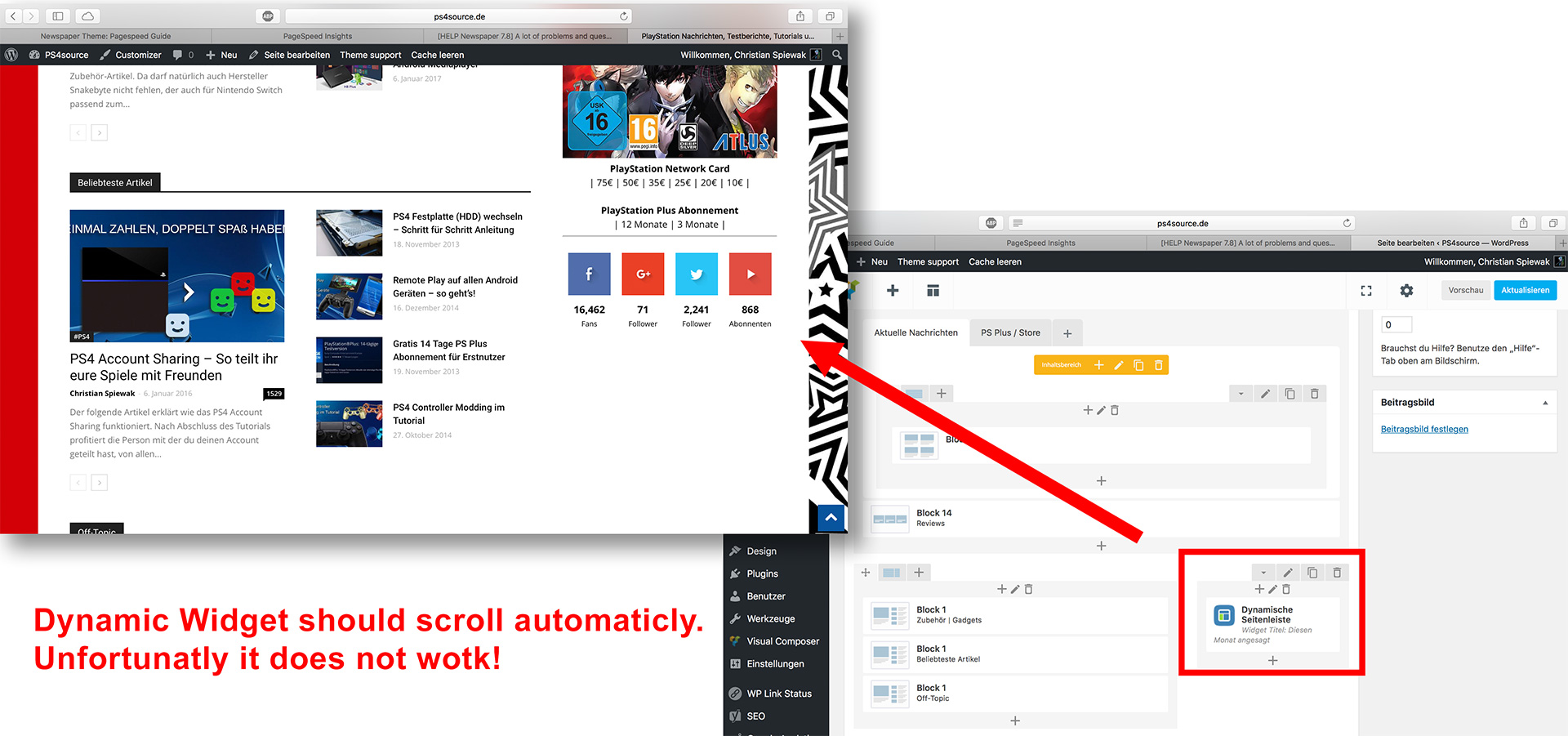
12) As you can see my dynamic widget on the homepage does not work:
 Sebastian Escobar
Hello
I want to create an entry where I can show access to the subcategories of a category, that is, can show the titles and a image of subcategories.
The way Visual Composer have to work on blocks is to call the categories for to download all their posts, but not show an access to that category.
I have, for example, the top category “Areas” and several subcategories among which are “Astronomy”, “Biology”, Social Sciences “, etc.
When I click on” Areas” I want to go to a page where I can access to “Astronomy”,”Biology”,”Social Sciences”, etc., and NOT to all post of “Astronomy”, “Biology”, “Social Sciences”, etc.
I could do a independent access trough image (I think) but the behavior in mobil is not good.
This is because in my main menu I have two drop-down items, and one of them shows subcategories, but these are not visible in the mobil.
I have activated “Mobile theme” and I do not see the possibility of accessing to these subcategories from the cell phone.
I think creating a post with access to the subcategories would be solved.
 Sergey Batalenkov
Good afternoon. I created additional widgets, added to them any element, for example “Arbitrary text or HTML-code”. But after rebooting the page, it disappears in the admin panel. It is displayed on the site! I can not edit it, because it’s invisible.
 poppeto
Hi,
How can i show top menu and my main menu on my mobile theme please? there is no option on mobile settings only for main menu and i use my top menu as a shop/cart menu….
Thanks
 sasquatters
 Sorry about that. I got it working. For those also wanting to do this, use this code and replace the link as needed.
<iframe width=”100%” height=”166″ scrolling=”no” frameborder=”no” src=”https://w.soundcloud.com/player/?url=https://api.soundcloud.com/tracks/318011283&color=8800ff&auto_play=false&hide_related=false&show_artwork=true&show_comments=true&show_user=true&show_reposts=true”></iframe>
sasquattersHello,
I am trying to embed a SoundCloud into my page and it is not working. When I post the short code, the html is visible on the page.
Here is the shortcode made for WordPress
[soundcloud url=”https://api.soundcloud.com/tracks/318011283″ params=”color=8800ff&auto_play=false&hide_related=false&show_comments=true&show_user=true&show_reposts=false” width=”100%” height=”166″ iframe=”true” /]
 ahavahel
 I encounter the same problem with the thumb-images in the video player.
Your player, for example, embed the following image: http://img.youtube.com/vi/WXWf8VYutm8/default.jpg
But https://img.youtube.com/vi/WXWf8VYutm8/default.jpg also works.

Mabey you can fix this, so the pages with this video player don’t give a security alert.
Thanks.
-
This reply was modified 9 years by
ahavahel.
 Marcus_S
Hello,
I can not select an existing sidebar in the Theme panel in the Categories menu, for example.
What can be the cause. I use the Dynamic Widgets plugin
 trakmaster
Hi, I was wondering how to order the featured post in the Big Grid 3 settings? For example I may want to move a certain article to the first big box.
 nairolf
 Sorry,
It is in the “All file & documentation” and not in the “Installable WordPress file only”
nairolfThe “td-speed-booster” plugin is missing in the 7.8.1 version downloaded from Themeforest (14/04/2017).
The folder /inclues/plugins contain only VC & social counter
 isd
isdTheme panel > Theme Fonts has an impressive list of fonts. However, it’s not clear the connection between these fonts and the website.
For example, if I want to increase the font-size under the images, do I have to change “Big Grids Article Title > Medium Images”? Or should I change “Module and Blocks Article Title > Module 1”?
Do you have a list that connects the page font to the Theme list?
Thanks in advance
 pjkenned
I am having an issue with standard lists not displaying properly:
Example: https://www.servethehome.com/amd-ryzen-5-1600x-linux-benchmarks-review-good-cpu-poor-value/ (see under Test Configuration heading)
It seems to happen when there are links in the list.
I did disable caching, restarting the VM just to ensure it was not a caching issue, and it was not.
Reverted to twenty seventeen and the list renders properly. Reverted to old theme and the list renders properly.
Does anyone have ideas on how to fix this?
 hunsour
Hello every time I got a lot of help from you guys. So I thank you so much.
I want to ask you one more question.
if I set the theme highlight color, the various colors are set the same.
For example the color of the main menu button and the color of footer’s contact us.
How do I set these colors apart? I also want to using FTP separately, Or using stylesheets.
I want you to give me a wise answer. I’m always thankful
Simion C. Hi,
You can use any block available for your page – https://demo.tagdiv.com/newspaper/block-1/ with this layout
– https://forum.tagdiv.com/how-to-use-visual-composer/
This is how it is recommended to create your page structure, please try and use a combination of blocks and layout that you think it is suited for your website, using the theme options.
If you would like to create your own block, you can do so using this guide
– https://forum.tagdiv.com/practical-example-how-to-add-a-new-block-and-module/
Or you could modify an existing block through the child theme
– https://forum.tagdiv.com/the-child-theme-support-tutorial/
Thanks
Simion C. Hi,
If you would like to create a new thumbnail size for an existing module, you can define that new thumb size using the method provided in the previous link, in the api plugin. You can download the plugin here
– https://forum.tagdiv.com/practical-example-how-to-add-a-new-block-and-module/
Then using the child theme modify an existing module to use the custom thumbnail size, from the plugin. I believe this should work properly.
Just make sure to regenerate your thumbnails – https://forum.tagdiv.com/thumbnails-fix-strange-looking-images-on-blocks/ so the new size will be created.
This way you will not loose this customization with a theme update, everything is done through the plugin and child theme. Maybe additional options regarding this will be available in a future release, but I could not say for sure if this will happen.
About the license, the Envato license specifies you can use the theme on a single end-product at a time
– http://themeforest.net/licenses/standard
A sub-domain however can be used and the theme activated on it, if it’s part of the same project. You can use the theme on this sub-domain, as long as it will not be a different website with different content.
Thanks
 nothereatm
Currently I’m using the default setup from your index dummy page demo:
[vc_row][vc_column][metaslider id=103][/vc_column][/vc_row] [vc_row][vc_column][td_block_15 custom_title="Popular recipes" td_ajax_filter_type="td_category_ids_filter"][td_block_ad_box spot_id="custom_ad_1" spot_title="- Advertisement -"][/vc_column][/vc_row][vc_row el_class="td-recipes-deserts"][vc_column][td_block_15 custom_title="Deserts" header_color="#dd4949" sort="random_posts"][/vc_column][/vc_row][vc_row el_class="td-recipes-chicken"][vc_column][td_block_15 custom_title="Chicken & Beef" header_color="#3e8ebc" sort="random_posts"][/vc_column][/vc_row][vc_row][vc_column][td_block_video_youtube playlist_title="VIDEO RECIPES" playlist_yt="aJdU-Y_4cig, 10zarkHqXRo, jOmD2tIvsJg, Fw5fBM2osSw, -JKtWOqARa4, tM5b0engFM0, m8WACcHLeeQ, uJsFkZBbn5w"][/vc_column][/vc_row][vc_row el_class="td-recipes-instagram"][vc_column][td_block_instagram instagram_id="twisted_food" instagram_images_per_row="4" instagram_number_of_rows="" custom_title=""][/vc_column][/vc_row]
Only thing I’ve added is the slider on the top of the page.
What I’m trying to do now it to replace those dummy demo blocks with real categories which I’ve created.
For example first dummy block is “Popular recipes”.
[td_block_15 custom_title="Popular recipes" td_ajax_filter_type="td_category_ids_filter"]
1) How does this work? It should really work depending on the number of views on each recipes article, does it work that way?
2) Also how would i exclude some categories from this block?
Next block is “Deserts”.
[td_block_15 custom_title="Deserts" header_color="#dd4949" sort="random_posts"]
The problem is it doesn’t really show the deserts category.
1) How do I set it up to show the desserts category with descending order of the newest posts?
 wydawca
Can you help me with tag problem?
Example: http://francuskie.pl/tag/citroen not working
But if i login as editor/admin it works perfectly