
- NewspapertagDiv AMP Plugin Tutorial
- NewspaperTrack Subscription Sources with Locker URL in Opt-In Builder
- NewspaperWP Rocket and Newspaper Theme: Optimization Guide
- NewspaperCredit System
- NewspaperIntroduction to CPT and ACF with Newspaper Theme
- NewspaperHow to edit modules for Flex Block X
- NewspaperHow to use the Posts List shortcode
- NewspaperUser review system
- NewspaperCustom Fields Support
- NewspaperHow to generate Facebook App ID
- NewspaperHow to insert a block inside the content of a post
- NewspaperModal Popup
- NewspaperPayPal Setup
- NewspaperLink Tracker
- NewspaperLockers
- NewspaperGeneral Options that May Interfere with the Newspaper Theme
- NewspaperAdd Cryptocurrency Price Ticker Widget
- NewspaperPosts Loop Element
- NewspaperThe Newspaper Mobile Theme: Introduction
- NewspaperAutoptimize Plugin – install and configuration
 Simion C.
 Hi,
I do not understand exactly what you are trying to achieve. For example you can have a subtitle for the posts – https://www.screencast.com/t/XMKyQsUGo that displays under the post title in the article page – https://www.screencast.com/t/YXQDCHXS4VP or you can create custom sidebars and use them with the respective posts – https://www.screencast.com/t/wEm45SvUfW6 in which you can use any of the available blocks, or a text block with title like this – https://www.screencast.com/t/A0WiMDbKRUua and style it the way you like.
Thanks
 kem06bo08
I’m using the your demo website to create my new website.
I can’t find the setting to change the name or title of a block. For example, there are some blocks available on the demo website such as “DON’T MISS”, “LIFESTYLES NEWS”, “HOUSE DESIGN”…
Please show me how to change that and how to link a block to a category or menu.
Thank you.
 Marcus_S
 Thanks for your Answer.
I have now adjusted the files accordingly.
For an article (https://salzsau-panorama.de/2017/03/26/termine-fuer-bleckeder-osterfeuer-2017/) it is also displayed accordingly (the copyright field). But with two others this is not the case. Example: https://salzsau-panorama.de/2017/03/23/arbeitgeberverband-sucht-die-besten-firmen/
I can’t find the Mistake.
Have you an idea, what can be the reason?
 Bogdan B.
 Hello,
There seems to be an issue with the access token in the current version of the social counter and newspaper 7.8.
Please download this version: http://cdn.tagdiv.com/wp-content/uploads/2017/03/td-social-counter.zip
And very important: clear all your caching including the browser cache. Example for chrome: https://www.screencast.com/t/f9Q66lPx1fY
Now the access token should work as before.
Thank you!
 adibiase
Hi
I’ve received this warning of violation from my ads provider
https://support.google.com/adsense/answer/1346295?hl=en&ref_topic=1271508&rd=1#Encouraging_accidental_clicks
it says the megamenu is encouraging accidental clicks when scrolling down the page and a banner appear.
It seems the megamenu is not compatible with Adsense. Have you received similar warnings and have an idea on how to avoid this issue?
regards
Bogdan B. Hi,
There were a few changes to the theme grid since then so you will have to recreate the element for it to show up again. Here is an example: https://www.screencast.com/t/Oh2e91u6
Result: https://www.screencast.com/t/WtT5YuCOVc
Thank you!
 simchris
 Generally, the AMP version has no relation to the main theme as the AMP endpoint is highly mobile optimized and doesn’t support any of the theme features, so kind of pointless to have as “part of the theme.”
But we all have our own thoughts on this.
What if TagDiv abandons the theme on your 100,000 page site, and no longer works with PHP 7.5? You’d need to suddenly change to an agnostic plugin. if you had been using agnostic plugin originally, it would work regardless of “theme.” I prefer that “separate” function, personally, especially if it gets added into something like http/2 as a feature.
I’d like a flying car, too, but not going to hold my breath 🙂
I’m out!
-
This reply was modified 9 years by
simchris.
 ben.hinc
 For example the mobile plugin could support non https, and support javascript, and various things which AMP does not support, ad units, TagDiv API, speed booster hooks, etc.
The only reason I’m suggesting a single plugin as a solution is because AMP for WP, when used with Automattic’s AMP plugin, can function as both an AMP plugin and the site’s mobile theme.
I can toggle a setting in AMP for WP and it will replace Newspaper with its theme (which is AMP compliant) for any mobile visitor.
That’s what I would envision Newspaper’s implementation to be like: completely transparent to the end user. For normal people who don’t know what AMP is, it would serve as a mobile theme as it does now. For those who want AMP functionality and are willing to live with the limitations it brings, they can flip a switch and everything is instantly AMP’d.
It’s not like the work hasn’t been and isn’t being done by the AMP for WP guys — everything is open source and freely available. It could literally be taken, sprinkled with a little Newspaper magic and be ready to go.
ben.hinc I get what you’re saying. I would think that the developers would be MORE interested than I am that websites using their theme have the best AMP experience available.
Let’s say — for the sake of argument — that Newspaper is the best desktop theme available anywhere. And, continuing this hypothetical, let’s also say that on mobile, when using the mobile plugin, it’s also the best theme money can buy. The absolute, hands-down best.
If this were true, why would the developers be okay with whatever AMP implementation a site owner wants to use?
To protect the integrity of the theme and keep it at the forefront, I’d certainly want to offer my own solution if I had my name on this theme.
But to have every experience be the best available EXCEPT when someone clicks into a site from a mobile search result? That reflects poorly on everyone involved.
simchris I guess my point was, theme devs not going to make the theme mobile plugin setup for AMP, as this would introduce giant amount of support for people who don’t understand AMP or how it works.
For example the mobile plugin could support non https, and support javascript, and various things which AMP does not support, ad units, TagDiv API, speed booster hooks, etc.
It would be NICE if they had an AMP plugin that works like the mobile plugin, as separate paid product, perhaps, which could replace the one included with theme with specific guidelines on what it does and can never do. Two totally different things.
Making ONE mobile plugin for theme that worked for both mobile/noAMP and mobile/AMP would add huge amount of code bloat, also possible issues with adding the AMP end-points and hooks and all sorts of bizarro potential issues with folks who can’t even clear their caching when updating.
“In a perfect world…” sure, would be nice. But unlikely to happen anytime soon.
Frankly, I believe the “back end” skunkworks plan is more focused on developing a replacement for Visual Composer for their “ION” version and doing sideways dev on that which can be sold outside of ThemeForest as traditional foundry method (“direct sale”).
I got what you were saying about “wouldn’t it be nice if …” — I was just pointing out wasn’t going to happen based on working with them for 3+ years here.
The support overhead for that would be insurmountable from a business case standpoint. Look at all the issues with Facebook (“why doesn’t my photo show up…” or “why isn’t my views incrementing…” “why do I need a Facebook account to use the FB widget …” etc.). So, experienced devs already moving on making their own solution based on the available tools; newbies already confused by what AMP is, and unlikely to get the issues with search/replace of inline styles, ad unit custom inserts, etc.
It’s awesome we have so many active folk here actually “into” this stuff.
My opinions are only my own, so take all with grain of salt — sure you were doing that anyway 😉
But again, to get on with your life you really should consider this the way forward:
a) desktop > theme CSS (main URL)
b-1) mobile > theme CSS responsive (main URL)
b-2) mobile > theme plugin/CSS mobile (optional) with custom settings (main URL)
c) mobile > AMP compatible > AMP plugin + custom template (AMP endpoint)
You can only have 3 of the 4 options as it stands.
In our case we do a, b-1, c.
What you were wanting was a, b-2 – where b-2 has multi-thread option based on visitor including redirect to AMP endpoint vs normal URL.
Betcha box of gingerbread cookies you will have an eternal wait on that!
 Thomas
Hello
I use an extension Woo Floating Cart but it appears on the mobile menu.
To test add some products to the cart for example here:
http://www.virtualmagie.com/boutique/tours/inv3rsion-pierre-boc-yves-meret/
How I could achieve that this block cart be under the menu?
Regards

Simion C. Hi,
Please specify where would you like to make these changes to the links so I can provide a better answer. For example in the post content you can achieve this like here – https://www.screencast.com/t/3kXS93sTI for every link inserted. Or you could use some css to style them all at once – https://www.screencast.com/t/mFUSsxrJbdac for the post content.
These are all the theme options regarding fonts – https://forum.tagdiv.com/font-customization/
Thanks
 dahlnewpage
For the various header styles samples, there is a banner in black with a picture of a woman and the text says:
The most popular NEWS MAGAZINE WordPress Theme. Experience the Change. Buy Now.
How do I insert my own banner here?
thanks
Bogdan B. Hello,
Thank you for your appreciation.
1) I have tested your site on mac but could not see the line you mention. https://www.screencast.com/t/kHdvVpdbcJUN
2) Our theme has a custom login already which can be accessed on the front-end: https://forum.tagdiv.com/login-how-to-enable-user-registration/ – https://www.screencast.com/t/D0BiMNXRTqyG
3) sorry but there is no gradient color section for the header and footer but you can add a footer background image: https://www.screencast.com/t/rKgVA4TL
For the header it can only be done with custom css.
4) Sorry but only by using the obile theme can you have a separate menu for mobile devices.
5) The quotes can be changed from the fonts option: https://www.screencast.com/t/tcwLRz4daHU
6) and 7) It is ok as there are no restrictions in this regard. It will load all of the elements, yes, but you should not experience drastic loading speed drops. It is recommended to increase your overall loading speed by using this guide: https://forum.tagdiv.com/how-to-make-the-site-faster/ and increase your system status parameters like so: https://forum.tagdiv.com/system-status-parameters-guide/
lease only use wp super cache and these settings: https://forum.tagdiv.com/cache-plugin-install-and-configure/ if you plan on using a cdn server: https://forum.tagdiv.com/cloudflare-cdn/
8) This topic explains how to use speedbooster together with other plugins: https://forum.tagdiv.com/topic/tinymce-advanced-and-other-various-disabling-speed-boster/
9) Please provide an example as the image is not working
10) The validator also provides errors for ALL of the well known sites including google, facebook, Amazon, Yahoo, etc. We have stopped trusting it 🙂
Thanks
 The Irish Place
 Hi,
I have followed your instructions regarding caching and re-installing the settings for Instagram but to no avail. See the example at the following link…
http://www.screencast.com/t/ALhscg95
If you visit the website http://www.theirishplace.com you can sse the issue live.
Regards
Fergus Walsh
Simion C. Hi,
You can use a code like in this example this – https://www.screencast.com/t/eUlSNk8urJ based on the menu item ID’s. The custom colors will show when the menu item is hovered. This is the code used in the example, you can change the colors to your liking, and enter it in Theme panel->Custom Css
.menu-item-63 a:hover {

background-color: red!important;

}

.menu-item-22 a:hover {

background-color: blue!important;

}

.menu-item-21 a:hover {

background-color: green!important;

}

.menu-item-20 a:hover {

background-color: pink!important;

}

.menu-item-715 a:hover {

background-color: brown!important;

}
Thanks
Bogdan B. Hello,
I have checked your site but the header is the same on both post and pages. Please provide an example of where the margin is different
Thank you!
Simion C. Hi,
In order to modify a user’s permissions you will have to edit the theme files and change the code. The theme uses the default user role capabilities of wordpress – https://codex.wordpress.org/Roles_and_Capabilities
Here is an example of how the user roles are used in our theme based on this function – https://codex.wordpress.org/Function_Reference/current_user_can – https://www.screencast.com/t/IgcSMCC4mPF
So if you would like to have admin privileges for your editors you could make your modification there based on the editor capability. Or maybe find a plugin with that capability that you can use in this case.
Thanks
 Amit Jain
I have installed latest version of newspaper theme.
1) Trying to install Newspaper Default Demo ‘Only Settings & No Content’ however it installing demo with full content. Tried other demos as well however same thing is happening.
2) Also the Generate Access Token feature on Social Counter Widget is not generating an access token.
Please check at your end and do the needful asap.
ben.hinc I’m sorry, I must have missed where Chris offered advice on how to achieve what I’m looking to accomplish.
I’m asking for the mobile theme that is put in place when the tagDiv mobile theme plugin is activated be AMP compliant so that when someone searches on mobile and clicks an AMP link, that is what they see.
Anything less than that is unsatisfactory and very much a brick wall.
I’m not looking for alternatives. I’m not looking to modify some existing AMP template to be close to the real thing. These are all workarounds that offer a less-than-optimal experience. Am I the only one that sees this?
What I don’t understand is why everyone seems to be so accepting of compromises and workarounds.
Just a quick note: I already have a heavily customized AMP implementation that is just as functional as the tagDiv mobile theme (maybe more so). The problem is that it ISN’T the tagDiv mobile theme. It’s not like I’m not familiar with how this works and I’m coming at this with zero knowledge which seems to have been implied in this thread.
-
This reply was modified 9 years by
ben.hinc.
ben.hinc Judging by the number of brick walls I’m hitting with this topic, including in this thread, six months may not be enough time to prepare for AMP’s inclusion as a ranking signal.
Now is the time to work out these challenges. A forward-thinking theme and plugin developer would have had this figured out yesterday so that six months from now, money could be made.
I’m dismayed by the snail-like pace I’m encountering and the overall lack of concern. I can’t believe I don’t have a legion of people clamoring for the same thing I’m asking for. How is this not a worry of every single website that uses this theme for a serious business purpose and is actually planning not just six months into the future but for the next several years?
I would understand if a tagDiv representative came into this thread and argued with me. But to suggest that six months is too far in the future to plan for is disconcerting.
ben.hinc AMP is not a ranking signal yet.
The key word here is “yet.” Isn’t it better to be proactive rather than reactive?
Forget about today’s ranking — it’s tomorrow’s ranking that AMP support will impact.
 Michael
 Some misinformation in this thread about Google ranking because of AMP.
AMP is not a ranking signal yet. If your competitor is outranking you it’s for other reasons.
 fenomeno0chris
Hello to the whole Newspaper/Newsmag team!
First I want to say, thank you very much for creating such great themes.
After 3 years I decided with my team to change the overall design of my homepage, by buying Newspaper7. The reaction of our readers and users are mostly positive. So thats a good sign.
Of course such a huge change is not that easy to handle and thats why I still have some problems and question, which should be solved.
All problems occur on the latest version of Newspaper 7.8
1) On my MacBook with the default Safari browser, I often get this annoying and bad looking line through the whole header section. How can I solve the problem?
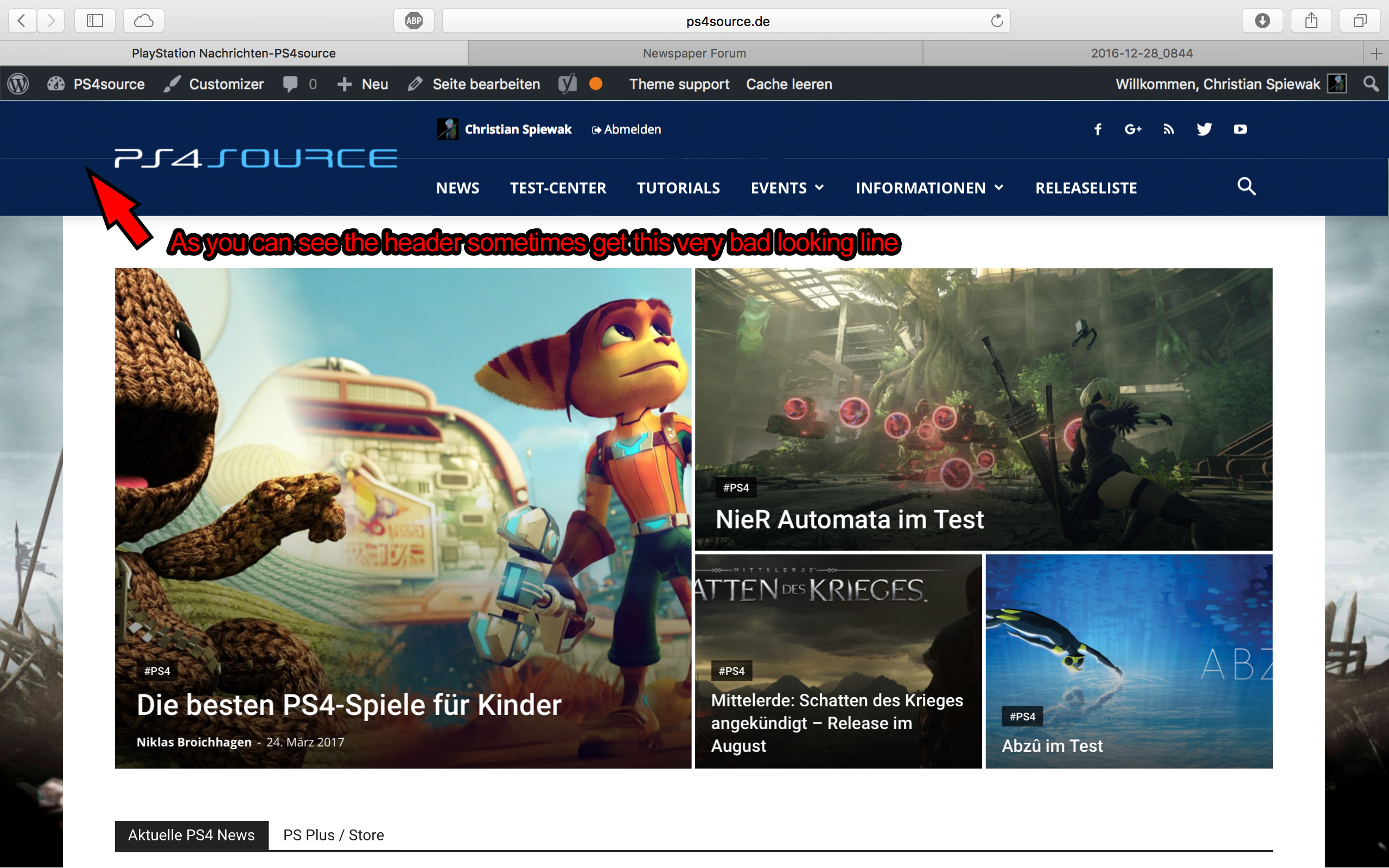
2) Which register plugin should I use? I don’t want to let new users to set a new password on the bad looking interface of WordPress. Im sure you guys know what I mean and have a good recommendation for that. Beside that, what should I use to prevent registrations from bots?
3) Is it possible to have a gradient header and footer, instead of just one color? It looks a bit boring.
4) How can I change the menu just for the mobile page, without using td-mobile-plugin?
5) How can I change the the font style and size of quotes? At default settings it looks way too big (see here)
6) Is it ok too use the responsive options, to create one site with different blocks and grids for mobile and desktop? Im asking cause I don’t know if my site will load much longer, if it has to load information even though there are not displayed. (see details here)
7) My current page speed is a disaster (see here). Why is it so bad, since Im using kraken.io image optimizer and WP Super Cache? How can I improve the score?
8) How can I use td-speed-booster, without uninstalling my plugins? (Disqus Comment System, TablePress, TotalPoll…) I really need those plugins, but I still want to have a fast homepage!
9) If I set [Template Setting->Force Full width->Header Menu] to “No Stretch”, the logo of my site is not at the correct position.

10) validator.w3.org shows, that my page has 33 errors (see here). How can I fix them?
ben.hinc AMP needs custom classes, compliant post meta code, special ad unit setup, custom hooks for plugins, no use of javascript stuff, https-only elements, etc., etc.
Most of these issues have been solved by the AMP for WP plugin I linked to in an earlier reply (when used in conjunction with Automattic’s plugin). Therefore, they CAN be solved.
There’s no reason why tagDiv’s mobile plugin can’t solve all the same issues in the exact same way this plugin has and deliver a full Newspaper-like mobile experience while maintaining AMP compliance.
And trust me — I’m aware of the HTTPS requirement. We’ve moved our site as well as our podcast to HTTPS in order to comply with it.
