
- NewspapertagDiv AMP Plugin Tutorial
- ApiPractical example – How to add a new Block and Module
- NewspaperTrack Subscription Sources with Locker URL in Opt-In Builder
- NewspaperWP Rocket and Newspaper Theme: Optimization Guide
- NewspaperCredit System
- NewspaperIntroduction to CPT and ACF with Newspaper Theme
- NewspaperHow to edit modules for Flex Block X
- NewspaperHow to use the Posts List shortcode
- NewspaperUser review system
- NewspaperCustom Fields Support
- NewspaperHow to generate Facebook App ID
- NewspaperHow to insert a block inside the content of a post
- NewspaperModal Popup
- NewspaperPayPal Setup
- NewspaperLink Tracker
- NewspaperLockers
- NewspaperGeneral Options that May Interfere with the Newspaper Theme
- NewspaperAdd Cryptocurrency Price Ticker Widget
- NewspaperPosts Loop Element
- NewspaperThe Newspaper Mobile Theme: Introduction
 AntonioT
 A simple question for example:
I have the mobile version with the title “LATEST ARTICLES” and I must change this – How can I do It?
about this: When I try to see the mobile version on desktop adding /?amp it returns to the desktop homepage
Your reply is very important
Thanks
 Anamaria
 Hello,
The Mobile Theme is a performance optimized theme included in the Newspaper main theme and it loads only for mobile devices. It comes with its own templates for page, post, category, etc so your current templates from the desktop theme will get converted to the mobile theme layout. For more details, please take a look here: https://forum.tagdiv.com/the-mobile-theme/ https://forum.tagdiv.com/the-mobile-theme/
A full explanation you can find here: https://www.youtube.com/watch?v=SpGkOnJeNZY
Please note that if a page is made by Composer, then the content won’t be displayed on Mobile theme version. Check the case here: https://forum.tagdiv.com/topic/amp-pages-not-shown/
If you use the Mobile theme plugin, then you can not edit the pages with tagDiv Composer.
There are no settings to customize the pages.
You have only some settings for this layout, which you can find in the Theme Panel -> Mobile Theme
Also, please check this topic where I explained each mobile version -> https://forum.tagdiv.com/topic/mobile-version-not-working-properly-2/ and choose what mobile version you want.
Thank you!
 allisonb23
Good day
A client of a website we created for them are requesting a feature similar to featured posts.
A good example of this is Twitter as you can pin a post to the top of your page.
The website: https://smilefm.co.za/
So we are looking to to find out if its possible to implement a “pin” feature to their posts and here is how it should work:
When the client creates a post they can Pin it to the front of that category and should the posts be displayed as a carousel or a list, the pinned post would not shift or be replaced when moving onto the next page of Posts in that category.
I have been having trouble implementing this feature manually and would like to know if there is a way to implement this?
I have tried using the featured posts but the client wishes to be able to one-click pin posts rather than selecting categories.
Would this be possible to implement or even use a third-party plugin that works well with Tagdiv?
AntonioTHi,
I have Version: 11.5.1 REGISTERED
I have define PLUGINS’ SETTINGS – MOBILE THEME
How can I edit the mobile theme?
notes: When I try to see the mobile version on desktop adding /?AMP it returns to the desktop homepage
 jotem
jotemI noticed that by adding a photo gallery to the website I have the option to set the “TagDiv gallery” options. But the options themselves are practically none.
1. Is it possible to style the display of the gallery using, for example, Cloud Templates?
2. I would like to be able to display the gallery as a slideshow, but switching between photos would reload the page (getting more views). Can you guide me to the right solution?
 Calin
Calin Hi,
I believe that the website looks like that because you have the amp plugin enable and this is set on “Transitional”, please set it on “Reader” or please disable the plugin.
Thank you!
 Yazz
YazzHi Hello there,
We are implementing text to speech feature in our blog. Therefore, we would like to find solution for the issues below;
Our sample post with TTS – https://www.qbuzz.qnet.net/2022/09/26/qnet-sports-partners-business-lessons/
1 – How to create new post format to indicate post with TTS function. Right now theres 3 types of post format which is standard, video and audio. We would like to have our own custom listening icon on featured image as per sample here. https://ibb.co/PTxhhhP . Or can we tweak from audio post format? https://ibb.co/Z1SLmwq
2 – The post template for this TTS, How to make the listening option position on top of featured image. Currently, we add TTS iframe as the first section on post editor, featured image automatically projected on top of post front end.
Thank you.
Regards,
Yazz Hashim
 christopherkevil8838
 Thank you.
Please clarify if I should edit the logo and title/tagline size in the regular desktop site.
Your annotated imgur instructions suggest that these edits should be made to the default header rather than anything done specifically in the mobile header.
Maybe if you provide a click sequence it would be clearer.
For example:
tagdiv editor>header menu>…
 GanaAdhikar
Hi,
I want to add a menu along with collapsible in the header.
Can I do it. If yes, how to do it?
please check image below to know What I am talking about:

Please help me.
thanks
 Coinno
Hi
There are mulitple errors on the site.
1. I have readded footer images: Theme panel -> Footer -> Footer info content.
Footer Logo
Footer Retina Logo
Multiple times but upon refreshing they show up as broken.
Example footer here: https://debatt1.no/inyheter-helge-luras-pa-facebook/
I right clicked and selected Inspect.
There are also other errors there which I am not sure if has to do with the theme.
 seowebas
Hi. There is possible to use offset to break up the homepage so that not all sections is displaying the same content – but where can I example break up so that certain sections is only displaying from certain categories, and by that excluding others in some areas.
Would like to control which content shows up where on frontpage. Atm it only seems (to me) that this is not possible ?
Domain: kulinariskmat.no
 jornalcont
Hi! I have a serious issue with the theme, related to function
“USE LAST 24/48 HOURS & 7 DAYS POST SORTING”.
In all blocks of my site when I check the option to use the contents of the last 7 days, 24/48 hours, the block is deleted instantly.
The function is active in the theme, however, when I go to customize my site, as soon as I check the option, the block is simply deleted.
can you help me?
 fff28
fff28 thanks i will check that
a last question and we consider this topic solved thanks to you
If I supress the 2 “official AMP plugin” AND “tagdiv mobile theme” plugins … the rest of the theme is still responsive ? do I still get the 4 size icones in the tagdiv editor and nice responsive page? or do I loose much more ?
 2zi0
2zi0Hello,
I was wondering if it’s possible to change the mobile menu to give it a personal layout, for example a structure like:
Category1

Subcategory1_1   Subcategory1_2   Subcategory1_3   Subcategory1_4   Subcategory1_5

Subcategory1_6   Subcategory1_7   Subcategory1_8   Subcategory1_9   Subcategory1_10
-----------------------------------------------------------------------------------
Category2
Subcategory2_1 Subcategory2_2 Subcategory2_3 Subcategory2_4 Subcategory2_5
Subcategory2_6 Subcategory2_7 Subcategory2_8 Subcategory2_9 Subcategory2_10
ecc…
Maybe modifying the module template files, using custom ones?
Or, at least, is it possible to make it appear with all the uls already opened?
Thank you
Calin Hi,
What can be done is to contact us via email (contact@tagdiv.com) and establish the moment when both you and he can check this problem (for example, Monday at 12 o’clock utc2).
Thank you!
Calin Hi,
If you are using a standard header, then the H1 will be on logo and titles, when a title is present the logo will no longer have h1.
Now if is a cloud, then you can choose the element that will have the h1 -> https://i.imgur.com/E2B3K8n.png (for example each logo from the website will have h1 also the posts/page titles).
I hope this will help you!
Anamaria Hello,
The Mobile Theme is a performance optimized theme included in the Newspaper main theme and it loads only for mobile devices. It comes with its own templates for page, post, category, etc so your current templates from the desktop theme will get converted to the mobile theme layout. For more details, please take a look here: https://forum.tagdiv.com/the-mobile-theme/ https://forum.tagdiv.com/the-mobile-theme/
A full explanation you can find here: https://www.youtube.com/watch?v=SpGkOnJeNZY
Please note that if a page is made by Composer, then the content won’t be displayed on Mobile theme version. Check the case here: https://forum.tagdiv.com/topic/amp-pages-not-shown/
If you use the Mobile theme plugin, then you can not edit the pages with tagDiv Composer.
There are no settings to customize the pages.
You have only some settings for this layout, which you can find in the Theme Panel -> Mobile Theme
Also, please check this topic where I explained each mobile version -> https://forum.tagdiv.com/topic/mobile-version-not-working-properly-2/ and choose what mobile version you want.
Thank you!
 SujanRoy
Recently google detected mobile usability issue on some of my articles. I installed and activated mobile theme and AMP plugin but I can’t use the same template for header and footer that I’m using for desktop version.
Can you please help me to use the same template on mobile theme as well?
SujanRoyHi there! My site, https://fitbabu.com/, is working fine. Google also showed that my site and articles and other pages are mobile friendly and viewable on mobile.
But yesterday they detected one article is not viewable on mobile. Though my articles are perfectly viewable on mobile and small screen scenes.
I don’t use mobile theme or AMP because the AMP and mobile theme makes my site look completely different on mobile devices.
I use one mobile template (mobile version of desktop version) for each page or article on my site. Everything was fine, even google never detected any mobile usability issues until yesterday.
I don’t want to use the mobile theme because because it makes my site look completely different on mobile, including header and footer.
Is there any way I can use newspaper mobile theme and make my site look exactly like how it looks on desktop?
Please help?
 hollyger
Hi,
I disabled google fonts in the theme panel, uploaded own custom fonts, but the theme still talks to google.
I have to stop this, can someone tell me what to do?
Stylesheet:
https://fonts.googleapis.com/css?family=oswald
https://fonts.googleapis.com/css?family=merriweather:300,400,700&subset=cyrillic
https://fonts.googleapis.com/css?family=open+sans:300,400,600,700&subset=cyrillic
Font:
https://fonts.gstatic.com/s/opensans/v34/memvyags126mizpba-uvwbx2vvnxbbobj2ovts-muw.woff2
https://fonts.gstatic.com/s/merriweather/v30/u-440qyriqwlorhsvowk_l5-fczm.woff2
https://fonts.gstatic.com/s/merriweather/v30/u-4n0qyriqwlorhsvowk_l52xwnzwmf6.woff2
fff28 see my previous post, I got some more explanation on the 2nd part:
the text shown at page start, is the text from the “Header Logo” block, specifically the Logo Text & Logo Text Tagline … but as soon as you move the page down and up again to show the sticky header, or go to smaller width, this text is, only then, replaced by the text in the theme pannel>header>logo & Favicon
… definitively a bug for your teams
As a workaround I will now replace one text, to be the same as the other one, but clearly misleading in the theme
on the first question, about mobile … any answer please ?
 nahwewe09
My website thehopenewspaper.com’s header & footer just dissappeard and start misbehaving. Any one help will be appreciated.
 Slavisai
  discovermh
 We have custom taxonomy Country – 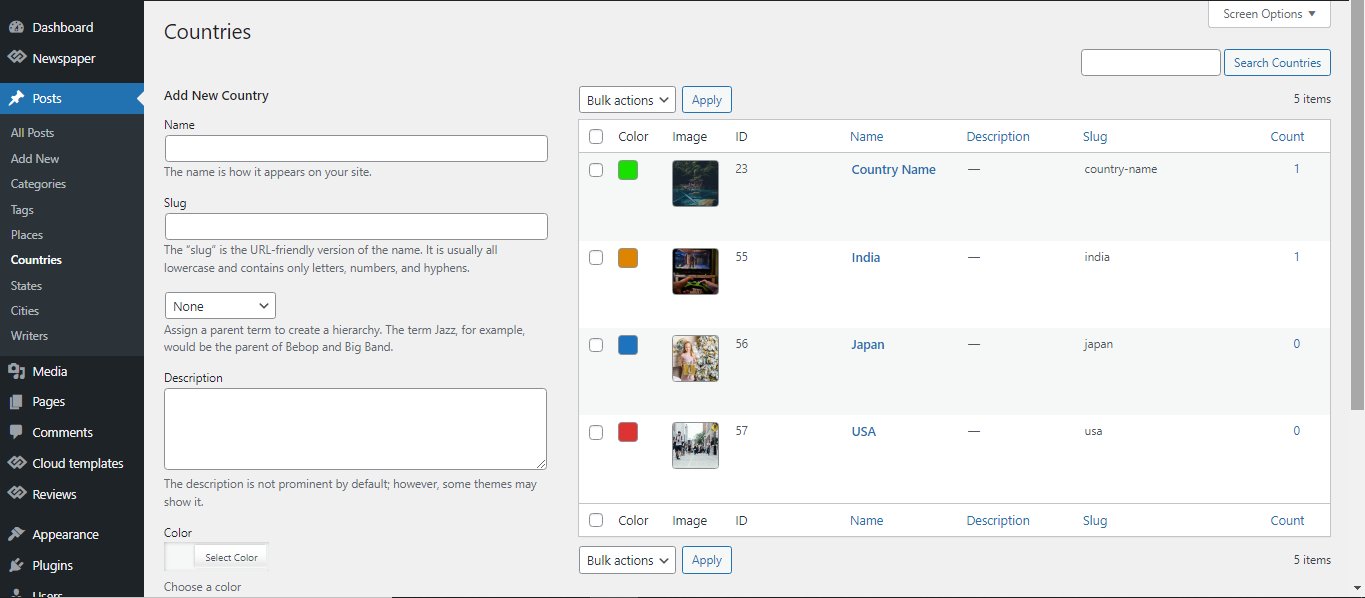
State – 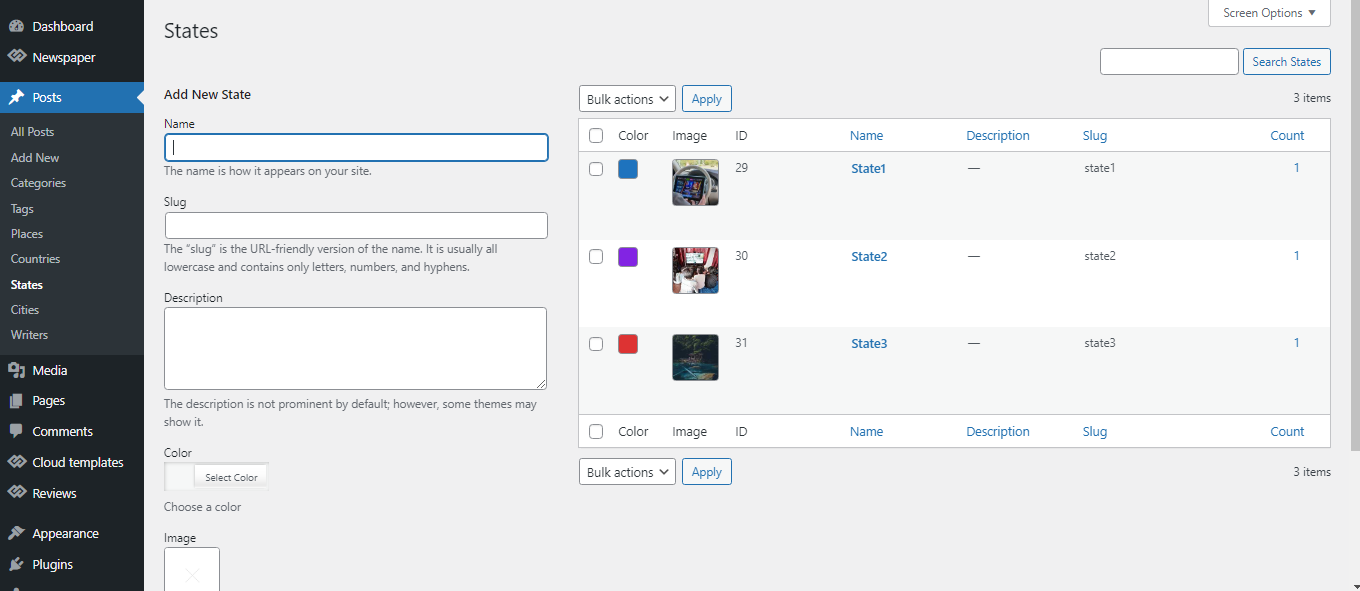
We want to display all country & state lists on the home page with its image.
Same for Category, City and Tag.
fff28 Hello Anamaria,
about your comment on the mobile plugin: as said above, if I want a site mainly desktop, but that displays also good on mobile, what do you recommend ? (mobile plugin? no mobile plugin ? other ?). Please be a bit precise
About H1s: as said above, I suppressed mine as a temporary workaround to avoid search engine penalty. Where can I edit the tagline that appears only on sticky header ONLY WHEN you scroll the page up OR when you reduce browser width (Texts are different. My main OK text is “Product Design & Innovation”, this I can edit. And the other text is “The Product Design & Innovation”, this I can not edit. So where ?
Best regards,
Fabrice

