- NewspapertagDiv AMP Plugin Tutorial
- ApiPractical example – How to add a new Block and Module
- NewspaperTrack Subscription Sources with Locker URL in Opt-In Builder
- NewspaperWP Rocket and Newspaper Theme: Optimization Guide
- NewspaperCredit System
- NewspaperIntroduction to CPT and ACF with Newspaper Theme
- NewspaperHow to edit modules for Flex Block X
- NewspaperHow to use the Posts List shortcode
- NewspaperUser review system
- NewspaperCustom Fields Support
- NewspaperHow to generate Facebook App ID
- NewspaperHow to insert a block inside the content of a post
- NewspaperModal Popup
- NewspaperPayPal Setup
- NewspaperLink Tracker
- NewspaperLockers
- NewspaperGeneral Options that May Interfere with the Newspaper Theme
- NewspaperAdd Cryptocurrency Price Ticker Widget
- NewspaperPosts Loop Element
- NewspaperThe Newspaper Mobile Theme: Introduction
 Anamaria
 Hello,
Please check with the tagDiv Composer and disable the H1. For example, H1 from logo(header, footer, mobile, sticky) : https://forum.tagdiv.com/topic/6-h1-tags-on-front-page-bing-have-deindexed-my-site/
Thank you!
 stemalo
My plugin site gives me a full width site, without margins:
For example this entry:
https://2024.gartenwoche.ch/branchenverzeichnis/listing/zebra-ag-garten-und-pool-2/
What could this be? Tried some settings, no effect.
 itayg3131
Hey,
I have a new blog website with theme: Newspaper – News & WooCommerce WordPress Theme.
At some point my website became very slow and stuck, and my organic impressions just dropped to zero. It’s like this for a few weeks already.
The website doesn’t have large images and is fully SEO optimized.
I implemented WP-rocket to try to solve it but it didn’t.
The main issue is that the website is very slow and stuck.
Any suggestions?
Thanks!
 Børnenes Aarhus
Hi tagDiv Support Team,
I’m having an issue where the <h1> tag around the logo isn’t being removed, even after enabling “Disable H1 on logo” in both the frontend (tagDiv Composer) and backend (Theme Panel). I’m running Newspaper version 12, updated from version 8, and working in a test environment to redesign my site. My goal is to fix a “Multiple H1” issue flagged by Screaming Frog, where the logo has an empty <h1> alongside the page title’s <h1>.
Here’s what I’ve tried:
In tagDiv Composer (Frontend):
I imported a new header from Cloud Library.
Edited the “Header Logo” block, found “Disable H1 on logo” (a checkbox), checked it (enabled it), and saved the template.
Assigned the new header to the homepage in Theme Panel > Header > Main Menu.
In Theme Panel (Backend):
Went to Theme Panel > Header > Logo.
Found “Disable H1 on logo” (another checkbox), checked it (enabled it), and saved settings.
Cache Clearing:
Cleared W3 Total Cache (“Empty All Caches”).
Cleared Chrome browser cache and tested in incognito mode.
Despite these steps, the <h1> tag remains in the source code. Here’s an example of what I see when inspecting the page in Chrome:
html
<h1><span class=”tdb-logo-img-wrap”> </span></h1>
This empty <h1> causes a “Multiple H1” issue, as my page titles (e.g., from “Single Post Title”) also use <h1>.
What could be overriding the “Disable H1 on logo” setting? Is this a known issue after updating from version 8 to 12? Could old templates or settings from version 8 be interfering? Any help would be appreciated!
 agoramt
I’m currently using the Newspaper theme (v12.6.8), and I’ve noticed a performance issue related to the Ajax pagination process on my site. Specifically, requests to /wp-admin/admin-ajax.php?td_theme_name=Newspaper&v=12.6.8 are slowing down the website.
Could you kindly provide any recommendations on how to mitigate this slowdown? Additionally, would creating an index in my database help improve performance, or are there any other optimization steps I should consider to address this issue?
I appreciate your assistance and look forward to your response.
Best regards,
Eduardo Gonçalves
https://agoramt.com.br/
 olivierdupuis
Hello,
I have just created a category, but I want to remove it. I don’t see any feature in the Category settings to remove a category. Can you help me with this ?
Thanks

 Bettina
 Hello!
You can do that so easily with the help of the tagdiv Composer, for example: https://app.screencast.com/4AvVH5JJuqWxA This value can be added on a row or any element and control the position.
Set the row as stretch row and content, and the second row as simple. We have some settings for the rows and different stretch sizes: https://www.screencast.com/t/bsbB5P97A
Thank you!
Bettina Hello!
It helps you to display a custom field in the button URL, for example, but we have the shortcode custom field as well: https://forum.tagdiv.com/custom-fields-support/
You can display a custom field for a post or listing in a block on your homepage. You should use a custom module template displayed with the help of the flex block builder: https://forum.tagdiv.com/modules-builder-newspaper-theme/
Thank you!
Bettina Hello!
Check this guide: https://forum.tagdiv.com/modules-builder-newspaper-theme/
Regarding the design, you can split a row into 2 and add an inner row splitter into 4, and you will have 8 columns, like in your example.
Thank you!
Bettina Hello!
For example, page templates are different from the single, category, tag templates.
So, you should edit the pages one by one. But if another template is global, for example, a single cloud template, then you should make the changes once, and they will apply to all your articles.
More documentation about the cloud templates is here:
– https://forum.tagdiv.com/cloud-library-templates/
– https://forum.tagdiv.com/design-post-pages-using-cloud-library-templates/
– https://forum.tagdiv.com/cloud-library-category-templates/
About pages here: https://forum.tagdiv.com/page-templates-2/ -> https://forum.tagdiv.com/homepage-how-to-build-and-set-it/
Check out this video about how to create a website from scratch: https://www.youtube.com/watch?v=SoGQ0d5kIBg
Thank you!
Bettina Hello!
We have 3 options available for mobile versions that you can use:
1. Responsive version: A responsive version of your website looks similar to the desktop version. TagDiv Composer is used to edit the page. Click on the mobile viewport: https://www.screencast.com/t/XDQJedlggSB. You can see your mobile version there and edit or adjust the elements to look better.
2. Mobile pages: https://tagdiv.com/newspaper-10-3-7-update-brings-customizable-and-fast-mobile-pages
3. Mobile theme plugin: The Mobile Theme is a performance-optimized theme included in the main Newspaper theme that only loads on mobile devices. It comes with its own templates and designs for pages, posts, categories, etc., so your current templates from the desktop theme will get converted to the mobile theme layout. Please see https://forum.tagdiv.com/the-mobile-theme/ and https://forum.tagdiv.com/mobile-theme-introduction/ for more information.
A full explanation is here: https://www.youtube.com/watch?v=SpGkOnJeNZY
If you need to use mobile version 1 or 2, then you need to uninstall the Mobile Theme plugin and AMP.
Thank you!
Bettina Hello!
The social icons from the mobile menu come from the Theme Panel -> Social/Apis -> Social Networks -> https://i.imgur.com/kKYIECB.png. Remove/edit them as needed.
There are only a few settings for it in the theme panel. For example, you can change the color of the text in the mobile menu from the Theme panel -> Theme colors -> Mobile menu -> Text/icons color.
If you want to customize more, you can create a page and display it here: https://app.screencast.com/d00epUU2ygyXk. More info about modal popup here: https://forum.tagdiv.com/modal-popup/
Thank you!
Bettina Hello!
Do you have the Mobile theme and AMP installed and active? If so, please deactivate them, clear all the cache, and try again.
Thank you!
 Good Target
Hi ! The example page for an article category clearly shows that there’s a bug. The elements aren’t in the right place at all.
What’s really strange is that the page displays fine if I’m logged in as administrator. But in public mode the page is all broken. How can I fix this?
link to the page with the anomalies (public) :https://postimg.cc/rzFw0VX9
link to the OK page (administrator link) : https://postimg.cc/kDFYZCBL
thanks !
 newspatron
I have created a couple of custom posts, in a new website project that i am working on.
i noticed that the button text is Booking and the button url is {cf_tdcf_booking}.
Where does this code redirect, as it returns the not found page. I understand that {cf_tdcf_booking}, will have to be modified.
Reference image https://imgur.com/a/Dx4xMi9
Can you please how to change the {cf_tdcf_booking} to something else?
I want the button redirect to the relevant custom post type.
The details of the custom post type [key] is
travel-agent
The particular field in the custom post type is
paxpnr_booking
Home page screenshot of the concern
Please let me know how to correctly configure the button url.
I am looking for a redirect to the individual custom post type when clicked (for example https://paxpnr.com/travel-agent/sasta-europe-1-2/), at the custom post type field (url), to be more specific.
 accursi
 Dear Simion,
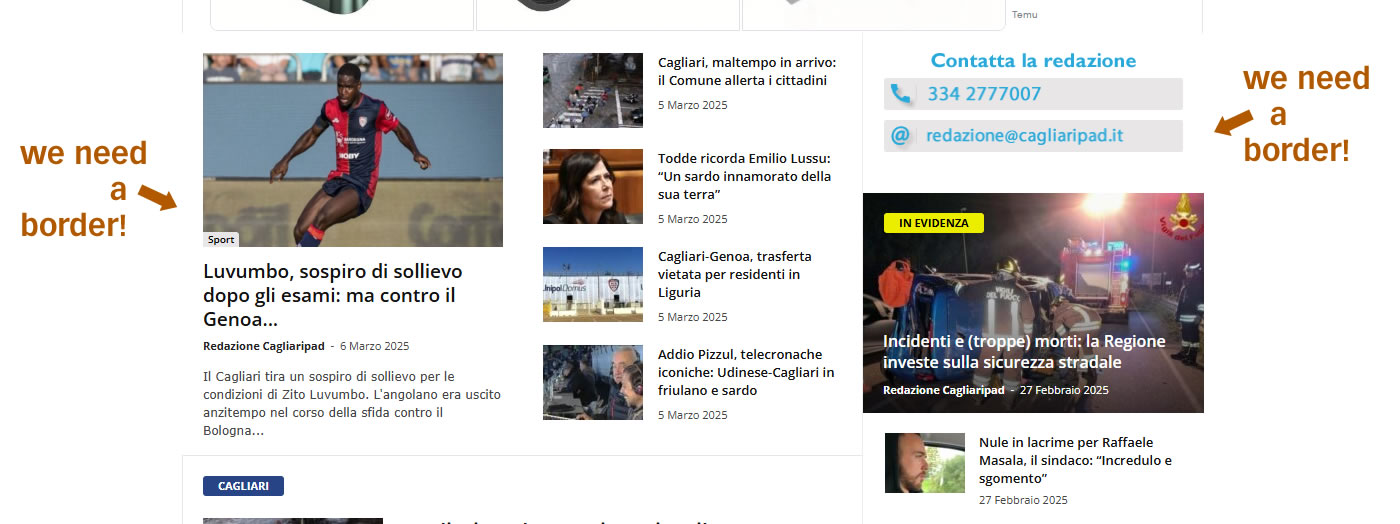
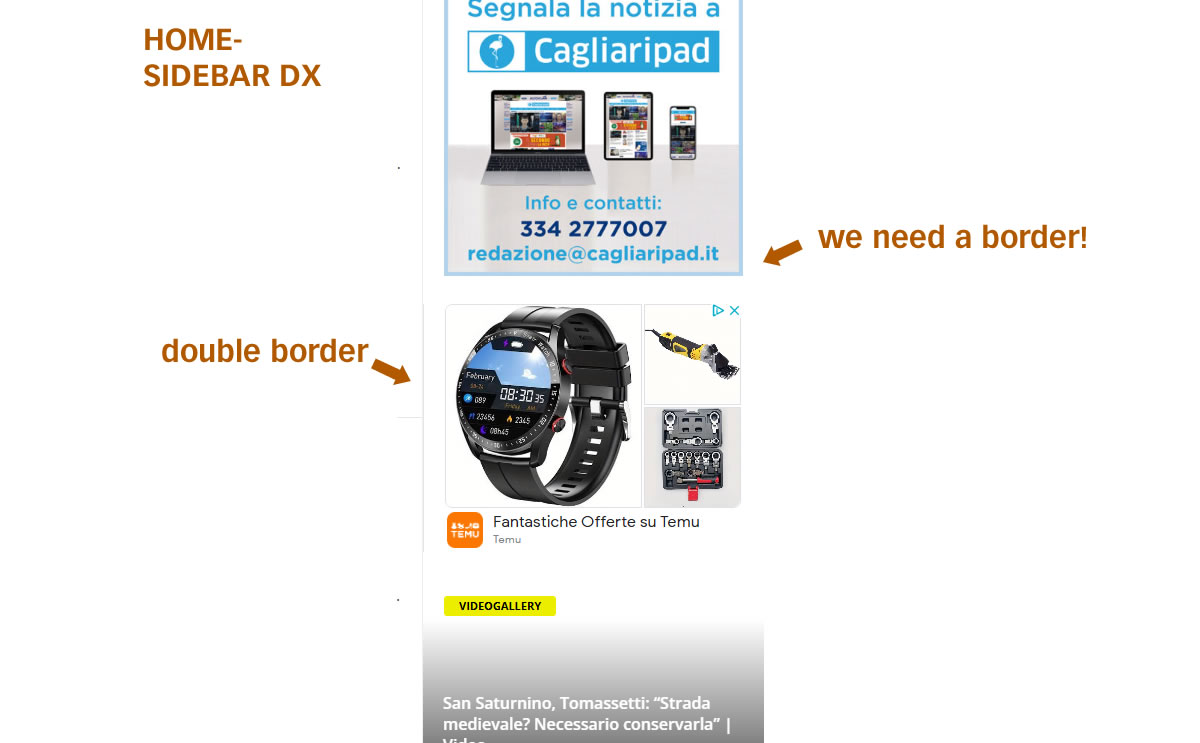
I can talk to you now about the edges task.
In the meantime, thank you for helping us in all cases. You’re very good.
as I wrote, we cannot manage or change the edges.
We’ll want the entire homepage with the light gray border of the theme.
I’ll send you examples of where we fail to change them.
1 https://assets.cagliaripad.it/wp-content/uploads/2025/03/06114038/screen001.jpg
2 https://assets.cagliaripad.it/wp-content/uploads/2025/03/06114042/screen002.jpg
Thanks and good work
 Babawomba
 Hi,
We have disabled all ads on the sample post which we shared to demonstrate the issue:
https://winbuzzer.com/2020/02/11/microsoft-deepspeed-with-zero-can-train-100-billion-parameter-ai-models-xcxwbn/
Everything works fine on pages where I embed taxopress tables, and ads are no issue there:
https://winbuzzer.com/ai/models/
This is a specific issue that only affects posts/articles. We have set up the post template exactly the same like the page template we are using.
Bettina Hello!
You should add code there and not copy-paste the example. Can you please provide an example of what you need to achieve?
Thank you!
Bettina Hello!
Unfortunately, there is no option to add WhatsApp to that shortcode. With the help of the tagdiv Composer elements, you can create and customize a line for WhatsApp and add a link there, too. The counter should be written manually, too. For example, you can add a simple button with a link, and you can add text and an icon.
Thank you!
 varunnaagar
Hi Team,
I have tried to fix this issue but not able to fix. In my website thetlcnews.com the tag div composer, visual composer & elementor is not working. Kindly check & advise.
 c386
c386 Hi Bettina,
Thank you for continuing to look into this.
That’s so strange. Maybe helpful if I provide a live example. On this page – https://tinyurl.com/ya2whvx2 – you’ll notice a line of text that reads ‘How we test and review products’
Prior to the update, this text was small. Do you have any idea what else might have caused the change?
Bettina Hello!
I’ve tested and in 12.6.8 version, the feature is working the same.
You can increase or decrease that font-size if you like all the paragraphs to look the same, and you can add a line height, for example: https://app.screencast.com/OfGYJoe0e8g1R
Thank you!
 Mark Gilbert
Hello – I’ve noticed that a hide feature has appeared in TOC – as here, for example – https://jazzjournal.co.uk/2025/03/05/reviewed-benjamin-boone-krokofant-prepared-tuomo-markus-with-verneri-pohjola/
How come? Is it something I can turn off? I don’t remember turning it on.
Thanks
Mark Gilbert
 pildat
https://new.pildat.org/events-media
Hi, we are in the process of revamping our old website. Please check the above url. The Ajax filter applied on this page is not working. Can you please help us get this functional?
Thank You
 Asida Technologies
 Hi Bettina,
Thank you for the detailed explanation! I have tried all the suggested methods, but I am still facing an issue with the login functionality on mobile. Even after disabling the login option, it remains active.
I have:
✅ Disabled the Mobile Theme plugin and AMP
✅ Cleared the cache (both website and browser)
✅ Checked for conflicting plugins and themes
✅ Verified settings in TagDiv Composer
Despite these steps, the login remains enabled on mobile. Could you suggest any other possible fixes? Is there a specific setting or file override that might be causing this issue?
Looking forward to your guidance!
Thanks!
-
This reply was modified 1 year by
Asida Technologies.