- NewspapertagDiv AMP Plugin Tutorial
- ApiPractical example – How to add a new Block and Module
- NewspaperTrack Subscription Sources with Locker URL in Opt-In Builder
- NewspaperWP Rocket and Newspaper Theme: Optimization Guide
- NewspaperCredit System
- NewspaperIntroduction to CPT and ACF with Newspaper Theme
- NewspaperHow to edit modules for Flex Block X
- NewspaperHow to use the Posts List shortcode
- NewspaperUser review system
- NewspaperCustom Fields Support
- NewspaperHow to generate Facebook App ID
- NewspaperHow to insert a block inside the content of a post
- NewspaperModal Popup
- NewspaperPayPal Setup
- NewspaperLink Tracker
- NewspaperLockers
- NewspaperGeneral Options that May Interfere with the Newspaper Theme
- NewspaperAdd Cryptocurrency Price Ticker Widget
- NewspaperPosts Loop Element
- NewspaperThe Newspaper Mobile Theme: Introduction
 Calin
Calin Hi,
All pro demos are using cloud templates from tagDiv Cloud Library, these can be edited only with tagDiv Composer, so you are using a single post templates this can be edited with tagDiv Composer and you can adjust it as you want -> https://i.imgur.com/eMV43pi.png use the right click to remove elements -> https://i.imgur.com/MVBO1sm.png after you remove all the elements from sidebar set the set row from 2 in 1 -> https://i.imgur.com/ofpISOQ.png
If you are using a pro demo, the footer is a cloud template, then you’ll need to edit it from a page, for example, you can edit the homepage, click on edit with tagDiv Composer -> https://i.imgur.com/uweNRrc.jpg after that go down to the footer end edit it how you want (now you can customize the the whole web-page from fronted).
The standard templates can be edited only with custom css and using the settings from theme panel.
Thank you!
 anishdesai2003
 Hi Calin,
I had installed the AMP plugin and done setting as per your Docs. But in that case Navigation is not showing in all pages except Home page.
Thank you
Calin Hi,
Please check our documentation for How to Make an AMP Ready Website with Newspaper Theme
-> https://tagdiv.com/amp-newspaper-theme/
Also please check our documentation for mobile theme automatic Optimization for Mobile with Newspaper Theme -> https://tagdiv.com/mobile-theme-automatic-optimization-for-mobile-newspaper-theme/
If you want to keep the desktop layout on mobile you can use from Mobile theme the “AMP” option https://www.screencast.com/t/jcbjyrjrjgW , and your website will have on mobile version the same content and design as on desktop, and only the amp post/page will have the mobile theme design.
Also here is a similar topic -> https://forum.tagdiv.com/topic/errors-after-update-2/
Thank you!
 TomChen25
Hello,
I received a message for Google Search Console about AMP issues. I installed the AMP plugin. Few questions: what is the best mode to use: Standard, transitional, or reader?
When I use the Standard and Transitional I get really slow loading. But I have to fix the AMP issues and increase the speed of the site.
Secondly, on the AMP validate URL, I have 63 invalid markups kept and 65 invalid markups removed. What does it mean? Should I update it?
Any other suggestions about the AMP?
Also, is it better to install the mobile theme plugin?
Calin Hi,
This error happens due to a lot of possible reasons. Check the useful guide from here -> https://www.hostinger.com/tutorials/fix-sorry-you-are-not-allowed-to-access-this-page-wordpress#gref
Theme activation -> https://tagdiv.com/how-to-activate-the-newspaper-theme/
You can manually activate the Newspaper theme from here: https://www.screencast.com/t/EL4k48Lq
If this is still not working go in Newspaper> System status and replace the url from: -> https://i.imgur.com/WlRnszw.png
admin.php?page=td_system_status
in
admin.php?page=td_system_status&reset_registration=1
And try after that to activate the theme.
Let me know the results!
Calin Hi anishdesai2003,
Please use the amp plugin with the mobile theme plugin as in our documentations from here :
-> https://forum.tagdiv.com/the-mobile-theme/
-> https://forum.tagdiv.com/tagdiv-amp-plugin-tutorial/
Also you can use the settings from theme panel, these will be apply for amp and mobile theme too -> https://i.imgur.com/6QXJvFR.png -> https://i.imgur.com/mi0qdQf.png
Let me know if the problem persist!
Thank you!
 grvag
grvag Thank you for the valuable reply…
I change some things in WordPress they all are listed below
1) Added two extra plugins (Yoast SEO) & (Header Footer Code Manager- “HFCM”)
Uses HFCM to add Google analytic Code.”Please suggest better plugin to add codes in header” which don’t affect the theme and work properly.
2) Edit some file in the root directory “wp-include” >> “functions.php” >> “edit” to hide some WordPress detail (suggested by my hosting provider to increase the security of my website, so I did it)
3) Add a simple class in Appearance >> Customize >>Additional CSS i.e
p {
font-size:18px
}
.tagdiv-type {
font-size:18px
}
Thank you
Now I am thinking of resetting my website and installed it again freshly and published article again.
I am thinking It’s my fault maybe I did something wrong…No problem I will correct it from a start
I feel lucky if you give me some tip?
Calin Hi,
1. That code can be from some ads or plugins that you are using and yes if this is removed then the problem will be fix.
2. Withe a fresh install there is no need to any extra plugins to make a amp to work, if you want you can make a test on localhost only with theme plugins.
Also we recommend to use WP Super Cache plugin, this is a free plugin and tested with our theme, also we have a guide for the settings you should do -> https://forum.tagdiv.com/cache-plugin-install-and-configure/ W3 Total Cache plugin was in the links that I provide as example, there are users using WP Rocket or Automatize.
This is one of our live demos that has the amp option enable, you can check it if you want -> https://demo.tagdiv.com/newspaper_local_news/
Thank you!
 jamesrobson
 Thanks Vlad
I understand that the imported themes can only be edited via tagDiv Composer.
As an example i have downloaded the Amberlight footer theme. I have opened the composer but unlike other elements there is no style tab.
I have changed the colour in the background gradient and saved it but that makes no difference. i cannot see any information in your documentation as to how to do this?
i have to admit after a few days using your product i am beginning to regret buying it. I can see that it could be a great but i struggle to see how it is applicable for beginners. it is very complicated, which would be fine if you had detailed guides to help understand the basics but i’m afraid your documentation is extremely lightweight – you assume a great deal of existing knowledge and don’t explain the basics.
Coming to this as a first time website builder i really think that you should market it as for people with website building experience and/or provide a great deal more information.
I am going to persist for a while longer but am increasingly thinking that i will have to ditch it for something easier with better guidance.
J
 c0sie
c0sieHi,
I have recently installed the Journal demo onto my site – however the home page and single post pages are not using the same sidebar – they look the same from the demo itself, but if I make a change to the sidebar on the home page using the tagBuilder (say removing the author photo for example) that isnt then replicated on a single post page.
I bought the theme as I was under the impression that the sidebars were the same and I could have the same sidebar running across every page on my site.
Does anyone know if it is possible to have the same sidebar running across every page please?
I am new to all this, sorry.
 sunil9960
There is content which fails AMP validation. Nevertheless, the invalid markup has been automatically removed. Review issues
Invalid elements: script
Calin Hi,
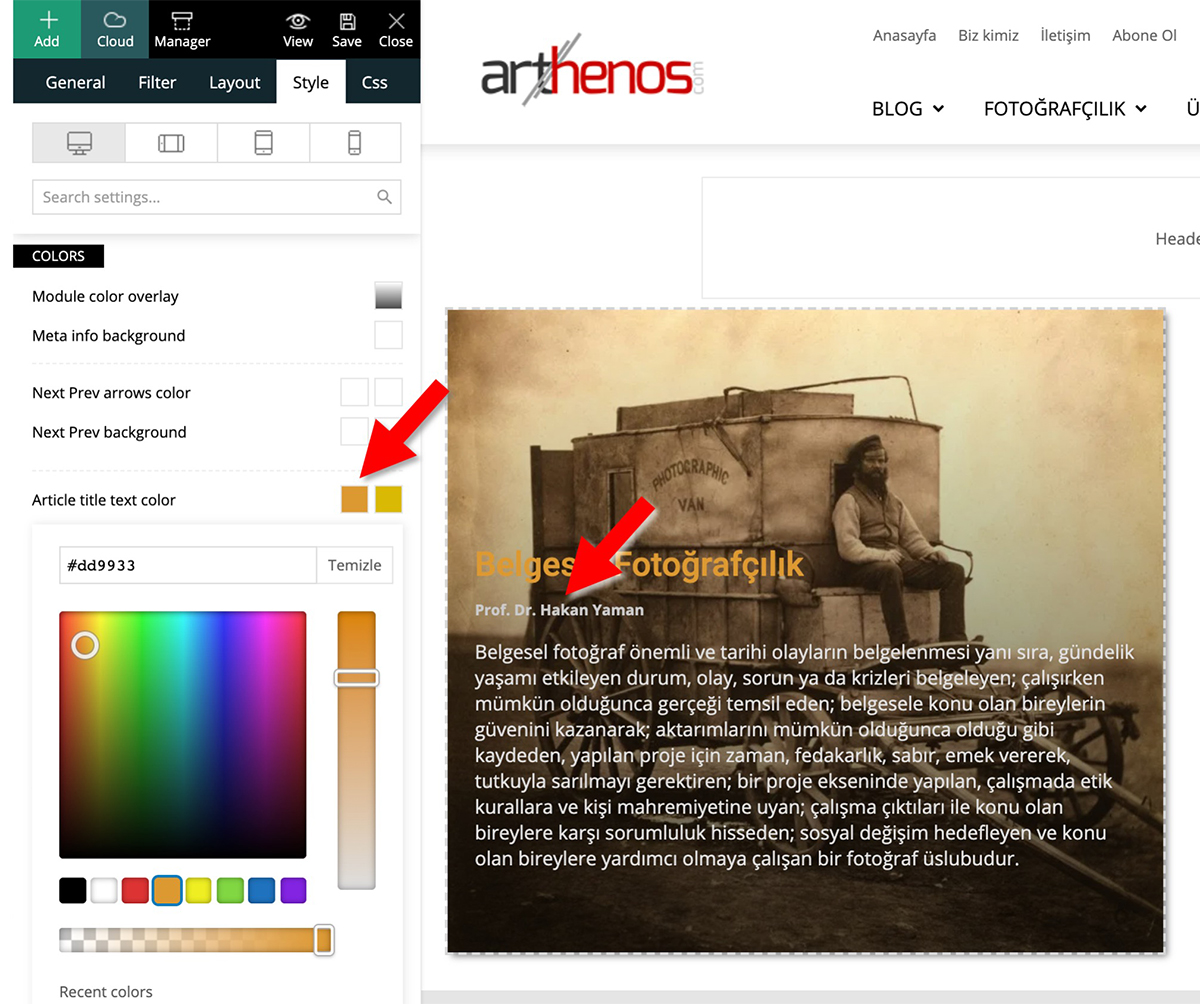
In your example you are editing the article title text color -> https://www.arthenos.com/wp-content/uploads/2020/06/Author_Text_Color.jpg and this is apply -> for author -> https://i.imgur.com/RoyZa9N.png
Thank you!
Calin Hi,
Unfortunately this can not be done automatically, but if user click on location on Weather then it will get his location -> https://i.imgur.com/wFRfob7.png here is an example -> https://demo.tagdiv.com/newspaper/weather-widget/
Thank you!
Calin Hi,
When the mobile version or amp is displaying on desktop is a cache problem, we recommend to use WP Super Cache plugin, this is a free plugin and tested with our theme, also we have a guide for the settings you should do -> https://forum.tagdiv.com/cache-plugin-install-and-configure/ also if you are using other cache plugins please deactivate them and make a test.
Also using the mobile theme plugin, you’ll gain a better speed then responsive version of theme, but in order to achieve that speed you’ll need to create a new content for pages because in the most of cases those were made with builders ( tagDiv Composer, WPBakery ) and you need to use only the mobile editor ( you need to set the content for pages in mobile editor and this content will be display on mobile theme)
-> https://i.imgur.com/9d0UWLT.png
Also you can show the responsive version on mobile theme -> https://i.imgur.com/m0bVB5T.png you can check more details about mobile theme in our documentation -> https://forum.tagdiv.com/the-mobile-theme/ or if you want to have the responsive version only, you can use the amp option from mobile theme -> https://i.imgur.com/oofST3D.png (to use the mobile theme template on amp) or you can disable the plugin.
Thank you!
anishdesai2003 Hi,
Thanks for replying.
https://www.youropinioncorner.com/category/business/
here is the link.
For now, I have disabled AMP in all posts but you can check the issue in category pages.
Thank you
Calin Hi,
I believe that is why the transition was placed in the first place, to make the possible flashing not so noticeable. Not all browsers produce the same results, there are differences regarding how the website is loaded between Chrome, Firefox and IE for example. You could try some tricks from these topics
– https://www.nccgroup.trust/uk/about-us/newsroom-and-events/blogs/2016/may/why-background-images-are-slow-to-display-and-how-to-make-them-appear-faster/
– http://smallbusiness.chron.com/making-background-images-load-faster-31826.html
Thanks
Calin Hi,
Unfortunately there is only a general option that will apply for all posts -> https://i.imgur.com/00c9J7H.png
The only way that you can hide several individual posts is to use a custom css -> https://forum.tagdiv.com/create-custom-code-using-the-browsers-inspector/ here is an example of code that is using the post id https://i.imgur.com/qHoP7Ve.png -> https://i.imgur.com/fAze6Sv.png
Thank you!
 Fabrice
Hi. I have a real problem with page templates in the “cloud template” section. When I choose a template with sidebar, the display is correct in the builder : I can add or remove blocks and the sidebar is visible and functional. Unfortunately in production, the sidebar no longer exists and the content of the sidebar is displayed below the main content of the page, sometimes above it. I have this problem on all pages containing a sidebar (single post, categories …).
For example: https://www.421chevaux.com/category/ford-mustang/ (the “MOST READ” part is supposed to be a sidebar on the right, but is below the main content).
To have a sidebar on sigle page, I have to use the native wordpress sidebar and not the tagdiv sidebar which does not work.
It’s not a pluggin problem because I deactivated and reactivated to test. The problem started with the major update 🙁
Thank you very much for helping me.
 kirby-axon
hello,
recently I got an email from theme forest to say theres an update available for newspaper. Therefore I downloaded it. However, I’m unsure If I should be doing this manually?
I seen on the documentation that you can do this through the cpanel in file manager. However, some of the instructions it has mentioned, I was not able to find on mine, for example the theme selection in file manager.
I thought I could maybe download the new one in the theme panel but theres no option.
If I have to do this manually, is there a chance I could loose the content already on my website now? as I’m new to this and not sure how to do a back up.
Thanks
TomChen25I’m trying desperately to increase the speed of the site. I got the LCP issue: longer than 4 s (desktop) on google search console. I installed the AMP and Mobile theme plugins and somehow the website was a mess and I had to activate the theme again. The biggest problem is the images and most likely the video section.
What should I do? Autoptimize is a good plugin?
Also, can I change the color of the theme?
kirby-axonHello,
I recently uploaded a cloud template for my homepage, its the fashion Pro template. I’m unsure if its the template, however the content on my homepage, pages etc will not go to the full width of the page
Screen Shot 2020-05-24 at 12.06.47
I am happy with this look on my homepage, although I’d prefer it back to normal for my posts and I’m unsure of how to do that.
Hope you can help.
Thanks
grvag I never inject any such code in my website or even I don’t know to code that’s why I choose you Tagdiv.
I have some questions, please answer
1. As you describe in your latest reply that, I set a custom JavaScript for ads(But I never did so?) if I manage to remove that code than my problem will be solved?
2. It is mandatory that we have to install W3 Total Cache every time if we purchase a newspaper theme in order to fix the amp error?
Thank you
Gaurav Verma
 atom32
When trying to send a telegram error 404 crashes http://joxi.ru/Dr8P5znczRgqpr
Is there any way to fix this?
Page for an example where there is a share button: https://pixelbox.ru/nabor-tekstur-staroy-bumagi
 romeoblu26
 I made a video, I hope this helps
http://www.vampiresradio.com/help.avi
 frangonzalez
 Thank you very much for your answer. Maybe I have not explained myself well. I am translating with Google Translator.
I would like the floating module of the mega menu to drop 30 pixels down. I want to push down it 30 px. This is possible?
The mega menu module cover an important part of the header.
I have verified that in the “search” option of the header, it is possible to lower the height of the floating form. See this example: https://ibb.co/D9H4pgR
I want get the same with the mega menu.
This is I have: https://ibb.co/ZHpYDhL
This is I want: https://ibb.co/fr1PJNt
Is it possible to lower the floating module of the mega menu by 30 px as in the screenshot?
Thank you,