
- NewspaperHow to use the Flex Blocks cache option
- NewspaperCache plugin – install and configure
- NewspaperWP Rocket and Newspaper Theme: Optimization Guide
- NewspaperFlex Block Settings Guide
- NewspaperGeneral Options that May Interfere with the Newspaper Theme
- NewspaperThe Newspaper Mobile Theme: Introduction
- NewspaperAutoptimize Plugin – install and configuration
- NewspaperHow to update a plugin
- NewspaperCloudflare (CDN)
- NewspaperFacebook Share
- NewsmagRequirements for Newsmag
- NewsmagHow to update the theme
- NewsmagtagDiv Social Counter tutorial
- NewsmagTop bar templates
- NewsmagAjax view count
- TutorialsWhat is Ajax preloading?
- NewspaperVideo Playlist
- Newspaper7 Days Post Sorting
- NewspaperAjax View Count
- NewspaperTop bar templates
 Bogdan B.
 Hi
Please clear your browser cache as I have tested this on multiple browsers. The 2 logos have the exact same dimensions.
https://www.22places.de and https://spielwiese.22places.de
Try this from a different machine.
Thank you!
 Catalin
 Hello case,
Please ensure that you are using the latest version of the theme (Newspaper 7.1.1) and also, the required plugins ->Visual Composer 4.11.2 and Social Counter 4.1. Try to clear all your caches and test it again. Also, please ensure that you have right set your Social Counter, according to our documentation here -> https://forum.tagdiv.com/tagdiv-social-counter-tutorial-2/
Hope this helps and let us know how it goes!
Thaks for your understanding!
Bogdan B. Hello,
Smooth scrolling is no longer required and was removed in the latest version of the theme. Please disable this function. Also the jagged scrolling does not come from the smooth scroll. It could be a plugin conflict. Please try to deactivate all plugins except visual composer, clear cache and reset cdn file.
Thank you!
Bogdan B. Hello Patrick,
Unfortunately, as you mentioned, we cannot offer support for untested plugins. We only tested the ones on this list: http://screencast.com/t/lLaRuK7oCAbE Any plugin beyond this list could provide mixed results. Visual composer and woocomerce work well together, but we cannot say for sure if they will still work together with other plugins. You can test this by deactivating all plugins except visual composer and woocommerce and clearing all caches. This way you can see if there is a conflict directly between woocommerce and visual composer. We are not aware of any such conflict. (I tested both plugins on my end but could not find any issues when both are active). If your plugin worked in newspaper 6 even with VC and Woocommerce, then you can revert your theme version to newspaper 6 if you truly need the plugin.
Thank you!
Bogdan B. Hi,
I see the post you mentioned is added on 27.05.2016. Did you have newspaper then or another theme. That was what I was trying to say. The theme will only count from the moment you activated it. It will not count if you had any other theme installed previous to this date. AS for the cache, its not the browser cache i mentioned but a caching plugin or a cdn server. You do have caching in place as if I hit the refresh button, the counter does not increment.
If this is not the case and you had the theme active at that time, are you sure the 1955 refer to this single post? if this is the case, then please send us an email at contact@tagdiv.com and provide wop-admin so we can login and inspect the counter. Please also include a link to this topic so we can identify you.
Thank you!
 Andrei L.
 Hi
Try to deactivate all plugins except Visual Composer, clear all caches then test again. Let us know how it goes and if the problem persist please send us an email at contact@tagdiv.com with your login credentials and we will inspect this issue as soon as possible, also include a link to this topic.
Thanks!
Catalin Hello davidcolq,
I have checked your smart list and I saw that it is working fine but when I link to the image, I will get error -> http://screencast.com/t/JPcdJbbr8f Please ensure that you have right set your smart list according to our documentation here -> https://forum.tagdiv.com/smart-lists/ Also, please try to disable all the active plugins, leave just Visual Composer to active, clear all your caches, purge CDN files if you are using the CDN system and install only the plugins that come bundled with our theme and rule out the conflicting plugins. I have tested on my side the smart list feature and everything seems to work as properly, as you can see in our demo preview, here -> http://demo.tagdiv.com/newspaper/smart-list-style-2/
Hope this helps and let us know how it goes!
Thaks for your understanding!
Catalin Hello Sayeed,
I have tested on my side with smart list 6 and everything seems to work as properly, as you can see in our demo preview here -> http://demo.tagdiv.com/newspaper/whitewater-rafting-day-trip-new-york-east/ Please try to disable all the active plugins, leave just Visual Composer to active, clear all your caches, purge CDEN file is your are using CDN system and install only the plugins that come bundled with our theme and rule out the conflicting plugins.
Thanks for your understanding!
Andrei L. Hi
I’ve checked your site and the theme seems to work fine. I assume that the feature image is not displayed on posts create with style 4 because it’s deactivated from Theme panel. Try to enable the featured image for posts from theme panel > post settings: http://screencast.com/t/lBdvNrBJN7 clear all caches then test again.
Thanks!
Catalin Hello moor,
I have checked your website and I saw that you are using RTL mode for your website. Unfortunately, our theme does not have such an option for RTL mode and because it has not been designed to be used in this mode, sorry! Also, please try to disable all the active plugins, leave just Visual Composer to active, clear all your caches and install only the plugins that come bundled with our theme and rule out the conflicting plugins. Try to revert the theme to the default state, without untested plugins, clear all your caches and let us know if your problem is still there after these changes.
Thanks for your understanding!
Catalin Hello krisorqla,
I have checked your website and I saw that your menu is not working fine. First of all, please ensure that you are using the latest version of the theme (Newspaper 7.1.1) and also, the latest version of required plugins (Visual Composer 4.11.2 and Social Counter 4.1), try to clear all your caches, purge CDN file if you are using CDN system and install only the plugins that come bundled with our theme and rule out the conflicting plugins. So, if your problem is still there, please contact your hosting provider because it is possible that your dedicated served to have cache and ask to be removed for achieving best results.
Please notice that your images could be affected by your untested plugins. Try the theme without then and check the results.
Please notice that the loading time for your site depends on many factors and please notice that we cannot provide support for speed optimization because it is not covered by our support. First of all, please ensure that your dedicated server meets these requirements, like this -> https://forum.tagdiv.com/requirements-for-newspaper/ Also, you can use our tutorial regarding on page speed, like this -> https://forum.tagdiv.com/how-to-make-the-site-faster/
Please ensure that you have correctly set it your facebook counter, according to our documentation here -> https://forum.tagdiv.com/tagdiv-social-counter-tutorial-2/
Hope this helps and let us know how it goes!
Thanks for your understanding!
Catalin Hello Page52,
Please ensure that your ad code is correct. So, as you can see in our documentation, the theme supports only the Google Adsense and also, if you want to use other custom ad code you will have to check this link here -> https://forum.tagdiv.com/using-other-ads-non-adsense-ads/ Also, please ensure that you are using the latest version of theme (Newspaper 7.1.1), WordPress (4.5.2) and also, the latest version of required plugins (Visual Composer 4.11.2 and Social Counter 4.1). Try to clear all your caches and test it again.
Hope this helps and let us know how it goes!
Thaks for your understanding!
Catalin Hello szedmaktom,
Please ensure that you are using the latest version of the theme (Newspaper 7.1.1), WordPress (4.5.2) and also, the latest version of required plugins (Visual Composer 4.11.2 and Social Counter 4.1). Please ensure that you have updated your theme only via FTP because this is the surest method in this case. Try to clear all your caches and check again. I have tested on my side and the custom Sidebars are working fine.
Also, please make sure that this type of issue does not come from your untested plugins. Try to disable all the active plugins, leave just Visual Composer to active, clear all your caches and install only the plugins that come bundled with our theme and rule out the conflicting plugins.
Hope this helps and let us know how it goes!
Thanks for your understanding!
Catalin Hello g10ktk,
Please notice that until now we do not have any bad reports in this regard. Please ensure that you are using the latest version of the theme with the latest version of required plugins. Also, please ensure that all of these processes was made via FTP because this is the surest method in this regard. So, if your problem is still there, I suggest doing a new clean install from scratch with the latest version of the theme, clear all your caches and check again the results. It is possible that you installing do be incomplete and that’s why you get this errors. Also, please disable all your plugins, leave just Visual Composer to active, clear all your caches and install only the plugins that come bundled with our theme and rule out the conflicting plugins.
Hope this helps and let us know how it goes!
Thanks for your understanding!
 podohost
 I got some errors with wp super cache. I used MAXCDN with w3 cache and no problem.
Bogdan B. Hi,
If you set up a cdn, you must purge the cdfn files exactly as you reset the cache from the caching plugin. A cdn is another form of cache so a css modification will only take place after all caches are cleared.
Thank you!
Catalin Hello BigHead_s,
Please ensure that you have fully followed all the steps from out tutorial here -> https://forum.tagdiv.com/smart-sidebar-2/ Also, please ensure that this type of issue does not come from your untested plugins which could interfere with the theme and also. could create some js errors which stopped this feature. Try to disable all the active plugins, leave just Visual Composer to active, clear all your caches, purge CDN file if you are using the CDN system and test it again and check the results.
Hope this helps and let us know how it goes!
Thanks for your understanding!
Catalin Hello mhendiz,
Please notice that the WordPress uses, ‘by default’, for each visitor, approximatively 40 requests to the database. So, if you install a basic theme, you will bring approx.60-70 requests and if you are using some plugins, your requests will reach to 100 requests/person. If you are over than 600 users (600*100=60 000 requests) and yet, you will have a problem in this regard and that’s why your CPU are ‘going crazy’. Please keep in mind that this is why cache plugin is needed and we recommend using that, for better results. Also, if you do not want to use some caching plugin for your theme, you will have to try to reduce the number of these requests, using fewer blocks on your pages, deactivating the page view count and ajax page view and also, you will have to use only the plugins which are absolutely necessary for your project. Another alternative in this regard would be that your caching plugin to be active only for your pages if you do not have ads (in case of you have not ads for your all pages). So, you can try to disable the WP-Cron.php if you are not using this or you can set it to work at different intervals. For more information about this case, please consult this links here -> http://www.inmotionhosting.com/support/website/wordpress/disabling-the-wp-cronphp-in-wordpress
Hope this helps!
Thanks for your understanding!
 g10ktk
Hi there,
Whenever I search on website 10keythings.com
it throws me the following error even on the Top of the Top header Menu(-
Warning: Class __PHP_Incomplete_Class has no unserializer in /home/content/p3pnexwpnas10_data01/27/2779827/html/wp-content/object-cache.php on line 520
I have tried activating and deactivating various plugins but in vain. It is happening after the latest update of Newspaper theme 7.
I have raised this issue earlier too but in vain.
Catalin Hello cheekyrome,
I have tested on my side this case and everything seems to work as properly. I have created 2 new custom sidebars and have switched them to other category and the widgets from them still remain there. Please ensure that you are using the latest version of the theme (Newspaper 7.1.1) and also, the latest version of required plugins (Visual Composer 4.11.2 and Social Counter 4.1) and WordPress (4.5.2). Also, please ensure that this type of problem does not come from your untested plugins which could interact with the theme and might cause a lot of unknown issues, like this one. Please try to disable all the active plugins, leave just Visual Composer to active, clear all your caches, purge CDN file if you are using the CDN system and rule out the conflicting plugins.
Hope this help and let us know how it goes!
Thanks for your understanding!
Andrei L. Hi
Try to update the plugin from the file provided here: http://cdn.tagdiv.com/wp-content/uploads/2016/05/td-social-counter.zip clear all caches then test again.
Thanks!
Andrei L. Hi
The code works fine on my side even if I’ve added the code for two ads: http://screencast.com/t/KBU7trul1MBN I’ve used this code to get the previous result: http://pastebin.com/uU5mfpsM and this css: http://pastebin.com/FUGduV2h
Make sure you added the code properly, clear the cache memory then test again.
Thanks!
Catalin Hello Cassiano,
First of all, please ensure that you are using the latest version of the theme (Newspaper 7.1.1) and also, the latest version of the required plugins (Social Counter 4.1 and Visual Composer 4.11.2). Please notice that the theme was fully tested and the Instagram is working as expected. Also, please ensure that your Instagram ID is a correct one and public (not private from the Instagram settings). Try to clear all your caches and test it again and check the results.
Thanks for your understanding!
 goldfish45
after adding cdn settings css can’t detect …why this happening??
 mhendiz
Hi i have dedicated server. 16 gb ram Intel(R) Core(TM) i7-2600 CPU @ 3.40GHz and SSD.
When i habe 600 online user in my blog my cpus going crazy 😀
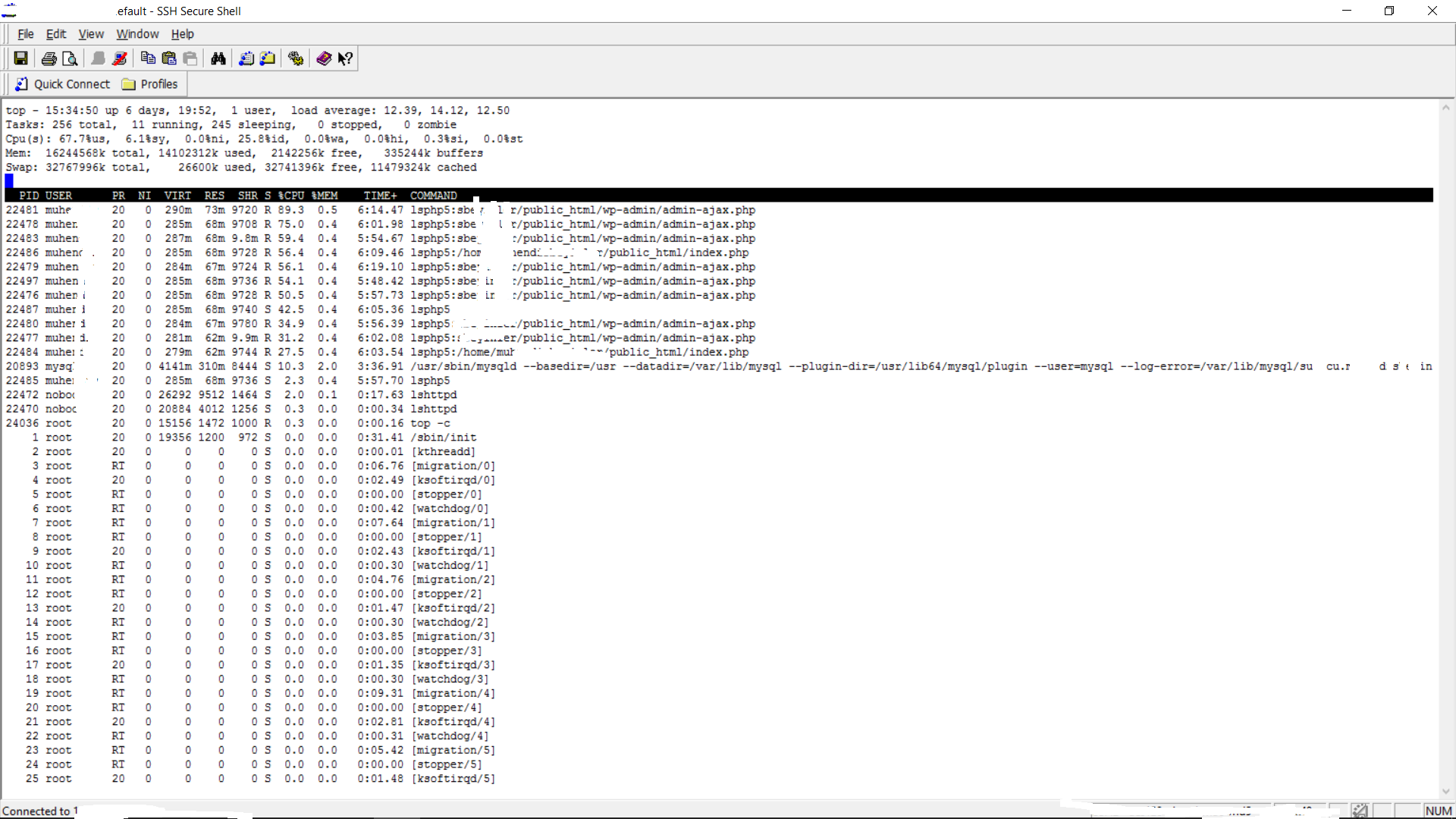
I think there is a problem in the theme “admin-ajax.php bot deficits.
i m using latest version and i m not using cache on blog. When i use cache i can t earn money.
