
- NewspaperHow to Use tagDiv Cloud Library
- NewspaperCloud Library Templates
- NewspaperCloud Library – Category Templates
- NewspaperDesign your Post Pages using the Cloud Library Templates
- NewspapertagDiv Cloud Library Plugin
- NewspaperCloudflare (CDN)
- NewspaperSingle External Shortcode and External Shortcode
- NewspaperSearch setup for custom post type
- NewspapertagDiv Composer – Website Manager
- NewspaperFlex Block Builder and Flex Loop Builder
- NewspaperModules Builder in Newspaper Theme
- NewspaperIntroduction to CPT and ACF with Newspaper Theme
- NewspaperCreate a frontend submission form
- NewspaperFilters and sorting for taxonomies
- NewspaperUser review system
- NewspaperHow to use the Google Maps API
- NewspaperWooCommerce: Happy “Add to Favorites!”
- NewspaperHow to insert a block inside the content of a post
- NewspaperHow to setup the Contact Page
- NewspaperPosts Loop Element
 bgo
bgoHello,
I am creating a cloud template which I would like to use for ‘deals’ on our site. This means when creating a new deal I will use this template.
As an example I would like to use “text with image” element. -> https://www.dropbox.com/s/r8a6s2qat0j8246/Schermafdruk%202018-11-01%2013.10.32.png?dl=0
Facing one major problem: how do I change for each deal (inside the post) this default Image/Url/text or do I have to create for each deal a copy of this template?
Thanx
 Calin
Calin Hi,
1. For ad row in categories please set “>” before each subcategory
https://www.screencast.com/t/2OvC8so0IP
https://www.screencast.com/t/brOm1GtRWq
2. You can not set there the view count and Facebook like, but you can hide the comments, just click on the flex, click on the Layout https://www.screencast.com/t/gwNlEZ8q -> https://www.screencast.com/t/dnHdZXdfd9X
Meta Info on Modules and Blocks -> https://forum.tagdiv.com/meta-info-modules-blocks/
3. You can hide the comment but not show the Facebook like
Global settings -> https://forum.tagdiv.com/general-settings/
4. You can activate the like button from panel, but if you want to have a share count and like button count you can use a plugin like this: Shared Counts -> https://wordpress.org/plugins/shared-counts/
https://www.screencast.com/t/BUdp8ZXo
If you refer to comments please read Enable/disable comments -> https://forum.tagdiv.com/enabledisable-comments/
5. Just open the page with tagdiv Composer click on the ticker and set the navigation to manual https://www.screencast.com/t/mrrIGgebEnu
6. Please use tagDiv Cloud Library -> https://forum.tagdiv.com/tagdiv-cloud-library-plugin/
Here is an affiliate link were you can test what you can do with cloud librarian and td composer :
https://affiliate.tagdiv.com/#/load/Pages
Hope this will help you.
Thank you.
 pavel@earnware.com
If there’s a blank tagdiv composer editor, then this is what it caused in my case: 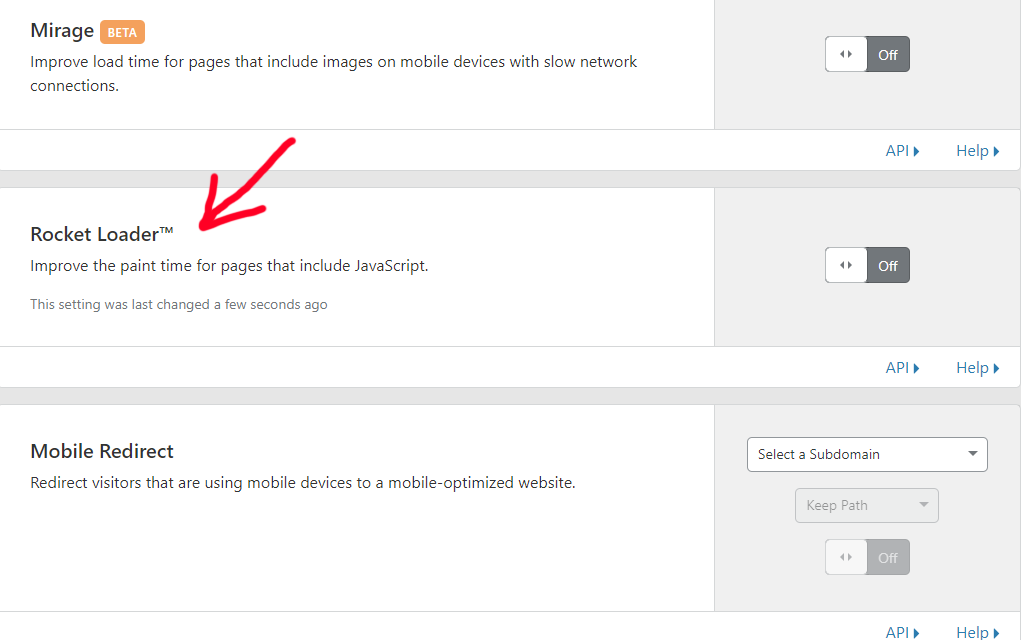 – this is a setting in cloudflare – in the speed tab. If it’s ON, tagdiv composer editor is blank in the last 9.1 release. Hopefully you will include this in your bug list and fix!
pavel@earnware.com Hey, @rvt @Catalin – so if there’s a blank tagdiv composer editor, then this is what it caused in my case: – this is a setting in cloudflare – in the speed tab. If it’s on, tagdiv composer editor is blank.
I hope this helps and you will include a fix for it @Catalin.
-
This reply was modified 7 years by
pavel@earnware.com.
-
This reply was modified 7 years by
 RitaLorraine
Hi there,
LOVE this theme! My only problem is I can’t figure out the tags. All my tags are creating a 404 “page not found” error. I went to the Theme Panel and set a Cloud template for the tag. But still when I click on one of my tags it goes to page not found. Can you please tell me what I’m doing wrong? Should I just disable all my tags? Thank you!
 ML
ML Alright it makes sense now. And how would you advice to build this layout as easy as possible ? Through Cloud template or through the tag composer ?
Thanks a lot,
 Will June
 I have checked the system status, it meets the requirements, and have the 9.1 version, and updated all the plugins.
But still cannot use the cloud template option. Response “Invalid reply from server endpoint.”
-
This reply was modified 7 years by
Will June.
Calin Hi,
Have you check the theme system status is configured as mentioned in the requirements guide. Please follow the guide carefully
– https://forum.tagdiv.com/requirements-for-newspaper/
Also if you don’t have the last version of theme please make update the theme ->
https://forum.tagdiv.com/how-to-update-the-theme-2/ ( and plugins TD Composer and TD Cloud Library )
Let us know the results.
Thank you.
Will JuneI am getting the error message when I use the cloud template.
“Invalid reply from server endpoint.”
And I have read those posts about this error, I have tried to do all methods listed on those posts, but the issue still there.
I need also send email to contact@tagdiv.com?
 cocktail
 Reinstalled right now the theme on my website got this message:
PLUGINS DISABLED AUTOMATICALLY
The following plugins were disabled because they are incompatible with this version of Newspaper:
tagDiv Cloud Library
For update please check our Plugins update guide
 Catalin
 Hello daniel,
Please check the following topic from here -> https://forum.tagdiv.com/topic/disqus-comment-not-working-with-cloud-templates/
Thanks for the message!
Calin Hi,
If you refer at this: https://www.screencast.com/t/H8TK0Y1o1Us
Please read the documentation about:
Category templates-> https://forum.tagdiv.com/category-templates/
Category tag on modules/blocks -> https://forum.tagdiv.com/category-tag-on-modulesblocks/
Or you can use tagDiv Cloud Library https://forum.tagdiv.com/category-tag-on-modulesblocks/
Thank you.
Calin Hi,
If you are using mobile theme then you need to add the ads in mobile theme > mobile ads
https://www.screencast.com/t/Ena0Pbisp0H
If you are not using the mobile theme then you can use a cloud template for singles, edit it and drag the ad box after bottom sharing, save the template and set in ton posts.
https://www.screencast.com/t/i5YbCPpAC
Thank you.
Calin Hi,
You can set the template page “Pagebuilder + latest articles + pagination” and set to post loop settings and layout M14
https://www.screencast.com/t/bDVVjmhxE
See results: https://www.screencast.com/t/4zXdCiAf
Category templates -> https://forum.tagdiv.com/category-templates/
If you are using TagDiv Composer and tagDiv Cloud Library you can edit the template how you like.
Thank you for your understanding.
cocktail Is there anything wrong with the cloud? Im trying to import a single post template and keeps loading forever. See image https://imgur.com/a/uQO70mk
 Anonymous
Hi, is there a workaround to use disqus on cloud library post template?
Thank you.
Anonymous +1 for disqus to work on cloud library
Calin Hi,
You can use tagDiv Cloud Library https://forum.tagdiv.com/tagdiv-cloud-library-plugin/
Here is an affiliate link were you can test all you can do with cloud library -> https://affiliate.tagdiv.com/#/load/All
Thank you for your understanding.
Calin Hi,
Please be notice that the tagDiv Composer is made for build page and edit templates, not create content for posts, just template for post, page, categories…
Please read our documentation about tagDiv Composer tutorial -> https://forum.tagdiv.com/tagdiv-composer-tutorial/
tagDiv Cloud Library plugin -> https://forum.tagdiv.com/tagdiv-cloud-library-plugin/
Thank you for your understanding.
Calin Hi,
You can use a template from tagDiv Cloud Library section Category
https://www.screencast.com/t/Rz3vjbwOJs
You can edit the template how you want, and place the ads were you want.
Thank you.
Calin Hi,
For the first problem change the template for the homepage https://www.screencast.com/t/E86NsVbfqh
Page templates
Homepage – How to build and set it
Or you can set s homepage template from tagDiv Cloud library
Second problem you need to edit the homepage with TD Composer
https://www.screencast.com/t/10QwBfxv
Thank you.
Calin Hi,
If you use a template from tagDiv Cloud Library then you can edit the template how you want :
https://www.screencast.com/t/19lgNqObw
https://www.screencast.com/t/GxMRqmXvIYcK
Thank you.
Catalin Hello Franciscoroche,
You should use the Cloud Template Library because from there you can import another category template or you can create it your own Category Template, using the TD Composer. Check more details here -> https://forum.tagdiv.com/tagdiv-cloud-library-plugin/
Thanks.
Calin Hi,
If you refer to this date https://www.screencast.com/t/MnTpSgP5adme the you can use a template from tagDiv Cloud Library ( https://www.screencast.com/t/trxJ3FzRsNX ).
Edit the template from cloud, go on post loop, layout, https://www.screencast.com/t/ByQrshq8 , look after date and hide it https://www.screencast.com/t/tzi7SVYyR8VZ save the template.
Thank you for your understanding.
Calin Hi,
Please make show that you have the last version of them, and the tagDiv Composer updated and activate, check to have the last version of tagDiv Cloud Library activate.
Also make sure that the theme system status is configured as mentioned in the requirements guide. Please follow the guide carefully
– https://forum.tagdiv.com/requirements-for-newspaper/
If you have all this please deactivate all plugins and after that activate just the plugin that are tested on our theme.
Thank you for your understanding.

