
- NewspapertagDiv Composer – Website Manager
- NewspaperWhen tagDiv Composer is Not Working
- NewspapertagDiv Composer Tutorial
- NewspaperScroll Animation
- NewspaperSingle External Shortcode and External Shortcode
- NewspaperCredit System
- NewspaperBookmark – Save For Later
- NewspaperFlex Block Builder and Flex Loop Builder
- NewspaperModules Builder in Newspaper Theme
- NewspaperIntroduction to CPT and ACF with Newspaper Theme
- NewspaperCreate a frontend submission form
- NewspaperHow to Use the Tabbed Content shortcode
- NewspaperCreate a form contact page
- NewspaperFilters and sorting for taxonomies
- NewspaperUser review system
- NewspaperCustom Fields Support
- NewspaperWooCommerce: Happy “Add to Favorites!”
- NewspaperWoo Brands
- NewspaperModal Popup
- NewspaperShortcodes
 Simion C.
 Hi,
You could use a row, this has options to set a background image
– https://www.screencast.com/t/IER3bPwb
Also the rows can be stretched to full width
– https://www.screencast.com/t/lsjImvzm
Then in the row you can place any element you want, like a text column for displaying text.
There are of course other elements in the composer that can be used to display images and text, you could try them out as well
– https://www.screencast.com/t/KoFfq3CLIIBi
Thanks
Simion C. Hi,
There is no documentation specific for that element, that I could provide you with. You can simply place the element on the page using the tagDiv composer and configure it as you want
– https://forum.tagdiv.com/tagdiv-composer-tutorial/
It has many options that you can use. You can enter text, an image and use the design and styling settings
– https://www.screencast.com/t/9Emv6StWfkrm
So simply place it on the page you want and begin configuring it step by step.
Thanks
Simion C. Hi,
I am having trouble accessing your website, I had to use VPN browser extension to be able to see it. You might have restrictions on the website.
From what I see there is a strange width and height set for the row containing the big grid, which are also causing a big empty space below the grid
– https://www.screencast.com/t/l63IM1RL
If you used custom code or set design on the row containing the grid or grid itself in the composer
– https://www.screencast.com/t/PSeExgx65OgS
Try to remove the custom code or modifications made in the mentioned locations, then check the grid again.
Thanks
 oltreirestinews
I have the following error when i’m tring to modify a page on my site:
vc-tabs.min.js?ver=5.4.5:1 Uncaught TypeError: Cannot read property ‘getRelatedTab’ of undefined
at HTMLDocument.changeHandler (http://…/wp-content/plugins/js_composer/assets/lib/vc_tabs/vc-tabs.min.js?ver=5.4.5:1:3497)
at HTMLDocument.dispatch (http://…/wp-admin/load-scripts.php?c=1&load%5B%5D=jque…uery-ui-mouse,jquery-ui-draggable,utils,moxiejs,plupload&ver=4.9.4:3:12444)
at HTMLDocument.r.handle (…/wp-admin/load-scripts.php?c=1&load%5B%5D=jque…query-ui-mouse,jquery-ui-draggable,utils,moxiejs,plupload&ver=4.9.4:3:9173)
at Object.trigger (…/wp-admin/load-scripts.php?c=1&load%5B%5D=jque…uery-ui-mouse,jquery-ui-draggable,utils,moxiejs,plupload&ver=4.9.4:3:11573)
at Object.a.event.trigger (…/wp-admin/load-scripts.php?c=1&load%5B%5D=jque…query-ui-mouse,jquery-ui-draggable,utils,moxiejs,plupload&ver=4.9.4:9:8275)
at HTMLSpanElement.<anonymous> (…/wp-admin/load-scripts.php?c=1&load%5B%5D=jque…uery-ui-mouse,jquery-ui-draggable,utils,moxiejs,plupload&ver=4.9.4:3:18991)
at Function.each (…/wp-admin/load-scripts.php?c=1&load%5B%5D=jque…query-ui-mouse,jquery-ui-draggable,utils,moxiejs,plupload&ver=4.9.4:2:2881)
at a.fn.init.each (…/wp-admin/load-scripts.php?c=1&load%5B%5D=jque…jquery-ui-mouse,jquery-ui-draggable,utils,moxiejs,plupload&ver=4.9.4:2:846)
at a.fn.init.trigger (…/wp-admin/load-scripts.php?c=1&load%5B%5D=jque…uery-ui-mouse,jquery-ui-draggable,utils,moxiejs,plupload&ver=4.9.4:3:18967)
at a.fn.init.$.fn.(anonymous function) [as hide] (…/wp-content/plugins/social-booster/admin/metabox/cmb2-conditionals-master/cmb2-conditionals.js?ver=1.0.4:11:9)
changeHandler @ vc-tabs.min.js?ver=5.4.5:1
dispatch @ load-scripts.php?c=1…lupload&ver=4.9.4:3
r.handle @ load-scripts.php?c=1…lupload&ver=4.9.4:3
trigger @ load-scripts.php?c=1…lupload&ver=4.9.4:3
a.event.trigger @ load-scripts.php?c=1…lupload&ver=4.9.4:9
(anonymous) @ load-scripts.php?c=1…lupload&ver=4.9.4:3
each @ load-scripts.php?c=1…lupload&ver=4.9.4:2
each @ load-scripts.php?c=1…lupload&ver=4.9.4:2
trigger @ load-scripts.php?c=1…lupload&ver=4.9.4:3
$.fn.(anonymous function) @ cmb2-conditionals.js?ver=1.0.4:11
f @ load-scripts.php?c=1…embed&ver=4.9.4:116
(anonymous) @ load-scripts.php?c=1…embed&ver=4.9.4:116
dispatch @ load-scripts.php?c=1…lupload&ver=4.9.4:3
r.handle @ load-scripts.php?c=1…lupload&ver=4.9.4:3
trigger @ load-scripts.php?c=1…lupload&ver=4.9.4:3
a.event.trigger @ load-scripts.php?c=1…lupload&ver=4.9.4:9
(anonymous) @ load-scripts.php?c=1…lupload&ver=4.9.4:3
each @ load-scripts.php?c=1…lupload&ver=4.9.4:2
each @ load-scripts.php?c=1…lupload&ver=4.9.4:2
trigger @ load-scripts.php?c=1…lupload&ver=4.9.4:3
CMB2ConditionalsInit @ cmb2-conditionals.js?ver=1.0.4:184
(anonymous) @ cmb2-conditionals.js?ver=1.0.4:280
i @ load-scripts.php?c=1…lupload&ver=4.9.4:2
fireWith @ load-scripts.php?c=1…lupload&ver=4.9.4:2
ready @ load-scripts.php?c=1…lupload&ver=4.9.4:2
K @ load-scripts.php?c=1…lupload&ver=4.9.4:2
(anonymous) @ VM1993:2
T.e.string.f.function.c.(anonymous function) @ VM2016:51
(anonymous) @ VM1993:2
b @ VM1993:1
(anonymous) @ VM1993:2
T @ VM2016:51
l @ VM2016:49
So if i want modify the template or something else i can’t.
This error come out when i update wordpress from 4.9.3 to 4.9.4
I viewed the error from the console in the browser.
Could you help me?
 rsenzon
 Am I missing something… I have the same question… i am running Newspaper 8.6. In TD Composer when I select a row or element, then navigate to the CSS tab I do not have an option for Display. The last option I have in the panel is Color 2 overlay. The a link to “Clear CSS”
Simion C. So you have created sidebars like shown above, and they are not appearing in the widgets section.
I have tested this myself, first I created a sidebar here for example
– https://www.screencast.com/t/XU3aayWpTwn
This sidebar appears in widgets and I can add content to it
– https://www.screencast.com/t/a31c9syf
Now it can be selected in any place where you want it to display, for example in the composer
– https://www.screencast.com/t/bfkMNerAIx
When using the composer you can also simply split the row as you mention and the sidebar would be considered the 1/3 column. Then drag items in it. An advantage of having widget sidebars would be that you can simply select a predefined sidebar and use it multiple times.
If you already tried this and with no results, then there is a problem. The first step would be to deactivate all plugins except theme plugins. Usually plugins are causing issues. Then try again to create a sidebar and set it. Let us know the results.
Thanks
 tonima
I have one page only, and I can edit it, everything goes fine. That page is displayed on URL http://dev.mega-media.hr/megamedia-test/. But when I visit http://dev.mega-media-hr/ there is no option for tagdiv composer. I want this to be my homepage and I want to edit it, how do I do it?
 Bogdan B.
 Hello,
Please make sure you have the tagdiv composer plugin installed and active. Check the plugins section. If it;s active, then try to disable all other plugins except the tagdiv composer and test again.
Thank you!
Bogdan B. Hello,
They are available in the tagdiv composer, not under posts. You have to install the multi-purpose plugin first. Please edit a page with the tagdiv composer page builder and you will see the new elements among the page builder elements. It is a live page builder so each element is self explanatory. you simply add it to your page and see the result live.
Thank you!
Bogdan B. Please press the back-end editor button as seen in your screenshot. You are in the mce editor, not in visual composer.
Thanks.
 Jerrad
 Thanks Catalin. Just curious, what is the long term plan for Newspaper’s support with Visual Composer?
Simion C. That is a normal page, you can edit it with the composer and place anything you like. Most contact form plugin have shortcodes that you can use as shown above. Check this article
– http://www.wpbeginner.com/plugins/5-best-contact-form-plugins-for-wordpress-compared/
– http://www.wpbeginner.com/beginners-guide/how-to-create-a-contact-form-in-wordpress/
For example the contact form used in this theme demo is created with WPForms plugin
– https://demo.tagdiv.com/newspaper_dentist/contact/
Thanks
 nirv1
nirv1Hi guys!
I purchased the Newspaper 8.6 lately.
How come I don’t have “Edit with TD Composer”
Iwant to edit the home page of my newspaper.
Thanks a lot.
 mike_ashworth
 Hi, thanks for your reply.
sidebars are enabled on my templates so ready to go. (however i dont see sidebars when going to the widgets section of the regular wordpress panel – is this a problem?)
starting with my website homepage, i would first need to create a 2/3, 1/3 look to enable the sidebar to go into the right hand side 1/3?
I can see the widget sidebar option when using the composer. So i would ddrag that into the right hand side 1/3 space first yeah? and then populate the sidebar with the various things i want such as social counter, popular articles etc etc?
Simion C. Hi,
Indeed that would summarize it. Certain row layouts and elements will break when both page builders are active at the same time.
A thing to note would be that the tagDiv composer will receive many more options over future theme updates. These will not be available in Visual composer.
Thanks
Simion C. I have installed the same demo you mention, the global medicine. I then proceeded to edit the homepage with the tagDiv composer. Each element that is added with the composer can be edited with it.
Only the Latest articles and it’s sidebar cannot be edited with it. The latest articles section is displayed because of the selected page template
– https://www.screencast.com/t/MrrhItZlzaBL
Also the sidebar of this section is set there.
Other than this section, everything in the page content can be edited with the composer. If you could mention what elements exactly you are having problems with, it would be helpful.
Thanks
Simion C. Hi,
Demos may contain multi-purpose elements, these can only be edited or placed with the tagDiv composer. The dental demo is built with such elements, it cannot be edited with Visual composer, the shortcodes will not be interpreted by it.
The tagDiv composer is the main page builder in the theme. All the demos are built with it. The new multi-purpose plugin and elements can only be used with it. Coming updates will provide many more options and features specially for the tagDiv composer. That should be taken into consideration
– https://forum.tagdiv.com/tagdiv-composer-tutorial/
– https://www.youtube.com/watch?v=C0ARTSimnUY&index=4&t=43s&list=PL6CsDkMaejhr2ExZCO73U11SSVKB9r_NE
Thanks
 Catalin
 Hello ANM,
Please notice that our composer cannot be used for post pages, but only for pages. So, if you want to add the Call to action from each post pages without the author box, notice that you should do this from the code using the <?php echo do_shortcode ('your code here'); ?> method because another way of doing this does not exist, sorry! The code should have to be added to quotation mark should have to be taken from here -> https://www.screencast.com/t/qKWeLfGg -> https://www.screencast.com/t/DyEb0gJ9IYh -> https://www.screencast.com/t/tW8Vja2vx (example for post template style 1) and the result is here -> https://www.screencast.com/t/TOeFVx01Ob.
Thanks for the message!
 arvind
hello theme admin my website insidesport.co used newspaper theme 7 used.my visual composer not working in theme page.please help me.
page Screen shotVisual composer not working http://prntscr.com/iarsy2
Simion C. Hi,
You must first create sidebars, they will then appear in the widgets section. Sidebars can be created from multiple places
– https://forum.tagdiv.com/sidebars-tutorial/
These can then be used on posts, category pages, or as you mention on pages using the Widgets sidebar element. Using the composer simply drag the elements in the location you want, then select from your available sidebars
– https://www.screencast.com/t/BYC2c5g8H7
Please let us know if you have any further questions.
Thanks
 nishino
So my tagdiv composer is not working. When I try to use it on my homepage it just keeps loading and loading and spins in a circle but never loads the content. It works on my other pages. It just doesn’t work on my home page. How do I fix this?
Simion C. Hi,
The latest version of Visual composer provided in the theme package (5.4.5) is tested with the theme and it works properly. So there should be no problem using updating it.
When the tagDiv composer is active, Visual composer elements may be affected. That would be the only situation when issues are present.
So keep the tagDiv composer deactivated and there should be no problem with the pages, if the pages were built with Visual composer.
If you used this Elementor page builder as well on those pages, note that we have not made any tests with it and the theme or compatibility tests between all these three builders.
Pages should be created using only one composer, also not edited with a different one. That will not cause any problems such as the ones you mention. Use only the page builder that was used initially to build the pages.
We will be able to provide a refund in this case, if you cannot use the theme and theme page builders included in the package for the website.
Thanks
 beycank
Hi everyone
Yesterday I update my theme via Plugin. Now my site design is broken. (beycank.com) I found that, tagdiv composer is deleted. So I tried to install again but I got this problem:
Installing Plugin: tagDiv Composer
The plugin does not have a valid definition section.
Installation package downloaded, download location: http://beycank.com/wp-content/themes/Newspaper/includes/plugins/td-composer.zip…
Opening package …
Installing plugin …
The destination folder already exists. /var/www/vhosts/beycank.com/httpdocs/wp-content/plugins/td-composer/
Attachment setup failed.
So, What should I do now? where can I found this folder. Should I delete it and try again to install it? Thank you so much. Please help me 🙂
 kenigmatic
 Thank you.
One thing – how do I add a contact form to this page? http://moneyoak.com/contact/
Can I do this thru TD Composer?
 robsabo10
I don’t know where this issue popped up from, but I noticed it yesterday. We’ve added some code by way of speeding up the site while deleting many plugins. Already troubleshooted by disabling every plugin on the site and removing any code that was added.
On every TAG page, our images display the WORDPRESS CAPTION CODE for some strange reason. Never has this happened over two years prior to yesterday.
example of tag: elitesportsny.com/tag/greg-bird

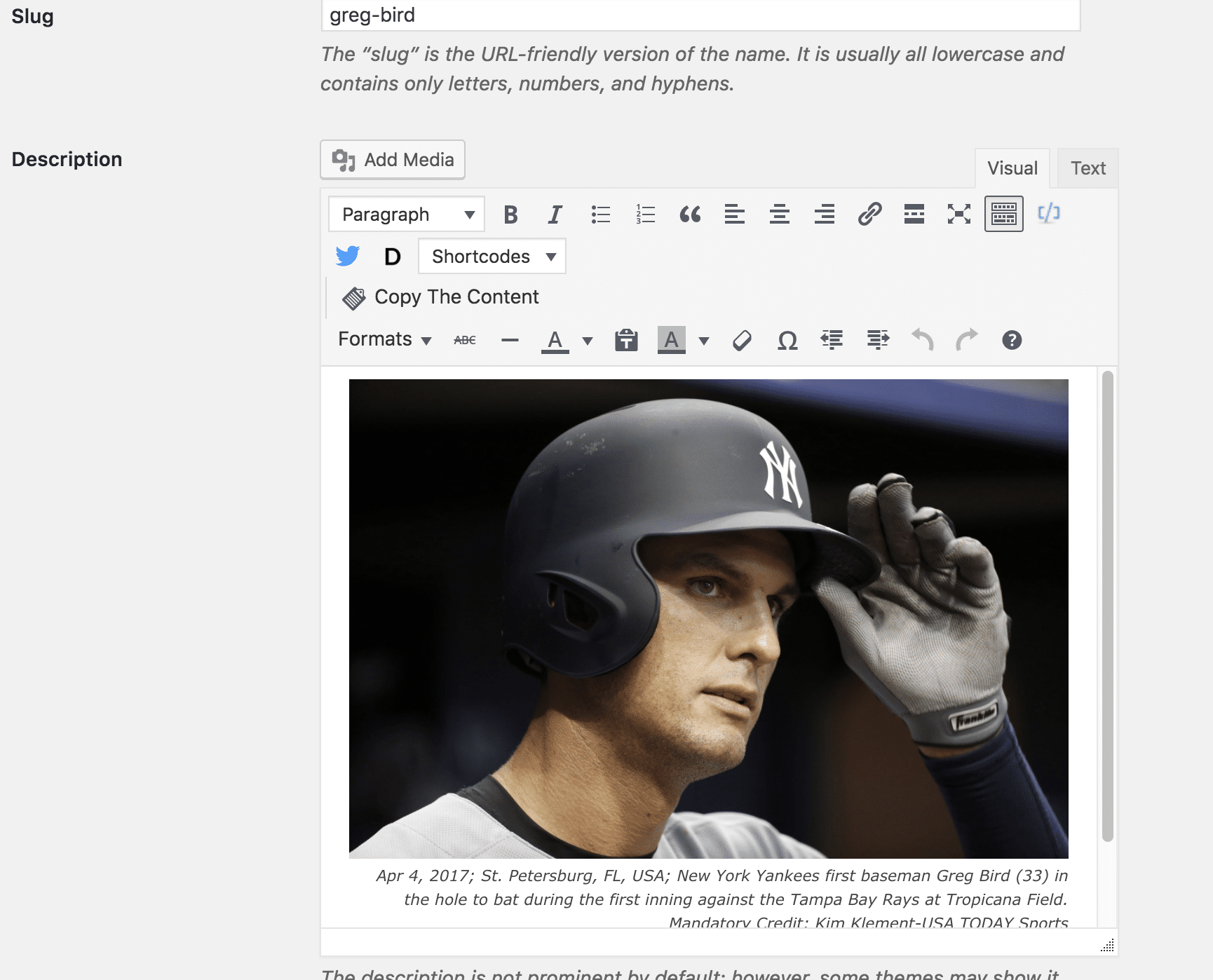
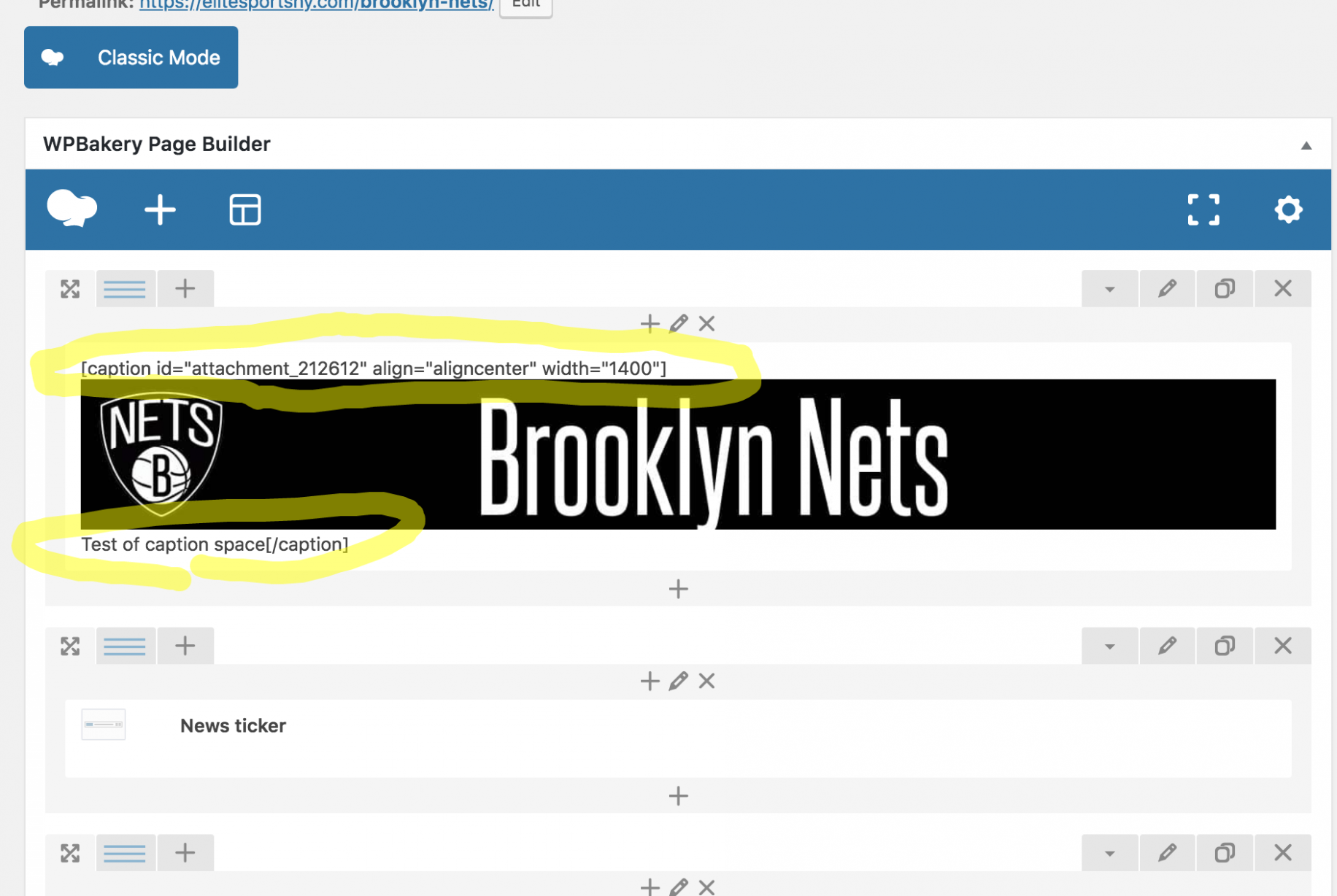
So the backend of the tag and post shows fine, yet the Tag shows up completely screwed up. The backend of the Page is messed up, yet shows up on the front end as perfectly fine. It feels like a Visual Composer issue, but I’ve always used the regular version coming with the theme. (Just updated it tonight out of desperation in looking to fix the issue.)
Definitely need help here. Thanks.
