- NewspapertagDiv Composer – Website Manager
- NewspaperWhen tagDiv Composer is Not Working
- NewsmagtagDiv Composer Tutorial
- TutorialsFrom WPBakery to tagDiv Composer
- NewspapertagDiv Composer Tutorial
- NewsmagHow to use the Visual Composer plugin
- NewspaperScroll Animation
- NewspaperSingle External Shortcode and External Shortcode
- NewspaperCredit System
- NewspaperBookmark – Save For Later
- NewspaperFlex Block Builder and Flex Loop Builder
- NewspaperModules Builder in Newspaper Theme
- NewspaperIntroduction to CPT and ACF with Newspaper Theme
- NewspaperCreate a frontend submission form
- NewspaperHow to Use the Tabbed Content shortcode
- NewspaperCreate a form contact page
- NewspaperFilters and sorting for taxonomies
- NewspaperUser review system
- NewspaperCustom Fields Support
- NewspaperWooCommerce: Happy “Add to Favorites!”
 phommasy
Errors at elements: 10(models) : 9(dom). The model does not match the content Current state has involved an issue. You could try an UNDO operation (CTRL+Z / CTRL+SHIFT+Z)
how to solve it?

 decab
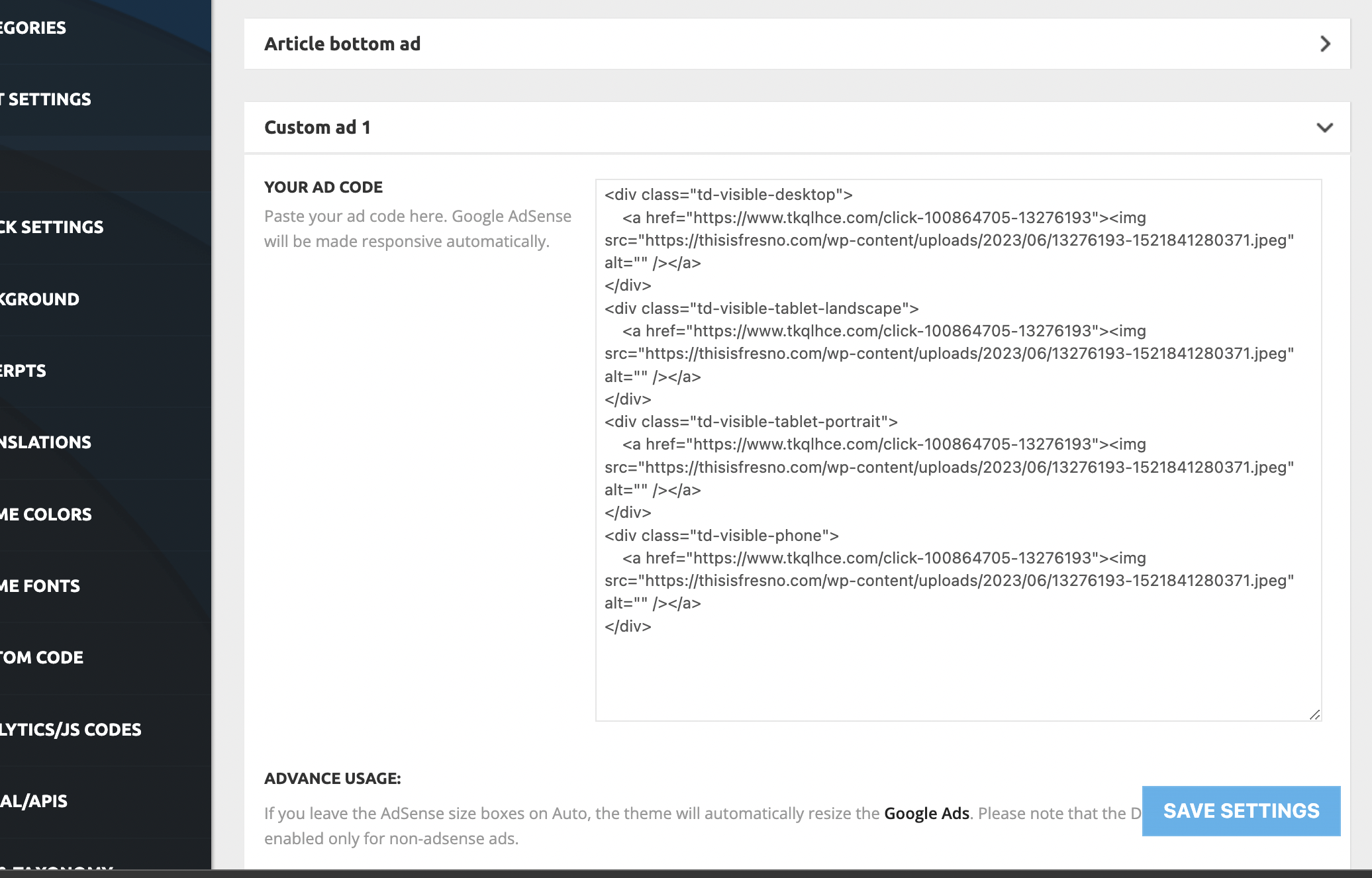
decabI cannot for the life of me get Ads to work from the theme panel ads, custom ad 1/2/3/4/5. Or any Ad from the preset category.
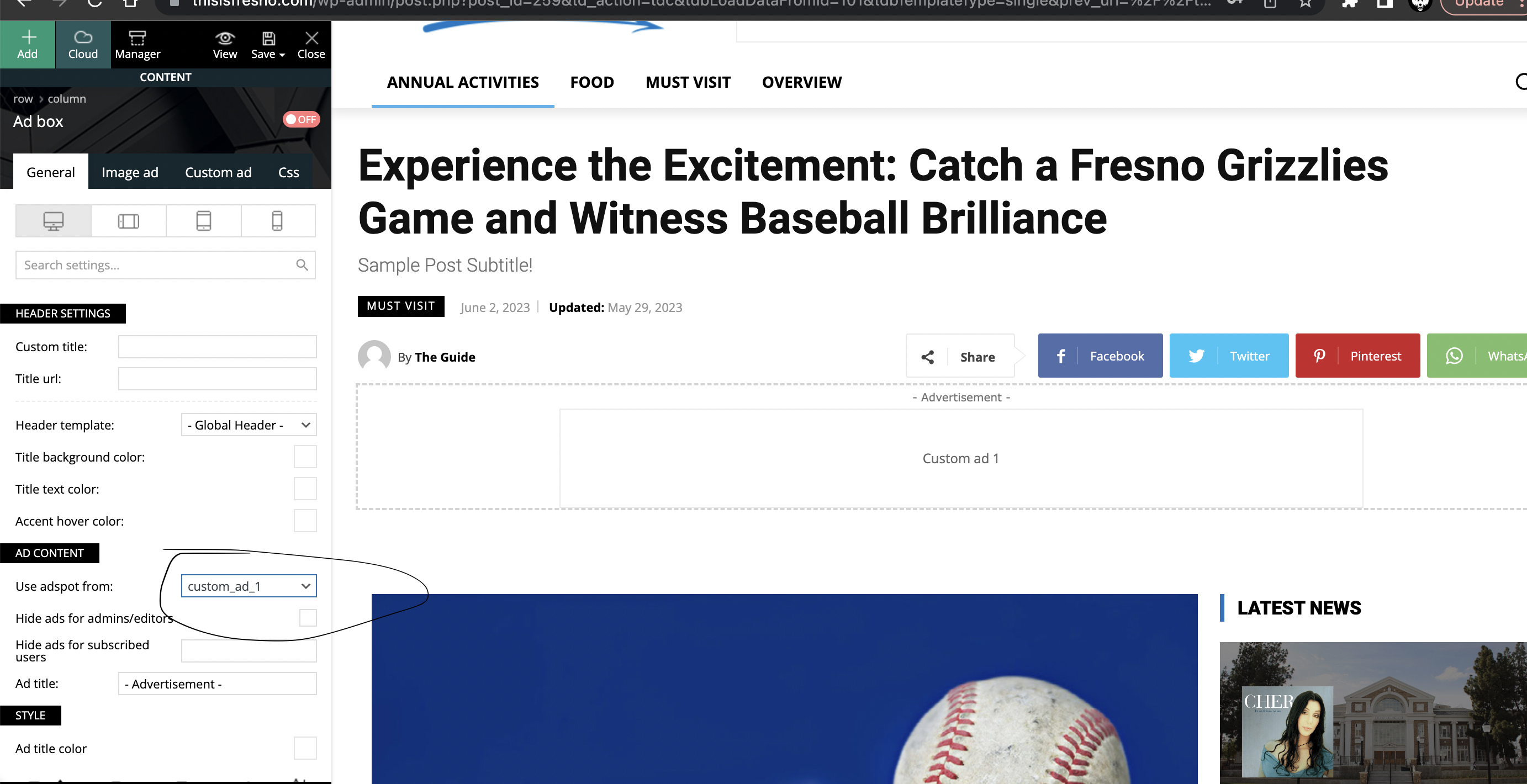
My issue is that I want to select “Custom Ad 1” from the theme composer. I click it from the drop down and nothing happens. I save and refresh the page. It only shows the default theme filler content.
For me to place ads I just have to manually set each one with the photo and link. That gets tiring, especially when there is a panel for ads available with a drop down. Here is what Im looking at:
Thisisfresno.com
https://thisisfresno.com/wp-content/uploads/2023/06/Screen-Shot-2023-06-17-at-9.51.48-AM.png
https://thisisfresno.com/wp-content/uploads/2023/06/Screen-Shot-2023-06-17-at-9.55.29-AM.png
https://thisisfresno.com/wp-content/uploads/2023/06/Screen-Shot-2023-06-17-at-9.54.03-AM.png
 ludyma
Hello, using the patchstack security plugin, it informs me of a vulnerability against attacks (cross site scripting XSS). by the TagDiv editor. is there a patch?

 sjahan
 Hi, yes I do track ad performance via Google but that’s only for my AdWords campaigns. The Ad Box I’m using in the tagDiv composer is just an image I uploaded that links to a 3rd party site. So I want to be able to track the performance of the image as that’s not part of Google.
 saggel
Good evening. I noticed that in the date template, the post-loop component in the tagdiv composer loads articles from three months prior once the day’s articles are finished.
Examples
Date 14/6/2023 https://shorturl.at/cnPRU When loads the 16 articles published on this day, loads articles from 14 March
Date 15/6/2023 https://shorturl.at/vAR12 When loads the 20 articles published on this day, loads articles from 15 March
Date 1/6/2023 https://shorturl.at/htzHR When loads the 13 articles published on this day, loads articles from 11 March
Can you check it?
The settings for post-loop component are:
Thank you
 Bettina
 Hello Gurkirat!
Check in the TagDiv Composer. For example, H1 from logo(header, footer, mobile): https://forum.tagdiv.com/topic/6-h1-tags-on-front-page-bing-have-deindexed-my-site/
Thank you!
Bettina Hello!
The theme panel settings are working and will be applied on the default templates which are not customizable with the TagDiv Composer.
Thank you!
Bettina Hello @mouawiaa!
Instead of editing every element and set the float to the left, you could use the RTL demos already set it up: https://prnt.sc/nORzLv7nLWws. You can also import sections, pages and copy-paste the element in the tagdiv Composer.
Thank you!
 Anamaria
 Hello,
Please try to edit with tagdiv Composer, and select the menu and check the tab css -> https://i.imgur.com/U9PTYUV.png
Thank you!
Anamaria Hello,
You can edit the Single Post Template using tagDiv Composer -> https://www.youtube.com/watch?v=6m8-EebnfM0
If you have the same template for all posts, then you need to set it global here -> https://i.imgur.com/yG21rqe.png
Thank you!
Bettina Hello @dlicoppe !
Edit the homepage with the TagDiv Composer, mobile viewport : https://www.screencast.com/t/XDQJedlggSB. This is the right location.
I cannot make any videos because, of course, I do not have the same issue as you. Probably that element is there, but it is hidden. I explained above in the video how you can find a hidden element in Composer. Please take a look and try to solve your issue. If this is not possible, we are waiting for your email.
Thank you for understanding!
Bettina Hello!
We recommend using cloud/PRO templates in order to have the possibility to edit them with the TagDiv Composer, which contains a lot of functions and features, Please check our tutorial here: https://forum.tagdiv.com/tagdiv-composer-tutorial/
More documentation about the cloud templates is here:
– https://forum.tagdiv.com/cloud-library-templates/
– https://forum.tagdiv.com/design-post-pages-using-cloud-library-templates/
– https://forum.tagdiv.com/cloud-library-category-templates/
Thank you!
Anamaria Hi,
You can remove the Single Post Date from the template, select with tagDiv Composer and with a right-click you can delete => https://i.imgur.com/GNzcGmJ.jpg , or selecting the element and with drag & drop place into the deleting red zone from the bottom right of the page => https://i.imgur.com/vkQVCjn.jpg this change will be apply to all posts that use that template. The same for comments.
Thank you!
 lactufr
Hello, once again, after hours of research, after reading the documentation, I still don’t know where to change the links in the social network icons of the header.
The video shows div composer but no, there is no possibility to modify this area.
Everything is extremely complicated on this subject.
THANKS
Bettina Hello @theheritagelab !
Please check the console and see which errors you encounter. Normally, if you click on that button, the WP Editor will open and you can add some text/code/shortcode there. Close the WP Editor from X, save the changes from Composer and view the page to see the changes.
It’s possible to be from the firewall or security module which blocks the admin-ajax.php request, which usually displays a 403 or 404 error.
If you don’t use a security plugin, please ask your host about this, maybe you have a security module that blocks this.
If you use a plugin like Wordfence please set it in learning mode.
Also, if you are using Cloudflare, please make sure that is set as in our guide https://forum.tagdiv.com/cloudflare-cdn/, you need to disable the Rocket Loader.
Examine some other potential interfering factors: https://forum.tagdiv.com/general-options-may-interfere-newspaper-theme/
Let me know the results!
Thank you!
Bettina Hello!
Please re-install the theme or do these steps:
1. deactivate TagDiv Composer
2. uninstall (delete) TagDiv Composer
3. clear cache (if a cache plugin is present).
4. install TagDiv Composer
5. activate TagDiv Composer
6. clear cache (if a cache plugin is present).
Make sure that the plugins are installed and active. Clear the cache and let me know the results!
Thank you!
 theheritagelab
Hello,
While editing pages with the TagDiv composer, I’m unable to “edit content” on the column text elements. E.g, on the home page, I have a shortcode displaying events – but I am unable to now edit the same.
🙁
Bettina Hello @dlicoppe !
If you check with the CSS inspector, you’ll find it here: https://prnt.sc/0sOI2tH8C2XL
Make sure it is not hidden in Composer. If you can’t find an element after you have hidden it on every viewport, check this thread for the solution: https://forum.tagdiv.com/topic/cssdisplay-show-or-hidden/
Or set a CSS code with display none.
Thank you!
 Gurkirat Singh
The TD Composer Kept Loading – and it is using so many high resources on My server how to fix – and my header is not showing also
This error showing on my homescreen
Invalid argument supplied for foreach()
wp-content/plugins/td-composer/legacy/common/wp_booster/td_util.php:679
td_util::check_header()
wp-content/plugins/td-composer/legacy/common/wp_booster/td_wp_booster_functions.php:705
td_load_css_fonts()
wp-includes/class-wp-hook.php:308
do_action(‘wp_enqueue_scripts’)
wp-includes/script-loader.php:2194
wp_enqueue_scripts()
wp-includes/class-wp-hook.php:308
do_action(‘wp_head’)
wp-includes/general-template.php:3049
wp_head()
wp-content/plugins/td-standard-pack/Newspaper/header.php:11
{closure}()
wp-includes/class-wp-hook.php:308
do_action(‘tdc_header’)
wp-content/themes/Newspaper/header.php:2
load_template(‘wp-content/themes/Newspaper/header.php’)
wp-includes/template.php:718
locate_template()
wp-includes/general-template.php:48
get_header()
wp-content/plugins/td-standard-pack/Newspaper/page.php:7
1 Plugin: td-composer
Bettina Hello @dlicoppe !
Ok. Once again, if you have this element on the pages, please choose a menu from here: https://prnt.sc/3Uv47zBB-zpz or delete it like this: https://prnt.sc/gDPHSDDfCSbH
Finally, the code will disappear. In the theme panel settings, make sure you did not set any style: https://prnt.sc/eS7jx2yCC8OR
Please check every page in the tagdiv Composer, any language page and viewport.
I hope that helps you and you can solve your issue!
Thank you!
 mtjweb
When an article is opened on a mobile device, there is the default WordPress error messages shown.
In the logs, I see the following error:
[Wed Jun 14 11:59:55.214315 2023] [proxy_fcgi:error] [pid 1696871:tid 140319819536128] [client 123.123.123.123:47370] AH01071: Got error 'PHP message: PHP Warning: require_once(../wp-content/Newspaper/tagdiv-deploy-mode.php): failed to open stream: No such file or directory in ../wp-content/plugins/td-composer/mobile/functions.php on line 11PHP message: PHP Fatal error: require_once(): Failed opening required '../wp-content/Newspaper/tagdiv-deploy-mode.php' (include_path='.:') in ../wp-content/plugins/td-composer/mobile/functions.php on line 11'
It looks like the value for $get_parent_template_directory is missing the “themes” directory.
I looked in the code, but could not find where this value is comming from.
Anybody a idea?
 afuentessa
 Hello,
I have the same problem.
The tagDiv Composer plugin increases the server load to 100/100 and it blocks my website
 volvano
 https://imgur.com/a/i5jsU8h this is how it looks on the composer, but when vieiwing the site there is an extra line as shown below https://imgur.com/a/tD4H1ZR.
volvano sorry i am missing something here, i have clicked in the footer zone, clicked on the row alll over the footer and i cant see any inline text. the inline text that shows on your screenshsot doesnt show on my composer at all. literally tried clicking everywhere.
Bettina Hello!
You can only modify the footer with TagDiv Composer if you go to a page where it is assigned and edit that page with TagDiv Composer, and then you will have access to the footer also. For example, edit your homepage with TagDiv Composer, scroll till footer, click on footer zone and you can edit it. The hover color is always the second color from here: https://prnt.sc/5t-_QoTq9FoU
Thank you!