
- NewspaperModules Builder in Newspaper Theme
- NewspaperIntroduction to CPT and ACF with Newspaper Theme
- NewspaperHow to edit modules for Flex Block X
- NewspaperStripe Setup
- NewspaperPayPal Setup
- NewspaperAdd Cryptocurrency Price Ticker Widget
- NewspapertagDiv Shop
- NewspaperDesign your post pages using the Default Templates
- NewspaperTheme modules and blocks
- NewspaperUsing the Theme Translations with WPML
- NewspaperHow to Set the Image Avatar
- NewspaperNewspaper theme documentation
- NewsmagInstalling pre-built websites
- NewsmagIntroduction
- NewsmagSmart Lists
- NewsmagTheme thumbs
- NewspaperSmart Sidebar
- NewspaperBreadcrumbs
- NewspaperFooter Builder
- NewspaperMain Menu
 FBM
FBMHi,
is there any way that we could use custom taxonomies for the dropdown menu as it is shown in this example: https://demo.tagdiv.com/newspaper_pulses_pro/ in the menu item “news”?
Thank you for your response!
 luisle
Hi, can i change header and body?. I install demo Magazine Pro, but i want to show header 100% with, and in the zone where i see the logo, show only the logo with a background color.
I can send you a image like i want to show the header, i think is easy an possible, but with the tools of the theme into the backoffice, i can’t do this.
Regards.
 petitefilms
Hi! I’m using newspaper (craft template https://demo.tagdiv.com/newspaper_craft_ideas/), and I would like to have an about me box the same as the home page on this template.
I have two things frustrating me:
The author of the page is not a real person, it’s the support person I paid for when I bought the theme. So, how can I:
a) change the author of the home page
b) create a very SIMPLE author template. I’ve been to Cloud library and it’s so complicated. I just want to be able to add a photo, my name and a small blurb. And I want it to look similar to the template linked above
I would be so grateful for your help as I’ve been at it for 3 hours and getting nowhere.
Thanks!
 flyingfinn
 Hello thank you for your answer. We use a PRO/could template. We imported the header of the newspaper demo through cloud templates.
Though we cant edit. The inner position cant be deleted (no option like the one in video) and also cant drag and drop new rows so i can set up two other banners. Same in the inside article i showed you.
I can send you a video if you like. Or if we misunderstood something please help us understand. Thank you!
 Bettina
 Hello!
If you like the entire demo you can install it from Newspaper -> Prebuilt Websites -> Default pro with content or without. Or you can inspect the demo and you can see which elements are used there.
Thank you!
 Vlad S
 Hello!
If you are using a PRO demo or cloud library template that is being done via tagDiv Composer. Theme panel does not work over cloud library templates.
In order to increase the width click on the ROW button and you are able to set it wider: https://www.screencast.com/t/YXYVRjSFhK
For the background color, on the ROW button – CSS Tab: https://www.screencast.com/t/FdPWxq0iK0
Thank you!
Vlad S Hello!
As you can see here now the cart is an element which can be added using tagDiv Composer: https://www.screencast.com/t/50RiFOFtH You can set it anywhere on your page if you are using a PRO demo or a cloud library template.
Thank you!
Vlad S Hello!
Let us know what you want to change, PRO demos are fully editable using tagDiv Composer. You can take a look at our video guides here to find some inspiration on how some elements work: https://www.youtube.com/user/tagdiv
Thank you!
Bettina Hello!
You can edit the slider and adjust the sizes from the plugin only.
For more information, check also our documentation: https://forum.tagdiv.com/import-revolution-sliders-on-demos-prebuilt-websites/
Thank you!
 mr-x
mr-xHello,
How to make top 10 page like?
https://demo.tagdiv.com/newspaper_pro/top-interior-design-in-2020-new-york-business/
Thanks
 lyon
lyonHello, We are using Newspaper Theme version 10.4 on our multisite network, with WordPress 5.7.2. Ever since updating to 10.4, we’ve had an issue that affects just two of our sites on the network, one of which is the main site. All the other sites have no issue.
What happens is when we build a page with a sidebar in TD Composer, and leave the page template set to default, we are seeing a strange overlapping sidebar:
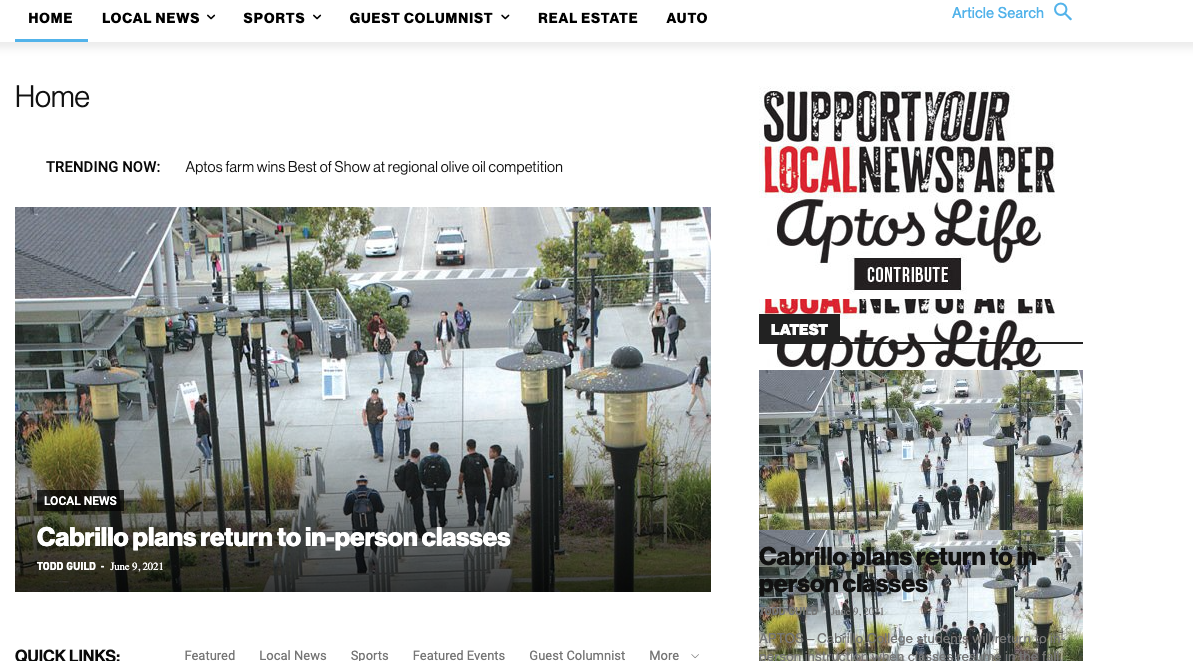
This is how we have the sidebar set in TD Composer:
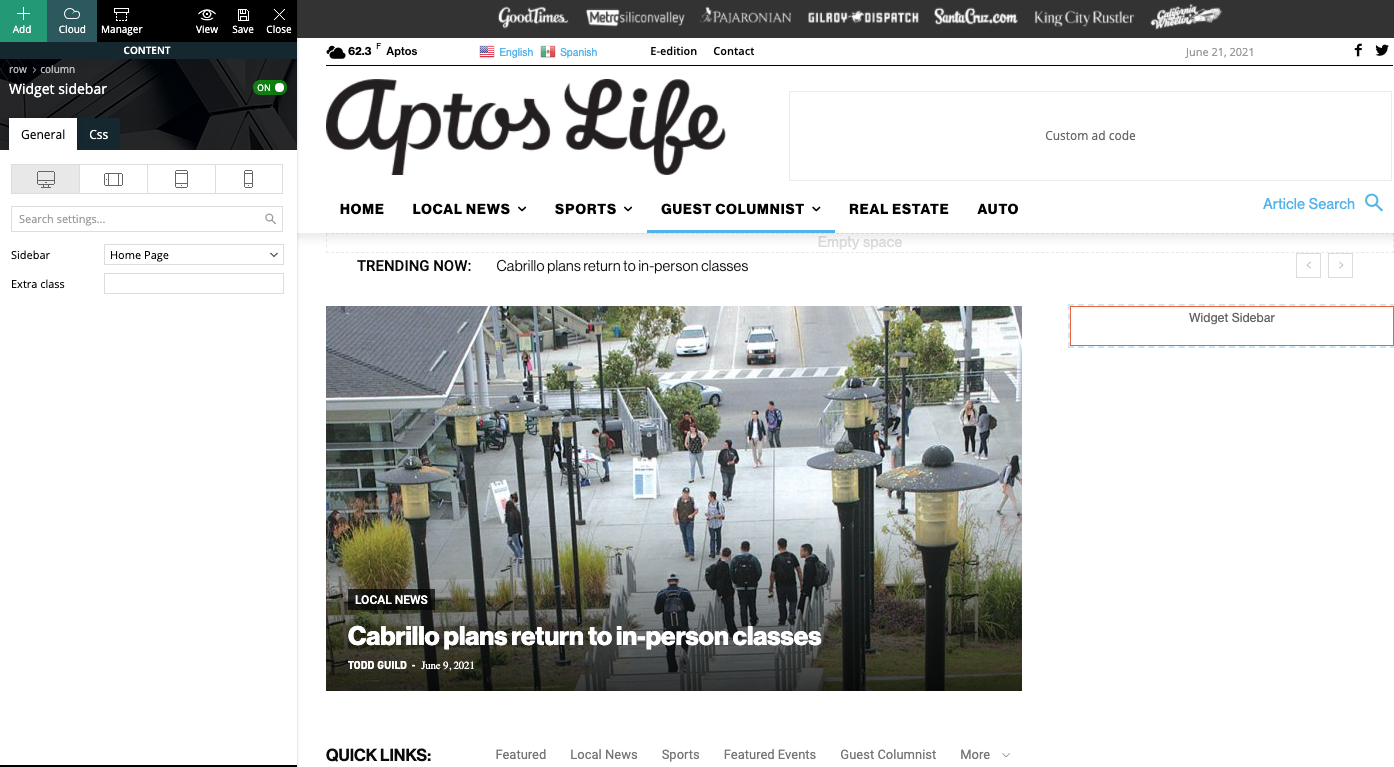
As a temporary workaround we can set the page template to Pagebuilder + latest articles + pagination, but this opens up a whole new set of problems. For example, if we try to change or hide the sidebar in the “Homepage latest articles” settings, no changes occur. Even something such as changing the title on the post loop won’t take affect.
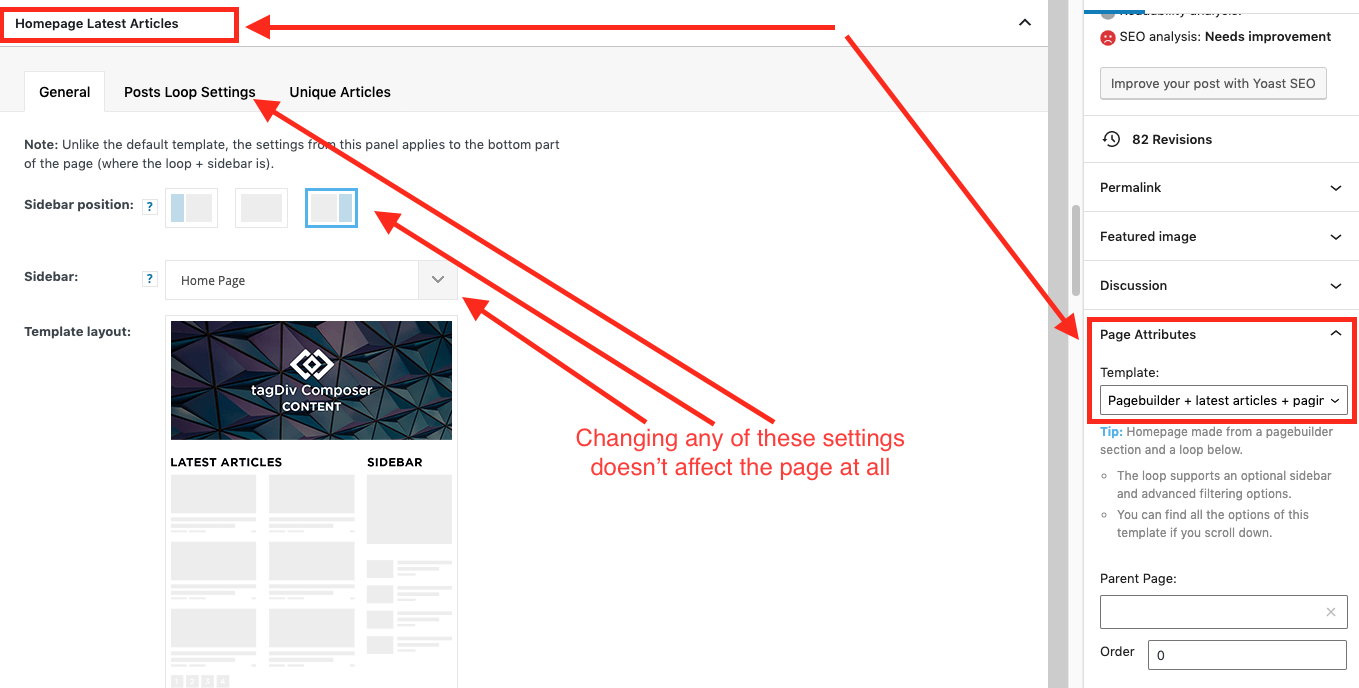
As a result, instead of two overlapping sidebars, we now have two duplicate sidebars stacked on top of each other:
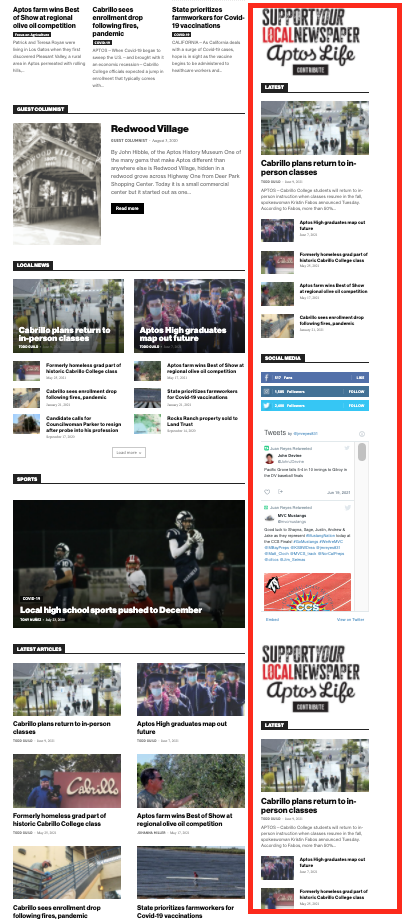
Is there any way to fix these issues? Ideally we would like to leave the page template set to default, with the overlapping sidebars eliminated.
We’ve already tried disabling all our plugins to check for conflicts. Here is some more info from the System Status panel:
Theme name Newspaper
Theme version 10.4
Theme database version 10.4
HTTP channel test wordpress
Installed demo Default – demo ID: default | install type: full
Theme Mobile Newspaper mobile version
php.ini configuration
Server software Apache/2.4.38 (Debian)
PHP Version 7.3.19-1~deb10u1
post_max_size 32M – You cannot upload images, themes and plugins that have a size bigger than this value. To see how you can change this please check our guide here.
max_execution_time 120
max_input_vars 3000
SUHOSIN installed false
PHP extensions
mbstring available
GD library available
WordPress and plugins
WP Home URL https://aptoslife.com
WP Site URL https://aptoslife.com
WP version 5.7.2
WP multisite enabled Yes
WP Language en_US
WP Memory Limit 1 GB/request
WP_DEBUG False
Caching plugin No caching plugin detected – for best performance we recommend using WP Super Cache
 Bezukhof
Some posts using the same global template have very small fonts, even though when I edit it with the TagDiv Composer the font’s are showing larger.
Example page with small font:
Example page with appropriate font size:
https://nichefacts.com/wordpress-affiliate-program/
Demonstration of issues:
https://www.awesomescreenshot.com/video/4207926?key=e4a8ae82f33f13635f761d456b241d1d
Bettina Hello!
Unfortunately, there you will find only homepage, header template and footer from that demo.
Thank you for understanding!
 pinnaclecompass
 Updated theme today. Header and footer options in theme panel disappeared. We now have to recreate our old basic headers that we had to find and download from cloud library. Full width headers don’t look the same as before, even if we choose the ‘basic’ header styles that were there for last 5 years.
We used multipurpose headers with buttons on one of our sites. That option is gone as well.
We are really thinking on restoring the whole site. This is way too much work to rebuild the headers and footers from scratch, especially when alignment is off (ex. ad and main menu is not centered, even though that’s what the downloaded template showed. There isn’t no option for global settings (ex. social links, footer copyright text, etc…) like in the past versions.
This might be fine for new sites where you can just install a demo, but on existing sites this is way too much work.
-
This reply was modified 5 years by
pinnaclecompass.
 Digital Nomads
Hi there,
I’m using your Fashion demo for one of mi sites: https://marieclaire.com.mx/dejate-seducir-por-lo-nuevo-de-ulla-johnson/
In Single Post Template: I added a column to the row where de Single Post content is.
It looks OK in desktop but I’m having an issue in mobiles: content es cropped on the right size.
I tried all the settings and Css for mobile, but the changes I do seems not to be affecting either the row, column or element.
What’s weird: I do can see the changes in tagdiv editor and in my iPhone SE 2020, but not in the rest of mobile devices.
Hope you can help me to fix this. Thanks in advance,
Gerardo
mr-xHello,
I want one of my category to look like
https://demo.tagdiv.com/newspaper_pro/category/tagdiv-fashion/
how can I find it in Cloud Library?
Thanks
 domaincraft
Hi,
I need to upload header menu in mobile menu. I do it:
1) opening Tagdiv Composer on the page of interest;
2) selecting the phone viewport;
3) select the hamburger menu;
4) finally select “td-demo-header menu” from the drop-down menu of the option “select menu” of tagdiv composer.
The above procedure uploads correctly the mobile menu, but it causes the reset of the page text. In particularly the text in the page disappears and appaears the following string [tdc_zone type=”tdc_content”][vc_row][vc_column][/vc_column][/vc_row][/tdc_zone]
 Anamaria
 Hello,
You are probably uploading the whole theme package. You have to upload only the theme zip file, not the whole package which contains other items
– https://help.market.envato.com/hc/en-us/articles/202821510-Theme-is-missing-the-style-css-stylesheet-error
Install via WordPress -> https://forum.tagdiv.com/install-via-wordpress/
Install via FTP -> https://forum.tagdiv.com/install-via-ftp/
Requirements for Newspaper => https://forum.tagdiv.com/requirements-for-newspaper/
After installing the theme and activating it you will find in the Prebuilt websites all the theme demos and you can import whatever demo you want => https://www.screencast.com/t/6rf5g0Dxc0K
Thank you!
Anamaria Hello,
If you follow the steps which are presented in this tutorial here: https://tagdiv.com/how-to-increase-page-loading-speed/ you’ll be able to increase the speed of your website.
Also, to increase the page speed you can check these similar topics for more solutions:
– https://forum.tagdiv.com/topic/optimize-script-to-improve-site-speed/
– https://forum.tagdiv.com/topic/a-few-tips-for-newspaper-x-speed-high-cpu-usage-issues/
– https://tagdiv.com/how-to-increase-page-loading-speed/
– https://developers.google.com/speed/docs/insights/v5/about
– https://forum.tagdiv.com/topic/score-100100-pagespeed-with-newspaper-wordpress-theme/
– https://forum.tagdiv.com/topic/newspaper-theme-speedify-your-website/
Please note that page speed is not covered by the support team: https://forum.tagdiv.com/newspaper-theme-support/
Please give it a try and follow the steps which I presented above about page speed.
Also, check our guide from here: https://forum.tagdiv.com/how-to-make-the-site-faster/
Please make sure to use our newest tool called tagDiv CSS Analyzer which comes in handy to resolve some of your issues. Take a look at the video guide here: https://www.youtube.com/watch?v=tnkVapqhIHc
“This custom tool performs an automatic test to find missing CSS rules applied by user interaction. Moreover, you can manually interact with a chosen section/component from the page while the tool records all the involved CSS. It will generate the final CSS file for this page and also will split the rules in Critical CSS to be loaded in the website’s header.” ( https://tagdiv.com/whats-new-in-the-newspaper-theme-10-4-update/ )
We tested our tool on our demos, and we have such great results!
Take a look at this topic because it could help you: https://forum.tagdiv.com/topic/css-analyzer-step-by-step-and-doubts/
Let me know the results!
Thank you!
flyingfinnHello and thank you for your support.
We try to use UK demo. We set up the page in desktop and we just want the responsive version for mobile view.
Though for a strange reason in mobile the header and footer are different.
Different background colours and different menu in footer.
Cab you help us understand why is this happening? Mobile theme is disabled. Thank you in advance
Mobile header:
Responsive header
Mobile footer
Responsive footer
 howard576
Hi, I’ve noticed that the ‘Woo Attributes Filter’ doesn’t appear on mobile. This isn’t specific to my website but is also the case on your demos e.g. on the make shop demo, the attributes filter isn’t available for mobile. Is this feature not available or is there a way to enable this filter for mobile users?
Anamaria Hello,
tagDiv Composer is the main plugin on which the theme works, even the Theme Panel is included in this plugin.
In tagDiv composer are implemented several design options, functionalities, etc.
Also, normally if you use cloud templates you can have a better speed than with tagDiv Standard Pack, this does not mean that you do not have to make customizations.
Also, the tagDiv Standard Pack plugin from version 10.4, is no longer required because the new demos are using cloud templates.
Thank you!
Have a nice day!
 claudiairagan
I have a demo (test) site and an official site (www.multiwomanandco.com). After updating (yesterday) to version 11.0 and intense testing of the new update in the demo environment I found no problems. So I installed the new version also on the official site, also no problems… at first!!! Today both environments showed only theme images (as reported in other topics). So I downgraded the official site to version 10.4 and it worked again. In the Demo environment I deleted the TAGDIV Composer Plugin and reinstalled it as suggested as a solution in other topics. It solved (for now?) the problem. Because there are more serious problems reported with the new version I won’t install version 11.0 on my official site and will wait for a new release. I don’t trust version 11.0 for now. Can you tell me if there will soon be indeed a new version where (all) the problems will be solved?
By the way, I will monitor my Demo environment and will let you know when the problem with the theme images reoccur.
Kind Regards
Anamaria Hello,
Those blocks are from the tagDiv Standard Pack plugin, so, if you want to continue using them, you need to have the tagDiv Standard Pack plugin updated and activate, from version 10.4, this plugin is no longer required because the new demos are using cloud templates.
Thank you!
 insumedical
 hi…
Calin…
https://demo.tagdiv.com/newspaper_classic_pro/
Take a look at the demo page.
The design is wrong.
