- NewspaperAutoptimize Plugin – install and configuration
- NewspaperCache plugin – install and configure
- NewspaperInstalling Pre-built Websites
- NewspaperHow to Install Newspaper via FTP
- NewspaperHow to Install Newspaper via WordPress
- NewspaperIntroduction to CPT and ACF with Newspaper Theme
- NewspaperHow to edit modules for Flex Block X
- NewspaperWooCommerce: Happy “Add to Favorites!”
- NewspaperWoo Brands
- NewspaperStripe Setup
- NewspaperModal Popup
- NewspaperPayPal Setup
- NewspaperFlex Block Settings Guide
- NewspaperHow to setup the Contact Page
- NewspaperAdd Cryptocurrency Price Ticker Widget
- NewspaperInfinite Loading for Single Posts
- NewspaperThe Newspaper Mobile Theme: Introduction
- NewspapertagDiv Social Counter plugin
- NewspapertagDiv Shop
- NewspapertagDiv Opt-In Builder
 medvid
 We don’t have any other plugin.Just your plugins and woocommerce.Clean installation. If we disable woocoemrce works 100% the site we can read articles if we enabvle crash. We changed permissions of the suggested directories to 755 for directories and 644 for files nothing. We don;t know what to do. Godaddy says they are not the problem as is VPS they don’t care to check.
 debasishsinha
 after several try , find out that the entire sites code were some how corrupted and its beyond recovery. Even tried to restore with the backups of November but that too not working as it says the code were corrupted so having any other option , i have deleted the data base so i can start a fresh , now while reinstalling the licence is not capturing to Active NewsPaper .
 thetraders
 I installed it on my website, but only the Table Of Content section I can’t add Post to it. While in the Demo I see it as Post, not Page.
https://thetraders.vn/
https://demo.tagdiv.com/newspaper_towntalk_pro/
 Bettina
 Hello!
You should also install and set the Module templates required on the flex block builder: https://forum.tagdiv.com/flex-block-builder-flex-loop-builder/
Thank you!
 shellhackx
Hello,
I want to use the pre-built ” APP Pro” site
I installed it but its missing an element.
-
“Flex Block BuilderThe Cloud Library Module Template set for this block is not valid or it no longer exists. Please select another Module Template”


The error may be on my side, but wondering if anyone can help?
Thank you
medvid I detected the problem but I can’t find solution. If I activate woomerce plugin happens this. If I don;t install woocoemrce is totally perfect. What could be the issue?
medvidHello. I purchased the newspaper plugin. I install and all runs fine. Now, for example I install the demo NEWSWEEK and all is loaded and without error but if I click the NEWSWEEK header orange letters it gives me:
Server Error
403
Forbidden
You do not have permission to access this document.
That’s what you can do
With just click nothing else. To make enable again the wordpress that crash hard. I need to remove caches and login again but the error is there. There is som3thing wrong as the last time before this minimal example I just changed in general settings of wordpress the permalinks and that caused the error and impossible to click again on anything due the same error 403. Now is the same using just that NEWSWEEK Demo and with just clicking the orange NEWSEEK letters crash. How can i override this?
 Oktay
OktayHi,
Does the theme have a way to import google reviews into the listings so that it displays here
See this example listing: https://double-glazing-windows.co.uk/listing/perfitinstallations-com/
Bettina Hello!
Here is the setting for Mobile theme: https://app.screencast.com/yYhHkpNzYa75u
We have 3 options available for mobile versions that you can use:
1. Responsive version: A responsive version of your website looks similar to the desktop version. TagDiv Composer is used to edit the page. Click on the mobile viewport: https://www.screencast.com/t/XDQJedlggSB. You can see your mobile version there and edit or adjust the elements to look better.
2. Mobile pages: https://tagdiv.com/newspaper-10-3-7-update-brings-customizable-and-fast-mobile-pages
3. Mobile theme plugin: The Mobile Theme is a performance-optimized theme included in the main Newspaper theme that only loads on mobile devices. It comes with its own templates and designs for pages, posts, categories, etc., so your current templates from the desktop theme will get converted to the mobile theme layout. Please see https://forum.tagdiv.com/the-mobile-theme/ and https://forum.tagdiv.com/mobile-theme-introduction/ for more information.
A full explanation is here: https://www.youtube.com/watch?v=SpGkOnJeNZY
If you need to use mobile version 1 or 2, then you need to uninstall the Mobile Theme plugin and AMP.
Thank you!
Bettina Hello!
We have 3 options available for mobile versions that you can use:
1. Responsive version: A responsive version of your website looks similar to the desktop version. TagDiv Composer is used to edit the page. Click on the mobile viewport: https://www.screencast.com/t/XDQJedlggSB. You can see your mobile version there and edit or adjust the elements to look better.
2. Mobile pages: https://tagdiv.com/newspaper-10-3-7-update-brings-customizable-and-fast-mobile-pages
3. Mobile theme plugin: The Mobile Theme is a performance-optimized theme included in the main Newspaper theme that only loads on mobile devices. It comes with its own templates and designs for pages, posts, categories, etc., so your current templates from the desktop theme will get converted to the mobile theme layout. Please see https://forum.tagdiv.com/the-mobile-theme/ and https://forum.tagdiv.com/mobile-theme-introduction/ for more information.
A full explanation is here: https://www.youtube.com/watch?v=SpGkOnJeNZY
If you need to use mobile version 1 or 2, then you need to uninstall the Mobile Theme plugin and AMP.
Thank you!
Bettina Hello!
Please update the theme and plugins and ensure the standard pack plugin is installed and active. Check this topic as well: https://forum.tagdiv.com/topic/social-share-links-in-theme-panel/
Thank you!
Bettina Hello!
Please delete the tagfiv plugins and reinstall them. Make sure you do not use any extra plugins that can interfere, such as any optimization plugin.
Let me know the results!
Thank you!
 vunt
vuntHello support,
I have installed prebuilt website – Default PRO then i viewed it on localhost, it showed content as attached image, link: https://imgur.com/a/Qn0BxSm
Pls help me set up to view website full as Default PRO.
Thanks
Vunt
 Simion C.
 Hi,
Sorry for the delay.
So the issue with the pages fixed itself. That can happen sometimes.
The optin plugin actually enables the user registration (if was not active before) when installing it https://prnt.sc/k6P3nDB7tDzv
And it will provide its own login/register page https://prnt.sc/aTLE4ESAc9fA Installing the plugin should not interfere with the capabilities of the users to register or log into the website. Could you please provide an example of the issue, or mention more details about it?
Thank you!
 TruthIsEditable
http://www.presidentialnewsreview.com
This is the errors showing in the console
JQMIGRATE: Migrate is installed, version 3.4.1
tdSmartSidebar.js?ver=12.6.9:2 Uncaught ReferenceError: tdUtil is not defined
at tdSmartSidebar.js?ver=12.6.9:2:95
at tdSmartSidebar.js?ver=12.6.9:21:31Understand this errorAI
tagdiv_theme.min.js?ver=12.6.9:236 Uncaught TypeError: tdSmartSidebar.td_events_resize is not a function
at tagdiv_theme.min.js?ver=12.6.9:236:395Understand this errorAI
tagdiv_theme.min.js?ver=12.6.9:315 Uncaught TypeError: tdSmartSidebar.item is not a constructor
at tagdiv_theme.min.js?ver=12.6.9:315:1
at Array.forEach (<anonymous>)
at HTMLDivElement.<anonymous> (tagdiv_theme.min.js?ver=12.6.9:314:489)
at ce.each (jquery.min.js?ver=3.7.1:2:3129)
at e.<computed>.each (jquery.min.js?ver=3.7.1:2:1594)
at tagdiv_theme.min.js?ver=12.6.9:314:158
at Array.forEach (<anonymous>)
at tagdiv_theme.min.js?ver=12.6.9:314:101
at dispatch (jquery.min.js?ver=3.7.1:2:40035)
at v.handle (jquery.min.js?ver=3.7.1:2:38006)Understand this errorAI
2tagdiv_theme.min.js?ver=12.6.9:236 Uncaught TypeError: tdSmartSidebar.td_events_resize is not a function
at tagdiv_theme.min.js?ver=12.6.9:236:395Understand this errorAI
4presidentialnewsreview.com/:1 Uncaught (in promise) Error: A listener indicated an asynchronous response by returning true, but the message channel closed before a response was receivedUnderstand this errorAI
 bjornno11
I have just installed WordPress and Newspaper. So far it looks ok and I can handle the simplest things. However, I have others who will write news and post and I want something easier for them to use. They just need a page where they can post text, maybe some pictures, possibly video. They need to be able to write headlines and intros. Are there any plugins for this?
Bettina Hello!
You can install only one demo. You can install the templates and sections of other demos for other pages. You can see all the templates in the Cloud Templates.
Check the guide: https://forum.tagdiv.com/installing-demos/
More documentation about the cloud templates is here:
– https://forum.tagdiv.com/cloud-library-templates/
– https://forum.tagdiv.com/design-post-pages-using-cloud-library-templates/
– https://forum.tagdiv.com/cloud-library-category-templates/
About pages here: https://forum.tagdiv.com/page-templates-2/ -> https://forum.tagdiv.com/homepage-how-to-build-and-set-it/
Check out this video about how to create a website from scratch: https://www.youtube.com/watch?v=SoGQ0d5kIBg
Thank you!
 Anamaria
 Hello,
You have the mobile theme version now, so you can disbale the plugins to check the responsive version.
Using our theme, you can choose from 3 mobile versions
-> mobile responsive => https://www.screencast.com/t/oJ2ShOp47
-> mobile theme plugin => https://forum.tagdiv.com/the-mobile-theme/
-> mobile page => https://tagdiv.com/newspaper-10-3-7-update-brings-customizable-and-fast-mobile-pages/ The option that you need to use.
Suppose you created the mobile pages with tagDiv Composer. In that case, when you install the Mobile Theme plugin, your pages will be overwritten by the plugin (the mobile theme comes with its templates for page, post, category, etc, so your current templates from the desktop theme will get converted to the mobile theme layout, the page content is made without builders in mobile editor => https://www.screencast.com/t/xbgZG8kH also, the options that are provided to edit the mobile theme version are limited (this keeps the things simple)).
This is a video about Responsive Newspaper Theme, AMP & Mobile Theme, Mobile Pages & Templates -> https://www.youtube.com/watch?v=SpGkOnJeNZY.
So, the mobile responsive is what you see when that you select the viewport on phone => https://www.screencast.com/t/matV17hH, so some settings may apply for each viewport(where is the border blue), and others are not(where the border is black).
The mobile page has the mobile templates from Cloud Library => https://www.screencast.com/t/YCcZ8rL8
The Mobile responsive version of the theme and the mobile page editor can be edit with tagDiv Composer, the mobile theme plugin cannot.
For example, you can have the mobile theme plugin activated and use the mobile page/mobile responsive version for the homepage/pages, but for the categories pages/404 page, you can’t use the mobile page/mobile responsive version if you have the mobile theme plugin activated.
So, if you want to design the pages with tagDiv Composer, you can use the mobile page or mobile responsive version.
Thank you!
 simchris
 In WordPress you can edit posts with td-composer, or the default gutenberg editor, and if you have the classic editor pluging installed, you can still use the old classic editor from old wordpress (what we do here).
When you go to edit a post, there are little links below the post in the posts menu, to choose how to edit.
(I don’t work here.)
 inkslinger
 This has been resolved… The Plugin AMP was somehow holding the page stuck… Deleting the AMP app and then reinstalling it solved it… (more to discover later)
Bettina Hello!
Please try to reinstall the page from the Cloud Library to have all the elements there, and for mobile, you can order the columns/inner columns: https://app.screencast.com/Tt6i5SOMhh8lH
Please note that you should write 1,2,3 for each column/inner column.
You can also build a mobile page that will be different than the one from desktop: https://tagdiv.com/newspaper-10-3-7-update-brings-customizable-and-fast-mobile-pages/
Or you can have double elements, hide the one you do not want on the desktop, and show it on mobile. Each element has this option in the CSS tab: https://app.screencast.com/NOSucmHCgrxmw so the inner column is hidden there: https://app.screencast.com/zOIFfWefTMz0t
The order should be like this: https://app.screencast.com/jqpfISJpCr86T
I hope that helps you!
Thank you!
 mongreanly
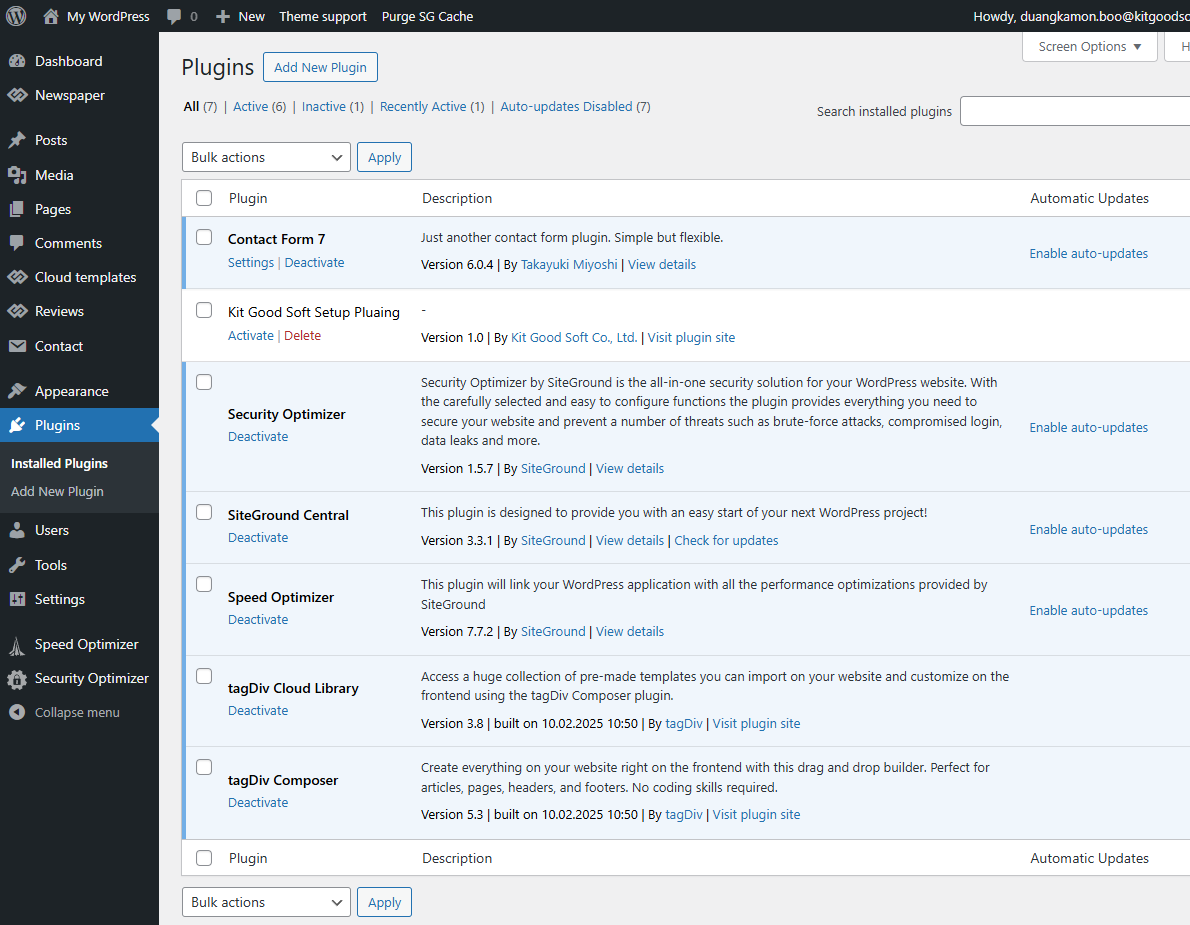
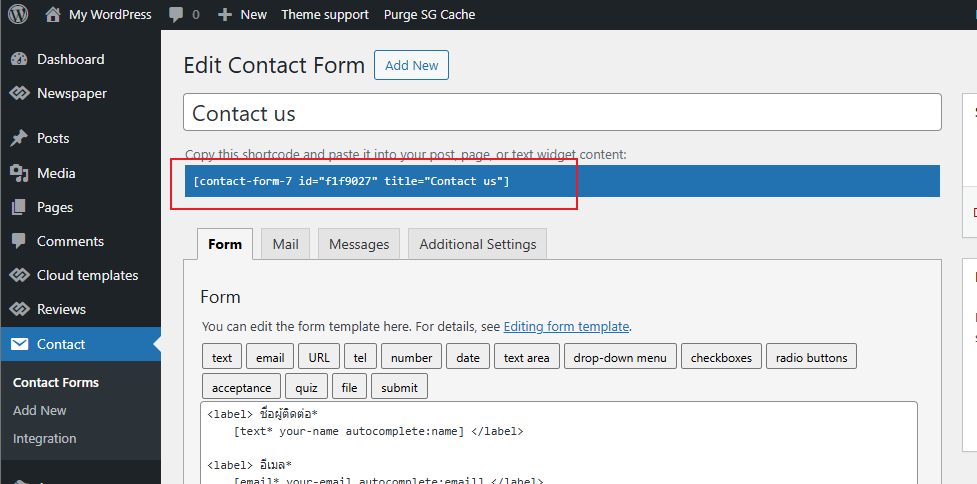
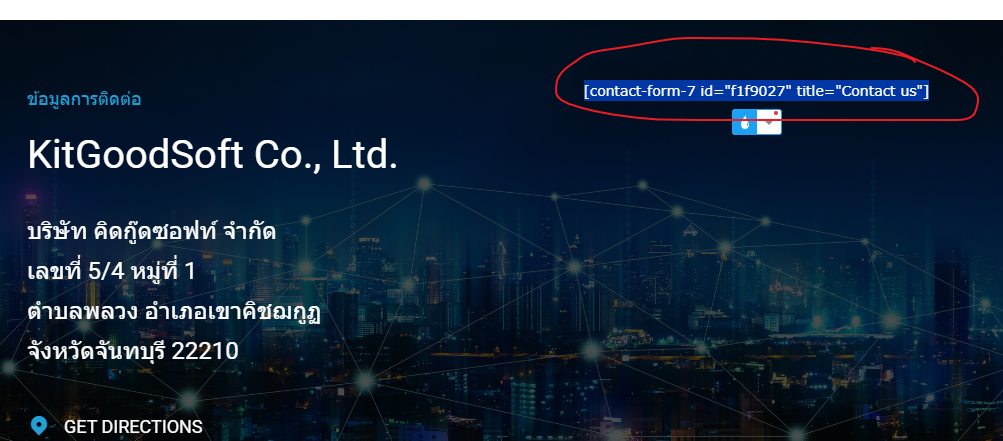
 I installed and activated the plugin and checked that the shortcode is correct as shown in the image link below.
– https://t7516229.p.clickup-attachments.com/t7516229/e293a80d-a8ba-40d0-a37e-b31997add4b1/image.png
– https://t7516229.p.clickup-attachments.com/t7516229/58d28562-961f-4dab-b179-710aa6ea3de6/image.png
– https://t7516229.p.clickup-attachments.com/t7516229/71a77306-68dc-4823-ae6c-e82038539f72/image.png
-
This reply was modified 1 year by
mongreanly.
Anamaria Hello,
Do you have the plugin installed and activated? Also, please make sure that the shortcode is correct.
Thank you!
 Jude
Jude Hi
What plugin did you install. I have the same problem
Thank you
-
This reply was modified 1 year by
Jude.
 stonebug
Hi, I have 2 license keys for the Newspaper theme that I already use for 2 live websites.
I want to test prebuilt websites on my local environment that I have installed locally on the Laragon server on my PC.
I can’t import pre-built websites as I first need to register with a theme license code.
I don’t want to register a testing website (locally) with an already registered purchase code to avoid any issues on the live websites.
How can I download a prebuilt Newspaper website?
Can I have a temporary license code to use locally on my PC for testing?
Thank you.