
- NewspaperAutoptimize Plugin – install and configuration
- NewspaperCache plugin – install and configure
- NewsmagInstall via WordPress
- NewsmagInstall via FTP
- NewsmagInstalling pre-built websites
- TutorialsHow to install Revolution Slider
- NewspaperInstalling Pre-built Websites
- NewspaperHow to Install Newspaper via FTP
- NewspaperHow to Install Newspaper via WordPress
- TutorialsHow to Install bbPress forum
- NewspaperIntroduction to CPT and ACF with Newspaper Theme
- NewspaperHow to edit modules for Flex Block X
- NewspaperWooCommerce: Happy “Add to Favorites!”
- NewspaperWoo Brands
- NewspaperStripe Setup
- NewspaperModal Popup
- NewspaperPayPal Setup
- NewspaperFlex Block Settings Guide
- NewspaperHow to setup the Contact Page
- NewspaperAdd Cryptocurrency Price Ticker Widget
 Vlad S
 Hello !
Please make sure that you have made the update correctly. We recommend deleting the older version of the theme and plugins and install the new one, overwriting the files of the theme could cause issues. Also please watch our tutorial regarding images here: https://forum.tagdiv.com/thumbnails-fix-strange-looking-images-on-blocks/
Thank you !
Vlad S Hello !
The best way would be to activate a default theme, remove the existing Newspaper THeme and tagDiv Plugins and install the new theme. Find out more about it here: https://www.templatemonster.com/help/how-to-delete-wordpress-theme.html
Thank you !
 kizmostudio
Hello,
Why i can’t use Single Post Template 1 – 35 using tagdiv cloud library?
here the screenshot link
Please help, i want use Single Post Template 2 for my website project at ootb.id
 viniciusyamada
So, looks what happens after instaled X version, 2 misterious banners on mobile devices: https://prnt.sc/ptilrq
1 floating banner bar and ‘ square between title and Header ads.
Please, what whappened? Heeeelp me!
My site is http://www.gay.blog.br
 dimitrisv
I am sure that our site as a publishing site is not the only one that it is a must to be able to have multiple authors per article. To this end we used the “PublishPress Multiple Authors Pro” plugin (you can find it here: https://1drv.ms/u/s!Akul2ygARwfdhvIZeMJibxelk–t_g?e=mkJ4dY )
It works well only in one type of post: https://about.gr/article/%CE%BB%CE%BF%CE%B9%CE%BC%CF%8E%CE%B4%CE%B5%CE%B9%CF%82-%CE%B4%CE%B9%CE%AC%CF%81%CF%81%CE%BF%CE%B9%CE%B5%CF%82/
However we do notice that the plugin fails in the following pages:
https://about.gr/category/abstracts/ – display of the WP user who put the article and not the multiple authors
https://about.gr/current-issue/ – Display of the word Author when single author and also link to his page; No display of the multiple authors (with their attributes), just display the multiple authors in the bottom, yet the link reference is for the first author only.
https://about.gr/author/%ce%b5%cf%85%cf%83%cf%84%ce%ac%ce%b8%ce%b9%ce%bf%cf%82-%ce%b4-%cf%80%ce%b1%cf%80%ce%b1%ce%b2%ce%b1%cf%83%ce%b9%ce%bb%ce%b5%ce%af%ce%bf%cf%85/ – link to the profile page of each author, is erratic. Shows not the number of his/her posts – links to the post page of the actual WP user who published the article – but with erratic statistics (0 posts, 0 comments)
https://about.gr/issue/sept-nov-2016/ – correct display of the single (virtual) authors but not display of the multiple authors
https://about.gr/?s=%CE%91%CF%80%CF%81%CE%B5 – search results display only the actual WP user who published the article
I talked with the authors of plugin who tried to sort out the issue by creating a child theme. Here is what they came back with:
“Something is weird in the theme. Did you change any file in the core of the theme? I already added overrides to the required theme files, but the posts pages are showing something that I don’t see in the code:
Please, could you check and let me know from where the “By” text/tag is coming from? I see this in the code:
<div class=”td-author-by”>By</div>
But I have searched on every file in the theme and didn’t find that. It is important because it says me that the post pages are coming from elsewhere, and we need to find out, otherwise we can’t fix those pages.
A similar thing is happening on the pages that are not working. I have override all the occurrences of
<span class=”td-post-author-name”>Dimitris Vayenas <span>-</span> </span>
with the code to display the authors coming from Multiple Authors, but I still see the default output.
Please, could you check or consult the theme creators asking for some explanation?
Attached is the child theme (already installed on your site) just in case you need to send them for checking.
Looking forward to helping,”
Please find attached here the code of the child theme:
https://1drv.ms/u/s!Akul2ygARwfdhvIYUGF6DPxVv1mhRQ?e=5aGq6I
Please help.
 PlasticDan
 Hi Edward,
That link talks about updating a plugin though, I am looking at updating the theme. Also, I looked at that guide, but the guide shows a button that says “Install/Active Plugin”, however, that button does not show up in my dashboard: https://ibb.co/k0SJTzq
 Decentralbox
Hello,
I installed Newspaper 10 today.
I have deactivated the standard plugin package and want to build everything myself with the Cloud Template plugin.
Unfortunately I have 2 problems:
1.) I can’t change the copyright at the bottom when I select a footer menu. How is this supposed to work? I already searched the whole backend. There is this text: “© Newspaper WordPress Theme by TagDiv”. I want to change it to my copyright.
Image: https://imgur.com/qNr4N0p
I haven’t found an option to disable this bar either, so I can simply recreate it with a footer template. Is this not possible anymore?
2.)If I want to create a footer, there is the possibility to insert social icons into the footer. But there is no way to add Telegram. Have you forgotten that? Telegram is by far one of the most important social icons. How can I add it now?
Image: https://imgur.com/KsHf5Ty
Thank you for the update. I’m really excited to see how the speed behaves when we have rebuilt our site as it looked with 9.8.
Best Regards
 Adilosadil
Hi everyone,
after updating the theme I receive this msg:
syntax error, unexpected ‘.’, expecting ‘)’ in /home1/dishesdeli/public_html/wp-content/plugins/td-composer/legacy/common/wp_booster/td_global.php on line 415
The first time I made the update using the Envato Market plugin, to fix the problem I deleted the old version of the theme and plugins.
The second time I installed the theme from WordPress panel, the theme installation was successful but plugins are showing an ajax error, but I did it manually and they were ok except Tagdiv composer.
Please help, my website is showing a maintenance page
Vlad S Hello !
@meiggsmedia all the updates are found in here: https://themeforest.net/item/newspaper/5489609
@Nitneuk, Standard pack is made to work with older version, you can deactivate it and install Default PRO demo and it will work.
Can you please let us know more details about your instagram issue ? Paste a link to your website too.
Thank you !
Adilosadil hi,
after the installation of the theme, plugins are not installed they show an ajax error.
I tried to do manually but i receive this msg:
Parse error: syntax error, unexpected ‘.’, expecting ‘)’ in /home1/dishesdeli/public_html/wp-content/plugins/td-composer/legacy/common/wp_booster/td_global.php on line 415
Vlad S Hello !
Please make sure that you have updated your theme properly.
The best way to update the Newspaper Theme is to delete the current Newspaper Theme version and TagDiv Plugins and after that you can install the new version.
Overwriting files will cause conflicts.
Thank you !
Vlad S Hello !
The best way to update the Newspaper Theme is to delete the current Newspaper Theme version and TagDiv Plugins and after that you can install the new version.
Overwriting files will cause conflicts.
Thank you !
 Alina S
Hello, Community!
We know you all want to make your website faster :), we want that for you, too. Newspaper theme 10 brings you a new way to build a faster WordPress website. For the first time in WordPress, you have the freedom to choose how much code the theme is loading and optimize your website’s performance straight from the beginning.
To give you this functionality, we’ve introduced a new plugin called the Standard Pack (available to you for free.) When you update to Newspaper 10, you must activate this plugin, or your website will display the shortcodes on the frontend. We cannot make the plugin automatically activate for you, so you’ll need to go to WordPress Admin area > Newspaper Theme > Plugins and enable the Standard Pack plugin.
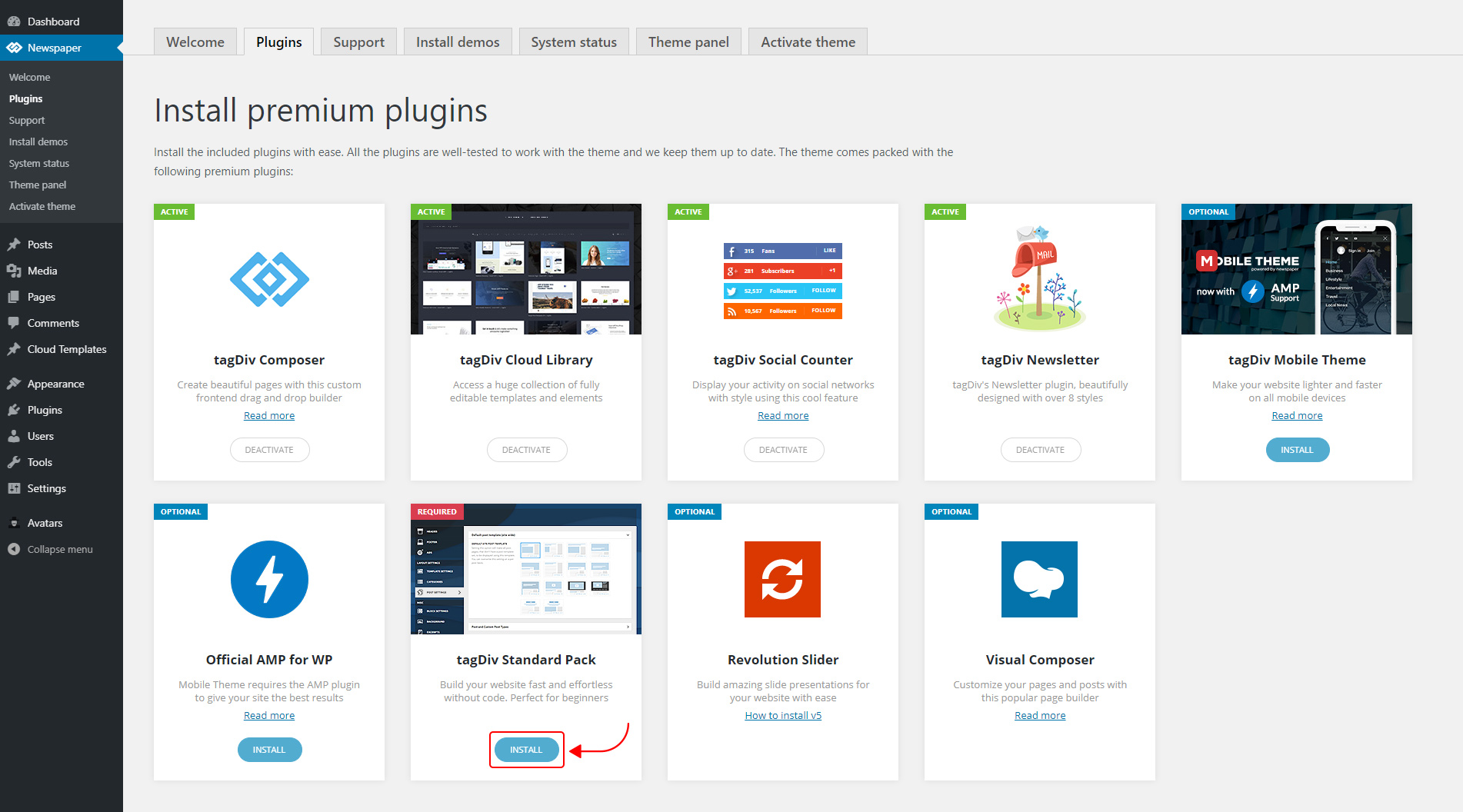
The new Standard Pack Plugin has two functions:
– it brings all the functionality you love in the previous versions
– allows you to separate things when you want to build everything customized and go for website’ performance.
The complete list of templates influenced by the Standard Pack plugin:
In the theme panel:
15 Headers
8 Category templates
10 Big Grids
19 Modules for blocks
14 Single post styles
14 Footer templates
In the tagDiv Composer:
25 Blocks
12 Big Grids
10 Big Grid Full
1 Big Grid Slide
Extra
All the demos that are not marked as PRO Demos.
You can find more details on how to use the Standard Pack Plugin in the dedicated article. When your website has no more dependencies on the Standard Pack plugin, you can deactivate it to increase the page loading time and performance.
If you need the previous version, you can download it from here (Newspaper v9.8).
I hope you’ll enjoy this update!
Thank you!
 Keresztlabda
 I tried to update, but when I upload the new files I get an error saying: the folder is exists. So I installed an other template, activate and after delete a Newspaper9 theme and then installed the Newspaper10 files, it was succesfull and when it finished with the update the website looks like then earlier. So it was easy and now the website is much faster.
 Ciaran
uninstalled theme and new updated added and site now gives “The site is experiencing technical difficulties.”
Works fine if I swap theme so seems to be the update
 infod9
Hi,
I just upadated Newspaper 9 theme to Newspaper X, beacuse like many other users, I was expectiong higher speed. But now I see that speed is not any better. I don’t know if I need to change any settings or I have other problems, that I don’t achive speed of your demo site (https://demo.tagdiv.com/newspaper_pro/) which is on Google PageSpeed Insights more than 90 on Mobile and Desktop. I allready have fallowed all you instructions to get more speed, this inclues installing WP Super Cache, changing setting of it and all other changes that you said I need to change for Newspaper 9. Please help.
Vlad S Hello !
You can install it over. The files will overwrite automatically.
Thank you !
 ariwisnu
 One more question sir.
If i want to install another demo, do i need uninstall the older one first, or is it okay to not uninstall it?
ariwisnuI have my website installed with Default newspaper demo. Recently I updated my theme to Ver.10 via Envato Market Plugin.
Now I really want to use the new Default Newspaper pro.
1. How to change my current Default Newspaper to the Default Newspaper Pro?
2. Do I need to uninstall this one http://prntscr.com/pt6pxd (the demo I installed earlier)?
3. If I install the Default Newspaper Pro, how to make it not change all of my content that I’ve make with the old Default Newspaper?
 a.harmach
 Kpanik
Hello I received an e-mail from you indicating that there is a download to run for my theme, but does not update the theme automatically by going to updates?
What should I do in practice? download the file and reinstall the whole theme? Do you risk ruining all the work I have done to date?
 zeeshan_tariq
 How to update from News Paper 9.8 to News Paper theme X. I have recently installed the former and building my pages yet.
 Calin
Calin Hi,
First please make sure that you have the mobile theme an amp plugin installed and activated and you’ll need to use one of these options from mobile theme -> http://prntscr.com/okbyin
1. The auto ads for amp need to be set in mobile theme in in amp ads -> http://prntscr.com/pt3bmw
Only one code is need to be set in theme panel, the other one is a standard code and is already add in our theme -> http://prntscr.com/pkwtzh also the code need to be set only in AMP ads -> http://prntscr.com/pkwum2
2. If you want to have more ads on amp you can set the amp ads in mobile ad section and these will be display on amp too -> http://prntscr.com/pt3ffj
3. In order to add the amp analytics code all you need to do is to set the code that you get in theme panel > mobile theme > amp analytics -> https://www.screencast.com/t/0WqKEVLN
Thank you!
Calin Hi,
Please check our documentation for how to install and import the revolution sliders on demos:
How to install Revolution Slider v5 -> https://forum.tagdiv.com/how-to-install-revolution-slider-v5/
Import Revolution Sliders on demos -> https://forum.tagdiv.com/import-revolution-sliders-on-demos/
Hope this will help you!
Thank you.
 awards-webmaster
Hi,
I have imported the LifeNews demo and made some tweaks to it via fonts, colors, etc..
HOWEVER, my advertisements do NOT show up any longer on the homepage. The header ad is through the theme panel and doesn’t show. In the blocks, I’ve inserted a few, and they also do not show.
In addition, if I try to update the page in order to put SEO for the page, featured images, etc.., it redirects to the posts and nothing holds.
Can you please assist?
