
- NewspaperUsing Other Ads
- NewspaperSidebar ads
- NewspaperIntroduction to CPT and ACF with Newspaper Theme
- NewspaperHow to edit modules for Flex Block X
- NewspaperHow to use the Posts List shortcode
- NewspaperCreate a frontend submission form
- NewspaperHow to Use the Tabbed Content shortcode
- NewspaperWooCommerce: Happy “Add to Favorites!”
- NewspaperHow to generate Facebook App ID
- NewspaperLink Tracker
- NewspaperFlex Block Settings Guide
- NewspaperGeneral Options that May Interfere with the Newspaper Theme
- NewspaperSocial Icons
- NewspaperPosts Loop Element
- NewspaperSet a Background for Category Page
- NewspaperThe Newspaper Mobile Theme: Introduction
- NewspaperHow to Add a Logo in Newspaper
- NewspapertagDiv Shop
- NewspaperAutoptimize Plugin – install and configuration
- NewspaperHow to Use tagDiv Cloud Library
 Simion C.
 Hi,
1. That would be the demo header ad, it can be replaced with your own ads in the theme panel ads section
– https://www.screencast.com/t/Th0h0Snzd4
Or simply replace the demo image and set the link you want in the demo ad code
– https://www.screencast.com/t/ynUvB1yK
More about it here – https://forum.tagdiv.com/using-other-ads-non-adsense-ads/
2. Enter the ad code as provided (like Adsense for example )in the ad section you want. If you do not use Adsense but a different ad implementation, the same applies. If the ad code is valid it will be displayed (in some cases additional steps have to be taken, follow ad provider instructions).
3. The sizes of Big grids are fixed, they will always look the same. There are 10 Full big grids that can be used for full width
– https://demo.tagdiv.com/newspaper/full-big-grid-1/
Also blocks have predefined design, however the rows in which they are placed can be stretched and they will adapt
– https://www.screencast.com/t/n7MpHTGdFB
4. Regardless of image size used for featured images, the theme will create thumbnails from them. These thumbnails will be loaded, not the full image. Still there are methods to optimize the thumbnails, see point 3 in this guide for example
– https://forum.tagdiv.com/how-to-make-the-site-faster/
Thanks
 lounewman4
Is there a way to assign different “sidebar” ads to different pages? If I am reading this correctly, it looks like I can just assign a singular sidebar ad to all of my pages.
I see that there are 5 “custom” ads that can be entered. Outside of those 5, you can’t add any other custom ads?
 Christian12
 We never had any problems with the update of Newspaper. We need our plugins. The error was from an ads partner and is fixed. Other people have also the problem with Firefox.
 bemibel
 Hi Catalin,
After investigating, I solved most of the problems.
1. The problem number one was the plugin Speed Booster, doing strange effects on mobile version.
2. The second problem was the custom css. By default, the theme loads the css at the end, and that was the problem of the strange effects at loading. What I did is install a Custom CSS plugin that allows me to load the css at the beggining, and then the problem disappears.
3. The third problem, and I have not solved it yet, is visual composer. When you choose full width for a row, the row loads less width and after a second it turns to full width, producing an ugly effect. Why? This is probably a theme bug, because I checked other websites made with Newspaper and EVERYBODY has the same problem using full width rows with visual composer.
So my questions are:
1. Can you propose a new setting for the next update that allows you to chose if you want to load the css at the beggining or at the end?
2. By now, and to avoid installing a plugin for custom css, there is any code that I can use to load the css at the beggining?
3. Is there any way to solve the problem with visual composer and full width rows?
—
I want to say that most of the problems are theme bugs. Speed Booster is a plugin made by TagDiv, and it produces errors. The theme loads custom css at the end by default and you can’t change it. Finally, there is a problem with visual composer and the theme, loading late full width rows made with VC.
I would appreciate that this time you can help me finding solutions to my problems, at least at the visual composer bug.
Thank you.
Bernat
Simion C. Hi,
On mobile there seem to be some errors present on the page
– https://www.screencast.com/t/BCGEz4Eb
These errors seem to be related to ads, they do not appear on desktop. I would suggest if possible to remove the ad codes where entered and test to see if this improves the website speed. There are also many speed optimization guides here on the forum, very useful to read
– https://forum.tagdiv.com/topic/score-100100-pagespeed-with-newspaper-wordpress-theme/
– https://forum.tagdiv.com/topic/newspaper-theme-speedify-your-website/
– https://forum.tagdiv.com/topic/tutorial-chriss-custom-optimizations-for-functions-php-etc/
– https://forum.tagdiv.com/cache-plugin-install-and-configure/
– https://forum.tagdiv.com/cloudflare-cdn/
– https://forum.tagdiv.com/how-to-make-the-site-faster/
– https://forum.tagdiv.com/topic/tinymce-advanced-and-other-various-disabling-speed-boster/
Thanks
 mradamrothwell
I’m not sure whats going on. I think it’s something to do with caching. When people view this page on mobile, The page loads incorrectly so i can see the header on the site twice and the text is displayed really badly. I’ve cleared the cache and it doesn’t solve it.
Sometimes when i clear the cache the first visit is ok and then when i refresh it goes wonky again. It doesn’t seem to happen on other pages as far as I can tell so far. I’m not sure if it’s related to the w3 total cache or something else. It also happens for some people on desktop viewing on internet explorer and sometimes other browsers.
 Padraig
 Thanks for getting back to me so fast.
So i’ve attached a Screenshot – Ideally i would like a 1 px border around my thumbnails and images. However the live CSS i’m using is also putting a 1px border around my logo and other items. Is there a way i can edit the blocks to do this?
http://www.chaoshour.com/wordpress/wp-content/uploads/2018/01/screen.jpg
Just some advice is all i’m looking for.
Thanks so much Catalin 🙂
 Bogdan B.
 Hello,
@dita999 if your bottom ad is placed in the theme panel but does not show up on the post itself, please make sure it is not disabled from the theme panel ads section: https://www.screencast.com/t/1jtKrXuY If this is not the case, please contact us via email at contact@tagdiv.com and provide wp-admin so we can login and investigate. Please also include a link to this topic so we can identify you.
It is best practice to create your own topic. Please do not post in other people;s topics if you have an unrelated issue.
The latest articles section is controlled from the page loop settings as mentioned here: https://forum.tagdiv.com/page-templates-2/
Thank you!
 simchris
 TWO ISSUES:
FIRST — Once in awhile Google has issues with some advertisers whose content is loaded from off Google’s own platform … meaning, Google tries to show ad in spot – system pulled from times out, your spot times out; blank spot … only way to permanently cure that is to have a “text only” ad spot without graphics or multimedia like animations/video, etc.
On one of our news sites this past couple of weeks, we’ve had that happen where one spot always renders, then banner across top does not.
SECOND — However, in addition to the *normal* time out issues, there has been a specific on/off issue, which started last week, which times out *all* ad units. Has nothing to do with your site, your content, any supposed warning from Google about compliance or other b.s. — totally issue with Google’s system.
One so-called ‘expert’ on the Google forum is claiming it’s because your page doesn’t meet Google’s content requirements which is totally wrong. It is happening to *all* sites, regardless of i.p. or content type, location, etc. for our sites in the U.S.
On the other hand — it is bizarre that “some” pages refuse to load ads, on 10 visits, while next door pages on same site, load ads every time. Looking at the page and running audit, there is no bad code, bad link, bad content (e.g., a mortgage pro winning an industry award from magazine = no ads; gov of NY awarding grant to schools = ads).
Only thing you can do is just live with it, really.
Google *will* warn you about content like promoting software that allows you to steal/download YouTube videos, or warez, or nazi propaganda, or whatever. But that is common sense.
Not sure that helps – just feedback.
 timski82
Hi guys,
I´m not able to save the adsense code in into the theme panel of my website http://elektroauto-portal.de/ – I read something here in the forum what to do (deactivate plugins and so on). I used the similiar Design for another page and everything worked fine. Can you help please? Thanks a lot. Timo
 cortexx
 thank you , it works !
another question, how to make shortcodes ( installed via plugin) work in combo with newspaper ? i want to insert them in the ads section, so it will be easier to save all ads in shortcodes and insert them based on criteria .
 Catalin
 Hello losozaa,
Notice that our theme has been tested only with AdSense Code for Advertisement. So, if you want using other ads you should check our documentation here -> https://forum.tagdiv.com/using-other-ads-non-adsense-ads/
Thanks for your understanding!
 MiguelPat
 I think I found the problem… It was on my adsense account, in that unit (link unit), I have configured to show another URL if there is no ads to show… I think that is causing the javascript problem.
 Michael Lubert
Hello, I’ve been trying since a bit after 8 AM today to get some help with this, but it seems my posts are for some reason being ignored (while other posters long after me are receiving plentiful responses). I purchased the Newspaper Theme last week, but I cannot create posts any longer, and nor can I access the Ads tab (it just spins around and around when I try to access it). There seems to somehow be some code in the Sidebars tab. I don’t know the origin of this code, but it seems very lengthy. The builder of my site has been unable to fix it; he tried reinstalling the theme and reinstalling it, but to no avail. I will very much need some assistance with this asap, and thanks.
Simion C. Hi,
I could give you a code to make the titles in the footer have the same background color
– https://www.screencast.com/t/euNPTTx7HYk
.td-footer-wrapper div .td_block_template_3 .td-block-title > * {

background-color: #222222;

}
Regarding the ad, make sure the code used is valid, test it in a different ad spot and see if it is displayed
– https://forum.tagdiv.com/using-other-ads-non-adsense-ads/
Thanks
 MrOrsh
I have had this problem before, and for some reason it came back after updating to the latest version of the theme.
I´m trying to add an Ad Title from Theme Panel > Ads > Header ad. To display “Advertisement” over my header Adsense ad. I´m using Header Style 7.
However nothing happens. Have reset browser cache and tried with other computers, but the text is nowhere to be found. I know this used to be a bug a couple of versions ago, seems it hasn´t been completely fixed. Or am I missing something?
Site url: enkelteknik.se
Edit: All other ad spaces and placements works fine when it comes to displaying the ad title-text.
Michael LubertI have a recently established WordPress website which is doing well. I just purchased the Newspaper Theme. However, I am no longer able to create posts, and nor can I access the Ads tab (when I click on the arrow, it just spins around and around and never completes). When I try to type in the text field, no text appears. I believe I saw something which might be causing the problem on the Sidebars tab. There now appears to be some code there which I don’t recall was there before, and there doesn’t seem to be a way to get rid it.
As I said, the site is doing well, and I am not interested in reinstalling WordPress as I understand this will delete all of my data. Hopefully this can be otherwise resolved without such an extreme and destructive measure.
Simion C. Hi,
You can add your own image in the ad spot, Adsense is not a must if it is not needed. Please see this guide in the matter
– https://forum.tagdiv.com/using-other-ads-non-adsense-ads/
An example is the default image used as a header logo in the theme demo
– https://www.screencast.com/t/GGbBNg2c1
– https://demo.tagdiv.com/newspaper/
The image size used for the header banner image is 728x90px.
Thanks
 Marolynx
 I have choosen another aproach: disable all plugins and now it works.
I had done updating via envato plugin and the actual version is 8.5.1
I have identified the plugin “Insert Post Ads” as the one that crashes the Newspaper Panel.
This is sad, because i want to use it for inserting ads at every few paragraphs.
Bogdan B. Hello,
1. The theme has no ‘restore deleted items’ functionality. The theme does not have any code that can do this. That is caused by your host or cdn. Programs that can create and restore back-ups. The theme does not have any back-up functionality.
As for the colors you mention changing, it is due to a slow loading speed on your site. Css works in cascades. IF the page loads slow, you can see each of these cascades happen live. Please use this guide to increase your site loading speed: https://forum.tagdiv.com/how-to-make-the-site-faster/
2. The theme ad seo yoast both add an og image. If you just need one, please remove the other.
3. If you want to add shortcodes to the templates, yopu will have to place the code in the specific template, not in functions.php. Please check the theme files here for category templates: https://www.screencast.com/t/GR7JqrRF5k1
you can also use https://www.screencast.com/t/VSohzsCF
As for tag pages: https://www.screencast.com/t/VHgM9kNv
Thank you!
 unit45host
Hi,
the second time happened when the theme “restore” deleted items…
I removed the demo images – 1. from wp-admin/media – 2. from everything in the uploads directory.
2nd of December had a 30 min server downtime ( still not sure what was caused – since got doubled memory/4 GB/, disk space/40 GB/ )
25th December had a DDOS attack against portal, caused a “frozen menu on mobile” and “no pictures were shown” about 5 hours on the website.
After both outages, the theme API ( what else? ) restored parts from demo content – like changed back the color settings to its default, restored all DELETED demo images to the media library…
So, I will move the stuff to a dedicated server / 2 TB disk, 64 gb ram /, but I don’t want the demo content is shown again – so complete remove the demo installer, also I want to remove all unnecessary items like woocomerce, bbpress related things from function.php
And would like to set the customised settings as default. Whenever I load a page/post I see a slight delay – and the default blue colors on the header. – Why is it loading the demo original at all?
2.,
///SSO Notice Conflict detected — your theme or another plugin is adding meta property=”og:image” to the head section of this webpage.
SSO Notice 1 duplicate meta tags found. Check 0 of 5 failed (will try again later)…
SSO Notice Checking https://1000wordsmagazine.com/?p=2321 for duplicate meta tags…
///
I removed the meta property tag because interfere was caused by wpsso SEO plugin.
wp-content/themes/Newspaper/mobile/functions.php
if (!empty($td_image[0])) {
echo ‘<meta property=”og:image” content=”‘ . $td_image[0] . ‘” />’;
3.,
I would like to show shortcodes on category and tags pages. But the snippet not works, in function .php.
And in twenty5-6-7 themes working – therefore Newspaper theme strips out the shortcode support.
add_filter( ‘category_description’, ‘do_shortcode’ );
https://premium.wpmudev.org/blog/cool-wordpress-category-pages/
https://webgilde.com/en/shortcode-not-working-category-description/
https://github.com/Yoast/wordpress-seo/issues/4786
That was the recommended solution from those websites, but it does not work at all, with the Newspaper theme.
Thank you, Zoltan
 The Irish Place
I am trying to set custom (google) fonts in the theme panel. After changing the fonts and stylings some are saving and they are displayed on the front end. Others are reverted back to their previous setting after the save. This has happened multiple times.
I am running the latest verion of the theme and all plugins.
Also I notice some of the fonts/stylings are taken from the demo installation (default demo)… I have made a new homepage layout in TD-Composer.. and set style and layout options in the theme panel. Can I just uninstal this demo to remove its influence? Or will that cause I lot of issues if the stylesheet disapears?
What the best way to approach that?
The issue is when the page loads it loads the default font and colour accents. After 2 seconds the custom settings kick in and are displayed correctly…. but the initial load is still the ‘default’ settings. Should I uninstal that demo or should I look to edit the css somewhere. I suppose that would lead to quicker page speed if I did it that way??
Site: theirishplace.com
 EquipaRefrigeracao
 Ohh, I’ve realized that really the problem is with the Newsmag theme, because when I try other theme, the images are showed normally (like in the attached image).
Help me, please, my clients are complaining that they can not see the images …
Thank you

EquipaRefrigeracaoHello,
I hope you’re doing good.
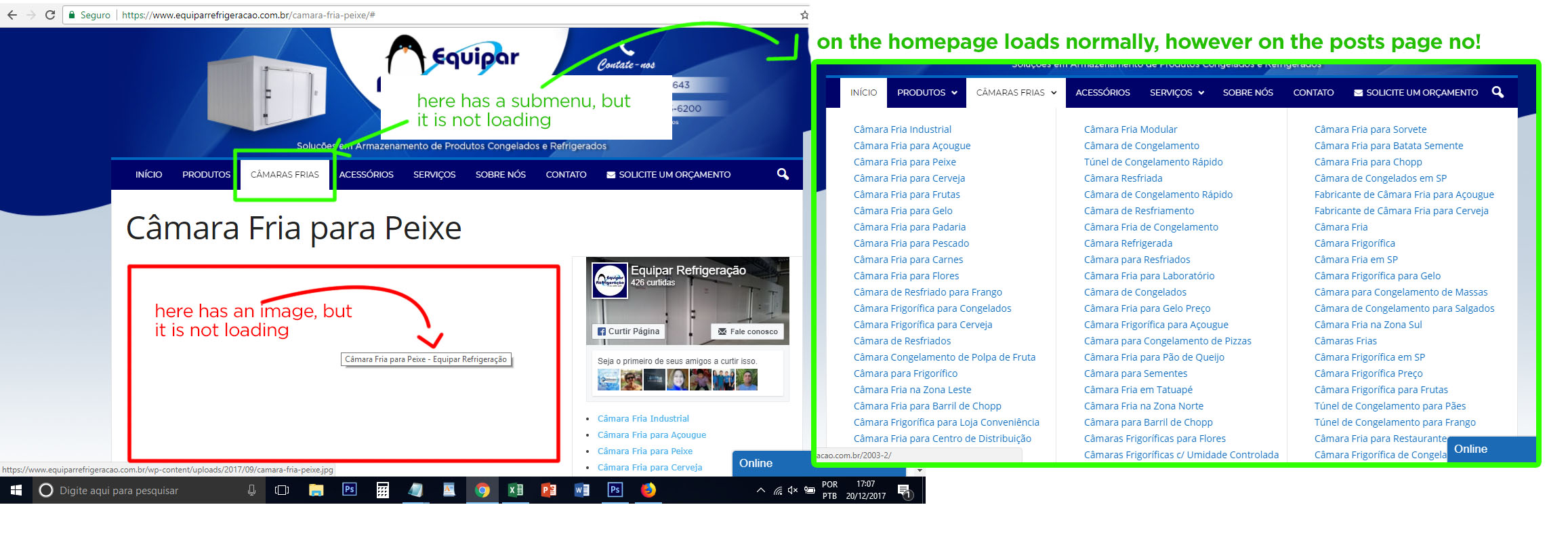
I’m with a great problem on my website: the images are not being displayed in the posts, and others things like submenu, search field not too. Sometimes they show up, sometimes they do not.
I think it could be a problem with CSS or JavaScript on the Newsmag theme, since I tried everything: I optimized the images, solved SSL problems, optimized the database, try it on other browsers, flushed browser cache, but so far nothing solved my problem.
This is a post example: https://www.equiparrefrigeracao.com.br/camara-fria-peixe/
Could you help me? See the image attached, please.
Thank you
 Mariano Jonte
Hi people, a basic question.
Where should I insert the “general” Google AdSense code? -> Is in Index.php?
That is, I read where to insert the codes for Header, Sidebar, and others.
But the code that goes between Head General labels ?.

