
- NewspaperUser review system
- NewsmagReviews
- NewspaperReviews
- NewspaperCredit System
- NewspaperModules Builder in Newspaper Theme
- NewspaperHow to use the Posts List shortcode
- NewspaperModal Popup
- NewspaperLockers
- NewspaperLeads
- NewspaperFlex Block Settings Guide
- NewspaperSingle Post Shortcodes
- NewspaperDefault Category Settings
- NewspaperCloud Library – Category Templates
- NewspaperBig Grid Flex Settings
- NewspaperMeta Info on Modules and Blocks
- NewspapertagDiv Cloud Library Plugin
- NewspapertagDiv AMP Plugin Tutorial
- NewsmagtagDiv Composer Tutorial
- NewspapertagDiv Composer Tutorial
- TutorialsDefault Block Settings Guide
 DutchReview
Hey TagDiv team,
1. After updating to 11.4.2 last week our custom mobile homepage is no longer displaying.
I have read through the documentation and the previous posts and can confirm that the “Disable mobile theme” setting is turned on: https://jmp.sh/06VjFc7
I have also cleared our cache. Can you please assist?
Two other small enquiries:
2. Some of our pages that were previously displaying responsively on mobile are not anymore (one displays but there is a large gap at the top and many of the images are out of proportion, and the other two load an empty page). The first doesn’t have mobile theme disabled and the other two do. When I view these pages on desktop using Inspect and scale them for mobile devices they scale perfectly.
https://dutchreview.com/dutch-language-schools/
https://dutchreview.com/dutch-tax-accountants/
https://dutchreview.com/recruitment-agencies/
3. I enquired recently about why we couldn’t see headers when working in the Block Editor after the latest WP update. These are semi-fixed (they show as a different font) but still appear very small. Is there a way to fix these so that they appear closer to WYSIWYG yet?
Thanks in advance!
 azrix
azrixHi, I am having problem to figure out how my preview on other browser is different from what appear on my admin frontend view. I am using a firefox browser to manage my backend and the view appears exactly like my theme template but when I try to view it on google and opera it didn’t look the same.
site url: http://www.hoopla.my
view on my admin frontend: https://www.mediafire.com/view/a9e6whc8rlvun41/admin-view.png/file
view on google: https://www.mediafire.com/view/kq7kco321tgkham/google-view.png/file
view on my opera: https://www.mediafire.com/view/ygxz9zkff45r12x/opera-view.png/file
 Vincent
Hello,
I have a problem with showing review stars correctly. It appears to be 5 blank stars without showing the correct score, as it is in the following link, you may have a look at the bottom of the post.
https://www.maymovie.com/2022/03/22/light-the-night-season-3-1/
I found the review stars could not be shown in any post list or post flex, please show me a way to correct this.
Thanks.
 micha022
hello. i need to fix preview in flix block 1
look at screenshot – https://www.screencast.com/t/PPf98yifP
i want same button position and same letters count in each block.
and second problem
look at screenshot – https://www.screencast.com/t/qJ63Azrfj
I have bad size of meta path with text. in mobile site version. Pls help me to make it looks cool ^)
THX
micha022hi. need to chenge color of box with page previev. look at screenshot.
https://www.screencast.com/t/Wm2gWKEeYh8
i redline it.
Need result like this
https://www.screencast.com/t/tfNatzlzY7t6
thx
 ilouge Media
Hi,
I am facing the following error on my website at AMP Settings
Because of plugin issue(s) detected, you may want to review and suppress plugins. You may also want to browse alternative AMP compatible plugins.
tagDiv Composer
by tagDiv
Version 2.5 | built on 11.11.2019 15:07
 pixerize
Hi,
I am new to your theme, but I saw lots of good review, so I bought it for my new project. I need some customization for my client, and I would like to ask here if you can help me with it.
1) I need to transfer 1000+ posts, with at least a featured image, but WP default import fails to add featured images (Checked “Download and import file attachments”, and I have also tried with the export media plugin export-media-with-selected-content/). Do you have any recommendations?
2) My Client wants to use advertisements on the empty sides of the website, using the “AdRotate” plugin (classic shortcode for frontend). For better reference check the screenshot https://prnt.sc/zhBRwQM5Yvgp
Thank you,
Djordje
 Archerix
 The review schema definitely needs to be revised
 Ibalex
 Hi there!
One would not normally ask a question if he has not tried out something. I am aware of the location of where to addsubtitle within the post-editor. My query is that the subtitle does not show up whether for panel, default or single post template. When you emphasise Singl post template, do you mean subtitle does work for other posts templates?
For the avoidance of doubt, I have changed the posts to a single post template and even a new post based on the single post template and added the subtitle, yet the subtitle does not show under the main title of the post. See screenshot 

Please, note that I am creating a post under the role of an Editor, not an Administrator so the other option of using the Tag Div composer to edit the post and add subtitle is not available to me. If this option is the only way it means other Editors cannot simply add subtitles to their posts?
So my issue is not resolved.
-
This reply was modified 4 years by
Ibalex.
 Mark Gilbert
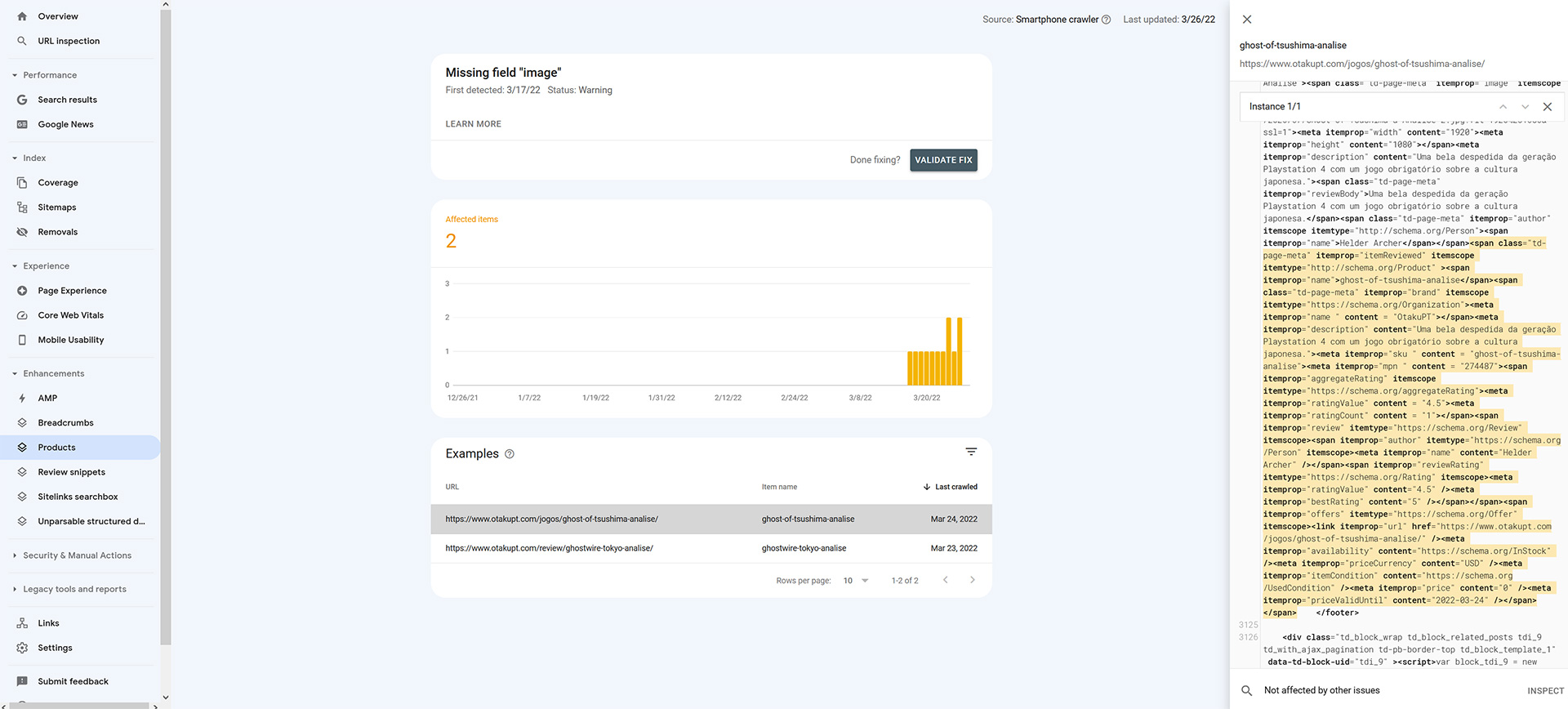
Hello – I’ve had 3 emails from Google telling me I need fix issues at https://jazzjournal.co.uk/ as follows, 1-3 below. Are these fixes that can/should occur in the Newspaper theme?
1) Search Console has identified that your site is affected by 1 Review snippets structured data issues:
Rating is missing required best and/or worst values
(For example – https://jazzjournal.co.uk/2020/07/12/blues-people/)
2) Search Console has identified that your site is affected by 1 Products structured data issues:
Rating is missing required best and/or worst values
3) Search Console has identified that your site is affected by 1 Products issues:
Missing field ‘image’
(For example, https://jazzjournal.co.uk/2019/05/15/vasil-hadzimanov-band-lines-in-sand/)
Thanks
Mark Gilbert
ArcherixHi, Search Console is giving a warning related to how Newspaper shows reviews
Although in “Review snippets” it gives no warnings, in “Products” it says that it’s missing de field “Image” (I’m sending a screenshot)
It’s not a site breaking feature, but in a future actualization of newspaper you could give a revamp in how the reviews are showing in Newspaper, for example allow a 10 star ratting instead of 5 star, and fields for pros and cons, something google now takes into account. Takes into account the new SEO rules for reviews.
 retrology
Hi there.
I hope you are doing well.
Please note that the Sidebar (Column) in Single Post Detail Page is acting as a sticky sidebar even though the sticky option is unchecked.
I have also cleared the cache of both the website and browser multiple times, but it still doesn’t work.
Please assist.
Website: https://retrology.net/
Please refer to the following image:
https://drive.google.com/file/d/1-yfap2v6zK1lSXCIv6K3zvbbqavxpJcY/view?usp=sharing
Page with the issue:
https://retrology.net/oscar-winner-amadeus-1984-movie-review-realm-of-classical-music/
Thank you.
Regards,
Talha
 loslunes
 Understood, it could be a good idea to add an option to choose the average words per minute between “average reader (200-250 wpm)” o “advanced reader” (300+ wpm). But its ok, I think my last “reading time plugin” used 250 so thats why in long reviews now we have 2-3 more minutes than before. Many thanks.
 dmxsta
Hello TagDiv,
The review schema has been broken for a few years and needs fixing, I was told it would have been fixed in the latest update, however, it wasn’t.
I simply want the review schema to display the correct rating out of 10, and display the authors name next to the review. At the moment, it shows the shows the review rated out of 5 and has “1 vote” instead of the authors name.
What the theme needs: https://gyazo.com/347d44986d804a58ea9bbbee830b7f38
What we have: https://gyazo.com/a82827b330bc2c613c7f3063fa3cf3b2 – the rating says 4.5/10 when I have rated it 9/10 in the post.
The fix is SO simple and should only take a few minutes, just change BestRating to 10, and display the current rating from post settings.
I would fix the issue myself, however, td-page-meta is outside the_content(), so it is impossible to catch it with the parser, because this data is output before I can parse it. I’ve been looking into TD plugins (theme related) and noticed that some of the meta data code hasn’t changed since 2015, including the reviews. This is very unacceptable for a wordpress theme with so many sales, besides, not a single function in the code is created in such a way that it can be filtered, everything is written strictly and without the possibility of customization, all code is written directly in the class constructor
I really hope we can get this issue fixed soon.
Regards
-Dan
 ludyma
Hello, for a few days, I have received complaints from my clients because the menu does not load when it is on mobile, it stays waiting and never shows up, you have to enter PC mode and from there you access the categories. Could you please review or what do I have to do to solve this.
Checking if I am logged in if the menu appears but if I am as a visitor it does not load.
 IMPULSIA GROUP
Hi guys,
Their seems to be a issues between what we see in previewed articles becuase they do not refelect published posts.
On this URL: https://www.watchespedia.com/
We are currently using Newspaper 11 with “single Post Template 58 – influencer” for posted articles.
Preview image:
Preview
Posted image:
Posted
We need to have the posted embeded Youtube video size to reflect the size shown in the preview image!
Thank you for your help!
 TheGrandes
I reviewed the documentation, read almost the entire forum here, and implemented all of the guidelines. However, nothing seems to work, and Google AdSense does not appear on my site. What can I do?
 christvbible
 <iframe src=”https://drive.google.com/file/d/1nv-ukGbGXWgkg6LDfsdNJugg-RDWnp-I/preview” width=”640″ height=”480″ allow=”autoplay”></iframe>
 FiscoEquo
Hi, we have been using for many months the plugin “WP RSS Aggregator” (via shortcode) to display in the sidebar some updates RSS from an external press agency. Since we updated Newspaper the widget in the front-end is EMPTY (see fiscoequo.it, “NEWS ADNKRONOS” box in the SB), but in the configuration and in the preview the news list and the links appear correct.
We contacted the developer of the plugin, who says to check compatibility with the theme … since, as reported, in the configuration mode the plugin seems to work absolutely correctly.
 casprom
Hi guys. Thank you very much for all the support so far in each topic.
Here’s a new thing we’re trying to optimize on our site. We would like our writers to be able to put the feature video link in the Feature Video box, but this field doesn’t display in the Authors view.
If they could use this box it would be much faster to review and publish their works so we we’re hoping there’s a way to make this field available and visible to them. Image of the box here: https://drive.google.com/file/d/1YXuYmILhK6-atA3tvoGx_fw016VE69qR/view?usp=sharing
 reloaded
 Hi Bettina,
i’ll try to explain with screenshots.
So the original layout you show is this one: Newsmag Star review original layout
The one i was able to configure looks like this: MT star review layout
So you can clearly see in my layout there is some white blank space between star score and summary/overall score
AND
Summary’s bottom border line is not perfectly aligned with overall score’s border line. Ref1 and Ref2 of previous post
I can show you how it looks my review system in composer:
Star review system in composer
What i was asking is to make it looks exactly as you demo page which is how it used to look before when i was using Newsmag theme.
Thanks. Hope it helped.
-
This reply was modified 4 years by
reloaded.
 Calin
Calin Hi,
If you want to display on blocks the number of reviews and not the stars, then will be need to make some custom changes in the theme files.
Here are some similar topics -> https://forum.tagdiv.com/topic/review-scores-like-mrbuzz-com/
Thank you!
 Redlemon
I am copying an element within TD Composer, which I am then pasting before or after some other element. On the first attempt I am almost always getting the following error. On the second attempt I am rarely getting the same error; usually it is pasting like it should. When there is the same error a second time, a third attempt has always worked so far. Please review and advise. This is happening after upgrading to the latest version (11.4.1).
_getDestinationModel Error: Container destination not available! Current state has involved an issue. You could try an UNDO operation (CTRL+Z / CTRL+SHIFT+Z)
 yonish3
When I try to duplicate a post I get a critical error.
https://prnt.sc/FQQVeeGrS8dL
https://prnt.sc/xwbnjZc_tpTX
This happens also when I try to do it from the post manager page.
It does create it as a draft
https://prnt.sc/0odG2MXgKwEN
But I cannot use it, as using preview show the same error.
Here is my website:
https://happybarefoot.com/
 organizerclub
I’m using the same menu on all pages and the icons only show on internal pages.
They are configured like this:
<i class=”tdc-font-tdmp tdc-font-tdmp-home”></i> Home
In preview mode, it shows on the homepage, but when viewed live, it only shows on internal pages.
Not sure what to do. Any suggestions?



