
- NewsmagtagDiv Composer Tutorial
- TutorialsFrom WPBakery to tagDiv Composer
- NewspapertagDiv Composer Tutorial
- NewsmagHow to use the Visual Composer plugin
- Apitd_api_block::update_key
- Apitd_api_block::update
- Apitd_api_block::add
- NewspaperCredit System
- NewspaperCreate a frontend submission form
- NewspaperHow to Use the Tabbed Content shortcode
- NewspaperCreate a form contact page
- NewspaperFilters and sorting for taxonomies
- NewspaperUser review system
- NewspaperModal Popup
- NewspaperFlex Block Settings Guide
- NewspaperSocial Sharing
- NewspaperSingle Post Shortcodes
- NewspaperInfinite Loading for Single Posts
- NewspaperThe Newspaper Mobile Theme: Introduction
- NewspaperHow to Add a Logo in Newspaper
 Catalin
 Hello commandeleven,
Ignore this message and try to edit your page with TD COmposer, save the project and it should work fine.
Thanks.
 Rok111
Today I bought theme Newspaper, so I have the latest version. I am using WP version 4.9.6
I get the following error every time I try to use TD Composer (in page):
http://www.mywebsite.com/beta/wp-admin/post.php?post_id=53&td_action=tdc&tdbTemplateType=page
Error picture >> https://ibb.co/hQGX2y <<
Catalin Hello squallhajime,
Please understand that’s the only available way for creating posts with TD Composer. You should create some single templates with your desired design for your posts and then, choose it for your posts. You will do not have double content as you said above. To preview your custom template, the content is just a dummy data and if it will be loaded to your post, this layout will be fit to your own content and also, the Seo will not be affected in any way.
Thanks for your understanding!
 Simion C.
 Hi,
On phones the sidebar content will drop below the comments at the bottom. The sidebar cannot be disabled just for mobile, only in general. Hiding the sidebar would be an option with CSS or in the composer with the responsive options, but it does not apply here because there is an Adsense ad in the sidebar (Adsense ads should not be hidden with CSS).
Also having an Adsense in a sidebar when sticky could potentially be a violation of Adsense rules
– https://www.screencast.com/t/WgVg3S0S2fyt
– https://www.screencast.com/t/aztyvtdGZCiU
– https://support.google.com/adsense/answer/48182?hl=en
Only when the mobile theme plugin is used the sidebar will not be displayed on phones
– https://forum.tagdiv.com/the-mobile-theme/
Thanks
 balochistanpost
I currently have version 8.0 installed, can I directly upgrade to version 8.8 by following the tutorial on tagdiv?
From my past experience with other themes, it was not possible to directly upgrade to the latest version, if you had a very old version.
I have made many CSS changes, which reading from the forum I know will disappear after the upgrade but would it also reset the structure of the main page that I have created with TD Composer.
 worldofmaya
Hi!
I’m trying to updated an existing site from version 8.1 to 8.8.1 without success. Everything loads fine in v8.1. As soon as I use the new theme none of the posts have any content (td-post-content ist empty).
– I tried to reset everything via theme panel
– I disabled all plugins
– only disabled td-composer
– installed Demo content
Nothing helped.
Last thing I did was enabling wp debug which displays the following error:
Fatal error: Uncaught Error: Call to undefined function get_featured_image_copyright() in /usr/www/users/testsd/wp-content/themes/Newspaper-child/includes/wp_booster/td_module_single_base.php:166 Stack trace: #0 /usr/www/users/testsd/wp-content/themes/Newspaper/loop-single.php(47): td_module_single_base->get_image('td_696x0') #1 /usr/www/users/testsd/wp-includes/template.php(688): require_once('/usr/www/users/...') #2 /usr/www/users/testsd/wp-includes/template.php(647): load_template('/usr/www/users/...', true) #3 /usr/www/users/testsd/wp-content/themes/Newspaper/single.php(28): locate_template('loop-single.php', true) #4 /usr/www/users/testsd/wp-includes/template-loader.php(74): include('/usr/www/users/...') #5 /usr/www/users/testsd/wp-blog-header.php(19): require_once('/usr/www/users/...') #6 /usr/www/users/testsd/index.php(17): require('/usr/www/users/...') #7 {main} thrown in /usr/www/users/testsd/wp-content/themes/Newspaper-child/includes/wp_booster/td_module_single_base.php on line 166
Do you have any clue why this happens?
Rok111 I got same problem with TD Composer….
 diadoraz10
 I’m getting the same error when trying to open TD Composer:
(“my site name appears here”) didn’t send any data. ERR_EMPTY_RESPONSE
I’m running wordpress 4.9.6 and Newspaper v8.8.1
I’ve uninstalled/re-installed WordPress a couple times as well as the theme. This error appears no matter if I create a page, edit a page (tried loading one of your demo’s) etc.. Below is the URL given when I click the TD Composer button:
 Mpburgus
 So, I have now uploaded it via ftp like you suggested and now the TD composer is not an option on the front end like it was before. I tried to install the plugin from the zip file provided and from the themes menu and still nothing.
 satwell
When I try to edit my Posts page with TD Composer, I get the following error:
Errors happened during tdcIframeData.init() -> bindViewsModelsWrappers()!
Suggestions?
 reflector
I created a homepage with the composer but when I try to open the page to edit the page with the composer I get a tdcIframeData.init() -> bindViewsModelsWrappers()! error.
Catalin Hello squallhajime,
Sorry but please notice that Visual Composer has not been tested on post pages and we do not recommend something like this, unfortunately! Notice that we have a cloud library and from there you have an option to create your own post template using the TD Composer. Please check our documentation from here -> https://forum.tagdiv.com/tagdiv-cloud-library-plugin/
Thanks for your understanding!
Catalin Hello sk_rocks,
If you want to use these settings you should use only Visual Composer functionality because our TD COmposer does not have these options, sorry! -> https://www.screencast.com/t/3dhph13Vj Use only Visual Composer for that page if you do not want to get some errors.
Thanks for the message!
 Adaras
Hi,
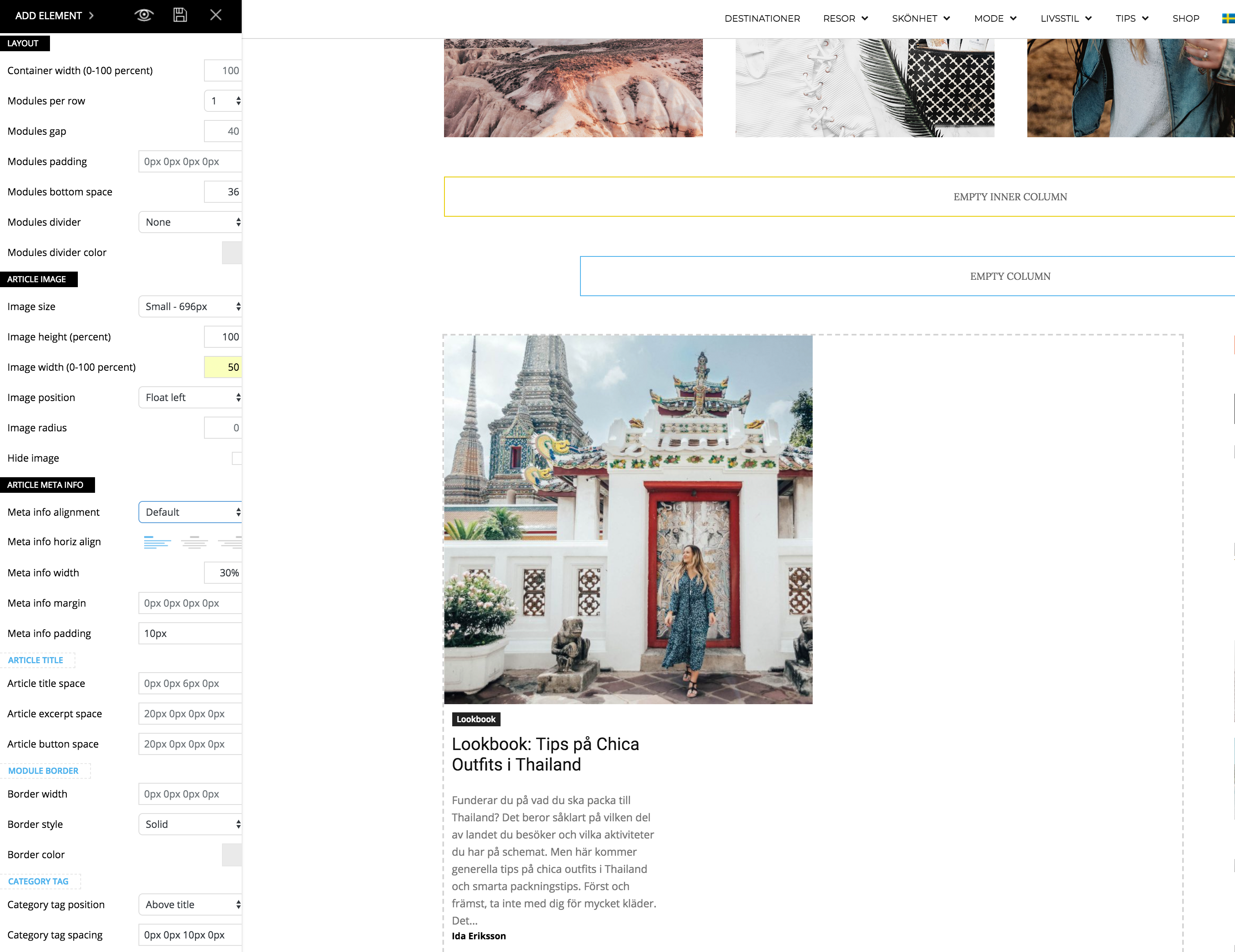
I just updated to the newest version of the theme and noticed a problem when I’m trying to make my flex block as the example for “2 modules per Row here”: https://demo.tagdiv.com/newspaper/flex-block/
I can’t get my meta description to show next to the photo. It’s position below or above the photo, no matter what I do.
When I inspected the elements I see that the difference is that my .td_module_flex_1 .td-module-container has flex-direction: column. And if I change it to “row” like in the example it works. But how do I get it right with only the TD composer?
Catalin Hello squallhajime,
Notice that you can create your own post template from Cloud Library and customize it with TD COmposer as you wish. For more information about this setting, please check our documentation from here -> https://forum.tagdiv.com/tagdiv-cloud-library-plugin/
Thanks for your understanding!
Simion C. Hi,
A 404 errors would mean that the requested resources are not found on the server. The first one refers to a child theme and a font file it seems, try deactivating the child theme temporarily.
The second error is provided because a file is not found it seems. But the unusual thing is that there is no such file in the main theme folder. Maybe you made some modifications to the theme files, or file additions. Or maybe a plugin is doing it. You could investigate these first and check if there are still errors.
Deactivate the child theme, deactivate all non-theme plugins, remove theme modifications or code added in the theme files. Check if the errors are still present. Ultimately re-install the theme by FTP
– https://forum.tagdiv.com/install-via-ftp/
If the errors are gone and there is still a problem review the theme requirements
– https://forum.tagdiv.com/requirements-for-newspaper/
Also these similar topics know to solve composer loading issues
– – https://forum.tagdiv.com/topic/javascript-error-td-composer-wont-load/
– https://forum.tagdiv.com/topic/gray-page-tagdiv/
Let us know what you find.
Thanks
Catalin Hello royyan,
Sorry but please notice that builder is not tested with the theme and we do not recommend using it, unfortunately! You should use our page builder TD Composer if you want to achieve good theme results.
Thanks for the message!
MpburgusI am using WP version 4.9.6
I get the following error every time I try to use TD Composer:
This page isn’t working
(“my site name appears here”) didn’t send any data.
ERR_EMPTY_RESPONSE
I have followed all the recommendations for configuring WP and PHP provided in the documentation and, I have green lights on the system status within Newspaper. I have also tried using several browsers to do this.
I have also uninstalled and reinstalled the theme and the plugin and have installed the plugin from the Newspaper plugin tab as well as the zip file provided and nothing seems to work.
I am using WP version 4.9.6
 dylanswims
Hi,
Is there a map element on the page builder or a map plugin that has been tested with TD composer that you would recommend?
Thanks,
 Amit
Amit Not possible to send admin details
I switched to Visual Composer and everything is good now
I think TD composer is still a beta product
 NT
NTas i was about to do installer this pop up need help:
Downloading installation package from https://nitinthusoh.com/wp-content/themes/Newsmag/includes/plugins/td-composer.zip…
Download failed. cURL error 60: SSL certificate problem: self signed certificate
 ananas
I created some Pages with td composer and used the widget sidebar. The sidebars are not sticking like the smart sidebars, that is used when I don’t create the page with td composer. Is there any way I can make them sticky?
 maXss
maXssGoodmorning,
since I update Newspaper Theme and td composer (last version of both) I had a problem with composer. The error is “502 Bad Gateway nginx”.
I disabled all my plugins but the error persist. All the checks of the theme are green. I uninstalled and reinstalled several times (via ftp and via wordpress installer), but the error persist.
Can you help me to understand what’s the error? I really need it!
 historybooksinsider
I’ve been having an issue where my mobile menu doesn’t open. When clicked, the background just goes grey. I’ve checked Page Speed Insights, deactivated all plug-ins besides TD Composer, and cleared cache.
What I just found out is that the menu actually does open, but it takes 2 minutes! Screenshare: https://www.youtube.com/watch?v=0nMGmZKCzUk.
Thanks for any fixes!
 miejan
I need to add a block but when I edit with TD composer a section of my home page comes up as text, not editable blocks. Please advise.
I have a screen show but don’t have anyway to add it here.
