
- NewspapertagDiv Composer Tutorial
- NewspaperCredit System
- NewspaperCreate a frontend submission form
- NewspaperHow to Use the Tabbed Content shortcode
- NewspaperCreate a form contact page
- NewspaperFilters and sorting for taxonomies
- NewspaperUser review system
- NewspaperModal Popup
- NewspaperFlex Block Settings Guide
- NewspaperSocial Sharing
- NewspaperSingle Post Shortcodes
- NewspaperInfinite Loading for Single Posts
- NewspaperThe Newspaper Mobile Theme: Introduction
- NewspaperHow to Add a Logo in Newspaper
- NewspaperCustom Post Type Support
- NewspaperCloud Library Templates
- NewspaperDesign your Post Pages using the Cloud Library Templates
- NewspaperHeader Builder
- NewspapertagDiv Cloud Library Plugin
- NewspaperAd Box Element and Ads Overview
 damir78
 ok, thanks for the answer.
1. do you mean newspaper?
2. ok, maybe do some action for the New Year holidays 🙂
I managed to expand the width of the template to 1200px and on the first P+V website, I got 90 for mobile / 95 desktop on the google page speed test
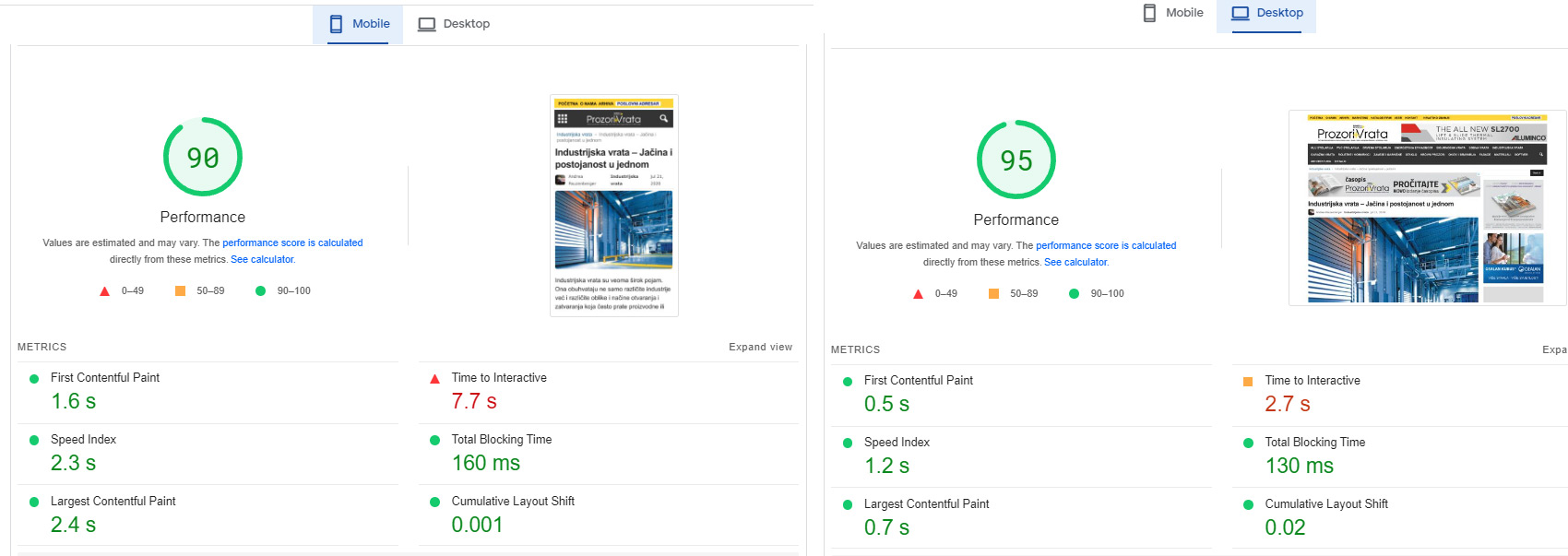
Although it is a huge website with over 20 google dfp banner positions.
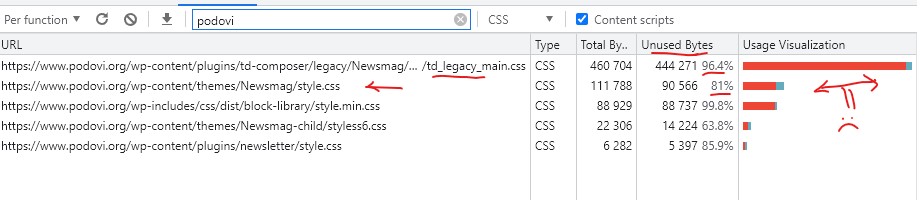
I had to modify your Newsmag/style.css and td-composer/legacy/Newsmag/assets/css/td_legacy_main.css a lot
there is still space for reduction and a better rating.
On the other Podovi website, I didn’t change those two files, so far.
I just minified them, I get 83 mobile / 93 desktop
Basically, these two files must definitely be reduced, they are too big and too unused.
Basically, I am satisfied with the template. I will probably try the newspaper as well, because I am planning to upgrade one of those two web portals soon.
 Jens H.
 Thanks – I installed 5.2.2 but wasn’t prompted to upgrade TD-Composer. Will do that 🙂
 Anamaria
 Hi,
Yes, but you need to do changes in the theme files You need to edit this file -> wp-content/plugins/td-composer/legacy/common/wp_booster/td_module.php and add the code here https://imgur.com/DrUdqvY
The number pagination is available only for the posts loop block.
Thank you!
Jens H.The last few days I have recieved my “Ithemes Security Pro” report telling me that TagDiv composer 3.5 is unsafe.
“Known issues in tagDiv Composer v3.5 | built on 17.10.2022 15:09 – tagDiv Composer < 3.5 – Unauthenticated Account Takeover”
It links to a CVE report: https://cve.mitre.org/cgi-bin/cvename.cgi?name=CVE-2022-3477
Can you tell me whether its a false positive or ?
 beckymontpetit
Good evening,
The site is: https://rochestermom.com
We updated the Newspaper theme to 12.1 this evening, and updated the Newspaper TagDiv plugins, and the site was not loading the TagDiv shortcode at all. The link below is a screenshot of the problem.
I also copied a couple of the error logs from Kinsta, our hosting company:
2022/10/25 00:28:59 [error] 174#174: *29376 FastCGI sent in stderr: “PHP message: PHP Fatal error: Unknown: Cannot use output buffering in output buffering display handlers in Unknown on line 0” while reading upstream, client: 199.48.94.108, server: rochestermom.com, request: “GET /rochestermn/guides/rochester-mn-guide-birthday-parties/ HTTP/1.1”, upstream: “fastcgi://unix:/var/run/php7.4-fpm-rochestermom.sock:”, host: “rochestermom.com:56292”, referrer: “https://rochestermom.com/”
2022/10/25 00:28:59 [error] 174#174: *29376 FastCGI sent in stderr: “PHP message: PHP Fatal error: Allowed memory size of 268435456 bytes exhausted (tried to allocate 37494768 bytes) in /www/rochestermom_257/public/wp-content/plugins/gravityforms/includes/libraries/class-dom-parser.php on line 136” while reading response header from upstream, client: 199.48.94.108, server: rochestermom.com, request: “GET /rochestermn/guides/rochester-mn-guide-birthday-parties/ HTTP/1.1”, upstream: “fastcgi://unix:/var/run/php7.4-fpm-rochestermom.sock:”, host: “rochestermom.com:56292”, referrer: “https://rochestermom.com/”
2022/10/25 00:20:35 [error] 174#174: *29010 FastCGI sent in stderr: “PHP message: PHP Fatal error: Uncaught Error: Call to undefined function the_ID() in /www/rochestermom_257/public/wp-content/themes/twentytwentyone/template-parts/content/content.php:14
Stack trace:
#0 {main}
thrown in /www/rochestermom_257/public/wp-content/themes/twentytwentyone/template-parts/content/content.php on line 14” while reading response header from upstream, client: 5.45.80.13, server: rochestermom.com, request: “GET /wp-content/themes/twentytwentyone/template-parts/content/content.php HTTP/1.1”, upstream: “fastcgi://unix:/var/run/php7.4-fpm-rochestermom.sock:”, host: “rochestermom.com:56292”
Lastly, this was the Console error I saw when inspecting the site:
Uncaught TypeError: fbq.getState is not a function
init https://rochestermom.com/wp-content/plugins/td-composer/legacy/Newspaper/js/tagdiv_theme.min.js?ver=12.1:10
setTimeout handler*init https://rochestermom.com/wp-content/plugins/td-composer/legacy/Newspaper/js/tagdiv_theme.min.js?ver=12.1:10
<anonymous> https://rochestermom.com/wp-content/plugins/td-composer/legacy/Newspaper/js/tagdiv_theme.min.js?ver=12.1:16
Any help to resolve this would be fantastic, thank you!
 GerPic
Hi, the WordPress CSM returned an error connected to the td-composer plugin and the following message “An E_COMPILE_ERROR error was caused in line 47 of the file /web/htdocs/www.matinella.it/home/wp-content / plugins / td-composer / legacy /comune/wp_booster/td_wp_booster_functions.php. Error message: require_once (): Open failed request ‘td_block.php’ (include_path = ‘.: / php7.4 / lib / php’) .
The site is currently inaccessible. How should we fix this error? thank you
The website link is http://www.matinella.it
 loverblessed
 Okay, I have detected how you can create the problem from your end.
Use Single Post Template – Medicine PRO as a Global template from the cloud template.
Then edit it using TD composer and add Single Post Comments element.
Save it and reload each post URL on your website.
That should create the problem from your end.
Thanks
 Calin
Calin Hi,
For sub footer style 1 please try this file -> wp-content/plugins/td-standard-pack/Newspaper/parts/footer/td_sub_footer_template_1.php
If you are using the multipurpose sub footer the please try on this file -> wp-content/plugins/td-composer/td-multi-purpose/footer/tdm_sub_footer_template_1.php
I hope this will help you!
 zielmedien
Hello, I would like to link a complete row on a page in TD composer to an external URL. How can I do this?
 tafieb
 Fatal error: Uncaught Error: Call to undefined function iconv() in /home/zbcnewsco/public_html/wp-content/plugins/td-composer/legacy/common/wp_booster/td_util.php:4250 Stack trace: #0 /home/zbcnewsco/public_html/wp-content/plugins/td-composer/legacy/common/wp_booster/td_css_res_compiler.php(58): mb_detect_encoding(‘{“all”:{“margin…’) #1 /home/zbcnewsco/public_html/wp-content/plugins/td-composer/legacy/Newspaper/includes/shortcodes/td_block_trending_now.php(196): td_css_res_compiler->load_settings(‘td_block_trendi…’, Array) #2 /home/zbcnewsco/public_html/wp-content/plugins/td-composer/legacy/common/wp_booster/td_block.php(1616): td_block_trending_now->get_custom_css() #3 /home/zbcnewsco/public_html/wp-content/plugins/td-composer/legacy/Newspaper/includes/shortcodes/td_block_trending_now.php(254): td_block->get_block_css() #4 /home/zbcnewsco/public_html/wp-content/plugins/td-composer/legacy/common/wp_booster/td_global_blocks.php(27): td_block_trending_now->render(Array, ”) #5 /home/zbcnewsco/public_html/wp-includes/sho in /home/zbcnewsco/public_html/wp-content/plugins/td-composer/legacy/common/wp_booster/td_util.php on line 4250
This is what I am getting when I try to do a simple edit of the homepage.
 ian909
 Hi Calin,
I’ve added a link into the theme file -> wp-content/plugins/td-composer/legacy/Newspaper/parts/header/td-login-modal.php I’ve put it where i think it should go but it still take opens up the area to enter your email rather than following the link.
Thanks
Ian
 Subin Chandran
The web page at https://ibcmedia.in/wp-admin/post.php?post_id=1634&td_action=tdc&tdbTemplateType=page&prev_url=%2F%2Fibcmedia.in%2F might be temporarily down or it may have moved permanently to a new web address.
ERR_HTTP2_PROTOCOL_ERROR
this is the error message i am getting please help me to rectify this prob
Calin Hi,
I think the problem is that the membership plugin does not replace the elements in the theme for the reset password.
If you need to set a specific link, then I think it should be set manually in the theme files.
Now, depending on the type of header you use, you must edit a certain file.
-> wp-content/plugins/td-composer/legacy/Newspaper/parts/header/td-login-modal.php
-> wp-content/plugins/td-cloud-library/parts/tdb-login-modal.php
Thank you!
 Stanford Nix
I have edited the cloud template for the category page in cloud templates. When I view the page in TD composer, it looks fine. But when I view ANY category page from my phone it is using a different theme layout!
The theme should look like this
but when I view on my phone it looks like this
PLEASE HELP! I launch my new subscription offers this weekend and I dont want my website to look like this. I just updated to newspaper 12 but I dont think that is the issue. I also have every category using the selected theme in theme panel
 shirohae
When activating td-composer the whole website breaks, front end and backend with the following 2 errors:
01.
The tdc_state::$is_live_editor_ajax is NOT setThe tdc_state::$is_live_editor_iframe is NOT set
wp_booster error:
td_api_base::mark_used_on_page : a component with the ID: tdb_util is not set.
/var/www/html/wp-content/plugins/td-composer/legacy/common/wp_booster/td_api.php
02.
The tdc_state::$is_live_editor_ajax is NOT setThe tdc_state::$is_live_editor_iframe is NOT set
wp_booster error:
Missing parameter: ‘file’
/var/www/html/wp-content/plugins/td-composer/legacy/common/wp_booster/td_autoload_classes.php
Display backtrace
 dennisjpitocco
 This error is significantly impacting our ability to update over a dozen pages. Can you please expedite the bug fix? Thank you!
wp_booster error:
Internal error: The system tried to use an att that does not exists! class_name: tds_button3 Att name: “button_tdicon” as “1-button_tdicon”
/home/bizcatal/public_html/wp-content/plugins/td-composer/legacy/common/wp_booster/td_style.php
 Peter_86
 This is the error:
Internal error: The system tried to use an att that does not exists! class_name: tds_button8 Att name: “button_tdicon” as “1-button_tdicon”
/home/xxxxxxxx/public_html/wp-content/plugins/td-composer/legacy/common/wp_booster/td_style.php
I have 3 buttons with name: tds_button8 I have removed icons from buttons but it was the same. Now I have inserted them back.
 mita
mitaHi,
I’d like to report issues with cloud templates on our site. So far we couldn’t find what’s causing it and I kindly ask your team to inspect it and provide feedback. Im sending this ticket by email to support@tagdiv.com with credentials to access the site.
https://jornaldoalgarve.pt/wp-admin/admin.php?page=tdb_cloud_templates
The preview of those templates are not working as expected. When clicking “view” we are always redirect to the last article published and for that reason we are not seeing the righ version of the template. We can access the right template only when using ‘Edit with Tad Composer’.
Thanks,
Marta
dennisjpitocco Thank you Bettina. We followed your steps above and still not working on certain pages. We see the following error displayed:
wp_booster error:
Internal error: The system tried to use an att that does not exists! class_name: tds_button8 Att name: “button_tdicon” as “1-button_tdicon”
/home/bizcatal/public_html/wp-content/plugins/td-composer/legacy/common/wp_booster/td_style.php
Calin Hi,
Unfortunately, there is no option in the theme for this, you’ll need to manually change the links.
The file path for modal is this one -> wp-content/plugins/td-composer/legacy/Newsmag/parts/header/td-login-modal.php
The file path for the top bar that holds the elements sing in/join is this one -> wp-content/plugins/td-composer/legacy/Newsmag/parts/header/top-menu.php
I hope this will help you!
 gono
gono Hi @Anamaria
Thank you for your feedback.
It is great that you want to help your customers to generate revenue but it would be more helpful if this would happen with products that make actually sense.
The paywall feature is a pain when it got released. You were providing something that was needed in your area but maybe not for all your customers. When we wanted to get rid of the invoicing part or certain fields it was mentioned that this sort of customization would be not possible. The feature did not create any backend users or gave us the option to add them to newsletters etc. The management of users was just difficult.
This is one of the features that got released half-baked but got advertised with a lot of noise.
The same happened to CPT in 11.5 Lot’s of noise about the awesome update but since day one of that update, your customers were asking for Demos and instructions. Instead, we were asked to wait for the next update which took 4 months. So I kind of felt it be wrongly advertised.
If you go by popular requests, I think I saw more requests from your customers to enhance the author review feature than user reviews. With great reviews, your customers are generating revenue, yet it is just a block.
Also, how do you figure out what is popular? Is there any roadmap or anything your customers can vote on?
You really should stick to what you are, providing a newspaper theme and making that the best, easiest and leanest available. 100s of features will bloat it up and you can’t meet all requests. Your theme is called the newspaper and not any multipurpose theme. Trying to compete with premium plugins can only make it worse – for example directory plugin.
I was already really hesitant when I was forced to use your own composer instead of one of the three major ones. Why? Because if you keep loading up the theme with features that are not needed without the chance to deactivate them, I might have to switch the theme but that’s the problem. Since everything is built with TD composer, I have to start from scratch. Sure that is one way to retain your customer base.
How do you plan on moving forward?
As you mentioned you want to help your customers avoid paying for premium plugins by creating your own features in a theme. And I think that is the problem we see. You try to implement so many features from plugins but as you said, you are a small team. This results in half-baked features which are creating frustrations. And people are stuck with unnecessary code on their page just because of a couple of requests. I don’t want user reviews, how do I get rid of it?
See, I’m not trying to bash you guys, but trying to understand and of course, part of me is frustrated as well.
So what I would like to get some answers specifically are the following:
1. Author review – My number one feature request. Is that on your list? Are you guys working on the multiple requests to make author reviews much nicer and easier? This is a content piece that generates revenue for your customers. It has been brought up and we were asked to wait for the next update.
2. Feature turn-off. Since you are integrating more and more stuff, can we please make options in the theme panel that either disable certain features or you branch them out as your own plugins? In that way, the customer can decide what feature they need and load it as required.
3. More and fast bug fixing. There were lots of things going on with the review schema and not everyone was aware of the solution to delete something and reactivate again. Instead of providing a bug-fixing update, we have been asked to wait for the next update. As you mentioned, customers are generating revenue, we can’t wait for SEO impacting fixes for months.
4. Small feature updates. You don’t have to make huge update jumps, no Theme developer does that. Add a feature here and there but you don’t need to make everyone wait just to release an update with X new features which some of them might be buggy.
Thank you.
 GanaAdhikar
 Hi,
I added a new block copying block 1 in td api plugin. Named it td_block_17 in php file.
Changed name of block in td-api-plugin.php.
The name is displayed in td composer. But, when I try to add it to a column. it shows just a spinner. it keeps loading and loading.
please check image below:

Kindly, tell me what is going on.
FYI, same thing happens, when I try to add the custom flex block that comes in td api plugin without any modification.
I am using td api plugin which comes with newsmag 5.
thanks
-
This reply was modified 3 years by
GanaAdhikar.
-
This reply was modified 3 years by
 exakt
exakt 
There must be some way to not use very old javascript code. It makes it impossible to have other plugins on the site. For example in this picture is an event issue that was was addressed in javasript/jquery in 2018. Four years ago.

Also look at these jQuery migrate warnings. We have the newest version of the theme and plugins installed. Why is this occurring?
And lastly, there is not code in the same minified file. It is a specific file with legacy javascript.
/wp-content/plugins/td-composer/legacy/Newspaper/js/tagdiv_theme.min.js?ver=12′
We do not need to use any legacy stuff at all. So how can we get away from this?
exaktHow can we avoid legacy javascript (and CSS) being used on our site? That this is used seems to result in the page crashing when there’s interaction with WooCommerce. For example,
https://staging2.frihetsnytt.se/wp-content/plugins/td-composer/legacy/Newspaper/js/tagdiv_theme.min.js?ver=12:192
 AsiaLifestyle
 Update:
My initial suspicion was correct, since both themes using the same plugins with different settings that created the conflict and crashed the WP engine.
I have renamed the td-composer and other td-plugings and the NewsPaper12 asked to install those new plugins and License and all is working now. We still need to change the logos and some colours but all is good.
