- NewspaperHow to update a plugin
- NewspaperHow to update the WPBakery Page Builder plugin
- NewspaperHow to Update the Newspaper Theme
- NewspaperSingle Post Excerpt
- NewspaperWP Rocket and Newspaper Theme: Optimization Guide
- NewspaperCredit System
- NewspaperHow to use the Bing Maps API
- NewspaperModules Builder in Newspaper Theme
- NewspaperCreate a frontend submission form
- NewspaperCustom Fields Support
- NewspaperFlex Block Settings Guide
- NewspapertagDiv Opt-In Builder
- NewspaperHow to use the YouTube API
- NewspaperDefault Category Settings
- NewspapertagDiv Composer Tutorial
- NewspaperHow to Set the Image Avatar
- NewspaperUnique Articles
- NewspaperFacebook Share
- NewspaperCache plugin – install and configure
- NewspaperFeatured Image, Video or Audio
 giurgiunet
Hello, I cannot update the theme. If I do, I lose all of the content, and the website becomes a jumble of HTML and shortcodes.
What gives?
 Bettina
 Hello @Stexs!
Our team is currently working on a recurring solution with Stripe. After testing, we will plan to introduce it in a new update.
We only have monthly and annual subscriptions. I’ll also add this feature to our list!
Thank you!
 EricPrin
My “Edit Content” pop-up opens but the WP Editor section is blank?
I recently updated to PHP8. Is this a problem?
 karlostipo
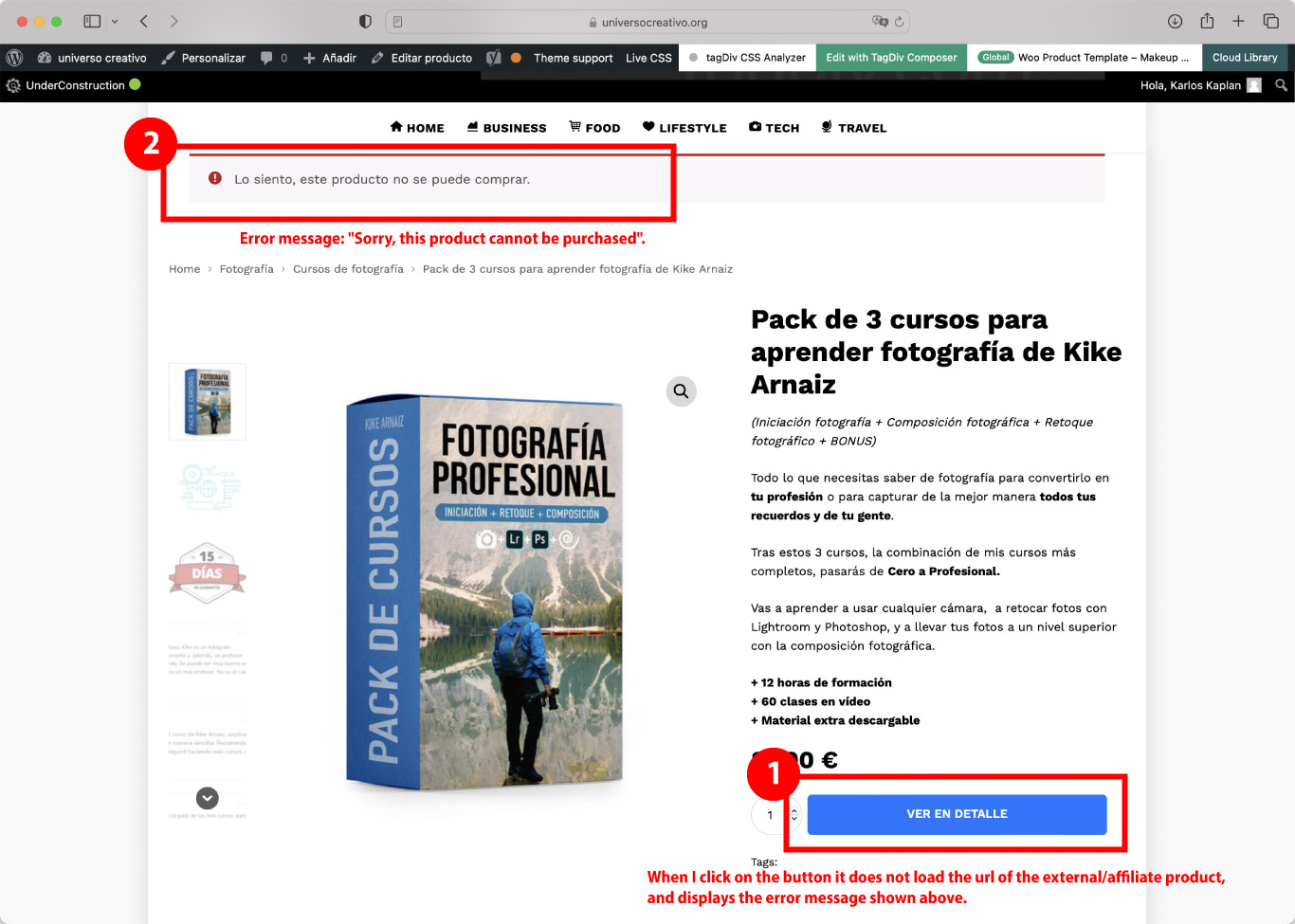
Woocommerce, affiliated/external product: Problem on the product page of WooCommerce, when clicking on the buy button (in my case “ver en detalle”) does not open the affiliate URL that has assigned that product. What happens is that an error message comes up at the top that says: “Sorry, this product cannot be purchased”.
After doing a lot of testing and research, I have found that this error only happens when I have a tagDiv template assigned to the product page. If you don’t assign an existing tagDiv template or create a new template it does work correctly, that is if you leave the default WooCommerce style it does work. This is why it is clear that the problem is in the tagDiv Composer… I consider that it is a serious error because in my store there will only be affiliated/external products… (I attach a screenshot of the error here).
Could you please help me with this issue, or could you check this error and update the theme version soon?
My website is under development so to see the error I can provide you with a username and password to access.
Thank you very much in advance for your help.
Best regards,
Carlos
 ognjenm3
 Hey Calin,
Thank you for your help.
It looks like because of its recent update, Easy Table of Contents plugin was invading my headers for some reason, so I downgraded the version and it seems to work!
Have a nice day.
Bettina Hello G3!
We recommend to use cloud/PRO templates in order to have the possibility to edit them with the TagDiv Composer which contains a lot of functions and features, please check our tutorial here: https://forum.tagdiv.com/tagdiv-composer-tutorial/
More documentation about the cloud templates is here:
– https://forum.tagdiv.com/homepage-how-to-build-and-set-it/
– https://forum.tagdiv.com/cloud-library-templates/
– https://forum.tagdiv.com/design-post-pages-using-cloud-library-templates/
– https://forum.tagdiv.com/cloud-library-category-templates/
The Standard Pack plugin is useful only if you are using the default templates.
When you update the theme, make sure you have the latest update of plugins too.
I would gladly recommend you make a backup and update plugins and the theme via file transfer to the latest update: https://forum.tagdiv.com/how-to-update-the-theme-2/
Thank you!
 G3Partners
Hi,
Our website is currently on the Newspaper theme: https://theicon.ist/
When we post on Twitter with a URL of one of our Posts, Twitter does not seem to show a Twitter Card for all posts. For example:
Successful Twitter card would be: https://twitter.com/TheIconistNews/status/1587106668659503104
Unsuccessful Twitter card would be: https://twitter.com/TheIconistNews/status/1587023211144744961
Via Twitter Validator (https://cards-dev.twitter.com/validator) we see the following issue with the unsuccessful posts:
INFO: Page fetched successfully

WARN: No metatags found
We found this error from the logs:
PHP message: PHP Warning: require(/www/wp-content/plugins/td-standard-pack/Newspaper): failed to open stream: No such file or directory in /wordpress/wp-includes/comment-template.php on line 1556
PHP message: PHP Fatal error: require(): Failed opening required '/www/wp-content/plugins/td-standard-pack/Newspaper/' (include_path='.:/usr/share/php') in /wordpress/wp-includes/comment-template.php on line 1556"
The plugin td-standard-pack fails to open stream, which could be the reason the meta tags are not being retrieved properly.
We are currently on Newspaper theme version 11.2, however updating the theme causes the site to crash… is there any way to update the theme without crashing the site?
Many thanks for considering my request.
G3
 clubfred
 Hi, I have a quick update. I was able to find my old custom CSS and other tweaks in an old cached version of my site. So now I am trying to just switch to Newspaper 12 and update my changes/settings.
However, the same issue occurs when trying to activate it. I add the purchase code and get a message that it was activated. But afterwards the theme still says ‘Your Theme is not Registered”, and also flashes UNREGISTERED at the top.
Is there something other than “Activating” it I need to do, or why won’t it save the status as registered after the activation says it was successful?
Thanks
 GeekPride
Updated to the newest version of Newspaper and it seems to have killed my site.
I now just have a homepage that is a long list of code.
HELP!
ognjenm3Hello,
I was editing some posts for my website and when I published them I noticed that Header 8, which I use for almost everything on my website, is malfunctioning and displaying another line for some reason.
Here’s the image so you can see what I’m talking about:
I updated the theme and purged cache, but it’s still like this. I tested it with different browsers and on mobile, and the problem is present there as well.
The URL to my website is: https://jebanje.rs/
Thank you in advance for your help.
 Anamaria
 Hi,
When you update the theme, please disable all extra plugins, and after doing the update.
There are also situations where the update does not work properly (due to certain extra plugins that are active, certain restrictions, and server settings), so, please deactivated all extra plugins (if you have WordFence, you need to use the WordFence Assistant to remove it).
Thank you!
Anamaria Hello Jason,
If you want to update the theme, you should download the latest version of it from Theme Forest account and download it.
Please make a full backup to all files and database => https://www.youtube.com/watch?v=LAJXrSI-dDA
Here you can find information about the changes that have occurred in each update over time https://tagdiv.com/newspaper/
I recommend that you update the theme manually https://forum.tagdiv.com/how-to-update-the-theme-2/ via FTP/cPanel/File Manager, also if possible disable extra plugins during the theme update to avoid any problems that may arise and make sure that you have activated the tagDiv Standard pack plugin to keep the website’s look. You can try to update the theme on a staging website.
After you update the theme, you need to update the theme plugins too.
In the worst cases, the settings in the theme panel may be lost (there have been isolated cases), in these cases, after the theme plugins that were previously used are activated, you will have to use a backup for the theme panel -> https://forum.tagdiv.com/import-export-theme-settings/
Also, if you want, you can contact our custom work team here and they can help you to update the theme safely: https://tagdiv.com/premium-customization-services/
Hope this help you!
Thank you!
clubfredHi,
Our site doesn’t look right, even when I restore backups that were good. We are on an older version of Newspaper (8.1.1). I downloaded the new version and will try to updated it.
But the problem at the moment is the current version shows unregistered, and when I activate it, it says it is activated but it isn’t. And the Theme Panel doesn’t show any of the settings we had in there. So I can’t back that up, or even take a look at the colors and font settings we had.
Can you help me activate it so I can at least see our old settings before upgrading?
Thanks,
Jason
Anamaria Hello,
I recommend you update the theme on a staging website and make sure that you activate the tagDiv plugins activated to keep the website’s look.
Before the update, please fully backup all files and the database if something goes wrong. => https://forum.tagdiv.com/how-to-update-the-theme-2/ using method B.
Also, please let us know about errors when you try to update the theme; also, please disable all extra plugins.
Thank you!
Anamaria Hi,
First of all, it is not recommended to auto-update any theme or plugin, as there is a possibility that it may cause certain problems with the functionality of the website. Also, it is always advisable to make a backup to all files and databases before updating -> https://forum.tagdiv.com/how-to-update-the-theme-2/ -> https://wordpress.org/support/article/updating-wordpress/
It looks like the tagDiv plugins can’t be installed, like tagDiv Composer and tagDiv Cloud Library, so please check and activated the plugins.
There are also situations where the update does not work properly (due to certain extra plugins that are active, certain restrictions, and server settings), so, please deactivated all extra plugins (if you have WordFence, you need to use the WordFence Assistant to remove it).
Thank you!
 wpjim23
 Hi just an update that I fixed the issue 🙂 It was an issue with cloudflare’s security. Feel free to delete this post if you think it is unrelated to tagdiv
-
This reply was modified 3 years by
wpjim23.
 tagdivchick
 I was able to figure it out by starting over from a brand new cloud template and also by utilizing the page caches.
However, changes don’t get updated unless you go into each post, and “update” it. Is this a bug?
For example, lets say I modify the single post template. It won’t show for any of the posts until i go into each single post, update it (with no changes) and refresh/clear objects.
This doesn’t seem like the right functionality because if you change something on the single post template, it would be unreasonable to go into each post manually and to do a phantom update by changing nothing and hitting ‘update’.
Does that make sense?
-
This reply was modified 3 years by
tagdivchick.
 Alexandru-Valentin Muşat
Hi guys,
I’ve found some issues regarding the row’s video background option:
1. On mobiles, the video is not loading/starting. You can see the problem also in your demo page: https://demo.tagdiv.com/newspaper_smart_app/support
2. If a self-hosted URL is used instead, the video is not stretched correctly to the height but resized, keeping the aspect ratio.
With Youtube video:

With self-hosted video:

Please fix these issues; everything worked well before the update.
Have a nice day!
 Micha
Micha You mostly just read about problems. I can say this much, that there were no problems with my two large websites. I only had to activate the composer in the plugin directory again, but otherwise it ran smoothly.
by the way, you can simply download the theme and plugins and if the update fails, so back to the old version. This is a bit cumbersome, but easy to do.
 bwpage3
12.1 has so many cool, new, features, however, after reading all the comments and past experience with updates, I simply DO NOT dare to try to update which is a shame.
Anyone running an active daily site cannot afford to go down and these issues do not seem to be getting resolved.
I am still trying to figure out why release updates that are not 100% tested?
As customers, we could lose our entire business if the website goes down for even 1 day.
 Bikul
BikulHello,
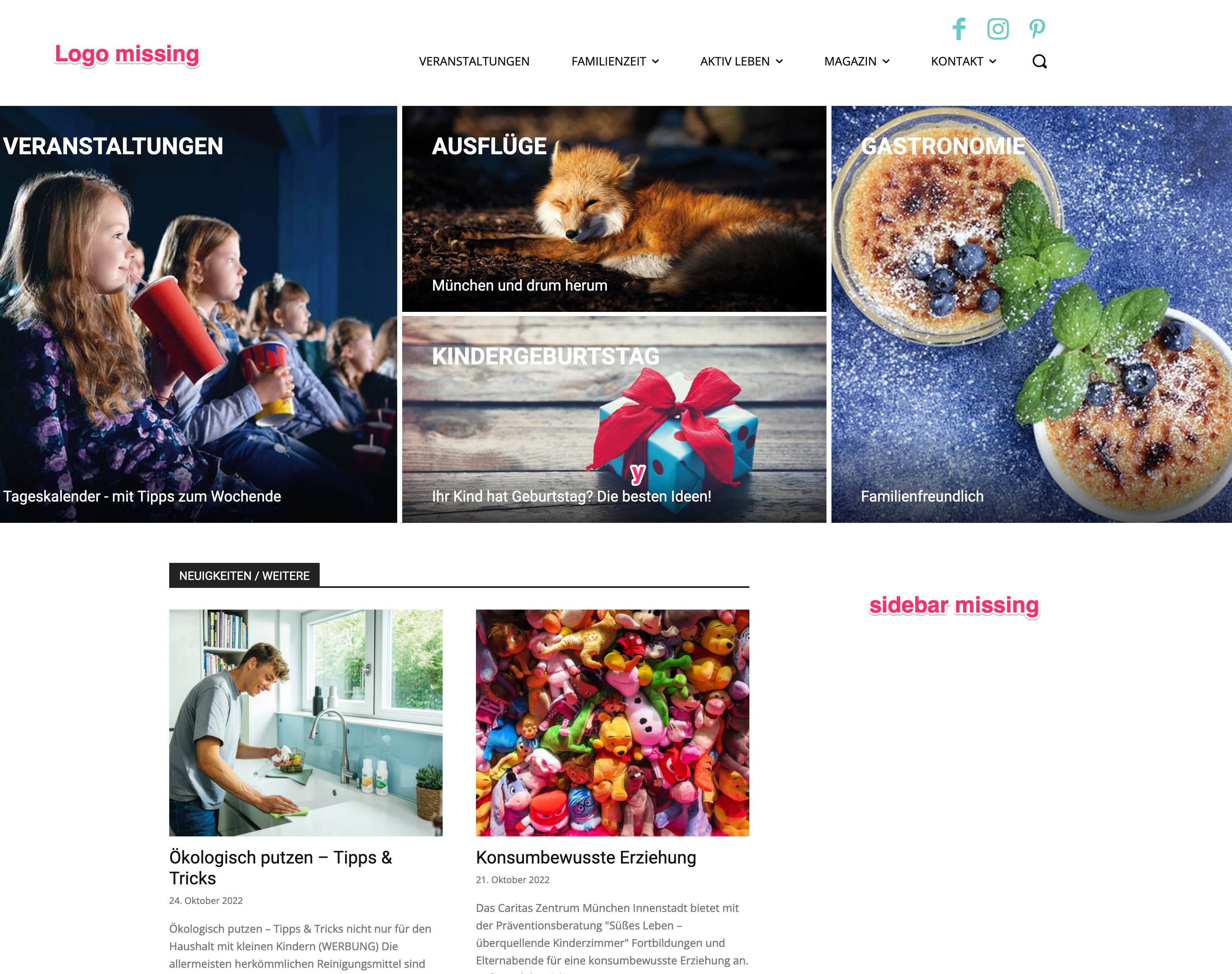
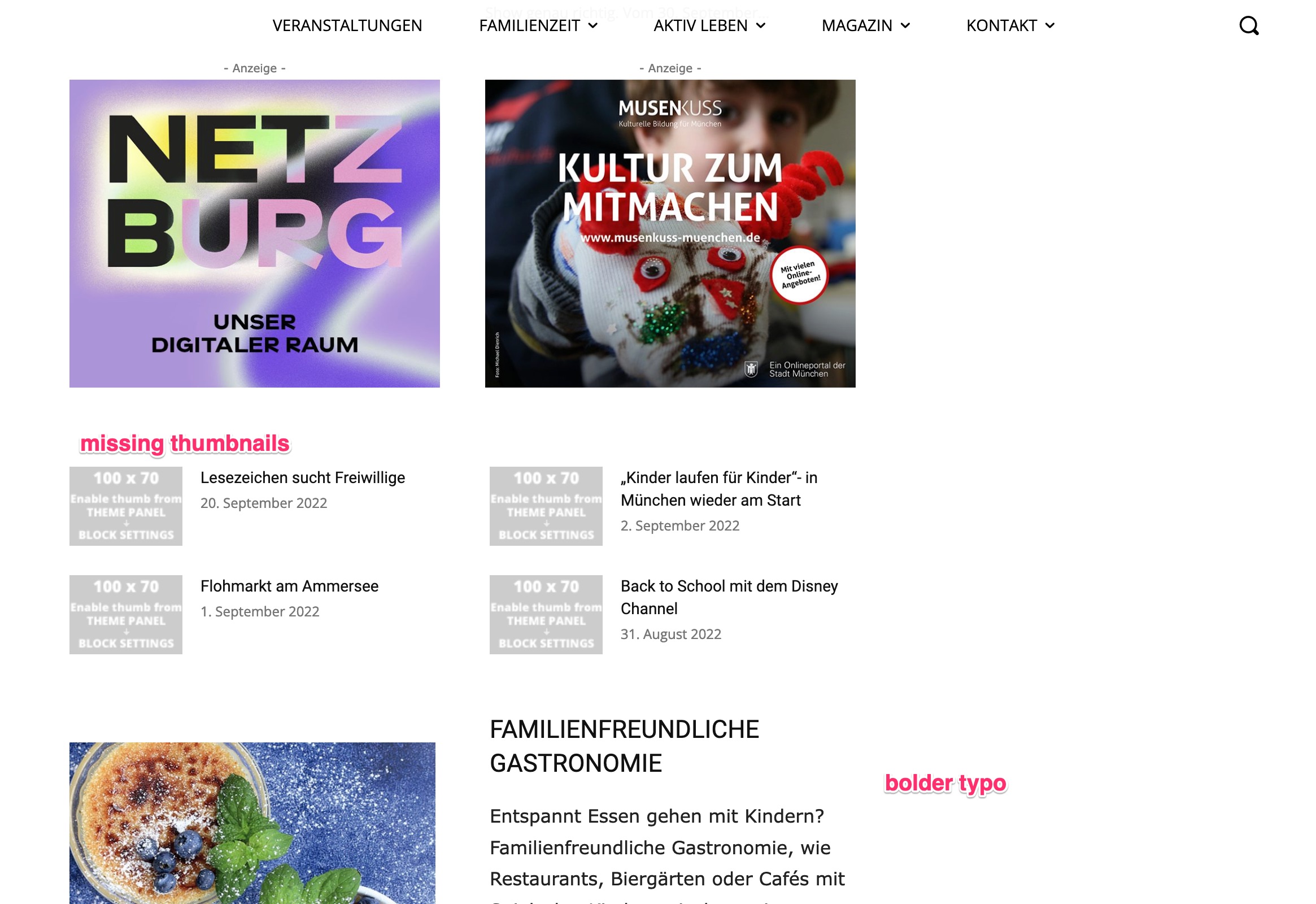
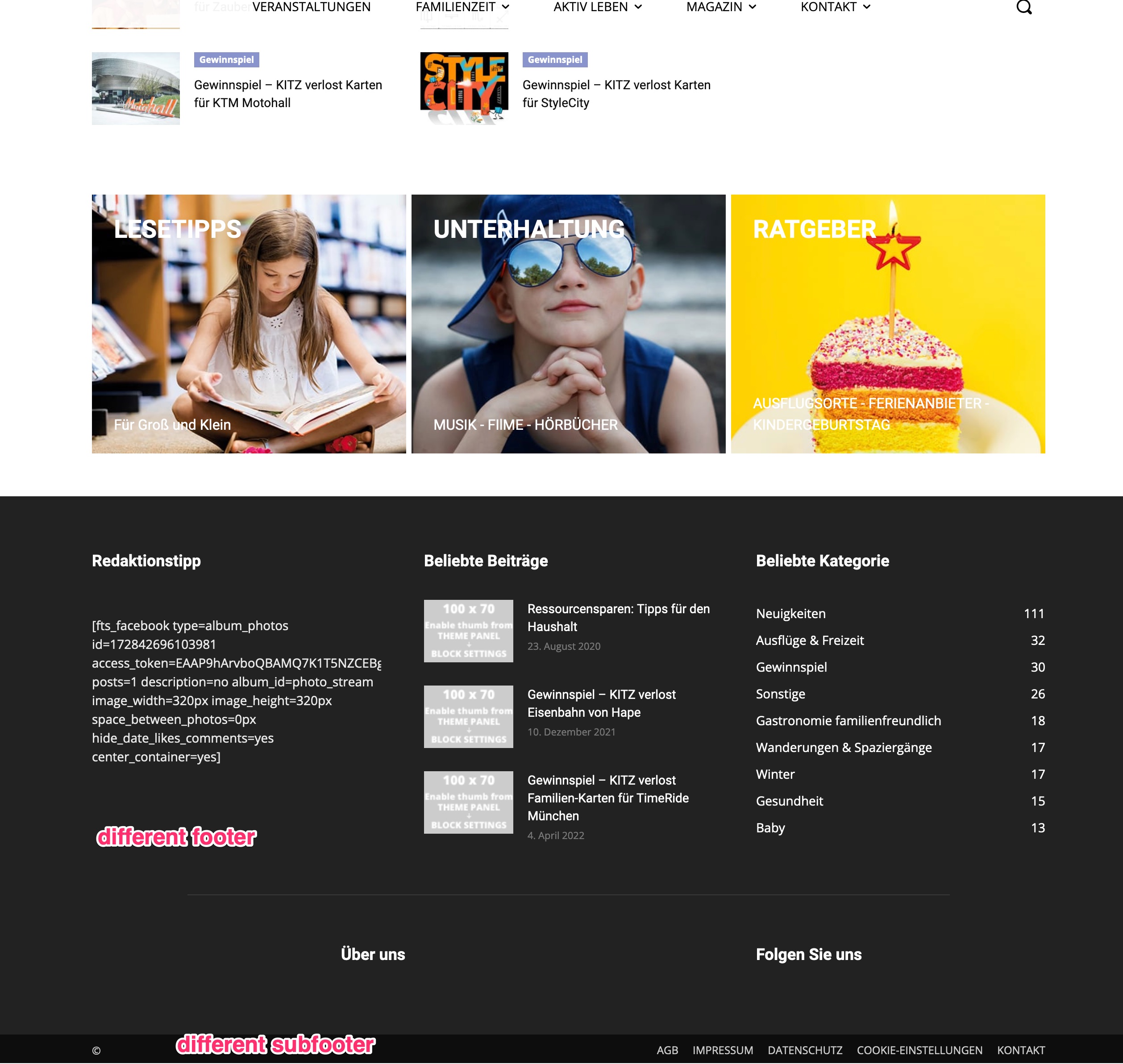
when I update the Newspaper theme from 12 to 12.1 (and installing necessary plugins) the website is not as it was before:
– Logo missing
– Sidebar missing
– some thumbnails missing
– footer and subfooter are completely different
So I reverted it to my backup-version 12 for now.
What can I do?
Thanks for Help
Bernd
https://kitz-magazin.de/download/12_1_01.jpg
https://kitz-magazin.de/download/12_1_02.jpg
https://kitz-magazin.de/download/12_1_03.jpg
 beckymontpetit
Good evening.
I just updated our PHP engine to 8.0, all plugins have been updated as well, and then we updated Newspaper to 12.1, but TagDiv Composer cannot be activated. We get the following error:
Warning: require_once(td_deploy_mode.php): Failed to open stream: No such file or directory in /www/rochestermom_257/public/wp-content/plugins/td-composer/td-composer.php on line 113
Fatal error: Uncaught Error: Failed opening required ‘td_deploy_mode.php’ (include_path=’.:/usr/share/php’) in /www/rochestermom_257/public/wp-content/plugins/td-composer/td-composer.php:113 Stack trace: #0 /www/rochestermom_257/public/wp-admin/includes/plugin.php(2313): include_once() #1 /www/rochestermom_257/public/wp-admin/plugins.php(192): plugin_sandbox_scrape(‘td-composer/td-…’) #2 {main} thrown in /www/rochestermom_257/public/wp-content/plugins/td-composer/td-composer.php on line 113
Any help would be appreciated, thank you!
 nibbl
nibbl Great thanks!!!
But can you make in the next updates at least one or two blocks that would display ads through an equal number of paragraphs?
Let’s say I want to display an ad every 10 paragraphs.
That would be a very handy feature.
Thank you!
Bettina Hello @EmilianoB2T!
We have 3 options for mobile versions that you can use:
1. Responsive version: A responsive version of your website looks similar to the desktop version. Edit the page with TagDiv Composer. Click on the mobile viewport: https://www.screencast.com/t/XDQJedlggSB. There you can see your mobile version and edit or adjust the elements to look better.
2. Mobile pages: https://tagdiv.com/newspaper-10-3-7-update-brings-customizable-and-fast-mobile-pages
3. Mobile theme plugin: The Mobile Theme is a performance-optimized theme included in the main Newspaper theme that only loads on mobile devices. It comes with its own templates and design for pages, posts, categories, etc., so your current templates from the desktop theme will get converted to the mobile theme layout. For more information, please visit https://forum.tagdiv.com/the-mobile-theme/ and https://forum.tagdiv.com/mobile-theme-introduction/.
A full explanation is here: https://www.youtube.com/watch?v=SpGkOnJeNZY
Please disable the Mobile Theme plugin and see the results!
Thank you!
Bettina Hello @thasneemklry !
A code in your frontend is appearing only when you have a plugin uninstalled and it should be installed, so instead of the code, it will display the element from that plugin.
Make sure you have the latest update of the theme and plugins too. Check if all the necessary tagdiv plugins are active in the Newspaper -> Plugins. Install the Standard Pack plugin if you use the default templates.
Thank you!