
- NewspaperHow to update a plugin
- NewspaperHow to update the WPBakery Page Builder plugin
- NewspaperHow to Update the Newspaper Theme
- NewspaperSingle Post Excerpt
- NewspaperWP Rocket and Newspaper Theme: Optimization Guide
- NewspaperCredit System
- NewspaperHow to use the Bing Maps API
- NewspaperModules Builder in Newspaper Theme
- NewspaperCreate a frontend submission form
- NewspaperCustom Fields Support
- NewspaperFlex Block Settings Guide
- NewspapertagDiv Opt-In Builder
- NewspaperHow to use the YouTube API
- NewspaperDefault Category Settings
- NewspapertagDiv Composer Tutorial
- NewspaperHow to Set the Image Avatar
- NewspaperUnique Articles
- NewspaperFacebook Share
- NewspaperCache plugin – install and configure
- NewspaperFeatured Image, Video or Audio
 Bettina
 Hello!
Deactivate the cache plugin that you use and check again to see if the problem is still there.
We have 3 options available for mobile versions that you can use:
1. Responsive version: A responsive version of your website looks similar to the desktop version. TagDiv Composer is used to edit the page.Click on the mobile viewport: https://www.screencast.com/t/XDQJedlggSB. There, you can see your mobile version and edit or adjust the elements to look better.
2. Mobile pages: https://tagdiv.com/newspaper-10-3-7-update-brings-customizable-and-fast-mobile-pages
3. Mobile theme plugin: The Mobile Theme is a performance-optimized theme included in the main Newspaper theme that only loads on mobile devices. It comes with its own templates and designs for pages, posts, categories, etc., so your current templates from the desktop theme will get converted to the mobile theme layout. Please see https://forum.tagdiv.com/the-mobile-theme/ and https://forum.tagdiv.com/mobile-theme-introduction/ for more information.
A full explanation is here: https://www.youtube.com/watch?v=SpGkOnJeNZY
If you need to use mobile version 1 or 2, then you need to uninstall the Mobile Theme plugin and AMP.
Thank you!
 PFN365
 Hi, I use Cloud Templates for everything on site. Since the new Google update is prioritizing tech SEO, I’d strongly recommend you make the changes in your next update to account for these things.
 theheritagelab
 Hi @Bettina,
I should have mentioned before : I have updated the theme to the latest one. In the mobile design, I could make the inner column background grey, but the “sticky” is not an option I can’t tick. — yes, I meant the mobile viewport. It would seem I cannot tick the option…(it is not highlighted). I can however, alter the sticky offset. Please let me know what I am missing!
Bettina Hello!
Please set it as sticky also in the mobile viewport(select the inner column settings). Update the theme to the latest version.
For every update, we always recommend the following:
-> First of all, please make sure you have a backup.
-> Please deactivate all the non-tested plugins with our theme before updating.
-> Update WordPress, PHP, the theme, and plugins to the latest version: https://forum.tagdiv.com/how-to-update-the-theme-2/.
-> Check all these requirements for the theme: https://forum.tagdiv.com/requirements-for-newspaper/
Thank you!
 sentiersduphoenix
Hello There,
Since the update, the separator block doesnt’ appear anymore.
Do you a solution for me ?
Regards,
Bettina Hello!
We have 3 options available for mobile versions that you can use:
1. Responsive version: A responsive version of your website looks similar to the desktop version. TagDiv Composer is used to edit the page.Click on the mobile viewport: https://www.screencast.com/t/XDQJedlggSB. There, you can see your mobile version and edit or adjust the elements to look better.
2. Mobile pages: https://tagdiv.com/newspaper-10-3-7-update-brings-customizable-and-fast-mobile-pages
3. Mobile theme plugin: The Mobile Theme is a performance-optimized theme included in the main Newspaper theme that only loads on mobile devices. It comes with its own templates and designs for pages, posts, categories, etc., so your current templates from the desktop theme will get converted to the mobile theme layout. Please see https://forum.tagdiv.com/the-mobile-theme/ and https://forum.tagdiv.com/mobile-theme-introduction/ for more information.
A full explanation is here: https://www.youtube.com/watch?v=SpGkOnJeNZY
If you need to use mobile version 1 or 2, then you need to uninstall the Mobile Theme plugin and AMP.
Thank you!
Bettina Hello!
We recommend to use cloud/PRO templates in order to have the possibility to edit them with the TagDiv Composer which contains a lot of functions and features, please check our tutorial here: https://forum.tagdiv.com/tagdiv-composer-tutorial/
More documentation about the cloud templates is here:
– https://forum.tagdiv.com/cloud-library-templates/
– https://forum.tagdiv.com/design-post-pages-using-cloud-library-templates/
– https://forum.tagdiv.com/cloud-library-category-templates/
We will check all these points seriously, and if there’s something that we can do to change something, then we will add it to the next update.
Thank you!
Bettina Hello!
Make sure you have all the tagdiv plugins active, including the Standard Pack plugin (Newspaper -> Plugins).
Change the PHP version as well, and make sure you have the latest update of the theme and plugins.
If the problem is still there, then we would like to check and help you as soon as possible.
Thank you!
 Anamaria
 Hello Matt,
I recommend updating the theme to version 12.6.6 and checking for malware.
After you update the theme, you need to update the theme plugins too.
In the worst cases, the settings in the theme panel may be lost (there have been isolated cases), in these cases, after the theme plugins that were previously used are activated, you will have to use a backup for the theme panel -> https://forum.tagdiv.com/import-export-theme-settings/
You could consider reinstalling the WordPress version, and checking for this plugin wp-zexit.php. It might be wise to inspect via FTP if it doesn’t appear in the WordPress -> Plugins. Additionally, using Wordfence to scan the website and remove unknown users would be prudent.
Change admin passwords and delete admin accounts you are not familiar with;
– Delete any weird/unknown plugins;
– Delete the weird/unknown themes;
– Clean unfamiliar Theme Panel injected code (example – https://i.imgur.com/4q70kCv.png);
– Clean WordPress files (example – https://i.imgur.com/stJCqiK.png)
Please block /wp-json/tdw/save_css
If an attacker wants to target this URL /wp-json/tdw/save_css they can do so. Even if the website uses a different theme, the attacker can still try that URL. We could add an option to be able to enable/disable the Live CSS, it will be considered. But for now in order to remove it this can only be done with a modification to the composer plugin. I think that all that removing it requires is to comment this line of code – https://prnt.sc/RtwvL5Nc4ikR -> https://prnt.sc/ymZmhdUfp57U But as I mentioned, the attacker can still try to access the URL.
If you want, you can contact our custom work team here, and they can help you update the theme safely: https://tagdiv.com/premium-customization-services/
Thank you!
 jchoi
jchoi Current version is 12.6.1.
Tagdiv Cloud library is enabled.
I will try what you suggested and then update the theme again.
 mattemkadia
Hi Guys, what could cause a white screen of death when no updates have been carried out between the site working and the site not working? Our site was fine on Friday, Saturday, Sunday, and Monday, and then today (Tuesday) we came to log in and everything was showing a white on the front end but the dashboard was working fine.
The only way to get things to render the front end was to disable tagDiv Composer. We’ve been running WordPress 6.1.1 with tagDiv Newspaper 12.3 stable for months. I tried everything to resolve it but had to resort to a server rollback to Saturday, 3 days ago, which bought everything back online – still using the same versions of everything.
Thanks
Matt
 findbitter
Hi,
I want the author name and date to appear side by side. And next to them, if there is an update to the content, the update date. I want to set it to appear on the same line. How setup this?
Thank you
 ryflex
Hello, i just updated my website and i got this:
Fatal error: Uncaught TypeError: array_filter(): Argument #1 ($array) must be of type array, bool given in /home/770064.cloudwaysapps.com/wwrspgevpg/public_html/wp-content/plugins/td-cloud-library/state/single/tdb_state_single.php:959 Stack trace: #0 /home/770064.cloudwaysapps.com/wwrspgevpg/public_html/wp-content/plugins/td-cloud-library/state/single/tdb_state_single.php(959): array_filter() #1 /home/770064.cloudwaysapps.com/wwrspgevpg/public_html/wp-content/plugins/td-cloud-library/shortcodes/single/tdb_single_categories.php(328): tdb_state_single->{closure}() #2 /home/770064.cloudwaysapps.com/wwrspgevpg/public_html/wp-content/plugins/td-cloud-library/shortcodes/single/tdb_single_categories.php(328): Closure->__invoke() #3 /home/770064.cloudwaysapps.com/wwrspgevpg/public_html/wp-content/plugins/td-composer/legacy/common/wp_booster/td_global_blocks.php(27): tdb_single_categories->render() #4 /home/770064.cloudwaysapps.com/wwrspgevpg/public_html/wp-includes/shortcodes.php(433): td_global_blocks::proxy_function() #5 [internal function]: do_shortcode_tag() #6 /home/770064.cloudwaysapps.com/wwrspgevpg/public_html/wp-includes/shortcodes.php(273): preg_replace_callback() #7 /home/770064.cloudwaysapps.com/wwrspgevpg/public_html/wp-content/plugins/td-composer/includes/tdc_composer_block.php(220): do_shortcode() #8 /home/770064.cloudwaysapps.com/wwrspgevpg/public_html/wp-content/plugins/td-composer/includes/shortcodes/vc_column.php(440): tdc_composer_block->do_shortcode() #9 /home/770064.cloudwaysapps.com/wwrspgevpg/public_html/wp-content/plugins/td-composer/legacy/common/wp_booster/td_global_blocks.php(27): vc_column->render() #10 /home/770064.cloudwaysapps.com/wwrspgevpg/public_html/wp-includes/shortcodes.php(433): td_global_blocks::proxy_function() #11 [internal function]: do_shortcode_tag() #12 /home/770064.cloudwaysapps.com/wwrspgevpg/public_html/wp-includes/shortcodes.php(273): preg_replace_callback() #13 /home/770064.cloudwaysapps.com/wwrspgevpg/public_html/wp-content/plugins/td-composer/includes/tdc_composer_block.php(220): do_shortcode() #14 /home/770064.cloudwaysapps.com/wwrspgevpg/public_html/wp-content/plugins/td-composer/includes/shortcodes/vc_row.php(1187): tdc_composer_block->do_shortcode() #15 /home/770064.cloudwaysapps.com/wwrspgevpg/public_html/wp-content/plugins/td-composer/legacy/common/wp_booster/td_global_blocks.php(27): vc_row->render() #16 /home/770064.cloudwaysapps.com/wwrspgevpg/public_html/wp-includes/shortcodes.php(433): td_global_blocks::proxy_function() #17 [internal function]: do_shortcode_tag() #18 /home/770064.cloudwaysapps.com/wwrspgevpg/public_html/wp-includes/shortcodes.php(273): preg_replace_callback() #19 /home/770064.cloudwaysapps.com/wwrspgevpg/public_html/wp-content/plugins/td-composer/includes/tdc_composer_block.php(220): do_shortcode() #20 /home/770064.cloudwaysapps.com/wwrspgevpg/public_html/wp-content/plugins/td-composer/includes/shortcodes/tdc_zone.php(771): tdc_composer_block->do_shortcode() #21 /home/770064.cloudwaysapps.com/wwrspgevpg/public_html/wp-content/plugins/td-composer/legacy/common/wp_booster/td_global_blocks.php(27): tdc_zone->render() #22 /home/770064.cloudwaysapps.com/wwrspgevpg/public_html/wp-includes/shortcodes.php(433): td_global_blocks::proxy_function() #23 [internal function]: do_shortcode_tag() #24 /home/770064.cloudwaysapps.com/wwrspgevpg/public_html/wp-includes/shortcodes.php(273): preg_replace_callback() #25 /home/770064.cloudwaysapps.com/wwrspgevpg/public_html/wp-includes/class-wp-hook.php(324): do_shortcode() #26 /home/770064.cloudwaysapps.com/wwrspgevpg/public_html/wp-includes/plugin.php(205): WP_Hook->apply_filters() #27 /home/770064.cloudwaysapps.com/wwrspgevpg/public_html/wp-content/plugins/td-cloud-library/wp_templates/tdb_view_single.php(139): apply_filters() #28 /home/770064.cloudwaysapps.com/wwrspgevpg/public_html/wp-includes/template-loader.php(106): include('/home/770064.cl...') #29 /home/770064.cloudwaysapps.com/wwrspgevpg/public_html/wp-blog-header.php(19): require_once('/home/770064.cl...') #30 /home/770064.cloudwaysapps.com/wwrspgevpg/public_html/index.php(17): require('/home/770064.cl...') #31 {main} thrown in /home/770064.cloudwaysapps.com/wwrspgevpg/public_html/wp-content/plugins/td-cloud-library/state/single/tdb_state_single.php on line 959

There has been a critical error on this website.
website url: sportnewsitalia.com
theheritagelab fully on board that dark mode is needed & each update I hope there is this one change. However — having seen a couple of other themes, it does not seem to be an uncomplicated add on for a theme like Newspaper which offers so much customisation. Dark mode requires colour customisation etc too — of course, cant be sure that this is the reason Newspaper is delaying it, but just here to say that between the customizations and endless features that Newspaper offers and Dark mode, I’d choose the former. People come to your site for content and yes, design plays a huge role, but it isn’t the only factor.
Anamaria Hi,
If you want to edit the code depending on the type of header you use, you must edit a certain file.
-> wp-content/plugins/td-composer/legacy/Newspaper/parts/header/td-login-modal.php
-> wp-content/plugins/td-cloud-library/parts/tdb-login-modal.php
Please note that any change you make in the theme files after update will be overwritten and you have to make the changes again. Better save the code somewhere and then apply it again after every update. Or you can set them in child-theme, please take a look in the documentation: https://forum.tagdiv.com/the-child-theme-support-tutorial/
Also, does the option to recover the password from the WordPress login page work?
Thank you!
Anamaria Hello,
Please disable alos, the mobile theme plugin.
Using our theme, you can choose from 3 mobile versions
-> mobile responsive => https://www.screencast.com/t/oJ2ShOp47
-> mobile theme plugin => https://forum.tagdiv.com/the-mobile-theme/
-> mobile page => https://tagdiv.com/newspaper-10-3-7-update-brings-customizable-and-fast-mobile-pages/ The option that you need to use.
Suppose you created the mobile pages with tagDiv Composer. In that case, when you install the Mobile Theme plugin, your pages will be overwritten by the plugin (the mobile theme comes with its templates for page, post, category, etc, so your current templates from the desktop theme will get converted to the mobile theme layout, the page content is made without builders in mobile editor => https://www.screencast.com/t/xbgZG8kH also, the options that are provided to edit the mobile theme version are limited (this keeps the things simple)).
This is a video about Responsive Newspaper Theme, AMP & Mobile Theme, Mobile Pages & Templates -> https://www.youtube.com/watch?v=SpGkOnJeNZY.
So, the mobile responsive is what you see when that you select the viewport on phone => https://www.screencast.com/t/matV17hH, so some settings may apply for each viewport(where is the border blue), and others are not(where the border is black).
The mobile page has the mobile templates from Cloud Library => https://www.screencast.com/t/YCcZ8rL8
The Mobile responsive version of the theme and the mobile page editor can be edit with tagDiv Composer, the mobile theme plugin cannot.
For example, you can have the mobile theme plugin activated and use the mobile page/mobile responsive version for the homepage/pages, but for the categories pages/404 page, you can’t use the mobile page/mobile responsive version if you have the mobile theme plugin activated.
Thank you!
 iangdb
Hello,
I have updated my website plugins and the website broke.
my website is https://parentandchild.sg/
This is a screenshot of my issue: https://ibb.co/J77qJT4
Do let me know if you need my login details.
 Calin
Calin Hi Alex,
Yes, the option has been fixed -https://i.imgur.com/OGfcnc3.png – https://tagdiv.com/newspaper/?utm_source=forum&utm_medium=menu&utm_campaign=forum_loggedin&utm_content=52878 – https://i.imgur.com/4kBJjnv.png
As for the new suggestion, a similar option for the featured images for blocks modules is on our list (unfortunately is not yet assigned, so I d not know if will be add in the coming update or not), I believe that this will be add on each flex block, also I added your suggestion with the theme panel option and I hope this option will be add in the coming updates.
Thank you!
Bettina Hello Rozemarijn!
1. Did you check the multi option? For example: https://app.screencast.com/WBIgK0862EpQA
2. I’ve checked on the latest update of the theme and I can’t see this problem on our theme. Please make sure it is not a plugin conflict.
3. Yes. The terms will disappear if they have 0 posts. Make a test and deactivate all plugins except tagDiv ones. Also, if you are using a cache plugin, deactivate it, clear all cache, and try again.
Thank you!
Calin Hi Teachy,
I will like to help you related to mobile versions that our theme can provide:
The theme has by default a responsive version and this can be checked (and some options from elements/blocks can be adjusted).
Now the theme is also providing a an option to create mobile pages and mobile cloud templates. – https://tagdiv.com/newspaper-10-3-7-update-brings-customizable-and-fast-mobile-pages/
And the last one is the tagDiv Mobile Theme plugin.
Now When the tagDiv Mobile theme plugin is enabled this one will apply. If the plugins is disable and you have a mobile page/template, then that one will be apply.
If none of them is enabled, then the responsive version will be used.
Thank you!
Anamaria Hello,
You can create a mobile template, and in this way, you can change the place of the element for mobile https://tagdiv.com/newspaper-10-3-7-update-brings-customizable-and-fast-mobile-pages/
Thank you!
Anamaria Hello,
The options from the theme panel are for standard templates. If you have cloud templates, you must make all the changes using tagdiv Composer https://forum.tagdiv.com/tagdiv-composer-tutorial/ -> https://forum.tagdiv.com/how-use-tagdiv-cloud-library-templates/. Also, if the block is not from our theme, then to change the color, you need to use a custom code CSS.
Using our theme, you can choose from 3 mobile versions
-> mobile responsive => https://www.screencast.com/t/oJ2ShOp47
-> mobile theme plugin => https://forum.tagdiv.com/the-mobile-theme/
-> mobile page => https://tagdiv.com/newspaper-10-3-7-update-brings-customizable-and-fast-mobile-pages/ The option that you need to use.
Suppose you created the mobile pages with tagDiv Composer. In that case, when you install the Mobile Theme plugin, your pages will be overwritten by the plugin (the mobile theme comes with its templates for page, post, category, etc, so your current templates from the desktop theme will get converted to the mobile theme layout, the page content is made without builders in mobile editor => https://www.screencast.com/t/xbgZG8kH also, the options that are provided to edit the mobile theme version are limited (this keeps the things simple)).
This is a video about Responsive Newspaper Theme, AMP & Mobile Theme, Mobile Pages & Templates -> https://www.youtube.com/watch?v=SpGkOnJeNZY.
So, the mobile responsive is what you see when that you select the viewport on phone => https://www.screencast.com/t/matV17hH, so some settings may apply for each viewport(where is the border blue), and others are not(where the border is black).
The mobile page has the mobile templates from Cloud Library => https://www.screencast.com/t/YCcZ8rL8
The Mobile responsive version of the theme and the mobile page editor can be edit with tagDiv Composer, the mobile theme plugin cannot.
For example, you can have the mobile theme plugin activated and use the mobile page/mobile responsive version for the homepage/pages, but for the categories pages/404 page, you can’t use the mobile page/mobile responsive version if you have the mobile theme plugin activated.
Thank you!
 javiaceytuno
This class fixed the right column of the website as they do in the demos and it stopped working.
 pwisker
Hi!
I have connected my site https://ztratum.com/ with my X account
PLease see: 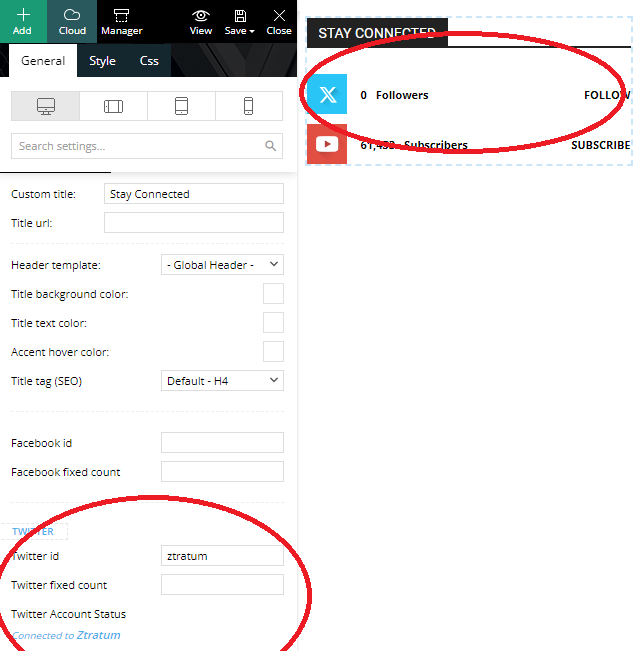
But it does not update my followers….. Any tips?
Thank you!
Patrick
 bakamann
Hello,
In addition to the major social media platforms, like Facebook or X (Twitter), we also post on other platforms that popped-up recently. I hope you would consider adding the likes of Bluesky, Threads, Mastodon or Kick on the Social Networks on your future updates.



