- NewspapertagDiv AMP Plugin Tutorial
- ApiPractical example – How to add a new Block and Module
- NewspaperTrack Subscription Sources with Locker URL in Opt-In Builder
- NewspaperWP Rocket and Newspaper Theme: Optimization Guide
- NewspaperCredit System
- NewspaperIntroduction to CPT and ACF with Newspaper Theme
- NewspaperHow to edit modules for Flex Block X
- NewspaperHow to use the Posts List shortcode
- NewspaperUser review system
- NewspaperCustom Fields Support
- NewspaperHow to generate Facebook App ID
- NewspaperHow to insert a block inside the content of a post
- NewspaperModal Popup
- NewspaperPayPal Setup
- NewspaperLink Tracker
- NewspaperLockers
- NewspaperGeneral Options that May Interfere with the Newspaper Theme
- NewspaperAdd Cryptocurrency Price Ticker Widget
- NewspaperPosts Loop Element
- NewspaperThe Newspaper Mobile Theme: Introduction
 Simion C.
 Hi,
The global header option can be overridden by a more specific case. So for example if a global header template is set, then in a post template a different header is set, this will override the global header.
If you want to use the same header for all the website, set it globally, and make sure specific pages or cloud templates don’t use their own headers. If one is using a different header style, edit it with the composer and make it use the global header
– https://prnt.sc/oofnpr
Here is a guide on the cloud plugin – https://forum.tagdiv.com/tagdiv-cloud-library-plugin/
And a composer tutorial – https://forum.tagdiv.com/tagdiv-composer-tutorial/
Please let me know if you have more questions.
Thanks
 ubuntu
 what’s the css code to remove featured posts & what’s the css code to add most commented (I don’t want it to display on two sections or pages where I don’t have comments enabled though is it possible?)
 Raybijach
Hi all!
How to remove STICKY Logo & STICKY Menu to Romania News PRO?
Thanks!
 rupesh_ic
Hi, I am trying to use Header Life News Pro but I am facing a couple of issues.
1) How do I change default logo text and tagline which comes as part of smart snap always? Although, I am able to hide logo text and tagline in the normal mode. I do not see smart snap option in the theme panel too.
2) My website has all mega menus but one of the category i.e. ORAL HEALTHCARE is not the mega menu but it shows page which I am displaying via page ID. Now, life news pro menu does not open this category in the menu. How to fix this?
3) In the mega menu, for example, HEALTH category, how do I have a scroll bar for different subcategories which are part of HEALTH. For now, there is a limit of 13 subcategories. How do I remove this limit and fix some height and show other subcategories in the scroll bar?
I have deactivated this header template but if you want I can activate it for your findings.
 Prateek
Hi, team tagDiv.
You people referred to this link several times in the posts that I’ve gone through before posting this one.
This is the link—
https://developers.google.com/analytics/devguides/collection/amp-analytics/
But in this link the code that’s supposed to measure the traffic contains two scritps and one other tag. This is what google suggest website owners to paste in their website’s code.
But you people suggest to remove the scripts and all the other tags and to keep just the JSON code.
The code that you suggest pasting doesn’t work.
I’ve tried pasting this code in the amp plugin alone and in the amp section of theme panel alone and in the both amp plugin and themepanel’s amp section at once. But nothing worked.
What should I do now?
I have made a separate property (with same domain name) for amp pages and used a separate analytics ID. Can you explain the entire and perfect procedure that can be followed to see how much traffic is coming to amp pages?
 David
DavidHi, the following does not work with the latest version of the theme:
Twitter Video Embed: Not visible on AMP
Facebook Video Embed: No thumbnail at all
 Gul Klud
 Here is a list of all the plugins we have. Please let me know if you know of any that can cause a conflict and show a “broken image” icon at the bottom of every article. Otherwise please let me know how to remove that icon!
ActiveCampaign
Akismet Anti-Spam
AMP
Autoptimize
bbPress
Duplicate Menu
Clone content
Jetpack af WordPress.com
tagDiv Cloud Library
tagDiv Composer
tagDiv Mobile Theme
tagDiv Newsletter
tagDiv Social Counter
Ultimate Member
WordPress Import
Yoast SEO
 mparlevliet
On desktop we have the tags above the article, but on mobile (we use Mobile + AMP) they are below the article. Is there a way to move them towards the top on mobile as well?
Example: https://www.vitalthrills.com/2019/08/02/walking-dead-season-10-photos-gamma-virgil/
 SpinUp19
 Good morning Vlad. Thank you for reply me.
I have already done the modifications on the original files. I’m asking you if you have planned a way to do it in a “not destructive manner”, for example, using the child theme.
Simion C. Hi,
1. So you have created a page besides the homepage. Pages can display any posts you want, the blocks have an extensive filtering and sorting options, please see this guide
– https://forum.tagdiv.com/block-settings-tutorial/
Posts that appear in blocks will lead to the post page.
So for example you can place 5 blocks, each can show posts from your desired categories. Most sorting methods are dynamic, an exception would the featured method
– https://prnt.sc/onaz3p
If you would like to make a block or grid display specific posts, you could sort by featured for more control. That means that only posts that you assign to the Featured category will appear in that element – https://forum.tagdiv.com/featured-posts-2/
If you add just one post in the featured category, that will be displayed in the block until another one is added, and so on.
2. Each block or grid can be filtered as a whole. So it is not possible to filter it to show 3 posts from one specific category, and 2 from another – https://prnt.sc/onb1tz
Use multiple blocks to have a different filtering set on them.
3. One way is to use the featured sort, as mentioned in my first answer. But the posts will still cycle as you enter more in the featured category.
You could enter post IDs manually in the provided filter – https://prnt.sc/onb38k
Once post IDs are entered there, that block or grid will always show only those posts, until you edit the page and replace/remove them.
The filtering and sorting will affect the block or grid as a whole, the posts will be displayed accordingly. There can’t be a static (sticky) post in one module while the rest use a different sort.
4. Some footer styles come with predefined content, this content can’t be changed. The widgets you mention are 2 block 7 widgets and a popular category widget, that are predefined in the footer, they can’t be removed or customized.
If you want to replicate this but with your own settings, you can choose an empty footer template – https://prnt.sc/onb6qy and add a block 7 widget in the first and second footer section, and a popular category in the third – https://prnt.sc/onb7gj COnfigure them as you want. The popular category widget will show categories which have the most posts in them automatically.
– https://forum.tagdiv.com/footer-templates/
The theme provides an option to set a footer page instead of a template. So you can also create a page and set it to appear in the footer, instead of a template.
5. I believe you are referring to the email in the footer
– https://prnt.sc/onb9rt
Like other elements the color of the email link will be the theme accent color
– https://prnt.sc/onba0q
A dedicated setting just for the email isn’t available unfortunately. However I could give you a code to change it’s color without changing thew theme accent color
– https://prnt.sc/onbbz1
The code can be entered in the Theme panel->Custom code->CSS section
– https://prnt.sc/onbc7d – https://pastebin.com/8aeM6F9a
Please let me know if I missed something.
Thanks
 Calin
Calin Hi,
If I understand correctly you are referring to an option to allow you to enable/disable the amp on posts in function of the category, unfortunately for the moment the only option is individual, maybe in the coming updates will be add some more options.
If this is not what you mean, please provide some more details.
Thank you for your understanding!
Simion C. Hi,
@meri You could use flex blocks, these now have options to change the heading of the title (since update 9.7.4) – https://prnt.sc/onaohm – https://prnt.sc/onaoo8
The options is available for all the flex blocks.
However, if you would like to modify a block template, that is possible to do in a child theme now. So for example if you use block template 3, copy it in the child theme like so
– https://prnt.sc/onapsr then modify the heading from h4 to what you want.
If you have more questions let me know.
Thanks
 magnustheender
 Thank you so much, I really appreciate the help.
One last question, when using edge (but not chrome or internet explorer) whenever the sticky menu overlaps an image that I have added effects to, the effects go away until I refresh the page, for example: https://bisbooks.org/about/the-world-of-evo/the-softlands/
Not a huge deal, but would be nice if I could fix it. Again thank you so much for all the help!
 cyrus
cyrus Hi Simion,
These may be my last questions before I activate all 4 websites and licenses.
Grateful for your answers. I was told to pick a post page. I deactivated a post page, and keeping TagDiv on every page, so that issue is solved but still the other issue exists which is…
1.I have a news page that is NOT the home page and there is no designated post page. But I also have other categories. How do I choose for some articles within their own category or general posts to go on the main news page that I created as a the page to receive all news, but some articles to only go on the specific category page I like to choose and not show in the first page of the main news page? And how do I keep one specific post at the top and not let new post drop it down?
2. In the Tag builder, how do I command a block, or a grid with news to be which category I want in that page, or even lets say in a block of 5 to have 3 articles from one category and 2 of them from other categories? So If I have 8 different blocks, or categories on a page, how do I differentiate them and their content?
3. How to tell the TagDiv system to keep an article active in the main news page, (Not Home Page) or category and not be filtered down by new posts, and or tell a block or grid of 3 or 5, to keep one important post permanent active while the other posts to rotate based on new posts? And would your answer apply the same way for the home page?
4. How do I change the Footer content of Fuetures, Popular, or editors choice based on pages or categories. For example, if I have category of finance, I may want the category economics and politics in the footer popular/editor choice, future article sections, rather than having it site wide? Or I may want certain posts.
5. The footer content has a section “Email US” But it is blue and hard to read, I don’t a section in the Theme Colors to change that to white since the background is black?
Thank you Very Much Simion,
Best,
Cyrus
 Amari
AmariI’m using the recommended plugins to have posts become AMP compatible but was wondering if there is a way to set exceptions by category vs. having to do each individual post?
 Vlad S
 Hello !
We are sorry for the inconvenience !
You mean to add spacing like this example: https://www.screencast.com/t/37XGDB34dkBq ?
If so, please re-edit your page in Mobile editor and see if the problem fixes.
The Mobile Theme had no changes within the last update. You can also check to see if the new version conflicts with your plugins.
If you have done all this and the issue is still there. Please contact us via email at contact@tagdiv.com and provide admin login, as well as cPanel or FTP if possible. We will take a look. Include a link to this topic in the email.
Thank you !
 VoZz
VoZzI’m using the Newspaper theme with the mobile theme. On my mobile pages many of my white spaces and breaks in the text are gone and now all the pages are messed up. I think it happend on the last update. One example: https://bit.ly/2YxKmlH
Please let me know how to fix this.
 alejandroman
Hi
I’m trying to activate the mobile+AMP setting and also select a theme to use in mobile (I want progmenu) but I cannot save any settings. I click save and it acts like its saving but never progresses beyond looking like its saving. Using version 9.74 and new required plug-ins.
Vlad S Hello !
I’ve reviewed some of your pages and the AMP seem to work. You said that this did not happened before. What have you changed that made this issue happen ?
Also if you know what page is problematic please paste a link to it so we can inspect.
Thank you !
 h1o2s6
 hi,
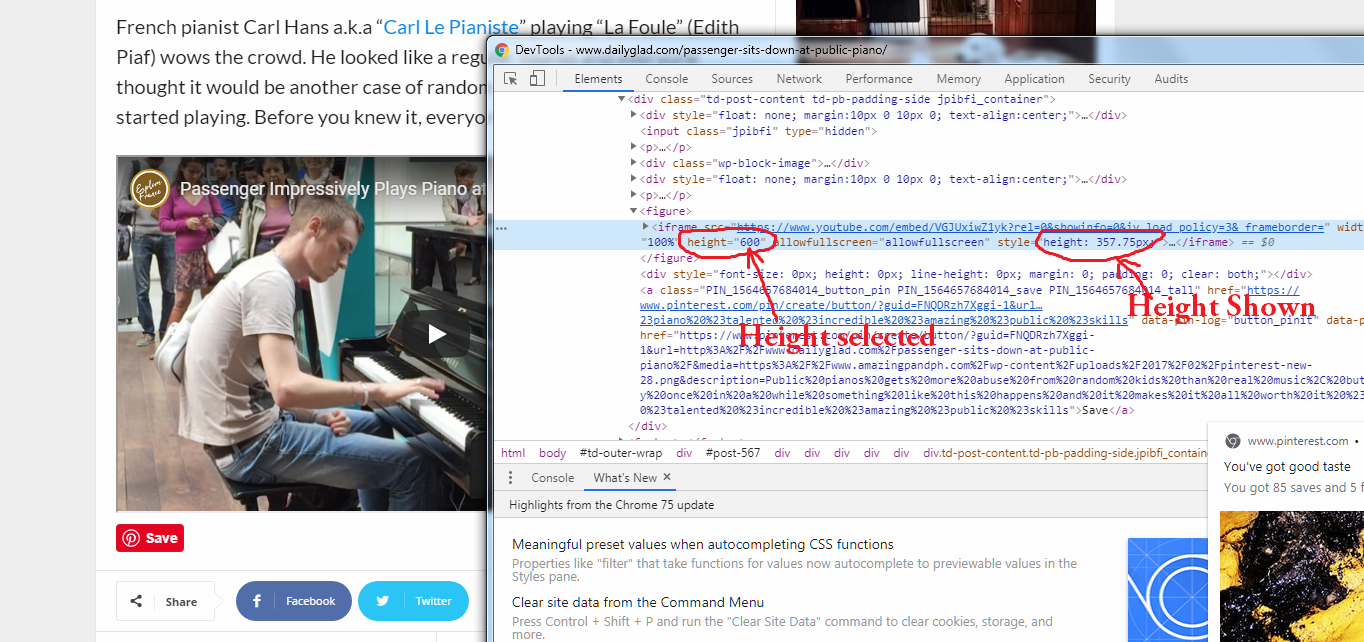
I tried many things but always I got the same height https://www.amazingpandph.com/wp-content/uploads/2019/08/1-1.png
and here is the iframe code <iframe src=”https://www.youtube.com/embed/VGJUxiwZ1yk?rel=0&showinfo=0&iv_load_policy=3& frameborder=” width=”750″ height=”600″ allowfullscreen=”allowfullscreen”></iframe> im using 600 height for the video not 375…
Thank you!
 exmas22
So I enabled amp+mobile , but my contact page is a blank page on mobile, why is that? https://sakugacentral.com/contacto/ here is the page
 dtechted
Hi,
I am facing the issue of AMP on google search console only inner page, not the homepage. It is saying
:- Linked AMP version is invalid
:- Tag found outside the document head which is only allowed as a direct child of the document head.
This wasn’t happening before.
Website:- https://www.randomtxt.co.in/
Simion C. If you want to use one of the theme post template for a CPT, try to copy the desired single and loop single from the composer in the child theme (main folder).
So for example I have a CPT called td_book and I want to use post template 4 for it. I copied the loop-single-4 and single_template_4 PHP files from the composer in the main child theme folder – https://prnt.sc/omu5sk
The single_template_4 has to be renamed single-yourCPTname, in my case it is single-td_book.
So now the CPT uses post template 4 – https://prnt.sc/omu6r9 – https://prnt.sc/omu6vm
Should work the same for you, please give it a try and let me know.
Vlad S Hello !
The issues with “The link you followed has expired” come from a bad wordpress setup not from Newspaper Theme. It shouldn’t matter that your live site uses the key or not.
By a test site I mean a localhost install. We here use Wordrpess + Xampp.
Please make sure that your install is properly made. Make sure all the steps found here are followed: https://forum.tagdiv.com/install-via-wordpress/
Let me know if this was helpfull !
Thank you !
 WFSU
WFSUHello,
I feel like I have tried everything to get this to work. I have the following settings enabled:
Post Settings > Post and Custom Post Types > Show Categories Tags
Block Settings > Category tag on Modules/Blocks
CPT & Taxonomy > My Custom Post Type > Category Spot Taxonomy Set to Categories
And the categories still aren’t displaying in the Big Grid Flex 4 box. They display for default post types, but not for any of my custom post types. The category displays at the top of the page and the breadcrumbs are correct when you navigate into the custom post via the flex box; however, no tags are displaying on the front page.
Is there another option I am missing?
Thanks for your awesome support,
Alexander McIndoe