- NewspapertagDiv Composer – Website Manager
- NewspaperWhen tagDiv Composer is Not Working
- NewsmagtagDiv Composer Tutorial
- TutorialsFrom WPBakery to tagDiv Composer
- NewspapertagDiv Composer Tutorial
- NewsmagHow to use the Visual Composer plugin
- NewspaperScroll Animation
- NewspaperSingle External Shortcode and External Shortcode
- NewspaperCredit System
- NewspaperBookmark – Save For Later
- NewspaperFlex Block Builder and Flex Loop Builder
- NewspaperModules Builder in Newspaper Theme
- NewspaperIntroduction to CPT and ACF with Newspaper Theme
- NewspaperCreate a frontend submission form
- NewspaperHow to Use the Tabbed Content shortcode
- NewspaperCreate a form contact page
- NewspaperFilters and sorting for taxonomies
- NewspaperUser review system
- NewspaperCustom Fields Support
- NewspaperWooCommerce: Happy “Add to Favorites!”
 Bratschemili
Hi everyone,
I’m currently facing an issue with my website hosted on GoDaddy. I’m using the Newspaper template by TagDiv, and everything was working perfectly until a few months ago. Back then, I used a plugin to generate my SSL certificate, but I forgot to renew it. I’ve now fixed the SSL issue, and the certificate is properly configured, but I can’t use the TagDiv Composer to edit or create any blocks.
I have experience working with the TagDiv Composer, and this issue only started after the SSL problem. I’ve tried clearing the cache, disabling plugins, and checking for updates, but nothing has worked so far.
Has anyone else encountered a similar problem? I’d really appreciate any guidance on how to resolve this.
Thanks in advance!
 norbiQue
 Hi,
Many functions are inactive in TagDiv Composer
 knthdgd
Hi TagDiv.
I installed “Security Optimizer by SiteGround” to protect my site, but then the “Edit Content” button in Composer did not work anymore, just loading and loading forever: https://i.postimg.cc/Jh3pq6hQ/Sk-rmbillede-2025-01-14-kl-15-00-53.png
When deactivating Security Optimizer, it works great again.
I think that is something you should fix, right?
 Bettina
 Hello!
Please check it in the tagdiv Composer.
Check in the Composer and mobile viewport, and delete the entire element from there, too. Clear all the cache and try again.
Place the ticker in a new row and ensure it is placed in the content zone, not the header zone. Please follow the video to see where you can find and edit/build your sticky header on mobile and desktop, too: https://www.screencast.com/t/l6v2Belt
Sure. You can install a blank template, customize it in the tagdiv Composer, and assign it to your posts. More info here: https://forum.tagdiv.com/design-post-pages-using-cloud-library-templates/
I hope that helps you!
Thank you!
 Simion C.
 Having options for customizing the author box would be great indeed. For author pages/templates it is possible with Newspaper, where each element of the author box is separate in the composer https://prnt.sc/cRDUDJn14qzQ So you can use what you want, in any order.
With Newsmag it’s not possible in the same way. It will either have to be modified in the code, or with CSS. If it can be done with CSS, like hiding certain elements or changing their order, then in my opinion it’s easier to use CSS. At least you won’t have to keep making the modifications all over again after an update or reinstall. It doesn’t work for everything however.
If there’s something else that I can help with, please let me know at any time.
Thank you!
Simion C. Having options for customizing the author box would be great indeed. For author pages/templates it is possible with Newspaper, where each element of the author box is separate in the composer https://prnt.sc/cRDUDJn14qzQ So you can use what you want, in any order.
With Newsmag it’s not possible in the same way. It will either have to be modified in the code, or with CSS. If it can be done with CSS, like hiding certain elements or changing their order, then in my opinion it’s easier to use CSS. At least you won’t have to keep making the modifications all over again after an update or reinstall. It doesn’t work for everything however.
If there’s something else that I can help with, please let me know at any time.
Thank you!
 DavidCLM
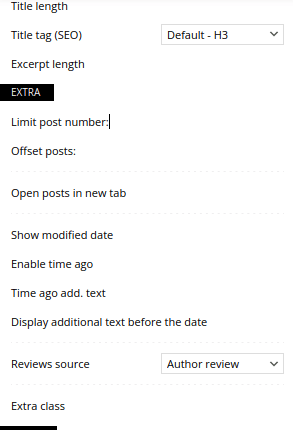
I’ve already deactivated all plugins, reinstalled the tagdiv composer, changed the entire site and I couldn’t find the configuration or the problem… the checkboxes for all the tag div composer blocks disappeared.
 mikisan
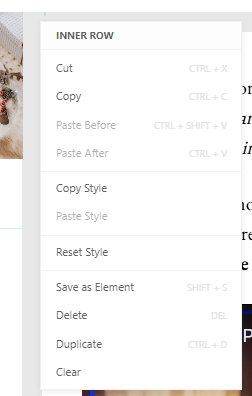
 Oops! I also realized the Events Calendar plugin also disables the contextual menu (to copy, delete, etc. elements) in the composer, this one:
Bettina Hello!
By enabling that option, this sidebar should appear: https://app.screencast.com/ZLJM7vbLc2lqs
If it’s not appearing, then it could be a plugin conflict.
This is a standard feature, so you can not edit it with the tagdiv Composer.
We can check your issue via email.
Thank you!
Bettina Hello Ritu!
I can see that the video works well in the tagdiv Composer. The testimonials appear, which means something extra is interfering there, and the video is stopped on mobile, and the testimonials are not displayed. When you click on the white blank space, the testimonials appear, but the slide is not working responsively. I recommend you disable all the caching tools, including the ones from GoDaddy, and check if these features work correctly.
Maybe you can connect with some plugins or embed the code manually for each review.
Thank you!
 Anamaria
 Hello,
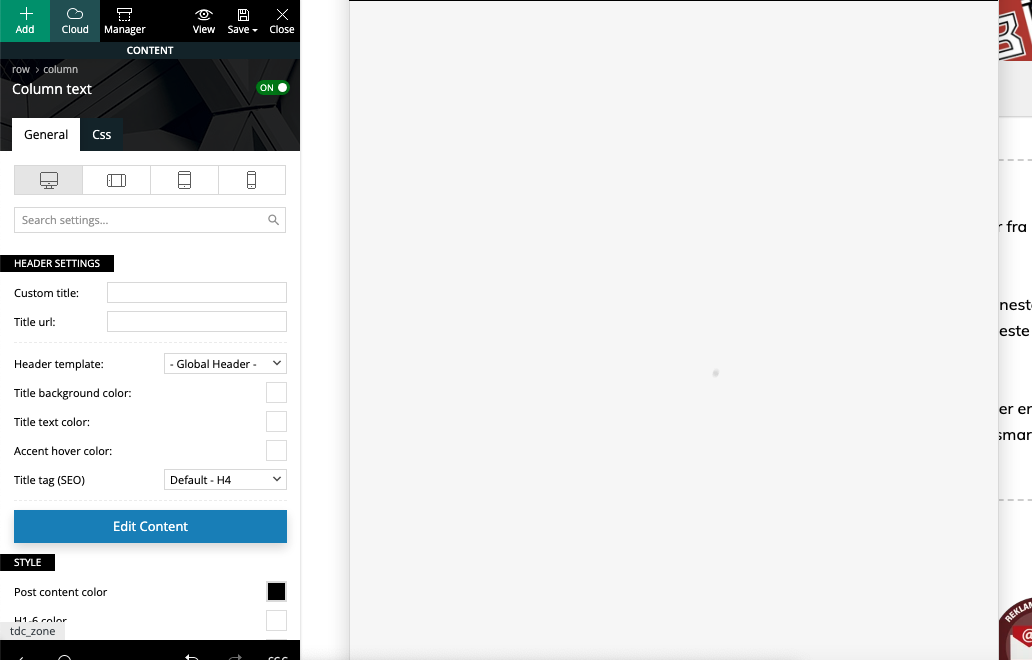
A shortcode can be inserted using the element “Column text” or “Text with title”. “Column text” and “text with title” elements have a button called “edit content” and if you click on that button, the WP Editor will open, and you can add some text/code/shortcode there. Close the WP Editor from X, save the changes from Composer and view the page to see the changes https://i.imgur.com/cdG1yAs.jpeg
Thank you!
 srendell
I am using advance ad plugin for advertise management.
I want to add 3rd party plugins and content shortcode on my home page.
tag div composer not shows any option to show add shortcode so I can call 3rd party plugin on home page.
Please help me
 milanstapley
 Dear tagDiv Support Team,
I am experiencing an issue on my WordPress site, which appears to be caused by the tagDiv Composer plugin. To resolve this problem, I need to update all tagDiv plugins and the Newspaper theme to their latest versions.
However, I am unable to locate the compressed files required (plugins and theme) in my account or anywhere else.
Could you please guide me on where to download the necessary files, or provide them directly?
Thank you in advance for your help.
Bettina Hello!
Please select the row in the tagdiv Composer and choose the layout you want for your columns: https://app.screencast.com/1cp6R5nEJHVBF
Also, you can specify each column width individually: https://app.screencast.com/E4tCp1L64vYmR
Thank you!
Bettina Hello!
We recommend using cloud/PRO templates to have the possibility to edit them with the TagDiv Composer, which contains a lot of functions and features; please check our tutorial here: https://forum.tagdiv.com/tagdiv-composer-tutorial/
More documentation about the cloud templates is here:
– https://forum.tagdiv.com/cloud-library-templates/
– https://forum.tagdiv.com/design-post-pages-using-cloud-library-templates/
– https://forum.tagdiv.com/cloud-library-category-templates/
About pages here: https://forum.tagdiv.com/page-templates-2/ -> https://forum.tagdiv.com/homepage-how-to-build-and-set-it/
Check out this video about how to create a website from scratch: https://www.youtube.com/watch?v=SoGQ0d5kIBg
I do not recommend changing the code in the theme because every time you update the theme, the changes will disappear. Please let me know what you need to achieve and your issue. You could probably solve the issue without the extra code.
Thank you!
Anamaria Hello,
This issue is strange. I don’t think that this issue is related to the WPML plugin.
Also, what version of WordPress, theme, WPML, and PHP do you have?
You can check our documentation here https://forum.tagdiv.com/using-theme-translations-together-wpml/
You need to translate the English (original language) the template for each language in part – https://i.imgur.com/CDmeHCf.png you should have them for each language cloud template – https://i.imgur.com/4agmUtg.png
A much simpler and faster alternative is to duplicate the cloud template you want to use in another language, edit it and select the desired language – https://i.imgur.com/z1CqgBo.png (edit the name) – https://i.imgur.com/dPX8ROs.png – https://i.imgur.com/Lc81IgP.png This method needs to be used to translate all cloud templates.
The pages are created with tagDiv Composer which is a page builder, when WPML is used it cannot translate everything that was built with the page builder and must be edited for each language separately. Please open the page in the editor and click on translate – https://i.imgur.com/TXH6y1c.png. After, if you duplicate the template, you can edit it to change the logo, menu, and whatever you want.
When you make the corrections, make sure you are on the page with the language you are editing, and if you use the cache, or object cache, please clear it.
Please check this topic https://forum.tagdiv.com/topic/missing-strings-on-wpml/
Thank you!
Anamaria HI,
Please check this topic https://graphicdesign.stackexchange.com/questions/71107/how-to-view-svgs-code-in-illustrator and after adding it to the manager, please check this guide https://forum.tagdiv.com/tagdiv-composer-website-manager/
Thank you!
Anamaria Hello,
This warning is on our list to investigate it. Please let me know what PHP version you have. Also, if the URL is not saved you can inspect them by right-clicking -> inspect -> console -> select the error in the tab network -> preview, and you can see the cause.
Please check this topic https://forum.tagdiv.com/topic/tagdiv-composer-does-not-save-only-content-of-homepage/
Thank you!
Bettina Hello!
If you use the cloud templates, please edit the page with the tagdiv Composer and make the changes. Otherwise, use some CSS code.
Thank you!
Simion C. Hi,
Displaying the featured image in a page is possible, but it will require a bit of customization.
You could modify the page template and add a code in it for the featured image. The page template file is here in the composer plugin https://prnt.sc/avQVYo0gd2EF
And the featured image can be added after the page title, after the closing h1 https://prnt.sc/GxAYpJwIz71g This is the code https://pastebin.com/MkzmBLQz
This way all the pages that use the default page template will display the featured image, if there is one set. The modification could be done in a child theme, in order to not lose it after a theme update.
If you want we can implement this solution on your website, you can send us an email at contact@tagdiv.com and provide admin login for the website, and access to cPanel so we can use the file manager https://mediatime.net/cpanel
Thank you!
Simion C. Hi,
That is possible. You could test it on posts first. The Yoast breadcrumbs can be added in the post template file.
The post template files are in the composer here https://prnt.sc/RMECazpUiK1I Each of them corresponds to a post template, loop/single template 1 means post template 1 for example.
In the post template the theme breadcrumbs are displayed via this line of code https://prnt.sc/N65vACkzn0Bx which can be removed or commented.
Then the Yoast breadcrumbs can be displayed via the code they provide here https://yoast.com/help/how-to-implement-yoast-seo-breadcrumbs/
Like this https://prnt.sc/ZQ-uTUitRlJD
The Yoast breadcrumbs are then displayed https://prnt.sc/qb7ZfX6zQyjq and they can be customized in the Yoast plugin https://prnt.sc/vUk7Ph5Qp5ix Visually they may need some CSS to fit with the rest of the website, they look kind of rough by default.
Please try and let me know if I can help more.
Thank you!
Anamaria Hello,
Please block /wp-json/tdw/save_css
If an attacker wants to target this URL /wp-json/tdw/save_css they can do so. Even if the website uses a different theme, the attacker can still try that URL. We could add an option to be able to enable/disable the Live CSS, it will be considered. But for now in order to remove it this can only be done with a modification to the composer plugin. I think that all that removing it requires is to comment this line of code – https://prnt.sc/RtwvL5Nc4ikR -> https://prnt.sc/ymZmhdUfp57U But as I mentioned, the attacker can still try to access the URL.
Thank you!
Anamaria Hi,
To change the logo please edit with tagDiv Composer,select the header logo and change it => https://i.imgur.com/cR7F0v4.png -> https://www.youtube.com/watch?v=HXQQygkCCJo -> https://forum.tagdiv.com/add-logo-newspaper/
For mobile please edit with tagDiv Composer, select the viewport on phone, select the header logo and change it => https://i.imgur.com/cR7F0v4.png
Please provide some screenshots.
Thank you!
 lavozdelfestejo
 Dear TagDiv Composer Support Team,
I would like to provide you with an updated summary of the issues I’m currently facing. I apologize for the multiple messages I’ve sent earlier and any confusion they may have caused. Unfortunately, I’m unable to delete those messages. Here’s the current status:
Mobile View Issues:
I have successfully recreated mobile templates for all categories and deactivated the Theme Mobile plugin.
The body of the website now displays correctly on mobile. However, the footer and header still have problems:
I can’t figure out how to adapt the footer for mobile view.
Regarding the header, I’m unsure if I need to recreate it specifically for mobile. If that’s the case, I’d appreciate guidance because I’ve tried and haven’t been successful.
Social Media Connections:
I’m struggling to link social media accounts, particularly Instagram. It redirects me to Facebook, and I can’t connect Instagram.
I’d like to link the following platforms: Instagram, Facebook, Twitter, TikTok, and YouTube. Could you provide instructions on how to resolve this?
Calendar Issue:
I’ve created a calendar page using shortcodes with the Events Manager plugin. It displays perfectly on desktop but does not appear on mobile. I understand this may be outside your scope, but any advice would be appreciated.
Post Appearance:
I have 108 posts already created, and I’d like to redesign their appearance to make them more visually appealing. Is there a way to bulk-apply a new design to all of them?
Content Entry While Traveling:
On January 17 and 18, I’ll be covering events from the street using an Android tablet or iPhone. I need to create and publish two or three posts during that time. Could you recommend the best workflow for adding content using mobile devices?
I truly appreciate your help, as I’m aiming to launch the website on January 15 or 16, and these issues are critical to resolve before then.
Thank you so much for your time and support.
Best regards
lavozdelfestejo I wanted to update you on the issues I was facing earlier and clarify the current situation.
Entry Display Issue: I have resolved the issue with the single entry being displayed. It turned out that I wasn’t seeing the next post because the “static page” setting was disabled in the Appearance/Customize section. Once I re-enabled the static page option, everything started displaying properly. However, I am still facing issues with mobile visibility.
Mobile Display Issue: I need the mobile version to display exactly as it appears when I use the “mobile view” option in TagDiv Composer on desktop. Essentially, I want the mobile version to reflect the same design I created on the desktop. Currently, this is not happening.
Footer Display Issue: I am still facing issues with the footer. It does not appear correctly on the mobile version. In the desktop version, I have set up a three-column footer, but it doesn’t display as expected on mobile.
Instagram Connection: I’m also having trouble linking Instagram to my website. It redirects to Facebook, and I am unable to connect Instagram. I need to link Facebook, Instagram, and Twitter. YouTube and TikTok connections can wait for now since they are not updated, but I would like to fix the main social media platforms as soon as possible.
Could you please guide me on how to fix these mobile display issues and the social media connection problems? I would greatly appreciate your prompt response as my website is launching soon.
Thank you for your help, and I look forward to your response.
Best regards
-
This reply was modified 1 year by
lavozdelfestejo.