
- NewspapertagDiv Composer – Website Manager
- NewspaperWhen tagDiv Composer is Not Working
- NewspapertagDiv Composer Tutorial
- NewspaperScroll Animation
- NewspaperSingle External Shortcode and External Shortcode
- NewspaperCredit System
- NewspaperBookmark – Save For Later
- NewspaperFlex Block Builder and Flex Loop Builder
- NewspaperModules Builder in Newspaper Theme
- NewspaperIntroduction to CPT and ACF with Newspaper Theme
- NewspaperCreate a frontend submission form
- NewspaperHow to Use the Tabbed Content shortcode
- NewspaperCreate a form contact page
- NewspaperFilters and sorting for taxonomies
- NewspaperUser review system
- NewspaperCustom Fields Support
- NewspaperWooCommerce: Happy “Add to Favorites!”
- NewspaperWoo Brands
- NewspaperModal Popup
- NewspaperShortcodes
 gamerproblemsofficial
Hi there, I am unable to download Visual Composer. It comes up with this message.
——————————————————————————————————-
Warning: require_once(/home/content/n3pnexwpnas01_data01/62/2903462/html/wp-content/plugins/js_composer/include/helpers/helpers_factory.php): failed to open stream: No such file or directory in /home/content/n3pnexwpnas01_data01/62/2903462/html/wp-content/plugins/js_composer/js_composer.php on line 158
Fatal error: require_once(): Failed opening required ‘/home/content/n3pnexwpnas01_data01/62/2903462/html/wp-content/plugins/js_composer/include/helpers/helpers_factory.php’ (include_path=’.:/usr/local/php5_4/lib/php’) in /home/content/n3pnexwpnas01_data01/62/2903462/html/wp-content/plugins/js_composer/js_composer.php on line 158
————————————————————————————————————-
All help will be appreciated
 ldjohn
 The URL is http://misfitsbliss.com/
The Active Widgets are as follows:
Akismet
Social Media and Share Icons (Ultimate Social Media)
W3 Total Cache
WP Product Review
WP User Avatar
WP Smush
WPBakery Visual Composer (4.7.4)
Yoast SEO
I will definetely be backing up in future. Just puzzled why the theme reset.
 Terrence
 Hi,
Thanks for the advise. I do hope in future Visual composer for post can be enhanced.
 Alin [tagDiv]
 Hi,
Please note that the theme doesn’t come with rtl support and you will need custom modifications for it and it is not an easy task. The parallax feature from Visual Composer use javascript and it is not an easy task to change it. I suggest to hire a professional developer for this as the time doesn’t allow us to provide custom work, sorry!
Thanks!
 Andrei L.
 Hi,
Try to deactivate lazy load animation from theme panel > template settings: http://screencast.com/t/pFGo6zqq also deactivate all plugins except Visual Composer, clear all caches ant test again. Ther Lazy load animation create issues when Rocket loader or any other tools wich minify the js are used.
Let us know how it goes!
Thanks.
 Bogdan B.
 Hi,
I have inspected the issue closer. Please disable Rocket loader plugin as it is known to cause problems with our theme. Please disable the lazyload option from the theme panel http://screencast.com/t/bxf83Vbp and disable all plugins except visual composer.
Thanks.
 Catalin
 Hi @Yannik97,
If you want to use a different symbol for every block used in visual composer, in CSS code you need to add a speccific class for each block: (.td_block_1 or .td_block_2 or .td_block_3 … or .td_block_18).
For my example, the CSS code look like that:
.td_block_1 .block-title span::before {

content: '\';

margin-right: 10px;

}
Thanks and let me how it goes!
Andrei L. Hi
1. It may be a conflict between some plugin and theme lazy load animation, Check in browser console if there are some errors, also try to deactivate all plugins except Visual Composer, clear all caches and test again.
2. I am not sure why this happens, but you can try the default template and check if the problem is still there.
Let me know how it goes and if you can’t manage to solve this issue please provide your site url so I can inspect it closer.
Thanks!
 Yannik97
 Thanks for your reply.
When I add the .block-title class in custom css every title on my homepage have this icon. I have to add a class name on the blocks in visual composer. But then all titles in the visual composer block have this icon.
-> 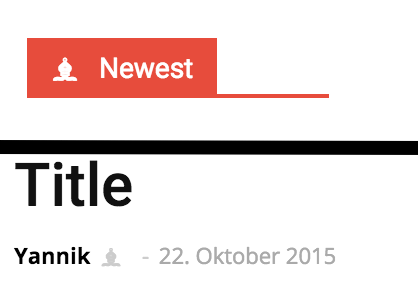
I have to reach only the main title of an area.
.newest span::before {
content: '\265D';
margin-right: 10px;
}-
This reply was modified 10 years by
Yannik97.
Bogdan B. Hi,
For the image preview on the main page you need to disable all your plugins except visual composer and check to see if the images show. If not, please provide a link to your website so we can take a look.
You can create a sub-menu in appearance->Menus like so: http://screencast.com/t/pzdvVHzAQM – https://www.youtube.com/watch?v=bxphw24ZvHY
Thanks.
Bogdan B. Hello,
Visual composer elements were not tested on posts. They work but lose their CSS and styling. You need custom work to get them to display like on a page.
As an alternative, you can use a different block to achieve your goals. For example a block 14: http://screencast.com/t/JzduopNO1
and style it with CSS:
.single-post .td_module_mx1{

padding-bottom:5px;

padding-right:1px;

}

.single-post .td_block_14{

margin-top:15px;

}
You can change the padding/margin values to your preference.
Add the code to the theme panel->Custom CSS box.
Thanks
Bogdan B. Hi,
You can replicate the slider you use with an image carousel element in visual composer and set it up similar to your plugin: http://screencast.com/t/eEFvzM1VA or you can apply a custom CSS for your slider to make it scroll on the mobile version as well:
 @media(max-width: 767px) {

.ult-carousel-wrapper .slick-list {

overflow: visible;

}

.ult-carousel-wrapper .slick-prev {

left: 0px;

}

.ult-carousel-wrapper .slick-next {

right: 0;

}

}
result: http://screencast.com/t/9sBHDo0SPb
Thanks.
Catalin Hi @KingVictus,
You are using an older version of visual composer (4.4.2) http://screencast.com/t/NFGSjUJi . Please update your plugin to ultimate version 4.7.4. http://screencast.com/t/uFGlVNrBr5
This may be the reason for your problem. Try this and let me know how it goes.
Hope this helps.
Alin [tagDiv] Hi,
Please test this without any plugins active except of Visual Composer, remove also any custom modifications, like this image that can affect your test. Please test an article from our demo and see if works. We use only the recommended plugins.
Here you can find all the thumbs used by the theme including the featured image size – http://screencast.com/t/vMglIyJrQ
If you want to change this or add a new thumb size you will have to edit the td_config.php file – http://screencast.com/t/ylE0NAKMzG and here is used on default post template – http://screencast.com/t/3qEXetvMDH7
If you make any changes you will have to regenerate thumbnails – https://forum.tagdiv.com/existing-content/
You can find more details here(it is from newsmag docs, but it is the same also for newspaper) – https://forum.tagdiv.com/image-size/
I have also checked you site on Ipad Mini and the page is loading. Please provide more details about the issue you have.
Thanks!
Bogdan B. Hello,
I have checked your website and saw multiple javascript problems.
Please disable all your plugins except visual composer and disable all minifications (if you have any).
You also have a few errors in your console: http://screencast.com/t/lpYXqbYkLSU
Let us know how it goes
Thanks.
Bogdan B. @frasercarly89 Replied here: https://forum.tagdiv.com/topic/visual-composer-crashes-site/
Thanks.
Bogdan B. Hello Carly,
The latest version of visual composer was tested with our theme and should not cause any errors. That is why it’s bundled with the theme. Please install the visual composer version that comes with the theme and not other ones.
Here is the guide on how to update the plugin – https://forum.tagdiv.com/update-the-visual-composer-plugin-wpbakery/
You can also try to disable all other plugins except visual composer and check if your problem does not originate from a conflicting plugin.
Let us know how it goes.
Thanks you!
Alin [tagDiv] Hi,
1. Please check the documentation about how to make a category megamenu – https://forum.tagdiv.com/mega-menu/
If you done this properly and you still have issues, please disable all your plugins except Visual Composer, clear cache and check again.
2. Some plugins may conflict with the theme lazy load effect, so you could try to disable this feature – http://screencast.com/t/x2yxTw1cbj or check this without plugins.
3. Not exactly sure what you mean the url for category page must be mydomain.com/category/health
4 .Please check the documentation regarding the block settings, how to filter by specific category – https://forum.tagdiv.com/block-settings-tutorial/ and provide a link so I can inspect this and provide a solution.
Also this guide how to create and set a homepage – https://forum.tagdiv.com/homepage-how-to-build-and-set-it/ and you can check our youtube channel for some video tutorials – https://www.youtube.com/watch?v=rgWqozuqmJk
Thanks!
Thanks!
Bogdan B. Hello,
The theme has a few options to insert ads. Please read the doccumentation on how you can use ads: https://forum.tagdiv.com/header-ad/ (there are 8 sections on ads)
For pages you can use visual composer’s ad box element.
Headers have their own ad space you can use. If you want to place another ad besides the one provided by the theme you will have to alter the theme core files.
If you want to use the code method for example in the category pages, you can use a ‘do_shortcode’ function and set it to use one of the custom ad spots from the theme panel:<?php echo do_shortcode('[td_block_ad_box spot_id="custom_ad_1"]');?> and place the code in the corresponding category file: http://screencast.com/t/LgZK8Zys2Uw
I hope this helps.
Thanks.
-
This reply was modified 10 years by Bogdan B..
Andrei L. Hi
Try to deactivate all plugins except Visual Composer, clear all caches and test again. If the problem persist please provide a link so I can inspect it closer, as I can’t access your site now: http://screencast.com/t/9ALwK9RXn
Thanks!
Alin [tagDiv] Hi,
I’m not sure what you have deleted and how all your image disappeared.
I recommend to do more investigations regarding this, a start can be to ask your host about this. I’m sure he can offer more information on why those files were deleted(user action or plugin).
Also you could check the security settings on your site, look for the parameters specified in the following guide – http://codex.wordpress.org/Hardening_WordPress
Regarding the video thumbnails, when featured video is used the thumb from video provider(youtube, vimeo) is downloaded and used as featured image and it should not be any issues even if you use the same video url, so please check this without any plugins active except of Visual Composer, clear cache and see if you still have this issue. Also please make sure you use the latest theme version 6.5.1 and the plugins provided with the theme.
Thanks!
Alin [tagDiv] Hi,
In version 6 of the theme we have more blocks that can help you to create your page using Visual Composer pagebuilder. And now you can add the excerpt length fore each module and like you can see it is specified also the block(s) where the modules is used – http://screencast.com/t/WwPwgyC11m3K
Thanks!
Bogdan B. Hello,
Please try to disable all your plugins except visual composer, clear your cache and purge CDN if you use it. If the problem is still there, check your system status to see if any of the parameters there need to be adjusted: http://screencast.com/t/yrsLFrV3M1q. You can follow this tutorial: https://forum.tagdiv.com/system-status-parameters-guide/
Let us know how it goes.
Thanks.
 jcarr99
Exactly as the title says, only on chrome… the visual composer homepage post, and login modal are not showing up.
To be more specific. the homepage post is showing but the image does not. Both items work in safari and firefox so I’m assuming it’s a chrome issues. Any suggestions?
Example: Gruntstuff.com
 frasercarly89
Hello,
I just did the theme update to 6.5.1, and went about to deactivate and delete the VC, and upload the new plugin that came with that update – unfortunately, this crashed my site, as soon as I deactivated it. It took an hour to get back online, the site back-ups weren’t even working (thank goodness for WPengine and their great support). I am not going to go about updating to the new VC plugin until I know for sure what I am doing will not crash my site. Can you guide me, please?
Best,
Carly
