
- NewspapertagDiv Composer – Website Manager
- NewspaperWhen tagDiv Composer is Not Working
- NewspapertagDiv Composer Tutorial
- NewspaperScroll Animation
- NewspaperSingle External Shortcode and External Shortcode
- NewspaperCredit System
- NewspaperBookmark – Save For Later
- NewspaperFlex Block Builder and Flex Loop Builder
- NewspaperModules Builder in Newspaper Theme
- NewspaperIntroduction to CPT and ACF with Newspaper Theme
- NewspaperCreate a frontend submission form
- NewspaperHow to Use the Tabbed Content shortcode
- NewspaperCreate a form contact page
- NewspaperFilters and sorting for taxonomies
- NewspaperUser review system
- NewspaperCustom Fields Support
- NewspaperWooCommerce: Happy “Add to Favorites!”
- NewspaperWoo Brands
- NewspaperModal Popup
- NewspaperShortcodes
 frasercarly89
 This is what happened when I updated visual composer – my entire site crashed, and even when I go back to try and update it, it still brings me to this page.
As soon as I deactivated VC, the site crashed, now I can’t even get into my site.
 doucare1971
 Nevermind, I am looking for a carousel where it just picks from categories without adding the content manually and I don’t think the tabbed content on visual composer does this. I think you just got it set where you added certain posts or media to it and that is it. I am looking for random post carousel thing and there is nothing like that in visual composer. Kind of like the big grid 3 but in a rotating carousel. So don’t worry about showing me what you did.
doucare1971 Hey, you are welcome! Can you do me a favor now give me instructions on how you did that tabbed section on you homepage where it is culture/tech & science/society with scrolling. I can’t figure how you did that and I tried the tabbed content element on visual composer but it had nothing for categories in the element to select. Are you using a plugin for that?
 Yannik97
Hi,
I want to use font awesome icons in titles of blocks.
When I add a icon with the <i> tag the title does not show up. When I insert a html block via visual composer I can add a icon but then I can’t change the color of the title background.
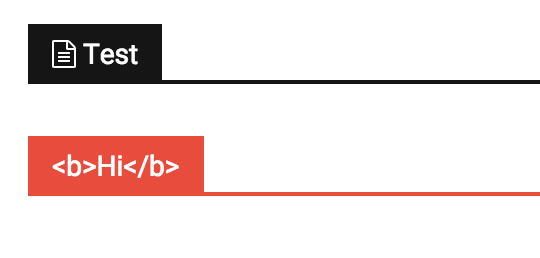
 Javier
 Hello Bogdan,
It seems that does not work great because not all the rows are the same height. So If I set max-height:700px there are “free space” between rows and If I set max-height:500px, some images are bigger than the row in which they are included.
In other themes that work with Visual Composer, I do not have problems with blank space between rows. I just create rows and put content inside.
Any suggestion? Thank you in advance.
 Alin [tagDiv]
 Hi,
The tagdiv gallery was not designed to be used in a text block using Visual Composer. If you add it in a post content without using VC you will see that it wont be any issues. This is on our list and we will fix it as soon as possible.
You can try this custom css in Theme Panel > Custom Css until we fix it – http://screencast.com/t/ATzbkNYW
.single .td-pb-span12 .wpb_text_column .td-slide-on-2-columns .td-slide-galery-figure {

width: 100%;

}

.single .td-pb-span12 .wpb_text_column .td-slide-on-2-columns .td-doubleSlider-1 .td-slide-item img {

max-width: 100%;

}
Thanks!
 Bogdan B.
 Hi,
This problem might be a plugin conflict. Please try to disable all your plugins except visual composer and then activate lazyload and see if the problem is still there.
Let us know how it goes.
Thanks.
 Andrei L.
 Hi
Try to deactivate all plugins except Visual Composer to make sure there are no conflicts between some plugins scripts and adsense script, also empty all caches then test agauin. Also make sure you don’t violate the google policy regarding content: https://support.google.com/adsense/answer/48182?hl=en Also make sure that the local ads respect the google policy: https://support.google.com/adsense/answer/9728?hl=en&vid=1-635811158129849793-2288929648
Hope this help.
Thanks!
 zpooned
 As a note, I have tried deactivating all plugins except composer, and theme/composer is up to date.
EDIT: Just had someone else try the site, and it works fine for them. So it seems like the issue is local. I am puzzled. This ONLY happens if I try editing something in Theme panel. (And it didn’t happen yesterday)
 Andrei L.
 Hi
I’ve checked your site and the search works fine now: http://screencast.com/t/O0rlUtmEpT If you still have this issue try to deactivate all plugins except Visual Composer, clear all caches including browser cache and test again.
Let me know how it goes.
Thanks!
 wpdiv
wpdivHi
I have installed speed booster plugin in my site and followed the instructions appeared here https://forum.tagdiv.com/how-to-make-the-site-faster/
Once i run the code..
function td_inspect_scripts() {
global $wp_scripts, $wp_styles;
echo 'registered scripts<br>';
foreach ($wp_scripts->queue as $handle) {
echo $handle . ' | ' . $wp_scripts->registered[$handle]->src . '<br>';
}
echo 'registered styles<br>';
foreach ($wp_styles->queue as $handle) {
echo $handle . ' | ' . $wp_styles->registered[$handle]->src . '<br>';
}
}
add_action( 'wp_print_scripts', 'td_inspect_scripts' );
Got the snippet as follows…
registered scripts
admin-bar | /wp-includes/js/admin-bar.min.js
contact-form-7 |
td-site | http://www.wpdiv.com/wp-content/themes/Newspaper/js/tagdiv_theme.js
comment-reply | /wp-includes/js/comment-reply.min.js
registered styles
admin-bar | /wp-includes/css/admin-bar.min.css
contact-form-7 |
boxes | http://www.wpdiv.com/wp-content/plugins/wordpress-seo/css/adminbar.min.css
parent-style | http://www.wpdiv.com/wp-content/themes/Newspaper/style.css
js_composer_front | http://www.wpdiv.com/wp-content/plugins/js_composer/assets/css/js_composer.css
td-theme | http://www.wpdiv.com/wp-content/themes/WPDIV/style.css
Based on above results i did added the strings in my speedbooster plugin as shown below based on your manual here https://forum.tagdiv.com/how-to-make-the-site-faster/
$this->move_style_to_footer_queue('parent-style');
$this->move_style_to_footer_queue('td-theme');
$this->move_style_to_footer_queue('js_composer_front');
$this->move_js_to_footer('td-site');
$this->move_js_to_footer('comment-reply');
But still i am getting the same issues…. http://prntscr.com/8u044l
Where i did wrong and will you please help me to get rid of the errors experiencing here.
Bogdan B. Hello croboy,
Visual composer was not tested on posts. It has that option and you can add blocks to your post , but you will need custom CSS modification to position it.
You can add a padding to it with CSS:
.single-post .td_block_wrap{

padding-top:50px

}
Place it in the theme panel-custom CSS box.
This code adds a padding to all block elements on posts (all of them will stick to the text without a padding or margin set to them). You can tweak the value in the code to your preference.
Thanks.
Alin [tagDiv] Hi,
If you cannot edit the blocks, please select all elements to be available from Visual Composer settings – http://screencast.com/t/qMhcwpK8wlcQ
Please provide more details about your issue if this is not what you mean and also a link to your site.
Thanks!
-
This reply was modified 10 years by Alin [tagDiv].
Bogdan B. Hello Carly,
I set your Instagram account on my counter and your followers get picked up: http://screencast.com/t/mXLCiU694
Please clear your cache and purge CDN files if you use it. If it doesn’t work, you can try to disable all other plugins except visual composer and social counter and check it again.
Let us know how it goes!
Thanks.
 dizajn
 Yes, thanks for looking into it. One featured image wasnt resized during the upload and i deleted that post. Now it is ok back to normal.
For the second page i also use visual composer.
http://notranjskoprimorske.si/napovednik/
Here are also squares.
And if you click on event and you get eventcard poped up, you see in header of event card where date is displayed, there are also squares.
Bogdan B. Hi Rolf,
Please make sure you have the option checked in the visual composer general settings: http://screencast.com/t/n0moebTn2t
It should show up in all elements list: http://screencast.com/t/Rm6KSOoTbk
Thanks.
Alin [tagDiv] Hi,
I have tested your site again and seems that you don’t get this error anymore – http://screencast.com/t/vGQ8iwXb0m
Maybe it was something on your page that affected this.
Not sure why you have this issue only for your homepage, please disable all your plugins except of Visual Composer and Events plugin, clear cache and check if you still have this issue.
Do you use Visual Composer also for your second page?
Thanks!
 fluxresearch
Visual Composer’s General Settings allow you to restrict access to various user groups.
But the individual posts still have access to Post Settings which I assume is part of the Newspaper Theme.
Is there a way to limit the Post Settings by user role or to make only one available?
I’m actually using a standard format for all my posts so if I could hide the Post Settings entirely that would work as well.
Thanks!
 ericgui
Hello
In my layout I have multiples blocks (block 8, block 7 and so on…) I wanted to change some of them, but the are not appearing in the visual composer ! How do I get them back ? Urgent.
thanks
 croboy
Hello,
I con’t figure out how to add a block to the end of post (main template).
I figured out to how to set up a homepage using visual composer. I watched tutorial.
I just don’t understand is it possible to add block to every post that is using regular template.
I know in Theme panel there is Post setting -> Default site post template.
Is it possible to create template that at the end of post has blocks?
Thank you in advance.
JavierHello,
I have done a “Landing page” using only native Visual Composer items. There are 4 rows and the page have some empty space between rows and I do not know why. There are not empty rows between rows, no margin changes in visual composer… And I have not been able to find what’s wrong using firebug.
You can see the page in this link.
Could someone help me to find where I have the problem?
 webdream
 Hi Alin, thanks for fast reply.
I just tried to use TAG as workaround to my issue but it doesn’t works:
I had created a new TAG inside Articles named “tag-a” and I bind it to 3 articles.
I had created a new TAG inside Events Manager Tag named “tag-a” (same slug) and I bind it to 1 event.
Editing my page with Visual Composer inside block-module named “Big Grid Side” I have this settings:
GENERAL
– Big grid style: Grid Style 1
– Offset posts: *null*
– Autoplay slider (at x seconds): *null*
– Limit post number: 8
FILTER
– Category filter: – All Categories –
– Multiple categories filter: *null*
– Filter by tag slug: tag-a
– Multiple authors filter: *null*
– Post Type: post,event
– Sort order: – Latest –
With this configuration I can see only the three posts tagged as tag-a but no event showing.
Removing “Filter by tag slug” I can see all my posts and all my events in this module.
I think that event manager’s tag and article’s tag are not shared.
So, if i can show either articles and events How can I filter all of them for a particular shared tag, category?
Thank you again for your precious assistance.
Andrei L. Hi
The theme uses blocks, which can be manipulated in Visual Composer page builder, to build the pages. You can find more details in this regard here: https://forum.tagdiv.com/newsmag-how-to-use-visual-composer/ – https://forum.tagdiv.com/newsmag-block-settings-tutorial/ – https://forum.tagdiv.com/newsmag-homepage-how-to-build-and-set-it/
Every block it’s built from one or more modules, depending by block’s layout. Here you can check the layout for modules: https://forum.tagdiv.com/modules/ and also you can check it live on our demo: http://screencast.com/t/V1q24L1JbPf – http://demo.tagdiv.com/newsmag/category/module-1-category/
Hope this help.
Thanks!
Alin [tagDiv] Hi,
Please check our documentation about how to create a homepage – https://forum.tagdiv.com/homepage-how-to-build-and-set-it/ and also the block settings – https://forum.tagdiv.com/block-settings-tutorial/
You can check also our youtube channel, there are some video that can help to create your page like this one – https://www.youtube.com/watch?v=rgWqozuqmJk
If you want to use Visual Composer on posts you will have to enable it from Visual Composer Settings – http://screencast.com/t/5c485h2XG But don’t forget that the theme was designed to create pages using VC pagebuilder and the posts are designed to have default text content. However you can use Visual Composer on posts.
Thanks!
 Boubacar
Hello, I want to know how to change the title of my “news ticker” I add with the visual composer
[URL=http://www.hostingpics.net/viewer.php?id=581684dds.jpg][IMG]http://img11.hostingpics.net/thumbs/mini_581684dds.jpg[/IMG][/URL]
