
- NewspapertagDiv Composer – Website Manager
- NewspaperWhen tagDiv Composer is Not Working
- NewsmagtagDiv Composer Tutorial
- TutorialsFrom WPBakery to tagDiv Composer
- NewspapertagDiv Composer Tutorial
- NewsmagHow to use the Visual Composer plugin
- NewspaperScroll Animation
- NewspaperSingle External Shortcode and External Shortcode
- NewspaperCredit System
- NewspaperBookmark – Save For Later
- NewspaperFlex Block Builder and Flex Loop Builder
- NewspaperModules Builder in Newspaper Theme
- NewspaperIntroduction to CPT and ACF with Newspaper Theme
- NewspaperCreate a frontend submission form
- NewspaperHow to Use the Tabbed Content shortcode
- NewspaperCreate a form contact page
- NewspaperFilters and sorting for taxonomies
- NewspaperUser review system
- NewspaperCustom Fields Support
- NewspaperWooCommerce: Happy “Add to Favorites!”
 Anamaria
 Hello Renzo,
Please let me know what templates you use. If you have templates from the theme panel, please try using the cloud templates and disable the tagdiv standard pack plugin.
There are many optimization guides provided by our users here in the forum, some made by us; you could check some of them
– https://forum.tagdiv.com/cache-plugin-install-and-configure/
– https://forum.tagdiv.com/how-to-make-the-site-faster/
– https://forum.tagdiv.com/topic/high-number-of-ajax-request/
– https://www.infophilic.com/get-almost-100-pagespeed-newspaper-theme/
– https://forum.tagdiv.com/topic/score-100100-pagespeed-with-newspaper-wordpress-theme/
– https://www.andraware.com/wp-rocket-for-newspaper-theme/
– https://spraythemes.com/newspaper-theme/how-to-speed-up-the-newspaper-wordpress-theme-using-wp-rocket/
– https://forum.tagdiv.com/topic/page-speed-guide-for-2023-beginners-and-advanced/
– https://forum.tagdiv.com/topic/newspaper-theme-speedify-your-website/
– https://forum.tagdiv.com/topic/tutorial-chriss-custom-optimizations-for-functions-php-etc/
– https://forum.tagdiv.com/cloudflare-cdn/
– https://forum.tagdiv.com/topic/theme-causing-high-cpu-usage-2/
– https://forum.tagdiv.com/topic/sql-querys-high-cpu/
– https://forum.tagdiv.com/topic/newspaper-theme-slow-to-respond/
– https://premium.wpmudev.org/blog/optimizing-your-wordpress-database-a-complete-guide/
– https://underconstructionpage.com/optimize-wordpress-database/
– https://crunchify.com/better-optimize-wordpress-database-all-in-one-guide/
If you use Wp Rocket, you can try to exclude the following files
/jquery-?[0-9.](.*)(.min|.slim|.slim.min)?.js
/jquery-migrate(.min)?.js
/wp-content/plugins/td-composer/legacy/Newspaper/js/tagdiv_theme.min.js
tdBlocksArray
Thank you!
Anamaria Hello,
You can use the cloud templates without using the elements from tagdiv Standard Pack; this plugin is deprecated.
There are many optimization guides provided by our users here in the forum, some made by us; you could check some of them
– https://forum.tagdiv.com/cache-plugin-install-and-configure/
– https://forum.tagdiv.com/how-to-make-the-site-faster/
– https://forum.tagdiv.com/topic/high-number-of-ajax-request/
– https://www.infophilic.com/get-almost-100-pagespeed-newspaper-theme/
– https://forum.tagdiv.com/topic/score-100100-pagespeed-with-newspaper-wordpress-theme/
– https://www.andraware.com/wp-rocket-for-newspaper-theme/
– https://spraythemes.com/newspaper-theme/how-to-speed-up-the-newspaper-wordpress-theme-using-wp-rocket/
– https://forum.tagdiv.com/topic/page-speed-guide-for-2023-beginners-and-advanced/
– https://forum.tagdiv.com/topic/newspaper-theme-speedify-your-website/
– https://forum.tagdiv.com/topic/tutorial-chriss-custom-optimizations-for-functions-php-etc/
– https://forum.tagdiv.com/cloudflare-cdn/
– https://forum.tagdiv.com/topic/theme-causing-high-cpu-usage-2/
– https://forum.tagdiv.com/topic/sql-querys-high-cpu/
– https://forum.tagdiv.com/topic/newspaper-theme-slow-to-respond/
– https://premium.wpmudev.org/blog/optimizing-your-wordpress-database-a-complete-guide/
– https://underconstructionpage.com/optimize-wordpress-database/
– https://crunchify.com/better-optimize-wordpress-database-all-in-one-guide/
If you use Wp Rocket, you can try to exclude the following files
/jquery-?[0-9.](.*)(.min|.slim|.slim.min)?.js
/jquery-migrate(.min)?.js
/wp-content/plugins/td-composer/legacy/Newspaper/js/tagdiv_theme.min.js
tdBlocksArray
Thank you!
Anamaria Hi,
If your settings are not saved, please check this topic -> https://forum.tagdiv.com/topic/tagdiv-composer-does-not-save-only-content-of-homepage/ and try the suggestions. Also, please check the cache, and clear/purge all cache.
Also, to change the logo, please check this video and guide -> https://www.youtube.com/watch?v=HXQQygkCCJo ->
https://forum.tagdiv.com/add-logo-newspaper/
Thank you!
 nicolaslavado
My website is using the Newspaper theme and I have installed the recommended plugins, including Tag Div Composer, which is necessary for the proper functioning of the theme.
For the past few weeks, I have noticed that when I enter the homepage of my website, it automatically redirects to an external website that I don’t know. After several tests, I have found that the issue is resolved when I deactivate the Tag Div Composer plugin, which leads me to believe that it is the cause.
I would greatly appreciate your help in resolving this issue. Could you please advise me on what steps I can take to fix this problem and prevent it from happening again in the future?
Thank you for your attention to this matter.
 Bettina
 Hello!
The tagdiv Composer plugin is a bigger one with a lot of functions and settings. Our developers tried to improve it more and more, optimize it as much as they could in every update, and also bring in new features. We will try to do our best for this, but it will always need a little bit of separate optimization depending on each website. And, without a doubt, good optimization entails using the tagdiv Composer plugin’s features less.
Thank you!
Bettina Hello @filipg !
They have the same settings in the TagDiv Composer, right? Please check carefully! Clear all your cache(also from your browser) and try again.
Thank you!
 leagcooks
 Thank You Calin.
One more question sorry. I have added the list dots to the links using the tagdiv composer, they are showing on the back end but do not appear on the front end?
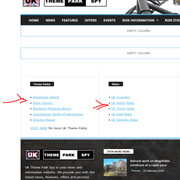
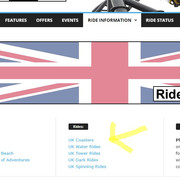
Hope you can help, Thank You as aslways…
Lea.
-
This reply was modified 3 years by
leagcooks.
 SP1
SP1 Hi Bettina,
thanks, but I am not talking about the home page. I am talking about the article templates/single post template.
Like this – https://www.gadgetbridge.com/how-to/top-ways-to-turn-off-auto-emoji-on-discord-mobile-and-pc/
which is in Show site-wide settings in the tag div composer.
Bettina Hello @sp1!
Edit the homepage with the TagDiv Composer, and use a flex block and there you can choose the pagination you need: https://prnt.sc/VNGgaCDVcDB5
Thank you!
Anamaria Hello,
Please edit with tagdiv Composer, scroll until the footer, select the row and go to the tab CSS and delete the background image -> https://i.imgur.com/u5rlTwr.png
Various factors can influence page speed, including server response time, network latency, image optimization, caching, and more. While the PHP version itself may not directly affect page speed, it can impact the web application’s performance, which in turn can affect page speed. For example, newer versions of PHP often have performance improvements that can speed up the execution of code and reduce server response times.
There are many optimization guides provided by our users here in the forum, some made by us; you could check some of them
– https://forum.tagdiv.com/cache-plugin-install-and-configure/
– https://forum.tagdiv.com/how-to-make-the-site-faster/
– https://forum.tagdiv.com/topic/high-number-of-ajax-request/
– https://www.infophilic.com/get-almost-100-pagespeed-newspaper-theme/
– https://forum.tagdiv.com/topic/score-100100-pagespeed-with-newspaper-wordpress-theme/
– https://www.andraware.com/wp-rocket-for-newspaper-theme/
– https://spraythemes.com/newspaper-theme/how-to-speed-up-the-newspaper-wordpress-theme-using-wp-rocket/
– https://forum.tagdiv.com/topic/page-speed-guide-for-2023-beginners-and-advanced/
– https://forum.tagdiv.com/topic/newspaper-theme-speedify-your-website/
– https://forum.tagdiv.com/topic/tutorial-chriss-custom-optimizations-for-functions-php-etc/
– https://forum.tagdiv.com/cloudflare-cdn/
– https://forum.tagdiv.com/topic/theme-causing-high-cpu-usage-2/
– https://forum.tagdiv.com/topic/sql-querys-high-cpu/
– https://forum.tagdiv.com/topic/newspaper-theme-slow-to-respond/
– https://premium.wpmudev.org/blog/optimizing-your-wordpress-database-a-complete-guide/
– https://underconstructionpage.com/optimize-wordpress-database/
– https://crunchify.com/better-optimize-wordpress-database-all-in-one-guide/
If you use Wp Rocket, you can try to exclude the following files
/jquery-?[0-9.](.*)(.min|.slim|.slim.min)?.js
/jquery-migrate(.min)?.js
/wp-content/plugins/td-composer/legacy/Newspaper/js/tagdiv_theme.min.js
tdBlocksArray
Thank you!
 sushmasmaurya@gmail.com
 ok, it is asking to implement the YouTube API Key. I will do that one. Thanks.
And one more thing, I want to add a banner for one of my affiliate product in the homepage (https://digitalsushma.com/) between these two sections (screenshot attached). And I am not able to find any option from tagdiv composer to add an element. Kindly guide me how to do this.
Bettina Hello @stodd !
These styles are defaults, and unfortunately, you can’t change the settings or customize them as in the TagDiv Composer. You can customize only the cloud templates with the TagDiv Composer.
Thank you for understanding!
Bettina Hello @insumedical!
In the cloud templates, you can add the ads when you edit the post with TagDiv Composer in the element called ” Single Post Content ” in the tab ADS. Documentation here: https://forum.tagdiv.com/article-ads/
Or you can use the element called “Ad box” from TagDiv Composer, and there you need to add the ads: https://forum.tagdiv.com/ads-adsense-overview/
Thank you!
Anamaria Hello,
Please deactivate, delete and reinstall tagDiv Composer from Newspaper plugins => https://www.screencast.com/t/OrzLvR2j and clear all cache.
Thank you!
Anamaria Hi,
If your settings are not saved, please check this topic -> https://forum.tagdiv.com/topic/tagdiv-composer-does-not-save-only-content-of-homepage/ and try the suggestions. Also, please check the cache, and clear/purge all cache.
Thank you!
Anamaria Hello,
You can create your section as you want with tagdiv Composer -> https://i.imgur.com/Vfn67wO.png -> https://i.imgur.com/u5HjsGT.png
Thank you!
Anamaria Hello,
Please let me know what header style you use.
If you have a cloud header, then you need to edit the page with tagDiv Composer => https://www.screencast.com/t/MIhm17tgIJeX select the logo and disable H1 on the logo => https://www.screencast.com/t/T6pvm7wR9 -> https://www.screencast.com/t/P7DuA9su from header and footer => https://www.screencast.com/t/31zJzmsS also if you use a sticky header.
The H1 must appear only once on the page/post and must be applied to an important element for SEO, usually placed on the logo.
Thank you!
Anamaria Hello,
I think that I know what the problem is, please edit the cloud template with tagDiv Composer -> https://i.imgur.com/j8YvKks.png click on the block and remove the offset -> https://i.imgur.com/dJ0iFQu.png let that field empty.
If you don’t mean this please give me more details, and screenshots.
A solution for sending a screenshot/video is this:
Download, capture, and send: https://www.techsmith.com/jing-tool.html
After making the screenshot, you will have a link; paste it here.
Thank you!
Anamaria Hello,
If you have installed a Pro prebuilt Website, you can hide the author name from the block with tagDiv Composer => https://www.screencast.com/t/wEdPdPyp2ChA , edit the page and select the block you want to edit and in the tab called “Layout” you can hide the author => https://www.screencast.com/t/fjrVaQm5IX the same for comments.
You can remove the Single Post Author Box using Edit with tagDiv Composer with a right-click. You can delete => https://i.imgur.com/BnhhxVh.png , or selecting the element and with drag & drop place into the deleting red zone from the bottom right of the page => https://i.imgur.com/vkQVCjn.jpg the same for comments.
Thank you!
 Clecio
 Hi Bettina,
In the panel, the phrase is already in Portuguese, but in the td_login.php file, it is in english, and when I reset the password, it arrives in English, ignoring what is in the panel.
/wp-content/plugins/td-composer/legacy/common/wp_booster/td_login.php
 insumedical
 Bettina
Check out the URL below.
https://being-money.com/wp-content/uploads/2023/02/02-15-01.jpg
within the article
I’m trying to put Google AdSense auto ads source.
What should I load in the TagDiv Composer editor?
—
Have a nice weekend.
 agatay
Hello everyone! TagDiv Composer Dont save Pages in Cloud Template. For example, I make changes on the main page, click save and only the footer and header are saved. And the content is not saved. I searched the forum, some had problems with protection plugins. And I don’t have any
Bettina Hello Faris!
Please edit an article with the TagDiv Composer, click on your content and delete the element Single Post Content: https://prnt.sc/8J2z4AO6vUlX
As a result, there will only be one element on the page.
Thank you!
Bettina Hello Andy!
Please execute these steps:
1. deactivate TagDiv Composer
2. uninstall (delete) TagDiv Composer
3. clear cache (if a cache plugin is present).
4. install TagDiv Composer
5. activate TagDiv Composer
6. clear cache (if a cache plugin is present).
Let me know the results!
Thank you!
Bettina Hello!
Edit the search page with the TagDiv Composer and check the element’s settings(General tab). There should be a post type option and please write there the word “post” in order to display the posts and not the CPT.
Thank you!



