
- NewspapertagDiv Composer – Website Manager
- NewspaperWhen tagDiv Composer is Not Working
- NewspapertagDiv Composer Tutorial
- NewspaperScroll Animation
- NewspaperSingle External Shortcode and External Shortcode
- NewspaperCredit System
- NewspaperBookmark – Save For Later
- NewspaperFlex Block Builder and Flex Loop Builder
- NewspaperModules Builder in Newspaper Theme
- NewspaperIntroduction to CPT and ACF with Newspaper Theme
- NewspaperCreate a frontend submission form
- NewspaperHow to Use the Tabbed Content shortcode
- NewspaperCreate a form contact page
- NewspaperFilters and sorting for taxonomies
- NewspaperUser review system
- NewspaperCustom Fields Support
- NewspaperWooCommerce: Happy “Add to Favorites!”
- NewspaperWoo Brands
- NewspaperModal Popup
- NewspaperShortcodes
 Calin
Calin Hi Sangar,
Please edit your cloud category template with tagDiv Composer – https://i.imgur.com/RyWhHlH.png and if you are using flex blocks make sure that in tab filter you are using the current category filter https://i.imgur.com/flBu7Gm.png , or you can use the post loop filter, this will automatically display the correct articles for each category.
Calin Hi,
I checked the website and I see that you have the tagdiv mobile theme plugin enabled, but the lightspeed plugin cache that you are using do not have the cache option for mobile enabled. So it will deliver the mobile version on desktop. Also, do you want to have a different version on mobile, different from desktop and simple? If yes, then keep the mobile theme plugin, if no, then please disable and remove the plugin so the responsive version will be used.
The footer you have can be edited suing tagDiv Composer https://forum.tagdiv.com/footer-templates/ also, now I see that all elements have a hover color that is working.
Can you please provide an example for how you should like the time to be display? I will check and see what can be done.
Thank you!
Calin Hi,
First edit the page with tagDiv Composer – https://i.imgur.com/qbNfpm4.png then select the element then in the left sidebar the general tab will be display, https://i.imgur.com/KBeQmnD.png look for the offset, if you have a number there, remove it.
Calin Hi.
The header now looks ok there is no red magnifying glass – https://i.imgur.com/Li5XCm0.png but what you need to do now is to edit the header for mobile version. Use the tagDiv Composer – https://i.imgur.com/JFGPwSm.png – select any element and after that in left sidebar set the mobile viewport – then you can edit the elements from mobile menu zone – https://i.imgur.com/QHLv7IP.png
Calin Hi,
For this you need to use the tagDiv Composer to edit the single post template, select the content row and set it on a single column – https://i.imgur.com/xVU0cWo.png
Calin Hi,
If you are using a single post template then the inline ads should be set using tagDiv Composer on the cloud template as in this guide https://forum.tagdiv.com/article-ads/
Calin Hi,
The zones are refer to header/content/footer zone.
Most of the time the problem is from a shortcode that is not compatible with our theme, therefore after you set it with tagDiv Composer and save the page, the next time when you try to edit it, you’ll get that error. The most simple and fast way to resolve it is to use a page revision – https://wordpress.com/support/page-post-revisions/
Also, please check our guide from here at point 5 -> https://forum.tagdiv.com/tagdiv-composer-not-working/ also after trying the steps from our guide you do not get any good results, you can send us an email at contact@tagdiv.com and provide wp-admin login, as well as cPanel and credentials. We will take a look. Include a link to this topic in the email.
Thank you!
Calin Hi,
Yes, this can be done using cloud template sand tagDiv Composer. You need to use a flex block in sidebar and use the special filters – https://forum.tagdiv.com/flex-block-settings-guide/ – https://i.imgur.com/elBLXrl.png – https://i.imgur.com/6JSFNax.png each filter should be set on respective cloud template (single filter on single post template, category, on category cloud template …)
Thank you!
 il4a
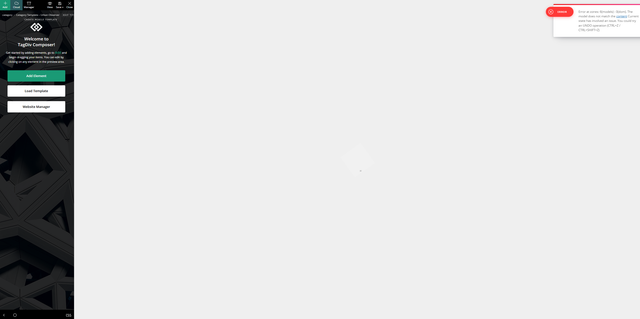
il4aHello, when trying to edit a page using the “Edit with TagDiv Composer” button i get this error, and the page is just blank:
Error at zones: 6(models) : 0(dom). The model does not match the content Current state has involved an issue. You could try an UNDO operation (CTRL+Z / CTRL+SHIFT+Z)
 Simion C.
 Hi,
We usually get questions concerning the search functionality, not a search logo. The search is mainly represented by an icon https://prnt.sc/HoJFAuEKSPrH sometimes also by text next to the icon, or just text. If maybe you would like to use an image/icon of your own, there is a way.
If you can convert your image/icon in SVG code format, then you can load it in the composer as a custom icon https://prnt.sc/kGToFYob_OA2 Then you can select that as the search icon https://prnt.sc/qQhmxUtYzg-L
Or maybe another way would be to just set the image you want as the background of the search https://prnt.sc/MOlxgPVs-U10
Or maybe you are referring to something else entirely. We can help more if you could explain what a search logo is exactly, and how or where you want to display it and what it should do. I see the website and there’s currently a logo and a button inside the header.
Please let us know.
Thanks.
Simion C. Hi,
Those can both be removed by editing the post template with the composer. They are ad boxes with an image set https://prnt.sc/0XPoqh-bvTNd the other one too https://prnt.sc/cpQ66Vf6JYF_ The images can be removed or just remove the ad boxes themselves.
But if these ad boxes are not visible in the composer, then it’s quite unusual. We will take a closer look, please send us an email at contact@tagdiv.com and provide admin login for the website. We will get to the bottom of the issue.
Thanks.
 theheritagelab
Hello, while editing a page or post template, my sidebar screen is not showing any icon for “undo”, “save” etc. I can add a row, but cannot see the icons for layout…console isn’t showing any issue and it was working yesterday just fine! Screenshot
 Horrormovies.gr
Hello, I just installed Yoast SEO Premium, and I see that no schema is passing through nor breadcrumbs list.
In the Theme Panel the “enable article schema” is disabled, and in Yoast SEO I use the default article for all posts.
The URL of my post is https://horrormovies.gr/movies/final-destination-bloodlines-2025-review/.
I disabled all plugins also except the tagDiv Composer, tagDiv Cloud Library, and Yoast SEO. Nothing changed.
Calin Hi,
Unfortunately there is no convertor tool, but what can be done is to import from the cloud templates a page, section and templates that are similar with the old one you have (if you want the same layout), those can be edited on frontend using tgDiv Composer.
Calin Hi,
Most of the time the problem is from a shortcode that is not compatible with our theme, therefore after you set it with tagDiv Composer and save the page, the next time when you try to edit it, you’ll get that error. The most simple and fast way to resolve it is to use a page revision – https://wordpress.com/support/page-post-revisions/
Thank you!
 CoinWeek2.0
I am trying to install Newsmag on my Dev environment at wp-engine. Got it installed ut whwn i tried to get tho the editor on dash, nothing happened. Looked at error log on Server and found this…..
PHP Fatal error: Uncaught Error: Class “tdc_check_domain” not found in /nas/content/live/devcoinweek/wp-content/plugins/td-composer/legacy/common/wp_booster/td_ajax.php:1704#012Stack trace:#012#0 /nas/content/live/devcoinweek/wp-includes/class-wp-hook.php(324): td_ajax::on_ajax_check_envato_code(”)#012#1 /nas/content/live/devcoinweek/wp-includes/class-wp-hook.php(348): WP_Hook->apply_filters(”, Array)#012#2 /nas/content/live/devcoinweek/wp-includes/plugin.php(517): WP_Hook->do_action(Array)#012#3 /nas/content/live/devcoinweek/wp-admin/admin-ajax.php(192): do_action(‘wp_ajax_td_ajax…’)#012#4 {main}#012 thrown in /nas/content/live/devcoinweek/wp-content/plugins/td-composer/legacy/common/wp_booster/td_ajax.php on line 1704
Copy Json
***********************************************
{
“installName”: “devcoinweek”,
“environment”: “DEV”,
“type”: “error”,
“date”: “2025-07-08T23:11:33.953Z”,
“severity”: null,
“client”: null,
“message”: “PHP Fatal error: Uncaught Error: Class \”tdc_check_domain\” not found in /nas/content/live/devcoinweek/wp-content/plugins/td-composer/legacy/common/wp_booster/td_ajax.php:1704#012Stack trace:#012#0 /nas/content/live/devcoinweek/wp-includes/class-wp-hook.php(324): td_ajax::on_ajax_check_envato_code(”)#012#1 /nas/content/live/devcoinweek/wp-includes/class-wp-hook.php(348): WP_Hook->apply_filters(”, Array)#012#2 /nas/content/live/devcoinweek/wp-includes/plugin.php(517): WP_Hook->do_action(Array)#012#3 /nas/content/live/devcoinweek/wp-admin/admin-ajax.php(192): do_action(‘wp_ajax_td_ajax…’)#012#4 {main}#012 thrown in /nas/content/live/devcoinweek/wp-content/plugins/td-composer/legacy/common/wp_booster/td_ajax.php on line 1704″,
“uuid”: “45fd7e19-b55d-4a06-b7b7-b558ba039558”
}
I have no idea why this failed. Our currenct production site uses Newspaper 12, and I was looking to update. Very disapointing. So what can you do to assist?
Please advise ASAP as we have a deadline
 borgelastreet
Hello,
I’m experiencing an issue when trying to modify an article template that’s in the cloud library. Every time I attempt to edit it using the TD Composer, I’m redirected to a 404 error page.
Could you please assist me with resolving this?
Calin Hi,
You need to assign that footer cloud template as global, this can be done from more places, for example you can do this from the theme panel – https://i.imgur.com/8ZOd1On.png or from cloud templates – https://i.imgur.com/GQAWjdA.png also, make sure that the footer is not set only as individual on that page or cloud template.
The footer image can be edited using tagDiv Composer – https://i.imgur.com/Bept9jG.png select the footer row and check the css tab from there you can remove or replace the image – https://i.imgur.com/dXwS33R.png
I hope this will help you!
 snowsbest
Hello
I have the http://www.snowsbest.com site using Newspaper theme. Our Ajax menus on each block are no longer working but when I go into composer, the category IDs are correct etc but the categories are not hyperlinked on the home page.
Any ideas?
 RENATO
 @Calin Thanks, I managed to solve the previous issue. But there are three things I still need to fix:
1. Custom YouTube Thumbnails Are Getting Cropped
The custom thumbnails pulled from YouTube are all being cut off. You can check — this is happening with all YouTube embeds.
Examples:
https://ibb.co/Q7PjvBhw
https://ibb.co/MyqTmqzs
And here are sample pages:
https://glostv.com/abc13-houston/
https://glostv.com/bloomberg-news/
2. Channel Logo Images Are Being Cropped.
This issue appears on the homepage and across the site, wherever the channel logo is displayed at 120x120px. The theme is cropping the images in a way that none of the logos show properly, and I haven’t been able to fix this.
Examples:
https://ibb.co/1JXyF1RS
https://glostv.com/
3. I Can’t Replace the Theme Layout with My Own Design
This is the main issue. I want to replace the current homepage layout from the theme with a cleaner, more modern grid layout — similar to this:
https://ibb.co/RkTq98Q7
I built an HTML version that looks perfect here:
https://glostv.com/pagina-incial-teste/
However, I couldn’t get it to work using TagDiv Composer — the images are always stretched, and the layout settings are just too limited. I’ve watched your tutorials, but none helped.
I think one possible solution could be a custom snippet that overrides the current layout and allows me to use my HTML version instead.
Can you help me figure out a working solution?
 newsratosurya
Dear TagDiv Support Team,
I am facing a recurring issue while editing my pages using the TagDiv Composer in the Newspaper theme.
The error message displayed is:
sql
Copy
Edit
Errors at inner columns: 4(models) : 6(dom). The model does not match the content
Current state has involved an issue.
You could try an UNDO operation (CTRL+Z / CTRL+SHIFT+Z)
Along with this, I have noticed that I am unable to remove empty spaces/gaps that appear between columns or rows on the page. These unwanted spaces affect the layout and design, and no matter what I try, they persist.
I have attempted undo operations, cleared caches, checked for incorrect shortcodes or HTML, and updated the theme and plugin, but the problem still remains unresolved.
Could you please assist me with:
How to fix the model/content mismatch error effectively?
How to remove or reduce unwanted empty spaces in TagDiv Composer?
Thank you for your support. I am looking forward to your prompt assistance.
Calin Hi, with tagdiv composer it is possible to edit anything you just need to familiarize yourself with it, for example, open the homepage page in td composer and go to the footer page there you can select the elements you want to edit, and in the left sidebar you will have tabs (general, style, css … – https://i.imgur.com/PTxXNaT.png depending on the selected element), in this case you need to set the row that holds the content and change its color – https://i.imgur.com/6zC3hz8.png – https://i.imgur.com/aZ9jLEX.png select the css tab and set the background color https://i.imgur.com/9lXAxWf.png
I hope it helps you
Calin Hello ekpenworld, can you please provide a screenshot to a page/article where the ad is still display? I check the website and now I no longer see any ads.
Hi Thoiba, please provide some more details and screenshots with the problem you are having. If possible please reply only here https://forum.tagdiv.com/topic/tagtiv-composer-not-working/
Thank you!
 TimRHL
Hello,
unfortunately the theme can’t get a hang of the plugin “The Event Calendar”. I can customize the calendar as I want but when adding a new event, the whole page always shuts down and I receive an email with the following error:
Ein Fehler vom Typ E_ERROR wurde in der Zeile 3276 der Datei /mnt/web718/b3/91/570513591/htdocs/STRATO-apps/wordpress_02/app/wp-content/plugins/td-subscription/includes/td_subscription.php verursacht. Fehlermeldung: Uncaught TypeError: array_key_exists(): Argument #2 ($array) must be of type array, null given in /mnt/web718/b3/91/570513591/htdocs/STRATO-apps/wordpress_02/app/wp-content/plugins/td-subscription/includes/td_subscription.php:3276
Stack trace:
#0 /mnt/web718/b3/91/570513591/htdocs/STRATO-apps/wordpress_02/app/wp-includes/class-wp-hook.php(324): td_subscription::td_post_theme_settings_mb_save_filter()
#1 /mnt/web718/b3/91/570513591/htdocs/STRATO-apps/wordpress_02/app/wp-includes/plugin.php(205): WP_Hook->apply_filters()
#2 /mnt/web718/b3/91/570513591/htdocs/STRATO-apps/wordpress_02/app/wp-content/plugins/td-composer/legacy/common/wp_booster/wp-admin/external/wpalchemy/MetaBox.php(880): apply_filters()
#3 /mnt/web718/b3/91/570513591/htdocs/STRATO-apps/wordpress_02/app/wp-content/plugins/td-composer/legacy/common/wp_booster/wp-admin/external/wpalchemy/MetaBox.php(2081): WPAlchemy_MetaBox->apply_filters()
#4 /mnt/web718/b3/91/570513591/htdocs/STRATO-apps/wordpress_02/app/wp-includes/class-wp-hook.php(326): WPAlchemy_MetaBox->_save()
#5 /mnt/web718/b3/91/570513591/htdocs/STRATO-apps/wordpress_02/app/wp-includes/class-wp-hook.php(348): WP_Hook->apply_filters()
#6 /mnt/web718/b3/91/570513591/htdocs/STRATO-apps/wordpress_02/app/wp-includes/plugin.php(517): WP_Hook->do_action()
#7 /mnt/web718/b3/91/570513591/htdocs/STRATO-apps/wordpress_02/app/wp-includes/post.php(5060): do_action()
#8 /mnt/web718/b3/91/570513591/htdocs/STRATO-apps/wordpress_02/app/wp-includes/post.php(5162): wp_insert_post()
#9 /mnt/web718/b3/91/570513591/htdocs/STRATO-apps/wordpress_02/app/wp-admin/includes/post.php(453): wp_update_post()
#10 /mnt/web718/b3/91/570513591/htdocs/STRATO-apps/wordpress_02/app/wp-admin/post.php(227): edit_post()
#11 {main}
thrown
Is there any solution to this? Do I have to uninstall installed plugins or where does the error come from?
Best regards
 crashcult
 I did what you said and deactivated that plugin like you said, but tagdiv composer still gives no mention anywhere about changing the footer color It only mentions to add a gradient color. The footer is white with black fonts, I want it to be black with white fonts. The tagdiv composer does not show where you can do this. I even looked at manager, it mentions footer and colors but nowhere to change the footer color. Is there anyway I can use Elementor page builder, or any other page builder, instaed of Tagdiv Composer? You can’t change footer colors with Tagdiv Composer, I looked all over? Is the Urbanobserver a problem template, should I just get rid of it? Thank you.



