
- NewspaperAutoptimize Plugin – install and configuration
- NewspaperCache plugin – install and configure
- NewsmagInstall via WordPress
- NewsmagInstall via FTP
- NewsmagInstalling pre-built websites
- TutorialsHow to install Revolution Slider
- NewspaperInstalling Pre-built Websites
- NewspaperHow to Install Newspaper via FTP
- NewspaperHow to Install Newspaper via WordPress
- TutorialsHow to Install bbPress forum
- NewspaperIntroduction to CPT and ACF with Newspaper Theme
- NewspaperHow to edit modules for Flex Block X
- NewspaperWooCommerce: Happy “Add to Favorites!”
- NewspaperWoo Brands
- NewspaperStripe Setup
- NewspaperModal Popup
- NewspaperPayPal Setup
- NewspaperFlex Block Settings Guide
- NewspaperHow to setup the Contact Page
- NewspaperAdd Cryptocurrency Price Ticker Widget
 Anamaria
 Hello,
Usually, this happens with cache plugins. If the cache plugin does not have mobile support then the mobile theme version can be delivered instead.
The solution would be to use the recommended WP Super Cache plugin instead and activate these settings (especially the mobile device support): https://forum.tagdiv.com/cache-plugin-install-and-configure/
Also, please let me know what plugin for the cache you use now.
I hope this helps.
Thank you!
Anamaria Hi,
This malware infects not only theme files but also WordPress files or other plugin files. This malware was not detected only in our theme but also in many other themes and plugins https://www.bleepingcomputer.com/news/security/massive-balada-injector-campaign-attacking-wordpress-sites-since-2017 / -> https://cybernews.com/security/wordpress-malware-epidemic-balada-injector/ -> https://www.geoedge.com/balda-injectors-2-0-evading-detection-gaining-persistence /
I can offer an alternative recommendation if you prefer that we don’t inspect your theme files. You could consider downgrading the WordPress version using the WP Downgrade plugin, reinstalling the theme, and checking for this plugin wp-zexit.php. It might be wise to inspect via FTP if it doesn’t appear in the WordPress -> Plugins. Additionally, using Wordfence to scan the website and remove unknown users would be prudent.
Also, please make sure that you have the latest version 12.6.1
Thank you!
 Bettina
 Hello @fgates !
A code in your frontend is appearing only when you have a plugin uninstalled when it should be installed, so instead of the code, it will display the element from that plugin. Check in Newspaper -> Plugins (the Standard Pack plugin).
Thank you!
 Sergey
Hello,
I am continuousely struggling with translation of headers at my site.
My development site is https://finpro.international
I cannot translate the header by sending it to translation queue because the header is base64 encoded https://prnt.sc/ItxR3ZDFz6up. While I was able to solve this for particular fields in other documents by adding them to XML configuration, with header this solution does not work. Because it does not indicate any specific attribute that is encoded. I tried to add manually base64 encoded attributes, but I failed because it started to throw other critical errors.
WPML support proposed to create a translation using WP editor. I could successfully create the translation document by this method. But when I switch the language to English in Cloud Templates section, the header template does not appear.
https://prnt.sc/xkbLQMxx_jiw
https://prnt.sc/6_WjMsIuteAQ
When I go back to WP Editor I see it as English Translation of Russian.
https://prnt.sc/ODyHqKfkCtKr
But from WP Editor I cannot edit it using TagDiv composer, because it is missing!
The supporter of WPML is trying to reproduce the issue with compatibility of WPML and Newspaper theme. And she is asking for your involvement, whether you can assist her to install and reproduce the issue in their sandbox. She asked me to recreate the issue, but I have no free license to be used in their sandbox. So she asked for your involvement. You can see the thread here:
https://wpml.org/forums/topic/cannot-see-header-and-footer-template/page/2/
Can you advice:
1) How to resolve the header translation issue with base64?
2) Can you provide them with development license for their sandbox: mellow-maraca.sandbox.otgs.work?
Thanks.
Anamaria Hi,
Please make sure that you have the tagdiv Shop plugin installed and activated.
Thank you!
 dlicoppe
 we’ve already tested that… we only solve the problem if we reinstall the theme with the demo on top of everything, but that’s not a solution
Bettina Hello!
Do you have the Standard Pack plugin installed and active?
Make a test and deactivate ALL plugins except tagDiv ones, also if you are using a cache plugin, deactivate it, clear all cache and try again.
If the problem is still there, then please contact us via email at contact@tagdiv.com and provide the following:
– admin url and credentials
– cpanel url and credentials
– a link to this topic in order to identify you
We will take a look and try to help you asap.
Thank you!
Bettina Hello!
We have 3 options for mobile versions that you can use:
1. Responsive version: A responsive version of your website looks similar to the desktop version. TagDiv Composer is used to edit the page.Click on the mobile viewport: https://www.screencast.com/t/XDQJedlggSB. There, you can see your mobile version and edit or adjust the elements to look better.
2. Mobile pages: https://tagdiv.com/newspaper-10-3-7-update-brings-customizable-and-fast-mobile-pages
3. Mobile theme plugin: The Mobile Theme is a performance-optimized theme included in the main Newspaper theme that only loads on mobile devices. It comes with its own templates and designs for pages, posts, categories, etc., so your current templates from the desktop theme will get converted to the mobile theme layout. Please see https://forum.tagdiv.com/the-mobile-theme/ and https://forum.tagdiv.com/mobile-theme-introduction/ for more information.
A full explanation is here: https://www.youtube.com/watch?v=SpGkOnJeNZY
If you need to use mobile version 1 or 2, then you need to uninstall the Mobile Theme plugin and AMP.
Thank you!
Bettina Hello @poporil !
Do you have all the theme’s plugins installed and active? Check out the Standard Pack plugin.
Thank you!
Bettina Hello Jonathan!
This seems to be a caching issue. Please try to uninstall the cache plugin and check if the problem is solved. Make sure you do not use an object cache or any caching tool in your Cpanel.
Let me know the results!
Thank you!
 bobwei
 The site is NOMRAL under editing mode:
https://drive.google.com/file/d/1tsQ9RczE1AIiX_JuZkTko9XZVnyw2MVg/view?usp=drive_link
But when acess the public link:
https://drive.google.com/file/d/1tnUAhRG5VvVxwsEz5yNFIrY3Oc6YbZPO/view?usp=drive_link
Already Tried:
– Reinstall and Activated All Tagdiv Plugins
– Everything is up to date
– PHP is 7.4
– WordPress is 6.3.2
– The cache plugin is deactivated
– Deactivated all plugin else the tagdivs ones
In the Inspection Console, showing:
https://drive.google.com/file/d/12_GVvJZcJB1AdXQe7sqE1gzOfPc-42Pp/view?usp=drive_link
So, I don’t know why this happen, because the template is worked normally, only today is happen this issue, I didnt make any update or install something before that.
Please Help with this.
-
This reply was modified 2 years by
bobwei. Reason: completing infos for solutions
 Olli
Olli @bobwei: Thank you very much! That fixed the problem!
Everything needed to be installed (and activated) again after the update to the latest version 12.6.1:
– tagDiv Cloud Library
– tagDiv Social Counter
– tagDiv Shop
– tagDiv Standard Pack
 poporil
“Good evening, I have noticed that despite performing all the updates on the theme, it doesn’t appear as it would if I had done a fresh installation..! What could be happening? For example, it still has the category ‘DEFAULT SITE POST TEMPLATE,’ while in the new version on another site I have, I see that the option to choose a tamplate post has been removed and you have to create your own
 dotranquangphuc
Hello, hope you are doing well.
I have a website built on the Newspaper 12 interface on the topic of Beer. I have a question, is there a feature in the Tagdiv editor that can display pre-installed color forks? (Please see attached images or website https://www.craftbeer.com/styles/american-amber-lager)
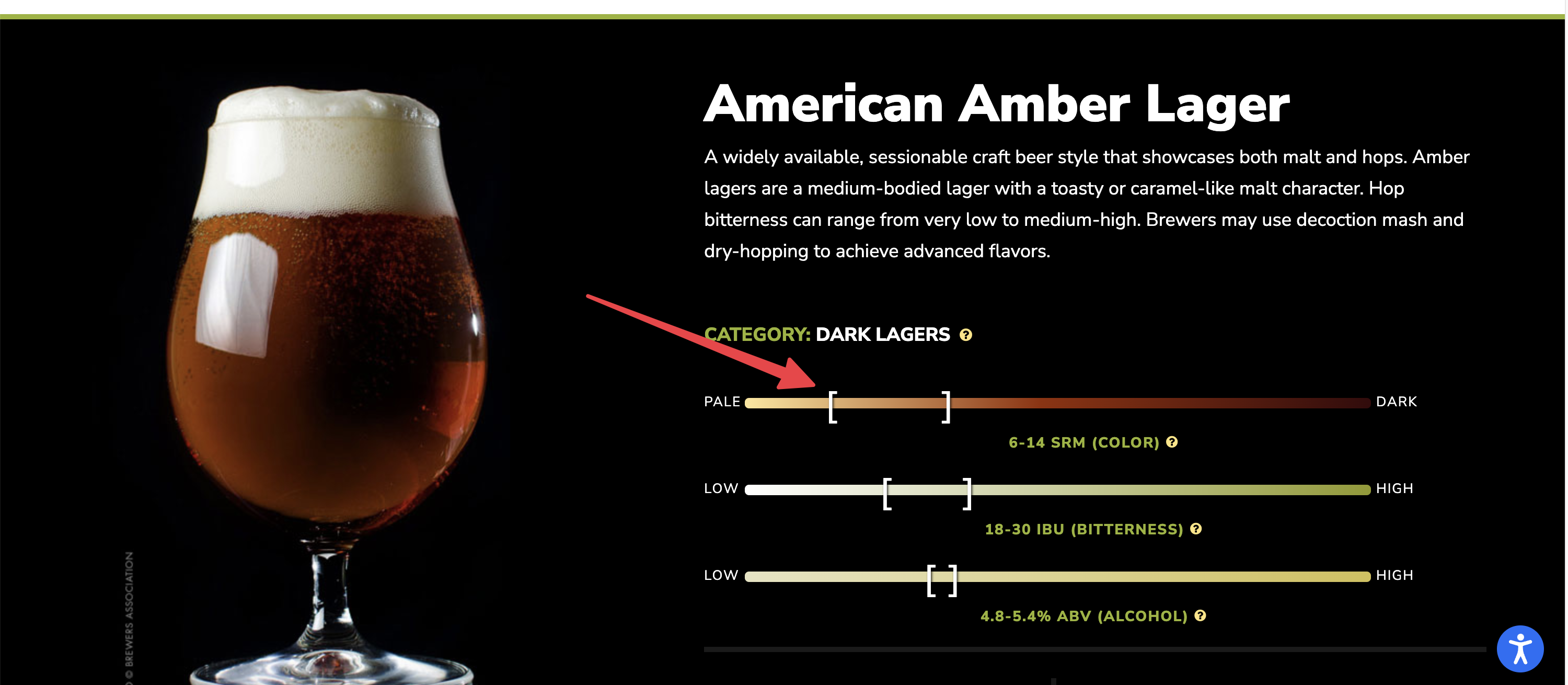
Or, do you know of a plugin that can display like that for TagDiv? I tried ACF but there doesn’t seem to be a color option.
This is very important for my website. So, please try to help me come up with some suitable solution that you know of.
Regard,
 rockman008
When I visit my Home page, the installed prebuilt doesn’t show even though I cleared all the cache. Sometimes, it displays, but most of the time, it doesn’t, even in incognito.
I downgraded to 12.5.1, and it works now. It seems like the version 12.5.1 is the stable version.
Prebuilt: Default Pro
Php version: 8.1.2
WordPress Version: 6.2.3
 SeaBlueHK
1) I have updated the theme to version 12.6.1 today, after reactivating all the required plugins, my site shown critial error, and could not show the correct layout.
2) Also, Everytime I install tagDiv Cloud Library Plugin, it cause Ajax error then crashes the Composer Plugin and Standard Pack Plugin too. It cause the whole site down which i need to disable my plugin folder and reinstall everything again.
Site Link: https://seablue.hk/
 cybernox
 I’m actually using Openlitespeed and have Litespeed plugin installed. I did cleared the cache. if you want you can take a look I can send the url.
Bettina Hello Jonathan!
We have 3 options for mobile versions that you can use:
1. Responsive version: A responsive version of your website looks similar to the desktop version. TagDiv Composer is used to edit the page.Click on the mobile viewport: https://www.screencast.com/t/XDQJedlggSB. There, you can see your mobile version and edit or adjust the elements to look better.
2. Mobile pages: https://tagdiv.com/newspaper-10-3-7-update-brings-customizable-and-fast-mobile-pages
3. Mobile theme plugin: The Mobile Theme is a performance-optimized theme included in the main Newspaper theme that only loads on mobile devices. It comes with its own templates and designs for pages, posts, categories, etc., so your current templates from the desktop theme will get converted to the mobile theme layout. Please see https://forum.tagdiv.com/the-mobile-theme/ and https://forum.tagdiv.com/mobile-theme-introduction/ for more information.
A full explanation is here: https://www.youtube.com/watch?v=SpGkOnJeNZY
If you need to use mobile version 1 or 2, then you need to uninstall the Mobile Theme plugin and AMP.
Thank you!
 insight
Hi
Ive just re-installed this theme but when I click on any of the header menu links like “Arts”, instead of going to the category page it returns the “Error 404 page not found”. I’ve not changed anything in the header menu. Can you tell me why?
thx
 Diana Scia
HI I BUY THE THEME NEWSPAPER AND I RENAME IT FOR SECURITY REASON.
I HAVE AN ISSUE
WHEN THE THEME NEED TO UPDATE IT HOW DO YOU DO TO INSTALL IF ACTUALLY HAVE A DIFFERENT NAME OF NEWSPAPER?
UPLOAD THEME WITH FTP OR FILE MANENER ?
 sebe
sebe Hello Bettina,
Oh, what a pity. From what version number can’t do it?
First I upload the main theme and the child theme.
Once everything is set up, I upload the modified themes (theme folders names, screenshots, edit css).
I have another installation in which I was able to do it. It’s true that it hasn’t been updated for a while (10.3.6.1).
If I cannot change the names, I am no longer interested. I will use another theme.
Regards.
Sebe.
Bettina Hello @Igor88 !
Do you use default templates or cloud templates?
In the cloud templates, you can add the ads when you edit the post with TagDiv Composer in the element called ” Single Post Content ” in the tab ADS. Documentation here: https://forum.tagdiv.com/article-ads/
Or you can use the element called “Ad Box” from TagDiv Composer, and there you need to add the ads: https://forum.tagdiv.com/ads-adsense-overview/
Please try to uninstall the cache plugin and check if the problem is solved.
Thank you!
 mckeec1
 Update: Installed version 12 into a staging copy of the site, it replaced version 8. Site is giving a blank home page with:
PHP Notice: Undefined index: post in /nas/content/live/[redacted]/wp-content/themes/Newspaper-child/functions.php on line 924, referer: https://[redacted]/
If I could get a copy of Version 8.7.2, that would potentially fix the security hole without requiring new work on this site. Thank you!
-
This reply was modified 2 years by
mckeec1.
 nedo
nedo Hi,
i finally been able to install the staging but now we do have a problem with the license key. We have the theme in use for the 2 domains available and we don’t have the possibility to assign the staging domain.
How can we handle this?
 Signlops
Hi I have installed app find pro template and customised the website, on the home page i have added filters and Apps, but the filters are not working, please check the screenshot i have selected the advertising tool, but still it shows all other categories
Website URL: https://signlops.au/
