
- NewspaperAutoptimize Plugin – install and configuration
- NewspaperCache plugin – install and configure
- NewsmagInstall via WordPress
- NewsmagInstall via FTP
- NewsmagInstalling pre-built websites
- TutorialsHow to install Revolution Slider
- NewspaperInstalling Pre-built Websites
- NewspaperHow to Install Newspaper via FTP
- NewspaperHow to Install Newspaper via WordPress
- TutorialsHow to Install bbPress forum
- NewspaperIntroduction to CPT and ACF with Newspaper Theme
- NewspaperHow to edit modules for Flex Block X
- NewspaperWooCommerce: Happy “Add to Favorites!”
- NewspaperWoo Brands
- NewspaperStripe Setup
- NewspaperModal Popup
- NewspaperPayPal Setup
- NewspaperFlex Block Settings Guide
- NewspaperHow to setup the Contact Page
- NewspaperAdd Cryptocurrency Price Ticker Widget
 aj.reynolds
Hi
We require a for the Newspaper theme. We use this theme on our website (https://www.indianlink.com.au/), and we use a simple app provided by AIM (https://www.thisisaim.com/) to deliver the articles of our website to our customers. The app can be found on the Apple or Play store and is called: Indian Link.
The app functions by pulling the Featured Image, Title, and Post content from a WordPress post using RSS, and delivering it to the app as an article to be tapped on. When tapped, the app diverts the user to the URL of that article.
We have discussed functionality with the app developer, and asked if any custom XML or PHP is required to make this function, but they have assured (and even showcased using a brand new WordPress installation), that the Featured Image, Title and Content pulls to the app without any additional plugins or changes to a standard WordPress installation.
Sadly, when the Newspaper theme is turned ON, the Title and the Content is pulled through, but the Featured Image is not. The image that appears in the app, is a default “fallback” image that has been set up in the AIM backend. If we turn the theme OFF, the featured images feed through to the app successfully.
At one stage, we had a programmer add this line of code to the bottom of the functions.php file, contained within: public_html/wp-content/themes/newspaper
// Add the 'media' namespace to the RSS feed

function custom_rss_namespace() {

    echo 'xmlns:media=http://search.yahoo.com/mrss/ ';

}

add_action('rss2_ns', 'custom_rss_namespace');
// Add the media:thumbnail to the RSS feed
function custom_rss_media_thumbnail() {
global $post;
if (has_post_thumbnail($post->ID)) {
$thumbnail = wp_get_attachment_image_src(get_post_thumbnail_id($post->ID), 'full');
$thumbnail_url = $thumbnail[0];
echo '<media:thumbnail url="' . esc_url($thumbnail_url) . '" />';
}
}
add_action('rss2_item', 'custom_rss_media_thumbnail');
It seemed to work, and the Featured Images began feeding correctly to the app. However as soon as there was a theme update, this file was overridden, and readding the same code did not result in the same outcome.
We’re in search of a permanent solution here, that would withstand future theme updates. I believe that there must be something in the Newspaper theme files that actively alters the original state of Featured Images, causing the app to not be able to find the image it is looking for when drawing from the RSS feed. If you use any online RSS viewer (example:https://rss.app/feed/y0F9FOXcarlvA9HX?utm_source=rssviewer&utm_medium=website), you will see that the featured images also do not appear.
Thank you in advance for your help!
 Magistar
 Whoops you are right the plugin can be installed and activated. Now the shortcode is gone. I’m sorry it looks like I was panacking a bit due to the injected articles. Thanks for the quick replies.
Magistar Whoops I did a new search and found a fix:
https://forum.tagdiv.com/topic/wp_booster-error-45/
I had to install and activate something called standard pack. Thanks @anamaria.
 dariusstoica
Hi,
I want to install the Newspaper theme, but before that, I would like to know if the video URLs from our current articles won’t be lost when the Newspaper theme is installed.
More precisely, with the “old” theme from our website, it seems we put the URLs of the videos in a field that belongs to the old theme. But, for the Newspaper theme, I would have to put the video’s URLs in another field that seems to belong to the Newspaper theme.
So, should I save the video’s URLs from each article, or will it be okay to install the Newspaper theme and will not lose any URLs from the articles?
 Bettina
 Hello!
Let only the tagdiv plugins be used, and uninstall any other plugin.
I would gladly recommend you make a backup and update plugins and the theme via file transfer to the latest update: https://forum.tagdiv.com/how-to-update-the-theme-2/
Let us know about the problems you have after the update.
Thank you!
Bettina Hello @greg19 !
Yes, they can’t be found on your install: https://prnt.sc/2uRqg7dnDVK_
Please add them again.
Thank you!
 zagasir
I have installed the Prebuild Website News Magazine Pro, and some single Post templates in Cloud Templates.
However, when I select the Single Post Template 11 or 16, the cover image is not displayed at full width.
See this screenshot:
https://www.uberti.eu/images/ESEMPI/template-11-screenshot-1.jpg
Questions:
1) How do I display the cover images of Single Post Template 11 and 16 at full width?
2) How do I remove the gray geometric pattern on the sides of the post?
Thank you.
 Anamaria
 Hi,
I suggest using WP Rocket plugin.
There are many optimization guides provided by our users here in the forum, some made by us; you could check some of them
– https://www.infophilic.com/get-almost-100-pagespeed-newspaper-theme/
– https://forum.tagdiv.com/cache-plugin-install-and-configure/
– https://forum.tagdiv.com/how-to-make-the-site-faster/
– https://forum.tagdiv.com/topic/high-number-of-ajax-request/
– https://forum.tagdiv.com/topic/score-100100-pagespeed-with-newspaper-wordpress-theme/
– https://www.andraware.com/wp-rocket-for-newspaper-theme/
– https://forum.tagdiv.com/topic/page-speed-guide-for-2023-beginners-and-advanced/
– https://forum.tagdiv.com/topic/newspaper-theme-speedify-your-website/
– https://forum.tagdiv.com/topic/tutorial-chriss-custom-optimizations-for-functions-php-etc/
– https://forum.tagdiv.com/cloudflare-cdn/
– https://forum.tagdiv.com/topic/theme-causing-high-cpu-usage-2/
– https://forum.tagdiv.com/topic/sql-querys-high-cpu/
– https://forum.tagdiv.com/topic/newspaper-theme-slow-to-respond/
– https://premium.wpmudev.org/blog/optimizing-your-wordpress-database-a-complete-guide/
– https://underconstructionpage.com/optimize-wordpress-database/
– https://crunchify.com/better-optimize-wordpress-database-all-in-one-guide/
Also, pagespeed is not covered by support -> https://forum.tagdiv.com/newspaper-theme-support/
If you use Wp Rocket, you can try to exclude the following files
/jquery-?[0-9.](.*)(.min|.slim|.slim.min)?.js
/jquery-migrate(.min)?.js
/wp-content/plugins/td-composer/legacy/Newspaper/js/tagdiv_theme.min.js
tdBlocksArray
To be able to optimize and to remove CLS and LCP please check these guide => https://developers.google.com/web/tools/lighthouse/ -> https://www.sqlpac.com/en/documents/google-pagespeeds-lighthouse-6-new-features-lcp-cls.html -> https://web.dev/lighthouse-whats-new-6.0/ -> https://web.dev/lcp/ -> https://web.dev/cls/
Thank you!
Bettina Hello @rockman008 !
We have 3 options for mobile versions that you can use:
1. Responsive version: A responsive version of your website looks similar to the desktop version. TagDiv Composer is used to edit the page.Click on the mobile viewport: https://www.screencast.com/t/XDQJedlggSB. There, you can see your mobile version and edit or adjust the elements to look better.
2. Mobile pages: https://tagdiv.com/newspaper-10-3-7-update-brings-customizable-and-fast-mobile-pages
3. Mobile theme plugin: The Mobile Theme is a performance-optimized theme included in the main Newspaper theme that only loads on mobile devices. It comes with its own templates and designs for pages, posts, categories, etc., so your current templates from the desktop theme will get converted to the mobile theme layout. Please see https://forum.tagdiv.com/the-mobile-theme/ and https://forum.tagdiv.com/mobile-theme-introduction/ for more information.
A full explanation is here: https://www.youtube.com/watch?v=SpGkOnJeNZY
If you need to use mobile version 1 or 2, then you need to uninstall the Mobile Theme plugin and AMP.
You can add the ad box element in the tagdiv Composer and add the code there in the mobile viewport. Read all about it here: https://forum.tagdiv.com/ads-adsense-overview/
Thank you!
 nishantkumar2010
How to Reduce unused JavaScript to improve loading speed .
I used debloat plugin for this, but after installing its showing white pages.
Bettina Hello Paolo!
If you updated the theme to the latest version, then you need to activate the Standard Pack plugin in order to have all the default templates available.
We recommend using cloud/PRO templates in order to have the possibility to edit them with the TagDiv Composer, which contains a lot of functions and features. Please check out our tutorial here: https://forum.tagdiv.com/tagdiv-composer-tutorial/
More documentation about the cloud templates is here:
– https://forum.tagdiv.com/cloud-library-templates/
– https://forum.tagdiv.com/design-post-pages-using-cloud-library-templates/
– https://forum.tagdiv.com/cloud-library-category-templates/
You can redesign the website using the tagdiv Composer, or import the cloud template you like from the Cloud Library, or install an entire demo (without content) with design only.
You can reproduce this block as well using Flex Block 1 for example: https://prnt.sc/CKfblif2FWAJ
Thank you!
Bettina Hello!
I can see that you have a lot of errors in the console. Make a test and deactivate ALL plugins except tagDiv ones, also if you are using a cache plugin, deactivate it, clear all cache and try again.
We have 3 options for mobile versions that you can use:
1. Responsive version: A responsive version of your website looks similar to the desktop version. TagDiv Composer is used to edit the page.Click on the mobile viewport: https://www.screencast.com/t/XDQJedlggSB. There, you can see your mobile version and edit or adjust the elements to look better.
2. Mobile pages: https://tagdiv.com/newspaper-10-3-7-update-brings-customizable-and-fast-mobile-pages
3. Mobile theme plugin: The Mobile Theme is a performance-optimized theme included in the main Newspaper theme that only loads on mobile devices. It comes with its own templates and designs for pages, posts, categories, etc., so your current templates from the desktop theme will get converted to the mobile theme layout. Please see https://forum.tagdiv.com/the-mobile-theme/ and https://forum.tagdiv.com/mobile-theme-introduction/ for more information.
A full explanation is here: https://www.youtube.com/watch?v=SpGkOnJeNZY
If you need to use mobile version 1 or 2, then you need to uninstall the Mobile Theme plugin and AMP.
Thank you!
Anamaria Hello,
The page loading speed can depend on many factors, and each website is unique from this point of view. Let me explain some of these factors and maybe they give you some starting points for optimizing your website. A good choice for the page speed, could be the mobile layout which contains fewer elements because it can improve a bit your page speed.
There are many optimization guides provided by our users here in the forum, some made by us; you could check some of them
– https://www.infophilic.com/get-almost-100-pagespeed-newspaper-theme/
– https://forum.tagdiv.com/cache-plugin-install-and-configure/
– https://forum.tagdiv.com/how-to-make-the-site-faster/
– https://forum.tagdiv.com/topic/high-number-of-ajax-request/
– https://forum.tagdiv.com/topic/score-100100-pagespeed-with-newspaper-wordpress-theme/
– https://www.andraware.com/wp-rocket-for-newspaper-theme/
– https://forum.tagdiv.com/topic/page-speed-guide-for-2023-beginners-and-advanced/
– https://forum.tagdiv.com/topic/newspaper-theme-speedify-your-website/
– https://forum.tagdiv.com/topic/tutorial-chriss-custom-optimizations-for-functions-php-etc/
– https://forum.tagdiv.com/cloudflare-cdn/
– https://forum.tagdiv.com/topic/theme-causing-high-cpu-usage-2/
– https://forum.tagdiv.com/topic/sql-querys-high-cpu/
– https://forum.tagdiv.com/topic/newspaper-theme-slow-to-respond/
– https://premium.wpmudev.org/blog/optimizing-your-wordpress-database-a-complete-guide/
– https://underconstructionpage.com/optimize-wordpress-database/
– https://crunchify.com/better-optimize-wordpress-database-all-in-one-guide/
Also, pagespeed is not covered by support -> https://forum.tagdiv.com/newspaper-theme-support/
If you use Wp Rocket, you can try to exclude the following files
/jquery-?[0-9.](.*)(.min|.slim|.slim.min)?.js
/jquery-migrate(.min)?.js
/wp-content/plugins/td-composer/legacy/Newspaper/js/tagdiv_theme.min.js
tdBlocksArray
To be able to optimize and to remove CLS and LCP please check these guide => https://developers.google.com/web/tools/lighthouse/ -> https://www.sqlpac.com/en/documents/google-pagespeeds-lighthouse-6-new-features-lcp-cls.html -> https://web.dev/lighthouse-whats-new-6.0/ -> https://web.dev/lcp/ -> https://web.dev/cls/
Thank you!
 Calin
Calin Hello,
Please try like this, please delete tagDiv Composer and tagDiv Cloud library too and after that install the plugins from Newspaper > plugins. Now in case that you can not activate the plugins from that place (but you should) you can try from Dashboard > plugins.
Also, you ca do a test using only tagDiv plugins.
Thank you!
 commandeleven
 We have no child theme, nor any CSS code added. The plugins with 12.6.1 were updated, but threw the whole site out of whack.
We updated and installed all the plugins related to 12.6.1, but when it wrecked our site, I downgraded again and fixed the mistakes caused by the update.
I am willing to give you credentials to login and sort out the problem, otherwise we will be looking for a new theme that doesn’t continuously cause problems for us.
 debasishsinha
 All required mandatory plugins of the standard pack plugins are installed and updated as well but still the codes are exposed. If there was a space to upload the screen shorts i would have uploaded them. Well, here is the link Please have a look https://www.insysdnet.com
 Pavol Sojka
Hi,
This is the issue: Newspaper Template is missing. Standalone themes need to have a templates/index.html or index.php template file. Child themes need to have a Template header in the style.css stylesheet. Please help
 msakande
 Dear,
since this morning the plugin tagDiv Cloud Library AUTO DISABLED
When I try to enable it I get the error Plugin Error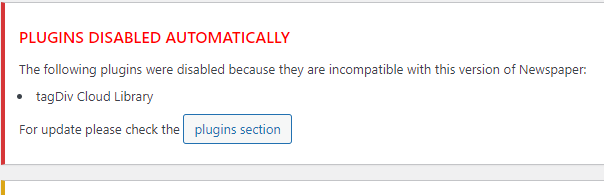 .
.
I delete the plugin and install it again, but I cannot activate it.
The Theme is up to date 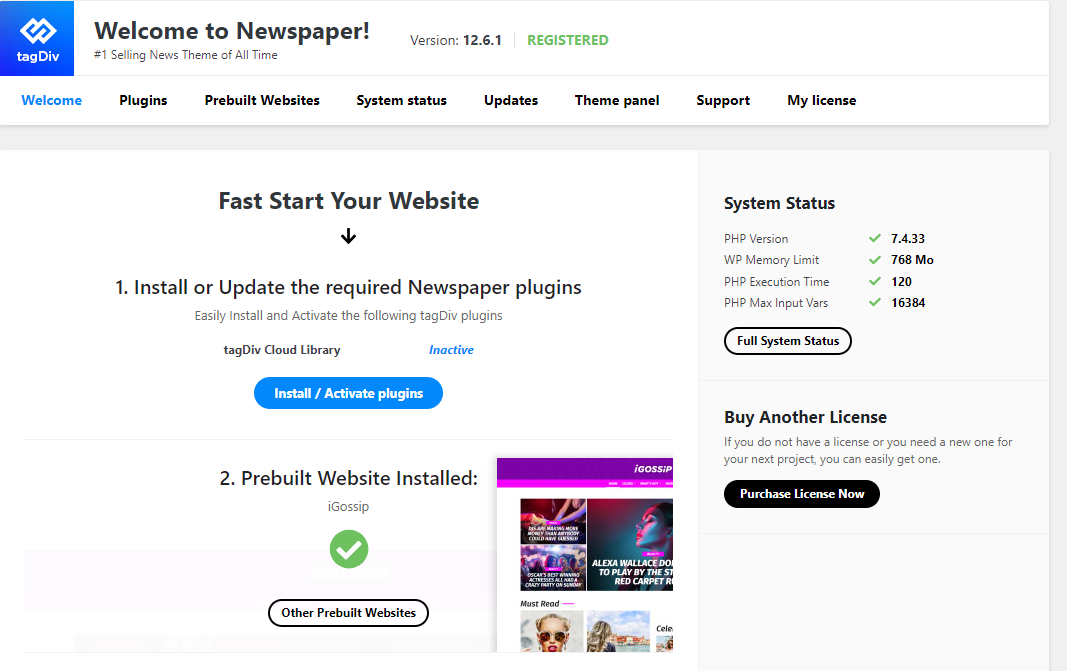
Bettina Hello @novodia!
If you use cloud templates, then you need to change the logo in the tagdiv Composer.
Please check our tutorial here: https://forum.tagdiv.com/tagdiv-composer-tutorial/
More documentation about the cloud templates is here:
– https://forum.tagdiv.com/cloud-library-templates/
– https://forum.tagdiv.com/design-post-pages-using-cloud-library-templates/
– https://forum.tagdiv.com/cloud-library-category-templates/
We have 3 options for mobile versions that you can use:
1. Responsive version: A responsive version of your website looks similar to the desktop version. TagDiv Composer is used to edit the page.Click on the mobile viewport: https://www.screencast.com/t/XDQJedlggSB. There, you can see your mobile version and edit or adjust the elements to look better.
2. Mobile pages: https://tagdiv.com/newspaper-10-3-7-update-brings-customizable-and-fast-mobile-pages
3. Mobile theme plugin: The Mobile Theme is a performance-optimized theme included in the main Newspaper theme that only loads on mobile devices. It comes with its own templates and designs for pages, posts, categories, etc., so your current templates from the desktop theme will get converted to the mobile theme layout. Please see https://forum.tagdiv.com/the-mobile-theme/ and https://forum.tagdiv.com/mobile-theme-introduction/ for more information.
A full explanation is here: https://www.youtube.com/watch?v=SpGkOnJeNZY
If you need to use mobile version 1 or 2, then you need to uninstall the Mobile Theme plugin and AMP.
Thank you!
Bettina Hello @clecio !
For sure, something is interfering if this happens only from time to time.
There is an error, or what exactly is not working?
If you mean cache, then we recommend the WP Super Cache Plugin: https://forum.tagdiv.com/cache-plugin-install-and-configure/
Thank you!
Bettina Hello!
It shouldn’t be like that. Did you have some CSS codes or something custom in a child theme? Make sure that you have all the plugins installed and activated, as well as up-to-date.
Thank you!
Anamaria Hi,
You need to disable the mobile theme and amp to have mobile responsive version.
Using our theme you can choose from 3 mobile versions
-> mobile responsive => https://www.screencast.com/t/oJ2ShOp47
-> mobile theme plugin => https://forum.tagdiv.com/the-mobile-theme/
-> mobile page => https://tagdiv.com/newspaper-10-3-7-update-brings-customizable-and-fast-mobile-pages/
If you created the mobile pages with tagDiv Composer, then when you install the Mobile Theme plugin, your pages will be overwritten by the plugin (the mobile theme comes with its templates for page, post, category, etc so your current templates from the desktop theme will get converted to the mobile theme layout, the page content is made without builders in mobile editor => https://www.screencast.com/t/xbgZG8kH also, the options that are provided to edit the mobile theme version are limited (this keeps the things simple)).
This is a video about Responsive Newspaper Theme, AMP & Mobile Theme, Mobile Pages & Templates -> https://www.youtube.com/watch?v=SpGkOnJeNZY
So, the mobile responsive is what you see then that you select the viewport on phone => https://www.screencast.com/t/matV17hH, so some settings may apply for each viewport(where is the border blue), and others are not(where the border is black).
The mobile page has the mobile templates from Cloud Library => https://www.screencast.com/t/YCcZ8rL8
The Mobile responsive version of the theme and the mobile page editor can be edit with tagDiv Composer, the mobile theme plugin cannot.
For example, you can have the mobile theme plugin activated and use the mobile page/mobile responsive version for the homepage/pages, but for the categories pages/404 page, you can’t use the mobile page/mobile responsive version if you have the mobile theme plugin activated.
So, if you want to design the pages with tagDiv Composer, you can use the mobile page or mobile responsive version.
Thank you!
Bettina Hello!
A code in your frontend is appearing only when you have a plugin uninstalled when it should be installed, so instead of the code, it will display the element from that plugin. Check in Newspaper -> Plugins (the Standard Pack plugin).
Thank you!
 Yigi
YigiHello, I updated my Word Press and I have problems installing the tagDiv Composer Plugin. When installing it, it sends me the error that it could not create folders or upload files. My WordPress version is the latest, and my PHP version is too
Bettina Hello Joachim!
Please uninstall the mobile theme and amp because amp creates those URLs.
Thank you!

