- NewspaperAutoptimize Plugin – install and configuration
- NewspaperCache plugin – install and configure
- NewsmagInstall via WordPress
- NewsmagInstall via FTP
- NewsmagInstalling pre-built websites
- TutorialsHow to install Revolution Slider
- NewspaperInstalling Pre-built Websites
- NewspaperHow to Install Newspaper via FTP
- NewspaperHow to Install Newspaper via WordPress
- TutorialsHow to Install bbPress forum
- NewspaperIntroduction to CPT and ACF with Newspaper Theme
- NewspaperHow to edit modules for Flex Block X
- NewspaperWooCommerce: Happy “Add to Favorites!”
- NewspaperWoo Brands
- NewspaperStripe Setup
- NewspaperModal Popup
- NewspaperPayPal Setup
- NewspaperFlex Block Settings Guide
- NewspaperHow to setup the Contact Page
- NewspaperAdd Cryptocurrency Price Ticker Widget
 Roupille
Hi,
1) For all the posts I would like just to be visible the center bar without the default side bar (to get the post wide),
Firstly I go to #Theme Panel #default site post template, then pick Style 6.
When testing the website all the posts reamain with the default right side bar. To get rid of it I need in the post option to select in #Post Settings the no sidebar option.
So I have to tick the same for the same posts. Is there the same option to set all posts in #Theme Panel #default site post template?
2) I have copied on a local test installation a copy of the Newsmap production folder. I received a message that I shold register it? Is it ok to use it that way for a couple of days as testing purpopse?
Best regards
Guillaume
 pbn
pbn Thanks Chris. I figured the Shim wasn’t intended for Newspaper but I’m getting the same problems. I just picked this up so won’t have access to older VC versions. Looks like I’ll have to stick to uninstalling / reinstalling the VC plugin every few days till this is resolved.
 plaguezor
Hello,
I just installed theme on my site, it appears like this ..
..
pbn Is this SHIM being worked on for the Newspaper theme? I have the Newspaper theme and the visual composer problem is affecting us as well? We have Newspaper 4.6.3 running on a WAMP stack. We get 2500 visits a day tops so that may be why it takes longer to affect us than larger sites?
I don’t get CPU usage warnings all I see is that the time to first byte on our site seems to slip everyday. I moved our site to an entirely different server and it helped for a day. The first day the TTFB was 900ms, today it’s 2000ms by the end of the week it’ll be back at 8000ms just like when we hosted it on a different server.
If I disable the Visual Composer, the time to first byte goes from 2000ms to 600ms.
The shim helps keep some of my article elements inline but all the columns don’t work. Disabling the Visual Composer also messes up the sliders on the front page and the shim doesn’t fix that.
Is there going to be a fix for this soon or do I need to manually rebuild my homepage?
I also noticed that if I removed and then reinstalled the Visual Composer Plugin, that it “reset” the issue and I’m back to 900ms TTFB. I presume it will just slip away again though…
-
This reply was modified 11 years by
pbn.
 MissMyra
Hello,
I’ve just installed the ‘forum’ on my website. I wonder if I can make categories myself. So f.e. I would like to set 10 categories and in those categories, my customers can ask their question.
Once someone asked a question on the forum, how can I set up that I have to approve the comments & questions, before they go live?
And a total other question, what’s the default font of the newspaper template?
Thank you very very much!
Best, Myra
 Alin [tagDiv]
 Hi,
Yes, you can disable Revolution Slider if you don’t use it, as this is an optional plugin . Only Visual Composer plugin has to be active if you create your pages using pagebuilder – https://forum.tagdiv.com/installation/
Thanks!
 cleardice
 Hi,
a)i tried all things your listed options, except “you have to set a featured video”, nothing works.
I dont understand what is meant by “set a featured video”.
Do we have to set every single video imported to the site, to featured image? but this doesn’t make sense.
We use a video robot and it imports different videos from youtube etc.
The index page shows these different videos and they change hourly. In the hundreds.
But still after clicking on them it opens the page but there is no video.
I didn’t set up a single post page. We just installed the theme and child theme as in documentation,
and loaded the settings and demos. http://www.yougothype.com is our page. i hope this is the link you want.
Please help.
b)Infinite Load doesn’t seem to work on any page.
Again we followed the email steps you sent but they didn’t work.
Our settings:
In Visual Composer for Main Page/Index page:
Parent – Homepage Infinite Scroll
Template- Homepage Blank
Used Block 8
-multiple category filter(hollywood, rides, luxury)
-Random Posts
Limit Post Number-5 (this is set automatically)
Pagination – infinite load is set
(load more was also tried. this shows on page. but when clicked its shows load circle but nothing more is added or changed. so this doesn’t work either. FYI.)
But please help with the Infinite Load.
Without these the site is useless 🙁
best regards,
Bora
 simchris
 If you can’t edit uploaded photos that is usually a caching issue, or conflict with a plugin interfering with the media editor; so a clean install of WP might be a good idea!
simchris Well.. note that for a “lot” of folks they are not having this “CPU death” issue. But also a lot are. Also there were a lot of conflicts with VC 4.5 and Yoast SEO.
So, not everybody having this issue. I know Radu has been trading email with the Bakery folks to share this experiences (and my server data presumably).
From what I understand, and might not be accurate their plans are:
a) the shim provides a solution for those of us with the CPU spiral of doom, as stop gap – works fine with VC 4.42 on my box — no problem for short term use at all as long as I’m not getting huge traffic spike ( so I check my CPU usage before messing with it )
b) they want to push Newspaper 5 asap; which has the threads of things from Newsmag (sticky sidebar, more layout options for home page; control over the blocks/images, etc.); and presumably will include VC 4.5.4 or whatever.
c) Newsmag 5 would then be a dev track for possibly building their own page builder that does not use VC at all.
So, there isn’t going to be a “death of TagDiv” or themes not working. Mine are working just fine and no need to upgrade anything “right now” for me. So, only reason I upgraded to 1.71 from 1.6 was for security patches.
But try using your old version of Visual Composer — the issue is with VC not the theme, but there is some bizarre combination of things that our particular server does *not* like at all. So, in my case using the 4.4.2 for short periods does work just fine; quickly tweak, then switch off VC, and huzahhh! I won’t install any VC version newer than that. Period. Luckily I’m not using VC for posts or pages; only the HOME PAGE … so in my case unless home page getting whacked, usually not big issue. I also have the addition in my functions.php to NOT load VC code on post pages.
So, delete new version of VC you installed;
reinstall older version of VC (any 4.4x version should work in theory)
leave shim active
turn on VC, and edit your page/layout.
Obviously you should be deactivating any caching stuff while messing with VC changes.
Anyway… mine is working ….
-
This reply was modified 11 years by
simchris.
MissMyraHello,
We’re installing this theme, but we get stuck at the ‘don’t miss’ part. Can we randomly pick articles/blogs/win actions/etc.. to put in this section? We used the options that the theme provides, but it’s not working.
Thank you very much!
Best, Myra
 consultnew
Hi
What is the Patch files in installation downloads zip folder ?
Can you please help
Thanks
MissMyraHello,
My web designer and I are installing the theme on my website. We have some problems with the pictures. It looks great on your demo, but not so great on our website. We assume you can advise us on recomendable picture sizes? We cannot find this. Thank you so much!
Best, Myra
 Roney
Roney hi ,
reinstalled wordpres and continues with the problem in forums I read on the internet , this type of problem usually happens when the subject has a repeat function.
Could debug this please ?
Alin [tagDiv] Hi,
This error comes from WordPress as this file menu.php is not apart of the theme (it is a part of WordPress). I’m not sure what customizations have you made so please make a fresh install of WordPress.
Thanks!
 alexschneiderru
Hi,
I have a problem with Google Fonts using.
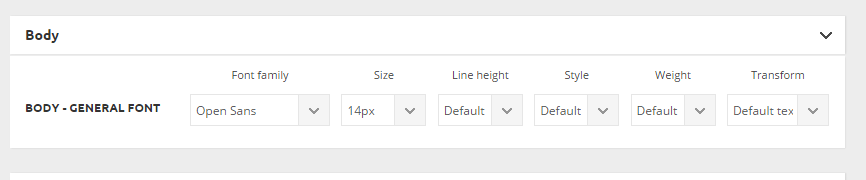
I chose this Google Font in the theme option panel http://c2n.me/3idRdU0.png but desired font (namely Open Sans) seems to not loading in the pages’ code.
This is my site (test installation) http://news.zzkk.ru/
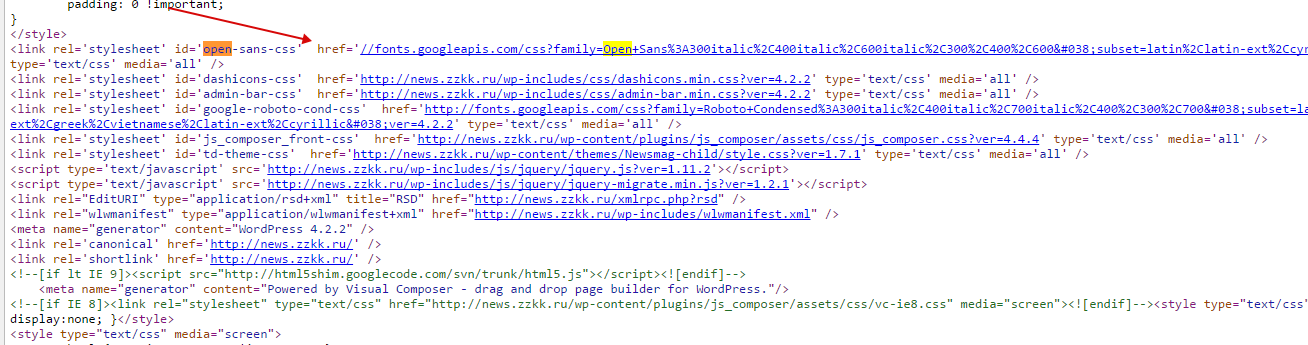
As one can see in the home page code there is no such font loading, only Roboto: http://c2n.me/3idSBUP.png (I was forced to manually load font through custom css http://c2n.me/3idSZS0.png
And there is another strange effect: this is page listing when admin is autorized on the site http://c2n.me/3idTkw1.png
This line appears in listing only when admin is autorized on the site!
Maybe I did something wrong?
Please help.
 trcrack
 After thinking the ribbon issue was fixed by deactivating one plugin, it popped up again. I started playing with other plugins by deactivating them. For most, whenever I deactivated a plugin, I’d refresh and the ribbon with the “Edit Post,” stats, etc at the top reappeared. After a couple of more refreshes, it disappears again.
I repeated this over with several plugins with the same results — fixed, then reverts back. This makes me think the issue is something else but I have no clue as to what.
I tried clearing cache, different computers and same things every time.
Perhaps the WP-Visual Bakery issue? I deleted it and reinstalled it earlier today as per the instructions.
-
This reply was modified 11 years by
trcrack.
 TVDinner
 yup i did notice that. They are nice.
I just deleted and removed Newsmag and reinstalled to start again.
Really need them to advise in my other thread so I can customize the header and ad sizes. The rest is pretty easy to set up.
simchris You can activate the “style” from the theme styles, but you still need to setup your home page however you want it to look and choose your content/categories to feature — no way for theme to know what categories you might have created.
Don’t use the “demo content” unless you’re just demo’ing for client; all that junk doesn’t help you with your own site content — just makes a mess of it.
Take a look at theme docs (link right side of page).
Normal practice would be:
1) install theme
2) use default style, or use the style import option
3) create blank page
4) build your page layout using Visual Composer; possibly create custom sidebar to use widgets on front page.
5) set your page as the static front page from WP settings
6) adjust page to tweak and fine tune
Fun to experiment. You can always do a working page, make that live. Then start new blank page and tweak that, then switch to that new version once completed the way you want it.
Not that difficult, but you do need to setup your own front page, obviously.
Hope that helped 🙂
-
This reply was modified 11 years by
 Sokae
SokaeHello Guys!
A few hours ago I saw that the right sidebar was missing in the articles. However, in the Home persists.
Can anybody help me? I restarted all, installed theme again … but nothing … the sidebar does not appear 🙁
 mxfarsa
 Hi again,
I went in and removed my cache plugin and reinstalled it, something must have happend with it that made some things on the site being locked and not updated…
It started to work again after this and after the update to 2.10 so everything is good now 🙂
Thank you for the quick reply and thank you for a great theme…..
Regards
Henrik
simchris As they said, you need to completely remove the version included with the theme; however the version included with the theme is a bundled version — so not everything in the paid version may work, but you can try it.
So, fully remove the bundle version from your site; then install the paid version.
Activate it; disable the tagspeed booster plugin; and see if everything works or not.
 bcnjmlopez
Hello
I bought in ThemeForest the paid version of Visual Composer 4.5.2.
But some functions do not work properly and have consulted wpbakery, and I answer the following:
“The issue is Because there is an inbuilt version of Visual Composer (or the related code) present in your theme Which is overriding the plugin standalone version and Hence it Causing the issue. You will Have to get rid of it. I would advise you to do so with the help of theme author, loose You Might Otherwise the additional elements added by him. Once this is done, you can install the standalone plugin and it will work fine. Kindly check. ”
Can you help?
Thank you very much,
José María López
 newwalter
I was using Newsmag Version: 1.6 then updated to 1.7 and 1.7.1, after update search block got broken.
please help to fix this.
i already tried reinstalling updates.
 Alin [tagDiv]
 Hi,
If you update the theme and you have custom modifications to the theme’s files, unfortunately you will have to re-add those modifications. Please make a backup of your current theme installation so you ca revert if something goes wrong.
Please send an email at contact@tagdiv.com and provide wp-access so we can take a look at the social counter issue. Also paste a link to this conversation so we can know who you are.
Thanks!
 prayaspatel03
hi,
my website link is -http://www.mytechblizz.com/
I have many problems
1) Installed demo on my site but i dont know where can i edit “Don’t Miss”, ” Fashion and Trends”, ” Travel Guide”, “Tech and Gadgets” etc.
2)My home page has many repetitive post i dont know how can i manage it so that my page shows every unique post.
3) Like in demo version how do i get these menus,
on the top left side- Demo Stakes,Default,Classic blog, Fashion, Sports etc.
4) how can active slider for my posts so that my post automatically change each 10 secs or whatever time i set.
Foe example, in ur demo verson, in ur homepage 1st for posts automatically change