
- NewspaperAutoptimize Plugin – install and configuration
- NewspaperCache plugin – install and configure
- NewspaperInstalling Pre-built Websites
- NewspaperHow to Install Newspaper via FTP
- NewspaperHow to Install Newspaper via WordPress
- NewspaperIntroduction to CPT and ACF with Newspaper Theme
- NewspaperHow to edit modules for Flex Block X
- NewspaperWooCommerce: Happy “Add to Favorites!”
- NewspaperWoo Brands
- NewspaperStripe Setup
- NewspaperModal Popup
- NewspaperPayPal Setup
- NewspaperFlex Block Settings Guide
- NewspaperHow to setup the Contact Page
- NewspaperAdd Cryptocurrency Price Ticker Widget
- NewspaperInfinite Loading for Single Posts
- NewspaperThe Newspaper Mobile Theme: Introduction
- NewspapertagDiv Social Counter plugin
- NewspapertagDiv Shop
- NewspapertagDiv Opt-In Builder
 Vlad S
 Hello !
This happens due to cache. Please follow our guide and make sure that WP Super Cache has been installed properly: https://forum.tagdiv.com/cache-plugin-install-and-configure/
Let us know the result.
Thank you !
 Shared-IT
 Hi Simon, thanks for your answer.
Within one of the Multisites the Update is shown as:
New Update is Available
A new version of the Newspaper Theme is ready to be installed. See what’s new here: Changelog
Current Version:
10.3.6
New Version:
10.3.6.1
By clicking the “install update” button it looks like installation is working but after 5 seconds I am in the update section of the network administration of multisite saying everything is updated, but thats not the case.
We will try to manually update via the WordPress theme panel.
 Calin
Calin Hi robdefran,
Please try the below steps:
Make sure that all theme requirements are set as in our guide from here -> https://forum.tagdiv.com/requirements-for-newspaper/
Also make sure that you have set the api key for YouTube-> https://forum.tagdiv.com/youtube-api-key/
Disable the theme and theme plugins, delete theme and reinstall the theme again after that check the results.
Thank you!
Calin Hi Digitalgirdharipandey,
Please try the below steps:
1. Disable tagDiv Composer -> https://i.imgur.com/uzBdRB9.png
2. delete tagDiv Composer -> https://i.imgur.com/xGGfYE7.png
3. Reinstall tagDiv Composer -> https://i.imgur.com/Ay0zJHn.png or -> https://i.imgur.com/ZMgV9at.png
4. Clear all cache from your website, host and browser ( for browser use force refresh Ctrl Shift R ).
If the problem still persists, please make sure that you do not have a plugin conflict, please deactivate ALL plugins except tagDiv plugins (theme plugins), also if you are using child theme or cache plugin, deactivate them, clear all cache and try again.
Also you can use the Enable jQuery Migrate Helper in some cases this can help you to make tagDiv Composer to work.
Let me know the results!
Thank you!
 financemediaromania
 Hi Calin. Ok, we installed all missing plugins, how can we fix that code issue (and show images and texts instead)?
Calin Hi Mark Gilbert,
It will be best if you can make a test on sub-domain or standing where to set only the WordPress plugin to see if the problem persists, if there is no problem then install the theme and check again, if there is a problem, let us know and we can take a look on the staging or subdomain without affecting the live website.
Thank you!
 Uzalendo News
 Hello Calin,
I am using latest theme, plugin i have only installed few which i require. Hosting i use safaricom servers and enterprise package https://domains.safaricom.co.ke/.
financemediaromaniaHi.
I tried to edit homepage, using Pagelayer, updated, and my page converts to source code and it cannot be fixed – unless backup is installed.
How to edit pages without this error?
Link: https://infrapress.ro/
Page begging: “[vc_row full_width="" parallax="" parallax_image=""][vc_column width="1/1"][td_block_big_grid_1 td_grid_style="td-grid-style-1" category_id="" sort="featured"][/vc_column][/vc_row][vc_row el_class="td-ss-row"][vc_column width="2/3"][td_block_1 custom_title="FASHION WEEK" limit="5" td_filter_default_txt="All" ajax_pagination="next_prev" header_color="#e29c04" category_id="" sort="random_posts"][td_block_19 custom_title=”GADGET WORLD” header_color=”#0b8d5d” limit=”8″ td_filter_default_txt=”All” category_id=”” sort=”random_posts”][vc_row_inner][vc_column_inner el_class="" width="1/2"][td_block_1 custom_title="BEST Smartphones" category_id="" limit="1" td_filter_default_txt="All" ajax_pagination="next_prev" header_color="#4db2ec" sort="random_posts"][/vc_column_inner][vc_column_inner el_class="" width="1/2"][td_block_10 custom_title=”DON’T MISS” limit=”3″ td_filter_default_txt=”All” sort=”random_posts”][/vc_column_inner][/vc_row_inner][/vc_column][vc_column width="1/3"][td_block_ad_box spot_id="sidebar"][td_block_1 custom_title="POPULAR VIDEO" header_color="#ed581c" limit="1" td_filter_default_txt="All" category_id="" ajax_pagination="next_prev" sort="random_posts"][td_block_8 custom_title="HOLIDAY RECEPIES" category_id="" limit="2" td_filter_default_txt="All" header_color="#0152a9" sort="random_posts"][/vc_column][/vc_row][vc_row full_width="" parallax="" parallax_image=""][vc_column width="1/1"][td_block_14 custom_title=”EVEN MORE NEWS” header_color=”#288abf” limit=”3″ td_filter_default_txt=”All” ajax_pagination=”next_prev” category_id=”” sort=”random_posts”][/vc_column][/vc_row]“
 Tinystepsbabyclub
Hi Guys
I am having a problem i hope you can help me with please.
I have the mobile theme installed (with AMP) and all is well apart from a very odd thing that is happening with the mobile menu. I appear to have two different mobile menu’s, depending on what page i open on my site.
Here is what my original Mobile Menu looked like when i set my site up (non Mobile theme installed) – https://imgur.com/63WfVNx
I decided to remove the colours and updated the Menu and added this to my Mobile Theme. Here is what my Menu looks like now on the Mobile Theme – https://imgur.com/cpyjc0k
The problem i’ve noticed is that the old Mobile Menu is appearing only on certain pages in my site (About, Cookies Policy, Privacy policy, Join Baby Club). The other pages are fine and the White Menu displays.
I can’t edit the old blue menu because it is no longer showing in the theme panel as i have the mobile theme installed. Any ideas why i have two mobile menus showing on different pages and how i can fix this? (i want to use the new white menu everywhere).
Thanks!
TS
 shikharagrl
 the tagDiv composer started working through this process, but I am getting two errors on jquery. the errors are mentioned below.
Installed jQuery Migrate Helper and through it, The Tagdiv composer worked but it is showing these theme errors.
jQuery Migrate Helper — Warnings encountered
This page generated the following warnings:
https://digitalmafiatalkies.com/wp-content/themes/Newspaper/includes/wp-booster/wp-admin/js/tagdiv-theme-plugins-setup.js: jQuery.fn.load() is deprecated
https://digitalmafiatalkies.com/wp-content/plugins/td-composer/assets/js/js_files_for_wp_admin.min.js: jQuery.fn.load() is deprecated
Please make sure you are using the latest version of all of your plugins, and your theme. If you are, you may want to ask the developers of the code mentioned in the warnings for an update.
Calin Hi,
You can use the theme with more cache plugins, but for the moment we have tested it only with WP Super Cache , also for cloudflare we have a guide here -> https://forum.tagdiv.com/cloudflare-cdn/
Thank you!
 Titine
 Hi Calin,
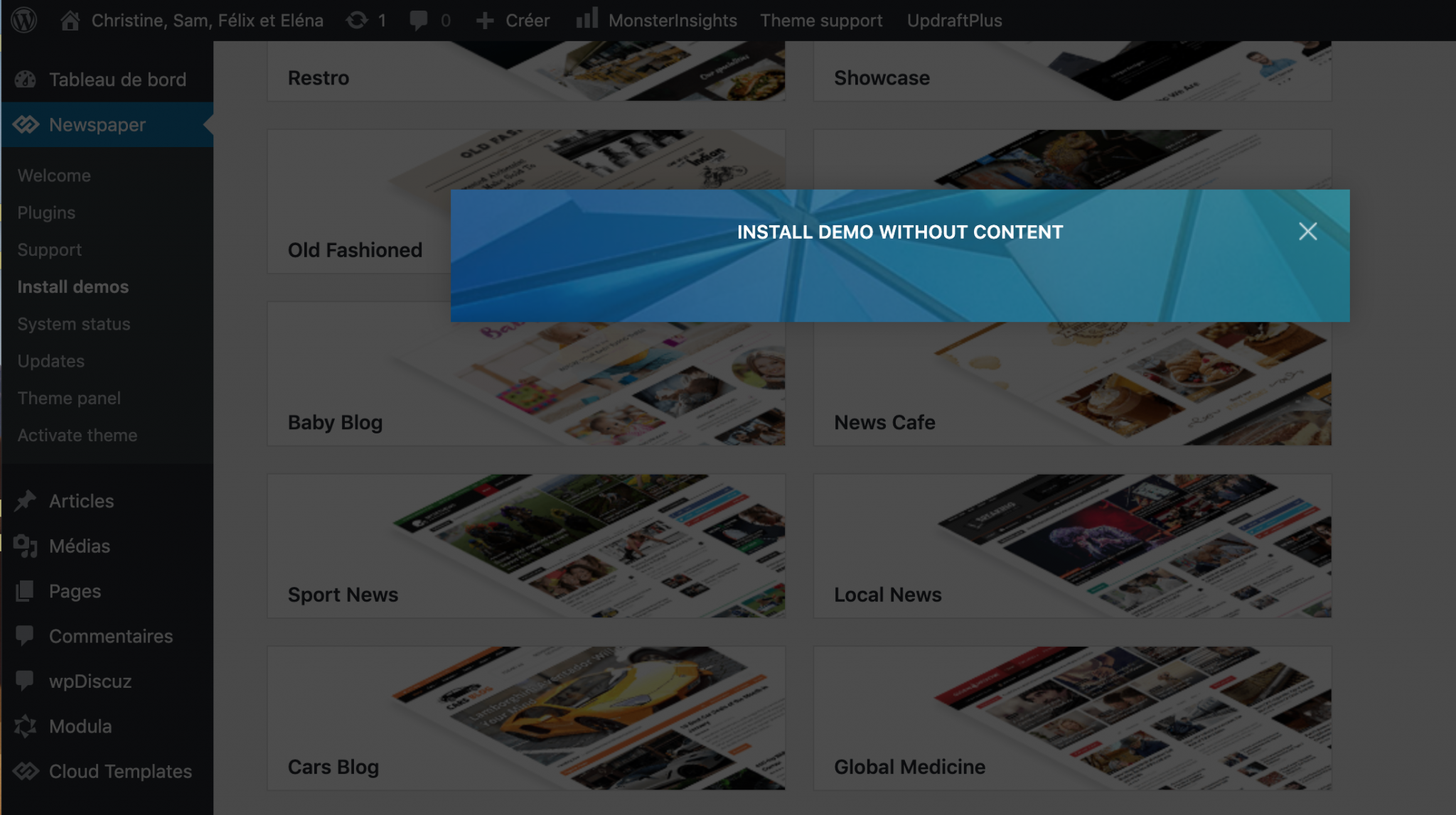
The Newspaper theme is activated, I made sure to use only tagDiv plugins and I tried in other browsers and I am still getting the same issue: I can’t install demos. Can you help me? Please find a screenshot below.
-
This reply was modified 6 years by
Titine.
Calin Hi Titine,
Please make sure that the theme is activate and that you are using ONLY theme plugins (tagDiv plugins) -> https://tagdiv.com/newspaper-theme-installing-demos/ also please try withe other browsers too.
If the problem persists, please provide me some screenshots.
Let me know the results!
Calin Hi Titine,
All demos and the revolution slider is included in our theme package, there is no extra charge for them.
Just make sure that you downloaded the theme with all files -> https://i.imgur.com/QO9Hl3i.png then you’ll need to unzip the package and install only the Newspaper theme from inside -> https://i.imgur.com/6f8y4TC.png the plugins provide will be there too. Also after you installed the theme, in order to have access to demos (to can install a demo) you need to activate the theme, for this please check our guide from here -> https://tagdiv.com/how-to-activate-the-newspaper-theme/
Hope this will help you!
Calin Hi Titine,
If you bought our Newspaper theme, then you have access to all demos, all of them are coming with the theme and you can chose the one that you want to install and use.
Also please note that you have two options when you install a demo, you can do it with content (and it will be display like here -> https://demo.tagdiv.com/newspaper_blog_baby/) or only the settings -> https://i.imgur.com/HzEW3rt.png, you can check more in our documentation for how demos are working -> https://tagdiv.com/newspaper-theme-installing-demos/
If there is still a problem, let me know!
Hope this will help you!
Vlad S Hello !
Please make sure that you have installed AMP properly as you can see in our guide here: https://forum.tagdiv.com/tagdiv-amp-plugin-tutorial/
Thank you !
Titine I click on install on the demo page and get an empty blue pop-up with just a title but no button. Nothing happens and nothing I can do except close that pop-up.
I followed your instructions to install the theme zip file (
the one with just the theme files, not the one will all the other files) and installed it successfully.
TitineI installed the Newspaper zip file with only the theme files (not all the files) because I was getting a failed installation – missing stylesheet error in WordPress. It then installed successfully. But, I am missing the demo files and I was going to use one of these demos for my site. I am also missing the slider plugin and other files (like child, etc..); I know they are optional for the $60 I paid I feel like they should be included.
 Candy Liu
I have install the category template but the live layout are difference form edit template , the column are crash , i also tried to reinstall the template from cloud, but seem look are same problem.
shikharagrl Installed jQuery Migrate Helper and through it, The Tagdiv composer worked but it is showing these theme errors.
jQuery Migrate Helper — Warnings encountered
This page generated the following warnings:
https://digitalmafiatalkies.com/wp-content/themes/Newspaper/includes/wp-booster/wp-admin/js/tagdiv-theme-plugins-setup.js: jQuery.fn.load() is deprecated
https://digitalmafiatalkies.com/wp-content/plugins/td-composer/assets/js/js_files_for_wp_admin.min.js: jQuery.fn.load() is deprecated
Please make sure you are using the latest version of all of your plugins, and your theme. If you are, you may want to ask the developers of the code mentioned in the warnings for an update.
 arunbabu
 i tryed to install these templates as you have showed in images,but not able to install and it is showing it is installing ,but is very slow and not even installing. My site is http://www.techjobs360.com and i want only the posts to be arranged with featuredimage of the posts.i wanted 3 columns or 4 columns of posts with 10 rows (currently it is 2 columns with around 10rows)in desktop and since i am using amp version in mobile i just want maximum posts to be loaded one by one with respective featured images also. now the images are also not loading in mobile , itryed various settings .because of this reason website is getting low traffic from google discover feed etc. i request you to give good solution .thank you.
 nhowarth
 I got around the problem by installing the Font Awesome plugin and changing the icons on the Header Main Menu to use them. Only newspaper.woff?17 is loaded as it’s used ‘Social icons’.
Ideally I like to change the icons in ‘Social icons’ to use the Awesome icons. Can you let me know how I can do that as there doesn’t seem to be an option to change them as there is with the Header Main Menu?
Thanks
Nigel
TitineI got an “install demo” blue pop-up but nothing happens and no button to click, just a cross to close but nothing gets installed.
TitineI bought this theme: https://demo.tagdiv.com/newspaper_blog_baby/
But after installing it, it doesn’t look like the baby blog above at all but like a bare page that needs to be designed from scratch. I was expecting this baby blog page template I could just upload and activate.
 Derek Little
 WP Super Cache significantly slows down my site. On the other hand, Cache Enabler makes my site light and fast.
Does the Cache Enabler plugin create problems for AMP? Or, are there any settings you’d recommend that would allow AMP to work?
https://marketingresults.club/wp-admin/plugin-install.php?tab=plugin-information&plugin=cache-enabler&TB_iframe=true&width=600&height=550



