- NewspaperAutoptimize Plugin – install and configuration
- NewspaperCache plugin – install and configure
- NewsmagInstall via WordPress
- NewsmagInstall via FTP
- NewsmagInstalling pre-built websites
- TutorialsHow to install Revolution Slider
- NewspaperInstalling Pre-built Websites
- NewspaperHow to Install Newspaper via FTP
- NewspaperHow to Install Newspaper via WordPress
- TutorialsHow to Install bbPress forum
- NewspaperIntroduction to CPT and ACF with Newspaper Theme
- NewspaperHow to edit modules for Flex Block X
- NewspaperWooCommerce: Happy “Add to Favorites!”
- NewspaperWoo Brands
- NewspaperStripe Setup
- NewspaperModal Popup
- NewspaperPayPal Setup
- NewspaperFlex Block Settings Guide
- NewspaperHow to setup the Contact Page
- NewspaperAdd Cryptocurrency Price Ticker Widget
 Anamaria
 Hello,
You need to edit with tagdiv Composer, and with it you can set the menu and so on.
You have the mobile theme plugin activated; please deactivate it and clear the cache.
Using our theme, you can choose from 3 mobile versions
-> mobile responsive => https://www.screencast.com/t/oJ2ShOp47
-> mobile theme plugin => https://forum.tagdiv.com/the-mobile-theme/
-> mobile page => https://tagdiv.com/newspaper-10-3-7-update-brings-customizable-and-fast-mobile-pages/ The option that you need to use.
Suppose you created the mobile pages with tagDiv Composer. In that case, when you install the Mobile Theme plugin, your pages will be overwritten by the plugin (the mobile theme comes with its templates for page, post, category, etc, so your current templates from the desktop theme will get converted to the mobile theme layout, the page content is made without builders in mobile editor => https://www.screencast.com/t/xbgZG8kH also, the options that are provided to edit the mobile theme version are limited (this keeps the things simple)).
This is a video about Responsive Newspaper Theme, AMP & Mobile Theme, Mobile Pages & Templates -> https://www.youtube.com/watch?v=SpGkOnJeNZY.
So, the mobile responsive is what you see when that you select the viewport on phone => https://www.screencast.com/t/matV17hH, so some settings may apply for each viewport(where is the border blue), and others are not(where the border is black).
The mobile page has the mobile templates from Cloud Library => https://www.screencast.com/t/YCcZ8rL8
The Mobile responsive version of the theme and the mobile page editor can be edit with tagDiv Composer, the mobile theme plugin cannot.
For example, you can have the mobile theme plugin activated and use the mobile page/mobile responsive version for the homepage/pages, but for the categories pages/404 page, you can’t use the mobile page/mobile responsive version if you have the mobile theme plugin activated.
So, if you want to design the pages with tagDiv Composer, you can use the mobile page or mobile responsive version.
Thank you!
 luca.cingano
 I have the same issue. I tried to resolve by reinstalling tagdiv plugins, but doesn’t work.
 ziamoon
I have configured the City theme for a non-AMP site and created a page for it. Additionally, I have configured another theme for mobile devices, with the address mysite.com/home-mobile. My expectation is that when a mobile user visits mysite.com, they should be automatically redirected to the mobile page, but that is not happening. The AMP plugin is installed, but I might be missing some settings causing this issue. How can I resolve this?
 rgchappell
Apparently there are some security vulnerabilities with the TagDiv Composer Plugin. I currently have 2.3 and need to update to 4.2. Where can I find a .zip file to install? Or do I have to update the whole theme? Thanks!
 Tribun74
Hi,
I have deactivated ALL Plugins. This is a fresh and a new installation.
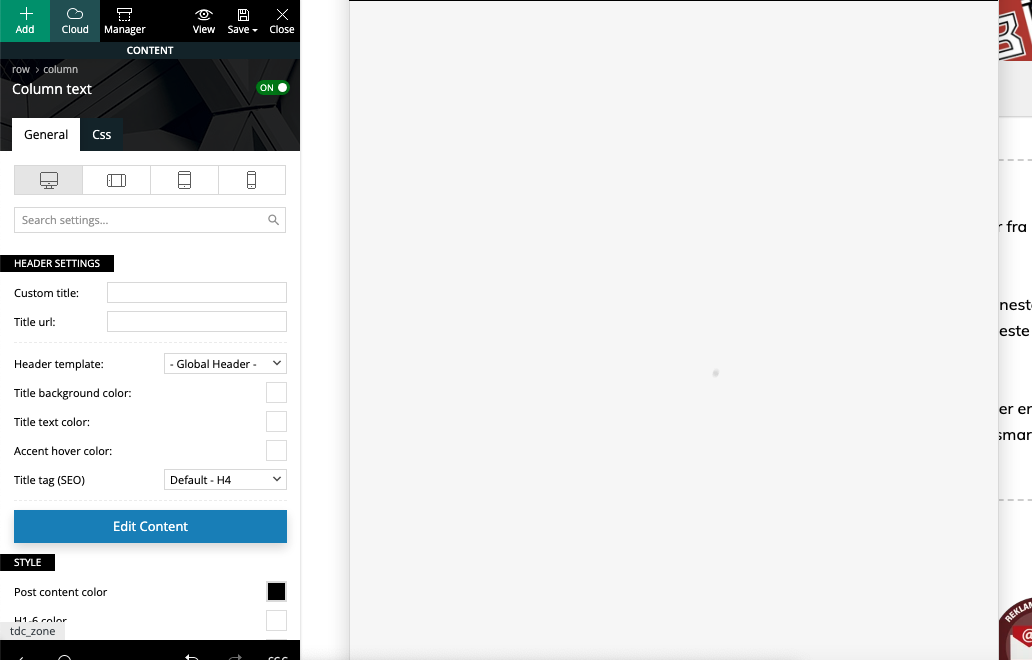
I cant enter the Title there, the entry field is missing.
The same problem I have on my second site (I have buy 2 Newspaper Licenses).
Do you have a idea?
THank you!
KR
Frank
 ikiweb
Hello,
I don’t think I fully understand how WebP images work.
I have installed the ShortPixel Optimizer plugin, and the WebP images are being generated correctly.
Example: form mypicture.jpg => mypicture.webp was created successfully
I have enabled WebP images in the theme settings:
BLOCK SETTINGS > Thumbs on Modules Block > Use WebP Format ==> ACTIVE
However, nothing changes on the website, and I don’t understand why.
Shouldn’t the blocks display WebP images instead of JPGs?
Am I missing something?
Thank you for your help!
 info@mlynar.org
Hello, I installed the purchased newspaper template and tried to create a translation into Slovak according to the instructions, but it still only loads and does not complete the process. Can you please advise me where I am making a mistake and why it does not finish as in the instructions?
 kjervert
 Sure. I’m trying to get a tag cloud installed on the homepage of a site that has newspaper 12 and tagdiv installed. I don’t see any options for it.
In wordpress widgets, there used to be an option for this. But, I don’t see a way to do it through the tag div editor.
Let me know what other information you need.
Karin
 Bettina
 Hello!
You can install multiple templates instead, and you can assign templates as you like, and when you modify them, they will remain like that, and they are there in the cloud templates and are not overwritten because you won’t install the entire prebuilt website.
The manager of all your cloud templates is here: https://app.screencast.com/SFs0AO79PyLV6
Thank you!
Anamaria Hello,
You can save row/element with right-click. and use it in other template. Also, please note that some elements are specific for that template, like single post content and so on.
Using the import/export option from the theme will allow you to import only the theme panel settings, the cloud templates go in tool > export – https://i.imgur.com/3Wxk885.png then to import you need to go in tool > import then install the wordpress importer and click on run import – https://i.imgur.com/tyxoVvg.png
Thank you!
 egarcianyc
As much as Live Preview is great, when trying to make a decision of which prebuilt to use, I like to view them with my content. I started out making custom changes to one and unfortunately when I installed a different prebuilt, all the work was changes were gone when I switched back to the original one I had worked on.
While it’s no HUGE deal since I can modify it quickly, I was wondering if there was a way to save it so that you don’t have to modify it all over again if you switch to another pre-built
 dansmith
Hi there,
Some of my team in the Cayman Islands cannot see most of the websites default icons within various devices and browsers. Icons like the menu drop arrows, post slider arrows, footer contact icons etc.
I however can see these on all devices and broswers – I am based in the UK.
Here is what my team in the Cayman Islands see…


Does anyone know what is causing this issue? They have tried clearing all cache. We also do not have any cache plugins installed.
Thanks,
Dan
 jobothan
 This is frustrating.
This used to work when I installed the theme.
When you post something in any blog_template (that you choose as styles below each post) the sidebar will be the same on all of them, unless you choose it to not be.
My problem, that I have described in many ways and documented with pictures, is, that this sidebar disaapears on ALL the styles/templates except for the default one.
In other words I can’t see the sidebar (and NOT the sidebar that pops in from the side when you scroll) unless I choose the default blog post template. And it didn’t use to be like this. Also I can’t choose to alter it in the tagdiv composer.
This limits me to post blog templates as the sidebar is gone from all my choices.
How do I get it back to how it was, so I can use alle the styles WITH the sidebar showing?
Please ask a colleague to help with this one – maybe that Ana can help?
Bettina Hello Caro!
Did you install the EastCoast Check Pro demo with content?
For this demo, you have to add Locations taxonomies under My directories. For each listing, you can choose the taxonomies: https://app.screencast.com/CR7Bx9yJnMT60
In the tagdiv Composer, you can display them like this: https://app.screencast.com/bmFCLIGBTKlmO
For the shortcode CPT Location Display, you need to have a Google Maps API key: https://forum.tagdiv.com/use-google-maps-api/
Thank you!
kjervert knthdgd
Hi TagDiv.
I installed “Security Optimizer by SiteGround” to protect my site, but then the “Edit Content” button in Composer did not work anymore, just loading and loading forever: https://i.postimg.cc/Jh3pq6hQ/Sk-rmbillede-2025-01-14-kl-15-00-53.png
When deactivating Security Optimizer, it works great again.
I think that is something you should fix, right?
Bettina Hello!
Please check it in the tagdiv Composer.
Check in the Composer and mobile viewport, and delete the entire element from there, too. Clear all the cache and try again.
Place the ticker in a new row and ensure it is placed in the content zone, not the header zone. Please follow the video to see where you can find and edit/build your sticky header on mobile and desktop, too: https://www.screencast.com/t/l6v2Belt
Sure. You can install a blank template, customize it in the tagdiv Composer, and assign it to your posts. More info here: https://forum.tagdiv.com/design-post-pages-using-cloud-library-templates/
I hope that helps you!
Thank you!
 Simion C.
 Having options for customizing the author box would be great indeed. For author pages/templates it is possible with Newspaper, where each element of the author box is separate in the composer https://prnt.sc/cRDUDJn14qzQ So you can use what you want, in any order.
With Newsmag it’s not possible in the same way. It will either have to be modified in the code, or with CSS. If it can be done with CSS, like hiding certain elements or changing their order, then in my opinion it’s easier to use CSS. At least you won’t have to keep making the modifications all over again after an update or reinstall. It doesn’t work for everything however.
If there’s something else that I can help with, please let me know at any time.
Thank you!
Simion C. Having options for customizing the author box would be great indeed. For author pages/templates it is possible with Newspaper, where each element of the author box is separate in the composer https://prnt.sc/cRDUDJn14qzQ So you can use what you want, in any order.
With Newsmag it’s not possible in the same way. It will either have to be modified in the code, or with CSS. If it can be done with CSS, like hiding certain elements or changing their order, then in my opinion it’s easier to use CSS. At least you won’t have to keep making the modifications all over again after an update or reinstall. It doesn’t work for everything however.
If there’s something else that I can help with, please let me know at any time.
Thank you!
 DavidCLM
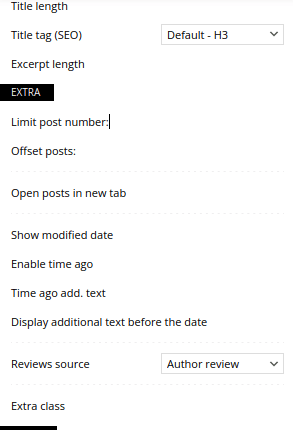
I’ve already deactivated all plugins, reinstalled the tagdiv composer, changed the entire site and I couldn’t find the configuration or the problem… the checkboxes for all the tag div composer blocks disappeared.
 nycinsider
 I don’t have that option in my settings:
General
Enable/disable saving history
Show hidden elements
Save settings
Those are my choices. I also can’t edit any of the templates anymore even if that option did exist b/c they all of a sudden don’t work with a plugin that has worked with your templates for 5+ years. Even on the homepage, where I completely removed that plugin and saved successfully 10x last week without error, today I opened the home page template and I’m getting an error. I know you’ll blame the plugin, but the error exists on templates where there is no plugin or conflicting anything – just tagdiv code. You sent me something called Custom Fields Support, but that doesn’t do what this plugin does. It’s basically like WP Patterns (reusable content), but you don’t have to open a post to edit them, they have their own listing in the dashboard menu.
I’ll probably have to move away from tagdiv/newspaper – it’s causing more errors/issues at this point than is worth troubleshooting. Faster to just move to a new theme and keep all the functionality built in to my sites. Giving up or changing functionality/plugins revenue is dependent on is way more challenging than installing a new theme. And since the paid support doesn’t help, just blames everything else about the site, it’s kind of a waste of time and money at this point – and the blame game just hinders revenue, so it’s a double loss.
-
This reply was modified 1 year by
nycinsider.
 eWolf
eWolfDear Team,
I have installed a user registration plugin (wpuserregistration.com) in order to add approval flow and a frontend user profile page.
Unfortunately, I faced the following issues:
1) Header login doesn’t allow me any customisation
2) login via wpuserregistration doesn’t work, otherwise, logout does.
3) Header login doesn’t redirect to wpuserregistration as the original wordpress slogin does.
 kibiribi
 lavozdelfestejo
Dear TagDiv Composer Support Team,
I am experiencing critical issues with the mobile view of my website and template management in TagDiv Composer. Below are the details:
Mobile View Issue: When I activate the Theme Mobile plugin, only the latest post is displayed, both on mobile and desktop versions, instead of the design I created. The only thing visible is that single post. If I deactivate the plugin on the desktop version, the design appears correctly, but on the mobile version, it still only shows the latest post and does not reflect the full mobile design I created.
Template Issue: Additionally, I had created the mobile version of all my category templates, but I deleted them before removing the Theme Mobile plugin to see if that was the problem. Now, I can’t access the templates; the option to use them doesn’t show up, which prevents me from creating or editing the mobile version. To check, I reinstalled the Theme Mobile plugin, but as mentioned in point 1, it only shows one post and doesn’t let me access the menu or anything, so I am unable to create anything or make progress.
Urgency: The launch date for my website is set for January 15th, and I need an urgent solution. The desktop version is nearly ready, but the mobile version still does not reflect the design I created. I’ve tried everything I can think of, and nothing seems to be working.
Could you please help me with these issues as soon as possible? The launch date is quickly approaching, and I need everything to be ready on both devices.
Thank you for your attention, and I look forward to your prompt response.
Kind regards
 a1-hbg1
Hi i have a clean new install of Newspaper Theme with Metropolitan PRO Demo. My Problem, i can´t see the settings for the selected element, there is in most cases just blank space. What can i do?