
- NewspaperAutoptimize Plugin – install and configuration
- NewspaperCache plugin – install and configure
- NewsmagInstall via WordPress
- NewsmagInstall via FTP
- NewsmagInstalling pre-built websites
- TutorialsHow to install Revolution Slider
- NewspaperInstalling Pre-built Websites
- NewspaperHow to Install Newspaper via FTP
- NewspaperHow to Install Newspaper via WordPress
- TutorialsHow to Install bbPress forum
- NewspaperIntroduction to CPT and ACF with Newspaper Theme
- NewspaperHow to edit modules for Flex Block X
- NewspaperWooCommerce: Happy “Add to Favorites!”
- NewspaperWoo Brands
- NewspaperStripe Setup
- NewspaperModal Popup
- NewspaperPayPal Setup
- NewspaperFlex Block Settings Guide
- NewspaperHow to setup the Contact Page
- NewspaperAdd Cryptocurrency Price Ticker Widget
 Mauro
Mauro I was deactivating every plugin I had installed and the error is Tagdiv Composer that creates conflicts with Yoast SEO. Please resolve the issue as soon as possible, as it is not an isolated inceidente, but several users have reported the same bug and the origin is more than clear.
Thank you in advance for the prompt solution.
Cordial greetings.
 lucagrandicelli
Just installed newspaper 10.0 on WP 5.3 ande applied the patch_10_10.1
Laragon development, local website with roughly 2K articles with corrrects tags & categories.
Enabled the “Related Articles box” in Post Settings -> Related Article
Unfortunately, no box shows up…
P.S: this issues comes along /w another related to missing social networks items in Post Settings -> Sharing (only the naver icons shows up)
Please can you help me? All of this happens when installing from scartch and not during a them update.
Thank you.
 rcieslak
 hi Calin,
I tried uninstalling plugins – did not work until I deactivated tagDiv Composer but from that point, the entire layout is gone on pages/posts…
 envatosh101
We have a newspaper theme installed on our multisite WordPress network and we are using a WPBakery Page Builder for all our development. In the latest newspaper update, we can not deactivate the tagDiv composer because it is compulsory and it is conflicting with WPBakery Page Builder and affecting our current design. Please help. Thanks!
 Ryansmccain
When I normally do an update my site looks weird until I re-install the TD Composer plugin, then it all looks fine again. I followed the same process here when upgrading from v9 to v10 but even after installing the TD Composer plugin, the home page looks broken.
This is the “code” for the homepage that breaks:
[tdc_zone][vc_row][vc_column][td_block_24 limit=”1″ custom_title=”LATEST ANSWER” mx16_el=”25″ m19_el=”45″ td_ajax_preloading=”preload”][/vc_column][/vc_row][vc_row][vc_column width="2/3"][td_block_11 mx4_tl=”35″ custom_title=”RANDOM ANSWERS” td_ajax_preloading=”preload” ajax_pagination=”next_prev” limit=”4″ sort=”random_posts” offset=”2″ m1_tl=”35″][td_block_15 sort=”” td_ajax_preloading=”preload” ajax_pagination=”load_more” limit=”3″ custom_title=”LATEST ANSWERS” offset=”1″][td_block_15 custom_title=”POPULAR ANSWERS” td_ajax_preloading=”preload” ajax_pagination=”load_more” sort=”popular7″ offset=”1″ limit=”3″ mx4_tl=”40″ tdc_css=”eyJhbGwiOnsic2hhZG93LXNpemUiOiIwIiwib3BhY2l0eSI6IjAiLCJkaXNwbGF5IjoiIn19″ f_header_font_style=”eyJwb3J0cmFpdCI6IiJ9″][/vc_column][vc_column width="1/3"][vc_widget_sidebar sidebar_id="td-default"][/vc_column][/vc_row][vc_row full_width="stretch_row_1200 td-stretch-content" tdc_css="eyJhbGwiOnsiZGlzcGxheSI6IiJ9LCJwaG9uZSI6eyJkaXNwbGF5IjoiIn0sInBob25lX21heF93aWR0aCI6NzY3fQ=="][vc_column][/vc_column][/vc_row][/tdc_zone]
I think this is what I saw on the page when it was broken, but I’m not 100% sure. I should have taken a screenshot but was in a rush to get my site back up.
 pscholtz
 Hi Vlad,
I created a new header based on Header Template 10. As you can see in the Header Manager the Sticky Menus are set to off.
Yet when I scroll up on the site a menu appears. How do I disable this? I don’t want a header or menu appearing when scrolling up.
I have the latest version 10_10.1 installed.
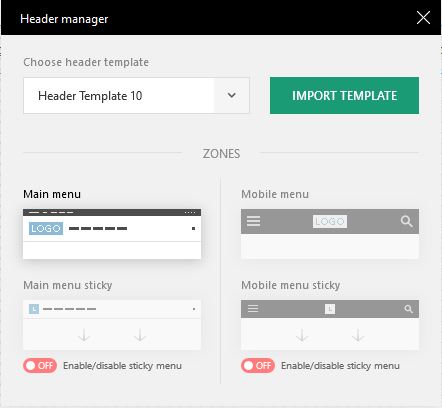

-
This reply was modified 6 years by
pscholtz.
 blockchainpost
 My problem isn’t migrate. I should start a new project on another domain. I have already uninstalled the Newspaper theme from the old domain. Now I just have to put it on the new domain
 Vlad S
 Hello !
Please make sure that you do the procedure properly according to our documentation here: https://forum.tagdiv.com/how-to-update-the-theme-2/
For Yoast: In the new update there have been inserted new blocks in gutenberg and due to those improvements you have to refresh your post because now Yoast doesn’t work in real time. So you can do this by updating and saving your posts.
The page editor has been fixed in the Newspaper 10.1
The best way to update the Newspaper Theme is to delete the current Newspaper Theme version and TagDiv Plugins and after that you can install the new version.
You can find 9.8 version here: https://forum.tagdiv.com/topic/action-required-please-read-how-to-update-to-the-newspaper-theme-v-10/
Also please read my last reply about update on this post: https://forum.tagdiv.com/topic/update-to-newspaper-10/
Overwriting files will cause conflicts.
Thank you !
Vlad S Hello !
No, those versions are mainly quick fixes, you can simply upload the new theme and everything should be ok. We recommend on deleting the tagDiv plugins and reinstalling them from the welcome panel.
Thank you !
 money@followyou
 I check it. The problem is coming because of the SG Optimizer plugin. It may be conflicting. But I strongly need that plugin. I can’t uninstall it.
The problem is coming after I updated the theme. It’s working fine before the update. Please tell me the solution. It’s very problematic.
 Maggo
Maggo Wordpress doesn’t show me that there is an update for the theme. Does that mean I have to go to the whole “deinstall old theme, then install new theme” process again? Or is there a quicker way?
Thank you. And great that you already fixed that. 🙂
 7grammi
 OK ! thanks for your availability, i got it fixed, for other people passing from here i reinstalled everything from the beginning now and it works again
have a nice day!
-
This reply was modified 6 years by
7grammi.
Vlad S Hello !
If you’re building your website from 0 the best is to disable the standard pack from the begining, install a PRO demo or design your pages from 0. The standard pack is usefull when you had a site before the Newspaper 10 and wanted to keep the same aspect.
Thank you !
 smehr1
 Update: I have been fiddling with a staging copy of one of our sites that I upgraded to 5.3 and it appears that the issue is due to a conflict between the new Gutenberg editor in WordPress 5.3 and the tagDiv Composer.
I confirmed this by disabling tagDiv Composer and the issue with not being able to add / edit posts and pages went away. Needless to say that is not a solution, but I have some good news. Since the conflict is between the theme’s composer vs. gutenberg, I installed a plugin called “Disable Gutenberg” (https://wordpress.org/plugins/disable-gutenberg/) and the problem was fixed.
For what it is worth, it should not be a surprise that this happened because running multiple visual composers will break a site.
 biryolgazetesi
After i installed mobile theme plugin the site only shows the latest article with a basic theme. I want responsive version of the main website on the mobile theme. How can i do it?
 dihossana
 I just realized that my Slider Revolution plugin is outdated. Could this have any effect? And moreover lately I installed “Site Kit by Google” plugin. I don’t know if any of the above have an effect on it.
smehr1This issue seems to only be impacting one of our sites using Newspaper. If I try to click “Edit Page” (not Edit TagDiv Composer) I get a blank page. I tried this while inspecting the page in Console in Chrome and I see the following errors that seem to be related to TagDiv Composer. Any thoughts on what could be causing this – happy to provide login details. Here are the errors I’m seeing when I click on “Edit Page” in the console:
GET https://mp.adcreview.com/wp-content/plugins/wpforms/pro/assets/css/vendor/dropzone.min.css?ver=5.5.0 net::ERR_ABORTED 404 (Not Found)

load-scripts.php?c=0&load[chunk_0]=jquery-core,jquery-migrate,utils&ver=5.3:8 JQMIGRATE: Migrate is installed, version 1.4.1

core-data.min.js?ver=2.7.4:1 Uncaught TypeError: Cannot read property 'transientEdits' of undefined

    at core-data.min.js?ver=2.7.4:1

    at f (core-data.min.js?ver=2.7.4:1)

    at Ut (core-data.min.js?ver=2.7.4:1)

    at data.min.js?ver=4.9.2:1

    at Object.r [as hasEditsForEntityRecord] (data.min.js?ver=4.9.2:1)

    at editor.min.js?ver=9.7.5:11

    at e (data.min.js?ver=4.9.2:1)

    at data.min.js?ver=4.9.2:1

    at Object.r [as isEditedPostDirty] (data.min.js?ver=4.9.2:1)

    at js_files_for_gutenberg_style.min.js?ver=c4e3da18d11732bf68ab9e3cf0d701cc:1

(anonymous) @ core-data.min.js?ver=2.7.4:1

f @ core-data.min.js?ver=2.7.4:1

Ut @ core-data.min.js?ver=2.7.4:1

(anonymous) @ data.min.js?ver=4.9.2:1

r @ data.min.js?ver=4.9.2:1

(anonymous) @ editor.min.js?ver=9.7.5:11

e @ data.min.js?ver=4.9.2:1

(anonymous) @ data.min.js?ver=4.9.2:1

r @ data.min.js?ver=4.9.2:1

(anonymous) @ js_files_for_gutenberg_style.min.js?ver=c4e3da18d11732bf68ab9e3cf0d701cc:1

(anonymous) @ data.min.js?ver=4.9.2:1

o @ data.min.js?ver=4.9.2:1

(anonymous) @ data.min.js?ver=4.9.2:1

p @ data.min.js?ver=4.9.2:1

(anonymous) @ data.min.js?ver=4.9.2:1

(anonymous) @ data.min.js?ver=4.9.2:1

(anonymous) @ data.min.js?ver=4.9.2:1

ie @ blocks.min.js?ver=6.7.2:2

Oi @ block-library.min.js?ver=2.9.5:8

ji @ block-library.min.js?ver=2.9.5:8

yo @ edit-post.min.js?ver=3.8.5:6

(anonymous) @ post.php?post=78&action=edit:2525

core-data.min.js?ver=2.7.4:1 Uncaught TypeError: Cannot read property 'transientEdits' of undefined

    at core-data.min.js?ver=2.7.4:1

    at f (core-data.min.js?ver=2.7.4:1)

    at Ut (core-data.min.js?ver=2.7.4:1)

    at data.min.js?ver=4.9.2:1

    at Object.r [as hasEditsForEntityRecord] (data.min.js?ver=4.9.2:1)

    at editor.min.js?ver=9.7.5:11

    at e (data.min.js?ver=4.9.2:1)

    at data.min.js?ver=4.9.2:1

    at Object.r [as isEditedPostDirty] (data.min.js?ver=4.9.2:1)

    at js_files_for_gutenberg_style.min.js?ver=c4e3da18d11732bf68ab9e3cf0d701cc:1

(anonymous) @ core-data.min.js?ver=2.7.4:1

f @ core-data.min.js?ver=2.7.4:1

Ut @ core-data.min.js?ver=2.7.4:1

(anonymous) @ data.min.js?ver=4.9.2:1

r @ data.min.js?ver=4.9.2:1

(anonymous) @ editor.min.js?ver=9.7.5:11

e @ data.min.js?ver=4.9.2:1

(anonymous) @ data.min.js?ver=4.9.2:1

r @ data.min.js?ver=4.9.2:1

(anonymous) @ js_files_for_gutenberg_style.min.js?ver=c4e3da18d11732bf68ab9e3cf0d701cc:1

(anonymous) @ data.min.js?ver=4.9.2:1

o @ data.min.js?ver=4.9.2:1

(anonymous) @ data.min.js?ver=4.9.2:1

p @ data.min.js?ver=4.9.2:1

(anonymous) @ data.min.js?ver=4.9.2:1

(anonymous) @ data.min.js?ver=4.9.2:1

(anonymous) @ data.min.js?ver=4.9.2:1

Oe @ blocks.min.js?ver=6.7.2:2

(anonymous) @ td_js_for_guten_blocks_editor.min.js?ver=c4e3da18d11732bf68ab9e3cf0d701cc:33
 cverretto
Goodmorning,
We would like to understand:
1. If we update to Newspaper10 (we have 9.8 installed) it will support Visual Composer?
2. If we import a new theme our posts and pages will be rewritten?
 alex1957
HI, on my site I installed both AMP (1.4.0) and tagDiv mobile theme plugin (1.3), but I see a yellowfins warming that tell me: The tagDiv Mobile Theme now works best with the AMP plugin to provide a complete solution for your content on mobiles. You can find out more here.
On the left menu I can’t see the voice AMP.
if I disable tadDiv Mobile Theme so I can the AMP and always the same message above.
Wordpress is 5.3 (last release), but was the same with 5.2
Bye
Alex
 tgamble
 √ i do have the latest version of wordpress installed.
√ clearing cache is a never-ending routine with this theme (WP Super Cache installed)
√ non theme plugins deactivated
√ Theme updated
X still broken
other thoughts?
Vlad S Hello !
Please make sure that you do the procedure properly according to our documentation here: https://forum.tagdiv.com/how-to-update-the-theme-2/
The best way to update the Newspaper Theme is to delete the current Newspaper Theme version and TagDiv Plugins and after that you can install the new version.
You can find 9.8 version here: https://forum.tagdiv.com/topic/action-required-please-read-how-to-update-to-the-newspaper-theme-v-10/
Also please read my last reply about update on this post: https://forum.tagdiv.com/topic/update-to-newspaper-10/
Overwriting files will cause conflicts.
Thank you !
 Calin
Calin Hi,
I do not quite understand on what you are referring with “tagDiv composer is not working”, you can not install it ? or you can not edit with it?, please provide some more details and some screenshots.
Thank you!
 jansena
I have a problem that not all of the menu items are clickable. Items with a submenu are clickable. see: https://snipboard.io/wMge5J.jpg
this problem occurs when I have a header of the template cloud. when I disable this and use the Standard Pack plugin then everything works ok. When I disable it again and activate the template cloud header, the menu problem begins again.
I have reinstalled the tagdiv composer, but that didn’t help.
What more can I do?
Calin Hi,
Usually this problem comes from CDN or cache plugin, we recommend to use WP Super Cache Plugin also if you are using cdn please make sure that you configure it as in our documentation from here -> https://forum.tagdiv.com/cloudflare-cdn/
Thank you for your understanding!
 bangokokesports
 I just follow the theme reinstall process (https://forum.tagdiv.com/how-to-update-the-theme-2/) but the bug of infinite load and the bug that won’t let me edit template still there.
It would be amazing if you take a look at it. It’s hurting my website for quite a while now.

