
- NewspaperAutoptimize Plugin – install and configuration
- NewspaperCache plugin – install and configure
- NewspaperInstalling Pre-built Websites
- NewspaperHow to Install Newspaper via FTP
- NewspaperHow to Install Newspaper via WordPress
- NewspaperIntroduction to CPT and ACF with Newspaper Theme
- NewspaperHow to edit modules for Flex Block X
- NewspaperWooCommerce: Happy “Add to Favorites!”
- NewspaperWoo Brands
- NewspaperStripe Setup
- NewspaperModal Popup
- NewspaperPayPal Setup
- NewspaperFlex Block Settings Guide
- NewspaperHow to setup the Contact Page
- NewspaperAdd Cryptocurrency Price Ticker Widget
- NewspaperInfinite Loading for Single Posts
- NewspaperThe Newspaper Mobile Theme: Introduction
- NewspapertagDiv Social Counter plugin
- NewspapertagDiv Shop
- NewspapertagDiv Opt-In Builder
 Calin
Calin Hi,
The message you get is quite common with WordPress. In most cases it can be easily fixed.
For example – https://wordpress.org/support/topic/the-link-you-followed-has-expired/
In that case the max upload size was limited, increasing it solved the problem. Usually this is the main cause.
Check this guide carefully and make modifications if needed to have set the requierments as in our guide
– https://forum.tagdiv.com/requirements-for-newspaper/
If everything is set properly there should be no problem. Contact your hosting provider if needed and ask them to make changes as the guide suggests.
You can also install the theme by FTP, that is not difficult to do and it’s very useful to know how to use FTP. If our guide is not detailed enough check some more online
– https://dappercodes.com/installing-wordpress-theme-via-ftp/
– https://docs.presscustomizr.com/article/141-how-to-manually-install-or-update-a-wordpress-theme
– https://www.shoutmeloud.com/install-wordpress-theme.html
Hope this helps and let us know how it goes!
Thanks for your understanding!
Calin Hello,
If you want to display the line on all deceive all you need to do is to set this custom css in Theme panel > Custom code> Custom css
.td-social-line{

    display: inline-block;

}
But please notice that the button for share for line is showing only on mobile device because was made only for the mobile deceive, in order to work on desktop your visitor need to have an app install on there desktops.
Thank you!
 Vlad S
 Hello !
In order to display a slide you have 3 options:
– Big Grid Slide and the Slide are post slides. Simple sliders with posts in them.
– Revolution slider is a multipurpose slider. You can find more about it here: https://forum.tagdiv.com/how-to-install-revolution-slider-v5/
In order to show only some posts in the blocks you will have to edit their filters as you can see here: https://www.screencast.com/t/hOzESgmyB2j
Thank you !
 pattydavid
 Also, I was just reading this on your site (https://tagdiv.com/newspaper-theme-customize-the-header-manager/?utm_source=newsletter&utm_medium=email&utm_campaign=td_blog&utm_content=zap2&utm_source=tagDiv+Forum+Registration&utm_campaign=12cc45a35e-AUTOMATION__Zap_2&utm_medium=email&utm_term=0_3c84948243-12cc45a35e-96366799&mc_cid=12cc45a35e&mc_eid=f53a03cc5a):
“With this new feature, you can now have different Headers for every page of your website. Each of them customizable right through our front-end page builder. Let’s take a look! Open the tagDiv Composer on any page of your website, or even an empty page, then click the orange Header Manager button.”
I don’t have an orange Header Manager button at all. Something doesn’t seem quite right with my installation of the theme. Am I missing something?
Thanks for your help.
Patty
pattydavid I deactivated all plugins except the tagDiv composer, cleared all caches, and still experienced the same issues. Could this be caused by the fact that I didn’t install the demos when I installed the theme?
 orangeed
Hi, can you please help me why when I scroll down then top I see only white without content. I don’t have installed any plugin only td composer
Calin Hello,
Please make sure that you do not have a plugin conflict, please deactivate ALL plugins except tagDiv Composer, also if you are using child theme or cache plugin, deactivate them, clear all cache and try again.
Also make sure that you install the theme as in our documentation from here .
Theme activation -> https://tagdiv.com/how-to-activate-the-newspaper-theme/
Let me know the results!
Thank you!
Calin Hello,
Our demo will not delete the existing posts if those was made buy you, if you edited posts/pages from demos, those will be remove, also you can check more about our demos in our documentation from here
Thank you!
Calin Hello,
So if you want to have all the theme functionality, you’ll need to install the tagDiv Composer, this theme plugin can be found in Newsmag > plugins.
Also please check our documentation for how to build a homepage -> https://forum.tagdiv.com/newsmag-homepage-how-to-build-and-set-it/
Thank you!
Calin Hello,
These kind of problems usually appear when there is a plugin conflict, please deactivate ALL plugins except tagDiv Composer, also if you are using child theme or cache plugin, deactivate them, clear all cache and try again.
Also for revolution slider you can check our documentation from here:
How to install Revolution Slider v5
Import Revolution Sliders on demos
Let me know the results!
Thank you!
 mukeshingh
i have installed everything but still amp showing error while testing in google amp tool. The amp url is working fine. you can check at https://www.hindibro.com/entertainment/filmywap/?amp
1 – Google error – https://ibb.co/x3TL6fw
2 – Official amp allredy install – https://ibb.co/cCLtvdN
3 – already enable post setting – https://ibb.co/Yj139v2
 alsmyth
Hi,
I installed your Newspaper theme and the “Old Fashioned” template.
My issue is that my server believes it is Malware.
Specifically I’m getting the following warning in the latest edition of Plesk Web Host edition “ImunifyAV has detected malware on some websites.”
It is 4 files that ImunityAV is identifying as malicious as follows:
/wp-content/plugins/td-composer/legacy/Newspaper/includes/demos/dentist/td_media_4.php
/wp-content/plugins/td-composer/legacy/Newspaper/includes/demos/dentist/td_media_5.php
/wp-content/plugins/td-composer/legacy/Newspaper/includes/demos/nature/td_media_2.php
/wp-content/plugins/td-composer/legacy/Newspaper/includes/demos/spa/td_media_2.php
Thank you
 Wolfmaster13
This is my website http://www.amazingcouple.net Yesterday i buy your theme and install it to my website.
Now i have 3 problem detail as below
1. I need to know the perfect size of Header background
2. How can i change topic of 3 columns in footer?
3. How can i modify first page like your demo? I need to see the column of pictures on the top of first page like this link https://www.amazingcouple.net/category/food-review/ and I need to show more topic in first like your demo.
Best Regards,
Rod W.
 madar88alexandru
Hi,
I bought NewsMag 4 theme 2 days ago, I’ve installed the theme and plugins, but I can see plugins, TDComposer, Newslatter etc. I can’t finish my website because I need to do the homepage… Thank you!
 Ikachu
Hi beautiful theme btw and looking forward to it, btw I would love to install the Influencer PRO theme but I can’t, is that means the theme isn’t ready yet?
Thank you
Ika
 swbmxcrew
I’ve just installed the theme to my website and it went ok, after trying to install the plugins the whole site crashed and was left with this messege “Fatal error: Allowed memory size of 134217728 bytes exhausted (tried to allocate 93 bytes) in /var/sites/s/swbmx.co.uk/public_html/wp-content/plugins/td-composer/legacy/common/wp_booster/td_util.php on line 1673” can anyone help?
 fuji_yama
Hi,Thanks all.
I’m trying to upload plug-in data directly on the Install premium plugins panel. An error will occur.
Warning: unpack (): Type V: not enough input, need 4, have 0 in /home/buype2020/kickme.jp/public_html/wp-admin/includes/class-pclzip.php on line 4384
The package could not be installed. PCLZIP_ERR_BAD_FORMAT (-10): Invalid archive structure
How can I solve it?
thank you for your cooperation.
 cindy3000
When uploading zip and installing I get: The link you followed has expired.
Any Idea why and how to fix this?
pattydavidIn TagDiv editor, when I try to edit a text block I added to my page, the WP Editor (visual) is blank and I can only see text in the html tab (text). The wysiwyg section just shows a long string of letters and numbers. However, when I save the page, it looks fine in a browser referencing my site (not in admin view). Could this have anything to do with the fact that I’m not using Gutenberg (I reverted to classic view)?
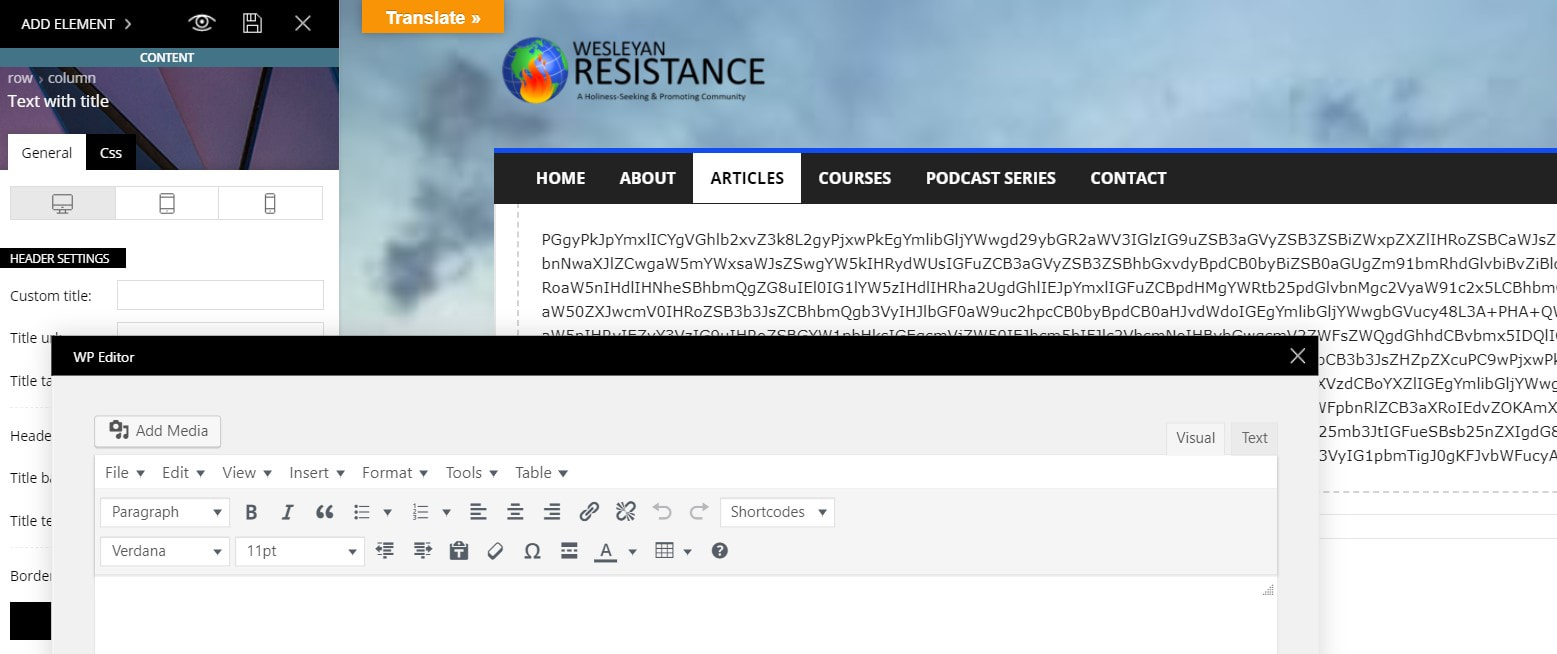
Overall, I love the typographic control of elements, but I’m just having a very hard time getting my existing WP site up and running in my new theme. I’ll keep working on it, but I may need to revert to a backup of my site if there are too many elements I can’t get to work (like the slider revolution, which still won’t work even though I’ve installed the plugin — there are two superimposed sets of headlines on the initial image, and the other images in the slider populate the entire page so that nothing else is readable).
Thanks for any help you can offer.
 truongvituan
Install demo will erase my existing posts?
I already have a website with existing theme. If I install your theme and install demo, will all my posts with images disappear?
I don’t want to lost all my posts before. I just want to use your theme with all my existing posts.
 PearlBells
Hello,
I bought the theme and Im testing it locally not online so i didn’t activate the newspaper will activate it when i choose a host.
I’m trying to practice and add wpml but i can’t manage to know how to get the plugins,the https://wpml.org/ website i have to buy them, i thought they are already included in the theme because that what i wanted and not a yearly subscription.
Can you help me with this it’s my first time.
 ColinHanley
 Hi Vlad,
So, I followed your instructions and added the updated version of the Theme.
When I installed and added the demo content for “Influencer”, I open the TD Composer,
I could edit stuff, but I need to delete sections and I can’t.
I tried deleting rows via the WP Bakery page builder, but it caused errors too.
At the moment, my options are limited in what I can do. If you could tell me what I might do to fix it, that would be great. As I said, I can set up a temp login if you needed to look at the back end.
Thanks again,
Regards,
Eamon.
 maheshwark97
I have the theme installed on an old website. I would like to transfer it to a new domain. How do I do this? Can you please pass on the instructions to me?
 RobinKiera
 Hi,
Thank you for your reply.
1. Thank you, the code works.
2. Version 9.7.3 and Version 9.8’s child theme file (Function.php and Style.css) are the same, though I replaced it but it didn’t work. I also reuploaded td-composer plugin from downloaded zip but that didn’t work either.
3. I did that too, Deactivate all plugins and active only the newspaper theme and composer plugins, reinstalled wordpress that didn’t work too. I hard refreshed it, change browser and it didn’t work either. here is the error log
1.wp-content/plugins/td-composer/includes/wpeditor.php
Uncaught ReferenceError: ajaxurl is not defined

    at HTMLDocument.<anonymous> (wpeditor.php?wp_path=/home/digit760/public_html/:411)

    at i (jquery.js?ver=1.12.4-wp:2)

    at Object.fireWith [as resolveWith] (jquery.js?ver=1.12.4-wp:2)

    at Function.ready (jquery.js?ver=1.12.4-wp:2)

    at HTMLDocument.J (jquery.js?ver=1.12.4-wp:2)
2. Uncaught TypeError: Cannot read property 'activeEditor' of undefined
at window.loadIframe (wpeditor.php?wp_path=/home/digit760/public_html/:175)
at onload (wpeditor.php?wp_path=/home/digit760/public_html/:278)
window.loadIframe @ wpeditor.php?wp_path=/home/digit760/public_html/:175
onload @ wpeditor.php?wp_path=/home/digit760/public_html/:278
the same file as above.
3. If I use a child theme, the following error will be added to console log.
.....wp-content/themes/Newspaper-child/font-newspaper.css?ver=9.8 net::ERR_ABORTED 404 (Not Found)
Vlad S ello !
We are sorry for your inconvenience !
It is mandatory to delete all what was left from the older tagdiv theme and plugin version before intalling this update. Overwriting the files would cause a lot of problems and maybe you’ve missed something while deleting the old files. Have you checked the plugins to be deleted too ? If you are certain that you have installed the updates correctly by deleting all of the older versions and made a clean install from scratch please contact us via email at contact@tagdiv.com and provide admin login, as well as cPanel or FTP if possible. We will take a look. Include a link to this topic in the email.
Also take a look at our documentation about installing the theme and plugins: https://tagdiv.com/how-to-install-plugins-and-update-plugins/ ; https://tagdiv.com/how-to-install-newspaper-theme/
Thank you !
