
- NewspaperAutoptimize Plugin – install and configuration
- NewspaperCache plugin – install and configure
- NewsmagInstall via WordPress
- NewsmagInstall via FTP
- NewsmagInstalling pre-built websites
- TutorialsHow to install Revolution Slider
- NewspaperInstalling Pre-built Websites
- NewspaperHow to Install Newspaper via FTP
- NewspaperHow to Install Newspaper via WordPress
- TutorialsHow to Install bbPress forum
- NewspaperIntroduction to CPT and ACF with Newspaper Theme
- NewspaperHow to edit modules for Flex Block X
- NewspaperWooCommerce: Happy “Add to Favorites!”
- NewspaperWoo Brands
- NewspaperStripe Setup
- NewspaperModal Popup
- NewspaperPayPal Setup
- NewspaperFlex Block Settings Guide
- NewspaperHow to setup the Contact Page
- NewspaperAdd Cryptocurrency Price Ticker Widget
 Catalin
 Hi,
Very important is to update all of these from the right section from here -> https://www.screencast.com/t/IXc7chhp Remove all the old version of them and install them again form that section, clear all the caches, purge CDN files and check the results. If the problem persists, please let us know.
Thank you!
 manfried
Hi,
I am absolutely newbie using newspaper theme, I just installed it.
I search in every section of the “theme panels” page, and in appearance, but I just can’t find where I can change the default header image ? You know, the one above the top menu ? I searched in documentation and tutorials, but it seems like it’s never mentioned or I just can’t find it.
Can anyone help me on that please ?
Thanks
 Berrageizf1
Hi there, recently bought the theme. Last night I was installing the theme, tried to looking for the child version; since I couldn’t find it I was going through this forum and I saw many complainings and problems related to the new updates and the child version of this theme. Since I haven’t create anything yet I would like to know what’s the best option for me right now. Is it better to stay with the “father”and not make any updates in the future or installed the child?… Assuming that I have to do a job for a client (an important news website) so I need something durable and trustable.
 netzfeuilleton
My Admin Panel and Login Page won’t load anymore. For another installation I get the errormessage that:
Warning: Cannot modify header information – headers already sent by (output started at /kunden/210098_88212/webseiten/wp-content/themes/Newspaper/includes/wp_booster/td_util.php:1311) in /kunden/210098_88212/webseiten/wp-includes/pluggable.php on line 1251
Warning: Cannot modify header information – headers already sent by (output started at /wp-content/themes/Newspaper/includes/wp_booster/td_util.php:1311) in /wp-includes/pluggable.php on line 1254
I installed Newspaper 9.7.1 running on a WordPress_MU 9.1 – i think. Although I can’t look it up since I don’t get back into the admin area.
 serdaryaygin
Hi,
I added the news magasine theme slider from template and installed online. I choose the posts to news magasine slider for the show but it is not working. The slider only displays demo images that have come theme. What can I do for to solve the problem? Thanks in advance!
https://ibb.co/XDB8Xpr
https://ibb.co/nMRTpML
 Simion C.
 Hi,
That may happen if the Yoast SEO plugin is installed, and the author archives are disabled
– http://prntscr.com/ng4kcf
Check if they are disabled there, enable them and the author pages should work.
Thanks
 iqbalmauludy
Hi Tagdiv, I have a problem with my Newspaper theme. At this time, I can’t activate the theme. The reason, before I installed the Newspaper theme on localhost for the development site. When I want to use it on my real site, the message “Maximum Activation Count” appears.
I have contacted contact@tagdiv.com email but there is no reply until now, thank you.
 Calin
Calin Hi,
Please make sure that you have installed the theme like in our documentation -> https://tagdiv.com/how-to-install-newspaper-theme/
Also please make sure that all the settings are like in our requirements, please follow the guide carefully
– https://forum.tagdiv.com/requirements-for-newspaper/
and please increase all requirements that are lower, and follow all steps.
Also you can check a similar topic -> https://forum.tagdiv.com/topic/trying-to-install-newspaper-theme/
Let me know the results!
Thank you!
 ayubboesono
 So, when I want use the demo permanently, I do not need uninstall that demo? How to save my demo setting, so I can use what already set in demo? Thank you.
 Revolvar
Hi Team, after installing the latest update 9.7 via FTP. I got 2 error messages “warning: cannot modify header information – headers already sent by “Pluggable.php” and the other generated from the plugin “mobile booster”. I will revert back to the previous version via FTP tonight BUT, I am sure I am not the only exception to the universe? I will send screenshots as well. I can’t do it right now. Can admin help here?
this is a sample of what I am getting but is not my specific one

 Alicegreentree
 I went back and tried again and yes the hover worked and theme details displays but there is no delete option. What the hell? There are 5 buttons under Details none of which are delete. The buttons are: Customize, Widgets, Menus, Edit CSS and Install plugins.
 jeffbb
The theme is installed but when I try to install a demo I’m taken to the top of the page. The ‘preview’ button works but the ‘install’ button does not.
 DanielSage96
Hi,
Since upgrading Newspaper to the latest version I’ve had nothing but trouble.
I now get messages saying
tagDiv Composer Outdated /
tagDiv Cloud Library Outdated /
tagDiv Social Counter Outdated /
I have disabled them, re-enabled & still same message, I have now removed them & re-installed the plugins and still get the same message – WHAT IS HAPPENING.
Simion C. Hi,
According to Envato license terms a theme can be used for a single end product (website)
– https://themeforest.net/licenses/standard
– https://themeforest.net/licenses/terms/regular
So the theme may be installed and activated on a single live website based on those terms.
Activating it on a testing domain or sub-domain is permitted, but different websites with different content will require more licenses
– https://forum.tagdiv.com/newspaper-6-how-to-activate-the-theme/
Thanks
Catalin Hi,
Please make sure when you update the theme to the latest version of it. First of all, you need to make a full backup to your database and then, you have to remove
your old theme and then add the new theme folder which contains the latest version of the theme. Also, you have not to overwrite because then you will encounter some problems. Check here -> https://forum.tagdiv.com/install-via-ftp/
Hope this helps and let us know how it goes!
Thank you!
Simion C. Hi,
From what I can see the website looks alright at the moment, the latest theme is installed
– http://prntscr.com/nfrcqv
Maybe you solved the problem you were having. If you follow the guide it should work
– https://tagdiv.com/updating-the-core-of-tagdiv-themes/
The most reliable method to update is by FTP – https://tagdiv.com/update-newspaper-theme/
If you have more questions let us know.
Thanks
 Robert90
From the last 4 updates https://developers.google.com/speed/pagespeed/insights/?hl=ro&url=https%3A%2F%2Fwww.vdtonline.com%2F i see my website on mobile don’t have speed. and from the last updates speed boster i do’t can install because it’s one problem.
Salut de la ultimile 4 updateuri siteul pe mobil imi arata ca nu e optimizat am incercat cateva optiuni pe aici dar pe mobil nimic nu reusesc sa il optimizez. Imi puteti da cateva idei va rog frumos de la ce poate fii (fondatorii acestei teme va rog nu imi mai dati link-uri de la oameni fara creier ca au optimizat ei perfect ca am incercat o optimizare cu cateva coduri in functions.php si am stricat site-ul o noapte m-am chinuit sa il repar, cei ce optimizeaza pun coduri bune si dupa cred ca le schimba habar nu am !!!!)? Multumesc frumos !!!!
 gpm79
gpm79 I do not see any update button of anything. Delete the plugin by ftp, install it and activate it from the theme panel and keep giving the same error. I have already uploaded all the files of the theme but the error keeps appearing.
 tl.rafael
Hi, when we setup the latest version of the theme (newspaper) was everything ok, we installed all the plugins and set up logo and titles…
after while the menu on mobile version stopped work, we checked everywhere to see if was some configuration wrong. but nothing is showing be wrong. Can u help usplease.
 AVmarket
 Tried. I’ve manually deleted plugin and tried do reinstall it. That is not the issue.
http://prntscr.com/nfpwfg
As you see all plugins are new, but we still have problem.
 doctorresidual
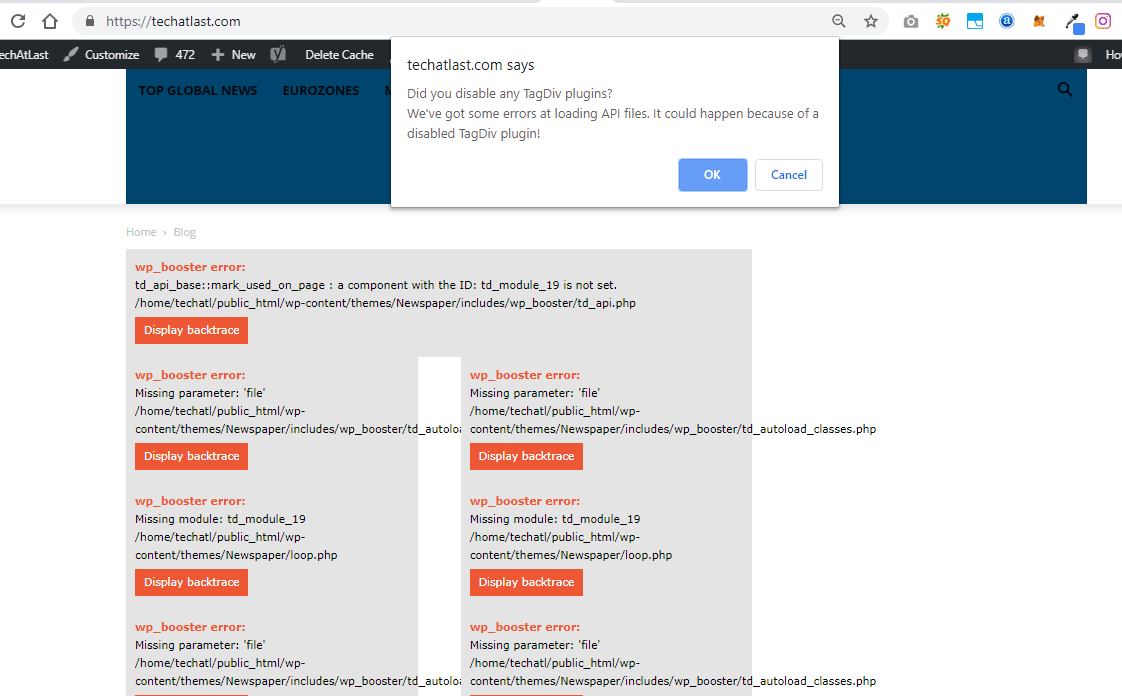
I have been on my site since morning having issue installing the updated version of TD composer plugin.
It has crashed my website.
It has affected hundreds of other websites too.
Kindly fix this plugin.

 MarkTravis
I just made a fresh install of Newspaper (purchased just an hour ago) onto a brand new WordPress site. But as soon as I enable the theme, I receive this error:
Parse error: syntax error, unexpected T_FUNCTION in /home2/admin/thedialogic.com/wp-content/themes/Newspaper/includes/td_config.php on line 1669
Even after going into the php file to play around with the lines by deleting them, a seemingly infinite number of errors remain (like jumping for line 1669 to 850 to 2100, etc).
I should add that even though this is a brand new site, I disabled the bloatware plugins that came with it and still received the same error when installing Newspaper.
 espiard
Hi,
I install template and demo content but i have few problem :
– In mobile version, i cannot see anything, why ? (I have picture on homepage, but i can see it only on desktop version)
Same problem for contact page.
– In desktop version, i have a solid border (on top of menu), where can i take it off please ?
– In Homepage, about latest article, i want to disable “read more” button.
You can check all of theses problems at : blog.unemplacement.com
Thank a lot;
 henrib
When i try to update to 9.7.1 i get an error message:
‘Can not be installed. The theme has no style.css stylesheet’
What is wrong?
 PFN365
Hi,
When my writers are saving their post, it goes to a blank white screen. The post saves, but they are led to the white screen. Also, some are having issues previewing the post as it leads to a white screen. I just installed this theme the other day. Website: http://www.profootballnetwork.com.
Here are the plugins I have active:
AMP
Bluehost
Classic Editor
Google Analytics for WP
Internal Link Building
Jetpack by WordPress.com
Members
Open external links in a new window
Publish to Apple News
Really Simple SSL
TablePress
tagDIV Composer
tagDIV Mobile Theme
tagDiv Social Counter
Yoast SEO Premium
