- NewspaperDesign your Post Pages using the Cloud Library Templates
- NewspaperDesign your post pages using the Default Templates
- NewspaperPage templates
- NewspaperCreate a form contact page
- NewspaperCloud Library Templates
- NewspaperCloud Library – Category Templates
- NewspaperHomepage – How to build and set it
- NewspaperPost templates
- NewspaperDefault post templates
- NewspaperCategory templates
- NewspaperPost template ads
- NewspaperSingle External Shortcode and External Shortcode
- NewspaperWP Rocket and Newspaper Theme: Optimization Guide
- NewspaperSearch setup for custom post type
- NewspapertagDiv Composer – Website Manager
- NewspaperBookmark – Save For Later
- NewspaperFlex Block Builder and Flex Loop Builder
- NewspaperModules Builder in Newspaper Theme
- NewspaperIntroduction to CPT and ACF with Newspaper Theme
- NewspaperCreate a frontend submission form
 Anamaria
 Hello,
Unfortunately, no. You need to add the content from Gutenberg in the element column text from composer, to be able to edit with Composer. You can not edit the pages created in Gutenberg with tagdiv Composer. You can save the elements from single post template with right-click and use them on the page. Please note that some elements can be used only on the single post template, and it cannot be used on other templates or pages.
Thank you!
 awilbanks
This is probably a dumb question, but I am using the Urban Observer demo on my site, but I can’t for the life of me figure out pages. I want to be able to add new pages (not posts) and edit them like normal posts, but it looks horrible in the Urban Observer demo, because only the header and footer is used. Is there no way to pick a template for a page like a post?
Anamaria Hello,
To increase page speed, I recommend checking which thumbnails you are using on your blocks. You might want to avoid having all of them enabled and optimize and regenerate images. You can use the EWWW Image Optimizer for image optimization and the OMGF plugin for fonts. Also, you can use the WP Rocket plugin.
Also, I recommended using cloud templates for posts, categories, and so on Flex blocks instead of blocks 1 to 25 and disabling the tagdiv Standard pack plugin.
here are many optimization guides provided by our users here in the forum, some made by us; you could check some of them
– https://www.infophilic.com/get-almost-100-pagespeed-newspaper-theme/
– https://forum.tagdiv.com/cache-plugin-install-and-configure/
– https://forum.tagdiv.com/how-to-make-the-site-faster/
– https://forum.tagdiv.com/topic/high-number-of-ajax-request/
– https://forum.tagdiv.com/topic/score-100100-pagespeed-with-newspaper-wordpress-theme/
– https://www.andraware.com/wp-rocket-for-newspaper-theme/
– https://forum.tagdiv.com/topic/page-speed-guide-for-2023-beginners-and-advanced/
– https://forum.tagdiv.com/topic/newspaper-theme-speedify-your-website/
– https://forum.tagdiv.com/topic/tutorial-chriss-custom-optimizations-for-functions-php-etc/
– https://forum.tagdiv.com/cloudflare-cdn/
– https://forum.tagdiv.com/topic/theme-causing-high-cpu-usage-2/
– https://forum.tagdiv.com/topic/sql-querys-high-cpu/
– https://forum.tagdiv.com/topic/newspaper-theme-slow-to-respond/
– https://premium.wpmudev.org/blog/optimizing-your-wordpress-database-a-complete-guide/
– https://underconstructionpage.com/optimize-wordpress-database/
– https://crunchify.com/better-optimize-wordpress-database-all-in-one-guide/
Thank you!
Anamaria Hello,
You have the mobile theme version now, so you can disbale the plugins to check the responsive version.
Using our theme, you can choose from 3 mobile versions
-> mobile responsive => https://www.screencast.com/t/oJ2ShOp47
-> mobile theme plugin => https://forum.tagdiv.com/the-mobile-theme/
-> mobile page => https://tagdiv.com/newspaper-10-3-7-update-brings-customizable-and-fast-mobile-pages/ The option that you need to use.
Suppose you created the mobile pages with tagDiv Composer. In that case, when you install the Mobile Theme plugin, your pages will be overwritten by the plugin (the mobile theme comes with its templates for page, post, category, etc, so your current templates from the desktop theme will get converted to the mobile theme layout, the page content is made without builders in mobile editor => https://www.screencast.com/t/xbgZG8kH also, the options that are provided to edit the mobile theme version are limited (this keeps the things simple)).
This is a video about Responsive Newspaper Theme, AMP & Mobile Theme, Mobile Pages & Templates -> https://www.youtube.com/watch?v=SpGkOnJeNZY.
So, the mobile responsive is what you see when that you select the viewport on phone => https://www.screencast.com/t/matV17hH, so some settings may apply for each viewport(where is the border blue), and others are not(where the border is black).
The mobile page has the mobile templates from Cloud Library => https://www.screencast.com/t/YCcZ8rL8
The Mobile responsive version of the theme and the mobile page editor can be edit with tagDiv Composer, the mobile theme plugin cannot.
For example, you can have the mobile theme plugin activated and use the mobile page/mobile responsive version for the homepage/pages, but for the categories pages/404 page, you can’t use the mobile page/mobile responsive version if you have the mobile theme plugin activated.
So, if you want to design the pages with tagDiv Composer, you can use the mobile page or mobile responsive version.
Thank you!
 mongreanly
Hello,
Could you please help me resolve this issue?
1. When I click to + button of Homepage template, it’s open very slow (more than 10s).
2. I try to import the Momentum Pro template, I encounter a problem. Despite several attempts, the import gets stuck at the end, and I receive the following error message: “One of the images failed to upload.”
Thank you in advance for your assistance!
 konsume
I have a page using a WP template (under page attributes) to grab some data in a non-WordPress database. (It runs a simple SQL query to grab a list of the latest trends)
When I attempt to use TagDiv to import this text list from said WP page I receive the message “The selected page has no content that can be rendered”
The issue is that if I go to the WP page directly, I see the content just fine. I’ve tried publishing this page through TagDiv composer, but it only allows me to use cloud based templates, rather than my own. Any ideas on a work around, or some other type of solution?
Thanks in advance!
 AndrewT
 Hi Bettina,
thanks for your respond.
hope these 3 images will illustrate what is not working and help to find a solution or fix.
I expect to see something like in this example from tagDiv:
https://cloud.tagdiv.com/category/podcasts/
Instead I see this and don’t find a way to fix it.
Showing within Edit TD Composer the element subcategories:
https://freeimage.host/i/3H22YhB
here you can see that the category has subcategories and individual subcategory image:
https://freeimage.host/i/3H227IV
this screenshot is prove that a subcategory has its own image and is displayed a sub-category template correct:
https://freeimage.host/i/3H22RmQ
It is identical with what tagDiv example is showing:
https://cloud.tagdiv.com/category/podcasts/sub-category-podcast-1/page/2/
As the first screenshot shows all images are the same, but under each image is a different subcategory-name listed
The image is not representing any subcategory, but instead the main category.
When removing that image from the main category, no image is showing in the element subcategories.

 richbilt2
Hi, i’m using Urban Observer cloud template and on my category pages, and i’m using the Flex Loop Sorting Options module to allow users to sort the way items display on the page.
I’d like to add the usual sorting options onto the drop down:
‘price low-high’
‘price high-low’
‘highest rating’
‘lowest rating’
How can i add them in please?
My webpages are very simple – and these are the type of results that show on the category page – with the expanded sort menu showing. thanks.
 jrh
jrhWhen I try to edit home page (johnrhall.com, template Old Fashion) all of a sudden I get the following error? It just appeared when I tried to edit this morning. It was fine when I last edited yesterday.
Now I cannot edit anything on home page.
Errors at columns: 1(models) : 8(dom). The model does not match the content Current state has involved an issue. You could try an UNDO operation (CTRL+Z / CTRL+SHIFT+Z)
jrhWhen I try to edit home page (johnrhall.com, template Old Fashion) all of a sudden I get the following error? It just appeared when I tried to edit this morning. It was fine when I last edited yesterday.
Errors at columns: 1(models) : 8(dom). The model does not match the content Current state has involved an issue. You could try an UNDO operation (CTRL+Z / CTRL+SHIFT+Z)
Anamaria Hello,
You can add the category sibling from composer in category template, not page. Category Siblings refers to categories that share the same parent category.
Thank you!
 qiurufeng
 Than how can I create a “category page” to use the category templates plz?
Anamaria Hello,
You have the mobile theme version now, so you can disbale the plugins to check the responsive version.
Using our theme, you can choose from 3 mobile versions
-> mobile responsive => https://www.screencast.com/t/oJ2ShOp47
-> mobile theme plugin => https://forum.tagdiv.com/the-mobile-theme/
-> mobile page => https://tagdiv.com/newspaper-10-3-7-update-brings-customizable-and-fast-mobile-pages/ The option that you need to use.
Suppose you created the mobile pages with tagDiv Composer. In that case, when you install the Mobile Theme plugin, your pages will be overwritten by the plugin (the mobile theme comes with its templates for page, post, category, etc, so your current templates from the desktop theme will get converted to the mobile theme layout, the page content is made without builders in mobile editor => https://www.screencast.com/t/xbgZG8kH also, the options that are provided to edit the mobile theme version are limited (this keeps the things simple)).
This is a video about Responsive Newspaper Theme, AMP & Mobile Theme, Mobile Pages & Templates -> https://www.youtube.com/watch?v=SpGkOnJeNZY.
So, the mobile responsive is what you see when that you select the viewport on phone => https://www.screencast.com/t/matV17hH, so some settings may apply for each viewport(where is the border blue), and others are not(where the border is black).
The mobile page has the mobile templates from Cloud Library => https://www.screencast.com/t/YCcZ8rL8
The Mobile responsive version of the theme and the mobile page editor can be edit with tagDiv Composer, the mobile theme plugin cannot.
For example, you can have the mobile theme plugin activated and use the mobile page/mobile responsive version for the homepage/pages, but for the categories pages/404 page, you can’t use the mobile page/mobile responsive version if you have the mobile theme plugin activated.
So, if you want to design the pages with tagDiv Composer, you can use the mobile page or mobile responsive version.
Thank you!
 Bettina
 Hello!
1. You can use the modal popup with a page(you can add an ad box in that page to add your ad) to open automatically: https://forum.tagdiv.com/modal-popup/
2. You can use Ad rotate plugin; for example, make the carousel there (group of images) and then add the shortcode into the ad box: https://forum.tagdiv.com/ads-adsense-overview/
3. Also, you can use the modal popup, as I explained in point 1. You should duplicate the post template to have a special template with the modal popup open automatically and assign it manually on each special post. Check this useful guide: https://forum.tagdiv.com/how-use-tagdiv-cloud-library-templates/
Thank you!
 Børnenes Aarhus
Hi,
I need help designing my category pages.
I have 2 issues:
Currently, all my categories share a global template. I need each category to have its own unique text. The text should appear at the top and bottom of the category page. When I add a text field to the category I’m working on, the same text appears on all categories because it is global.
All categories have the same global theme, but I need some categories to have a different look/template. How can I achieve this?
Have a nice day 🙂
 ikiweb
I’m creating a shortcode to use in both posts and categories.
To make this shortcode work I just need to get the category ID.
If I’m in a post it works fine, but if I’m in a category there doesn’t seem to be a way to access the current category ID.
If I try to debug it I see that the shortcode inserted in a category template (cloud template) doesn’t recognize is_tax() or is_category()… but always falls under is_single().
is (is_tax()) {

	// Don't work

}

elseif (is_category()) {

	// Don't work

}

elseif (is_single()) {

	// Single Post => Works well

    if (get_post_type() === 'post') {

        $post_id = get_the_ID();

        $post_title = get_the_title($post_id);

        $categories = get_the_category($post_id);

        if (!empty($categories)) {

            $category_id = $categories[0]->term_id;

        }

    } elseif (get_post_type() === 'tdb_templates') {
// This is the point!
// How do I get the current category ID?
}
}
Can you help me?
Bettina Hello!
We have 3 options available for mobile versions that you can use:
1. Responsive version: A responsive version of your website looks similar to the desktop version. TagDiv Composer is used to edit the page. Click on the mobile viewport: https://www.screencast.com/t/XDQJedlggSB. You can see your mobile version there and edit or adjust the elements to look better.
2. Mobile pages: https://tagdiv.com/newspaper-10-3-7-update-brings-customizable-and-fast-mobile-pages
3. Mobile theme plugin: The Mobile Theme is a performance-optimized theme included in the main Newspaper theme that only loads on mobile devices. It comes with its own templates and designs for pages, posts, categories, etc., so your current templates from the desktop theme will get converted to the mobile theme layout. Please see https://forum.tagdiv.com/the-mobile-theme/ and https://forum.tagdiv.com/mobile-theme-introduction/ for more information.
A full explanation is here: https://www.youtube.com/watch?v=SpGkOnJeNZY
If you need to use mobile version 1 or 2, then you need to uninstall the Mobile Theme plugin and AMP.
Thank you!
Anamaria Hello,
Yes, these are the templates that are created for pages. You do not need to create a mobile page, only if you want to show different designs and content for mobile.
Thank you!
 Davidpinto
 Hi Anamaria,
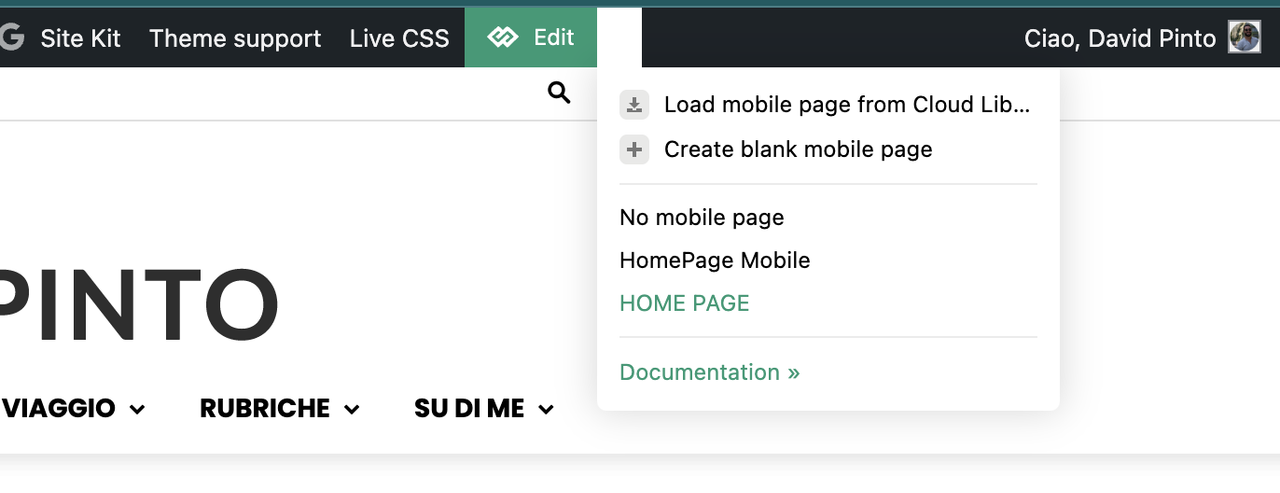
thank you so much, I’ve just now activated the option and now works. But I have a dubt. In the post page i selected the template for mobile and works well, instead in homepage I have this issue, why I don’t see the option specific for mobile template?
It’s correct what i see? This section is only for homepage mobile?
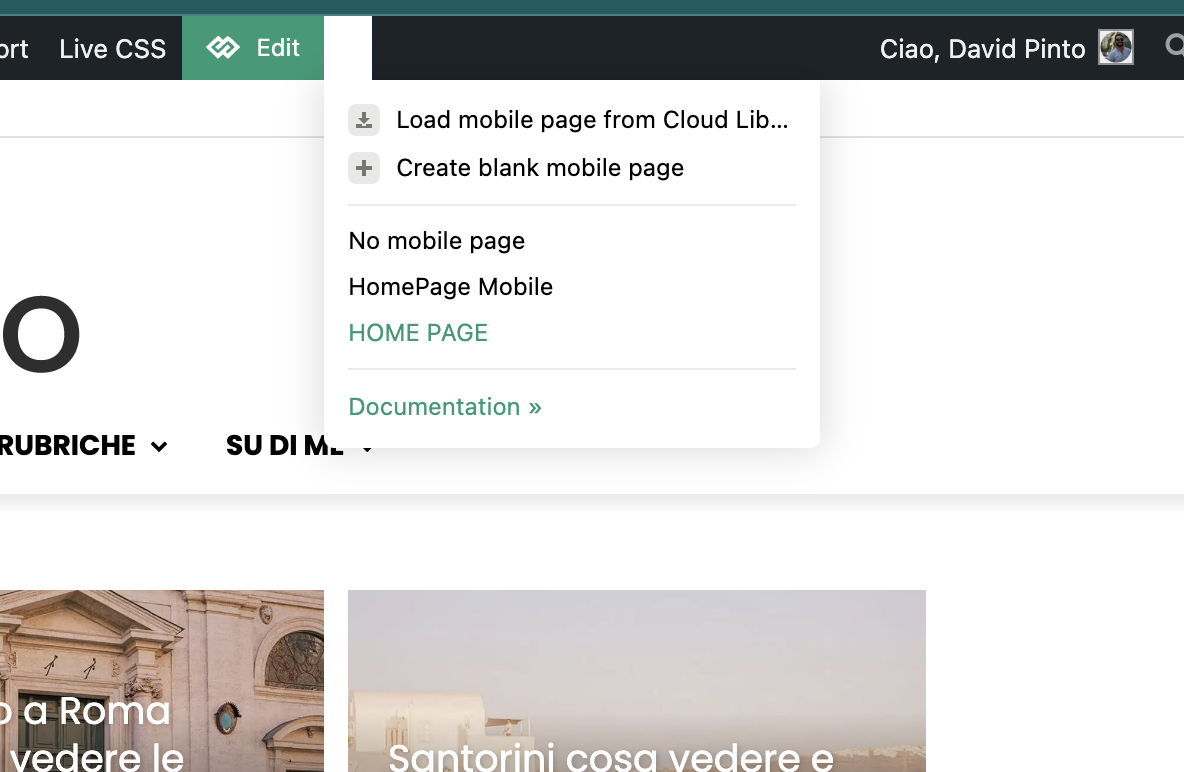
-
This reply was modified 1 year by
Davidpinto.
Davidpinto Ok I think the problem is on the setting…
On home page i saw this:
instead in the post page template is correct this view:
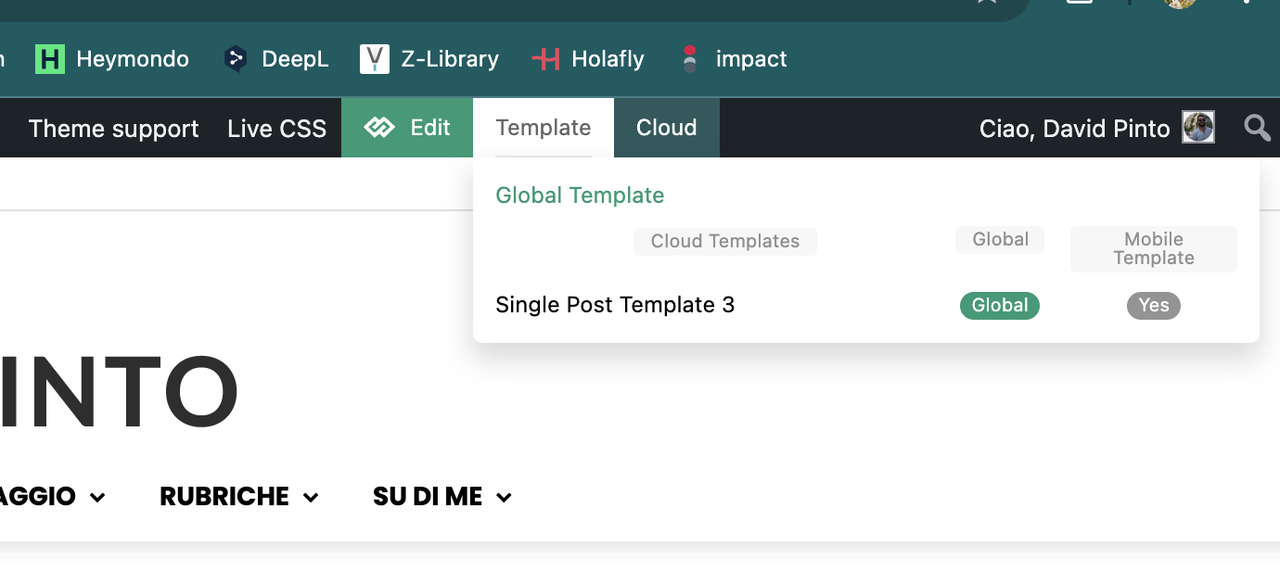
Why in the homepage I have that problem?
Thank you
DavidpintoHi,
I deactivated the plugin AMP and the Mobile Theme, because I would like to create a template only for mobile.
I tried with this guide: https://tagdiv.com/newspaper-10-3-7-update-brings-customizable-and-fast-mobile-pages/
and i created a template HomePage Mobile.
https://i.postimg.cc/PxcpTMwW/Screenshot-2025-02-18-alle-16-56-50.png
But I’m confused, because when i see on iPhone I have the flex verison of desktop mode.
the site is http://www.davidpinto.it
thank you
jrhHow do I set a featured image on a page–not a post. Currently, it displays the Old Fashion logo when submitting to social media platforms, even though I deleted it through the theme panel / Logo & Favicon settings.
The
https://johnrhall.com is the URL to the site and homepage.
Thank you
Bettina Hello!
You can use the tagdiv Composer and stretch the row how much you want. We have some settings for the rows and different stretch sizes: https://www.screencast.com/t/bsbB5P97A
More documentation about the cloud templates is here:
– https://forum.tagdiv.com/cloud-library-templates/
– https://forum.tagdiv.com/design-post-pages-using-cloud-library-templates/
– https://forum.tagdiv.com/cloud-library-category-templates/
About pages here: https://forum.tagdiv.com/page-templates-2/ -> https://forum.tagdiv.com/homepage-how-to-build-and-set-it/
Check out this video about how to create a website from scratch: https://www.youtube.com/watch?v=SoGQ0d5kIBg
Thank you!
 valerio88
 Good morning Bettina,
Comments are disabled on Dashboard -> Theme panel -> Template Settings -> Page template -> Disable comments. Also disabled in Dashboard -> Settings -> Discussion but the section keeps appearing on my homepage. Why?
Bettina Hello!
Go to Dashboard -> Theme panel -> Template Settings -> Page template -> Disable comments.
If you do not want the comments anymore, please go to Dashboard -> Settings -> Discussion and disable the option Anyone posts a comment.
Check this guide too: https://forum.tagdiv.com/enabledisable-comments/
I hope that helps you!
Thank you!