
- NewspapertagDiv Composer Tutorial
- NewspaperCredit System
- NewspaperCreate a frontend submission form
- NewspaperHow to Use the Tabbed Content shortcode
- NewspaperCreate a form contact page
- NewspaperFilters and sorting for taxonomies
- NewspaperUser review system
- NewspaperModal Popup
- NewspaperFlex Block Settings Guide
- NewspaperSocial Sharing
- NewspaperSingle Post Shortcodes
- NewspaperInfinite Loading for Single Posts
- NewspaperThe Newspaper Mobile Theme: Introduction
- NewspaperHow to Add a Logo in Newspaper
- NewspaperCustom Post Type Support
- NewspaperCloud Library Templates
- NewspaperDesign your Post Pages using the Cloud Library Templates
- NewspaperHeader Builder
- NewspapertagDiv Cloud Library Plugin
- NewspaperAd Box Element and Ads Overview
 saf
safProblem 1:
My TagDiv Composer no longer works
When I click on the edit with TD Composer button, I get a 502 error message.
Problem 2:
I’ve disabled the comment counter on each individual article since I use Facebook’s comment plugin, but on the home page, the posts still show a little black comment counter in a speech bubble. Since I don’t use the in-built comment, every article on my front page shows up as 0 comments. How can I remove this counter? Or at least make it read the number of comments from the facebook plugin?
Problem 3: My URL’s all have forced slashes, how do I get rid of this?
 rtrsny
Hello when i try to edit a page with td composer it show me this error. “This page isn’t working didn’t send any data. ERR_EMPTY_RESPONSE”. when i contact to hosting provider they told me to review plugin.All website working fine but when i try to edit with td composer it is showing me this error.
 Vano-253
 Hello!
On the latest version themes I have constantly “hangs” TD composer. I always refresh the page several times and resave the changes.
 mjp
mjpHey there, I’ve been troubleshooting a broken TD Composer on my site, and I’m having issues nailing down what’s causing the problem.
According to the system status tab, I’ve got all green lights (save for the caching, which I have turned off for the moment), but whenever I try to use the TD Composer to edit a page, I get a loading spinner, followed by a blank screen.
Any idea as to what else I could do here? Here’s my PHP configuration, as I’m assuming it has something to do with that:
Server software
Apache
PHP Version
5.6.38
post_max_size
200M
max_execution_time
900
max_input_vars
2000
SUHOSIN installed
false
I’ve got the most recent version of the theme (9.1), and imported the Old Fashioned demo – which is what I’m trying to edit through the TD Composer.
Let me know what you think, thanks!
 Catalin
 Hello Aman Singh,
Try to add the button with a link when you create the template from Cloud Library, using the TD Composer.
Thanks for your understanding!
 Calin
Calin Hi,
If you are using cloud template then you can edit the template of post, but not build content post with TD Composer.
Thank you for your understanding.
 greenvpro
Inside the Pages>Home-Front Page, near the bottom section, additional EMPTY COLUMN, LATEST ARTICLES & MOST POPULAR cannot be edited or removed using TD Composer. Are they inherited by WordPress and not the elements in Newspaper?
 Bangormedia
 Thank you for the email. I went to my cloudflare account and completely disable the cloudflare stuff. I then ensured that was a fresh page load and login. Then click the td composer and tried to remove the restaurant section that was at the bottom of the page. I saved and the green save came out from the top right on the screen. When I load the page or reload the td composer page. It did not save or remove the section I was trying to remove.
 Dansports
Since Today i can’t edit my homepage with the TD Composer as it shows the following error:
Error at columns elements 9(models):10 (dom). The model does not match…
Checking Theme and Plugins for Updates
I tried to deactivate and activate all plugins step by step.
RE-Installed the Tag Div Composer
Increased the WP Memory to 96 M on wp-config.php
Nothing affects the error message.
Here is a screen, hope you can figure it out:
https://share-your-photo.com/e158d30907
Thanks.
 imbob
imbobHi, I stretched my rows and ended up somehow getting this http://prntscr.com/lahhx1 when I save the page.
But when I’m editing with TD composer it looks like this http://prntscr.com/lahkl0
Obviously, I want it to look like in the TD composer in 2nd screenshot, do you know what is the problem that causes the weird layout when I save the page? I literally didn’t touch anything else.
Calin Hi,
After theme update please try to update TD Composer, if this don’t work, please make sure that the theme system status is configured as mentioned in the requirements guide. Please follow the guide carefully
– https://forum.tagdiv.com/requirements-for-newspaper/
Add this code in .htaccess
<IfModule mod_substitute.c>

SubstituteMaxLineLength 10M

</IfModule>
Thank you for your understanding.
Calin Hi,
In order to add a shortcode in a page using TD Composer you need to add a column text, click on edit content, switch wp editor form visual to text and paste the shortcode https://www.screencast.com/t/x42bJ74kd2m
Hope this will help you.
Thanks.
 surgo
surgoI can’t seem to find a way to add a shortcode(for an installed plugin) into a page that uses the TD Composer. Is this not possible or am I just overlooking something? Thanks.
Catalin Hello imbob,
Yes, if you will use our page builder for post pages, using the Cloud Template. Please check here -> https://forum.tagdiv.com/tagdiv-cloud-library-plugin/ Use the Single Template for your posts and notice that these can be customized with TD Composer.
Thanks for your understanding!
 Simion C.
 Hi,
@raigui1980 For composer problems there are a few things to check. First would be the requirements guide
– https://forum.tagdiv.com/requirements-for-newspaper/
Insufficient resources most likely will cause problems.
If there is no need for modifications in that matter, in some cases the solutions from these topics worked for blank pages or pages not loading, you could give them a try if possible
– https://forum.tagdiv.com/topic/gray-page-tagdiv/
– https://forum.tagdiv.com/topic/javascript-error-td-composer-wont-load/
Please let us know if there still is a problem.
Thanks
Calin Hi rahulroushan,
Please deactivate the composer, delete it from theme, go on themeforest login and get the theme with all file and install the td composer.
If the problem is still there please increase WP memory limit to 256 MB max_input_vars at last at 2000
And please follow the guide carefully
– https://forum.tagdiv.com/requirements-for-newspaper/
The minimum requirement are not enough if you have plugins install.
Thank you for your understanding.
Catalin Hello imbob,
1)If you will use the TD Composer to create your pages, notice that you can use our full-width elements and also, the ROW can be stretched -> https://www.screencast.com/t/RadDU5VodwS (this is an example).
2)If you want to use two section for Sidebars, you need to use 1/4+1/2+1/4 layout configuration from here -> https://www.screencast.com/t/R2FXiwhBdJ and then, add the Widget Sidebar for the Side parts.
3)Try to add every sidebar you want using the Ad Box with TD Composer. Also, if is not what you mean, provide more details about your problem and also, provide some useful screenshots with your desired changes.
Thanks for your understanding!
Calin Hi,
Please read this topic: https://forum.tagdiv.com/topic/theme-panel-wont-save-when-td-composer-is-active-and-other-errors/
Thank you for your understanding.
 menneskedyr
 Could be something else, but tonight I solved several problems that started happening after TD Composer update by increasing server resources. Try raising max_input_vars and WP_MEMORY_LIMIT and see if that helps. Worked for me.
menneskedyr Maybe not related to your issue but tonight I solved a major headache with TD Composer update and various weird stuff that started happening. It turned out that server resources that were enough before are not enough anymore. Probably not much of a difference, but still. I cranked up max_input_vars and WP_MEMORY_LIMIT and that did it.
 sejpost
We have mutliple content blocks on our homepage: http://www.CoronadoTimes.com
We added a new one called “Real Estate”. We have one story in that new category, but when we save the new content block, it doesn’t show on the homepage. Also, in the TD Composer view, it shows up when I add the category id, but then after saving it, it says “NO POSTS” in the TD Composer view – see image:
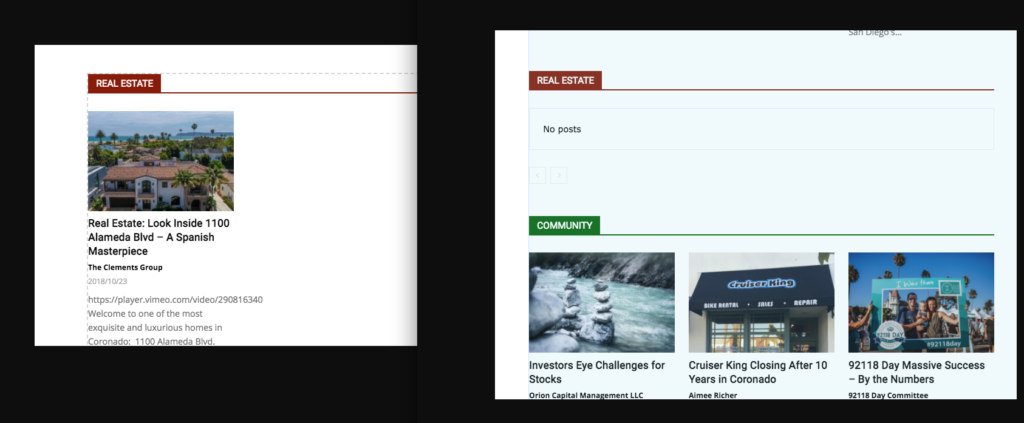
Why isn’t the single post showing? I want this post to show up in the REAL ESTATE NEWS block on the homepage:
https://coronadotimes.com/news/2018/10/23/real-estate-look-inside-1100-alameda-blvd-a-spanish-masterpiece/
Thanks,
Steve
 Viju
Viju GET mysite.com/wp-json/td-composer/do_job/? 404
{“code”:”rest_no_route”,”message”:”No route was found matching the URL and request method”,”data”:{“status”:404}}
menneskedyr As it normally happens I figured it out minutes after posting here… but here goes for those that may stumble the same way.
It seems that server resources that were fine for earlier version of TD Composer are not enough for the new one. My minimal configuration (as it is a test site) has had no problems until now.
If you update TD Composer and it starts acting up, give it a little more room to breathe if you can. Specifically, I’ve increased max_input_vars and WP memory limit. Don’t know which one fixed it.
Sorry for troubling you guys.
menneskedyrI have just updated my test site (fortunately not the live one) to 9.1 and new TD Composer wrecked a few things.
When TD Composer is active (new version, built 12.10.), saving options in the Theme Panel doesn’t work. The “busy” indicator just keeps spinning and nothing happens.
Also, activated TD Composer gives some very strange behaviour in the plugins area. For example, when I try to delete some other plugin by clicking the link on the Plugins page, WP throws a weird error on top of page and doesn’t do anything. When TD Composer is disabled, everything works.
I went through the usual checklist (disabling cache, all other plugins, reuploading everything from scratch…), nothing helped.
Please advise.
 Pawan Phayel
When I tried to activate both Yoast & TD Composer I found below given error message.
fatal error: unknown: cannot use output buffering in output buffering display handlers in unknown on line 0
What is this & How to solve?
