
- NewspaperHow to update a plugin
- NewspaperHow to update the WPBakery Page Builder plugin
- NewspaperHow to Update the Newspaper Theme
- NewspaperSingle Post Excerpt
- NewspaperWP Rocket and Newspaper Theme: Optimization Guide
- NewspaperCredit System
- NewspaperHow to use the Bing Maps API
- NewspaperModules Builder in Newspaper Theme
- NewspaperCreate a frontend submission form
- NewspaperCustom Fields Support
- NewspaperFlex Block Settings Guide
- NewspapertagDiv Opt-In Builder
- NewspaperHow to use the YouTube API
- NewspaperDefault Category Settings
- NewspapertagDiv Composer Tutorial
- NewspaperHow to Set the Image Avatar
- NewspaperUnique Articles
- NewspaperFacebook Share
- NewspaperCache plugin – install and configure
- NewspaperFeatured Image, Video or Audio
 Anamaria
 Hello,
In most cases, this problem occurs because you have the latest version of WordPress with an older version of the theme.
Please use the last version of WordPress 6.2 with the last theme version Newspaper 12.4 (if you have a theme version older, then tagDiv Composer does not work) and check to see if the problem persists.
If you need to make an update, before please make a full backup to all files and the database, in case something goes wrong. => https://forum.tagdiv.com/how-to-update-the-theme-2/
Here you can find information about the changes that have occurred in each update over time https://tagdiv.com/newspaper/
I recommend that you update the theme manually https://forum.tagdiv.com/how-to-update-the-theme-2/ via FTP/cPanel/File Manager, also if possible disable extra plugins during the theme update to avoid any problems that may arise and make sure that you have activated the tagDiv Standard pack plugin to keep the website’s look. You can try to update the theme on a staging website.
After you update the theme, you need to update the theme plugins too.
In the worst cases, the settings in the theme panel may be lost (there have been isolated cases), in these cases, after the theme plugins that were previously used are activated, you will have to use a backup for the theme panel -> https://forum.tagdiv.com/import-export-theme-settings/
Also, make sure that all the settings are like in our requirements, please follow the guide carefully: https://forum.tagdiv.com/requirements-for-newspaper/
and please increase all requirements that are lower, and follow all steps.
Also, if the problem persists please check if you do not have a plugin conflict, please deactivate ALL plugins except tagDiv plugins, also if you are using a child theme or cache plugin, deactivate them, clear all cache (also from your browser) and try again.
Let me know the results!
Thank you!
 Calin
Calin Hi sloope, you understand correctly how the option to hide the image works, what I recommend is to use a mobile page header – https://tagdiv.com/newspaper-10-3-7-update-brings-customizable-and-fast-mobile-pages/ doing this on mobile will be used a different header and should no longer load the one from desktop.
Thank you!
Calin Hi Alex,
Indeed, there is a problem with the theme panel option, when this is used is always apply. Anamaria informed a developer and looks that this problem has fixed today and should be added in the coming update.
Thank you for your time to let us know about this problem.
 DDN-Magazine
Hello
I’d be grateful for some assistance please.
The site lost all it’s sidebar widgets after a theme uodate to the latest version, so I’m in the process of trying to restore them.
I’m using a plugin called WPJobBoard that uses a custom post type named ‘Job’, I can’t get single job listings to show a sidebar despite all the settings looking correct. There are no sidebar settings in the plugin.
The sidebar was showing ok on single job posts before the update.
I’ve included some URL’s and screen captures below.
Any help would be gratefully received thank you.
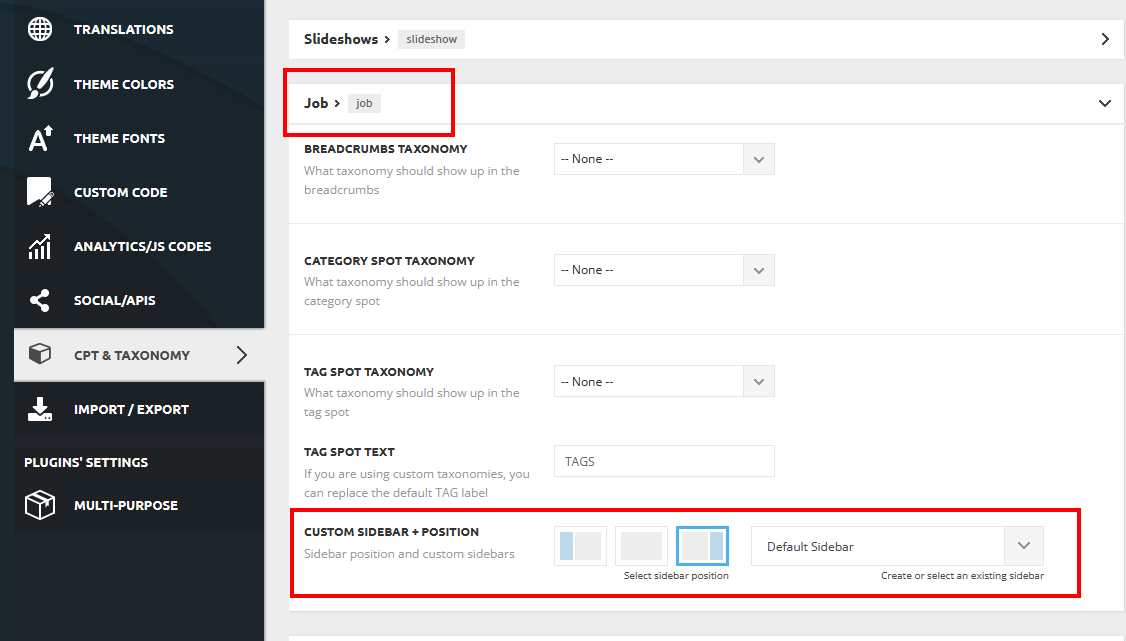
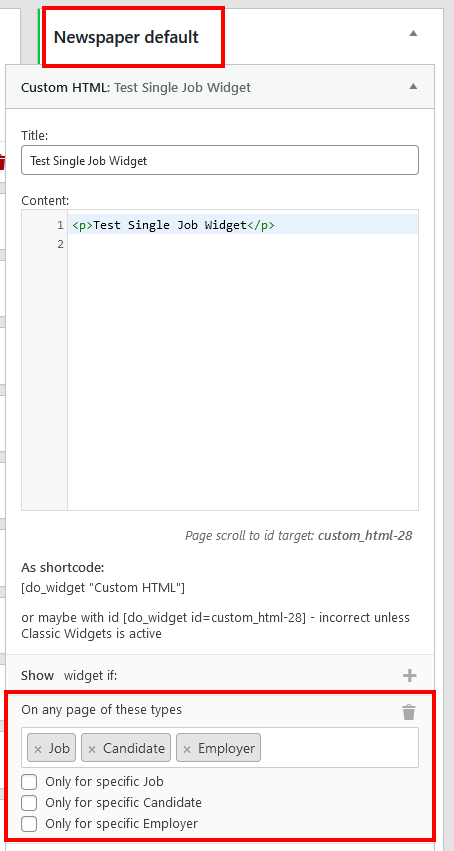
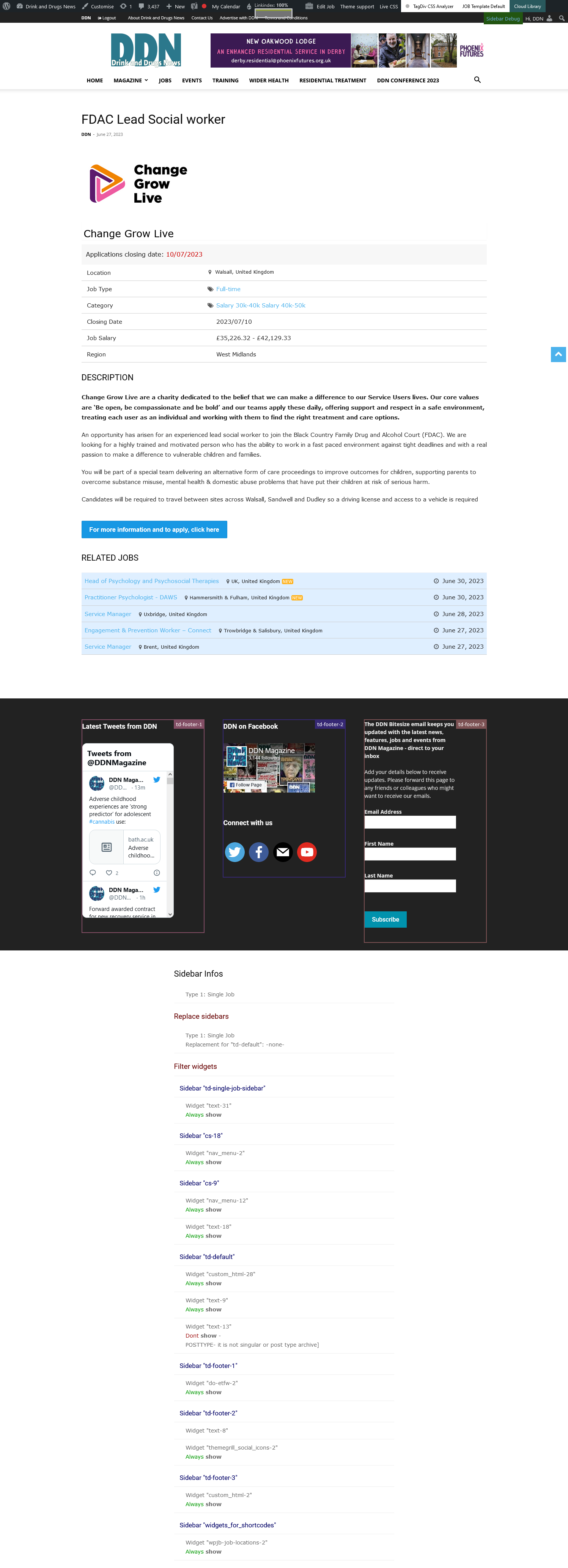
Calin Hello croboy,
Thera re elements that will create CLS, and one of them is the sticky menu and are other a few elements that are corrected now and will be included in the coming theme update.
If you can provide a link to your website, we can check it and see what can be done to resolve the CLS problems on mobile.
Thank you!
Calin Hello,
Indeed, I see that now on iPad and mobile the header no longer use the image as background and use only a background color.
If you are using only the responsive version, then what is can recommend is to see if when you are logged in and you edit the header in composer, those headers remains saved?
Also, if you are using the mobile page, then is possible to need to configurate the mobile page template separately – https://tagdiv.com/newspaper-10-3-7-update-brings-customizable-and-fast-mobile-pages/ (right now I see only the color on those devices).
Thank you!
Anamaria Hello,
Please try to install the plugin manually https://tagdiv.com/how-to-install-plugins-and-update-plugins/
Thank you!
 leeallen337
After updating the theme, My Header/Menu section does not render properly? Nor sure what happened, can this be fixed.
screen shot of Header…
 sharozajmal
Dear Team, Please check the theme settings I already check and update all the necessary changes which you requested earlier through the provided link. Now I am trying to update my site for the last 4 days and still I no success I request you guys thoroughly check this issue it costs me a lot and also wastes my time. I bought this theme just because of the features and convenience but it doesn’t mean the same as I expected from this theme.
 dxbsummer
After updating the theme panel, my header logo and menu bar not visible. what needs to be done.
Thanks
 croboy
 I updated second site to 12.4
When I look source in Google chrome developer tool, while scrolling I see changes in following code
<div class="td-header-wrap" style="position: fixed; top: -60px;">

            <div class="td-container">

                <div id="td-header-menu">

  ----
<div class="td-container" style="height: auto !important; padding-top: 60px;">
I don’t know what is that option in theme since on one site I don’t see it and on the other one I see it. Looks like floating menu or something else related to header.
 Rodolfo
Hello, after the update I no longer see some parts of the site (the update was made to the latest current version). You can help me?
Thanks in advance for the help
 elvisfrog
As I understand it, the sorting feature is set to prioritize ‘popularity’ over a set period of time – 24 hours, 48 hours, or 7 days. However, this feature sorts content based on the number of views rather than the publish date. As a result, an older article that continually attracts a high number of views would maintain its top position indefinitely.
I’m wondering, is there a code snippet or filter that could refine this process by integrating a date range? For instance, can we gather all posts published within the last 7 days and then sort these by the number of views? This way, the system would display posts with the highest view counts but only from the most recent 7-day period, thereby allowing more recent content a chance to rise in the rankings.
I know I could alter the code, but of course on updates that would be lost and have to manually add again.
Appreciate any feedback on this.
 Bettina
 Hello Emir!
You have the possibility to enable mobile theme only on some pages: https://forum.tagdiv.com/mobile-theme-introduction/
You can uninstall the mobile theme plugin and it will automatically display the responsive version of your desktop design.
Actually, we have 3 options for mobile versions that you can use:
1. Responsive version: A responsive version of your website looks similar to the desktop version. TagDiv Composer is used to edit the page.Click on the mobile viewport: https://www.screencast.com/t/XDQJedlggSB. There, you can see your mobile version and edit or adjust the elements to look better.
2. Mobile pages: https://tagdiv.com/newspaper-10-3-7-update-brings-customizable-and-fast-mobile-pages
3. Mobile theme plugin: The Mobile Theme is a performance-optimized theme included in the main Newspaper theme that only loads on mobile devices. It comes with its own templates and designs for pages, posts, categories, etc., so your current templates from the desktop theme will get converted to the mobile theme layout. Please see https://forum.tagdiv.com/the-mobile-theme/ and https://forum.tagdiv.com/mobile-theme-introduction/ for more information.
A full explanation is here: https://www.youtube.com/watch?v=SpGkOnJeNZY
If you need to use the mobile version 1 or 2, then you need to disable the Mobile Theme plugin.
Thank you!
Bettina Hello Ciprian!
Actually, we have 3 options for mobile versions that you can use:
1. Responsive version: A responsive version of your website looks similar to the desktop version. TagDiv Composer is used to edit the page.Click on the mobile viewport: https://www.screencast.com/t/XDQJedlggSB. There, you can see your mobile version and edit or adjust the elements to look better.
2. Mobile pages: https://tagdiv.com/newspaper-10-3-7-update-brings-customizable-and-fast-mobile-pages
3. Mobile theme plugin: The Mobile Theme is a performance-optimized theme included in the main Newspaper theme that only loads on mobile devices. It comes with its own templates and designs for pages, posts, categories, etc., so your current templates from the desktop theme will get converted to the mobile theme layout. Please see https://forum.tagdiv.com/the-mobile-theme/ and https://forum.tagdiv.com/mobile-theme-introduction/ for more information.
A full explanation is here: https://www.youtube.com/watch?v=SpGkOnJeNZY
If you need to use the mobile version 1 or 2, then you need to disable the Mobile Theme plugin.
Thank you!
Calin Hi,
I checked the site and I see that some numbers appear in the social counter – https://i.imgur.com/wIJtkdF.png, are they set manually? If they are not set manually, then the problem is that they are not updated in time.
Also, when you set Facebook and Instagram in the theme panel, does the number of social networks appear in the theme panel?
If you do not receive the social number at all, then please contact us at contact@tagdiv.com, I ask you to insert a link to this topic to identify you and also to offer you email access to the site to investigate the problem.
Thank you!
 loslunes
Hello, I have a not so important question but I prefer to do it than not.
I have updated to last Newspaper version today and then Admin post list table has appeared that way https://ibb.co/ryPsQyf
I mean the text from the tables has gonde to a middle alignment when it’s always at top. I have a code for showing feautured image at functions.php but it has always works fine and also when I delete it the “problem” persist. There´s any way to change css from admin table list so the text appears at top as always?
Hoping you understand the issue lol
 discovermh
 Hello,
No RC 12.4.1 Update after 07.06.2023 12:16.
Can you share the changelog with the same build.
 NicoPapaye
Hi ! I have an issue with my website on the social counter.
The count does not update and is still at 0 for all my counters (Facebook, Instagram, Twitter).
I did connect my accounts, and the username are ok in the tagdiv editor.
Could you please help ?
Bettina Hello @Explorion!
It is working one time: https://app.screencast.com/3jNVhhkd5DTxP. Also, you can use 1 from 3 different mobile versions: 1. Responsive version: A responsive version of your website looks similar to the desktop version. TagDiv Composer is used to edit the page.Click on the mobile viewport: https://www.screencast.com/t/XDQJedlggSB. There, you can see your mobile version and edit or adjust the elements to look better.
2. Mobile pages: https://tagdiv.com/newspaper-10-3-7-update-brings-customizable-and-fast-mobile-pages
3. Mobile theme plugin: The Mobile Theme is a performance-optimized theme included in the main Newspaper theme that only loads on mobile devices. It comes with its own templates and designs for pages, posts, categories, etc., so your current templates from the desktop theme will get converted to the mobile theme layout. Please see https://forum.tagdiv.com/the-mobile-theme/ and https://forum.tagdiv.com/mobile-theme-introduction/ for more information.
A full explanation is here: https://www.youtube.com/watch?v=SpGkOnJeNZY
If you need to use the mobile version 1 or 2, then you need to disable the Mobile Theme plugin.
Thank you!
 natork
 I was also facing the same issue. Sadly, we have to manually restrict those pages from public view. TagDiv should fix it in their next update
 yanaguita
 Hi Anamaria!
When I received this alert I had already updated the theme to version 12.4…
 steve-johnsonAnamaria
 Hello,
Please edit the file td_instagram.php in this path td-composer/legacy/common/wp_booster/td_instagram.php and remove https://i.imgur.com/Mg9DE3w.png “comments_count,like_count” line 655 in the next update will be fixed.
You have the Instagram connect in Theme Panel -> Social/APIS -> https://forum.tagdiv.com/instagram-widget/
Thank you!
Anamaria Hi,
You need to update the theme to the latest version 12.4
Please make a full backup to all files and database => https://www.youtube.com/watch?v=LAJXrSI-dDA
Here you can find information about the changes that have occurred in each update over time https://tagdiv.com/newspaper/
I recommend that you update the theme manually https://forum.tagdiv.com/how-to-update-the-theme-2/ via FTP/cPanel/File Manager, also if possible disable extra plugins during the theme update to avoid any problems that may arise and make sure that you have activated the tagDiv Standard pack plugin to keep the website’s look. You can try to update the theme on a staging website.
After you update the theme, you need to update the theme plugins too.
In the worst cases, the settings in the theme panel may be lost (there have been isolated cases), in these cases, after the theme plugins that were previously used are activated, you will have to use a backup for the theme panel -> https://forum.tagdiv.com/import-export-theme-settings/
Thank you!


