
- NewspaperHow to update a plugin
- NewspaperHow to update the WPBakery Page Builder plugin
- NewspaperHow to Update the Newspaper Theme
- NewspaperSingle Post Excerpt
- NewspaperWP Rocket and Newspaper Theme: Optimization Guide
- NewspaperCredit System
- NewspaperHow to use the Bing Maps API
- NewspaperModules Builder in Newspaper Theme
- NewspaperCreate a frontend submission form
- NewspaperCustom Fields Support
- NewspaperFlex Block Settings Guide
- NewspapertagDiv Opt-In Builder
- NewspaperHow to use the YouTube API
- NewspaperDefault Category Settings
- NewspapertagDiv Composer Tutorial
- NewspaperHow to Set the Image Avatar
- NewspaperUnique Articles
- NewspaperFacebook Share
- NewspaperCache plugin – install and configure
- NewspaperFeatured Image, Video or Audio
 Bettina
 Hello!
First of all, please make sure you have a backup done and then you can update the theme and the TagDiv plugins also.
Please take a look for this advice before updating: https://forum.tagdiv.com/topic/action-required-please-read-how-to-update-to-the-newspaper-theme-v-10/
I recommend you to make a backup and update plugins and the theme via file transfer, so that you don’t face any error: https://forum.tagdiv.com/how-to-update-the-theme-2/
If you do not want to update the theme, then downgrade the WordPress version.
Thank you!
 americaretail
Hi all, I want to ask for your help because a few days ago an error appeared with tagdiv composer. Tagdiv composer is not loading and is generating the errors shown in the following image. I am using the newspaper 8 theme and the problem appeared after updating to the wordpress version 5.7.1
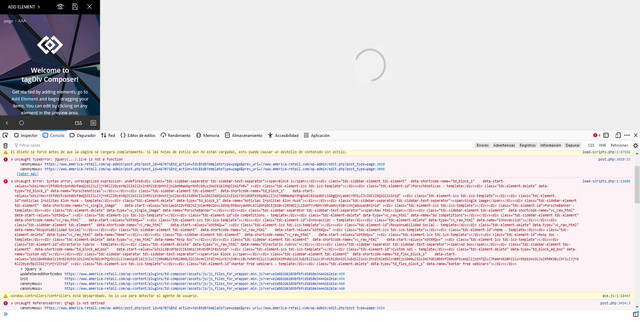 <br />gif h<br />
I would like to know if it can be fixed without having to update the newspaper theme and thanks for any help you can give me to solve it if possible. Thank you very much in advance.
 Anamaria
 Hello,
Normally, if use only the cloud library(tagDiv Standard Pack disable ) you should have a better speed because it will no longer load all CSS as tagDiv Standard Pack plugin.
This does not mean that the website does not need to be optimized.
Also, for the mobile version, you can use the mobile page => https://tagdiv.com/newspaper-10-3-7-update-brings-customizable-and-fast-mobile-pages/
This is a video about Responsive Newspaper Theme, AMP & Mobile Theme, Mobile Pages & Templates -> https://www.youtube.com/watch?v=SpGkOnJeNZY (03:11 – Mobile Templates & Pages)
Thank you!
 byothe
 Hello @Anamaria, the counter update problem is concerning :
– Instagram
– Facebook
– TikTok
Anamaria Hello,
bI just checked your website and it looks that your images and thumbs are not optimized, for example, you can use EWWW Image Optimizer plugin, also, you can try other plugins like Autoptimize. Your website needs an optimal speed that’s why you need to make some settings also to help for the improvement.
Also, to increase the page speed you can check these similar topics for more solutions:
– https://forum.tagdiv.com/topic/optimize-script-to-improve-site-speed/
– https://www.infophilic.com/get-almost-100-pagespeed-newspaper-theme/
– https://forum.tagdiv.com/topic/a-few-tips-for-newspaper-x-speed-high-cpu-usage-issues/
– https://tagdiv.com/how-to-increase-page-loading-speed/
However, page loading speed can depend on many factors, and each website is unique from this point of view.
Let me explain some of these factors and maybe they give you some starting points for optimizing your website.
External factors: server speed, if you are using CDN or not, the external resources loaded by your website like ads, fonts, tracking scripts like Facebook Pixel, Google Analytics, Twitter analytics, Hotjar and so on.
Internal factors: the number of elements on the page, image size, image formats, if you are using mobile optimized layouts, console errors, if you are using the Standard Pack plugin on not if you are using PRO demo or a standard one.
By the way, we have such a great result with this new update and with our new tool: https://www.youtube.com/watch?v=tnkVapqhIHc
Our tool is running only on normal pages and not for posts or categories for example.
“This custom tool performs an automatic test to find missing CSS rules applied by user interaction. Moreover, you can manually interact with a chosen section/component from the page while the tool records all the involved CSS. It will generate the final CSS file for this page and also will split the rules in Critical CSS to be loaded in the website’s header.” ( https://tagdiv.com/whats-new-in-the-newspaper-theme-10-4-update/ )
Our tool is running only on normal pages and not for posts or categories for example.
Also, if the errors appear on mobile you need to use a version as I said above.
Hope this helps you!
Thank you!
Bettina Hello!
Related to the page speed, this is our limit score, check this topic: https://forum.tagdiv.com/topic/guys-it-is-possible-to-get-good-speed-with-newspaper-theme/
Unfortunately, there is no button to hit and your score is high or your page speed is very high. You need to try to optimize your website.
If you follow the steps which are presented in this tutorial here: https://tagdiv.com/how-to-increase-page-loading-speed/ you’ll be able to increase the speed of your website.
Also, to increase the page speed you can check these similar topics for more solutions:
– https://forum.tagdiv.com/topic/optimize-script-to-improve-site-speed/
– https://forum.tagdiv.com/topic/a-few-tips-for-newspaper-x-speed-high-cpu-usage-issues/
– https://tagdiv.com/how-to-increase-page-loading-speed/
Please note that page speed is not covered by the support team: https://forum.tagdiv.com/newspaper-theme-support/
Please give it a try and follow the steps which I presented above about page speed.
Also, check our guide from here: https://forum.tagdiv.com/how-to-make-the-site-faster/
Please make sure to use our newest tool called tagDiv CSS Analyzer which comes in handy to resolve some of your issues. Take a look at the video guide here: https://www.youtube.com/watch?v=tnkVapqhIHc
“This custom tool performs an automatic test to find missing CSS rules applied by user interaction. Moreover, you can manually interact with a chosen section/component from the page while the tool records all the involved CSS. It will generate the final CSS file for this page and also will split the rules in Critical CSS to be loaded in the website’s header.” ( https://tagdiv.com/whats-new-in-the-newspaper-theme-10-4-update/ )
Our tool is running only on normal pages and not for posts or categories for example.
We tested our tool on our demos, and we have such great results!
Take a look in this topic because it could help you: https://forum.tagdiv.com/topic/css-analyzer-step-by-step-and-doubts/
Thank you!
 katsar0v
 Hi Vlad,
any update from the Dev Team?
Best
Kristiyan
 diaconescu
 Apologies, we’ve managed to solve the issue; we needed to do a plugin update.
Bettina Hello!
Related to the page speed, this is our limit score, check this topic: https://forum.tagdiv.com/topic/guys-it-is-possible-to-get-good-speed-with-newspaper-theme/
If you follow the steps which are presented in this tutorial here: https://tagdiv.com/how-to-increase-page-loading-speed/ you’ll be able to increase the speed of your website.
Also, to increase the page speed you can check these similar topics for more solutions:
– https://forum.tagdiv.com/topic/optimize-script-to-improve-site-speed/
– https://forum.tagdiv.com/topic/a-few-tips-for-newspaper-x-speed-high-cpu-usage-issues/
– https://tagdiv.com/how-to-increase-page-loading-speed/
Please note that page speed is not covered by the support team: https://forum.tagdiv.com/newspaper-theme-support/
Please give it a try and follow the steps which I presented above about page speed.
Also, check our guide from here: https://forum.tagdiv.com/how-to-make-the-site-faster/
Please make sure to use our newest tool called tagDiv CSS Analyzer which comes in handy to resolve some of your issues. Take a look at the video guide here: https://www.youtube.com/watch?v=tnkVapqhIHc
“This custom tool performs an automatic test to find missing CSS rules applied by user interaction. Moreover, you can manually interact with a chosen section/component from the page while the tool records all the involved CSS. It will generate the final CSS file for this page and also will split the rules in Critical CSS to be loaded in the website’s header.” ( https://tagdiv.com/whats-new-in-the-newspaper-theme-10-4-update/ )
Our tool is running only on normal pages and not for posts or categories for example.
We tested our tool on our demos, and we have such great results!
Take a look in this topic because it could help you: https://forum.tagdiv.com/topic/css-analyzer-step-by-step-and-doubts/
Hope that helps you!
Thank you!
Bettina Hello!
This issue has been discussed already here: https://forum.tagdiv.com/topic/after-the-current-update-nothing-works/
Thank you!
 Daljit Singh
 Hi there, I also am getting the same issue. But i have tried everything mentioned above. Here is the very short video i just created with my audio to show you that all the tips were given above is no longer working in the new updated version of the theme. Here is the video = https://youtu.be/fZ9TpBuTxtw
Note:- For the time, i am going to hide them with custom css
/* Inner */
.td-main-page-wrap .tdc-zone .tdc_zone .stretch_row_1400 .td-pb-row .tdc-column .wpb_wrapper .vc_inner{
display:none;
}
Bettina Hello!
This issue has been discussed already here: https://forum.tagdiv.com/topic/after-the-current-update-nothing-works/
Thank you!
Anamaria Hello,
In the new update, new implementations have been made for Google page speed and now, the width and height for images must be displayed, and on a standard template if you use SVG it will have width and height 0 (if you want you can use a stronger CSS to set these dimensions manually):
.td-main-logo img { width: 100%; }
our recommendation is to use a cloud header where you can upload SVG and set the dimensions => https://www.screencast.com/t/yVhxp0c6yf
Thank you!
Anamaria Hello,
Please try to do these steps
1. disable all tagDiv plugins
2. uninstall all tagDiv plugins
3. clear cache (if cache plugin exists)
4. re-install all tagDiv plugins again from Newspaper plugins => https://www.screencast.com/t/WLy01lbc
5. activate all tagDiv plugins
6. clear cache (if cache plugin exists)
Also, for the errors, you need to use a mobile theme plugin or mobile page.
You can find more information in these articles
-> mobile theme plugin => https://forum.tagdiv.com/the-mobile-theme/
-> mobile page => https://tagdiv.com/newspaper-10-3-7-update-brings-customizable-and-fast-mobile-pages/
This is a video about Responsive Newspaper Theme, AMP & Mobile Theme, Mobile Pages & Templates -> https://www.youtube.com/watch?v=SpGkOnJeNZY
Thank you!
Bettina Hello Sarah!
There are 3 options to use:
1. Responsive version: A responsive version of your website is looking similar like on desktop, edit the page with TagDiv Composer, click on the mobile viewport: https://www.screencast.com/t/XDQJedlggSB ; there you can see your mobile version and you can edit the elements there.
2. Mobile pages: https://tagdiv.com/newspaper-10-3-7-update-brings-customizable-and-fast-mobile-pages/
3. Mobile theme plugin: https://forum.tagdiv.com/the-mobile-theme/
A full explanation you can find here: https://www.youtube.com/watch?v=SpGkOnJeNZY
We recommend using WP Super Cache plugin https://forum.tagdiv.com/cache-plugin-install-and-configure/
The issue can be from a plugin conflict, that’s why, please deactivate ALL plugins except tagDiv ones, clear all cache and try again.
If this problem is not solved after that, then we need to take a look and see what happened there.
Please contact us via email at contact@tagdiv.com and provide the following:
– admin url and credentials
– a link to this topic in order to identify you
Our team will take a look!
Thank you!
Anamaria Hello,
You can use the standard header from Theme Panel, for this you need to have the Standard Pack plugin, but in the new update, this plugin is no longer required because the new demos are using cloud templates.
Also, you can use a header template from Cloud Library, and you can customize it with tagDiv Composer. => https://www.youtube.com/watch?v=HXQQygkCCJo
Thank you!
Bettina Hello!
This issue has been discussed already here: https://forum.tagdiv.com/topic/after-the-current-update-nothing-works/
Thank you!
Anamaria Hello,
Seems you have the Mobile theme plugin activate, when you install and activate the Mobile Theme plugin, your pages will be overwritten by the plugin (the mobile theme comes with its own templates for page, post, category, etc so your current templates from the desktop theme will get converted to the mobile theme layout, the page content is made without builders in mobile editor => https://www.screencast.com/t/xbgZG8kH also, the options that are provided to edit the mobile theme version are limited (this keeps the things simple)).
Better deactivate the plugin and see the results.
Also, if you create a mobile page, please check if is set correctly => https://tagdiv.com/newspaper-10-3-7-update-brings-customizable-and-fast-mobile-pages/
This is a video about Responsive Newspaper Theme, AMP & Mobile Theme, Mobile Pages & Templates -> https://www.youtube.com/watch?v=SpGkOnJeNZY
Thank you!
 Biscalex
Hello,
The homepage of my website https://www.bellimo.fr seems to be broken and is displaying all the wysiwyg shortcodes.
I didn’t do any modifications in the last month, so I don’t think I’m to blame for this.
My wordpress installation is on auto-update for all minor and major versions, maybe it has something with this ?
Is the newspaper theme up to date with latest updates of wp ?
Can you check and help me please ?
Thank you,
Alexandre
Anamaria Hello,
Yes, as Vlad said is on the list of fixes.
We are trying to fix this issue in future updates.
Thank you for your understanding!
 Calin
Calin Hi luke-tt, unfortunately, for the moment there were only few features added in the latest theme updates and most of theme were related to WordPress compatibility.
Unfortunately, the sorter on related articles has not been improved until now, this is still like before, sorry!
All news from the theme can be see in theme changelong at the bottom of page https://themeforest.net/item/newsmag-news-magazine-newspaper/9512331 -> https://i.imgur.com/qNEsSHx.png
Thank you for your understanding!
 richyorozco
The top element of http://www.catholicconnect.co, I want it to load the latest articles and it used to work but with the latest update it stopped working even after I select the filter to show the latest posts.
How can I fix this? Has anyone else experienced this issue?
 David
DavidHi,
after I updated my site from 10.3.X to 10.4 my Header Logo on Desktop just disappeared. I had added it via theme panel “Logo & Favicon” and it was never an issue to use SVG there. Till now. On mobile the Logo seems to display properly. My site: https://dreamcounter.de/
Any advice?
Thanks!
 Redlemon
Hi, I can see inside the Envato Market page that your theme is only compatible with WP v.5.6.x yet. Do you have an ETA of a compatible version with the v.5.7.2 maybe? I would like to update my WP core and theme, but am hesitant to do so until it is certain it will be safe.
Please advise.
Bettina Hello!
We tested with our latest theme version and there is no issue like that.
Please take a look for this advice before updating: https://forum.tagdiv.com/topic/action-required-please-read-how-to-update-to-the-newspaper-theme-v-10/
I recommend you to make a full backup and update plugins and the theme via file transfer, so that you don’t face any error: https://forum.tagdiv.com/how-to-update-the-theme-2/
Also, please deactivate ALL plugins except tagDiv ones, if you are using child themes or cache plugins, deactivate them, clear all cache and try again.
Thank you!

