
- NewspaperHow to update a plugin
- NewspaperHow to update the WPBakery Page Builder plugin
- NewspaperHow to Update the Newspaper Theme
- NewspaperSingle Post Excerpt
- NewspaperWP Rocket and Newspaper Theme: Optimization Guide
- NewspaperCredit System
- NewspaperHow to use the Bing Maps API
- NewspaperModules Builder in Newspaper Theme
- NewspaperCreate a frontend submission form
- NewspaperCustom Fields Support
- NewspaperFlex Block Settings Guide
- NewspapertagDiv Opt-In Builder
- NewspaperHow to use the YouTube API
- NewspaperDefault Category Settings
- NewspapertagDiv Composer Tutorial
- NewspaperHow to Set the Image Avatar
- NewspaperUnique Articles
- NewspaperFacebook Share
- NewspaperCache plugin – install and configure
- NewspaperFeatured Image, Video or Audio
 Catalin
 Hi,
We are sorry if you are facing this issue. Please make sure that you have correctly updated the theme and the plugins which come bundled with the theme core files. In most cases, that problem happened due to the following cases from this guide -> https://forum.tagdiv.com/tagdiv-composer-not-working/
For your second request, please note that WordPress keep all of your old modification into Revisions, like this -> http://prntscr.com/oadfq4 (Gutenberg) -> https://www.screencast.com/t/8e1sRL9X (Classic Editor) which allows you to roll back to an old version of your page/post. If you need more assistance in this case and if the problem persists, please send us an email at contact@tagdiv.com with your log-in information (wp-admin) so we can take a closer look at your setup page. Also, provide there the link of this topic so we can quickly identify you.
Thank you!
 Simion C.
 Hi,
I found that there are similar topics online about this issue happening
– https://www.seroundtable.com/google-wrong-dates-25864.html
– https://webmasters.stackexchange.com/questions/82213/why-is-the-date-displayed-in-the-google-search-result-is-3-days-older-than-the-a
– https://webmasters.stackexchange.com/questions/101116/serp-google-rich-snippets-showing-the-wrong-date-for-updated-post
I checked the post you mention, the datepuiblished data is like this
– http://prntscr.com/oad8zm
So the date is correct, but Google seems to not take it into account for some reason. Google should pick that datepublished and use it. There is a know issue when videos are used in the post, but there is no video in yours
– https://www.searchenginejournal.com/google-search-bug-shows-wrong-publish-date-causes-ranking-drops/178681/
You could try and request a re-crawl from them, maybe this will correct the problem, but it may take some time from what I can find
– https://stackoverflow.com/questions/9466360/how-to-request-google-to-re-crawl-my-website
Thanks
 VideoFilm
I really like the Newspapper theme. I plan to use it further. However, unpleasant problems have arisen: the topic is very slow, the pages open and remain for a very long time. Errors started recently: an update error occurs when saving changes to a record. After this, many processes are launched: zombie processes and sleeping processes. The site stops working and error 503 appears. I can not make changes to the records. Disconnected plugins, the error remained. Then she also turned off the Newspapper theme. After that, the error disappeared. Then she turned on the theme again without plug-ins, the error reappeared. On another site where the same topic was posed, there are no such problems, it only slows down. Help solve the problem.
 meri
meri An additional question:
3/ I changed the font for pages (from Helvetica to Roboto) but the pages are still showing text in Helvetica while posts were updated. I also changed the font color for both of them but pages remain with the old color, definitely not the one set in Theme colors > Pages.
Here is an example: https://www.mondeoz.com/politique-de-confidentialite/ where the font should be Roboto and the page text color #333333
Any idea why and how to fix it?
Thanks
 lvluphuman
 UPDATE! I figured it out. No idea how. But it’s working now.
Simion C. Hi,
Thank you for the kind words, much appreciated. As far as I know currently there aren’t any plans to add more capabilities to the wordpress search functionality. I will note this suggestion however, and it will be considered for future updates. Sorry for the inconvenience.
So for the moment you could make tests with some plugins, try free plugins if possible
– https://colorlib.com/wp/search-plugins-for-wordpress/
These may come with their own search template, but maybe the template can be customized in terms of design from within the plugin.
Please let us know if you have more questions or suggestions.
Thanks
Simion C. Hi,
Before the recent theme updates it was possible to modify the single template files in a child theme, and make the modification there. But now the single template files are in the tagDiv composer plugin – http://prntscr.com/oa14e0
It is possible to modify them there, but the modifications will be lost after a theme update.
However you could use a cloud post template – https://cloud.tagdiv.com/#/load/Single
Import/create a cloud post template and apply it to the posts. These templates can be edited with the composer, and also have a modified date element available
– http://prntscr.com/oa15wo
Please let me know if you have more questions.
Thanks
 Excelbud
 Quick update, I went through all of my plugins and discovered the error was being triggered by SG Optimizer (Siteground Plugin). By unclicking the Minify Javascript button, it fixed the problem.
With that said, is there a preferred pluggin for minifying javascript?
Thank you.
Excelbud
 devy
devyHow can we use the modified date instead of the published date?
Previously I edited the single.php file and changed the php get_the_date to php the_modified_date
However, I am not sure that can still be done and, either way, it will be removed after any update.
Do you have a long term solution where we can choose to show either the published or modified date in the actual post.
 Jose
Jose Thanks Simion C. and team,
That sounds really fantastic, I’m already excited waiting for a new update.
Have a nice week, Jose
Simion C. Hi,
That is possible if needed, just don’t use both of them on the same page.
I should note that some elements won’t be available in the composer when WPBakery is active. Elements such as the single image, column text, widget sidebar and a few others. This was intended as a way to avoid conflicts between the two composers, but it may change in future updates if a different solution is found.
Please let us know if you have more questions.
Thanks
Simion C. Should happen by next week, but I really can’t say for sure. However I can provide a solution to this issue. The file where the problem is, is this one
– http://prntscr.com/o9v51r
Depending of what is easier to do for you, either replace the file by deleting it and uploading this one – http://cdn.tagdiv.com/wp-content/uploads/2019/07/menu-mobile.zip
(unzip it and then upload it).
Or edit the file in question and remove all the code in it, then enter this one
– https://pastebin.com/smh8hy9P
Please try it and the problem should be solved. In the next theme update it will be fixed by default. Let me know, and sorry again for the inconvenience.
Simion C. Hi,
@CRiTiCAL That won’t work in a child theme. Currently the only way of loading code in the mobile header is to manually add it in the file mentioned above. I will make a note of this and it will be considered to add a field for it in the theme panel mobile theme settings.
@Jose That is an interesting suggestion, so something to allow the user to enable/disable the mobile theme for all the categories, posts, pages etc. There will be an option to choose for which pages or posts the mobile theme applies specifically, as an option in the edit screen. I will add this suggestion and it will be strongly considered by our developer team. Thank you for mentioning it.
In the coming theme updates there will be quite a few options added for the mobile theme. These are currently in work, some in testing. All suggestions are welcome. Please let us know if you have more suggestions.
Thanks
Catalin Hi,
I feel sorry that you are facing this issue, sorry! Please note most of the theme files were moved into the tagDiv Composer plugin as per the requirements of Envato: https://help.author.envato.com/hc/en-us/articles/360000472383-WordPress-Theme-Requirements.
We wrote an article on the subject here: https://tagdiv.com/updating-the-core-of-tagdiv-themes/ Using the latest version of the theme, you’ll need to activate the tagDiv Composer to keep the Newsmag theme functionality you’ve previously used. Also, please note that you have correctly done your update and also, ensure that all of your plugins were updated and enabled. If you need more assistance in this case, please send us an email at contact@tagdiv.com with your log-in information (wp-admin) and CPanel access for more deeper investigation.
Thank you!
 Calin
Calin Hi,
Please make sure that you have the last theme version ( Newspaper v9.7.3) and that you made a clean installation ( you do not overwrite other version of theme), also please make sure that you do not have a plugin conflict and all the theme e requirements are set according to our guide – https://forum.tagdiv.com/requirements-for-newspaper/
Theme Install Guide -> https://tagdiv.com/how-to-install-newspaper-theme/
How to Update the Newspaper Theme for WordPress -> https://tagdiv.com/update-newspaper-theme/
If there is still a problem, please provide some more details, some screenshots and a link where I can inspect this problem.
Thank you!
 paperweight2
 Hi,
thank you for the explanation. i have a little more question, can we use both of tagdiv composer and WPBakery composer after the update?
 Bruce Fischer
Wow. This is a total mess. I paid for the updated theme. I updated it and now my entire site looks terrible. The homepage is lumped into a classic post. The composure is not recognizing the old code at all. This is disappointing to say the least. When I try to edit my homepage, I get a classic post cluster-f**k that looks like this:
[vc_row][vc_column][td_block_trending_now limit=”8″][/vc_column][/vc_row][vc_row css=".td-top-border{border-top-width: 1px !important;}"][vc_column width="2/3"][td_block_slide autoplay=”4″ category_id=”11″ custom_title=””][td_block_2 custom_title="Featured Cases" header_color="#dd9933" category_id="2" sort="alphabetical_order" limit="15"][td_block_2 custom_title="Endorsed Cases" header_color="#dd9933" border_top="no_border_top" category_id="3" sort="alphabetical_order" limit="15"][td_block_2 custom_title="Successful Cases" header_color="#dd9933" category_id="53" sort="alphabetical_order" limit="15"][td_block_11 custom_title=”Judges For Justice Featured Cases” header_color=”#dd9933″ category_id=”67″][td_block_11 custom_title=”Justice For Illinois Wrongfully Convicted Cases” header_color=”#dd9933″ category_id=”75″][/vc_column][vc_column width="1/3"][vc_single_image image="1796" img_size="" alignment="center" style="vc_box_rounded" onclick="custom_link" link="https://www.facebook.com/Injustice-Anywhere-270758032980401"][vc_separator][vc_widget_sidebar sidebar_id="td-default"][/vc_column][vc_column][td_block_video_youtube playlist_title=”Recommended Videos” playlist_yt=”D0CqOtEITZg, d_nUtdU0wic, bh_X5vKF_LM, HAsEEXk84pA”][vc_empty_space height="2px"][td_block_video_youtube playlist_title=”Recommended Music” playlist_yt=”LZNCSGxM5Gw, pnfhCg6VAac, 1KylNm5eTrM”][/vc_column][/vc_row]
 reddisl
 UPDATE
After reading other AMP issues in the forum, I fixed it using this AD:
<amp-auto-ads
type=”adsense”
data-ad-client=”ca-pub-XXXXXXXXXXXXXXx”>
</amp-auto-ads>
 pavel@earnware.com
Hey,
Can you include a fix, for the headers, that contain backgrounds. So if you just make it a background (colored or image), the sides go too wide (the only fix is to place 1 in the margins, and then it’s exact width like the rest of the divs/modules). Please see this screenshot: 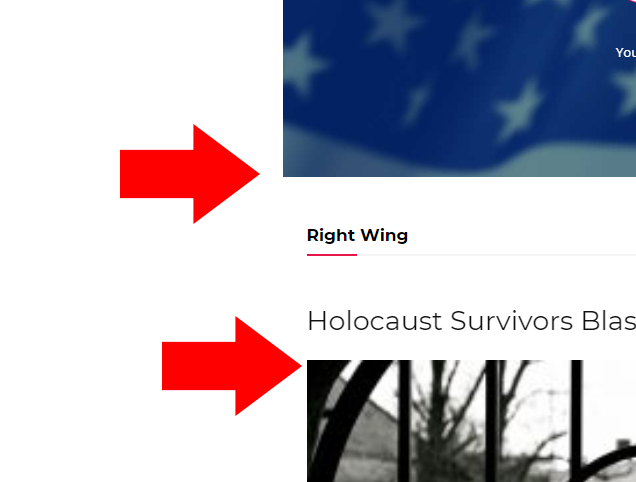
The live websites is here, you will see the top header: https://www.conservativesociety.org/
This is a problem, that we wait an update for – for a very long time, please see it, so the fix we do is like in this screenshot here: 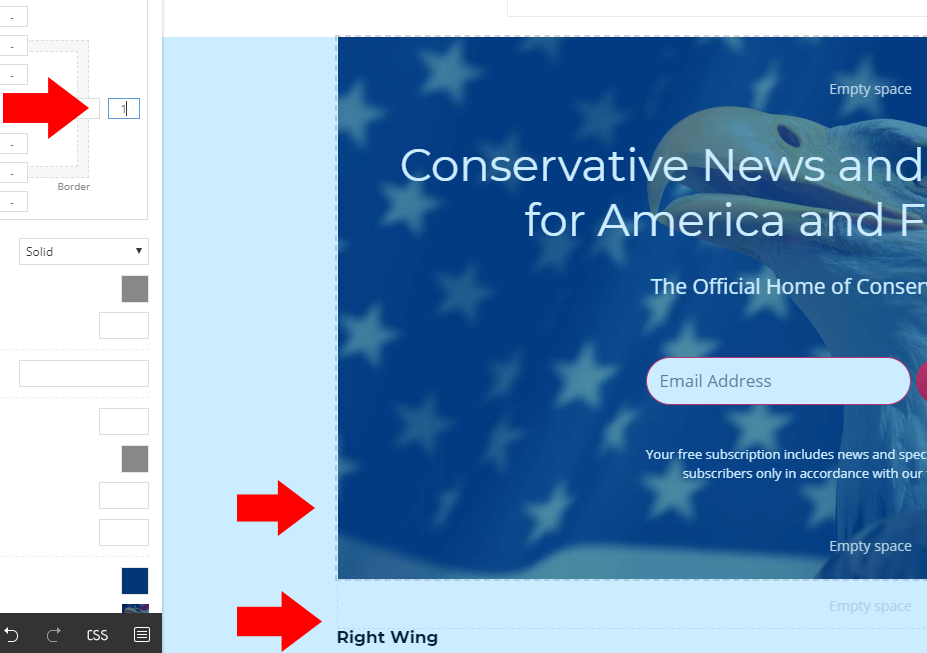
As you can see, when we type in 1, it works – but this is not a real fix, it should have the right width especially, if we own more than 20 websites, and having 4-5 header pages for each – it’s about 100 pages to fix.
 itduck2020
 Hi,
Just realised that our mobile display is completely affected after the update. The front-page layout is completely gone. No wonder everyone had been asking us to develop / upgrade to a new mobile site today.
Help
ITduck
itduck2020 Hi,
As mentioned, the previous fix suggested by Tagdiv was to disable the Tagdiv composer plugin for every update. It works all the time, but this time it didn’t work. I am not able to restore the about us page and all affected pages, unless i revert to the older theme.
Once we disable the Tagdiv composer plugin – this is how the page looks like but with conflicts.
https://ibb.co/5sqR8kG
https://ibb.co/nCBy5KH
https://ibb.co/TYvnYqM
https://ibb.co/Lt3BCBH
It affects all pages. Not just about us. At least you can see the pictures and text are created. You will also see the right side bar, which should not be in place. It is a plugin conflict problem.
Once the Tagdiv composer plugin is disabled, this is how the front-page looks like:
https://ibb.co/HGP9rNG
Kindly help. As we have client meeting the next day.
Calin Hello TimeToGoogle,
Please make sure that after you set the code you clear all cache and you coll the google to re-index your posts/pages.
In order to clear AMP cache that Google please check this article -> https://developers.google.com/amp/cache/update-cache
Ask Google to recrawl your URLs ->https://support.google.com/webmasters/answer/6065812?hl=en
If there is still a problem, please provide me a link where I can inspect your website and some screenshots with the implementation of code you’ve made.
Thank you!
Calin Hello @devy,
Yes you can add the code from child theme in the main theme, but how you say, you’ll need to re’add it after each update; also if you want you can try the above implementation, but first please make sure that your code is working correctly and you do not have a plugin conflict.
Thank you for your understanding!
Calin Hello @rrystrom,
Please provide some more details and some screenshots about the problem you are facing, also make sure that you have the theme updated and all theme requirements are set according to our guide – https://tagdiv.com/newspaper-theme-requirements/ and you do not have any plugin conflict.
Thank you!
devy Hi Calin
I am also experiencing problems with the child theme not displaying certain templates correctly. If I was to move over to the main theme what shall I do with my functions.php file in the child theme which has many amendments which I do not want to loose or can I add them to the main theme’s functions.php file. However, that what mean re-adding the changes every time there is an update.
Please advise.
