
- NewspapertagDiv AMP Plugin Tutorial
- ApiPractical example – How to add a new Block and Module
- NewspaperTrack Subscription Sources with Locker URL in Opt-In Builder
- NewspaperWP Rocket and Newspaper Theme: Optimization Guide
- NewspaperCredit System
- NewspaperIntroduction to CPT and ACF with Newspaper Theme
- NewspaperHow to edit modules for Flex Block X
- NewspaperHow to use the Posts List shortcode
- NewspaperUser review system
- NewspaperCustom Fields Support
- NewspaperHow to generate Facebook App ID
- NewspaperHow to insert a block inside the content of a post
- NewspaperModal Popup
- NewspaperPayPal Setup
- NewspaperLink Tracker
- NewspaperLockers
- NewspaperGeneral Options that May Interfere with the Newspaper Theme
- NewspaperAdd Cryptocurrency Price Ticker Widget
- NewspaperPosts Loop Element
- NewspaperThe Newspaper Mobile Theme: Introduction
 Bogdan B.
 Hello,
The featured image is also affected by the post style that you use. Post style default on a smart list will not show the featured image on all slides indeed. Try a post style 3 for example and the image will show up on each slide. https://www.screencast.com/t/w2cIDe59Hp
1. the ad shows up on each slide in your site. Please check again: https://www.screencast.com/t/YHdrOO9XbF
2. This is a default implementation as all the text needs to be read from the top down. You cannot have the post go to the middle of the slide when changing slides.
Thank you!
 Catalin
 Hello bobmak,
You should put it into the area where you want to appear on your website. For example, if you are using the post template style 1, you can add it below the author box section, like this -> https://www.screencast.com/t/KviSUJLYrns If you want to display more levels in our theme and if you are not aware of the steps which are needed to take in this regard, please consider hiring a freelancer/developer to help you because we cannot provide custom work at the moment, sorry!
Thanks for your understanding!
 a98cr125
Our articles are getting pulled into google news with the category names instead of the title itself. Here are 2 snapshots to show what is happening. This is even after I used data highlighter to try and fix the problem.
 GDMAG
GDMAG Creating the mobile apps by implementing what we call Webviews.
Since you’re not familiar with mobile nor html coding, Webviews are simple functions that loads a web page into the screen of your mobile app, creating a mobile app with webview can be easy, there are many tutorials to show you how it’s done, but it will require you to change one or two lines.
Which is the link of the website.
You can try this project on Github.
I have seen beginners creating a basic webview with no coding knowledge in less than 2 days, consider it your first step to understand more about how mobile app works, because it’s easy.
You can check this tutorial on youtube.
Don’t forget you’ll need to pay 99$ to the Appstore for submission,
I wish you good luck.
GDMAG Hello Rhonda,
I have already published two mobile apps (Android & iOS), how can I help ? 🙂
 Callipus
Hello,
How could I remove “All” subcategory for example under Lifestyle Category in the main menu of this demo:
https://demo.tagdiv.com/newspaper_magazine/
Thanks!
 blogging4friends
 Thanks for your super fast reply.
Here is the link: https://viralfex.com/8-tips-to-make-your-coffee-super-healthy/8/
ONLY smart list 3 i discovered does that but I noticed
[1] The ad will not show on all slides until
you get to the last slide…
[2] The Previous & Next button is at the
top, when you view it on mobile with a little
long article the user have to be scrolling up and down
which is NOT GOOD from a user perspective, GET ME?
Waitong for your reply
Catalin Hello Wasi,
So, if you will have to change the blocks from Footer section, you should change the Footer template to Footer template style 5 which allows you to add what Block you like. For example, you should look at this images like this -> https://www.screencast.com/t/2HMOTpu9UU1n -> https://www.screencast.com/t/HlR5xNJy6q -> https://www.screencast.com/t/bG4KwDg52
If is not what you mean, please provide more details so I will be able to provide a more accurate response.
Thanks for your understanding!
 David Henry
Is it possible to make a post sticky, so that it stays at the top even though other articles maybe newer.
An example of use would be for sponsored content, we might want to keep it at 3rd on the home page for 3 weeks.
Does that make sense?
 Simion C.
 Hi,
You could make them look the same using css, like this example here – https://www.screencast.com/t/YYnkFnKITqL where I used this code (you can change the color to what you need) just enter it in Theme panel->Custom Css
.widget_recent_entries .widgettitle,

.widget_recent_entries .widgettitle:after {

background-color: #4db2ec;

}
Please let me know if this works for you or you need further help.
Thanks
 seekandpartners
Hi guys,
As you can see from the image below or simply browsing every single category page on my site (for example:http://www.fisco7.it/category/accertamento/), there is a empty space repeated every 8 posts.
How can I solve that?
Thanks in advance,
Andrea

 juliusuk
 Hi Bogdan,
thanks for the reply. This is however not the issue. My grids will resize lage enough images so that grey bars will appear either below or to the right, if the given image has wrong aspect ratios. Example:
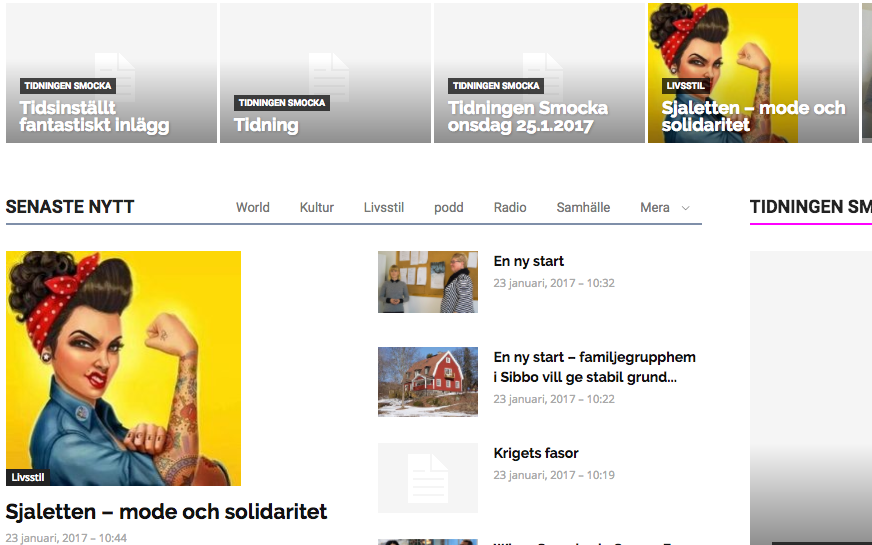
This square image is larger than either of these two module boxes in which it is showed here. It will fill proportionally any grid box or module/block image area to full height, but leave white space or grey area next to it since the boxes are of different aspect ratio. Vice-versa, any picture which fills the full width but not the height due to its aspect ratio, fills width 100% with image and leaves a grey area below – instead of cropping it to left & right, and filling the height to make the box look nice.
Can this behaviour be changed anywhere in the settings? I.e. So images fill either width/height to fully cover module/block box area and cropping things out, rather than just filling either and leaving grey bars?
– Julius
 GizmoSource
 I’ve reinstalled WordPress once again(I thought that might fix this issue) but still having the same problem
Here is what I’ve done.
1. Uninstalled the WordPress and freshly installed.
2. My website is already linked with the Cloudflare so I unlinked it completely by changing the Nameservers on the Domain Registrar
3. Installed the Newspaper Theme (7.6.1)
4. Registered the Theme, Installed the WP Super Cache Plugin and Change the WP Memory Limit to 256M according to this guide “https://forum.tagdiv.com/system-status-parameters-guide/” & “https://forum.tagdiv.com/cache-plugin-install-and-configure/”
5. Cleared the Cache (WP Super Cache Plugin)
6. Finally when I try to upload the logo and the same thing happened.
 Edward
 1. You can use different types of Quotes as in live example shown: http://demo.tagdiv.com/newspaper/blockquotes-pullquotes/
Quotes – This option lets you set up your quotes with style. There are 8 types of formatting options to make your quotes eye-caching: https://forum.tagdiv.com/post-formats-for-tinymce/
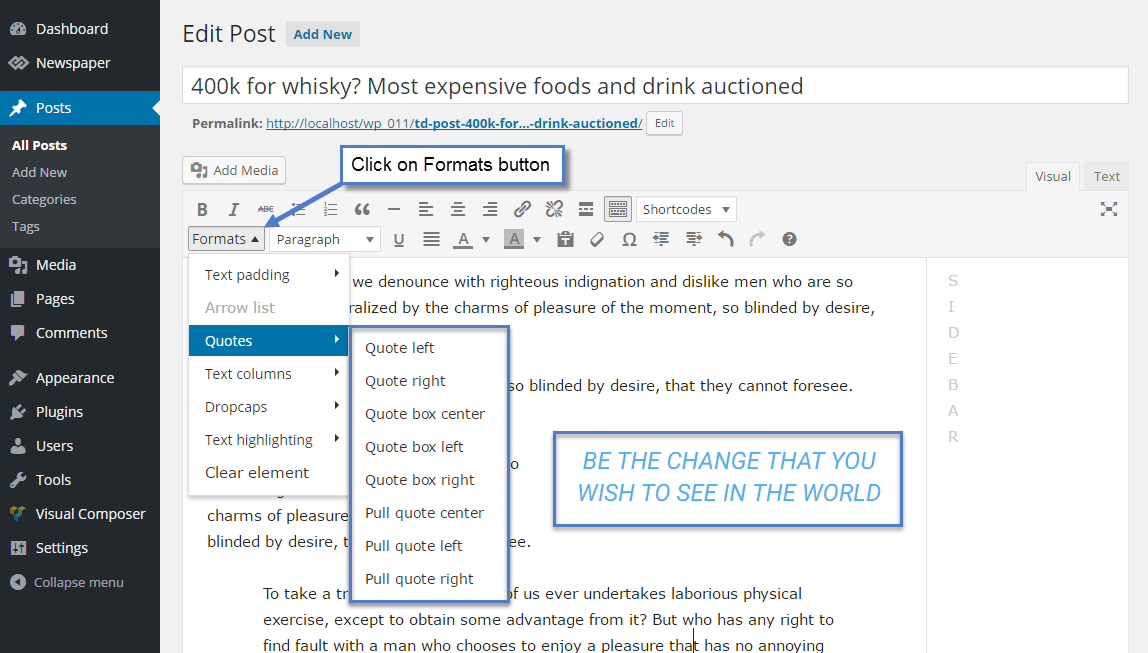
2. To change font settings in Quotes here:

 g2wp
g2wpHi i try to input video playlist on my page but does not work… I follow this documentation https://forum.tagdiv.com/video-playlist-2/
Youtube Video Playlist appears blank
my page is http://www.g2wp.com.br
[td_block_video_youtube playlist_title=”Videos” playlist_yt=”jRLe0cVT-N8&t=2s, U3I5b2pi2dE, -UftV8dQxos, D2GNiRV-Qvg, i-RFcgFZBwE, U3I5b2pi2dE, UCliT0ADtWQ” playlist_auto_play=”0″]
 LinkAntonDE
Hello Dear TagDiv-Team,
i am using the more article function and it is working.
The only problem though, the theme shows a default title which is the same for all sites#
and was not created by me. This is the title:
“XMehr Nordic Walking entdecken”
Question: How can i edit this?
Please see the example live on the site:
http://www.linkanton.de/grosse-groessen-mode-mollige-plus-size
Thank you in advance!
Best Regards,
Christian
 Michael
Hi,
I love the look of the theme and am looking forward to working with it.
Quick question…
Last night I purchased and installed NewsMag into a clean (new) installation of WordPress 4.7.2. I installed the Classic Blog demo site with all of the accompanying data. I’m now customizing that default to meet my own needs.
I would like to use Header Style 10 with a Text Logo and Tagline. When I navigate to Theme Panel/Header/Logo & Favicon to change the “Text Logo” and “Text Logo Tagline”, the fields are locked and uneditable… I can see the default values, but cannot click into the field to highlight or otherwise access the text.
Your documentation states that these fields are not accessible if there is a image logo loaded, but I do no have an image logo loaded… the image thumbnail fields above show an “X”.
What can I do to edit these fields?
Thanks,
Michael
 Ariri
AririHi there,
I have a bugh with my logo. It does display perfectly well on every page & post of my blog except for the on single page : http://www.thetravelbias.com/participate
I looked everywhere and event recreated the page from scratch but it doesn’t seem to be fixed.
Could you please help me with this?
Thanks a lot
Best
 simex74
Hello there;
I use instagram block shortcode for the post, it works on desktop browser without any problem, but on mobile theme it shows shortcode text. Here is the sample code,
[vc_row][vc_column][td_block_instagram instagram_id="someidhere" instagram_header="off"
instagram_images_per_row="2" instagram_number_of_rows="5" tdc_css=""][/vc_column][/vc_row]
Any suggestions?
Catalin Hello mayaguez,
Please notice that this type of plugin will create a new Taxonomy and that’s why you will see this in CPT&TAXONOMY section from theme panel. For more information about this section, please consult here -> https://forum.tagdiv.com/custom-post-type-support/ Also, notice that our theme has not been tested with this type of plugin and also, we cannot say for sure if it will work or not as properly with the theme, sorry!
Thanks for your understanding!
Bogdan B. Hello,
The featured category will be removed automatically from the sibling category dropdown if the name is exactly as follows: https://www.screencast.com/t/uxm3llRjw
If you change the name from Featured to any other, the category will show up in the dropdown. Here is an example:
with the name ‘Featured’ – https://www.screencast.com/t/fZbiUxzsxE
with the name changed to ‘Featured1’ – https://www.screencast.com/t/HgqKBeOEry3I
You can hide it with another name manually by activating this option: https://www.screencast.com/t/79AvFVpiF
Thank you!
Catalin Hello sainthilaire,
As a hint, you should edit the theme core files where the logo is created -> https://www.screencast.com/t/gCf1E3E2 and also, there you should add some conditions regarding on your category, as an example (if is_category(categroy_ID)) to show what type of logo you want. For more information about this rule, please consult here -> https://developer.wordpress.org/reference/functions/is_category/
Thanks for your understanding!
 vrpimp
 Free & Simple Contact Form Plugin – PirateForms and Blubrry Powerpress plugins seem to be causing the issue.
Catalin Hello kr15k0,
You should edit the theme core file and place the code after it. For example, if you are using the post template default and if you want to display your FB plugin after the article bottom ad you should edit the loop-single.php file and place here -> https://www.screencast.com/t/VBCaq4NlX
Thanks for your understanding!
Bogdan B. Hello,
This is the file where the sorting options are defined: https://www.screencast.com/t/hT7fQqccq1e
You will need coding skills though in order to implement the sorting. Here is an example post of how a new sorting option can be implemented:
https://forum.tagdiv.com/topic/implemented-new-sort-most-popular-among-posts-of-last-7-days/
Thank you!
